
Backing Up True Crypt Headers

JohnnyScience

New member
Power User
Local time
12:22 PM
Messages
889
Is anyone familiar with doing this?

From my understanding it allows you to safeguard your data incase it (or the Headers? I'm not sure which) ever get corrupted.

Where do you store this particular file then?

I have a separate HDD just for media & that is the one that I backed up onto my Passport HDD for safe keeping.

Would I want to put this file on my main media HDD & then also copy it to the backup Passport HDD? (although I don't know how it would get accessed on the backup Passport if & when there is an issue with it's data becoming corrupted.)

Thanks.
 

My Computer

Computer Manufacturer/Model Number
Built it myself
OS
Windows 7 64 & Ubuntu 64
CPU
Intel Quad Core Q6600 2.40GHz
Motherboard
Asus
Memory
8g
Graphics Card(s)
Nvidia 9600 GT & 9800 GT
Sound Card
Turtle Beach 5.1
Monitor(s) Displays
Three 19" Dell's & one 46" Samsung 750
I suppose it wouldn't be a bad idea to back up the headers, especially if you use full disk encryption. In terms of security, the headers will be just as easy/difficult to crack as the TrueCrypt volume itself, so you could put backup copies in a few places without much worry.

In terms of fault tolerance, I would probably just put it on an external or flash drive if you're using full disk encryption, or on another partition if you're using partition encryption or container files.

But I don't think backing up the headers would help you in the case of random data corruption of the contents. I think it will only help you if your headers get corrupted, rendering your entire disk/partition/container useless, until the backup saves the day.
 

My Computer

Computer Manufacturer/Model Number
Always changing!
OS
Windows 7/8/8.1 x64 &&& Debian-Based Linux
CPU
Always AMD
Motherboard
Always Asus
Memory
Always G-Skill
Graphics Card(s)
Always ATi/AMD
Internet Speed
Never fast enough
Antivirus
MBAM, MBAR, MBAE, Outpost (WinDefender Disabled)
Browser
Firefox w/plugins galore
Thanks for the info. I think you are correct, backing up the headers is only useful incase the headers themselves get corrupted.

I read this article:

How To Backup True Crypt Data To Be Prepared For Emergencies -

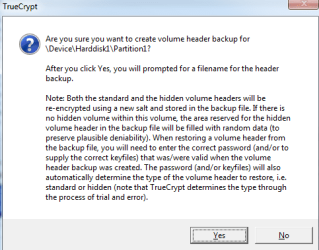
I think from my understanding of this warning message that backing up the main header also backs up the hidden volume as well. Is that correct?

This is also a great walk-thru for anyone looking to backup their data using Truecrypt:

http://www.sevenforums.com/tutorials/241427-truecrypt-encrypt-data-folders.html

I assume backing up the headers is something you only need to do once? Not a regular thing correct? I know if you change passwords you would need to re-backup the headers, but that particular issue isn't a concern.
 

Attachments

  • Untitled.png
    Untitled.png
    11.3 KB · Views: 0

My Computer

Computer Manufacturer/Model Number
Built it myself
OS
Windows 7 64 & Ubuntu 64
CPU
Intel Quad Core Q6600 2.40GHz
Motherboard
Asus
Memory
8g
Graphics Card(s)
Nvidia 9600 GT & 9800 GT
Sound Card
Turtle Beach 5.1
Monitor(s) Displays
Three 19" Dell's & one 46" Samsung 750
Yes, you will only need to do it once.

It's been a while since I've read through the TrueCrypt docs, but the way I remember it is that the hidden header is attached to the end of the normal header. I think it operates the same way as the free space plausible deniability with the hidden volume inside of the outer volume, in such a way that there is no way to tell if the hidden volume header is bogus data or not (unless you have the password of course).
 

My Computer

Computer Manufacturer/Model Number
Always changing!
OS
Windows 7/8/8.1 x64 &&& Debian-Based Linux
CPU
Always AMD
Motherboard
Always Asus
Memory
Always G-Skill
Graphics Card(s)
Always ATi/AMD
Internet Speed
Never fast enough
Antivirus
MBAM, MBAR, MBAE, Outpost (WinDefender Disabled)
Browser
Firefox w/plugins galore
Back
Top