
Solved backup boot imaging insists on unused and unwanted partition

So then you'd boot Partition Wizard CD, rightclick XP partition to Delete, click OK.

Is this what you want to do?

Indeed, your instructions at this point seemed like the simplest solution, at least for E/XP. I decided to retain D/Win7-32 though, until I'm sure I'm not going to lose anything special like registrations. That will take a little more time.

So, I booted on the PW boot CD to delete E then expand G into the space. The UI came up and it properly read my current partitions. But nothing worked, no right-click on E, no menus, no buttons at all would respond. Dead. So I booted a second time, this time with the PW "Safe Boot" (whatever that is). Same result, dead. I have no guess why, but I wonder if I just try running the PW from C if I'd be able to do the E and G actions. Would that be unsafe?

Is this a mouse issue? Did you try another mouse or type of mouse?

You can run these operations from Win7 on the other hard drive to be safest, then it doesn't need to hold everything in memory while it reboots to apply the changes which poses some risk. But I'd still have my files and a Win7 image from that drive backed up externally or to another drive. You should do this anyway. Backup Complete Computer - Create an Image Backup
Backup User and System Files
 
Is this a mouse issue? Did you try another mouse or type of mouse?

You can run these operations from Win7 on the other hard drive to be safest, then it doesn't need to hold everything in memory while it reboots to apply the changes which poses some risk. But I'd still have my files and a Win7 image from that drive backed up externally or to another drive. You should do this anyway. Backup Complete Computer - Create an Image Backup
Backup User and System Files

Yes, I bet the boot CD couldn't deal with anything but a serial mouse. Never occurred to me. I do have a USB>Serial adapter within 2 feet, somewhere...

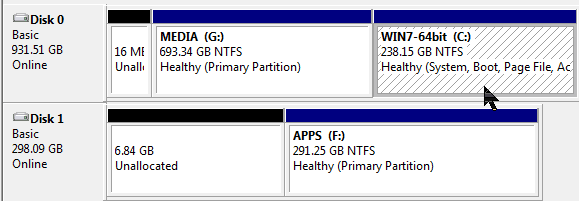
Anyway, yes the Minitool folks told me I could make these partition changes without the boot CD. If they guessed or knew about the serial mouse they didn't say. I'll copy this reply to them in email. So, I followed your advice and did a new PW install over on F/Apps. Btw I do have both a Macrium and an Aomei image on external both from 3 days ago. Below you can see the Minitool PW result as shown in DiscMgmt. As you can see I did both E and D. Oddly, PW wouldn't let me 'go all the way' in expanding F or G. In both cases it threw an alert that there was a 'bug in PW'. Never seen that before, where the developer codes in a bug alert but doesn't fix the bug. Maybe next version. In each case, after I backed off the expansion a tad PW happily proceeded.

In any case I'm happy now, happy with the exclusion of E from the imaging process, which I came here for, and even happier to be rid of the pesky remnants on E and D. Greg, you went above and beyond the call, and if I could I'd beam you over a whole apple pie. I'm marking this Solved.
 

Attachments

  • new-drives-sitch.png
    new-drives-sitch.png
    5.6 KB · Views: 5

My Computer My Computer

At a glance

Windows 7 Professional SP1 64-bitIntel Core i5 3570K @ 3.40GHz8.00GB Dual-Channel DDR3 @ 802MHz1024MB ATI AMD Radeon HD 6670
Computer type
PC/Desktop
Computer Manufacturer/Model Number
home-made 2008
OS
Windows 7 Professional SP1 64-bit
CPU
Intel Core i5 3570K @ 3.40GHz
Motherboard
ASUSTeK COMPUTER INC. P8Z77-V LX
Memory
8.00GB Dual-Channel DDR3 @ 802MHz
Graphics Card(s)
1024MB ATI AMD Radeon HD 6670
Sound Card
N.A. - mobo sound
Monitor(s) Displays
HP V242h 24' + HITACHI 51F59 HDTV
Screen Resolution
1920x1080
Hard Drives
Transcend 480 GB TLC SATA III 2.5' Solid State Drive
313GB Seagate ST3320620AS ATA Device (SATA)
977GB Western Digital WDC WD1001FAES-22W7A0 ATA Device (SATA)
320GB Seagate FreeAgent GoFlex USB external
PSU
RAIDMAX 530W Modular
Case
CoolerMaster HAF912Plus
Cooling
built-in CPU and case + Coolermaster Megaflow
Keyboard
Logitech Illuminated Keyboard K740
Mouse
iOne Lynx S2 mouse
Antivirus
Panda, Malwarebytes
Browser
Firefox 54.01
The small space is fairly common using PW Windows version. But you should be able to pick up the larger space using the boot disk with another mouse. If Extend doesn't work, try Resize.

We rarely need to settle for less than perfect w PW Boot disk.
 
Back
Top