- Local time
- 2:06 PM
- Messages
- 50,634
So then you'd boot Partition Wizard CD, rightclick XP partition to Delete, click OK.
Is this what you want to do?
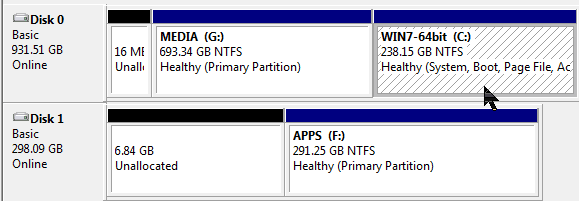
Indeed, your instructions at this point seemed like the simplest solution, at least for E/XP. I decided to retain D/Win7-32 though, until I'm sure I'm not going to lose anything special like registrations. That will take a little more time.
So, I booted on the PW boot CD to delete E then expand G into the space. The UI came up and it properly read my current partitions. But nothing worked, no right-click on E, no menus, no buttons at all would respond. Dead. So I booted a second time, this time with the PW "Safe Boot" (whatever that is). Same result, dead. I have no guess why, but I wonder if I just try running the PW from C if I'd be able to do the E and G actions. Would that be unsafe?
Is this a mouse issue? Did you try another mouse or type of mouse?
You can run these operations from Win7 on the other hard drive to be safest, then it doesn't need to hold everything in memory while it reboots to apply the changes which poses some risk. But I'd still have my files and a Win7 image from that drive backed up externally or to another drive. You should do this anyway. Backup Complete Computer - Create an Image Backup
Backup User and System Files