Backup Harddrive is immune to every chkdsk attempt

iamc3k

New member
Local time
7:29 PM
Messages
91
Folks,

I've got a Samsung spinpoint 1 Tb drive. It was a backup drive in a Vista build. I used Macrium to clone my Vista C drive to the Samsung. Then, I removed it.

Next, I built a new machine, a W7/64. THAT build uses an SSD for the operating system, "C", and a Western Digital hard drive (Black, 1 Tb) as the data drive, "D".

Once that machine was up and running, I decided to use the old Samsung drive as a backup. I physically installed it, Sata cable, and it is identified in windows as "E". Next, I tried using the Disk Management, Properties, Tools to run check. The window opens, then it immediately closes.

hmmm, thought I. Perhaps a remnant of the Vista OS was doing something. I then opened Disk Management, unmounted the drive, and performed a complete, long, reformat.

I restarted.

I tried using the properties, tools, check now window again. Still, that window will not check it. The progress bar never flashes. All that happens is about 1 second after I click "OK", the window closes. No messages.

I opened an elevated command prompt and tried "chkdsk e:" It came back with "The type of file system is NTFS." A pause, "Errors found. CHKDSK cannot continue in read-only mode."

I've searched a LOT of the internet on this. The drive has just under 9,000 hours on it. It passes every Samsung test I could throw at it from Samsung's support website.

Windows disk checking seems not to work.

How can I verify the disk before I trust my data backups to it?

Thanks,
Ken

I can rename the drive. Windows sees it. I can copy files to it. I can read files on it.
 

My Computer My Computer

At a glance

Microsoft Windows 7 Home Premium 64-bit 7601 ...AMD FX(tm)-8350 Eight-Core Processor16.00 GBNVIDIA GeForce GTX 670
Computer type
PC/Desktop
Computer Manufacturer/Model Number
Custom build
OS
Microsoft Windows 7 Home Premium 64-bit 7601 Multiprocessor Free Service Pack 1
CPU
AMD FX(tm)-8350 Eight-Core Processor
Motherboard
ASUSTeK Computer INC. M5A88-M
Memory
16.00 GB
Graphics Card(s)
NVIDIA GeForce GTX 670
Sound Card
(1) Realtek High Definition Audio (2) NVIDIA Virtual Audio
Monitor(s) Displays
Through AVR to one of two TV/Projector
Screen Resolution
1920 x 1080 x 32 bits (4294967296 colors) @ 60 Hz
Hard Drives
Samsung SSD 850 PRO 256G SATA Disk Device
Case
Silverstone GD09
Cooling
Air
Antivirus
Kaspersky Internet Security, 2015
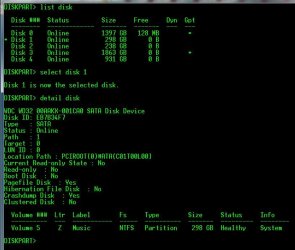
hi, in disk management is it shown as a basic or dynamic disk? also can you take a screenshot of what it gives you in dispkpart like my picture below when you do detail disk.
 

Attachments

  • disksmine.JPG
    disksmine.JPG
    70.5 KB · Views: 1

My Computer My Computer

At a glance

10 Pro x64Ryzen 9 3900X64GB(4x16GB) DDR4EVGA 1080ti FTW3
Computer type
PC/Desktop
Computer Manufacturer/Model Number
Custom
OS
10 Pro x64
CPU
Ryzen 9 3900X
Motherboard
Asrock x370 Tachi
Memory
64GB(4x16GB) DDR4
Graphics Card(s)
EVGA 1080ti FTW3
Sound Card
ASUS Xonar Essence STX (V4 Bursons), ODAC rev B, NFB-11, O2
Monitor(s) Displays
3xASUS PB278Q/R, Optoma HD142X
Screen Resolution
3x1440p, 1080p
Hard Drives
512GB 850 EVO(OS, Programs)
4TB (Movies)
3TB (Downloads)
3TB (Programs)
1TB HDD (Games)
2x6TB R1 (videos)
PSU
AX760
Case
Fractal Define R5
Cooling
NH-D15S
Keyboard
Massdrop Ctrl with Box Navy's
Mouse
G903, Alioth XXL Mat
Internet Speed
280/40
Antivirus
MBAM, ESET
Browser
Canary 64 Bit
Other Info
I also own a Thinkpad P50 Xeon 4K, X220T, X1C5
Thanks for the assist.

Here are some screenshots. (I went through the install new drive wizard in the meantime. It is now called "New Volume".)


This is what I was trying to do which has led to the problems:


When I hit "start" (whether I have the second box ticked or not), the "Check Disk" window greys out, the progress bar stays blank, and a second or two later it disappears. No drive activity noted.

Finally, here's the diskpart screenshot:


I hope some of this helps!

And thank you for taking the time to help me out.

Ken
 

My Computer My Computer

At a glance

Microsoft Windows 7 Home Premium 64-bit 7601 ...AMD FX(tm)-8350 Eight-Core Processor16.00 GBNVIDIA GeForce GTX 670
Computer type
PC/Desktop
Computer Manufacturer/Model Number
Custom build
OS
Microsoft Windows 7 Home Premium 64-bit 7601 Multiprocessor Free Service Pack 1
CPU
AMD FX(tm)-8350 Eight-Core Processor
Motherboard
ASUSTeK Computer INC. M5A88-M
Memory
16.00 GB
Graphics Card(s)
NVIDIA GeForce GTX 670
Sound Card
(1) Realtek High Definition Audio (2) NVIDIA Virtual Audio
Monitor(s) Displays
Through AVR to one of two TV/Projector
Screen Resolution
1920 x 1080 x 32 bits (4294967296 colors) @ 60 Hz
Hard Drives
Samsung SSD 850 PRO 256G SATA Disk Device
Case
Silverstone GD09
Cooling
Air
Antivirus
Kaspersky Internet Security, 2015
sorry took so long to reply, unfortunately everything seems to look okay on this end. you could try recreating the partition with diskpart select the disk then (make sure it's the right disk) type (leave out the quotes) "clean" and hit enter and it will wipe the whole disk of everything then do "create partition primary size=(then put it in as MB for this test just put 900000)900000 so the whole thing is "create partition primary size=900000"
then type exit and see if you can error check it after a reboot of the pc.
 

My Computer My Computer

At a glance

10 Pro x64Ryzen 9 3900X64GB(4x16GB) DDR4EVGA 1080ti FTW3
Computer type
PC/Desktop
Computer Manufacturer/Model Number
Custom
OS
10 Pro x64
CPU
Ryzen 9 3900X
Motherboard
Asrock x370 Tachi
Memory
64GB(4x16GB) DDR4
Graphics Card(s)
EVGA 1080ti FTW3
Sound Card
ASUS Xonar Essence STX (V4 Bursons), ODAC rev B, NFB-11, O2
Monitor(s) Displays
3xASUS PB278Q/R, Optoma HD142X
Screen Resolution
3x1440p, 1080p
Hard Drives
512GB 850 EVO(OS, Programs)
4TB (Movies)
3TB (Downloads)
3TB (Programs)
1TB HDD (Games)
2x6TB R1 (videos)
PSU
AX760
Case
Fractal Define R5
Cooling
NH-D15S
Keyboard
Massdrop Ctrl with Box Navy's
Mouse
G903, Alioth XXL Mat
Internet Speed
280/40
Antivirus
MBAM, ESET
Browser
Canary 64 Bit
Other Info
I also own a Thinkpad P50 Xeon 4K, X220T, X1C5
rvcjew,

Thanks. I tried what you suggested. No change.

I split the drive into 2 partitions and tried to surface scan each partition, in turn. No joy.

It -seems- to work. But, without full access to it via chkdsk, there's no way I can trust that the drive isn't somehow corrupted.

Ken
 

My Computer My Computer

At a glance

Microsoft Windows 7 Home Premium 64-bit 7601 ...AMD FX(tm)-8350 Eight-Core Processor16.00 GBNVIDIA GeForce GTX 670
Computer type
PC/Desktop
Computer Manufacturer/Model Number
Custom build
OS
Microsoft Windows 7 Home Premium 64-bit 7601 Multiprocessor Free Service Pack 1
CPU
AMD FX(tm)-8350 Eight-Core Processor
Motherboard
ASUSTeK Computer INC. M5A88-M
Memory
16.00 GB
Graphics Card(s)
NVIDIA GeForce GTX 670
Sound Card
(1) Realtek High Definition Audio (2) NVIDIA Virtual Audio
Monitor(s) Displays
Through AVR to one of two TV/Projector
Screen Resolution
1920 x 1080 x 32 bits (4294967296 colors) @ 60 Hz
Hard Drives
Samsung SSD 850 PRO 256G SATA Disk Device
Case
Silverstone GD09
Cooling
Air
Antivirus
Kaspersky Internet Security, 2015
Try running CHKDSK from the command line.

Open an Elevated Command Prompt, and run the command

CHKDSK E: /R (assuming it's drive E: )
It will (or at least should) take a while as it checks every sector in the partition.
 

My Computer My Computer

At a glance

Win 7 x64 Home Premium (and x86 VirtualBox VM...i3 370M/i7 6500U8GB - finally :)/8GBit's an i3, dude!/dual Intel&nVidia
Computer type
Laptop
Computer Manufacturer/Model Number
Asus K52F or Lenovo B51-80
OS
Win 7 x64 Home Premium (and x86 VirtualBox VM)/Win10
CPU
i3 370M/i7 6500U
Motherboard
Asus/Lenovo
Memory
8GB - finally :)/8GB
Graphics Card(s)
it's an i3, dude!/dual Intel&nVidia
Sound Card
onboard
Monitor(s) Displays
15.6" built-in
Screen Resolution
1366x768/1920x1080
Hard Drives
750GB Seagate internal
Sundry external drives attached to other computers on the local network
1TB SSD on the Lenovo
PSU
n/a
Internet Speed
as much as I can get - usually on a dongle/phone, so <1MB/s
Antivirus
MSE/Defender
Browser
IE11/12/Edge/Chrome/FF(if I must)
NoelDP,

Thanks. (I've tried, but I retried. Results below.)

Here's the "My Computer" and "Disk Management" screen:


The disk in question is disk 2, "Spare". Frankly, at this point, I've forgotten how many times I've formatted it, both long and short.

Here's another DISKPART shot:


What is odd, very odd, is what this shows. Disk 2 =should= be a GPT disk. It has no asterisk indicating that. Look upstream a few posts. Back then, it did. (In between I partitioned it, then un-partitioned it.) I went through the W7 new disk wizard and set it as a GPT disk with 512Mb sectors. I don't know where the 1024 Kb comes from.

Finally, here's what happens when I run chkdsk with an elevated command prompt:


I've tried to run chkdsk from the elevated command prompt countless times. I either get the error shown, above, or an error which states that it cannot complete a check of a disk in "read-only mode". (That's a paraphrase, it's pretty close to that.)

At this point, I'm getting close to opening the hard drive, rubbing magnets all over the disks, wrapping it fine copper wire, applying rapidly varying voltages, spinning them at high g's, baking them at 200C (or higher), spraying them with cold helium, and subjecting them to verbal abuse, all in an attempt to wipe out whatever is going on. :)

Thoughts?

Ken
 

My Computer My Computer

At a glance

Microsoft Windows 7 Home Premium 64-bit 7601 ...AMD FX(tm)-8350 Eight-Core Processor16.00 GBNVIDIA GeForce GTX 670
Computer type
PC/Desktop
Computer Manufacturer/Model Number
Custom build
OS
Microsoft Windows 7 Home Premium 64-bit 7601 Multiprocessor Free Service Pack 1
CPU
AMD FX(tm)-8350 Eight-Core Processor
Motherboard
ASUSTeK Computer INC. M5A88-M
Memory
16.00 GB
Graphics Card(s)
NVIDIA GeForce GTX 670
Sound Card
(1) Realtek High Definition Audio (2) NVIDIA Virtual Audio
Monitor(s) Displays
Through AVR to one of two TV/Projector
Screen Resolution
1920 x 1080 x 32 bits (4294967296 colors) @ 60 Hz
Hard Drives
Samsung SSD 850 PRO 256G SATA Disk Device
Case
Silverstone GD09
Cooling
Air
Antivirus
Kaspersky Internet Security, 2015
Hmmmm (warning - I'm in the pub) from that result it looks to me as if the OS drive isn't properly recognised.
 

My Computer My Computer

At a glance

Win 7 x64 Home Premium (and x86 VirtualBox VM...i3 370M/i7 6500U8GB - finally :)/8GBit's an i3, dude!/dual Intel&nVidia
Computer type
Laptop
Computer Manufacturer/Model Number
Asus K52F or Lenovo B51-80
OS
Win 7 x64 Home Premium (and x86 VirtualBox VM)/Win10
CPU
i3 370M/i7 6500U
Motherboard
Asus/Lenovo
Memory
8GB - finally :)/8GB
Graphics Card(s)
it's an i3, dude!/dual Intel&nVidia
Sound Card
onboard
Monitor(s) Displays
15.6" built-in
Screen Resolution
1366x768/1920x1080
Hard Drives
750GB Seagate internal
Sundry external drives attached to other computers on the local network
1TB SSD on the Lenovo
PSU
n/a
Internet Speed
as much as I can get - usually on a dongle/phone, so <1MB/s
Antivirus
MSE/Defender
Browser
IE11/12/Edge/Chrome/FF(if I must)

Attachments

  • diskcheck.JPG
    diskcheck.JPG
    109.4 KB · Views: 0

My Computer My Computer

At a glance

10 Pro x64Ryzen 9 3900X64GB(4x16GB) DDR4EVGA 1080ti FTW3
Computer type
PC/Desktop
Computer Manufacturer/Model Number
Custom
OS
10 Pro x64
CPU
Ryzen 9 3900X
Motherboard
Asrock x370 Tachi
Memory
64GB(4x16GB) DDR4
Graphics Card(s)
EVGA 1080ti FTW3
Sound Card
ASUS Xonar Essence STX (V4 Bursons), ODAC rev B, NFB-11, O2
Monitor(s) Displays
3xASUS PB278Q/R, Optoma HD142X
Screen Resolution
3x1440p, 1080p
Hard Drives
512GB 850 EVO(OS, Programs)
4TB (Movies)
3TB (Downloads)
3TB (Programs)
1TB HDD (Games)
2x6TB R1 (videos)
PSU
AX760
Case
Fractal Define R5
Cooling
NH-D15S
Keyboard
Massdrop Ctrl with Box Navy's
Mouse
G903, Alioth XXL Mat
Internet Speed
280/40
Antivirus
MBAM, ESET
Browser
Canary 64 Bit
Other Info
I also own a Thinkpad P50 Xeon 4K, X220T, X1C5
Guys,

My setup has an SSD as Disk C, the OS disk. It's identified as Disk 0 in diskpart.
Then, I use a 1Tb hard drive for data, Disk D. It's identified as Disk 1 in diskpart.
The disk in question (diq?) is Drive E, disk 2. It -had- a clone of Vista from a different machine. Now, I want to use it as a spare for this machine. Wiped of anything that had been on it. Pristine, and clean.

That disk, E, should have no data left on it in any manner. I've partitioned it, I've formatted it, I've reformatted it, ad nauseum.

As such, I wouldn't think a surface scan (or chkdsk /r) would require any kind of reboot to be performed. Regardless, there has been no message about such a need. If I try the elevated command prompt for the disk scan, I either get the error string, above (I googled it and it didn't point to any solutions), or I get the "can't do it on a read only disk" message. If I try the windows 7 tool, the tool window greys out and disappears within a second. No error message, no disk scanning.

Ken
 

My Computer My Computer

At a glance

Microsoft Windows 7 Home Premium 64-bit 7601 ...AMD FX(tm)-8350 Eight-Core Processor16.00 GBNVIDIA GeForce GTX 670
Computer type
PC/Desktop
Computer Manufacturer/Model Number
Custom build
OS
Microsoft Windows 7 Home Premium 64-bit 7601 Multiprocessor Free Service Pack 1
CPU
AMD FX(tm)-8350 Eight-Core Processor
Motherboard
ASUSTeK Computer INC. M5A88-M
Memory
16.00 GB
Graphics Card(s)
NVIDIA GeForce GTX 670
Sound Card
(1) Realtek High Definition Audio (2) NVIDIA Virtual Audio
Monitor(s) Displays
Through AVR to one of two TV/Projector
Screen Resolution
1920 x 1080 x 32 bits (4294967296 colors) @ 60 Hz
Hard Drives
Samsung SSD 850 PRO 256G SATA Disk Device
Case
Silverstone GD09
Cooling
Air
Antivirus
Kaspersky Internet Security, 2015
The Disk 0 has zero free space according to Diskpart - if that's the case, and Disk 0 is the OS drive, then you have a major problem.
 

My Computer My Computer

At a glance

Win 7 x64 Home Premium (and x86 VirtualBox VM...i3 370M/i7 6500U8GB - finally :)/8GBit's an i3, dude!/dual Intel&nVidia
Computer type
Laptop
Computer Manufacturer/Model Number
Asus K52F or Lenovo B51-80
OS
Win 7 x64 Home Premium (and x86 VirtualBox VM)/Win10
CPU
i3 370M/i7 6500U
Motherboard
Asus/Lenovo
Memory
8GB - finally :)/8GB
Graphics Card(s)
it's an i3, dude!/dual Intel&nVidia
Sound Card
onboard
Monitor(s) Displays
15.6" built-in
Screen Resolution
1366x768/1920x1080
Hard Drives
750GB Seagate internal
Sundry external drives attached to other computers on the local network
1TB SSD on the Lenovo
PSU
n/a
Internet Speed
as much as I can get - usually on a dongle/phone, so <1MB/s
Antivirus
MSE/Defender
Browser
IE11/12/Edge/Chrome/FF(if I must)
Isn't that interesting?

Look at post #2, with the diskpart image there. Most drives of his show 0 free. Only a few b free in his OS drive.

My computer's disk management windows, shown in post #3, do not correspond to what diskpart shows.

Is diskpart working correctly? My computer seems to operate fine. FWIW, I installed windows 7, clean, onto the SSD, with no other drive physically present. I am confident that diskpart's "free" memory listing is wrong. (Unless it means "free for formatting and unused by the operating system.)

Ken
 

My Computer My Computer

At a glance

Microsoft Windows 7 Home Premium 64-bit 7601 ...AMD FX(tm)-8350 Eight-Core Processor16.00 GBNVIDIA GeForce GTX 670
Computer type
PC/Desktop
Computer Manufacturer/Model Number
Custom build
OS
Microsoft Windows 7 Home Premium 64-bit 7601 Multiprocessor Free Service Pack 1
CPU
AMD FX(tm)-8350 Eight-Core Processor
Motherboard
ASUSTeK Computer INC. M5A88-M
Memory
16.00 GB
Graphics Card(s)
NVIDIA GeForce GTX 670
Sound Card
(1) Realtek High Definition Audio (2) NVIDIA Virtual Audio
Monitor(s) Displays
Through AVR to one of two TV/Projector
Screen Resolution
1920 x 1080 x 32 bits (4294967296 colors) @ 60 Hz
Hard Drives
Samsung SSD 850 PRO 256G SATA Disk Device
Case
Silverstone GD09
Cooling
Air
Antivirus
Kaspersky Internet Security, 2015
Back
Top