Cannot create a backup image on my backup harddrive?

iamc3k

New member
Local time
6:52 PM
Messages
91
Folks,

Running W7/64. I've tried to create a system backup to my D drive: error message states that I cannot create an image to a drive which Windows boots from or is installed on.

Not good.

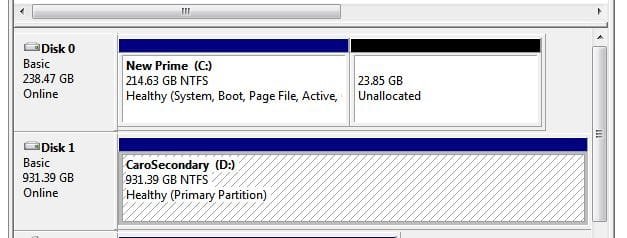
My computer has an SSD ,the C drive, and a spinner, the D drive.

When I installed Windows, I only had the C drive installed. The D drive was not physically connected.

Now, the D drive was recycled from another use. It +had+ been a C drive (possibly for this very machine). I did a full format on it, and ensured it was not hooked up during the SSD install. (I thought that would erase windows OS files.) Somehow, Windows on D drive won't die!

My thought is that I need to perform a repair install. I can do that...and I will. I'll make sure D drive is physically disconnected. Again. Obviously, my attempt to erase any and all previously used data on the D drive failed. (At least, that's my thought.)

How do I remove any OS remnants on the D drive? Yeah, I've got stuff on it, but I can create a Macrium backup and restore them, if need be.

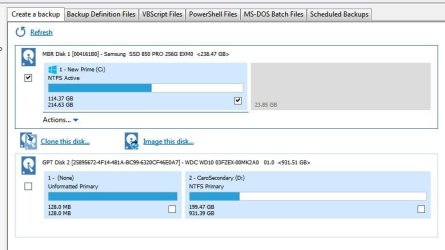
I've included Drive Manager image of it as well as what Macrium sees. (I've got some of the SSD unallocated for overprovisioning.)

Thanks,
Ken
 

Attachments
  • Drive jpg 01.JPG
    Drive jpg 01.JPG
    55.8 KB · Views: 0
  • Drive jpg 02.JPG
    Drive jpg 02.JPG
    45.2 KB · Views: 19

My Computer

Computer type
PC/Desktop
Computer Manufacturer/Model Number
Custom build
OS
Microsoft Windows 7 Home Premium 64-bit 7601 Multiprocessor Free Service Pack 1
CPU
AMD FX(tm)-8350 Eight-Core Processor
Motherboard
ASUSTeK Computer INC. M5A88-M
Memory
16.00 GB
Graphics Card(s)
NVIDIA GeForce GTX 670
Sound Card
(1) Realtek High Definition Audio (2) NVIDIA Virtual Audio
Monitor(s) Displays
Through AVR to one of two TV/Projector
Screen Resolution
1920 x 1080 x 32 bits (4294967296 colors) @ 60 Hz
Hard Drives
Samsung SSD 850 PRO 256G SATA Disk Device
Case
Silverstone GD09
Cooling
Air
Antivirus
Kaspersky Internet Security, 2015

My Computer

Computer type
PC/Desktop
Computer Manufacturer/Model Number
Own build (new) Desk1 / Asus ROG Win 7 / Desk2 1st build
OS
Desk1 7 Home Prem / Desk2 10 Pro / Main lap Asus ROG 10 Pro 2 laptop Toshiba 7 Pro Asus P2520 7 & 10
CPU
Desk1 i5 3750K / Laptop i7 GTX 860M / Desk2 i5 2500
Motherboard
Desk1 Asus P877-V / Desk2 Gigabyte H67 UD3H / Laptop ?
Memory
Desk1 8GB (1866) / Desk2 16GB (1333) / Laptop 8Gb DDR3
Graphics Card(s)
Desk 1& 2NVidia GTX 650 & Laptops on board Intel
Sound Card
Desk 1 & 2 -XONAR DG Realtek High Def audio Laptop
Monitor(s) Displays
Desk 1 Benq HD 2450 / Desk2 Philips 24" / Laptop 17.5"
Screen Resolution
1920x1080 D1 & D2 & Laptop 1
Hard Drives
Desk1 Samsung 120GB 830 SSD
Asus ROG 256GB 850 Pro SSD
Desk2 Samsung 840 256 SSD
Toshiba 120GB EVO
PSU
Desk 1 Corsair HX 1050/ Laptop ? / Desk 2 Corsair HX 650
Case
Desk 1 Cooler HAF XM ? Toshiba laptop / Desk2 Coolermaster
Cooling
Fans on all Desk1 -2 Desk2 - all Coolermasters 5 Laptop ?
Keyboard
Desk 1 MS Sidewinder X6 Desk 2 MS Sidewinder X 4
Mouse
Desk 1&2 - Gigabyte MS 900 gamer - laptop - Logitec wireless
Internet Speed
ADSL2+
Other Info
One other Desktop (tester) and spare Toshba laptop both with SSD's
Running Kaspersky 2016 ISS on all machines config'd identically
Logitec audio stereo systems on each machine (x3)
Canon MG5250MFC
Router/modem TP-Link running WPA2SK
Ok, I think I know what you would like to do: on your spare hard-drive, have a mirror copy of your OS on the original in-use hard-drive.
I do the same thing with my desktop and one of the two laptops -- the 2nd HD is a clone of the 1st, in-use, HD.
Either Acronis True Image or Macrium Reflect can clone a hard-drive onto another hard-drive, i.e., from the in-use to the spare.
I named my desktop's in-use HD's OS and data partitions: S01[20A]C and S01[20A]D respectively.
After each cloning operation:
-- I boot into the in-use HD's Windows, usually the top choice of the two listed.
[NOTE: If you do not get the white lettering on black background with the above two choices...we have a little nitnoy work to do!]
-- I rename the spare HD's OS and data partition S03[5A0]C and S03[5A0]D respectively
-- Control Panel --> Device Manager --> Disk Drives --> disable, not uninstall, the 2nd, spare, HD.
 

My Computer

Computer type
PC/Desktop
Computer Manufacturer/Model Number
Antec desktop; Acer Aspire laptops
OS
Windows 7 Professional 64-bit
CPU
Desktop i5; Acers i5 & i7
Memory
desktop 16GB; 1 Acer 8GB & 1 Acer 16GB
Hard Drives
1TB split into 2 equal partitions [OS and data] usable by RJS
Internet Speed
AT&T DSL
Browser
FF, GChrome, msIE
Other Info
Windows 7 Firewall, Emsisoft AM/AV, MSE [scan-only], SpywareBlaster, Ruiware/BillP combine
Okay, I've followed your instructions...

WHAT?!? Aarrgghh, I missed your edit! It's all goooooonnnne. ;)

Kidding, there. I thought I'd done that before I reused it. It's been about a year, so I'm not sure.

It's a WD Black, 1 Tb, about 2 years old. (Hmm, there's probably a SMART file I could find to get the exact info.)

Before I go through with copying all those files (to an external drive), DISKPART->"Clean All", disconnecting D, perfoming a repair install, then reconnecting and recopying...is there a way to verify/check what Windows files are on my D drive which are causing the issue?

Thanks,
Ken
 

My Computer

Computer type
PC/Desktop
Computer Manufacturer/Model Number
Custom build
OS
Microsoft Windows 7 Home Premium 64-bit 7601 Multiprocessor Free Service Pack 1
CPU
AMD FX(tm)-8350 Eight-Core Processor
Motherboard
ASUSTeK Computer INC. M5A88-M
Memory
16.00 GB
Graphics Card(s)
NVIDIA GeForce GTX 670
Sound Card
(1) Realtek High Definition Audio (2) NVIDIA Virtual Audio
Monitor(s) Displays
Through AVR to one of two TV/Projector
Screen Resolution
1920 x 1080 x 32 bits (4294967296 colors) @ 60 Hz
Hard Drives
Samsung SSD 850 PRO 256G SATA Disk Device
Case
Silverstone GD09
Cooling
Air
Antivirus
Kaspersky Internet Security, 2015
Ok, I think I know what you would like to do: on your spare hard-drive, have a mirror copy of your OS on the original in-use hard-drive.
I do the same thing with my desktop and one of the two laptops -- the 2nd HD is a clone of the 1st, in-use, HD.
Either Acronis True Image or Macrium Reflect can clone a hard-drive onto another hard-drive, i.e., from the in-use to the spare.
I named my desktop's in-use HD's OS and data partitions: S01[20A]C and S01[20A]D respectively.
After each cloning operation:
-- I boot into the in-use HD's Windows, usually the top choice of the two listed.
[NOTE: If you do not get the white lettering on black background with the above two choices...we have a little nitnoy work to do!]
-- I rename the spare HD's OS and data partition S03[5A0]C and S03[5A0]D respectively
-- Control Panel --> Device Manager --> Disk Drives --> disable, not uninstall, the 2nd, spare, HD.

Sorry, but not quite. I do use Macrium (and love it), but I was just trying to create Windows Backup image onto my D. My D is not dedicated as a mirror of my C. My C has limited space (you can see from the screenshots, original post.) I've got "data" (pictures, games, etc.) on my D drive.

My Macrium backup of my C drive is on an external drive. I do like your approach.

Cheers,
Ken
 

My Computer

Computer type
PC/Desktop
Computer Manufacturer/Model Number
Custom build
OS
Microsoft Windows 7 Home Premium 64-bit 7601 Multiprocessor Free Service Pack 1
CPU
AMD FX(tm)-8350 Eight-Core Processor
Motherboard
ASUSTeK Computer INC. M5A88-M
Memory
16.00 GB
Graphics Card(s)
NVIDIA GeForce GTX 670
Sound Card
(1) Realtek High Definition Audio (2) NVIDIA Virtual Audio
Monitor(s) Displays
Through AVR to one of two TV/Projector
Screen Resolution
1920 x 1080 x 32 bits (4294967296 colors) @ 60 Hz
Hard Drives
Samsung SSD 850 PRO 256G SATA Disk Device
Case
Silverstone GD09
Cooling
Air
Antivirus
Kaspersky Internet Security, 2015
I am not sure Ken how to see what the files on the D: drive are like mate - the only thing i can think of doing is run a chkdsk on that drive
http://www.sevenforums.com/tutorials/433-disk-check.html I always use Option 2 and usually use the /f and /r switches for good measure.

It is worth a try and might just cure what could be a simple problem.
 

My Computer

Computer type
PC/Desktop
Computer Manufacturer/Model Number
Own build (new) Desk1 / Asus ROG Win 7 / Desk2 1st build
OS
Desk1 7 Home Prem / Desk2 10 Pro / Main lap Asus ROG 10 Pro 2 laptop Toshiba 7 Pro Asus P2520 7 & 10
CPU
Desk1 i5 3750K / Laptop i7 GTX 860M / Desk2 i5 2500
Motherboard
Desk1 Asus P877-V / Desk2 Gigabyte H67 UD3H / Laptop ?
Memory
Desk1 8GB (1866) / Desk2 16GB (1333) / Laptop 8Gb DDR3
Graphics Card(s)
Desk 1& 2NVidia GTX 650 & Laptops on board Intel
Sound Card
Desk 1 & 2 -XONAR DG Realtek High Def audio Laptop
Monitor(s) Displays
Desk 1 Benq HD 2450 / Desk2 Philips 24" / Laptop 17.5"
Screen Resolution
1920x1080 D1 & D2 & Laptop 1
Hard Drives
Desk1 Samsung 120GB 830 SSD
Asus ROG 256GB 850 Pro SSD
Desk2 Samsung 840 256 SSD
Toshiba 120GB EVO
PSU
Desk 1 Corsair HX 1050/ Laptop ? / Desk 2 Corsair HX 650
Case
Desk 1 Cooler HAF XM ? Toshiba laptop / Desk2 Coolermaster
Cooling
Fans on all Desk1 -2 Desk2 - all Coolermasters 5 Laptop ?
Keyboard
Desk 1 MS Sidewinder X6 Desk 2 MS Sidewinder X 4
Mouse
Desk 1&2 - Gigabyte MS 900 gamer - laptop - Logitec wireless
Internet Speed
ADSL2+
Other Info
One other Desktop (tester) and spare Toshba laptop both with SSD's
Running Kaspersky 2016 ISS on all machines config'd identically
Logitec audio stereo systems on each machine (x3)
Canon MG5250MFC
Router/modem TP-Link running WPA2SK
Back
Top