Solved Backup space inadequate error and sytem reserved issues linked?

FrankFitz

New member
Local time
9:50 PM
Messages
28
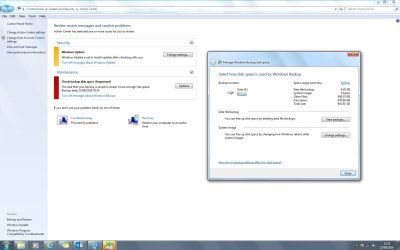
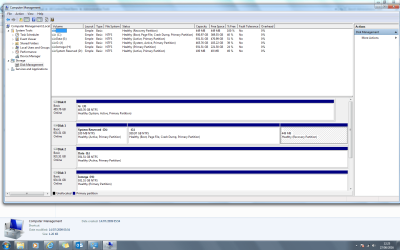
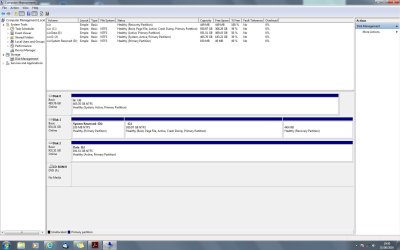
Trying to set up a regular backup routine as I recently had to completely re install everything after a crash. However, now getting error message saying that space is inadequate on backup drive. Have also now noticed I seem to now a have a separate "System reserved" section on my primary drive? Can anyone explain how I can sort this? Thanks in advance.

Bakup issue.jpg

Disk space issue.jpg
 

Attachments

  • Bakup issue.jpg
    Bakup issue.jpg
    103.1 KB · Views: 12
  • Disk space issue.png
    Disk space issue.png
    71 KB · Views: 11
  • Disk space issue.jpg
    Disk space issue.jpg
    176.3 KB · Views: 10

My Computer My Computer

At a glance

Windows 10AMD Athlon II x4 6408 GbNVIDIA GeForce8200
Computer type
PC/Desktop
Computer Manufacturer/Model Number
Priceless Computing
OS
Windows 10
CPU
AMD Athlon II x4 640
Motherboard
Asrock K10 N78MPro
Memory
8 Gb
Graphics Card(s)
NVIDIA GeForce8200
Sound Card
?
Monitor(s) Displays
HP w2207h
Hard Drives
C: 2 Tb SSD
PSU
?
Cooling
?
If i understand correctly,
Your [E] Backup drive has 470 GB free space
Your (Windows) drive uses 561 GB space Windows built-in backup utility does not use compression, you don't have enough free space on [E] An imaging program such as Macrium Reflect free uses compression, so a backup image should be around 300 GB, and would fit on [E] You can free up space on [E] to use the built-in utility, or use a different program such as Macrium. Now for the real fun, your Disk Management is a mess :( You have 3 Active partitions - E, J, and D You should only have 1 Active partition, having more causes problems An Active partition shows where a bootloader is installed The [J] drive is the [B]System[/B] drive, that shows where the bootloader is that was used to start Windows If Windows is installed into unallocated space it creates a System Reserved partition for the bootloader and a [C] partition for the Windows OS I believe you installed into unallocated space and that's why you have a System Reserved partition If Windows is installed into a pre-defined partition it installs the bootloader and Windows into that partition as [C] Either way is fine, i believe most systems have a System Reserved partition for the bootloader. When installing Windows only the drive where Windows is being installed should be connected. All other drives should be disconnected during the install. I believe you installed Windows with other drives connected causing this [U][B]If you want to try to fix your current install, try this:[/B][/U] Move the bootmgr to System Reserved [D], here is a tutorial for moving the bootmgr: [URL]http://www.sevenforums.com/tutorials/209885-bootmgr-move-c-easybcd.html[/URL] Reboot the PC, check Disk Management and make sure [D] is the [B]System, Active[/B] partition If everything looks ok, shut down and disconnect Disk 0 [J], and Disk 2 [E] Reboot and see if Windows boots up ok If all that works, shutdown and reconnect Disk 0 [J], and Disk 2 [E] Boot up Set [J] and [E] to inactive and reboot, here is a tutorial: [URL]http://www.sevenforums.com/tutorials/197157-partition-mark-inactive.html[/URL] Post a new screen print of Disk Management Your [C] partition uses 561 GB, so i believe you store USER data on [C] such as Photos, Videos, Documents, etc. Many people (myself included) only use the [C] Partition for the OS and installed programs. All User data is stored on a different partition such as [D]. That allows for for a much smaller [C] drive, and smaller/faster system backup images. The OS + Programs partition can be restored without affecting user data. That's a different discussion, just making you aware of the possibility. Sorry for the long-winded reply My suggestions are for a single-boot, Legacy BIOS, MBR setup. Multi-boot, UEFI, GPT, etc. work differently

 

My Computer My Computer

At a glance

Multi-Boot W7_Pro_x64 W8.1_Pro_x64 W10_Pro_x6...AMD Athlon II x4 6206GB GSkill DDR2 800AMD 4670 GPU + AMD 4200 IGP
Computer type
PC/Desktop
Computer Manufacturer/Model Number
home built
OS
Multi-Boot W7_Pro_x64 W8.1_Pro_x64 W10_Pro_x64 +Linux_VMs +Chromium_VM
CPU
AMD Athlon II x4 620
Motherboard
Gigabyte GA-MA785G-UD3H
Memory
6GB GSkill DDR2 800
Graphics Card(s)
AMD 4670 GPU + AMD 4200 IGP
Sound Card
on board Realtek ALC889A
Monitor(s) Displays
RCA 40" LCD TV, Insignia 32" LCD TV, HP 15" LCD monitor
Screen Resolution
1680 x 1050
Hard Drives
OCZ Vertex 3 120GB,
Samsung F3 1TB (3),
Several others - WD, Seagate, Hitachi, ...
PSU
Corsair 500 W
Case
Rosewill mid tower
Cooling
CM 90mm rifle
Keyboard
Gyration wireless, Logitech wireless, Dell USB wired
Mouse
Gyration wireless, Logitech wireless, V7 USB wired
Internet Speed
Spectrum - 100Mbps D / 10Mbps U
Antivirus
Avast, MBAM3, EMET, WinPatrol
Browser
Pale Moon, Firefox, IE
Other Info
2 multi-boot PC's
Mainly HTPC/Office/Gen purpose (no gaming).
Trendnet USB KVM.
LG DVD burner/Blue Ray Player.
Tray system for removable SATA backup drives.

Not currently OCd, under-volted.
I use Hybrid sleep, rarely re-boot or shutdown.

Hauppauge HD-PVR, Avermedia PCIe TV Tuner, Hauppauge PCI TV Tuner.
Thanks

David thanks for the prompt reply which strikes me as very comprehensive and knowledgeable. Your comment about my system being "a mess" is very accurate and I hope to get on to sorting it this week.

Unfortunately today I have been inundated with a truckload of spam/phishing emails so I will have to clear that out and then arrange a new email address. Its a real pain but has to be done.

Thank you gain David I will let you know how I get on.

Kind regards,

Frank
 

My Computer My Computer

At a glance

Windows 10AMD Athlon II x4 6408 GbNVIDIA GeForce8200
Computer type
PC/Desktop
Computer Manufacturer/Model Number
Priceless Computing
OS
Windows 10
CPU
AMD Athlon II x4 640
Motherboard
Asrock K10 N78MPro
Memory
8 Gb
Graphics Card(s)
NVIDIA GeForce8200
Sound Card
?
Monitor(s) Displays
HP w2207h
Hard Drives
C: 2 Tb SSD
PSU
?
Cooling
?
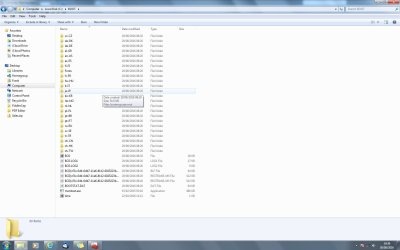
I think you have to provide a screenshot on the C:\ drive.

Wonder if the System Reserve files: Boot folder, Bootmgr, BOOTSECT.BAK
if it is also available at C:\ drive

It is possible, as mine is on the Active Primary Boot on C:\ drive for all 3 files/folder.
 

My Computer My Computer

At a glance

Windows 7 x64
Computer type
Laptop
Computer Manufacturer/Model Number
Toshiba L630 and L735
OS
Windows 7 x64
Hard Drives
240 GB SSD
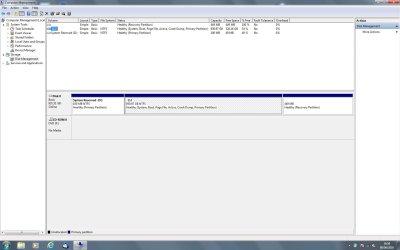
Situation after first use of EasyBCD

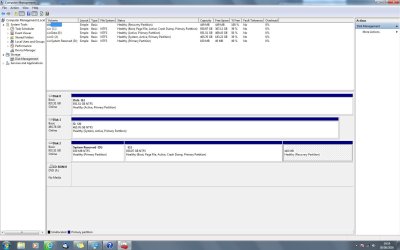
Last night downloaded and used EasyBCD and this is what the setup looks like now.

After easyBCD.jpg

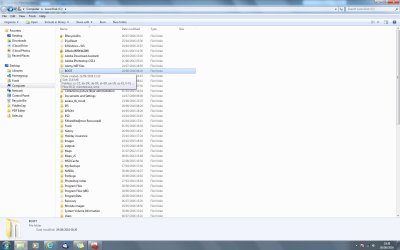
This is the C drive now BOOT appears to be greyed out.

C drive 1.jpg

The entries in the BOOT folder

C Drive 2.jpg
 

Attachments

  • After easyBCD.jpg
    After easyBCD.jpg
    144.2 KB · Views: 10
  • C drive 1.jpg
    C drive 1.jpg
    114.5 KB · Views: 6
  • C Drive 2.jpg
    C Drive 2.jpg
    101.8 KB · Views: 4

My Computer My Computer

At a glance

Windows 10AMD Athlon II x4 6408 GbNVIDIA GeForce8200
Computer type
PC/Desktop
Computer Manufacturer/Model Number
Priceless Computing
OS
Windows 10
CPU
AMD Athlon II x4 640
Motherboard
Asrock K10 N78MPro
Memory
8 Gb
Graphics Card(s)
NVIDIA GeForce8200
Sound Card
?
Monitor(s) Displays
HP w2207h
Hard Drives
C: 2 Tb SSD
PSU
?
Cooling
?
Do you have a Windows Installation disc or a System Repair disc (DVD disc) ?
If not, let me know and i can give you instructions to create one.
It's wise to have a disc available in case something goes wrong and you need to run a Startup Repair.

Your [G] drive is still the System Active partition, so that's where the bootloader is that was used to start Windows.

It looks like you moved bootmgr to , i asked you to move it to [D] in post #2. What you did changed the Active partition from [D] to [C] on Disk 2. I don't know if doing another Move Bootmgr to C with EasyBCD will fix this (this time move it C). That's why you want some type of startup repair disc available.
 

My Computer My Computer

At a glance

Multi-Boot W7_Pro_x64 W8.1_Pro_x64 W10_Pro_x6...AMD Athlon II x4 6206GB GSkill DDR2 800AMD 4670 GPU + AMD 4200 IGP
Computer type
PC/Desktop
Computer Manufacturer/Model Number
home built
OS
Multi-Boot W7_Pro_x64 W8.1_Pro_x64 W10_Pro_x64 +Linux_VMs +Chromium_VM
CPU
AMD Athlon II x4 620
Motherboard
Gigabyte GA-MA785G-UD3H
Memory
6GB GSkill DDR2 800
Graphics Card(s)
AMD 4670 GPU + AMD 4200 IGP
Sound Card
on board Realtek ALC889A
Monitor(s) Displays
RCA 40" LCD TV, Insignia 32" LCD TV, HP 15" LCD monitor
Screen Resolution
1680 x 1050
Hard Drives
OCZ Vertex 3 120GB,
Samsung F3 1TB (3),
Several others - WD, Seagate, Hitachi, ...
PSU
Corsair 500 W
Case
Rosewill mid tower
Cooling
CM 90mm rifle
Keyboard
Gyration wireless, Logitech wireless, Dell USB wired
Mouse
Gyration wireless, Logitech wireless, V7 USB wired
Internet Speed
Spectrum - 100Mbps D / 10Mbps U
Antivirus
Avast, MBAM3, EMET, WinPatrol
Browser
Pale Moon, Firefox, IE
Other Info
2 multi-boot PC's
Mainly HTPC/Office/Gen purpose (no gaming).
Trendnet USB KVM.
LG DVD burner/Blue Ray Player.
Tray system for removable SATA backup drives.

Not currently OCd, under-volted.
I use Hybrid sleep, rarely re-boot or shutdown.

Hauppauge HD-PVR, Avermedia PCIe TV Tuner, Hauppauge PCI TV Tuner.
I have the original installation CDs which I used when I re installed windows 64 bit. I will try moving boot manager to C: and if I need to I can always take the long way around by disconnection all drives other than C; Na re installing. Doers that sound sensible?
 

My Computer My Computer

At a glance

Windows 10AMD Athlon II x4 6408 GbNVIDIA GeForce8200
Computer type
PC/Desktop
Computer Manufacturer/Model Number
Priceless Computing
OS
Windows 10
CPU
AMD Athlon II x4 640
Motherboard
Asrock K10 N78MPro
Memory
8 Gb
Graphics Card(s)
NVIDIA GeForce8200
Sound Card
?
Monitor(s) Displays
HP w2207h
Hard Drives
C: 2 Tb SSD
PSU
?
Cooling
?
Yes, try moving the bootmgr to C.
It seems like the first time you did it, it only completed part of the process by changing the Active partition on the drive. It didn't make the C partition the System partition.
 

My Computer My Computer

At a glance

Multi-Boot W7_Pro_x64 W8.1_Pro_x64 W10_Pro_x6...AMD Athlon II x4 6206GB GSkill DDR2 800AMD 4670 GPU + AMD 4200 IGP
Computer type
PC/Desktop
Computer Manufacturer/Model Number
home built
OS
Multi-Boot W7_Pro_x64 W8.1_Pro_x64 W10_Pro_x64 +Linux_VMs +Chromium_VM
CPU
AMD Athlon II x4 620
Motherboard
Gigabyte GA-MA785G-UD3H
Memory
6GB GSkill DDR2 800
Graphics Card(s)
AMD 4670 GPU + AMD 4200 IGP
Sound Card
on board Realtek ALC889A
Monitor(s) Displays
RCA 40" LCD TV, Insignia 32" LCD TV, HP 15" LCD monitor
Screen Resolution
1680 x 1050
Hard Drives
OCZ Vertex 3 120GB,
Samsung F3 1TB (3),
Several others - WD, Seagate, Hitachi, ...
PSU
Corsair 500 W
Case
Rosewill mid tower
Cooling
CM 90mm rifle
Keyboard
Gyration wireless, Logitech wireless, Dell USB wired
Mouse
Gyration wireless, Logitech wireless, V7 USB wired
Internet Speed
Spectrum - 100Mbps D / 10Mbps U
Antivirus
Avast, MBAM3, EMET, WinPatrol
Browser
Pale Moon, Firefox, IE
Other Info
2 multi-boot PC's
Mainly HTPC/Office/Gen purpose (no gaming).
Trendnet USB KVM.
LG DVD burner/Blue Ray Player.
Tray system for removable SATA backup drives.

Not currently OCd, under-volted.
I use Hybrid sleep, rarely re-boot or shutdown.

Hauppauge HD-PVR, Avermedia PCIe TV Tuner, Hauppauge PCI TV Tuner.

Attachments

  • Second attempt EasyBCD.jpg
    Second attempt EasyBCD.jpg
    114.6 KB · Views: 8

My Computer My Computer

At a glance

Windows 10AMD Athlon II x4 6408 GbNVIDIA GeForce8200
Computer type
PC/Desktop
Computer Manufacturer/Model Number
Priceless Computing
OS
Windows 10
CPU
AMD Athlon II x4 640
Motherboard
Asrock K10 N78MPro
Memory
8 Gb
Graphics Card(s)
NVIDIA GeForce8200
Sound Card
?
Monitor(s) Displays
HP w2207h
Hard Drives
C: 2 Tb SSD
PSU
?
Cooling
?
[G] is still the SYSTEM, Active partition, so that's where the bootloader is used from :(
It looks like using EasyBCD to move the bootmgr (again) won't fix your problem.

You can disconnect Disk 0 and Disk 2, so you only have Disk 1 connected.
That removes the other 2 Active partitions that are probably confusing things.

Windows (Installed) will not startup that way, as it can't find the bootmgr.
You would need to boot Windows with your Install disc (DVD) and do a Startup Repair.

If that works you should be able to boot with only Disk 1 connected.
Then you should see [/B] as the [B]SYSTEM[/B], Active partition. The risk doing all this is you don't have enough room to do a backup of your C drive. If things go wrong, you could lose the data on that drive. Are you ok with that risk ?
 

My Computer My Computer

At a glance

Multi-Boot W7_Pro_x64 W8.1_Pro_x64 W10_Pro_x6...AMD Athlon II x4 6206GB GSkill DDR2 800AMD 4670 GPU + AMD 4200 IGP
Computer type
PC/Desktop
Computer Manufacturer/Model Number
home built
OS
Multi-Boot W7_Pro_x64 W8.1_Pro_x64 W10_Pro_x64 +Linux_VMs +Chromium_VM
CPU
AMD Athlon II x4 620
Motherboard
Gigabyte GA-MA785G-UD3H
Memory
6GB GSkill DDR2 800
Graphics Card(s)
AMD 4670 GPU + AMD 4200 IGP
Sound Card
on board Realtek ALC889A
Monitor(s) Displays
RCA 40" LCD TV, Insignia 32" LCD TV, HP 15" LCD monitor
Screen Resolution
1680 x 1050
Hard Drives
OCZ Vertex 3 120GB,
Samsung F3 1TB (3),
Several others - WD, Seagate, Hitachi, ...
PSU
Corsair 500 W
Case
Rosewill mid tower
Cooling
CM 90mm rifle
Keyboard
Gyration wireless, Logitech wireless, Dell USB wired
Mouse
Gyration wireless, Logitech wireless, V7 USB wired
Internet Speed
Spectrum - 100Mbps D / 10Mbps U
Antivirus
Avast, MBAM3, EMET, WinPatrol
Browser
Pale Moon, Firefox, IE
Other Info
2 multi-boot PC's
Mainly HTPC/Office/Gen purpose (no gaming).
Trendnet USB KVM.
LG DVD burner/Blue Ray Player.
Tray system for removable SATA backup drives.

Not currently OCd, under-volted.
I use Hybrid sleep, rarely re-boot or shutdown.

Hauppauge HD-PVR, Avermedia PCIe TV Tuner, Hauppauge PCI TV Tuner.
First I will need to download all of my images, 000's, to another storage before I risk that. Imight buy a new 2 TB external drive as an extra backup and use that first.
 

My Computer My Computer

At a glance

Windows 10AMD Athlon II x4 6408 GbNVIDIA GeForce8200
Computer type
PC/Desktop
Computer Manufacturer/Model Number
Priceless Computing
OS
Windows 10
CPU
AMD Athlon II x4 640
Motherboard
Asrock K10 N78MPro
Memory
8 Gb
Graphics Card(s)
NVIDIA GeForce8200
Sound Card
?
Monitor(s) Displays
HP w2207h
Hard Drives
C: 2 Tb SSD
PSU
?
Cooling
?
Understood and i agree !
I always make sure i have backups before making any changes like this.
Better safe than sorry, i don't want to hear you lost important data following my suggestions.
 

My Computer My Computer

At a glance

Multi-Boot W7_Pro_x64 W8.1_Pro_x64 W10_Pro_x6...AMD Athlon II x4 6206GB GSkill DDR2 800AMD 4670 GPU + AMD 4200 IGP
Computer type
PC/Desktop
Computer Manufacturer/Model Number
home built
OS
Multi-Boot W7_Pro_x64 W8.1_Pro_x64 W10_Pro_x64 +Linux_VMs +Chromium_VM
CPU
AMD Athlon II x4 620
Motherboard
Gigabyte GA-MA785G-UD3H
Memory
6GB GSkill DDR2 800
Graphics Card(s)
AMD 4670 GPU + AMD 4200 IGP
Sound Card
on board Realtek ALC889A
Monitor(s) Displays
RCA 40" LCD TV, Insignia 32" LCD TV, HP 15" LCD monitor
Screen Resolution
1680 x 1050
Hard Drives
OCZ Vertex 3 120GB,
Samsung F3 1TB (3),
Several others - WD, Seagate, Hitachi, ...
PSU
Corsair 500 W
Case
Rosewill mid tower
Cooling
CM 90mm rifle
Keyboard
Gyration wireless, Logitech wireless, Dell USB wired
Mouse
Gyration wireless, Logitech wireless, V7 USB wired
Internet Speed
Spectrum - 100Mbps D / 10Mbps U
Antivirus
Avast, MBAM3, EMET, WinPatrol
Browser
Pale Moon, Firefox, IE
Other Info
2 multi-boot PC's
Mainly HTPC/Office/Gen purpose (no gaming).
Trendnet USB KVM.
LG DVD burner/Blue Ray Player.
Tray system for removable SATA backup drives.

Not currently OCd, under-volted.
I use Hybrid sleep, rarely re-boot or shutdown.

Hauppauge HD-PVR, Avermedia PCIe TV Tuner, Hauppauge PCI TV Tuner.
You have been given good advice.

The only thing I would add is that your OS partition is too large IMO for efficient/regular system imaging. 200GB should be more than enough and move your significant data to a separate partition. Some data on the OS partition is ok but not large amounts.
Then decide on a strategy for backing up your data partition.
 

My Computer My Computer

At a glance

Windows 7x64 Home Premium SP1Intel i7 2600kG.Skill Ripjaws (DDR3-1600) 2x4GBNvidia GeForce GTS 450; Intel HD Graphics 300...
Computer type
PC/Desktop
Computer Manufacturer/Model Number
Own build
OS
Windows 7x64 Home Premium SP1
CPU
Intel i7 2600k
Motherboard
ASUS P8Z68 Deluxe
Memory
G.Skill Ripjaws (DDR3-1600) 2x4GB
Graphics Card(s)
Nvidia GeForce GTS 450; Intel HD Graphics 3000(GT2+)
Monitor(s) Displays
Dell Ultrasharp IPS panel U2311H, Samsung SyncMaster P2350
Screen Resolution
1920x1080
Hard Drives
Samsung 850 Pro SSD 256GB, Samsung SSD 840 120GB, Seagates 1TB Barracuda ST31000528AS x2
PSU
Seasonic M12II 520W
Case
Lian Li Lancool PC-K60
Cooling
Case: 1x120mm, 3x140mm CPU: Hyper 212+
Keyboard
Logitech MK520 (wireless)
Mouse
Logitech MK520
Internet Speed
6-7 Mbps
Antivirus
Norton Security Premium, Malwarebytes on 2 (MSE on 3rd PC)
Browser
FireFox
Other Info
Audio: Logitech Z523 2.1
Hi FrankFitz

I should say that you need to follow others on the advice.

My advice is to remove /delete the drive label on D:\ drive which is the "System Reserved" partition to prevent any further issue.

The "Active" and "System" should not be include in other partition, only in the D:\ and C:\ drives.

As for the partition on Disk 0 and Disk 2, if possible, create an additional partition.
This is to have separate partitions for, such as; Video, Data, etc; for easy to manage and backup, if nec.

As for what mjf suggest, the active data may leave it at the OS partition.
And these active data, do make copy of them to another Drive, so as to prevent sudden lost of the files.
That is to make a backup these active files first to another drive, then work on it.
Active files means these files are regular use, such as documents, amendment.
 

My Computer My Computer

At a glance

Windows 7 x64
Computer type
Laptop
Computer Manufacturer/Model Number
Toshiba L630 and L735
OS
Windows 7 x64
Hard Drives
240 GB SSD
I generally leave my (library) documents on the OS partition because they don't take up that much space. Like I said some data on the OS partition is ok. I actually put videos, photos, downloads on different HDDs because my OS is on an SSD. I don't bother with libraries unless they are document on the OS partition.

Because the OS partition may need an unexpected system reimage due to bad updates, malware etc there is an argument to put your documents elsewhere unless you are very diligent with your file/folder backup.
 

My Computer My Computer

At a glance

Windows 7x64 Home Premium SP1Intel i7 2600kG.Skill Ripjaws (DDR3-1600) 2x4GBNvidia GeForce GTS 450; Intel HD Graphics 300...
Computer type
PC/Desktop
Computer Manufacturer/Model Number
Own build
OS
Windows 7x64 Home Premium SP1
CPU
Intel i7 2600k
Motherboard
ASUS P8Z68 Deluxe
Memory
G.Skill Ripjaws (DDR3-1600) 2x4GB
Graphics Card(s)
Nvidia GeForce GTS 450; Intel HD Graphics 3000(GT2+)
Monitor(s) Displays
Dell Ultrasharp IPS panel U2311H, Samsung SyncMaster P2350
Screen Resolution
1920x1080
Hard Drives
Samsung 850 Pro SSD 256GB, Samsung SSD 840 120GB, Seagates 1TB Barracuda ST31000528AS x2
PSU
Seasonic M12II 520W
Case
Lian Li Lancool PC-K60
Cooling
Case: 1x120mm, 3x140mm CPU: Hyper 212+
Keyboard
Logitech MK520 (wireless)
Mouse
Logitech MK520
Internet Speed
6-7 Mbps
Antivirus
Norton Security Premium, Malwarebytes on 2 (MSE on 3rd PC)
Browser
FireFox
Other Info
Audio: Logitech Z523 2.1
Single drive boot worked OK and did not require Install CD's.

Single disk boot.jpg

Boot seems faster presumably because I have only one drive connected.

What about the other two drives is it a simple matter of reconnect or is there anything else I should do?
 

Attachments

  • Single disk boot.jpg
    Single disk boot.jpg
    100.7 KB · Views: 4

My Computer My Computer

At a glance

Windows 10AMD Athlon II x4 6408 GbNVIDIA GeForce8200
Computer type
PC/Desktop
Computer Manufacturer/Model Number
Priceless Computing
OS
Windows 10
CPU
AMD Athlon II x4 640
Motherboard
Asrock K10 N78MPro
Memory
8 Gb
Graphics Card(s)
NVIDIA GeForce8200
Sound Card
?
Monitor(s) Displays
HP w2207h
Hard Drives
C: 2 Tb SSD
PSU
?
Cooling
?
That's great.
Yes, reconnect the other two drives, and set the Active partition on those drives to Inactive.
Partition - Mark as Inactive
 

My Computer My Computer

At a glance

Multi-Boot W7_Pro_x64 W8.1_Pro_x64 W10_Pro_x6...AMD Athlon II x4 6206GB GSkill DDR2 800AMD 4670 GPU + AMD 4200 IGP
Computer type
PC/Desktop
Computer Manufacturer/Model Number
home built
OS
Multi-Boot W7_Pro_x64 W8.1_Pro_x64 W10_Pro_x64 +Linux_VMs +Chromium_VM
CPU
AMD Athlon II x4 620
Motherboard
Gigabyte GA-MA785G-UD3H
Memory
6GB GSkill DDR2 800
Graphics Card(s)
AMD 4670 GPU + AMD 4200 IGP
Sound Card
on board Realtek ALC889A
Monitor(s) Displays
RCA 40" LCD TV, Insignia 32" LCD TV, HP 15" LCD monitor
Screen Resolution
1680 x 1050
Hard Drives
OCZ Vertex 3 120GB,
Samsung F3 1TB (3),
Several others - WD, Seagate, Hitachi, ...
PSU
Corsair 500 W
Case
Rosewill mid tower
Cooling
CM 90mm rifle
Keyboard
Gyration wireless, Logitech wireless, Dell USB wired
Mouse
Gyration wireless, Logitech wireless, V7 USB wired
Internet Speed
Spectrum - 100Mbps D / 10Mbps U
Antivirus
Avast, MBAM3, EMET, WinPatrol
Browser
Pale Moon, Firefox, IE
Other Info
2 multi-boot PC's
Mainly HTPC/Office/Gen purpose (no gaming).
Trendnet USB KVM.
LG DVD burner/Blue Ray Player.
Tray system for removable SATA backup drives.

Not currently OCd, under-volted.
I use Hybrid sleep, rarely re-boot or shutdown.

Hauppauge HD-PVR, Avermedia PCIe TV Tuner, Hauppauge PCI TV Tuner.
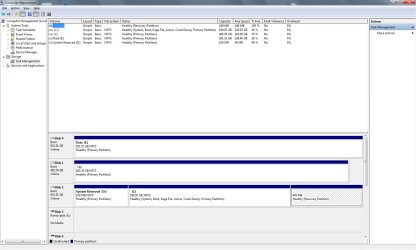
Hi DavidE

This is the position now which looks much better. The last drive I marked as inactive can now be reformatted as I have back ups of the data so that will start me off as my new backup drive. In addition, I have external drives with the same data.

Final.jpg
 

Attachments

  • Final.jpg
    Final.jpg
    112 KB · Views: 6

My Computer My Computer

At a glance

Windows 10AMD Athlon II x4 6408 GbNVIDIA GeForce8200
Computer type
PC/Desktop
Computer Manufacturer/Model Number
Priceless Computing
OS
Windows 10
CPU
AMD Athlon II x4 640
Motherboard
Asrock K10 N78MPro
Memory
8 Gb
Graphics Card(s)
NVIDIA GeForce8200
Sound Card
?
Monitor(s) Displays
HP w2207h
Hard Drives
C: 2 Tb SSD
PSU
?
Cooling
?
That's looking good and you're doing real well :)

If you want to really clean the backup drive, you can run a Diskpart Clean.
That will delete everything on the drive including the MBR (Master Boot Record).
http://www.sevenforums.com/tutorials/52129-disk-clean-clean-all-diskpart-command.html

I run Diskpart Clean on a drive i want to "reuse" that might have hidden obsolete MBR info.
I have often "migrated" to a new HD/SSD and end up reusing the old drive for somethings else such as data only.
It's probably not necessary unless you might reuse the drive as a boot drive someday, but i'm an overkill/clean disk freak :p

If you do use Diskpart Clean, make sure you select the correct drive !
 

My Computer My Computer

At a glance

Multi-Boot W7_Pro_x64 W8.1_Pro_x64 W10_Pro_x6...AMD Athlon II x4 6206GB GSkill DDR2 800AMD 4670 GPU + AMD 4200 IGP
Computer type
PC/Desktop
Computer Manufacturer/Model Number
home built
OS
Multi-Boot W7_Pro_x64 W8.1_Pro_x64 W10_Pro_x64 +Linux_VMs +Chromium_VM
CPU
AMD Athlon II x4 620
Motherboard
Gigabyte GA-MA785G-UD3H
Memory
6GB GSkill DDR2 800
Graphics Card(s)
AMD 4670 GPU + AMD 4200 IGP
Sound Card
on board Realtek ALC889A
Monitor(s) Displays
RCA 40" LCD TV, Insignia 32" LCD TV, HP 15" LCD monitor
Screen Resolution
1680 x 1050
Hard Drives
OCZ Vertex 3 120GB,
Samsung F3 1TB (3),
Several others - WD, Seagate, Hitachi, ...
PSU
Corsair 500 W
Case
Rosewill mid tower
Cooling
CM 90mm rifle
Keyboard
Gyration wireless, Logitech wireless, Dell USB wired
Mouse
Gyration wireless, Logitech wireless, V7 USB wired
Internet Speed
Spectrum - 100Mbps D / 10Mbps U
Antivirus
Avast, MBAM3, EMET, WinPatrol
Browser
Pale Moon, Firefox, IE
Other Info
2 multi-boot PC's
Mainly HTPC/Office/Gen purpose (no gaming).
Trendnet USB KVM.
LG DVD burner/Blue Ray Player.
Tray system for removable SATA backup drives.

Not currently OCd, under-volted.
I use Hybrid sleep, rarely re-boot or shutdown.

Hauppauge HD-PVR, Avermedia PCIe TV Tuner, Hauppauge PCI TV Tuner.
C: has ~600GB on it. I'd estimate 600GB would take at least 90 minutes to image and about the same time to restore using a USB 3 external HDD.
If you're ok with this you'll only get a few images on a 2TB external.
 

My Computer My Computer

At a glance

Windows 7x64 Home Premium SP1Intel i7 2600kG.Skill Ripjaws (DDR3-1600) 2x4GBNvidia GeForce GTS 450; Intel HD Graphics 300...
Computer type
PC/Desktop
Computer Manufacturer/Model Number
Own build
OS
Windows 7x64 Home Premium SP1
CPU
Intel i7 2600k
Motherboard
ASUS P8Z68 Deluxe
Memory
G.Skill Ripjaws (DDR3-1600) 2x4GB
Graphics Card(s)
Nvidia GeForce GTS 450; Intel HD Graphics 3000(GT2+)
Monitor(s) Displays
Dell Ultrasharp IPS panel U2311H, Samsung SyncMaster P2350
Screen Resolution
1920x1080
Hard Drives
Samsung 850 Pro SSD 256GB, Samsung SSD 840 120GB, Seagates 1TB Barracuda ST31000528AS x2
PSU
Seasonic M12II 520W
Case
Lian Li Lancool PC-K60
Cooling
Case: 1x120mm, 3x140mm CPU: Hyper 212+
Keyboard
Logitech MK520 (wireless)
Mouse
Logitech MK520
Internet Speed
6-7 Mbps
Antivirus
Norton Security Premium, Malwarebytes on 2 (MSE on 3rd PC)
Browser
FireFox
Other Info
Audio: Logitech Z523 2.1
Back
Top