Hello,
I am new to the forum and not sure if this is the correct place for my question, so please forgive me if not. Moreover, I apologize for the long thread but I want to explain in details what happened.
After a system crash, I tried to restore my win 7 from an acronis true image backup file stored on an external USB HDD (WD Passport, 1TB). After booting with acronis true image, I realized that I have another copy of the backup file on a second partition G: on the internal HD, so I restored this to drive C:. Since the system did not boot, I inserted Win7 CD to make a system repair, which also did not work. So I decided to install windows newly from CD. I had the message "Windows cannot be installed into this disk. The selected disk is of the GPT partition style". Following an advice after a search in google, I used Diskpart to clean the targeted volume. I can say I am 98% sure that I selected the right volume and that the external HDD was upluged. Anyway, after this, the installation did not work, but I discovered that the two partitions on the internal HDD had gone. I thought this is not too bad, since I have a copy of all my data on the external HDD. So I installed win 8.1 on a new partition on the internal HDD and kept a second partition for data to be copied later.
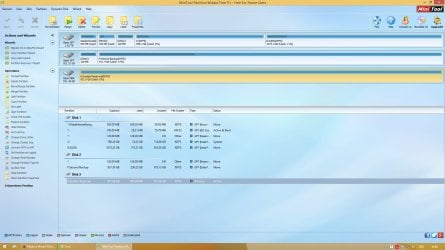
Installation went fine. Then I wanted to copy my data from the external HDD. The surprise is: the drive is shown with the name "System Reserved (E ", previously, it was called "WD Passport ....". Even worse, it is completely empty and the whole space of 1 TB is shown as free.
1. As I said, I am almost sure I did not clean the external HDD. I am even almost sure it was uplugged, but cannot say this for 100%.
2. Moreover, I did not touch the external HDD from inside acronis true image, where it was actually shown with the correct name.
3. Even if the HDD was plugged, I did not notice any operation on it that took even seconds of time.
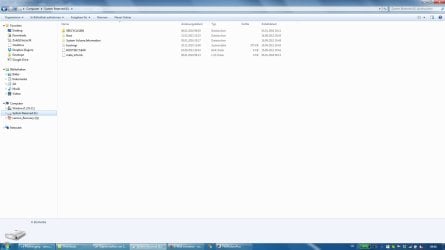
So I hope my data on the external HDD was not deleted or overwritten. I attached it to the PC at work and it shows the contents in the attachment.
Any hope to rescue my data? Please help!
Much thanks in advance.
I am new to the forum and not sure if this is the correct place for my question, so please forgive me if not. Moreover, I apologize for the long thread but I want to explain in details what happened.
After a system crash, I tried to restore my win 7 from an acronis true image backup file stored on an external USB HDD (WD Passport, 1TB). After booting with acronis true image, I realized that I have another copy of the backup file on a second partition G: on the internal HD, so I restored this to drive C:. Since the system did not boot, I inserted Win7 CD to make a system repair, which also did not work. So I decided to install windows newly from CD. I had the message "Windows cannot be installed into this disk. The selected disk is of the GPT partition style". Following an advice after a search in google, I used Diskpart to clean the targeted volume. I can say I am 98% sure that I selected the right volume and that the external HDD was upluged. Anyway, after this, the installation did not work, but I discovered that the two partitions on the internal HDD had gone. I thought this is not too bad, since I have a copy of all my data on the external HDD. So I installed win 8.1 on a new partition on the internal HDD and kept a second partition for data to be copied later.
Installation went fine. Then I wanted to copy my data from the external HDD. The surprise is: the drive is shown with the name "System Reserved (E
", previously, it was called "WD Passport ....". Even worse, it is completely empty and the whole space of 1 TB is shown as free. 1. As I said, I am almost sure I did not clean the external HDD. I am even almost sure it was uplugged, but cannot say this for 100%.
2. Moreover, I did not touch the external HDD from inside acronis true image, where it was actually shown with the correct name.
3. Even if the HDD was plugged, I did not notice any operation on it that took even seconds of time.
So I hope my data on the external HDD was not deleted or overwritten. I attached it to the PC at work and it shows the contents in the attachment.
Any hope to rescue my data? Please help!
Much thanks in advance.
Attachments
My Computer
At a glance
Win 7 (32b) and win 8 (64b)
- Computer type
- PC/Desktop
- OS
- Win 7 (32b) and win 8 (64b)