
Backup User and System Files - Create Shortcut

How to Create a Windows 7 "Backup User and System Files" Shortcut

   Information
This will show you how to create or download a Backup User and System Files shortcut that you can use to create a backup of your user and system files instead of having to go through the Control Panel to do so.

This shortcut is the same as if you clicked on either the Set up backup or Change settings button in Backup and Restore.
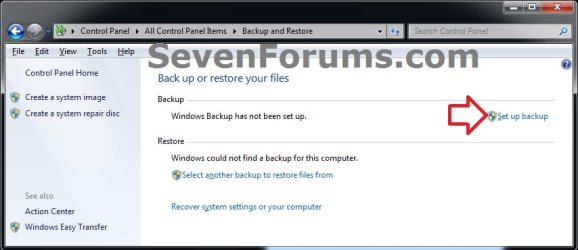
Set_up_backup.jpgChange_settings.jpg

   Warning
To be able to use this shortcut, you must be logged in as an administrator.


EXAMPLE: "Set up backup" or "Change settings"
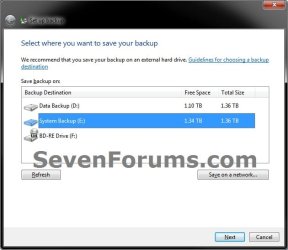
Example.jpg


OPTION ONE

Download and Setup "Backup User and System Files" Shortcut


1. Click on the Download button below to download the file below.
Backup_User_and_System_Files_Shortcut.zip


Download


2. Click on Save and save the .zip file to your desktop.

3. Open the downloaded .zip file, and extract (drag and drop) all of it's contents to your desktop.

4. Right click on the extracted Backup User and System Files.vbs file, click on Properties, General tab, and click on the Unblock button if available.
NOTE: If you do not have a Unblock button under the General tab, then the file is already unblocked and you can continue on.

5. Right click on the now unblocked Backup User and System Files.vbs file, and click on Cut.

6. Navigate to C:\Windows in Windows Explorer, then right click on a empty area of the window and click on Paste to move the .vbs file here.

7. If prompted by UAC, then click on Continue and Yes.

8. Right click on the extracted Backup User and System Files shortcut, click on Properties, General tab, and click on the Unblock button if available.
NOTE: If you do not have a Unblock button under the General tab, then the file is already unblocked and you can continue on.

9. You can now assign a keyboard shortcut, place in Quick Launch, or move this Backup User and System Files shortcut to where you like for easy use.


OPTION TWO

To Remove the "Backup User and System Files" Shortcut


1. Delete the Backup User and System Files shortcut.

2. In Windows Explorer, navigate to the .vbs file below, right click on it, and click on Delete.
C:\Windows\Backup User and System Files.vbs
3. If prompted by UAC, then click on Yes.
That's it,
Shawn


Attachments

Last edited:
The bug regarding nothing happening when you click on Back up now, Manage space, Turn on/off schedule, or Change settings is unfortunately not avoided by creating this shortcut, at least not on my PC. As this is a known bug that makes the Backup and Restore facility of very limited use, I hope MS will come up with a speedy patch to fix. I can't even change the drive to backup elsewhere once I do the Backup setup to recognise my current external drive. The only way is to reset to default configuration in the Registry and start all over again (your tutorial on the linked thread is great for this - thank you). Overall, MS have made a right mess of this facility judging by the many problems discussed on the forums.
 

My Computer

OS
Window 7 Home Premium 64-bit
Hello Cima, and welcome to Seven Forums.

I'm happy the reset backup configuration tutorial helps you on this for now. I'm not sure yet as to what triggers this bug either. Hopefully it will be fixed soon.
 

My Computer

Computer type
PC/Desktop
Computer Manufacturer/Model Number
Self built custom
OS
64-bit Windows 11 Pro for Workstations
CPU
Intel i7-8700K OC'd to 5 GHz
Motherboard
ASUS ROG Maximus XI Formula Z390
Memory
64 GB (4x16GB) G.SKILL TridentZ RGB DDR4 3600 MHz
Graphics Card(s)
ASUS ROG-STRIX-GTX1080TI-O11G-GAMING
Sound Card
Integrated
Monitor(s) Displays
2 x Samsung Odyssey G7 27"
Screen Resolution
2560x1440
Hard Drives
1TB Samsung 990 PRO M.2,
4TB Samsung 990 PRO PRO M.2,
TerraMaster F8 SSD Plus NAS
PSU
Seasonic Prime Titanium 850W
Case
Thermaltake Core P3
Cooling
Corsair Hydro H115i
Keyboard
Logitech wireless K800
Mouse
Logitech MX Master 4
Internet Speed
2 Gb/s Download and 100 Mb/s Upload
Antivirus
Malwarebyte Anti-Malware Premium
Browser
Google Chrome
Other Info
Logitech Z625 speaker system,
Logitech BRIO 4K Pro webcam,
HP Color LaserJet Pro MFP M477fdn,
APC SMART-UPS RT 1000 XL - SURT1000XLI,
Galaxy S23 Plus phone
Thanks Brink. If you hear anything about the cause or an upcoming fix I'd be very grateful if you could post here.
 

My Computer

OS
Window 7 Home Premium 64-bit
Will do. :)
 

My Computer

Computer type
PC/Desktop
Computer Manufacturer/Model Number
Self built custom
OS
64-bit Windows 11 Pro for Workstations
CPU
Intel i7-8700K OC'd to 5 GHz
Motherboard
ASUS ROG Maximus XI Formula Z390
Memory
64 GB (4x16GB) G.SKILL TridentZ RGB DDR4 3600 MHz
Graphics Card(s)
ASUS ROG-STRIX-GTX1080TI-O11G-GAMING
Sound Card
Integrated
Monitor(s) Displays
2 x Samsung Odyssey G7 27"
Screen Resolution
2560x1440
Hard Drives
1TB Samsung 990 PRO M.2,
4TB Samsung 990 PRO PRO M.2,
TerraMaster F8 SSD Plus NAS
PSU
Seasonic Prime Titanium 850W
Case
Thermaltake Core P3
Cooling
Corsair Hydro H115i
Keyboard
Logitech wireless K800
Mouse
Logitech MX Master 4
Internet Speed
2 Gb/s Download and 100 Mb/s Upload
Antivirus
Malwarebyte Anti-Malware Premium
Browser
Google Chrome
Other Info
Logitech Z625 speaker system,
Logitech BRIO 4K Pro webcam,
HP Color LaserJet Pro MFP M477fdn,
APC SMART-UPS RT 1000 XL - SURT1000XLI,
Galaxy S23 Plus phone
After looking for a solution of the backup bug in W7, finally I found this thread ;-)
 

My Computer

Computer Manufacturer/Model Number
ASRock
OS
Windows 7 Professional
CPU
Dual Core Atom N330
Memory
2Gb
Graphics Card(s)
Nvidea ION
Sound Card
Nvidea
Monitor(s) Displays
Dell 2007FP
Backup bug

I think I have discovered a partial workaround for this bug. Assuming you have managed the first backup before the majority of the backup screen buttons cease to work, plug in the same device that you used for the first backup (in my case, a usb external hard drive) and wait for the autoplay box to appear showing the options you can choose for this device. One of them should be "backup files to this drive" or something similar. Select this and immediately backup will begin without you having to do anything more. If you want to view progress, go to Control Panel and select Backup and Restore. You will see the progress bar gradually filling in. Do nothing more until the process has been completed. You will now have an incremental up-to-date backup to augment your original backup as intended by Windows 7. Hopefully Microsoft will sort out the rest of the non-functioning buttons in SP1
 

My Computer

OS
Window 7 Home Premium 64-bit
Hey Brink, it's great to read your threads. I know this thread is older but it's the only one I have found thus far describing the backup options bug. I was excited when I found this because I thought I was the only person suffering this rather strange and random bug. my first thought was that some system files were just corrupted, but i ran the sfc / scannow which turned up nothing. I have also performed a few clean installs before to no avail. But alas, as of the end of March, 2010, microsoft has not addressed the issue. Its good to know that i'm not alone though.
Just wondering if anyone had any other suggestions.
thanks
 

My Computer

Computer Manufacturer/Model Number
none (me)
OS
Windows 7 Home Premium 64-Bit
CPU
AMD Phenom II X2 550 BE
Motherboard
Asus M4A785TD-M EVO
Memory
Corsair Dominator 1600 4gb
Graphics Card(s)
MSI R5770 Hawk
Sound Card
integrated
Monitor(s) Displays
ASUS VW224U 22"
Screen Resolution
1680x1050
Hard Drives
WD Caviar Black 750gb
PSU
Corsair HX750
Case
Cooler Master HAF 922
Cooling
Scythe Mugen 2
Mouse
Gigabyte GM-M6800
Other Info
Computer name: the Duece
Thanks Brink

:D
Brink :
OMG I'm glad I found this post ! Had reinstalled system using True Image .tib + was preparing to Backup new , cleaned image after uninstalling numerous items (including T.I. in order to reinstall later) when discovered Backup + restore no longer functional ! Several attempts to rectify (Repair , Restore , merge backed up Registry , Google search , etc.) unsuccessful until I arrived here . Was disgustedly preparing to start all over again !
Hopefully this is a "Sticky" because apparently this is not an uncommon problem .
Thanks again .
 

My Computer

OS
Win7 Pro X64
You're most welcome Ron, and welcome to Seven Forums. :)
 

My Computer

Computer type
PC/Desktop
Computer Manufacturer/Model Number
Self built custom
OS
64-bit Windows 11 Pro for Workstations
CPU
Intel i7-8700K OC'd to 5 GHz
Motherboard
ASUS ROG Maximus XI Formula Z390
Memory
64 GB (4x16GB) G.SKILL TridentZ RGB DDR4 3600 MHz
Graphics Card(s)
ASUS ROG-STRIX-GTX1080TI-O11G-GAMING
Sound Card
Integrated
Monitor(s) Displays
2 x Samsung Odyssey G7 27"
Screen Resolution
2560x1440
Hard Drives
1TB Samsung 990 PRO M.2,
4TB Samsung 990 PRO PRO M.2,
TerraMaster F8 SSD Plus NAS
PSU
Seasonic Prime Titanium 850W
Case
Thermaltake Core P3
Cooling
Corsair Hydro H115i
Keyboard
Logitech wireless K800
Mouse
Logitech MX Master 4
Internet Speed
2 Gb/s Download and 100 Mb/s Upload
Antivirus
Malwarebyte Anti-Malware Premium
Browser
Google Chrome
Other Info
Logitech Z625 speaker system,
Logitech BRIO 4K Pro webcam,
HP Color LaserJet Pro MFP M477fdn,
APC SMART-UPS RT 1000 XL - SURT1000XLI,
Galaxy S23 Plus phone
Another Solution for MY System

Howdy Brink :
A solution which also may help others . I had installed Acronis True Image 2011 . This can disrupt Backup + Restore in Control Panel as suggested in their Forums : TIH 2011 uninstall wiped out my Windows 7 Backup & restore | Knowledge Base .
Even though I'd used Revo Uninstaller , then cleaned Registry leftovers with CC Cleaner + Sweepi , I still could not access Backup + Restore .
There is a Cleanup Utility available : Acronis True Image Home 2011 Clean Up Utility | Knowledge Base Also a Registry Fix which worked for me at bottom of the same page .
Thanks to your shortcut fix , I was able to create a Backup . Of course now I'll be wiping that to create another with repaired Control Panel !

Thanks Again !!
 

My Computer

OS
Win7 Pro X64
Thank for posting back with this Ron. :)
 

My Computer

Computer type
PC/Desktop
Computer Manufacturer/Model Number
Self built custom
OS
64-bit Windows 11 Pro for Workstations
CPU
Intel i7-8700K OC'd to 5 GHz
Motherboard
ASUS ROG Maximus XI Formula Z390
Memory
64 GB (4x16GB) G.SKILL TridentZ RGB DDR4 3600 MHz
Graphics Card(s)
ASUS ROG-STRIX-GTX1080TI-O11G-GAMING
Sound Card
Integrated
Monitor(s) Displays
2 x Samsung Odyssey G7 27"
Screen Resolution
2560x1440
Hard Drives
1TB Samsung 990 PRO M.2,
4TB Samsung 990 PRO PRO M.2,
TerraMaster F8 SSD Plus NAS
PSU
Seasonic Prime Titanium 850W
Case
Thermaltake Core P3
Cooling
Corsair Hydro H115i
Keyboard
Logitech wireless K800
Mouse
Logitech MX Master 4
Internet Speed
2 Gb/s Download and 100 Mb/s Upload
Antivirus
Malwarebyte Anti-Malware Premium
Browser
Google Chrome
Other Info
Logitech Z625 speaker system,
Logitech BRIO 4K Pro webcam,
HP Color LaserJet Pro MFP M477fdn,
APC SMART-UPS RT 1000 XL - SURT1000XLI,
Galaxy S23 Plus phone
And how to make a shortcut to create System image only?
 

My Computer

Computer type
Laptop
Computer Manufacturer/Model Number
Acer Aspire 5810T8929
OS
Windows 10 Home 64b
CPU
Intel Core Solo 1.4Ghz 800Mhz FSB
Memory
Samsung 4GB DDR3
Graphics Card(s)
Intel GMA 4500MHD
Screen Resolution
1366x768
Hard Drives
Seagate Momentus XT (Hybrid HD) 750GB
Internet Speed
40 Mbs
Antivirus
Kaspersky Free Antivirus
Browser
Chrome 60.0.3112.113 (Official Build) (64-bit)

My Computer

Computer type
PC/Desktop
Computer Manufacturer/Model Number
Self built custom
OS
64-bit Windows 11 Pro for Workstations
CPU
Intel i7-8700K OC'd to 5 GHz
Motherboard
ASUS ROG Maximus XI Formula Z390
Memory
64 GB (4x16GB) G.SKILL TridentZ RGB DDR4 3600 MHz
Graphics Card(s)
ASUS ROG-STRIX-GTX1080TI-O11G-GAMING
Sound Card
Integrated
Monitor(s) Displays
2 x Samsung Odyssey G7 27"
Screen Resolution
2560x1440
Hard Drives
1TB Samsung 990 PRO M.2,
4TB Samsung 990 PRO PRO M.2,
TerraMaster F8 SSD Plus NAS
PSU
Seasonic Prime Titanium 850W
Case
Thermaltake Core P3
Cooling
Corsair Hydro H115i
Keyboard
Logitech wireless K800
Mouse
Logitech MX Master 4
Internet Speed
2 Gb/s Download and 100 Mb/s Upload
Antivirus
Malwarebyte Anti-Malware Premium
Browser
Google Chrome
Other Info
Logitech Z625 speaker system,
Logitech BRIO 4K Pro webcam,
HP Color LaserJet Pro MFP M477fdn,
APC SMART-UPS RT 1000 XL - SURT1000XLI,
Galaxy S23 Plus phone
Superb, thanks, now i don't have to take time using the search program and files.
 

My Computer

Computer type
Laptop
Computer Manufacturer/Model Number
Acer Aspire 5810T8929
OS
Windows 10 Home 64b
CPU
Intel Core Solo 1.4Ghz 800Mhz FSB
Memory
Samsung 4GB DDR3
Graphics Card(s)
Intel GMA 4500MHD
Screen Resolution
1366x768
Hard Drives
Seagate Momentus XT (Hybrid HD) 750GB
Internet Speed
40 Mbs
Antivirus
Kaspersky Free Antivirus
Browser
Chrome 60.0.3112.113 (Official Build) (64-bit)
You're most welcome. :)
 

My Computer

Computer type
PC/Desktop
Computer Manufacturer/Model Number
Self built custom
OS
64-bit Windows 11 Pro for Workstations
CPU
Intel i7-8700K OC'd to 5 GHz
Motherboard
ASUS ROG Maximus XI Formula Z390
Memory
64 GB (4x16GB) G.SKILL TridentZ RGB DDR4 3600 MHz
Graphics Card(s)
ASUS ROG-STRIX-GTX1080TI-O11G-GAMING
Sound Card
Integrated
Monitor(s) Displays
2 x Samsung Odyssey G7 27"
Screen Resolution
2560x1440
Hard Drives
1TB Samsung 990 PRO M.2,
4TB Samsung 990 PRO PRO M.2,
TerraMaster F8 SSD Plus NAS
PSU
Seasonic Prime Titanium 850W
Case
Thermaltake Core P3
Cooling
Corsair Hydro H115i
Keyboard
Logitech wireless K800
Mouse
Logitech MX Master 4
Internet Speed
2 Gb/s Download and 100 Mb/s Upload
Antivirus
Malwarebyte Anti-Malware Premium
Browser
Google Chrome
Other Info
Logitech Z625 speaker system,
Logitech BRIO 4K Pro webcam,
HP Color LaserJet Pro MFP M477fdn,
APC SMART-UPS RT 1000 XL - SURT1000XLI,
Galaxy S23 Plus phone
Back
Top