Bad Hard Drive warning

Aperture

New member
Member
Local time
10:10 AM
Messages
94
I'm getting a bad hard drive warning.
Should I get a new hard drive?
If so is there a way for me to move everything exactly as it is over to a new hard drive, I mean drivers, programs and all.
I use my computer for recording in Pro Tools HD and it's very sensitive to any kind of modifications.
Is there a way to migrate to a new hard drive and for it to be 100% exactly the same?

Thanks
 

My Computer

OS
Windows 7 Home Premium
Make an image of the drive and then install the new drive and restore it.
I recommend Macrium , it is free and reliable.
good luck
Sven
 

My Computer

Computer type
PC/Desktop
Computer Manufacturer/Model Number
Custom Build
OS
windows 7 ultimate x64
CPU
AMD FX 6 CORE PROCESSOR
Memory
16 GB
Graphics Card(s)
on MB
Sound Card
on MB
Monitor(s) Displays
Acer
Screen Resolution
1920x1080
Hard Drives
Seagate ( C:\)
Case
mini tower
Keyboard
Logitech wireless
Mouse
Logitech wireless
Antivirus
MSE
Browser
IE11

My Computer

Computer type
PC/Desktop
Computer Manufacturer/Model Number
Self Assembled
OS
Microsoft Windows 10 Pro Insider Preview 64-bit
CPU
Intel(R) Core(TM) i3-4130 CPU @ 3.40GHz
Motherboard
Gigabyte Technology Co., Ltd. B85M-D3H
Memory
Corsair Vengence 4GB x2 (8.00GB Dual-Channel DDR3 @ 798MHz)
Graphics Card(s)
2047MB GeForce GTS 450 (ZOTAC International)
Sound Card
Onboard (Realtek High Definition Audio)
Monitor(s) Displays
LG Flatron E2040T
Screen Resolution
1600x900
Hard Drives
Western Digital 1 TB
Seagate 500 GB
PSU
Corsair VS550
Case
Cooler Master K380
Cooling
Cooler Master Seidon 120V Plus
Keyboard
Logitech MK260r
Mouse
Logitech MK260r
Internet Speed
PMPL Broadband
Antivirus
Windows Defender + MBAM
Browser
Firefox
Other Info
Dell Studio 15" Laptop
Thanks a lot for your suggestions.

Just one more thing instead of starting a new post:

Now when I start up the computer I get this black screen that says
"CHKDSK is verifying indexes (state 2 of 5)..."

This take FOREVER to finish. It's been two hours already and it just started stage 5 of 5.

I was wondering if this is also an indication that my hard drive is going bad?

What can I do?

Thanks
 

My Computer

OS
Windows 7 Home Premium
Use the Seatools test as suggested in post #3 in order to have a confirmation. It will say you the actual situation.

Take both the Short Generic test and Long Generic test.
 

My Computer

Computer type
PC/Desktop
Computer Manufacturer/Model Number
Self Assembled
OS
Microsoft Windows 10 Pro Insider Preview 64-bit
CPU
Intel(R) Core(TM) i3-4130 CPU @ 3.40GHz
Motherboard
Gigabyte Technology Co., Ltd. B85M-D3H
Memory
Corsair Vengence 4GB x2 (8.00GB Dual-Channel DDR3 @ 798MHz)
Graphics Card(s)
2047MB GeForce GTS 450 (ZOTAC International)
Sound Card
Onboard (Realtek High Definition Audio)
Monitor(s) Displays
LG Flatron E2040T
Screen Resolution
1600x900
Hard Drives
Western Digital 1 TB
Seagate 500 GB
PSU
Corsair VS550
Case
Cooler Master K380
Cooling
Cooler Master Seidon 120V Plus
Keyboard
Logitech MK260r
Mouse
Logitech MK260r
Internet Speed
PMPL Broadband
Antivirus
Windows Defender + MBAM
Browser
Firefox
Other Info
Dell Studio 15" Laptop
This take FOREVER to finish. It's been two hours already and it just started stage 5 of 5.

...

What can I do?

I believe the convential wisdom is to let chkdsk run to completion, no matter how long it takes.
 

My Computer

Computer type
PC/Desktop
OS
Windows 7 Professional x64, Arch Linux
I just ran both the Short and Long Generic tests from the Seagate program
and I got a Pass on both of them.
Also as to the CHKDSK that the computer did this morning it said it found no errors.

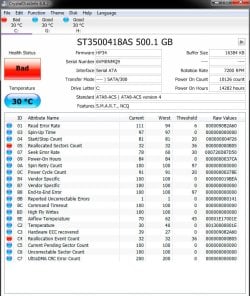
At the same time I'm getting error messages from Windows urging me to back up my hard drive and install a new hard drive because this one is about to go bad.

Do you have any suggestions as to what's going on?
 
Last edited:

My Computer

OS
Windows 7 Home Premium
The warnings make me think a SMART attribute is near or below threshold, but I would have thought the Seagate utility would not pass such a drive. Anyway, I'd suggest running CrystalDiskInfo and sharing a screenshot as in this post. CDI is just a suggestion, there are other utilities that can access SMART data. For example, I'm pretty sure Intel SSD Toolbox can access SMART data of any brand of SSD or HDD.
 

My Computer

Computer type
PC/Desktop
OS
Windows 7 Professional x64, Arch Linux
Either clone that HD to another HD today, or, make at least one if not two full images of your OS and data partition onto at least one if not two external HDs using something like Macrium Reflect [free or pay-for] or Image for Windows [I think still free, for sure pay-for] or Acronis True Image [for sure pay-for] today. And, going forward, please begin making weekly or bi-monthly full image backups.
 

My Computer

Computer type
PC/Desktop
Computer Manufacturer/Model Number
Antec desktop; Acer Aspire laptops
OS
Windows 7 Professional 64-bit
CPU
Desktop i5; Acers i5 & i7
Memory
desktop 16GB; 1 Acer 8GB & 1 Acer 16GB
Hard Drives
1TB split into 2 equal partitions [OS and data] usable by RJS
Internet Speed
AT&T DSL
Browser
FF, GChrome, msIE
Other Info
Windows 7 Firewall, Emsisoft AM/AV, MSE [scan-only], SpywareBlaster, Ruiware/BillP combine
OK, so I guess it's time to buy a new hard drive.
Just went on Amazon and I saw that there's
SATA then there's SATA II and also SATA III, there's PATA, SAS, SCSI as well.

My computer is an HP Z800 workstation from November of 2009.
I remember because I bought it a month after Win 7 was released.

Does that help telling what connection my OS hard drive is.
I have three hard drives 1tb each, was the largest at the time and I use this computer for recordings.

Thanks for your help....it's been amazing. Hope to get this behind me asap.
 

My Computer

OS
Windows 7 Home Premium
SATA II was introduced in 2004, so it's unlikely your system is SATA I. PATA (Parallel ATA) is just a retroactive name for ATA/IDE supposedly to avoid confusion with SATA (Serial ATA).

In a very simplistic sense, SCSI was the enterprise/high-end alternative to ATA. Similarly, SAS (Serial Attached SCSI) is the enterprise alternative to SATA. But unlike with PATA & SCSI, SATA devices can be connected to SAS controllers.

Now I'll put my inner storage geek away and share something that may actually be relevant to your interests: until recently, SATA controllers defaulted to Compatible mode (aka Legacy mode, IDE mode, etc) for OS support reasons. SATA native mode is called AHCI, and you want your controller in AHCI mode if at all possible. In particular, SATA features like hot-plugging, NCQ (improves HDD performance), and TRIM (extends SSD life) don't work in Compatible mode.
 

My Computer

Computer type
PC/Desktop
OS
Windows 7 Professional x64, Arch Linux
I got a screen shot.

Do you have any suggestions?

Thanks
 

Attachments

  • Untitled-1.jpg
    Untitled-1.jpg
    97.5 KB · Views: 1
Last edited:

My Computer

OS
Windows 7 Home Premium
Any advice on the screen shot?

I hope it came through.
 

My Computer

OS
Windows 7 Home Premium
Replace the disk as soon as possible.
If the indicator is yellow, you have a time to deal with; but now you dont have.
 

My Computer

Computer type
PC/Desktop
Computer Manufacturer/Model Number
Self Assembled
OS
Microsoft Windows 10 Pro Insider Preview 64-bit
CPU
Intel(R) Core(TM) i3-4130 CPU @ 3.40GHz
Motherboard
Gigabyte Technology Co., Ltd. B85M-D3H
Memory
Corsair Vengence 4GB x2 (8.00GB Dual-Channel DDR3 @ 798MHz)
Graphics Card(s)
2047MB GeForce GTS 450 (ZOTAC International)
Sound Card
Onboard (Realtek High Definition Audio)
Monitor(s) Displays
LG Flatron E2040T
Screen Resolution
1600x900
Hard Drives
Western Digital 1 TB
Seagate 500 GB
PSU
Corsair VS550
Case
Cooler Master K380
Cooling
Cooler Master Seidon 120V Plus
Keyboard
Logitech MK260r
Mouse
Logitech MK260r
Internet Speed
PMPL Broadband
Antivirus
Windows Defender + MBAM
Browser
Firefox
Other Info
Dell Studio 15" Laptop
Thanks all for your help.

I Downloaded the Macrium and did the cloning. Macrium 6, the latest, does not offer cloning, only copying files. So I got that and put everything on a 1T WD hard drive.
Computer seems to be doing just fine.
Ran all the tests and everything is fine.

I haven't tried to launch Pro Tools 8, don't have the guts to see a potential error message...lol
Will do so tomorrow. Just don't want to have to dig up a RAID driver from 2009.....lol

Thanks again fellas for saving my a** on this one.
 

My Computer

OS
Windows 7 Home Premium
Thanks all for your help.

I Downloaded the Macrium and did the cloning. Macrium 6, the latest, does not offer cloning, only copying files. So I got that and put everything on a 1T WD hard drive.
Computer seems to be doing just fine.
Ran all the tests and everything is fine.

I haven't tried to launch Pro Tools 8, don't have the guts to see a potential error message...lol
Will do so tomorrow. Just don't want to have to dig up a RAID driver from 2009.....lol

Thanks again fellas for saving my a** on this one.

Macrium Reflect 6 free does support cloning however, it's possible that disk errors on your old drive may have blocked cloning. If that is that case, you should make an image of your drive for restoration to your new drive. You will need to make a restoration CD or USB stick to restore an image (that can be done with Macrium Reflect).

If there were any System files (OS and/or programs) on the bad drive, just copying them over to another drive won't work. You have to either clone or image and restore them.
 

My Computer

Computer type
PC/Desktop
Computer Manufacturer/Model Number
Custom Build
OS
Win 7 Ultimate 64 bit
CPU
Intel i7-3930K
Motherboard
ASUS P9X79 WS
Memory
Kingston HyperX Genesis 32GB Kit (8x4GB Modules) 1600MHz DDR
Graphics Card(s)
MSI R7850 Twin Frozr 2GD5/OC Radeon HD 7850 2GB 256-bit GDDR
Sound Card
Asus Xonar Essence STX
Monitor(s) Displays
3x Asus VG248QE 24", Vizio 32" TV
Screen Resolution
1920 x 1080, ?
Hard Drives
Samsung 128GB 840 Pro SSD (1),
Samsung 4TB 850 EVO SSDs (4)
Samsung 4TB 850 EVO SSDs (16) external backup drives used in 2.5" hot swap bays in the computer.
PSU
Corsair HX750w
Case
Antec Two Hundred v2 (modified)
Cooling
Cooler Master GeminII S524 120mm (fan replaced with a 140mm)
Keyboard
Logitech G510s
Mouse
Logitech M525 (two in use)
Internet Speed
=< 32Mbps down, 8Mbps up
Antivirus
AVAST!, MBAM, SAS, Spybot S&D (all but MBAM free) Glary Util
Browser
IE11
Other Info
LSI 9211-8i HBA card (8 SATA III ports), 2.5" & 3.5" Hot Swap Bays, HooToo HT-CR001 PCI-E to USB 3.0 Internal Hub + 6 Slot Card Reader, and LG Model CH12LS28 BD-ROM Optical Drive. Also, ScanSnap S1500 ADF duplexing scanner, Canon 9000F flat bed scanner, Corsair SP2500 2.1 speakers, Samsung CLP 415nw laser color printer, Cyberpower PP2200SW UPS

My Computer

Computer type
PC/Desktop
Computer Manufacturer/Model Number
Self Assembled
OS
Microsoft Windows 10 Pro Insider Preview 64-bit
CPU
Intel(R) Core(TM) i3-4130 CPU @ 3.40GHz
Motherboard
Gigabyte Technology Co., Ltd. B85M-D3H
Memory
Corsair Vengence 4GB x2 (8.00GB Dual-Channel DDR3 @ 798MHz)
Graphics Card(s)
2047MB GeForce GTS 450 (ZOTAC International)
Sound Card
Onboard (Realtek High Definition Audio)
Monitor(s) Displays
LG Flatron E2040T
Screen Resolution
1600x900
Hard Drives
Western Digital 1 TB
Seagate 500 GB
PSU
Corsair VS550
Case
Cooler Master K380
Cooling
Cooler Master Seidon 120V Plus
Keyboard
Logitech MK260r
Mouse
Logitech MK260r
Internet Speed
PMPL Broadband
Antivirus
Windows Defender + MBAM
Browser
Firefox
Other Info
Dell Studio 15" Laptop
Back
Top