Bad RAM? Help Interpret Memtest86 (28,416 errors then 0 errors)

Just got another BSOD (presumably RAM related, waiting to hear back from the Crashes and Debugging forum). Things do seem more stable since upping my RAM voltage to 2.1, but obviously I'm still crashing here and there (twice today). What's next guys? Should I up my northbridge voltage and where should I up it to?
 

My Computer

Computer Manufacturer/Model Number
Built Desktop
OS
Windows 7 Home Premium 64bit
CPU
Intel Core2Duo E6850, LGA775, 3GHz, 4MB Cache, 1333 MHz FSB
Motherboard
GIGABYTE GA-EP43-UD3L
Memory
Corsair Dominator CM2X2048-8500C5D
Graphics Card(s)
HIS ATi Radeon HD 4850 (512MB GDDR3)
Monitor(s) Displays
Samsung SyncMaster 2253BW
Screen Resolution
1680x1050
Hard Drives
Asus DRW-2014L1T DVD-R/RW LightScribe 20X Drive
Case
Raidmax Smilodon Dirktooth
Cooling
Zalman CNPS9500A LED Intel Fan, CoolMax Case Fans
Keyboard
Logitech Wave Wireless
Mouse
Logitech Wave Wireless
Internet Speed
Edimax Wireless 802.11n 32-bit PCI Adapter (29.57/3.88 Mb/s)
Yes in this bios MCH is the NB voltage. I would go with 1.3 for MCH. I would also go into the advanced timing control and set to correct specs of 5 5 5 15 2T, the 2t setting can make a big difference for stablity here.
 

My Computer

Computer type
PC/Desktop
Computer Manufacturer/Model Number
Home built
OS
Windows 7 Ult, Windows 8.1 Pro,
CPU
Q9650-4.275GHz, E8600 4.5GHz, E6750-3.8GHz
Motherboard
Evga 780i FTW
Memory
G.Skill PC2 9600 1200Mhz 5 5 5 15 2T
Graphics Card(s)
GTX480
Sound Card
Asus Xonar D2
Monitor(s) Displays
HannsG
Screen Resolution
1680X1050
Hard Drives
GSkill Phoenix Pro 120GB SSD
PSU
ThermalTake Toughpower 1000Watt modular
Case
ThermalTake XaserV
Cooling
Xigmatek S1283
Keyboard
Logitech G15
Mouse
Logitech G9
Internet Speed
T1
Changing Northbridge to 1.3 now. In the Advanced Timing Control menu there is a lot of stuff in here that doesn't compute for me. Here is what I'm currently looking at...
tRRD = 4 [Auto]
tWTR = 4 [Auto]
tWR = 8 [Auto]
tRFC = 68 [Auto]
tRTP = 4 [Auto]
Command Rate (CMD) = 0 [Auto]

>>>>> Channel A
Channel A Timing Settings [Press Enter]
Channel A Driving Settings [Press Enter]

>>>>> Channel B
Channel B Timing Settings [Press Enter]
Channel B Driving Settings [Press Enter]

So where to from here? Do I set tRRD through tWR to 5, and then set tRFC to 15, and finally set tRTP to 2?

EDIT: Just got a BSOD on restart after upping Northbridge voltage. Windows relaunched into the boot screen to launch repair mode, which I did. Now it's locating files and giving me the Startup Repair "Your computer was unable to start" screen and it's attempting repairs. Just asked me if I wanted to restore to an earlier point in time. I declined. Is this because of the upped Northbridge voltage? Should I decrease back to 1.2 or back down to 1.1?
 

My Computer

Computer Manufacturer/Model Number
Built Desktop
OS
Windows 7 Home Premium 64bit
CPU
Intel Core2Duo E6850, LGA775, 3GHz, 4MB Cache, 1333 MHz FSB
Motherboard
GIGABYTE GA-EP43-UD3L
Memory
Corsair Dominator CM2X2048-8500C5D
Graphics Card(s)
HIS ATi Radeon HD 4850 (512MB GDDR3)
Monitor(s) Displays
Samsung SyncMaster 2253BW
Screen Resolution
1680x1050
Hard Drives
Asus DRW-2014L1T DVD-R/RW LightScribe 20X Drive
Case
Raidmax Smilodon Dirktooth
Cooling
Zalman CNPS9500A LED Intel Fan, CoolMax Case Fans
Keyboard
Logitech Wave Wireless
Mouse
Logitech Wave Wireless
Internet Speed
Edimax Wireless 802.11n 32-bit PCI Adapter (29.57/3.88 Mb/s)
The command rate change to 2T, it says = 0 Auto right now, sometimes it will Auto to 1T which hardly ever works correctly.

The cas timings looked right at auto 5 5 5 15. The rest of those numbers you can usually leave at Auto.

Try going down a notch to 1.2 for MCP.
 

My Computer

Computer type
PC/Desktop
Computer Manufacturer/Model Number
Home built
OS
Windows 7 Ult, Windows 8.1 Pro,
CPU
Q9650-4.275GHz, E8600 4.5GHz, E6750-3.8GHz
Motherboard
Evga 780i FTW
Memory
G.Skill PC2 9600 1200Mhz 5 5 5 15 2T
Graphics Card(s)
GTX480
Sound Card
Asus Xonar D2
Monitor(s) Displays
HannsG
Screen Resolution
1680X1050
Hard Drives
GSkill Phoenix Pro 120GB SSD
PSU
ThermalTake Toughpower 1000Watt modular
Case
ThermalTake XaserV
Cooling
Xigmatek S1283
Keyboard
Logitech G15
Mouse
Logitech G9
Internet Speed
T1
Okay. I changed that value to 2 (although I couldn't add a T to the end, it only accepted numerical values). I also backed the NB voltage back down to 1.1 because I couldn't get Windows to start otherwise. I'll try it back at 1.3 in a bit, or since I experienced problems at 1.3 should I try it at 1.2 instead or just leave it alone at 1.1?

And I can leave those other values alone (4, 4, 8, 68, 4) correct as I already have values set at 5, 5, 5, 15 on the main BIOS page right?
 

My Computer

Computer Manufacturer/Model Number
Built Desktop
OS
Windows 7 Home Premium 64bit
CPU
Intel Core2Duo E6850, LGA775, 3GHz, 4MB Cache, 1333 MHz FSB
Motherboard
GIGABYTE GA-EP43-UD3L
Memory
Corsair Dominator CM2X2048-8500C5D
Graphics Card(s)
HIS ATi Radeon HD 4850 (512MB GDDR3)
Monitor(s) Displays
Samsung SyncMaster 2253BW
Screen Resolution
1680x1050
Hard Drives
Asus DRW-2014L1T DVD-R/RW LightScribe 20X Drive
Case
Raidmax Smilodon Dirktooth
Cooling
Zalman CNPS9500A LED Intel Fan, CoolMax Case Fans
Keyboard
Logitech Wave Wireless
Mouse
Logitech Wave Wireless
Internet Speed
Edimax Wireless 802.11n 32-bit PCI Adapter (29.57/3.88 Mb/s)
Okay. I changed that value to 2 (although I couldn't add a T to the end, it only accepted numerical values). I also backed the NB voltage back down to 1.1 because I couldn't get Windows to start otherwise. I'll try it back at 1.3 in a bit, or since I experienced problems at 1.3 should I try it at 1.2 instead or just leave it alone at 1.1?

And I can leave those other values alone (4, 4, 8, 68, 4) correct as I already have values set at 5, 5, 5, 15 on the main BIOS page right?

Thats ok the T assumed because it's the command rate.

The reason for using a bit more MCH voltage is because this is usually required when using 8GB of memory. I'm not sure why it's being so picky about this slight increase in NB voltage. That doesn't make much sense to me.

Correct 5 5 5 15, Auto settings seem good here. It can sometimes help to set the memory frequency down to 800Mhz for now, the 750i doesn't always work so well at 1066Mhz when running 8GB of memory.
 

My Computer

Computer type
PC/Desktop
Computer Manufacturer/Model Number
Home built
OS
Windows 7 Ult, Windows 8.1 Pro,
CPU
Q9650-4.275GHz, E8600 4.5GHz, E6750-3.8GHz
Motherboard
Evga 780i FTW
Memory
G.Skill PC2 9600 1200Mhz 5 5 5 15 2T
Graphics Card(s)
GTX480
Sound Card
Asus Xonar D2
Monitor(s) Displays
HannsG
Screen Resolution
1680X1050
Hard Drives
GSkill Phoenix Pro 120GB SSD
PSU
ThermalTake Toughpower 1000Watt modular
Case
ThermalTake XaserV
Cooling
Xigmatek S1283
Keyboard
Logitech G15
Mouse
Logitech G9
Internet Speed
T1
8GB of RAM may indeed be quite a stress on the NB.

I too would set it at 800mhz for now, 2.1V ---- 5-5-5-15
 

My Computer

Computer Manufacturer/Model Number
Custom (Self Build)
OS
Windows 7 Home Premium 64bit
CPU
Intel Core i7 2700k
Motherboard
eVGA P67 SLI
Memory
8GB Mushkin Redline Ridgebacks @1866
Graphics Card(s)
EVGA GTX570 SC
Sound Card
XiFi Titanium HD
Monitor(s) Displays
LG W2453V
Screen Resolution
1920x1080
Hard Drives
Intel 320 80GB -- Intel X25-V 40GB --WD Black 1TB x2 -- WD Blue 640GB
PSU
Seasonic x750
Case
Corsair 600T SE White
Cooling
eVGA Superclocked CPU Cooler
Keyboard
Saitek Cyborg
Antivirus
Kaspersky
Browser
IE
Other Info
LG BD/DVD
Just to chime in...

If you are running the memory at 1066, you could try to loosen the timings slightly to see if it becomes more stable. Say 6-6-6-18, for instance. Running 8 GB puts a lot of strain on the memory controller, and you may have to loosen the timings to get it stable at that speed, as well as the NB voltage bump.

Keep in mind that you can also run the memory at 800 with tighter timings and achieve almost the same performance as 1066, but the important thing first of all, is to get the machine stable. So my advice would be to lower the memory speed to 800 with the timings that you have, or loosen the timings at 1066 and get it running right. You may have to accept the fact that with 8 GB, you may not be able to have the memory run at the exact specs they advertise.
 

My Computer

Computer type
PC/Desktop
Computer Manufacturer/Model Number
Mellon Labs (custom build)
OS
Win 7 Pro x64/Win 10 Pro x64 dual boot
CPU
AMD FX 8350 Vishera @ 4200
Motherboard
ASUS M5A97 R2.0
Memory
16 GB Mushkin Blackline DDR3-2400 @ 1866 (9-10-10-10-31)
Graphics Card(s)
XFX Radeon R9 280 Double D Black Edition
Sound Card
Realtek HD Audio on MB. Sounds great.
Monitor(s) Displays
Acer 24", Acer 22"
Screen Resolution
3840 x 1080
Hard Drives
1 x Mushkin Chronos 120 GB SSD (Win 10)
1 x Samsung 850 EVO 250 GB SSD (Win 7)
1 x WD 1TB SATA Blue
1 x WD 1TB SATA Green
PSU
Corsair TX-750
Case
CoolerMaster HAF 912+
Cooling
Coolermaster Seidon 240M Liquid AIO. 6 case fans
Keyboard
Logitech G710+
Mouse
Logitech G500s
Internet Speed
Much better since I got fiber, but still way overpriced.
Antivirus
MSE, Malware Bytes for scanning
Browser
Firefox
Other Info
Corsair VOID USB headphones.

A Mellon Labs X-1 - LCD Smartie driven system status display.

Brought to you by the letter E
Just to chime in...

If you are running the memory at 1066, you could try to loosen the timings slightly to see if it becomes more stable. Say 6-6-6-18, for instance. Running 8 GB puts a lot of strain on the memory controller, and you may have to loosen the timings to get it stable at that speed, as well as the NB voltage bump.

Keep in mind that you can also run the memory at 800 with tighter timings and achieve almost the same performance as 1066, but the important thing first of all, is to get the machine stable. So my advice would be to lower the memory speed to 800 with the timings that you have, or loosen the timings at 1066 and get it running right. You may have to accept the fact that with 8 GB, you may not be able to have the memory run at the exact specs they advertise.

Good point Mellon head, sometimes relaxing the timings can help when running 8GB as does increasing the memory voltage a bit or running it slower than spec.

The limit for these chip sets is 1088Mhz when running 8GB although the 750i does not like to run anywhere near this number with 8GB of memory for some reason. You could do 1088Mhz on the 780i though but only if you used the right brand of memory. Of course using just 4GB might be easier in the long run.

Usually 800-1000MHz is about all you can get with the 750i when running 8GB. Either way the slight decrease in performance won't be noticable.
 

My Computer

Computer type
PC/Desktop
Computer Manufacturer/Model Number
Home built
OS
Windows 7 Ult, Windows 8.1 Pro,
CPU
Q9650-4.275GHz, E8600 4.5GHz, E6750-3.8GHz
Motherboard
Evga 780i FTW
Memory
G.Skill PC2 9600 1200Mhz 5 5 5 15 2T
Graphics Card(s)
GTX480
Sound Card
Asus Xonar D2
Monitor(s) Displays
HannsG
Screen Resolution
1680X1050
Hard Drives
GSkill Phoenix Pro 120GB SSD
PSU
ThermalTake Toughpower 1000Watt modular
Case
ThermalTake XaserV
Cooling
Xigmatek S1283
Keyboard
Logitech G15
Mouse
Logitech G9
Internet Speed
T1
Edit:
A lot of posts since I started this one, was distracted.

Good information, manually set the timings and voltage in BIOS, relax timings and/or bring down to 800MHz.
End/Edit


Look on the lower left side of your motherboard and tell us the rev. number, should be rev. 1.0, 1.0, 1.2 or 1.3.

I have found an issue with your motherboard, they couldn't get 4 double sided RAM cards to run without errors.
Are there chips on both sides of your RAM cards?

Your manual states the it will run with 4 DS RAM cards, this doesn't mean it won't cause issues.

What are the increments on the MCH Core voltage settings?
NB voltage should be changed in very small increments and it is advisable to take your time and find the lowest voltage setting that will run stable.

Let us no the above information it will help with any adjustments.

Another Edit:

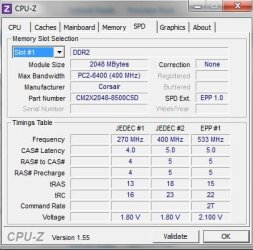
SPD JEDEC#2 specs, from CPUZ, for 400 MHz (800MHz) are 5-5-5-18 and 1.8v, this might be a good place to start, if your going to 800MHz.

Can you give us the link to the Crashes and Debugging forum so we can see what's going on there, also a good idea to give them a link here.

You mentioned that you were going to run 2 RAM cards and check if it was stable.
Was it Stable with 2 RAM cards?

Might be a good idea to get it running stable on 2 RAM cards, then work on the 4 RAM cards.
 
Last edited:

My Computer

Computer type
PC/Desktop
Computer Manufacturer/Model Number
76~2.0
OS
Windows 7 Ult x64 - SP1/ Windows 8 Pro x64
CPU
Intel Core i5-3570K 4.6GHz
Motherboard
Gigabyte GA-Z77X UD3H, f18
Memory
8GB (2X4GB) DDR3 1600 Corsair Vengeance CL8 1.5v
Graphics Card(s)
Sapphire HD 7770 Vapor-X OC 1GB DDR5
Sound Card
Onboard VIA VT2021
Monitor(s) Displays
22" LCD Dell
Screen Resolution
1680x1050
Hard Drives
Samsung 840Pro 128GB SSD,
Seagate Barracuda 500GB SATA2 7200rpm 32MB cache, Seagate Barracuda 1TB SATA2 7200rpm 32MB cache,
PSU
Corsair HX650W
Case
Cooler Master Storm Scout
Cooling
Corsair H80 2x12cm Noctua NF P12 , 2x14cm case fans
Keyboard
Logitech Wave
Mouse
CM Sentinel
Internet Speed
Dismal
Antivirus
Avast
Browser
Opera Next
Other Info
Haswell laptop: HP Envy 17t-j, i7-4700MQ, GeForce 740M 2GB DDR3, 17.3" Full HD 1920x1080, 16GB RAM, Samsung 840 Pro 128GB, 1TB Hitachi 7200 HDD,
Desktop: eSATA ports,
External eSATA Seagate 500GB SATA2 7200rpm,
External WD USB 500GB
As Dave76 just mentioned, you could lower your RAM voltage if you go down to 800. Basically, you always want to run your RAM at the lowest voltage that you can get away with. In your case, 2.1V is the maximum it should ever be. If it can be lower, then by all means do so. Just remember, stability first, then tuning.
 

My Computer

Computer type
PC/Desktop
Computer Manufacturer/Model Number
Mellon Labs (custom build)
OS
Win 7 Pro x64/Win 10 Pro x64 dual boot
CPU
AMD FX 8350 Vishera @ 4200
Motherboard
ASUS M5A97 R2.0
Memory
16 GB Mushkin Blackline DDR3-2400 @ 1866 (9-10-10-10-31)
Graphics Card(s)
XFX Radeon R9 280 Double D Black Edition
Sound Card
Realtek HD Audio on MB. Sounds great.
Monitor(s) Displays
Acer 24", Acer 22"
Screen Resolution
3840 x 1080
Hard Drives
1 x Mushkin Chronos 120 GB SSD (Win 10)
1 x Samsung 850 EVO 250 GB SSD (Win 7)
1 x WD 1TB SATA Blue
1 x WD 1TB SATA Green
PSU
Corsair TX-750
Case
CoolerMaster HAF 912+
Cooling
Coolermaster Seidon 240M Liquid AIO. 6 case fans
Keyboard
Logitech G710+
Mouse
Logitech G500s
Internet Speed
Much better since I got fiber, but still way overpriced.
Antivirus
MSE, Malware Bytes for scanning
Browser
Firefox
Other Info
Corsair VOID USB headphones.

A Mellon Labs X-1 - LCD Smartie driven system status display.

Brought to you by the letter E
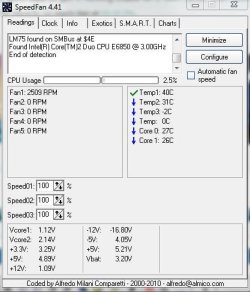
Speaking of voltage, have you checked your temperatures?

D/L Speed Fan or Real Temp and let us know what they are, post a snip if possible.

Reach in your case and see if you can hold your finger on the NB (North Bridge), be careful it might be very hot.
 

My Computer

Computer type
PC/Desktop
Computer Manufacturer/Model Number
76~2.0
OS
Windows 7 Ult x64 - SP1/ Windows 8 Pro x64
CPU
Intel Core i5-3570K 4.6GHz
Motherboard
Gigabyte GA-Z77X UD3H, f18
Memory
8GB (2X4GB) DDR3 1600 Corsair Vengeance CL8 1.5v
Graphics Card(s)
Sapphire HD 7770 Vapor-X OC 1GB DDR5
Sound Card
Onboard VIA VT2021
Monitor(s) Displays
22" LCD Dell
Screen Resolution
1680x1050
Hard Drives
Samsung 840Pro 128GB SSD,
Seagate Barracuda 500GB SATA2 7200rpm 32MB cache, Seagate Barracuda 1TB SATA2 7200rpm 32MB cache,
PSU
Corsair HX650W
Case
Cooler Master Storm Scout
Cooling
Corsair H80 2x12cm Noctua NF P12 , 2x14cm case fans
Keyboard
Logitech Wave
Mouse
CM Sentinel
Internet Speed
Dismal
Antivirus
Avast
Browser
Opera Next
Other Info
Haswell laptop: HP Envy 17t-j, i7-4700MQ, GeForce 740M 2GB DDR3, 17.3" Full HD 1920x1080, 16GB RAM, Samsung 840 Pro 128GB, 1TB Hitachi 7200 HDD,
Desktop: eSATA ports,
External eSATA Seagate 500GB SATA2 7200rpm,
External WD USB 500GB
Wow, tons of great info in here guys. I'll be busy repping you guys for the next half hour. LOL

My RAM does have chipsets on both sides. Very interesting that it hasn't been proven stable with 4 sticks of double-sided RAM. That alone makes me want to just buy a 2x4GB and try to get that stable. When the 8GB setup was working I was definitely enjoying it quite a bit. Fastest computer I've ever worked on. The 4GB setup isn't a slouch by any means, but the 8GB was really nice. Anyway, moving on to the issues at hand...

Major update this morning. I left the computer running overnight. When I checked it this morning it was crashing repeatedly before it would even get into Windows. It would try to boot the OS and just crash. I was getting errors from all different directions. I went into BIOS and set my NB voltage back to 1.1v, but still kept getting crashes. I eventually just pulled two sticks of RAM and dropped it down to a 2x2GB configuration and finally got into Windows and things seem stable. In this configuration I'm trying to remember if I've ever had any issues with crashes. I'm pretty sure it's been relatively stable in a 2x2GB configuration, just not the 4x2GB configuration.

I also touched the NB while I was in there pulling the RAM, because the RAM was pretty toasty. The NB was as well, but neither the RAM nor the NB were unbearable to touch. Above warm, definitely not, but not scalding.

I d/led SpeedFan and have attached my results.

Right now I'm stable on 4GB @ 2.1V @ 1066MHz. The question is do I try to get the system stable on 8GB @ 800MHz? Maybe try it in that configuation and drop the voltage to 1.8V, timing to 6-6-6-18, and where should I set the NB voltage?

Links to Crashes and Debugging posts. I was (and still am) having some driver issues, but those crashes are very infrequent. The memory related crashes are multiple times a day.
First one: http://www.sevenforums.com/crashes-...ographer-cant-work-go-back-xp.html#post952501
Second one: http://www.sevenforums.com/crashes-...-havent-seen-before-need-help-diagnosing.html
Third one: http://www.sevenforums.com/crashes-debugging/111296-another-bsod-cause.html

Haven't made one for the multiple crashes this morning and don't plan to.
 

Attachments

  • SpeedFan.JPG
    SpeedFan.JPG
    40.4 KB · Views: 11

My Computer

Computer Manufacturer/Model Number
Built Desktop
OS
Windows 7 Home Premium 64bit
CPU
Intel Core2Duo E6850, LGA775, 3GHz, 4MB Cache, 1333 MHz FSB
Motherboard
GIGABYTE GA-EP43-UD3L
Memory
Corsair Dominator CM2X2048-8500C5D
Graphics Card(s)
HIS ATi Radeon HD 4850 (512MB GDDR3)
Monitor(s) Displays
Samsung SyncMaster 2253BW
Screen Resolution
1680x1050
Hard Drives
Asus DRW-2014L1T DVD-R/RW LightScribe 20X Drive
Case
Raidmax Smilodon Dirktooth
Cooling
Zalman CNPS9500A LED Intel Fan, CoolMax Case Fans
Keyboard
Logitech Wave Wireless
Mouse
Logitech Wave Wireless
Internet Speed
Edimax Wireless 802.11n 32-bit PCI Adapter (29.57/3.88 Mb/s)
One thing I will add about running on 4GB that is a major issue with me. I use a Logitech wireless keyboard and mouse. On 8GB they both work flawlessly but for some reason when I drop down to 4GB they aren't nearly as responsive and when I'm typing fast or if the system of processing something and I'm moving the mouse it will skip around the screen. It's really weird to me that that's an issue between the 4GB setup and the 8GB setup but is that common? I've moved the receiver for the keyboard and mouse closer and it seems to have at least fixed it somewhat, but it performs flawlessly on 8GB. It's just really weird to me.

I was suffering some driver and anti-virus related BSODs. I've since updated all drivers and got MSE for antivirus so I'm stable there. It's scanning now and I have updates that need installing, so I'm going to restart once it's finished scanning then really try to tax the system with Lightroom or Photoshop and see how slow this 4GB configuration is compared to the 8GB configuration. I'm also going to get that mobo version number for you guys too.

My RAM says the following just to be 100% specific...

CM2X2048-8500C5D
XMS2-8500 2048MB 1066MHz 5-5-5-15 2.10V ver2.1 09090282
 

My Computer

Computer Manufacturer/Model Number
Built Desktop
OS
Windows 7 Home Premium 64bit
CPU
Intel Core2Duo E6850, LGA775, 3GHz, 4MB Cache, 1333 MHz FSB
Motherboard
GIGABYTE GA-EP43-UD3L
Memory
Corsair Dominator CM2X2048-8500C5D
Graphics Card(s)
HIS ATi Radeon HD 4850 (512MB GDDR3)
Monitor(s) Displays
Samsung SyncMaster 2253BW
Screen Resolution
1680x1050
Hard Drives
Asus DRW-2014L1T DVD-R/RW LightScribe 20X Drive
Case
Raidmax Smilodon Dirktooth
Cooling
Zalman CNPS9500A LED Intel Fan, CoolMax Case Fans
Keyboard
Logitech Wave Wireless
Mouse
Logitech Wave Wireless
Internet Speed
Edimax Wireless 802.11n 32-bit PCI Adapter (29.57/3.88 Mb/s)
I think if you want to run 8 GB reliably, you might have to drop to 800 and lower the voltage. With those timings and four sticks, though, I would set the voltage to the lowest point between 1.85 and 1.95V where it doesn't crash on you. I think 1066 using four sticks might just be too much for the NB to handle with that board.

If you can get it stable at 800, maybe then we can talk about tightening the timings and tuning a little at that point. Maybe we can give you nearly 1066 performance at 800, and that is certainly possible with a careful approach. But first, we work on getting you rock solid stable. :)

Edit: There's nothing wrong with that RAM. It looks like it's pretty good stuff. The board is good too. It just seems like it doesn't have the muscles for four sticks of RAM.
 

My Computer

Computer type
PC/Desktop
Computer Manufacturer/Model Number
Mellon Labs (custom build)
OS
Win 7 Pro x64/Win 10 Pro x64 dual boot
CPU
AMD FX 8350 Vishera @ 4200
Motherboard
ASUS M5A97 R2.0
Memory
16 GB Mushkin Blackline DDR3-2400 @ 1866 (9-10-10-10-31)
Graphics Card(s)
XFX Radeon R9 280 Double D Black Edition
Sound Card
Realtek HD Audio on MB. Sounds great.
Monitor(s) Displays
Acer 24", Acer 22"
Screen Resolution
3840 x 1080
Hard Drives
1 x Mushkin Chronos 120 GB SSD (Win 10)
1 x Samsung 850 EVO 250 GB SSD (Win 7)
1 x WD 1TB SATA Blue
1 x WD 1TB SATA Green
PSU
Corsair TX-750
Case
CoolerMaster HAF 912+
Cooling
Coolermaster Seidon 240M Liquid AIO. 6 case fans
Keyboard
Logitech G710+
Mouse
Logitech G500s
Internet Speed
Much better since I got fiber, but still way overpriced.
Antivirus
MSE, Malware Bytes for scanning
Browser
Firefox
Other Info
Corsair VOID USB headphones.

A Mellon Labs X-1 - LCD Smartie driven system status display.

Brought to you by the letter E
Okay guys, this is what I've done so far.

Checked the mobo. It's rev1.3. Is that good or bad?

Added in the other two sticks of RAM so I'm back to 8GB (4x2GB).

Went into BIOS, here is what I changed based on what I found here and another forum to hopefully stabilize the system...
Reset to Fail-Safe Defaults (which changed a few things, then I changed things on top of it)

CPU Host Clock Control = [Enable]
CPU Host Frequency(MHz) = 333
PCI Express Frequency(MHz) = 100

Performance Enhance = [Standard]
Extreme Memory Profile (X.M.P.) = [Disable]
(G)MCH Frequency Latch = 333
System Memory Multiplier = 2.40B (I had to set this to 2.40B to get it down to 800MHz as it calculates the frequency based on this setting, is that right?)
Memory Frequency(MHz) = 1066 800

CAS Latency Time = 6
tRCD = 6
tRP = 6
tRAS = 18

MCH Core Voltage (NB voltage) = 1.20V

DRAM Voltage = 1.90V

I was a bit worried it wouldn't boot with so much changed, but it did boot up. I'm back in now. I'm still experiencing the laggy keyboard/mouse when the system is being taxed, which wasn't the case with 8GB and the old settings, but then again that setup wasn't stable. I'm unsure if this setup is stable or not, but I'm going to start working on my photography stuff, which always puts the system through it's paces, and see what happens.

How do those settings look guys?

I changed the CPU Host Frequency and PCI Express Frequency, are those values okay?

I disabled the Extreme Memory Profile setting, is that okay? Seems that would bring more stability and I've noticed it off on other BIOS from people having similar problems.

I changed (G)MCH Frequency Latch to 333MHz, and System Memory Multiplier (SPD) to 2.40B to get to 800MHz. Is that correct?

Changing the timing to 6-6-6-18 okay or should I tighten it back up to 5-5-5-18?

Changed NB voltage from 1.10V to 1.20V, seems to be common when using 4 sticks of RAM. We know it's unstable at any higher voltage. Is that setting okay or should I drop back down to 1.10V?

DRAM Voltage is up from the stock 1.80V and down from the rated 2.10V to 1.90V. Is that okay, or should I go higher or lower?

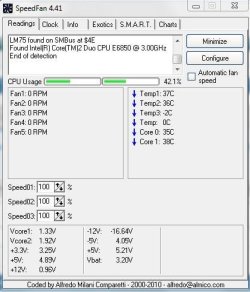
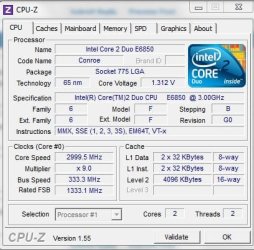
I've attached the SpeedFan results under this setup. CPU seems unusually high considering I'm just sitting here typing this post in my web browser with nothing else running. I'm also attaching some CPUZ snips in case it matters.

As long as everything is stable I don't think I'll mind the difference between 800 and 1066, my main concern is that I'm not getting this lag that I'm experiencing with my keyboard and mouse (moreso the mouse as I use it a lot in photo editing and when it gets jumpy it kills the precision I need to accomplish what I need to in the editing process).

 

Attachments

  • SpeedFan1.JPG
    SpeedFan1.JPG
    39.9 KB · Views: 6
  • SCPUZcpu.JPG
    SCPUZcpu.JPG
    45.2 KB · Views: 6
  • SCPUZmemory.JPG
    SCPUZmemory.JPG
    34.5 KB · Views: 6
  • SCPUZspd.JPG
    SCPUZspd.JPG
    38.9 KB · Views: 7

My Computer

Computer Manufacturer/Model Number
Built Desktop
OS
Windows 7 Home Premium 64bit
CPU
Intel Core2Duo E6850, LGA775, 3GHz, 4MB Cache, 1333 MHz FSB
Motherboard
GIGABYTE GA-EP43-UD3L
Memory
Corsair Dominator CM2X2048-8500C5D
Graphics Card(s)
HIS ATi Radeon HD 4850 (512MB GDDR3)
Monitor(s) Displays
Samsung SyncMaster 2253BW
Screen Resolution
1680x1050
Hard Drives
Asus DRW-2014L1T DVD-R/RW LightScribe 20X Drive
Case
Raidmax Smilodon Dirktooth
Cooling
Zalman CNPS9500A LED Intel Fan, CoolMax Case Fans
Keyboard
Logitech Wave Wireless
Mouse
Logitech Wave Wireless
Internet Speed
Edimax Wireless 802.11n 32-bit PCI Adapter (29.57/3.88 Mb/s)
I know Gregrocker is going to stab me on this.... However...

I looked at the board and noticed it is using an Intel Chipset. Just out of curiousity, did you happen to load the INF for the Intel Chipset for the board?

I ask this, cause I'm always a little leery of the Baseline drivers, not getting the most optimal performance. And I looked at gigabyte's site with regards to your board and noticed that there is a chipset driver download for it, dated 4/29/2010... And then looking at the Intel Website and noting that the chipset also drives the memory controller, so it makes me wonder if part of the problem might be driver handling related.
 

My Computer

Computer Manufacturer/Model Number
Alienware Area 51 Desktop and Dell Inspirion 17R (N7010)
OS
Windows 7 Ultimate x64 and Home Premium x64
CPU
Intel i7 960 (3.2 GHz Quad Core)
Motherboard
Alienware Intel based X58
Memory
12 Gigs (Triple Channel)
Graphics Card(s)
Alienware OEM nVidia GTX 560 Ti (1.25 Gig)
Sound Card
Creative Labs X-Fi Titanium
Monitor(s) Displays
Samsung PX2370 LED 23" Monitor
Screen Resolution
1920x1080
Hard Drives
2 320 Gig SATA in Raid 1 Configuration (System/App)
1 1 Tera SATA (Games)
1 1 Tera SATA (Data/Music/Videos)
PSU
750 Watt Power Supply
Case
Alienware Area 51 Desktop
Cooling
Liquid Cooled
Keyboard
Logitech G510
Mouse
Microsoft Trackball Explorer
Internet Speed
Cable
You're speaking greek to me Keiichi. LOL INF? I didn't load that for sure because I've never heard of it and don't know what it is. What is it and should I load it? Could you link me to that driver download that you found and let me know which specific one I should get? I could see a memory controller causing issues for sure. Obviously it's settings/configuration related to, as my system becomes more or less stable depending on those things, but if that could cause issues too I definitely want to address it.

Another issue that has arisen...

Along with the lag I'm experiencing, it seems my wireless is seriously slow now. I've got my laptop in the home office right beside my desktop, and my laptop is cruising on along the internet, while my desktop now sits and takes forever to load pages (if it even loads at all). Google Chrome was also crashing left and right (although that was a few days ago and now it seems to be okay, just takes forever to load pages). I did update my wireless driver, and have successfully loaded pages since then, but now it just sits there most of the time and says "Resolving proxy..." in the lower left and nothing happens. Any ideas?
 

My Computer

Computer Manufacturer/Model Number
Built Desktop
OS
Windows 7 Home Premium 64bit
CPU
Intel Core2Duo E6850, LGA775, 3GHz, 4MB Cache, 1333 MHz FSB
Motherboard
GIGABYTE GA-EP43-UD3L
Memory
Corsair Dominator CM2X2048-8500C5D
Graphics Card(s)
HIS ATi Radeon HD 4850 (512MB GDDR3)
Monitor(s) Displays
Samsung SyncMaster 2253BW
Screen Resolution
1680x1050
Hard Drives
Asus DRW-2014L1T DVD-R/RW LightScribe 20X Drive
Case
Raidmax Smilodon Dirktooth
Cooling
Zalman CNPS9500A LED Intel Fan, CoolMax Case Fans
Keyboard
Logitech Wave Wireless
Mouse
Logitech Wave Wireless
Internet Speed
Edimax Wireless 802.11n 32-bit PCI Adapter (29.57/3.88 Mb/s)
You're speaking greek to me Keiichi. LOL INF? I didn't load that for sure because I've never heard of it and don't know what it is. What is it and should I load it? Could you link me to that driver download that you found and let me know which specific one I should get? I could see a memory controller causing issues for sure. Obviously it's settings/configuration related to, as my system becomes more or less stable depending on those things, but if that could cause issues too I definitely want to address it.

Another issue that has arisen...

Along with the lag I'm experiencing, it seems my wireless is seriously slow now. I've got my laptop in the home office right beside my desktop, and my laptop is cruising on along the internet, while my desktop now sits and takes forever to load pages (if it even loads at all). Google Chrome was also crashing left and right (although that was a few days ago and now it seems to be okay, just takes forever to load pages). I did update my wireless driver, and have successfully loaded pages since then, but now it just sits there most of the time and says "Resolving proxy..." in the lower left and nothing happens. Any ideas?

From the gigabyte website:

GA-EP43-UD3L (rev. 1.1) - GIGABYTE

Go to Downloads, then set it to Drivers, Windows 7 (x32 or x64). Before you install the drivers, create a restore point to avoid having to rebuild your system. Try the chipset drivers, it will be listed as 'Intel INF', which should be for your board. See if that helps, if it doesn't look like it improved anything time to diagnose more. If it seems worse, REVERT BACK to save yourself grief of fighting with it for the time being.
 

My Computer

Computer Manufacturer/Model Number
Alienware Area 51 Desktop and Dell Inspirion 17R (N7010)
OS
Windows 7 Ultimate x64 and Home Premium x64
CPU
Intel i7 960 (3.2 GHz Quad Core)
Motherboard
Alienware Intel based X58
Memory
12 Gigs (Triple Channel)
Graphics Card(s)
Alienware OEM nVidia GTX 560 Ti (1.25 Gig)
Sound Card
Creative Labs X-Fi Titanium
Monitor(s) Displays
Samsung PX2370 LED 23" Monitor
Screen Resolution
1920x1080
Hard Drives
2 320 Gig SATA in Raid 1 Configuration (System/App)
1 1 Tera SATA (Games)
1 1 Tera SATA (Data/Music/Videos)
PSU
750 Watt Power Supply
Case
Alienware Area 51 Desktop
Cooling
Liquid Cooled
Keyboard
Logitech G510
Mouse
Microsoft Trackball Explorer
Internet Speed
Cable
Will do Keiichi. I got my work done today and now I'm running memtest on it. I'll create a restore point and load that driver up first thing in the morning.

Still getting crazy lag on the mouse and keyboard (and whole system really) anytime I'm putting even a little load on the system.

Internet is still going snail-slow.

The only things that have changed are drivers and BIOS settings.

I ran stable all day though without a single BSOD after this last round of revisions to the BIOS settings. I tightened the timing up to 5-5-5-18, left everything else the same as above in the last post, and I'm running memtest now. If I get any errors I'll go back to 6-6-6-18 and rerun memtest. If I get through 5-5-5-18 with no errors and it's stable, what can I do then to increase performance? Go down to 5-5-5-15? Up my RAM voltage to 2.0 or 2.1 (currently 1.9)?

I have to get rid of this lag. It's driving me nuts. Is it going to be possible for me to get rid of the lag and still have a stable system?
 

My Computer

Computer Manufacturer/Model Number
Built Desktop
OS
Windows 7 Home Premium 64bit
CPU
Intel Core2Duo E6850, LGA775, 3GHz, 4MB Cache, 1333 MHz FSB
Motherboard
GIGABYTE GA-EP43-UD3L
Memory
Corsair Dominator CM2X2048-8500C5D
Graphics Card(s)
HIS ATi Radeon HD 4850 (512MB GDDR3)
Monitor(s) Displays
Samsung SyncMaster 2253BW
Screen Resolution
1680x1050
Hard Drives
Asus DRW-2014L1T DVD-R/RW LightScribe 20X Drive
Case
Raidmax Smilodon Dirktooth
Cooling
Zalman CNPS9500A LED Intel Fan, CoolMax Case Fans
Keyboard
Logitech Wave Wireless
Mouse
Logitech Wave Wireless
Internet Speed
Edimax Wireless 802.11n 32-bit PCI Adapter (29.57/3.88 Mb/s)
Back
Top