
Bad Sectors

seekermeister

Old School
Guru
Gold Member
VIP
Local time
3:11 PM
Messages
6,618
Location
Indian Territory
I had always thought of bad sectors as being physical damage, and therefore cause for an RMA, but I found some old forum threads on the subject, one of which said this:

bad sectors are usually caused by cross-linked files which are a result of the operating system overwriting a portion of one file with another file. Potential causes of cross-linked files are turning off or restarting your computer without exiting Windows or by not regularly defragmenting your hard disk. Another reason is when the heads make contact with the hard disk platter(s).

My computer has had more than it's share of forced restarts, due to freezes where the only alternative was to use the reset switch. I knew that this could cause corrupted data, but never thought that it would also cause bad sectors.

If this is true, how would one determine if the problem is of a physical or a software based origin?
 

My Computer

Computer Manufacturer/Model Number
DIY
OS
W7x64 Pro, SuSe 12.1/** W7 x64 Pro, XP MCE
CPU
Phenom II 1090T w/Noctua NH-D14 /**4400+ X2 w/CM Hyper TX 3
Motherboard
ASRock 890FX Deluxe 4/**A8N-SLI
Memory
2 x 2GB Patriot PGS34g1600LLKA/**4x1GB Corsair VS
Graphics Card(s)
EVGA GTX460 SC/**EVGA 8800GTS
Sound Card
Asus Xonar D2X/**Xonar D1
Monitor(s) Displays
Acer X233H, Dell E152FPc /**LG M237-WD
Screen Resolution
1920x1080 & 1024x768/**1980x1080
Hard Drives
WDC 2TB, 1.5TB, 1TB, 500GB,Seagate 500GB , Maxtor 80GB /**500GB Seagate & WDC 1TB Black
PSU
CM RS600 w/ APC BX1000G/**Antec 500 TP w/ APC BX1000
Case
HAF922/**Antec 1040IIB
Cooling
3x200mm, 1x140 and 1x120mm/**5x80mm fans
Keyboard
Logitech Media USB/**Saitek Eclipse
Mouse
Cordless Trackman Wheel/**Ditto
Internet Speed
3.3Mbps
Other Info
SB 560 5.1 w/ Sennheiser RS140/**Creative T20 speakers, Dvico FusionHDTV7 Gold RT, Cisco E3000, HP 5510V AIO, Linksys E3000, Belkin F5U237 hub and **F5D8055 adapter
(** = 2nd rig)
Run a 'Defrag & Optimize' programe with the 'Auslogics Disk Defrag' free defrag software. (this run is a humble defrag run, it is just more complicated) After that your bad sectors should have gone (or moved) if they were software based errors.
 

My Computer

Computer type
PC/Desktop
Computer Manufacturer/Model Number
Custom Built PC
OS
Windows 7 Ultimate 64 bit SP1
CPU
Intel(R) Core(TM) i5-2500K
Motherboard
Gigabyte Technology Co., Ltd. Z68X-UD3-B3
Memory
12GB Kingston Hyperx 1600MHz
Graphics Card(s)
Asus GTS 450
PSU
500W Coolink
Other Info
Genius G-Pen F610 (PenPad)
Where did you find that quote?

I don't believe it's true. A bad sector has always been defined as a physical defect in the surface of the drive platters. The only fix I've ever seen that worked was to mark it bad so it's never used again. That's what Spinrite did.
 

My Computer

Computer type
PC/Desktop
Computer Manufacturer/Model Number
Lenovo IdeaCenter 450
OS
Windows 10 Pro X64
CPU
Intel Quad Core i7-4770 @ 3.4Ghz
Memory
16.0GB PC3-12800 DDR3 SDRAM 1600 MHz
Graphics Card(s)
Intel Integrated HD Graphics
Sound Card
Realtek HD Audio
Monitor(s) Displays
HP 22" LCD
Screen Resolution
1680 x 1050
Hard Drives
250GB Samsung EVO SATA-3 SSD
2TB Seagate ST2000DM001 SATA-2
1.5TB Seagate ST3150041AS SATA
Keyboard
Dell USB
Mouse
Lenovo USB
Internet Speed
Cable via Road Runner 3MB Upload, 30MB Download
Antivirus
Windows Defender, MBAM Pro, MBAE
Browser
Seamonkey
Other Info
UEFI/GPT
PLDS DVD-RW DH16AERSH
Most of what I found Googling were forum threads, therefore not necessarily definitive:

bad sector causes - Google Search

This statement from Wikipedia:

A bad sector is a sector on a computer's disk drive or flash memory that cannot be used due to permanent damage (or an OS inability to successfully access it),

seems to allude to it, although it is not clearly defined.

Bad sector - Wikipedia, the free encyclopedia

The first paragraph of this article seems to confirm it:

http://www.datarecovery.com.sg/data_recovery/bad_sector_on_hard_disk.htm
 

My Computer

Computer Manufacturer/Model Number
DIY
OS
W7x64 Pro, SuSe 12.1/** W7 x64 Pro, XP MCE
CPU
Phenom II 1090T w/Noctua NH-D14 /**4400+ X2 w/CM Hyper TX 3
Motherboard
ASRock 890FX Deluxe 4/**A8N-SLI
Memory
2 x 2GB Patriot PGS34g1600LLKA/**4x1GB Corsair VS
Graphics Card(s)
EVGA GTX460 SC/**EVGA 8800GTS
Sound Card
Asus Xonar D2X/**Xonar D1
Monitor(s) Displays
Acer X233H, Dell E152FPc /**LG M237-WD
Screen Resolution
1920x1080 & 1024x768/**1980x1080
Hard Drives
WDC 2TB, 1.5TB, 1TB, 500GB,Seagate 500GB , Maxtor 80GB /**500GB Seagate & WDC 1TB Black
PSU
CM RS600 w/ APC BX1000G/**Antec 500 TP w/ APC BX1000
Case
HAF922/**Antec 1040IIB
Cooling
3x200mm, 1x140 and 1x120mm/**5x80mm fans
Keyboard
Logitech Media USB/**Saitek Eclipse
Mouse
Cordless Trackman Wheel/**Ditto
Internet Speed
3.3Mbps
Other Info
SB 560 5.1 w/ Sennheiser RS140/**Creative T20 speakers, Dvico FusionHDTV7 Gold RT, Cisco E3000, HP 5510V AIO, Linksys E3000, Belkin F5U237 hub and **F5D8055 adapter
(** = 2nd rig)
A bad sector is a sector on the drive that couldn't be read when it was called into service. The drive will attempt to read it again (or the defragmenter). If it is unreadable once again, it will be marked bad 4ever.

The drive the has two available options, depending on its overall condition and age - replace the bad sector with the backup sectors every drive always has - and if it can do that, the bad sector doesn't appear in the count (but you can see this kind of event in SMART under a different category).

If it has run out of backup sectors, you get a bad sector you get to know about.
 

My Computer

Computer Manufacturer/Model Number
Asus N73SV
OS
Windows 7 x64 Ultimate SP1
CPU
Core i7-2630QM
Motherboard
Intel HM 65
Memory
6 GB DDR3
Graphics Card(s)
Nvidia GT 540M / Intel HD 3000 - Optimus switching
Sound Card
HD Audio (Intel Azalia/Realtek) ALC269
Monitor(s) Displays
LED flat panel
Screen Resolution
1920 x 1080
Hard Drives
2x Seagate Momentus 640 GB - 1,28 TB in total
Internet Speed
4 MB/256 kbps
Other Info
External HDs

WD Elements 1,5 TB
WD MyBook 500 GB
As far as the "spare sectors" that are provided for this purpose...where are they? Are they interspersed everywhere, among the regular sectors, or in a block set apart from the others? If the latter, that would be the cause of possible fragmentation. Once that a sector is marked bad, is it totally ignored in the future by diagnostics, or will it always be shown as a bad sector? If the latter, then there is no direct means to know if it has actually been remapped or not. I suppose that the only way to do so, would be to totally reformat the drive, and see if the bad sector continues to appear.
 

My Computer

Computer Manufacturer/Model Number
DIY
OS
W7x64 Pro, SuSe 12.1/** W7 x64 Pro, XP MCE
CPU
Phenom II 1090T w/Noctua NH-D14 /**4400+ X2 w/CM Hyper TX 3
Motherboard
ASRock 890FX Deluxe 4/**A8N-SLI
Memory
2 x 2GB Patriot PGS34g1600LLKA/**4x1GB Corsair VS
Graphics Card(s)
EVGA GTX460 SC/**EVGA 8800GTS
Sound Card
Asus Xonar D2X/**Xonar D1
Monitor(s) Displays
Acer X233H, Dell E152FPc /**LG M237-WD
Screen Resolution
1920x1080 & 1024x768/**1980x1080
Hard Drives
WDC 2TB, 1.5TB, 1TB, 500GB,Seagate 500GB , Maxtor 80GB /**500GB Seagate & WDC 1TB Black
PSU
CM RS600 w/ APC BX1000G/**Antec 500 TP w/ APC BX1000
Case
HAF922/**Antec 1040IIB
Cooling
3x200mm, 1x140 and 1x120mm/**5x80mm fans
Keyboard
Logitech Media USB/**Saitek Eclipse
Mouse
Cordless Trackman Wheel/**Ditto
Internet Speed
3.3Mbps
Other Info
SB 560 5.1 w/ Sennheiser RS140/**Creative T20 speakers, Dvico FusionHDTV7 Gold RT, Cisco E3000, HP 5510V AIO, Linksys E3000, Belkin F5U237 hub and **F5D8055 adapter
(** = 2nd rig)
As far as the "spare sectors" that are provided for this purpose...where are they? Are they interspersed everywhere, among the regular sectors, or in a block set apart from the others? If the latter, that would be the cause of possible fragmentation. Once that a sector is marked bad, is it totally ignored in the future by diagnostics, or will it always be shown as a bad sector? If the latter, then there is no direct means to know if it has actually been remapped or not. I suppose that the only way to do so, would be to totally reformat the drive, and see if the bad sector continues to appear.
AFAIK, most disks keep a few spare sectors on each cylinder and at least one spare cylinder. To the extent possible, a bad sector will be mapped to another sector on the same cylinder, or one located close by.

Theres another concept called Sector slipping in which all sectors between the bad sector and the replacement sector move down by one.
 

My Computer

Computer Manufacturer/Model Number
Too many to describe...
OS
Windows 7 x64 pro/ Windows 7 x86 Pro/ XP SP3 x86
I think the drive firmware has control over bad sectors so you can't do anything about it if it's really bad, although I'm not sure. Sectors that were unreadable for some temporary reasons will probably be succesfully read on second pass anyway.
 

My Computer

Computer Manufacturer/Model Number
Asus N73SV
OS
Windows 7 x64 Ultimate SP1
CPU
Core i7-2630QM
Motherboard
Intel HM 65
Memory
6 GB DDR3
Graphics Card(s)
Nvidia GT 540M / Intel HD 3000 - Optimus switching
Sound Card
HD Audio (Intel Azalia/Realtek) ALC269
Monitor(s) Displays
LED flat panel
Screen Resolution
1920 x 1080
Hard Drives
2x Seagate Momentus 640 GB - 1,28 TB in total
Internet Speed
4 MB/256 kbps
Other Info
External HDs

WD Elements 1,5 TB
WD MyBook 500 GB
The reason for my interest is to be able to determine if a bad sector is actually cause for an RMA or not. I got the impression that some file system problems might not be corrected properly by chkdsk, SFC, etc. and would remain until doing a low level format of the drive. Even though that would be a step that I would take prior to an RMA, it is not one that I would want to do, unless convinced that an RMA was necessary. Therefore, it would be good to be able to 100% determine the situation beforehand.

Teerex,

Are you saying that if a sector remains marked bad, after a second run of a diagnostic, that it definitely is a permanent flaw of the drive?
 

My Computer

Computer Manufacturer/Model Number
DIY
OS
W7x64 Pro, SuSe 12.1/** W7 x64 Pro, XP MCE
CPU
Phenom II 1090T w/Noctua NH-D14 /**4400+ X2 w/CM Hyper TX 3
Motherboard
ASRock 890FX Deluxe 4/**A8N-SLI
Memory
2 x 2GB Patriot PGS34g1600LLKA/**4x1GB Corsair VS
Graphics Card(s)
EVGA GTX460 SC/**EVGA 8800GTS
Sound Card
Asus Xonar D2X/**Xonar D1
Monitor(s) Displays
Acer X233H, Dell E152FPc /**LG M237-WD
Screen Resolution
1920x1080 & 1024x768/**1980x1080
Hard Drives
WDC 2TB, 1.5TB, 1TB, 500GB,Seagate 500GB , Maxtor 80GB /**500GB Seagate & WDC 1TB Black
PSU
CM RS600 w/ APC BX1000G/**Antec 500 TP w/ APC BX1000
Case
HAF922/**Antec 1040IIB
Cooling
3x200mm, 1x140 and 1x120mm/**5x80mm fans
Keyboard
Logitech Media USB/**Saitek Eclipse
Mouse
Cordless Trackman Wheel/**Ditto
Internet Speed
3.3Mbps
Other Info
SB 560 5.1 w/ Sennheiser RS140/**Creative T20 speakers, Dvico FusionHDTV7 Gold RT, Cisco E3000, HP 5510V AIO, Linksys E3000, Belkin F5U237 hub and **F5D8055 adapter
(** = 2nd rig)
The best route to RMA would be running the concerned diag tool and failing the short and long and other tests. Save a copy of the test results.

Until then, unless the disk is sluggish or there're random read/write errors, it should be fine. As usual, keep your data backed.
 

My Computer

Computer Manufacturer/Model Number
Too many to describe...
OS
Windows 7 x64 pro/ Windows 7 x86 Pro/ XP SP3 x86
For RMA reasons, if the drive is under guarantee, just use a tool that reads SMART. If the value of Off-line uncorrectable sector count is above zero, RMA the drive and use that SMART value as proof that you are entitled for a new drive, even if you haven't lost any data.

Other names for that value are Uncorrectable Sector Count or Offline Uncorrectable or Off-Line Scan Uncorrectable Sector Count.
 

My Computer

Computer Manufacturer/Model Number
Asus N73SV
OS
Windows 7 x64 Ultimate SP1
CPU
Core i7-2630QM
Motherboard
Intel HM 65
Memory
6 GB DDR3
Graphics Card(s)
Nvidia GT 540M / Intel HD 3000 - Optimus switching
Sound Card
HD Audio (Intel Azalia/Realtek) ALC269
Monitor(s) Displays
LED flat panel
Screen Resolution
1920 x 1080
Hard Drives
2x Seagate Momentus 640 GB - 1,28 TB in total
Internet Speed
4 MB/256 kbps
Other Info
External HDs

WD Elements 1,5 TB
WD MyBook 500 GB
That sounds like an idea, but I'm somewhat confused about which value to look at. As can be seen in my screenshot of HD Tune, there are several numbers to check, and all of them are above zero, except the threshold, which I assume is a fixed value. Since all 6 of my hard drives have similar numbers, it's seems unlikely that all are defective in exactly the same fashion.
 

Attachments

  • HD Tune.png
    HD Tune.png
    26.4 KB · Views: 219

My Computer

Computer Manufacturer/Model Number
DIY
OS
W7x64 Pro, SuSe 12.1/** W7 x64 Pro, XP MCE
CPU
Phenom II 1090T w/Noctua NH-D14 /**4400+ X2 w/CM Hyper TX 3
Motherboard
ASRock 890FX Deluxe 4/**A8N-SLI
Memory
2 x 2GB Patriot PGS34g1600LLKA/**4x1GB Corsair VS
Graphics Card(s)
EVGA GTX460 SC/**EVGA 8800GTS
Sound Card
Asus Xonar D2X/**Xonar D1
Monitor(s) Displays
Acer X233H, Dell E152FPc /**LG M237-WD
Screen Resolution
1920x1080 & 1024x768/**1980x1080
Hard Drives
WDC 2TB, 1.5TB, 1TB, 500GB,Seagate 500GB , Maxtor 80GB /**500GB Seagate & WDC 1TB Black
PSU
CM RS600 w/ APC BX1000G/**Antec 500 TP w/ APC BX1000
Case
HAF922/**Antec 1040IIB
Cooling
3x200mm, 1x140 and 1x120mm/**5x80mm fans
Keyboard
Logitech Media USB/**Saitek Eclipse
Mouse
Cordless Trackman Wheel/**Ditto
Internet Speed
3.3Mbps
Other Info
SB 560 5.1 w/ Sennheiser RS140/**Creative T20 speakers, Dvico FusionHDTV7 Gold RT, Cisco E3000, HP 5510V AIO, Linksys E3000, Belkin F5U237 hub and **F5D8055 adapter
(** = 2nd rig)
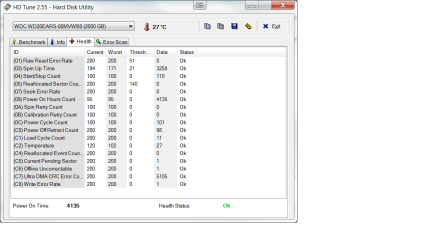
You have one finally unredeemably bad sector and one pending final evaluation. I say RMA the drive while your guarantee is valid.
 

My Computer

Computer Manufacturer/Model Number
Asus N73SV
OS
Windows 7 x64 Ultimate SP1
CPU
Core i7-2630QM
Motherboard
Intel HM 65
Memory
6 GB DDR3
Graphics Card(s)
Nvidia GT 540M / Intel HD 3000 - Optimus switching
Sound Card
HD Audio (Intel Azalia/Realtek) ALC269
Monitor(s) Displays
LED flat panel
Screen Resolution
1920 x 1080
Hard Drives
2x Seagate Momentus 640 GB - 1,28 TB in total
Internet Speed
4 MB/256 kbps
Other Info
External HDs

WD Elements 1,5 TB
WD MyBook 500 GB
HD Tune just finished a 6+ hour error scan of the same drive that I posted above, and it gave it a green light all the way...no bad blocks. If there is actually a permanently bad sector, why wouldn't it show up on the scan? I do have a couple of other drives which do show a bad block, regardless of how many times that I scan them.
 

My Computer

Computer Manufacturer/Model Number
DIY
OS
W7x64 Pro, SuSe 12.1/** W7 x64 Pro, XP MCE
CPU
Phenom II 1090T w/Noctua NH-D14 /**4400+ X2 w/CM Hyper TX 3
Motherboard
ASRock 890FX Deluxe 4/**A8N-SLI
Memory
2 x 2GB Patriot PGS34g1600LLKA/**4x1GB Corsair VS
Graphics Card(s)
EVGA GTX460 SC/**EVGA 8800GTS
Sound Card
Asus Xonar D2X/**Xonar D1
Monitor(s) Displays
Acer X233H, Dell E152FPc /**LG M237-WD
Screen Resolution
1920x1080 & 1024x768/**1980x1080
Hard Drives
WDC 2TB, 1.5TB, 1TB, 500GB,Seagate 500GB , Maxtor 80GB /**500GB Seagate & WDC 1TB Black
PSU
CM RS600 w/ APC BX1000G/**Antec 500 TP w/ APC BX1000
Case
HAF922/**Antec 1040IIB
Cooling
3x200mm, 1x140 and 1x120mm/**5x80mm fans
Keyboard
Logitech Media USB/**Saitek Eclipse
Mouse
Cordless Trackman Wheel/**Ditto
Internet Speed
3.3Mbps
Other Info
SB 560 5.1 w/ Sennheiser RS140/**Creative T20 speakers, Dvico FusionHDTV7 Gold RT, Cisco E3000, HP 5510V AIO, Linksys E3000, Belkin F5U237 hub and **F5D8055 adapter
(** = 2nd rig)
I'm telling you what I see in the SMART readings you posted. Your drive's firmware says that one sector is unreadable - permanently. Was it remapped? I don't know. Try other S.M.A.R.T reading tools, SIW for example. The choice is yours, but from what I'm seeing you have a valid case for RMA. That value should be 0, in fact, I have a 4 year old laptop that still has 0 in that category.
 

My Computer

Computer Manufacturer/Model Number
Asus N73SV
OS
Windows 7 x64 Ultimate SP1
CPU
Core i7-2630QM
Motherboard
Intel HM 65
Memory
6 GB DDR3
Graphics Card(s)
Nvidia GT 540M / Intel HD 3000 - Optimus switching
Sound Card
HD Audio (Intel Azalia/Realtek) ALC269
Monitor(s) Displays
LED flat panel
Screen Resolution
1920 x 1080
Hard Drives
2x Seagate Momentus 640 GB - 1,28 TB in total
Internet Speed
4 MB/256 kbps
Other Info
External HDs

WD Elements 1,5 TB
WD MyBook 500 GB
I'm familiar with most of what is in the two articles that you linked, but one comment caught my eye on the first one:

NOTE: Please run the test on all hard drives attached to your system. This is necessary as a fault in any of the drives can cause problems with the entire system.

Since I do have a couple of drives that I know have some bad sectors, I'm wondering if they could be responsible for some system instability that I have been having, even though neither of them are system drives? In fact, one of them is an external drive, they other one I will have to check, because I can't remember if it is in the PC or HTPC.

Since having installed the new motherboard, CPU & RAM, I haven't been able to boot with either of the two external drives powered up on the PC, it either simply hangs or hangs and starts loudly squawking an alert. I was thinking about replacing the controller card, because the Event Manager contains a series of errors regarding controller errors on drives 5 & 6, which are the two that are external.
 

My Computer

Computer Manufacturer/Model Number
DIY
OS
W7x64 Pro, SuSe 12.1/** W7 x64 Pro, XP MCE
CPU
Phenom II 1090T w/Noctua NH-D14 /**4400+ X2 w/CM Hyper TX 3
Motherboard
ASRock 890FX Deluxe 4/**A8N-SLI
Memory
2 x 2GB Patriot PGS34g1600LLKA/**4x1GB Corsair VS
Graphics Card(s)
EVGA GTX460 SC/**EVGA 8800GTS
Sound Card
Asus Xonar D2X/**Xonar D1
Monitor(s) Displays
Acer X233H, Dell E152FPc /**LG M237-WD
Screen Resolution
1920x1080 & 1024x768/**1980x1080
Hard Drives
WDC 2TB, 1.5TB, 1TB, 500GB,Seagate 500GB , Maxtor 80GB /**500GB Seagate & WDC 1TB Black
PSU
CM RS600 w/ APC BX1000G/**Antec 500 TP w/ APC BX1000
Case
HAF922/**Antec 1040IIB
Cooling
3x200mm, 1x140 and 1x120mm/**5x80mm fans
Keyboard
Logitech Media USB/**Saitek Eclipse
Mouse
Cordless Trackman Wheel/**Ditto
Internet Speed
3.3Mbps
Other Info
SB 560 5.1 w/ Sennheiser RS140/**Creative T20 speakers, Dvico FusionHDTV7 Gold RT, Cisco E3000, HP 5510V AIO, Linksys E3000, Belkin F5U237 hub and **F5D8055 adapter
(** = 2nd rig)
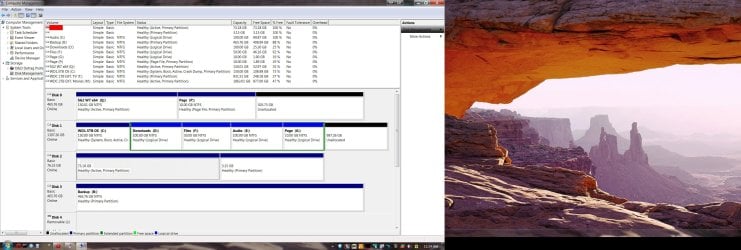
Can you post back a screenshot of your maximized Disk Management drive map with listings, with all drives attached and powered up?

I'd also run Disk Check with /f switch on the externals, if necessary from Command Line as shown in tute.
 
Here is the Disk Management screenshot. I have only begun having Windows scan the drives, so that is going to take a while.
 

Attachments

  • Disk Management.jpg
    Disk Management.jpg
    390.7 KB · Views: 101

My Computer

Computer Manufacturer/Model Number
DIY
OS
W7x64 Pro, SuSe 12.1/** W7 x64 Pro, XP MCE
CPU
Phenom II 1090T w/Noctua NH-D14 /**4400+ X2 w/CM Hyper TX 3
Motherboard
ASRock 890FX Deluxe 4/**A8N-SLI
Memory
2 x 2GB Patriot PGS34g1600LLKA/**4x1GB Corsair VS
Graphics Card(s)
EVGA GTX460 SC/**EVGA 8800GTS
Sound Card
Asus Xonar D2X/**Xonar D1
Monitor(s) Displays
Acer X233H, Dell E152FPc /**LG M237-WD
Screen Resolution
1920x1080 & 1024x768/**1980x1080
Hard Drives
WDC 2TB, 1.5TB, 1TB, 500GB,Seagate 500GB , Maxtor 80GB /**500GB Seagate & WDC 1TB Black
PSU
CM RS600 w/ APC BX1000G/**Antec 500 TP w/ APC BX1000
Case
HAF922/**Antec 1040IIB
Cooling
3x200mm, 1x140 and 1x120mm/**5x80mm fans
Keyboard
Logitech Media USB/**Saitek Eclipse
Mouse
Cordless Trackman Wheel/**Ditto
Internet Speed
3.3Mbps
Other Info
SB 560 5.1 w/ Sennheiser RS140/**Creative T20 speakers, Dvico FusionHDTV7 Gold RT, Cisco E3000, HP 5510V AIO, Linksys E3000, Belkin F5U237 hub and **F5D8055 adapter
(** = 2nd rig)
What is on Disk0? Ubuntu? It has no System flag so I assume if it's a bootable OS it is booting via C. If there's no OS on Disk0 I would move the Win7 HD there, making sure it remains set to boot first in BIOS setup.

The WDC 2tb external lettered M is not showing on map, but should not be Active. Where this can be a problem is if it has previously been bootsected and is interfering with boot. I would mark it Inactive using Diskpart from Elevated Command Prompt: Partition - Mark as Active (Method Two)

The Disk Check and definitive HD testing is more important at this point.
 
Back
Top