Basic Audio and Video Editing

Chips

New member
Member
VIP
Local time
11:29 AM
Messages
204
I've got an MP3 music track and a few videos (AVI and MP4) that I wish to simply chop the beginnings or ends off. Are there any free programs that I can use to do this basic editing?
 

My Computer My Computer

Computer type
PC/Desktop
OS
Windows 10
I've got an MP3 music track and a few videos (AVI and MP4) that I wish to simply chop the beginnings or ends off. Are there any free programs that I can use to do this basic editing?

Yep.

MP3: for nothing more than chopping, you can use mp3directcut. This has the advantage of NOT re-encoding the mp3, so you don't lose any sound quality. The disadvantage is that you can't do much else but cut. You might be able to fade--I haven't looked at it lately.

mpesch3.de - Homepage of mp3DirectCut and 1by1 - free MP3 editor and directory player

MP3: for more advanced editing, including cutting and pretty much anything else, you can use Audacity. It's a great program, but you'd have to re-encode when you are finished with the editing. That's not a big problem---I've never been able to detect the loss in sound quality when you only do a single re-encode. If you did 4 or 5 re-encodes, I'd expect you could detect the loss.

AVI: Machete Lite will do simple cuts on AVIs without re-encoding. It also will work on WMV files. But just those two file types. It is very simple to use.

There are a lot of programs that will do simple cuts on video, but many of them involve a re-encode and you are likely to notice it on video files.

Avidemux is free and I think it can operate on several file types, but it isn't simple for the uninitiated. I think it will NOT re-encode if you know how to operate it properly. I haven't played with it in years.

There may be others.

I'd like to find a simple to use video editor that does not re-encode and that works on many different file types. I haven't had any luck. Avidemux may be the simplest.

 

My Computer My Computer

Computer type
PC/Desktop
Computer Manufacturer/Model Number
Ignatz Special; 4 speed manual gearbox; factory air conditioning; one of one
OS
Windows 7 Home Premium SP1, 64-bit
CPU
Intel Skylake i5-6600K, not overclocked
Motherboard
AsRock Z170M Extreme 4, micro ATX
Memory
8 GB HyperX DDR4-2666 (2 x 4 GB)
Graphics Card(s)
none; graphics are integrated on CPU
Sound Card
onboard: Realtek ALC1150; external: USB Behringer UF0-202
Monitor(s) Displays
Dell S2340M 23 inch IPS
Screen Resolution
1600 x 900
Hard Drives
System: Crucial MX100 series SSD, 128 GB;
Data: Samsung Spinpoint 103SJ, 1 TB;
Backup: WD Caviar Green WD30EZRX-00D8PB0, 3 TB
PSU
Rosewill SilentNight 500 watt fanless, semi-modular
Case
Antec Solo II
Cooling
Noctua NH-U12S; Noctua F12 intake, Noctua S12A exhaust
Keyboard
Microsoft 200 6JH-00001 USB
Mouse
Dell or Microsoft optical wired; USB
Antivirus
Microsoft Security Essentials and Malwarebytes Premium
Browser
Pale Moon
Other Info
All fans PWM; speeds at idle: CPU circa 500 rpm; intake circa 600 rpm; exhaust circa 600 rpm; CPU temps 27 idle and 47 C load in a warm room (27 C/81 F) when running Intel Extreme Tuning Utility stress test.
I've tried the first one for MP3s and there doesn't seem to be any controls for editing, only for playing.
 

My Computer My Computer

Computer type
PC/Desktop
OS
Windows 10
I've tried the first one for MP3s and there doesn't seem to be any controls for editing, only for playing.

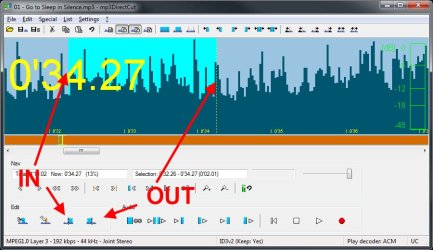
If you mean mp3 DirectCut, you have to set in and out points then go Edit - cut, copy, paste, or File - save selection etc - see snip

mp3_directcut.jpg
 

My Computer My Computer

Computer type
PC/Desktop
Computer Manufacturer/Model Number
self build
OS
W10 Pro x64, W7 Pro x64 in VMware
CPU
i7 2600K @ 4.4GHz
Motherboard
MSI Z68A-GD80
Memory
8GB Mushkin @ 1600MHz
Graphics Card(s)
Nvidia GTX 750 Ti
Monitor(s) Displays
27" Benq + 27" LG
Screen Resolution
1080p
Hard Drives
500GB 850 Evo SSD + 3 * 2TB Seagate
PSU
EVGA 650 GS modular
Case
Antec 300
Cooling
Seidon 120V v2
Internet Speed
62/18 Mbps
Antivirus
Defender (W10) + MSE (W7)
Browser
Firefox
I've tried the first one for MP3s and there doesn't seem to be any controls for editing, only for playing.

If you mean mp3 DirectCut, you have to set in and out points then go Edit - cut, copy, paste, or File - save selection etc - see snip

Thanks for the diagram. It seems my problem was that I had the wrong program installed. It looked similar, but only played tracks. All fixed now though. And yep, it worked a treat! :D
 

My Computer My Computer

Computer type
PC/Desktop
OS
Windows 10
Back
Top