
Basic Question About Drivers

scottinpa37

New member
Local time
7:24 PM
Messages
21
Location
Altoona, PA
Hi everyone. I wanted to ask if there is a big difference between updating the Windows 7 drivers through the Device Manager or through a program like DriverMax or SlimDrivers. I used SlimDrivers a few days ago and it updated a few drivers. It shows that the drivers are all up to date when I do a scan and when I check them in Device Manager, they are updated. I then ran a scan using DriverMax and it shows that I have 11 out of date drivers, such as Intel Chipsets, PCI bridge, processor PCI express root port, Realtek PCIe GBE Family controller, mouse and keyboard. Would it be worth trying to update these drivers with DriverMax or just letting them as is, since Device Manager (which checks my computer and online for updates) and SlimDrivers say they are updated? I attached a screen shot on some of the drivers in DriverMax. Thanks for any help!
 

Attachments
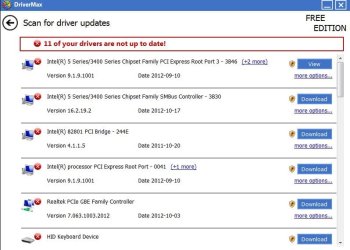
  • drivermax.JPG
    drivermax.JPG
    58.1 KB · Views: 15

My Computer

OS
Vista/7
I would never use any utility like Driver Max etc I use the Manufactures web site And also Windows update thats the best way to go
 

My Computer

Computer Manufacturer/Model Number
W530-3630QM1
OS
windows 7 home 64bit
CPU
INTEL-CORE I7
Memory
16GB
Hard Drives
750GB
Browser
Chrome
I never update drivers unless I discover a problem (like recently with my audio driver). I go by the saying: " If it ain't broke, don't fix it ".
 

My Computer

Computer Manufacturer/Model Number
HP, Dell, Gateway, Toshiba - 4 laptops and 2 desktops
OS
Vista, Windows7, Mint Mate, Zorin, Windows 8
CPU
from 1.6GHz Duo to i7
Monitor(s) Displays
2x HP w2207
Hard Drives
5x HDD, 7x SSD, 12x Externals
Keyboard
with trackball - no mices
Mouse
Trackball mice
Internet Speed
DSL 6000
You are most welcome
 

My Computer

Computer Manufacturer/Model Number
W530-3630QM1
OS
windows 7 home 64bit
CPU
INTEL-CORE I7
Memory
16GB
Hard Drives
750GB
Browser
Chrome
I have used driver management applications in the past, especially with a client system that I do not know the history of or that I have just built/updated.

I never, however use these type of application in an automatic mode. I use it merely to bring my attention to possible updates available. I always research what the driver may add to, (or remove from ). a system and what bugs it purports to fix.

If it seems prudent to update the driver I reboot the system, (to prove the system is healthy before changes), install the update and then reboot again. Any issues can now be checked and if needed the update reversed.

I would never advise the update of more than one driver at any one time, as any issues after the event could be due to any of those drivers updated or a possible conflict between them.

My method may not be for everyone, and it is more involved than a simple button click on an application but it is time proven :)
 

My Computers

System One System Two

  • Computer type
    PC/Desktop
    Computer Manufacturer/Model Number
    ChillBlast - Custom to my design
    OS
    Windows 11 Pro x64 [Latest Release and Release Preview]
    CPU
    Ryzen 9 5950X, 3.8 - 5.2 MHz
    Motherboard
    Asus Prime X570-Pro
    Memory
    64GB [2 x 32GB] DDR4 3200MHz
    Graphics Card(s)
    4GB NVIDIA GEFORCE GTX 1650 Ti
    Sound Card
    On-board SPDIF to 5.1 System + HDMI [5.1 system]
    Monitor(s) Displays
    32" UHD 32 Bit HDR Monitor + 43" UHD 4K 32Bit HDR TV
    Screen Resolution
    2 x 3840 x 2160 @60Hz
    Hard Drives
    1TB M2 SSD OS, 500GB Fast Access SSD, 2 x 8TB Data + Various Externals from 1TB to 4TB, 10TB NAS
    PSU
    NZXT C750 80 PLUS Gold 750W Modular PSU
    Case
    Workstation Case [Matt Black]
    Cooling
    NZXT Kraken X63 280mm CPU Cooler +2x Quiet Case fans
    Keyboard
    Logitech Wireless MX Keys & K400 + others
    Mouse
    Logitech Wireless MX Master 3S
    Internet Speed
    920 MB Down 50 MB Up
    Antivirus
    BitDefender Total Security Pro
    Browser
    Chrome (always run latest Non-Beta)
    Other Info
    Also run ...
    Laptop - Quad 8GB - Windows 10 Pro x64
    Nexus 7 Android tablet x2
    Samsung 10.2" tablet
    Blackview TAB 8 4G Android Tablet c/w Keyboard
    Wacom Intuos Pro Medium Pen Pad
    Wacom Intuos Pro Small Pen Pad
    Wacom Expresskeys Remote
    Loopdeck+ Graphics Controller
    Shuttle Pro v2 Control
  • Computer type
    Laptop
    System Manufacturer/Model Number
    Dell XPS 17 10750H
    OS
    Windows 11 Pro x64 Latest RP
    CPU
    Intel I7 10750H 5.0GHz
    Motherboard
    Dell XPS
    Memory
    32GB [2x16GB] DDR4 2933 MHz
    Graphics Card(s)
    nVidia GTX1650Ti 4 GB GDDR6
    Sound Card
    Stock [Realtek] 4 Speaker
    Monitor(s) Displays
    17" IPS UHD+ Infinity Edge Touchscreen
    Screen Resolution
    3840 x 2400
    Hard Drives
    2TB M2 NVMe, 4TB External + various 500GB & 1TB External NVMe (also have access to spinner HDD from
    PSU
    Stock
    Case
    Stock XPS Aluminium & Carbon Fibre
    Cooling
    Stock - Active Fan Control
    Keyboard
    Backlit + Various Logitech
    Mouse
    Stock Track Pad + Logitech MX Trackball
    Internet Speed
    72 MB Down 18MB Up
    Browser
    Chrome
    Other Info
    Also run ...
    Laptop - Quad 8GB - Windows 10 Pro x64
    Nexus 7 Android tablet x2
    10.2" tablet
    Sony Z3 Android Smartphone
    Wacom Intuos Pro Medium Pen Pad
    Wacom Intuos Pro Small Pen Pad
    Wacom Expresskeys Remote
    Loopdeck+ Graphics Controller
    Shuttle Pro v2 Control Pad
    10TB NAS
I always update drivers by downloading them from respective manufacturers' websites and that too only when the current driver is either troubling or I know I'm going to get some new 'feature' with a newer driver.

Please keep in mind that newer drivers are not always the best and can even cause serious problems and performance issues as is always with ATi drivers.
 
Thanks nilank! I had been using SlimDrivers and it seemed to working ok but when I went to update an Intel PCI Bridge, it stated that the driver I had on my system was newer. LOL SlimDrivers showed the driver was 2 years newer than the one on my system, yet Windows said the newest driver was on my system already.

Thanks everyone for all your help, I really appreciate it!
 

My Computer

OS
Vista/7
Thanks nilank! I had been using SlimDrivers and it seemed to working ok but when I went to update an Intel PCI Bridge, it stated that the driver I had on my system was newer. LOL SlimDrivers showed the driver was 2 years newer than the one on my system, yet Windows said the newest driver was on my system already.

Thanks everyone for all your help, I really appreciate it!

You're most welcome! You are advised not to use those third party tools. I have used and already suffered a lot (that was something called DriverMax as far as I can remember).
 
I never update drivers unless I discover a problem (like recently with my audio driver). I go by the saying: " If it ain't broke, don't fix it ".

What about things that aren't visible to the naked eye or worse, security holes?
 

My Computer

OS
Windows
Back
Top