Basic Requirements Before Posting your Networking Thread

2xg

What's up?
Guru
VIP
Local time
7:21 AM
Messages
2,377
Location
SoCal
This will help and give us an idea to better assist you with your networking concern. Please read and follow the requirements before you create a Thread in Network and Sharing Forum along with a detail description of your issue.

1. Is this a wired or wireless connection issue?

2. Who is your Internet Service Provider (ISP)?
US Providers - Comcast, Charter, AT&T, Verizon, etc...
UK Providers - BT, talktalk, Virgin Media, etc...

3. What type of Broadband connection are you using?
Dial-up, DSL, Cable, Satellite, Fios or T1

4. What is the exact Make and Model of your Modem, Router or Modem/Router Combo - Linksys, D-Link, Netgear, TP-LINK, etc.

5. What is the Name of the Anti-Virus, Security or Firewall Software installed from the problematic computer - McAfee, Norton, Eset, Webroot, Zone Alarm, etc.

6. How to run and post an ipconfig /all output of the computer(s) in question for review.
Click on the Windows Start button, in search programs and files type cmd, right click cmd on the top and select Run Administrator.
A message will pop ‘Do you want to allow the following program to make changes in your computer? Answer YES.

cmd.jpg


From the Command Prompt (black) screen, type ipconfig /all press enter. You will now see the results.
Note: You may also use any of these valid renditions:
ipconfig/all
ipconfig /all
ipconfig -all


Here’s your ipconfig/all output:

output.png

Note: If you would like a text file output. From the command prompt (black screen), Copy and Paste these ipconfig /all >c:\ipconfig.txt then press enter. You will find the output in your Local Disk ‘C’.
To post the output in a Forum or Notepad, right click on the Command Prompt Window and choose Select All, then press Enter, open up Notepad or go to your Post from the Forum right click on it and choose Paste.

For Wireless issue only:

Download, Install and Run Xirrus Wi-Fi Inspector from CNET site.
To run Xirrus Wi-Fi Inspector, double click the Xirrus icon on your Desktop, you may use the Windows 7 snipping tool to crop or Paint by tapping the Print screen key on your keyboard, open up Paint (Click on Start>All Programs>Accessories>Paint) then choose Edit from the Menu and select Paste, then save it and please attach the file on your next post.

We don't expect for you to be able to compile all of these prerequisites but will definitely help us expedite your networking issue.

Thank You!
2xg
 
Last edited:

My Computer

Computer Manufacturer/Model Number
Lenovo Desktop/Samsung Laptop
OS
Win7 & Win8 64bit
CPU
Intel i5
Internet Speed
Charter-20 Mbps
Antivirus
Avast
Browser
FF, IE9 and Chrome
Great Thread! Bookmarked*

I would rep but I have to spread some around :(

Thanks for this,
Josh :)
 

My Computer

Computer type
PC/Desktop
Computer Manufacturer/Model Number
Custom Built
OS
Windows 7 Professional x64 SP1 ; Windows Server 2012 R2 Standard
CPU
Intel Core i5 2400 @ 3.10GHz
Motherboard
Foxconn H67MP-S/-V/H67MP
Memory
8.0GB DDR3 @ 665MHz (2GBx4)
Graphics Card(s)
AMD Radeon HD 6870
Sound Card
Realtek High Definition Audio
Monitor(s) Displays
AOC 2243W & SMB1930NW
Screen Resolution
1440x900 & 1920x1080
Hard Drives
977GB Seagate ST31000524AS ATA Drive (SATA)
250GB WD iSCSI attached Drive
PSU
750W Gaming PSU
Case
Novatech Night
Cooling
Fan
Keyboard
Dell Standard PS/2 Keyboard
Mouse
R.A.T 07 Gaming Mouse
Internet Speed
Download: 10 Mbps Ping: 30ms Upload: 0.81 Mbps
Browser
Google Chrome
Other Info
Optiarc DVD RW AD-5260S ATA Device
Thanks Josh, no worries about the Rep. :)
Great Thread! Bookmarked*

I would rep but I have to spread some around :(

Thanks for this,
Josh :)
 

My Computer

Computer Manufacturer/Model Number
Lenovo Desktop/Samsung Laptop
OS
Win7 & Win8 64bit
CPU
Intel i5
Internet Speed
Charter-20 Mbps
Antivirus
Avast
Browser
FF, IE9 and Chrome
Great work 2xg :thumbsup:
 

My Computer

Computer Manufacturer/Model Number
W530-3630QM1
OS
windows 7 home 64bit
CPU
INTEL-CORE I7
Memory
16GB
Hard Drives
750GB
Browser
Chrome

My Computer

Computer Manufacturer/Model Number
Lenovo Desktop/Samsung Laptop
OS
Win7 & Win8 64bit
CPU
Intel i5
Internet Speed
Charter-20 Mbps
Antivirus
Avast
Browser
FF, IE9 and Chrome
I'm network stumped..........

.......... I have wired networking problem with Windows7 64 bit. Have 4 computers on my network. One replaced, but will not connect. Can use internet, see all other computers on the network. Have set up sharing on C drive and several subfolders of my main computer. Have matched workgroup, homegroup pass word and network sharing settings. When I try to connect I get a "Permissions not granted" message.

One weird thing on the main computer that holds all my data: on the C drive, then the folder that holds the data I want, I right click to get properties, and the attributes are shown as Read Only. I try everything to unselect Read Only, but it always reverts back after I apply and close. Could that be the problem and how could I fix it???

Here is the really weird part. The other 3 computers on the network are working great. Only the new computer has a problem connecting and functioning. I have tried a couple of other computers under the same circumstances and they all will not connect and I get the same "Permissions not granted message".

My situation is similar to:
http://www.sevenforums.com/network-sharing/127263-windows-cannot-access-pc-name-drive.html

Any help would be greatly appreciated.

REMguy
 

My Computer

Computer type
PC/Desktop
Computer Manufacturer/Model Number
HP
OS
windows 7 pro 64bit
Hi remguy422,

You will need to create your own Thread here and we'll be glad to assist you.
I'm network stumped..........

.......... I have wired networking problem with Windows7 64 bit. Have 4 computers on my network. One replaced, but will not connect. Can use internet, see all other computers on the network. Have set up sharing on C drive and several subfolders of my main computer. Have matched workgroup, homegroup pass word and network sharing settings. When I try to connect I get a "Permissions not granted" message.

One weird thing on the main computer that holds all my data: on the C drive, then the folder that holds the data I want, I right click to get properties, and the attributes are shown as Read Only. I try everything to unselect Read Only, but it always reverts back after I apply and close. Could that be the problem and how could I fix it???

Here is the really weird part. The other 3 computers on the network are working great. Only the new computer has a problem connecting and functioning. I have tried a couple of other computers under the same circumstances and they all will not connect and I get the same "Permissions not granted message".

My situation is similar to:
http://www.sevenforums.com/network-sharing/127263-windows-cannot-access-pc-name-drive.html

Any help would be greatly appreciated.

REMguy
 

My Computer

Computer Manufacturer/Model Number
Lenovo Desktop/Samsung Laptop
OS
Win7 & Win8 64bit
CPU
Intel i5
Internet Speed
Charter-20 Mbps
Antivirus
Avast
Browser
FF, IE9 and Chrome
I bought this awesome router and would like to recommend it. Any particular place I should post?

We do not seem to have a Network Hardware forum...
 

My Computer

Computer type
PC/Desktop
Computer Manufacturer/Model Number
Main WKS/Gaming Sloth
OS
W10 Pro
CPU
AMD Ryzen 5 2600X
Motherboard
Asus TUF B450M-PRO-GAMING
Memory
32 GB DDR4
Graphics Card(s)
AMD Radeon RX 5600 XT
Sound Card
Generic Motherboard
Monitor(s) Displays
2 x Dell 24" LED P2415Q
Screen Resolution
2 x 3840 x 2160
Hard Drives
Samsung NVME
PSU
750 W
Case
Fractal Design
Cooling
Fractal Design
Keyboard
Roccat Horde AIMO
Mouse
Logitech G703
Internet Speed
ADSL 30 MBit
Antivirus
Bitdefender
Browser
Firefox
@Coram Daes

I would post about that in the chill room below instead of networking and sharing:

Chillout Room - Windows 7 Help Forums

As its a recommendation and not a problem. Keeps the section clean.
 

My Computer

Computer type
PC/Desktop
Computer Manufacturer/Model Number
Custom Built
OS
Windows 10 Pro
CPU
AMD Ryzen 5 2400G Processor with Radeon RX Vega 11 Graphics
Motherboard
ASRock X470 Master SLI/AC AM4 AMD Promontory X470 SATA 6Gb/s
Memory
G.SKILL Ripjaws V Series 16GB (2 x 8GB) 288-Pin DDR4 SDRAM D
Graphics Card(s)
2047MB NVIDIA GeForce GTX 1060 6GB (EVGA)
Sound Card
Motherboard Built in
Monitor(s) Displays
Acer R240HY bidx 23.8-Inch IPS HDMI DVI VGA (1920 x 1080) Wi
Screen Resolution
1920 x 1080
Hard Drives
1TB Sandisk SSD PLUS (Main drive)
500 GB Seagate 7200 RPM (Games)
500 GB Western Digital 7200 RPM (Virtual Machines)
PSU
CORSAIR TX Series TX650M 650W 80+ Gold Modular Power Supply
Case
CORSAIR CARBIDE SPEC-02 Mid-Tower Gaming Case, Red LED Fan
Cooling
220mm, two 120mm, and four 60mm fans
Keyboard
Wired Dell keyboard
Mouse
Wireless Logitech mouse
Internet Speed
250mb down, 30mb up
Antivirus
Panda Cloud Antivirus
Browser
Chrome-ish x64
Other Info
Your awesome for reading this.
Good point. Thanks
 

My Computer

Computer type
PC/Desktop
Computer Manufacturer/Model Number
Main WKS/Gaming Sloth
OS
W10 Pro
CPU
AMD Ryzen 5 2600X
Motherboard
Asus TUF B450M-PRO-GAMING
Memory
32 GB DDR4
Graphics Card(s)
AMD Radeon RX 5600 XT
Sound Card
Generic Motherboard
Monitor(s) Displays
2 x Dell 24" LED P2415Q
Screen Resolution
2 x 3840 x 2160
Hard Drives
Samsung NVME
PSU
750 W
Case
Fractal Design
Cooling
Fractal Design
Keyboard
Roccat Horde AIMO
Mouse
Logitech G703
Internet Speed
ADSL 30 MBit
Antivirus
Bitdefender
Browser
Firefox
I would choose another downloading site for the wireless inspector. It's cnet installer enabled and we all know what that means.

We should edit to have them do the direct download button, or download from the manufacturer here:

Wi-Fi Inspector | Xirrus
 

My Computer

Computer type
PC/Desktop
Computer Manufacturer/Model Number
Custom Built
OS
Windows 10 Pro
CPU
AMD Ryzen 5 2400G Processor with Radeon RX Vega 11 Graphics
Motherboard
ASRock X470 Master SLI/AC AM4 AMD Promontory X470 SATA 6Gb/s
Memory
G.SKILL Ripjaws V Series 16GB (2 x 8GB) 288-Pin DDR4 SDRAM D
Graphics Card(s)
2047MB NVIDIA GeForce GTX 1060 6GB (EVGA)
Sound Card
Motherboard Built in
Monitor(s) Displays
Acer R240HY bidx 23.8-Inch IPS HDMI DVI VGA (1920 x 1080) Wi
Screen Resolution
1920 x 1080
Hard Drives
1TB Sandisk SSD PLUS (Main drive)
500 GB Seagate 7200 RPM (Games)
500 GB Western Digital 7200 RPM (Virtual Machines)
PSU
CORSAIR TX Series TX650M 650W 80+ Gold Modular Power Supply
Case
CORSAIR CARBIDE SPEC-02 Mid-Tower Gaming Case, Red LED Fan
Cooling
220mm, two 120mm, and four 60mm fans
Keyboard
Wired Dell keyboard
Mouse
Wireless Logitech mouse
Internet Speed
250mb down, 30mb up
Antivirus
Panda Cloud Antivirus
Browser
Chrome-ish x64
Other Info
Your awesome for reading this.
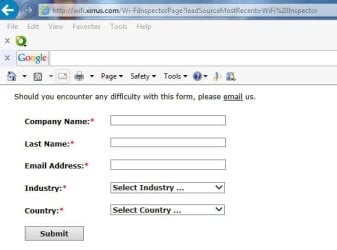
Thanks for your feedback... I used to have the download link directly from the Xirrus (Manufacturer) site but due to an update that they did, asking consumers to provider their info. including the Company Name they work for, they are hesitant to download it (see attached image). CNET download site should be okay. Again, I would have...... and my first option, but not for this reason.
I would choose another downloading site for the wireless inspector. It's cnet installer enabled and we all know what that means.

We should edit to have them do the direct download button, or download from the manufacturer here:

Wi-Fi Inspector | Xirrus
 

Attachments

  • Xirrus.JPG
    Xirrus.JPG
    39.4 KB · Views: 134

My Computer

Computer Manufacturer/Model Number
Lenovo Desktop/Samsung Laptop
OS
Win7 & Win8 64bit
CPU
Intel i5
Internet Speed
Charter-20 Mbps
Antivirus
Avast
Browser
FF, IE9 and Chrome
Ah did not see that.

Thanks for the explanation :)

I meant that above statement in a helpful way btw. Just in case it came off as bashing or something.
 

My Computer

Computer type
PC/Desktop
Computer Manufacturer/Model Number
Custom Built
OS
Windows 10 Pro
CPU
AMD Ryzen 5 2400G Processor with Radeon RX Vega 11 Graphics
Motherboard
ASRock X470 Master SLI/AC AM4 AMD Promontory X470 SATA 6Gb/s
Memory
G.SKILL Ripjaws V Series 16GB (2 x 8GB) 288-Pin DDR4 SDRAM D
Graphics Card(s)
2047MB NVIDIA GeForce GTX 1060 6GB (EVGA)
Sound Card
Motherboard Built in
Monitor(s) Displays
Acer R240HY bidx 23.8-Inch IPS HDMI DVI VGA (1920 x 1080) Wi
Screen Resolution
1920 x 1080
Hard Drives
1TB Sandisk SSD PLUS (Main drive)
500 GB Seagate 7200 RPM (Games)
500 GB Western Digital 7200 RPM (Virtual Machines)
PSU
CORSAIR TX Series TX650M 650W 80+ Gold Modular Power Supply
Case
CORSAIR CARBIDE SPEC-02 Mid-Tower Gaming Case, Red LED Fan
Cooling
220mm, two 120mm, and four 60mm fans
Keyboard
Wired Dell keyboard
Mouse
Wireless Logitech mouse
Internet Speed
250mb down, 30mb up
Antivirus
Panda Cloud Antivirus
Browser
Chrome-ish x64
Other Info
Your awesome for reading this.
An alternative to Xirrus Wi-Fi Inspector is inSSIDer for Home | MetaGeek
Edit: Looks as though metageek is monetizing inSSIDer 4
You can still get v3 for free on c/Net downloads (v3.0.7.48) and on Major Geeks (v3.1.2.1)

It doesn't have the built in tests (or at least not in the last version I used), but does provide the traffic, channel, and overlap.

If you haven't tried inSSIDer, kick the tires and take it for a spin to see if it meets your tool requirements.

Bill
.
 
Last edited:

My Computer

Computer type
Laptop
Computer Manufacturer/Model Number
HP Pavilion dv6-6c10us
OS
x64 (6.3.9600) Win8.1 Pro & soon dual boot x64 (6.1.7601) Win7_SP1 HomePrem
CPU
AMD A6-3420M APU with Radeon(tm) HD Graphics
Motherboard
Hewlett-Packard 1805
Memory
6.00 GB
Graphics Card(s)
AMD Radeon(TM) HD 6520G
Sound Card
(1) AMD High Definition Audio Device (2) IDT High Definiti
Monitor(s) Displays
HP W2072a 20" LCD (1600 x 900) @ 60 Hz
Screen Resolution
1366 x 768 x 32 bits (4294967296 colors) @ 60 Hz
Hard Drives
ST640LM0 00 HM641JI SATA Disk Device
Keyboard
Logitech k520 wireless KB
Mouse
Logitech m320 wireless mouse (bundled with KB)
Internet Speed
15/5 | 54 MB Wireless 'n'
Antivirus
Realtime: Defender or Avast | On-demand: Malwarebytes, ESET
Browser
IE 11 on Win8, IE 10 on win 7
Other Info
Media: [Gimp, Audacity, VLC] || Comm: [WEmail 2012, Skype] || Productivity: [OpenOffice,| Textpad] || Utils: [Sysinternals, cCleaner, Speccy, Defraggler]
New to the site as of today, new to windows 7, please go easy on me as i fear most of you will think I'm an idiot. I have a wired/wireless network at home meaning...I have a desk top pc with a wired connection to my modem/router, and then I have a wireless laptop, and my sons android tablet, plus both myself and my wifes android phones. My ISP in Minnesota is Frontier Communications, I have a service provided netgear wifi modem/router. The wired computer is a hp pavillion running Vista Home, my laptop is running Windows 7 Home premium x64 and i need to know how to set premissions for users on the laptop reguarding what they can and can't access on the wired pc running Vista. And I really need help doing the same thing but just locally on the laptop between user accounts that are on it.
 

My Computer

Computer type
Laptop
Computer Manufacturer/Model Number
HP G72
OS
Windows 7 Home Premium x64, Windows Vista Home Premium x??
CPU
Pentium dual core t4500 @2.3 gigs
Motherboard
?
Memory
3.0 gb
Monitor(s) Displays
17" hdwidescreen
Hard Drives
320gb
Internet Speed
high speed frontier communications, close to 6mbps down.
Hello,

We'll appreciate it if you can create a new Thread here, you'll be best assisted. Thanks. :)

New to the site as of today, new to windows 7, please go easy on me as i fear most of you will think I'm an idiot. I have a wired/wireless network at home meaning...I have a desk top pc with a wired connection to my modem/router, and then I have a wireless laptop, and my sons android tablet, plus both myself and my wifes android phones. My ISP in Minnesota is Frontier Communications, I have a service provided netgear wifi modem/router. The wired computer is a hp pavillion running Vista Home, my laptop is running Windows 7 Home premium x64 and i need to know how to set premissions for users on the laptop reguarding what they can and can't access on the wired pc running Vista. And I really need help doing the same thing but just locally on the laptop between user accounts that are on it.
 

My Computer

Computer Manufacturer/Model Number
Lenovo Desktop/Samsung Laptop
OS
Win7 & Win8 64bit
CPU
Intel i5
Internet Speed
Charter-20 Mbps
Antivirus
Avast
Browser
FF, IE9 and Chrome
Invisible devices

Am trying to connect wirelessly a Samsung Smart TV and my laptop. Both are well connected to the home network but neither sees the other on it, even at 5' distance. The laptop runs 7Pro with Norton 360 security.
Any suggestions will be highly appreciated.
 

My Computer

Computer type
Laptop
Computer Manufacturer/Model Number
Toshiba Satellite 17"
OS
Win 7 Pro x64
Hello my friend I am trying to connect via wifi a laptop in another part of the house that is made of solid brick and obviously (to me) the signal is getting blocked or at very least only getting a a very weak one.

Now I have tried extenders shifting the machine in the other room etc etc checked out the settings on the modem router and a far as I can see nothing amiss.
My IPS is the national carrier Telstra and seems to me to be operating from Hong Kong via the Philippines. I am now getting a lot of browser hits that are in German and English and I just don't know whether to buy a better modem or not that has say dual band wifi.
Current one is a TP-Link TD W8960N and my desktops are connected via Ethernet cable – ADSL2+ and even they have slowed down now - the laptop in the other room wifi.
AV is Kaspersky and this is that ip stuff
Microsoft Windows [Version 6.1.7601]
Copyright (c) 2009 Microsoft Corporation. All rights reserved.

C:\Windows\system32>ipconfig /all

Windows IP Configuration

Host Name . . . . . . . . . . . . : John-PC
Primary Dns Suffix . . . . . . . :
Node Type . . . . . . . . . . . . : Hybrid
IP Routing Enabled. . . . . . . . : No
WINS Proxy Enabled. . . . . . . . : No

Ethernet adapter Local Area Connection 2:

Connection-specific DNS Suffix . :
Description . . . . . . . . . . . : Kaspersky Security Data Escort Adapter
Physical Address. . . . . . . . . : 00-FF-32-7F-BE-8C
DHCP Enabled. . . . . . . . . . . : Yes
Autoconfiguration Enabled . . . . : Yes
Link-local IPv6 Address . . . . . : fe80::9895:9348:7235:d44d%16(Preferred)
IPv4 Address. . . . . . . . . . . : 10.101.192.166(Preferred)
Subnet Mask . . . . . . . . . . . : 255.255.255.252
Lease Obtained. . . . . . . . . . : Monday, November 21, 2016 7:53:34 AM
Lease Expires . . . . . . . . . . : Tuesday, November 21, 2017 7:53:34 AM
Default Gateway . . . . . . . . . :
DHCP Server . . . . . . . . . . . : 10.101.192.165
DHCPv6 IAID . . . . . . . . . . . : 503381810
DHCPv6 Client DUID. . . . . . . . : 00-01-00-01-1C-01-AF-90-10-BF-48-79-A7-68

DNS Servers . . . . . . . . . . . : 8.8.8.8
8.8.4.4
NetBIOS over Tcpip. . . . . . . . : Enabled

Wireless LAN adapter Wireless Network Connection:

Media State . . . . . . . . . . . : Media disconnected
Connection-specific DNS Suffix . :
Description . . . . . . . . . . . : Atheros AR9485 Wireless Network Adapter
Physical Address. . . . . . . . . : 94-DB-C9-4B-3D-E6
DHCP Enabled. . . . . . . . . . . : Yes
Autoconfiguration Enabled . . . . : Yes

Ethernet adapter Local Area Connection:

Connection-specific DNS Suffix . :
Description . . . . . . . . . . . : Intel(R) 82579V Gigabit Network Connectio
n
Physical Address. . . . . . . . . : 10-BF-48-79-A7-68
DHCP Enabled. . . . . . . . . . . : Yes
Autoconfiguration Enabled . . . . : Yes
Link-local IPv6 Address . . . . . : fe80::b8e9:e845:ded7:f5b9%11(Preferred)
IPv4 Address. . . . . . . . . . . : 192.168.1.101(Preferred)
Subnet Mask . . . . . . . . . . . : 255.255.255.0
Lease Obtained. . . . . . . . . . : Monday, November 21, 2016 6:31:30 AM
Lease Expires . . . . . . . . . . : Tuesday, November 22, 2016 6:31:30 AM
Default Gateway . . . . . . . . . : 192.168.1.1
DHCP Server . . . . . . . . . . . : 192.168.1.1
DHCPv6 IAID . . . . . . . . . . . : 235978568
DHCPv6 Client DUID. . . . . . . . : 00-01-00-01-1C-01-AF-90-10-BF-48-79-A7-68

DNS Servers . . . . . . . . . . . : 192.168.1.1
NetBIOS over Tcpip. . . . . . . . : Enabled

Tunnel adapter isatap.{C1341FE1-3386-483C-A58E-1A538B89417A}:

Media State . . . . . . . . . . . : Media disconnected
Connection-specific DNS Suffix . :
Description . . . . . . . . . . . : Microsoft ISATAP Adapter
Physical Address. . . . . . . . . : 00-00-00-00-00-00-00-E0
DHCP Enabled. . . . . . . . . . . : No
Autoconfiguration Enabled . . . . : Yes

Tunnel adapter Teredo Tunneling Pseudo-Interface:

Media State . . . . . . . . . . . : Media disconnected
Connection-specific DNS Suffix . :
Description . . . . . . . . . . . : Teredo Tunneling Pseudo-Interface
Physical Address. . . . . . . . . : 00-00-00-00-00-00-00-E0
DHCP Enabled. . . . . . . . . . . : No
Autoconfiguration Enabled . . . . : Yes

Tunnel adapter isatap.{327FBE8C-9D7B-40FB-B6A9-E001CB54439C}:

Media State . . . . . . . . . . . : Media disconnected
Connection-specific DNS Suffix . :
Description . . . . . . . . . . . : Microsoft ISATAP Adapter #2
Physical Address. . . . . . . . . : 00-00-00-00-00-00-00-E0
DHCP Enabled. . . . . . . . . . . : No
Autoconfiguration Enabled . . . . : Yes

Tunnel adapter isatap.{96FE089B-03A4-45B1-9966-A14A2C07E1EC}:

Media State . . . . . . . . . . . : Media disconnected
Connection-specific DNS Suffix . :
Description . . . . . . . . . . . : Microsoft ISATAP Adapter #3
Physical Address. . . . . . . . . : 00-00-00-00-00-00-00-E0
DHCP Enabled. . . . . . . . . . . : No
Autoconfiguration Enabled . . . . : Yes

C:\Windows\system32>
 

My Computer

Computer type
PC/Desktop
Computer Manufacturer/Model Number
Own build (new) Desk1 / Asus ROG Win 7 / Desk2 1st build
OS
Desk1 7 Home Prem / Desk2 10 Pro / Main lap Asus ROG 10 Pro 2 laptop Toshiba 7 Pro Asus P2520 7 & 10
CPU
Desk1 i5 3750K / Laptop i7 GTX 860M / Desk2 i5 2500
Motherboard
Desk1 Asus P877-V / Desk2 Gigabyte H67 UD3H / Laptop ?
Memory
Desk1 8GB (1866) / Desk2 16GB (1333) / Laptop 8Gb DDR3
Graphics Card(s)
Desk 1& 2NVidia GTX 650 & Laptops on board Intel
Sound Card
Desk 1 & 2 -XONAR DG Realtek High Def audio Laptop
Monitor(s) Displays
Desk 1 Benq HD 2450 / Desk2 Philips 24" / Laptop 17.5"
Screen Resolution
1920x1080 D1 & D2 & Laptop 1
Hard Drives
Desk1 Samsung 120GB 830 SSD
Asus ROG 256GB 850 Pro SSD
Desk2 Samsung 840 256 SSD
Toshiba 120GB EVO
PSU
Desk 1 Corsair HX 1050/ Laptop ? / Desk 2 Corsair HX 650
Case
Desk 1 Cooler HAF XM ? Toshiba laptop / Desk2 Coolermaster
Cooling
Fans on all Desk1 -2 Desk2 - all Coolermasters 5 Laptop ?
Keyboard
Desk 1 MS Sidewinder X6 Desk 2 MS Sidewinder X 4
Mouse
Desk 1&2 - Gigabyte MS 900 gamer - laptop - Logitec wireless
Internet Speed
ADSL2+
Other Info
One other Desktop (tester) and spare Toshba laptop both with SSD's
Running Kaspersky 2016 ISS on all machines config'd identically
Logitec audio stereo systems on each machine (x3)
Canon MG5250MFC
Router/modem TP-Link running WPA2SK
Unknown problem

Sample text.
 

My Computer

Computer type
PC/Desktop
Computer Manufacturer/Model Number
HP
OS
Windows 7 Professional 64 bit
CPU
i7-4770
Motherboard
HP
Memory
DDR3-12800
Graphics Card(s)
Intel built-in
Hard Drives
Hitachi 500 Gb
Antivirus
Avast
Browser
Firefox, chrome
Back
Top