Solved Batch Files not working when trying to open programs

SinRival

New member
Member
VIP
Local time
9:41 PM
Messages
111
I was trying to create a batch file to open up two programs which I mostly always start and use when I login and so I attempted to create the batch file following this: Launch Multiple Programs From A Single Shortcut Using A Batch File

While I managed to do all the actual "coding" part of it

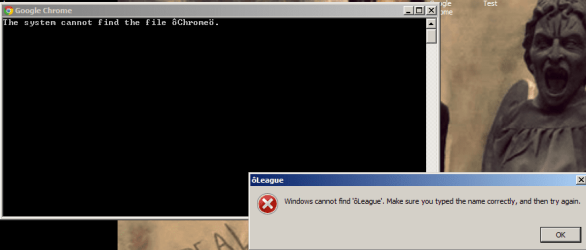
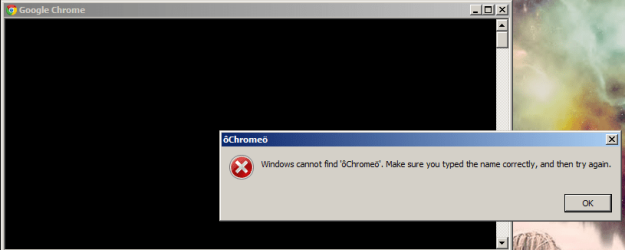
When I execute it I get a error message (screenshot in attachments of both errors)

I'm not quite sure why it has those strange letters and I'm just confused in general about why it isn't working.

The two programs are Google Chrome and League of Legends.

Once I had gotten the batch file to work I was going to schedule it to run during start-up so as to save some time in having to wait until I can open it and such.

Can anyone help?
 

Attachments
  • batch file not working 1.png
    batch file not working 1.png
    20.9 KB · Views: 2
  • batch file not working 2.png
    batch file not working 2.png
    36.2 KB · Views: 2

My Computer

Computer Manufacturer/Model Number
Toshiba Satellite C855-1GP
OS
Windows 7 Home Premium 64-bit (6.1, Build 7601)
CPU
Intel(R) Pentium(R) CPU B950 @ 2.10GHz (2 CPUs), ~2.1GHz
Motherboard
Intel Sandy Bridge ID1E59
Memory
6GB DDR3 Dual 6034 Mbytes
Graphics Card(s)
Intel HD Graphics
Sound Card
Realtek High Definition Audio
Monitor(s) Displays
LGD033A
Screen Resolution
1366 x 768 (32 bit) (60Hz)
Hard Drives
Hitachi HTS547575A9E384 600GB
Keyboard
Normal Keyboard
Mouse
Techair 3D Optical Mouse
Internet Speed
4.04mbps download speed 0.54mbps upload speed
Other Info
Awesome Laptop.
Please post the batch file for us to peruse.
 

My Computer

Computer Manufacturer/Model Number
HP Media Center
OS
Windows 7 32 bit
CPU
AMD 5200+ dual core
Memory
2 GB
Graphics Card(s)
NVidia GeForce 6150SE 128 MB
Monitor(s) Displays
CRT
Screen Resolution
1280x1024
Hard Drives
500 GB Sata internal :

SIIG USB 3.0 docking stations w/WD Caviar Black 6 Gb/s drives
Keyboard
PS/2
Mouse
PS/2 Wheel Mouse
Other Info
SIIG USB 3.0 PCIexpress card.
It might help if you'd Copy the text in the .bat file and post here. Or Attach the .bat file.
 

My Computer

Computer type
PC/Desktop
Computer Manufacturer/Model Number
Customs, Dell, Gateway, HP, Toshiba, Acer, ASUS
OS
Windows 7 Ultimate 64-bit, Windows 8.1 64-bit, Mac OS X 10.10, Linux Mint 17, Windows 10 Pro TP
Keyboard
Microsoft
Mouse
Microsoft
Oh yeah sorry. Here you go :)
 

Attachments

My Computer

Computer Manufacturer/Model Number
Toshiba Satellite C855-1GP
OS
Windows 7 Home Premium 64-bit (6.1, Build 7601)
CPU
Intel(R) Pentium(R) CPU B950 @ 2.10GHz (2 CPUs), ~2.1GHz
Motherboard
Intel Sandy Bridge ID1E59
Memory
6GB DDR3 Dual 6034 Mbytes
Graphics Card(s)
Intel HD Graphics
Sound Card
Realtek High Definition Audio
Monitor(s) Displays
LGD033A
Screen Resolution
1366 x 768 (32 bit) (60Hz)
Hard Drives
Hitachi HTS547575A9E384 600GB
Keyboard
Normal Keyboard
Mouse
Techair 3D Optical Mouse
Internet Speed
4.04mbps download speed 0.54mbps upload speed
Other Info
Awesome Laptop.

My Computer

Computer Manufacturer/Model Number
Toshiba Satellite C855-1GP
OS
Windows 7 Home Premium 64-bit (6.1, Build 7601)
CPU
Intel(R) Pentium(R) CPU B950 @ 2.10GHz (2 CPUs), ~2.1GHz
Motherboard
Intel Sandy Bridge ID1E59
Memory
6GB DDR3 Dual 6034 Mbytes
Graphics Card(s)
Intel HD Graphics
Sound Card
Realtek High Definition Audio
Monitor(s) Displays
LGD033A
Screen Resolution
1366 x 768 (32 bit) (60Hz)
Hard Drives
Hitachi HTS547575A9E384 600GB
Keyboard
Normal Keyboard
Mouse
Techair 3D Optical Mouse
Internet Speed
4.04mbps download speed 0.54mbps upload speed
Other Info
Awesome Laptop.
Code:
@echo off
 
start [COLOR=red]“[/COLOR]Chrome[COLOR=red]”[/COLOR] "C:\Program Files (x86)\Google\Chrome\Application\chrome.exe"
start [COLOR=red]“[/COLOR]League of Legends[COLOR=red]”[/COLOR] "C:\Riot Games\League of Legends\lol.launcher.exe"
SinRival, the problem with your above Text.bat is that between 'Chrome' and 'League of Legends' you've somehow managed to type ['LEFT DOUBLE QUOTATION MARK','0x201c'] and ['RIGHT DOUBLE QUOTATION MARK','0x201d'] instead of " ['QUOTATION MARK','0x22'] (normal double quotes).

Eliminating and swapping out the incorrect quotes around the two application names with normal double quotes leaves you with a perfectly working batch file.


PS: Took me for ages to figure out the problem with this one :confused:
 

My Computer

Computer type
PC/Desktop
OS
Windows 10, Windows 8.1 Pro, Windows 7 Professional, OS X El Capitan
Code:
[COLOR=#000000]PS: Took me for ages to figure out the problem with this one :confused:[/COLOR][/QUOTE]

I'm not surprised.  I looked at the bat file after reading this post and the quotes sure looked normal.  Nice pick up.  :)
 

My Computer

Computer Manufacturer/Model Number
HP Media Center
OS
Windows 7 32 bit
CPU
AMD 5200+ dual core
Memory
2 GB
Graphics Card(s)
NVidia GeForce 6150SE 128 MB
Monitor(s) Displays
CRT
Screen Resolution
1280x1024
Hard Drives
500 GB Sata internal :

SIIG USB 3.0 docking stations w/WD Caviar Black 6 Gb/s drives
Keyboard
PS/2
Mouse
PS/2 Wheel Mouse
Other Info
SIIG USB 3.0 PCIexpress card.
Back
Top