Battle for Middle Earth 2 error?

llama37

New member
Local time
11:27 PM
Messages
12
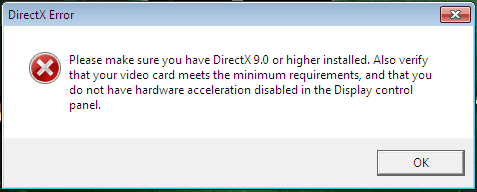
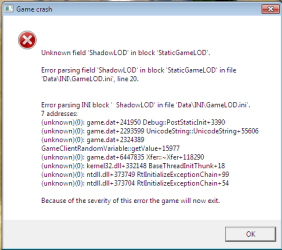
When I want to run the game, I keep getting an error. I created the folder from AppData, even the options.ini file but it keeps crashing!(Note: when I had Windows XP it was working perfectly)

On my PC I have:

Windows 7 Ultimate 32 bit
Intel(R) Celeron(R) CPU 2.66GHz 2.67GHz
1,50 RAM
nVidia GeForce FX 5200 128MB of memory

So, please help?
 

Attachments
  • Fără titlu2.png
    Fără titlu2.png
    9.2 KB · Views: 16

My Computer

OS
Windows 7 Ultimate 32bit
Have you tried re-installing it? it looks like the file 'GameLOD.ini' is messed up or corrupted, and re-installing it might help. Also try removing the file, and see if it runs like that.
 

My Computer

Computer Manufacturer/Model Number
Dell Inspiron 15R N5110
OS
Windows 7 Professional 64bit
CPU
i7-2670QM CPU @ 2.20GHz, 4 Cores, 8 Logical Processors
Motherboard
Dell 0HVRTT
Memory
8GB DDR3
Graphics Card(s)
NVIDIA GeForce GT 525M
Monitor(s) Displays
15.6" Monitor
Screen Resolution
1366 x 768
Hard Drives
500 GB
Mouse
Razer Deathadder
Have you tried re-installing it? it looks like the file 'GameLOD.ini' is messed up or corrupted, and re-installing it might help. Also try removing the file, and see if it runs like that.


I reinstalled it, made that folder again and the options.ini file.I used this

AudioLOD = High
HasSeenLogoMovies = yes
IdealStaticGameLOD = High
Resolution = 1024 768
StaticGameLOD = High
TimesInGame = 5

and after that I started the game I got that error. I have DirectX 11 and what is hardware acceleration?
 

Attachments

  • Fără titluerzz.png
    Fără titluerzz.png
    4.7 KB · Views: 12

My Computer

OS
Windows 7 Ultimate 32bit
try setting the settings the lowest. Your graphics card has 128mb ram but for high settings it requires 256mb i think.

Also what do you mean by creating the folder, is it necessary?
 

My Computer

Computer Manufacturer/Model Number
Dell Inspiron 15R N5110
OS
Windows 7 Professional 64bit
CPU
i7-2670QM CPU @ 2.20GHz, 4 Cores, 8 Logical Processors
Motherboard
Dell 0HVRTT
Memory
8GB DDR3
Graphics Card(s)
NVIDIA GeForce GT 525M
Monitor(s) Displays
15.6" Monitor
Screen Resolution
1366 x 768
Hard Drives
500 GB
Mouse
Razer Deathadder
How do I do that? I know 128 is pretty low because when I had XP the game was very slow on high graphics and after I changed the resolution to lowest and the graphics details to lowest it was working.

Yes, it's the folder with the settings for the game, saved games, maps and stuff like that. And, unfortunately since this game was designed for XP it won't create the folder when I install it.
 

My Computer

OS
Windows 7 Ultimate 32bit
Have you tried compatibility mode? (Right Click > Properties >Compatibility)

also to change the settings, in the options.ini change everything to low and set resolution to 640x 480 and see if it will start up.

If that does not work, search for another .ini file somewhere in the actual game folder itself.
 

My Computer

Computer Manufacturer/Model Number
Dell Inspiron 15R N5110
OS
Windows 7 Professional 64bit
CPU
i7-2670QM CPU @ 2.20GHz, 4 Cores, 8 Logical Processors
Motherboard
Dell 0HVRTT
Memory
8GB DDR3
Graphics Card(s)
NVIDIA GeForce GT 525M
Monitor(s) Displays
15.6" Monitor
Screen Resolution
1366 x 768
Hard Drives
500 GB
Mouse
Razer Deathadder
I tried all of that and it's still not working :/ What am I supposed to do now?
 

My Computer

OS
Windows 7 Ultimate 32bit
Do you have another computer with windows xp installed on it? If you do, you can install Battle for Middle earth 2 on it, reduce the settings to lowest, and then using a usb stick or network sharing, transfer the game from the xp computer to the windows 7 computer. If that doesn't work, then you might have to get a new graphics card.
 

My Computer

Computer Manufacturer/Model Number
Dell Inspiron 15R N5110
OS
Windows 7 Professional 64bit
CPU
i7-2670QM CPU @ 2.20GHz, 4 Cores, 8 Logical Processors
Motherboard
Dell 0HVRTT
Memory
8GB DDR3
Graphics Card(s)
NVIDIA GeForce GT 525M
Monitor(s) Displays
15.6" Monitor
Screen Resolution
1366 x 768
Hard Drives
500 GB
Mouse
Razer Deathadder
I don't have another computer, but I have a friend who has XP. Would that do?

I didn't quite understand the transfer part. Did you mean that after I install it on that computer, I put the installed game on the usb stick and put it on my computer?
 

My Computer

OS
Windows 7 Ultimate 32bit
Yup! just install it on their computer, start it up, change settings to lowest and then just copy and paste the whole game folder from their pc to your pc via a usb stick.
 

My Computer

Computer Manufacturer/Model Number
Dell Inspiron 15R N5110
OS
Windows 7 Professional 64bit
CPU
i7-2670QM CPU @ 2.20GHz, 4 Cores, 8 Logical Processors
Motherboard
Dell 0HVRTT
Memory
8GB DDR3
Graphics Card(s)
NVIDIA GeForce GT 525M
Monitor(s) Displays
15.6" Monitor
Screen Resolution
1366 x 768
Hard Drives
500 GB
Mouse
Razer Deathadder
Well, I've never heard about anything like this, but I'll give it a try.
 

My Computer

OS
Windows 7 Ultimate 32bit
This didn't work either :/ I guess it is the graphics card after all, but thanks for helping anyway! And by the way, which one would you recommend?
 

My Computer

OS
Windows 7 Ultimate 32bit
I'm not a real expert on graphic cards, but it all depends on what your budget is.

also are you looking for a pc or a laptop graphic card?
 

My Computer

Computer Manufacturer/Model Number
Dell Inspiron 15R N5110
OS
Windows 7 Professional 64bit
CPU
i7-2670QM CPU @ 2.20GHz, 4 Cores, 8 Logical Processors
Motherboard
Dell 0HVRTT
Memory
8GB DDR3
Graphics Card(s)
NVIDIA GeForce GT 525M
Monitor(s) Displays
15.6" Monitor
Screen Resolution
1366 x 768
Hard Drives
500 GB
Mouse
Razer Deathadder
Budget...Let's say max $200. PC graphic card.
 

My Computer

OS
Windows 7 Ultimate 32bit
Back
Top