BCM20702A0 driver

Start search box type >> CMD then right click run as Admin ...

Ok......I restored to Factory Image, then reinstalled Pro 7, plugged the bluetooth adapter in and went to the Insignia sight as instructed, and.......the same results. Failed to "update software".
 

My Computer

Computer type
Laptop
Computer Manufacturer/Model Number
Dell Mini
OS
Windows 7 Professional 32-bit
Have had them Beeps before in my case was a Hardware error ... Was fixed though with the proper Driver ...


OK Maxie. I restored to Factory Image. Then I upgraded to 7 Pro.
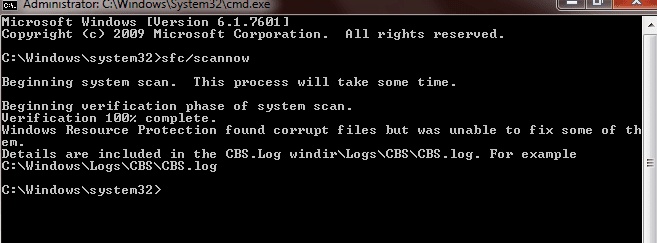
Then I ran sfc/scannow and got the same bad news as earlier...
 

Attachments

  • 1.png
    1.png
    70.8 KB · Views: 1

My Computer

Computer type
Laptop
Computer Manufacturer/Model Number
Dell Mini
OS
Windows 7 Professional 32-bit
Another question...different computer belonging to a coworker. It appears he picked up something viral....After not being connected to the internet for over a year, the computer was far from being "updated". His Compaq Running Vista now has the "herald mark" blue screen displaying **stop 0000000000 and so on. I F11 for recovery and then initiate System Repair but in the midst of "Loading Widows", the white progress bar stops and blue screen reappears. Not Good....do you concur?
 

My Computer

Computer type
Laptop
Computer Manufacturer/Model Number
Dell Mini
OS
Windows 7 Professional 32-bit
Another question...different computer belonging to a coworker. It appears he picked up something viral....After not being connected to the internet for over a year, the computer was far from being "updated". His Compaq Running Vista now has the "herald mark" blue screen displaying **stop 0000000000 and so on. I F11 for recovery and then initiate System Repair but in the midst of "Loading Widows", the white progress bar stops and blue screen reappears. Not Good....do you concur?


Could be many causes for that error first thing to check would be the Hardware ....
 

My Computer

Computer Manufacturer/Model Number
W530-3630QM1
OS
windows 7 home 64bit
CPU
INTEL-CORE I7
Memory
16GB
Hard Drives
750GB
Browser
Chrome
I guess Ill need to put my coworker's computer on the "back-burner" for now (although he has reiterated the importance repeatedly), as I am taking up too much of your time already. I can't get to anything on his computer....the screen is all distorted, lines through it, green segments flickering everywhere then blue screen appears.
 

My Computer

Computer type
Laptop
Computer Manufacturer/Model Number
Dell Mini
OS
Windows 7 Professional 32-bit
How would I check his hardware. I did install a Belking Wireless adaptor a few days ago.
 

My Computer

Computer type
Laptop
Computer Manufacturer/Model Number
Dell Mini
OS
Windows 7 Professional 32-bit
See if he can Boot in to the BIOS ...
 

My Computer

Computer Manufacturer/Model Number
W530-3630QM1
OS
windows 7 home 64bit
CPU
INTEL-CORE I7
Memory
16GB
Hard Drives
750GB
Browser
Chrome
OK...back to my computer. I want to make sure I understand this. I have downloaded the Windows Stand Alone Package and double-clicked to install. Now what?
 

My Computer

Computer type
Laptop
Computer Manufacturer/Model Number
Dell Mini
OS
Windows 7 Professional 32-bit
Let it run when done Upload the Log ..
 

My Computer

Computer Manufacturer/Model Number
W530-3630QM1
OS
windows 7 home 64bit
CPU
INTEL-CORE I7
Memory
16GB
Hard Drives
750GB
Browser
Chrome
I hate to be sooooo uneducated....so now that I have installed the update, do I now run the sfc? Windows is "Up to date" (Green Check mark).
 

My Computer

Computer type
Laptop
Computer Manufacturer/Model Number
Dell Mini
OS
Windows 7 Professional 32-bit
The Broadcom install wizard still comes up with "Failed to update software".
 

My Computer

Computer type
Laptop
Computer Manufacturer/Model Number
Dell Mini
OS
Windows 7 Professional 32-bit
No you are fine yes run the Scan ...
 

My Computer

Computer Manufacturer/Model Number
W530-3630QM1
OS
windows 7 home 64bit
CPU
INTEL-CORE I7
Memory
16GB
Hard Drives
750GB
Browser
Chrome
Another question...different computer belonging to a coworker. It appears he picked up something viral....After not being connected to the internet for over a year, the computer was far from being "updated". His Compaq Running Vista now has the "herald mark" blue screen displaying **stop 0000000000 and so on. I F11 for recovery and then initiate System Repair but in the midst of "Loading Widows", the white progress bar stops and blue screen reappears. Not Good....do you concur?
Run through this tutorial on the Vista box - some might not apply, being Vista not Win7, but most will apply.

Read through the tutorial and download all utility programs to a flash drive. Boot to safe mode if possible or use the Vista install disc to boot and use repair options from it. If you can't lay your hands on the Vista install disc, see this: Vista ISO - Download and Create Installation DVD or USB
If it comes down to it, you can also use that install media to reinstall Vista. You'll use the COA key on the side of the machine to activate it during or after the install. There might also might be a Repair install option for Vista, I don't remember - basically you tell Windows that you're Upgrading Windows, and it re-installs Windows without affecting your data.

From your description, it sounds like a graphics card issue, but there's not enough hard information to say for sure.

I suggest that you open a separate thread if you're going to trouble shoot that machine. It gets confusing if you try to work though issues on two machines at one time in one thread.

Bill
.

 

My Computer

Computer type
Laptop
Computer Manufacturer/Model Number
HP Pavilion dv6-6c10us
OS
x64 (6.3.9600) Win8.1 Pro & soon dual boot x64 (6.1.7601) Win7_SP1 HomePrem
CPU
AMD A6-3420M APU with Radeon(tm) HD Graphics
Motherboard
Hewlett-Packard 1805
Memory
6.00 GB
Graphics Card(s)
AMD Radeon(TM) HD 6520G
Sound Card
(1) AMD High Definition Audio Device (2) IDT High Definiti
Monitor(s) Displays
HP W2072a 20" LCD (1600 x 900) @ 60 Hz
Screen Resolution
1366 x 768 x 32 bits (4294967296 colors) @ 60 Hz
Hard Drives
ST640LM0 00 HM641JI SATA Disk Device
Keyboard
Logitech k520 wireless KB
Mouse
Logitech m320 wireless mouse (bundled with KB)
Internet Speed
15/5 | 54 MB Wireless 'n'
Antivirus
Realtime: Defender or Avast | On-demand: Malwarebytes, ESET
Browser
IE 11 on Win8, IE 10 on win 7
Other Info
Media: [Gimp, Audacity, VLC] || Comm: [WEmail 2012, Skype] || Productivity: [OpenOffice,| Textpad] || Utils: [Sysinternals, cCleaner, Speccy, Defraggler]
Another question...different computer belonging to a coworker. It appears he picked up something viral....After not being connected to the internet for over a year, the computer was far from being "updated". His Compaq Running Vista now has the "herald mark" blue screen displaying **stop 0000000000 and so on. I F11 for recovery and then initiate System Repair but in the midst of "Loading Widows", the white progress bar stops and blue screen reappears. Not Good....do you concur?
Run through this tutorial on the Vista box - some might not apply, being Vista not Win7, but most will apply.

Read through the tutorial and download all utility programs to a flash drive. Boot to safe mode if possible or use the Vista install disc to boot and use repair options from it. If you can't lay your hands on the Vista install disc, see this: Vista ISO - Download and Create Installation DVD or USB
If it comes down to it, you can also use that install media to reinstall Vista. You'll use the COA key on the side of the machine to activate it during or after the install. There might also might be a Repair install option for Vista, I don't remember - basically you tell Windows that you're Upgrading Windows, and it re-installs Windows without affecting your data.

From your description, it sounds like a graphics card issue, but there's not enough hard information to say for sure.

I suggest that you open a separate thread if you're going to trouble shoot that machine. It gets confusing if you try to work though issues on two machines at one time in one thread.

Bill
.
Yes sir....I sincerely appreciate the assistance from both you and Maxie.
The help will be duly noted! I will certainly open the appropriate new thread.
Respectfully, Patrick
 

My Computer

Computer type
Laptop
Computer Manufacturer/Model Number
Dell Mini
OS
Windows 7 Professional 32-bit
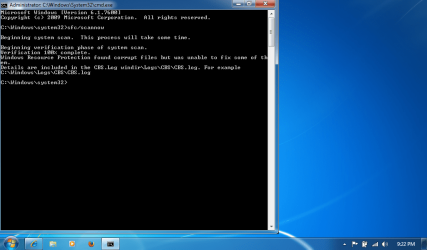
Now, what is the proper command to view the log?
 

Attachments

  • 1.png
    1.png
    6.7 KB · Views: 9

My Computer

Computer type
Laptop
Computer Manufacturer/Model Number
Dell Mini
OS
Windows 7 Professional 32-bit

Attachments

  • 1.png
    1.png
    6.7 KB · Views: 8

My Computer

Computer type
Laptop
Computer Manufacturer/Model Number
Dell Mini
OS
Windows 7 Professional 32-bit

My Computer

Computer type
Laptop
Computer Manufacturer/Model Number
HP Pavilion dv6-6c10us
OS
x64 (6.3.9600) Win8.1 Pro & soon dual boot x64 (6.1.7601) Win7_SP1 HomePrem
CPU
AMD A6-3420M APU with Radeon(tm) HD Graphics
Motherboard
Hewlett-Packard 1805
Memory
6.00 GB
Graphics Card(s)
AMD Radeon(TM) HD 6520G
Sound Card
(1) AMD High Definition Audio Device (2) IDT High Definiti
Monitor(s) Displays
HP W2072a 20" LCD (1600 x 900) @ 60 Hz
Screen Resolution
1366 x 768 x 32 bits (4294967296 colors) @ 60 Hz
Hard Drives
ST640LM0 00 HM641JI SATA Disk Device
Keyboard
Logitech k520 wireless KB
Mouse
Logitech m320 wireless mouse (bundled with KB)
Internet Speed
15/5 | 54 MB Wireless 'n'
Antivirus
Realtime: Defender or Avast | On-demand: Malwarebytes, ESET
Browser
IE 11 on Win8, IE 10 on win 7
Other Info
Media: [Gimp, Audacity, VLC] || Comm: [WEmail 2012, Skype] || Productivity: [OpenOffice,| Textpad] || Utils: [Sysinternals, cCleaner, Speccy, Defraggler]
Back
Top