BCM20702A0 driver

Please post the output from both SFC and SURT per step 4 in the instructions:
http://www.sevenforums.com/windows-...4840-windows-update-posting-instructions.html

Don't worry about step 5 - that's for people who hijack other threads.
This is your thread, so just post the CBS.zip folder here.
See: http://www.sevenforums.com/tutorials/9733-screenshots-files-upload-post-seven-forums.html

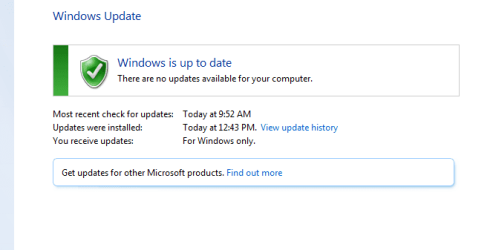
As stated earlier, I don't have any error codes on the Windows Update Window (Green Check mark).
 

My Computer

Computer type
Laptop
Computer Manufacturer/Model Number
Dell Mini
OS
Windows 7 Professional 32-bit
Thanks, looks like minor tcpmon.ini corruption, but I 'll ask another member to take a look - hang on.
Filtered View attachment 348067
 

My Computer

Computer type
Laptop
Computer Manufacturer/Model Number
HP Pavilion dv6-6c10us
OS
x64 (6.3.9600) Win8.1 Pro & soon dual boot x64 (6.1.7601) Win7_SP1 HomePrem
CPU
AMD A6-3420M APU with Radeon(tm) HD Graphics
Motherboard
Hewlett-Packard 1805
Memory
6.00 GB
Graphics Card(s)
AMD Radeon(TM) HD 6520G
Sound Card
(1) AMD High Definition Audio Device (2) IDT High Definiti
Monitor(s) Displays
HP W2072a 20" LCD (1600 x 900) @ 60 Hz
Screen Resolution
1366 x 768 x 32 bits (4294967296 colors) @ 60 Hz
Hard Drives
ST640LM0 00 HM641JI SATA Disk Device
Keyboard
Logitech k520 wireless KB
Mouse
Logitech m320 wireless mouse (bundled with KB)
Internet Speed
15/5 | 54 MB Wireless 'n'
Antivirus
Realtime: Defender or Avast | On-demand: Malwarebytes, ESET
Browser
IE 11 on Win8, IE 10 on win 7
Other Info
Media: [Gimp, Audacity, VLC] || Comm: [WEmail 2012, Skype] || Productivity: [OpenOffice,| Textpad] || Utils: [Sysinternals, cCleaner, Speccy, Defraggler]

My Computer

Computer type
Laptop
Computer Manufacturer/Model Number
HP Pavilion dv6-6c10us
OS
x64 (6.3.9600) Win8.1 Pro & soon dual boot x64 (6.1.7601) Win7_SP1 HomePrem
CPU
AMD A6-3420M APU with Radeon(tm) HD Graphics
Motherboard
Hewlett-Packard 1805
Memory
6.00 GB
Graphics Card(s)
AMD Radeon(TM) HD 6520G
Sound Card
(1) AMD High Definition Audio Device (2) IDT High Definiti
Monitor(s) Displays
HP W2072a 20" LCD (1600 x 900) @ 60 Hz
Screen Resolution
1366 x 768 x 32 bits (4294967296 colors) @ 60 Hz
Hard Drives
ST640LM0 00 HM641JI SATA Disk Device
Keyboard
Logitech k520 wireless KB
Mouse
Logitech m320 wireless mouse (bundled with KB)
Internet Speed
15/5 | 54 MB Wireless 'n'
Antivirus
Realtime: Defender or Avast | On-demand: Malwarebytes, ESET
Browser
IE 11 on Win8, IE 10 on win 7
Other Info
Media: [Gimp, Audacity, VLC] || Comm: [WEmail 2012, Skype] || Productivity: [OpenOffice,| Textpad] || Utils: [Sysinternals, cCleaner, Speccy, Defraggler]

Attachments

  • 1.png
    1.png
    44.4 KB · Views: 2

My Computer

Computer type
Laptop
Computer Manufacturer/Model Number
Dell Mini
OS
Windows 7 Professional 32-bit

My Computer

Computer type
Laptop
Computer Manufacturer/Model Number
Dell Mini
OS
Windows 7 Professional 32-bit

In the meantime, after checking for windows updates, I'm now at the beginning of 189 updates. Cool?
 

My Computer

Computer type
Laptop
Computer Manufacturer/Model Number
Dell Mini
OS
Windows 7 Professional 32-bit
You have had a Busy day :) ... No luck with the Driver yet for that Device ? ...
 

My Computer

Computer Manufacturer/Model Number
W530-3630QM1
OS
windows 7 home 64bit
CPU
INTEL-CORE I7
Memory
16GB
Hard Drives
750GB
Browser
Chrome
You have had a Busy day :) ... No luck with the Driver yet for that Device ? ...

I thought I was waiting to hear from Bill regarding the Speccy or whatever? Aren't I trying to repair this corrupt file or something like that?
 

My Computer

Computer type
Laptop
Computer Manufacturer/Model Number
Dell Mini
OS
Windows 7 Professional 32-bit
Yes i am sure Bill will advise you on that matter ... It is only very minor though have found a few possible Solutions ...
 

My Computer

Computer Manufacturer/Model Number
W530-3630QM1
OS
windows 7 home 64bit
CPU
INTEL-CORE I7
Memory
16GB
Hard Drives
750GB
Browser
Chrome
Yes i am sure Bill will advise you on that matter ... It is only very minor though have found a few possible Solutions ...

I am sincerely grateful all your help as well as for Bill's. Im curious what corrupted the file? Anyway, im 61 updates into this 189.....tic tock tic tock
 

My Computer

Computer type
Laptop
Computer Manufacturer/Model Number
Dell Mini
OS
Windows 7 Professional 32-bit
Have a read at the Link below ... But do not do any thing as it could make things worse ...


Cannot repair tcpmon.ini - Microsoft OS Forum - Software & Operating Systems - Dell Community

Good morning guys. Ok, so the computer burned the midnight oil installing 189 updates. Now we are sharing a cup of coffee over another 7 updates. Currently, the audio tone heard when I plug in the USB bluetooth adapter consists of the 3 quick tones which I believe tells me driver issues still exist. Starting from scratch, I attempted the Broadcom set up as the device manual suggests. Again, it quickly tells me it failed to update software. How should I proceed?
 

My Computer

Computer type
Laptop
Computer Manufacturer/Model Number
Dell Mini
OS
Windows 7 Professional 32-bit
I try not to trouble shoot an issue on a machine until it is completely up-to-date. Wastes my time and the other member's time.

Sometimes I forget to ask that simple question - thanks for posting that you are updating.

When Windows thnks it's done updating - run Windows update manually and look in the optional offers.
This is where WU provides HW drivers.
accept all offers, download and install.

There might be the driver you need in the list.

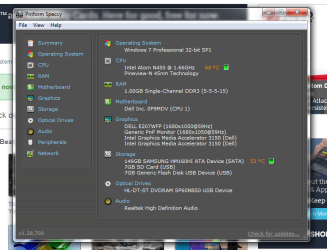
If the issue still exists, please PUBLISH another Speccy (you got it right the 2nd time ;))
Updating Windows obviously changes what's in the Speccy report.

Thanks,

Bill
.
 

My Computer

Computer type
Laptop
Computer Manufacturer/Model Number
HP Pavilion dv6-6c10us
OS
x64 (6.3.9600) Win8.1 Pro & soon dual boot x64 (6.1.7601) Win7_SP1 HomePrem
CPU
AMD A6-3420M APU with Radeon(tm) HD Graphics
Motherboard
Hewlett-Packard 1805
Memory
6.00 GB
Graphics Card(s)
AMD Radeon(TM) HD 6520G
Sound Card
(1) AMD High Definition Audio Device (2) IDT High Definiti
Monitor(s) Displays
HP W2072a 20" LCD (1600 x 900) @ 60 Hz
Screen Resolution
1366 x 768 x 32 bits (4294967296 colors) @ 60 Hz
Hard Drives
ST640LM0 00 HM641JI SATA Disk Device
Keyboard
Logitech k520 wireless KB
Mouse
Logitech m320 wireless mouse (bundled with KB)
Internet Speed
15/5 | 54 MB Wireless 'n'
Antivirus
Realtime: Defender or Avast | On-demand: Malwarebytes, ESET
Browser
IE 11 on Win8, IE 10 on win 7
Other Info
Media: [Gimp, Audacity, VLC] || Comm: [WEmail 2012, Skype] || Productivity: [OpenOffice,| Textpad] || Utils: [Sysinternals, cCleaner, Speccy, Defraggler]
I try not to trouble shoot an issue on a machine until it is completely up-to-date. Wastes my time and the other member's time.

Sometimes I forget to ask that simple question - thanks for posting that you are updating.

When Windows thnks it's done updating - run Windows update manually and look in the optional offers.
This is where WU provides HW drivers.
accept all offers, download and install.

There might be the driver you need in the list.

If the issue still exists, please PUBLISH another Speccy (you got it right the 2nd time ;))
Updating Windows obviously changes what's in the Speccy report.

Thanks,

Bill
.

Thanks Bill. I will publish the Speccy in a few.
 

My Computer

Computer type
Laptop
Computer Manufacturer/Model Number
Dell Mini
OS
Windows 7 Professional 32-bit
Have a read at the Link below ... But do not do any thing as it could make things worse ...


Cannot repair tcpmon.ini - Microsoft OS Forum - Software & Operating Systems - Dell Community
The TCPmon.ini issue is very mior and doesn't affect the operation of the machine.

This was a good find maxie, but some of the 'solutions' are a bit off. The way Component Based Servicing works is from the SxS store - that's where the action is, not in System32 or Syswow64. Managing the Sxs store is meant to be difficult (TrsutedInstaller is really the only ID that can work with it - unless you start screwing around - not advised)

Anyway, let's forget about the TCPmon.ini - SFC for now and refocus on the BT issue.

Patrick: My trouble shooting methods are slow, but methodical. Please be patient and work step-by-step with maxie and me. Trying different things in between steps might fix the issue, or might cloud the issue. You never know until you take a step what suggestion worked. Know which step solved the problem makes correcting it in the future (a fresh install) all the easier.

That's the way I fix stuff - other members have other methods. Some are faster and some take longer because of the number of steps forward / steps backward / steps nowhere.

Trouble shooting is really just trying different solutions to find the one that works on your machine. There is a method though, an order of suggestions and attempted solutions. Doing them out of order might cloud the final solution. I don't always know the exact order, but I know an order - simplest to more difficult.

I always let members know that this is their thread, their machine, and their time. How you proceed is always your choice.

I'm busy setting up a new install - so I'll be in and out for most of the day - hang tight... step-by-step. I'll review what you post and go to the next step.

You don't have to rely solely on my input, maxie is very good.

Bill
.

 

My Computer

Computer type
Laptop
Computer Manufacturer/Model Number
HP Pavilion dv6-6c10us
OS
x64 (6.3.9600) Win8.1 Pro & soon dual boot x64 (6.1.7601) Win7_SP1 HomePrem
CPU
AMD A6-3420M APU with Radeon(tm) HD Graphics
Motherboard
Hewlett-Packard 1805
Memory
6.00 GB
Graphics Card(s)
AMD Radeon(TM) HD 6520G
Sound Card
(1) AMD High Definition Audio Device (2) IDT High Definiti
Monitor(s) Displays
HP W2072a 20" LCD (1600 x 900) @ 60 Hz
Screen Resolution
1366 x 768 x 32 bits (4294967296 colors) @ 60 Hz
Hard Drives
ST640LM0 00 HM641JI SATA Disk Device
Keyboard
Logitech k520 wireless KB
Mouse
Logitech m320 wireless mouse (bundled with KB)
Internet Speed
15/5 | 54 MB Wireless 'n'
Antivirus
Realtime: Defender or Avast | On-demand: Malwarebytes, ESET
Browser
IE 11 on Win8, IE 10 on win 7
Other Info
Media: [Gimp, Audacity, VLC] || Comm: [WEmail 2012, Skype] || Productivity: [OpenOffice,| Textpad] || Utils: [Sysinternals, cCleaner, Speccy, Defraggler]
Oh, yeah ... BT is one of those technologies that is a bugger!
 

My Computer

Computer type
Laptop
Computer Manufacturer/Model Number
HP Pavilion dv6-6c10us
OS
x64 (6.3.9600) Win8.1 Pro & soon dual boot x64 (6.1.7601) Win7_SP1 HomePrem
CPU
AMD A6-3420M APU with Radeon(tm) HD Graphics
Motherboard
Hewlett-Packard 1805
Memory
6.00 GB
Graphics Card(s)
AMD Radeon(TM) HD 6520G
Sound Card
(1) AMD High Definition Audio Device (2) IDT High Definiti
Monitor(s) Displays
HP W2072a 20" LCD (1600 x 900) @ 60 Hz
Screen Resolution
1366 x 768 x 32 bits (4294967296 colors) @ 60 Hz
Hard Drives
ST640LM0 00 HM641JI SATA Disk Device
Keyboard
Logitech k520 wireless KB
Mouse
Logitech m320 wireless mouse (bundled with KB)
Internet Speed
15/5 | 54 MB Wireless 'n'
Antivirus
Realtime: Defender or Avast | On-demand: Malwarebytes, ESET
Browser
IE 11 on Win8, IE 10 on win 7
Other Info
Media: [Gimp, Audacity, VLC] || Comm: [WEmail 2012, Skype] || Productivity: [OpenOffice,| Textpad] || Utils: [Sysinternals, cCleaner, Speccy, Defraggler]
I should really read the title of some threads.

I think I have the same half card in my HP laptop. I'll double check - there is a full card with the same model.
The Speccy will tell me exactly - I can use the previous report to see about the HW. I still need the new Speccy after all updates, ok?

I'll be back in a bit.
 

My Computer

Computer type
Laptop
Computer Manufacturer/Model Number
HP Pavilion dv6-6c10us
OS
x64 (6.3.9600) Win8.1 Pro & soon dual boot x64 (6.1.7601) Win7_SP1 HomePrem
CPU
AMD A6-3420M APU with Radeon(tm) HD Graphics
Motherboard
Hewlett-Packard 1805
Memory
6.00 GB
Graphics Card(s)
AMD Radeon(TM) HD 6520G
Sound Card
(1) AMD High Definition Audio Device (2) IDT High Definiti
Monitor(s) Displays
HP W2072a 20" LCD (1600 x 900) @ 60 Hz
Screen Resolution
1366 x 768 x 32 bits (4294967296 colors) @ 60 Hz
Hard Drives
ST640LM0 00 HM641JI SATA Disk Device
Keyboard
Logitech k520 wireless KB
Mouse
Logitech m320 wireless mouse (bundled with KB)
Internet Speed
15/5 | 54 MB Wireless 'n'
Antivirus
Realtime: Defender or Avast | On-demand: Malwarebytes, ESET
Browser
IE 11 on Win8, IE 10 on win 7
Other Info
Media: [Gimp, Audacity, VLC] || Comm: [WEmail 2012, Skype] || Productivity: [OpenOffice,| Textpad] || Utils: [Sysinternals, cCleaner, Speccy, Defraggler]
Have a read at the Link below ... But do not do any thing as it could make things worse ...


Cannot repair tcpmon.ini - Microsoft OS Forum - Software & Operating Systems - Dell Community
The TCPmon.ini issue is very mior and doesn't affect the operation of the machine.

This was a good find maxie, but some of the 'solutions' are a bit off. The way Component Based Servicing works is from the SxS store - that's where the action is, not in System32 or Syswow64. Managing the Sxs store is meant to be difficult (TrsutedInstaller is really the only ID that can work with it - unless you start screwing around - not advised)

Anyway, let's forget about the TCPmon.ini - SFC for now and refocus on the BT issue.

Patrick: My trouble shooting methods are slow, but methodical. Please be patient and work step-by-step with maxie and me. Trying different things in between steps might fix the issue, or might cloud the issue. You never know until you take a step what suggestion worked. Know which step solved the problem makes correcting it in the future (a fresh install) all the easier.

That's the way I fix stuff - other members have other methods. Some are faster and some take longer because of the number of steps forward / steps backward / steps nowhere.

Trouble shooting is really just trying different solutions to find the one that works on your machine. There is a method though, an order of suggestions and attempted solutions. Doing them out of order might cloud the final solution. I don't always know the exact order, but I know an order - simplest to more difficult.

I always let members know that this is their thread, their machine, and their time. How you proceed is always your choice.

I'm busy setting up a new install - so I'll be in and out for most of the day - hang tight... step-by-step. I'll review what you post and go to the next step.

You don't have to rely solely on my input, maxie is very good.

Bill
.

Step (1)
 

Attachments

  • 1.png
    1.png
    8.2 KB · Views: 13

My Computer

Computer type
Laptop
Computer Manufacturer/Model Number
Dell Mini
OS
Windows 7 Professional 32-bit
Have a read at the Link below ... But do not do any thing as it could make things worse ...


Cannot repair tcpmon.ini - Microsoft OS Forum - Software & Operating Systems - Dell Community
The TCPmon.ini issue is very mior and doesn't affect the operation of the machine.

This was a good find maxie, but some of the 'solutions' are a bit off. The way Component Based Servicing works is from the SxS store - that's where the action is, not in System32 or Syswow64. Managing the Sxs store is meant to be difficult (TrsutedInstaller is really the only ID that can work with it - unless you start screwing around - not advised)

Anyway, let's forget about the TCPmon.ini - SFC for now and refocus on the BT issue.

Patrick: My trouble shooting methods are slow, but methodical. Please be patient and work step-by-step with maxie and me. Trying different things in between steps might fix the issue, or might cloud the issue. You never know until you take a step what suggestion worked. Know which step solved the problem makes correcting it in the future (a fresh install) all the easier.

That's the way I fix stuff - other members have other methods. Some are faster and some take longer because of the number of steps forward / steps backward / steps nowhere.

Trouble shooting is really just trying different solutions to find the one that works on your machine. There is a method though, an order of suggestions and attempted solutions. Doing them out of order might cloud the final solution. I don't always know the exact order, but I know an order - simplest to more difficult.

I always let members know that this is their thread, their machine, and their time. How you proceed is always your choice.

I'm busy setting up a new install - so I'll be in and out for most of the day - hang tight... step-by-step. I'll review what you post and go to the next step.

You don't have to rely solely on my input, maxie is very good.

Bill
.
Step (1)

Step (2) http://speccy.piriform.com/results/nPi3VcPdYj4t7P2nDJg33Yv
 

My Computer

Computer type
Laptop
Computer Manufacturer/Model Number
Dell Mini
OS
Windows 7 Professional 32-bit
Heads up Bill and Maxie....\
After publishing the Speccy, I went back to the Broadcom Setup and it is working as it should. So I will proceed with the standard BT install and setup. However, at a more convenient time for the two of you, I would still like to address the file corruption (just for fun/knowledge). I will confirm results momentarily prior to closing this thread. Respectfully, Patrick
 

My Computer

Computer type
Laptop
Computer Manufacturer/Model Number
Dell Mini
OS
Windows 7 Professional 32-bit
Back
Top