Solved Beep and other Windows sounds no longer work

coffent

New member
Member
Local time
3:39 PM
Messages
86
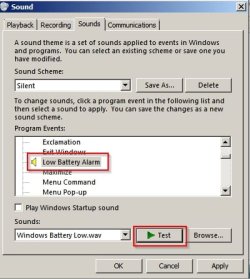
For no apparent reason, Windows sounds have stopped working. Going to ControlPanel>Sound>Sounds and performing a test on any Windows sound produces nothing. I have sound, as playing a *.wav file works fine, including the C:\Windows\Media\*.wav files. I did a Command Prompt > sfc /scannow and got the message that Windows Resource Protection did not find any integrity violations. What can be wrong?
 
Last edited:

My Computer My Computer

At a glance

Microsoft Windows 7 Home Premium 64-bit 7601 ...Intel(R) Core(TM) i7 CPU 920 @ 2.67GHz3.00 GBNVIDIA GeForce 210
Computer type
PC/Desktop
Computer Manufacturer/Model Number
Custom build
OS
Microsoft Windows 7 Home Premium 64-bit 7601 Multiprocessor Free Service Pack 1
CPU
Intel(R) Core(TM) i7 CPU 920 @ 2.67GHz
Motherboard
Jetway/Kuroshio JBI-600-LF (or BI-600) [Intel Burnside?]
Memory
3.00 GB
Graphics Card(s)
NVIDIA GeForce 210
Sound Card
Creative Sound Blaster X-Fi Titanium HD with THX SB1270
Screen Resolution
1920 x 1080 x 32 bits (4294967296 colors) @ 60 Hz
Hard Drives
(1) Hitachi HDS721010CLA332 ATA Device (2) ST1500DM003-9YN16G ATA Device (3)
Antivirus
Avast Antivirus
Browser
Firefox
Right tick on your desktop and select Properties.
Tick on Sounds on the window that opens.

You Should find what you need there.

Jack
 

My Computer My Computer

At a glance

Windows 10 Pro. 64/ version 1709 Windows 7 Pr...Intel i7-6800K @ 4.3Corsair Platinum 16 gig @2400EVGA GTX 1070 OC
Computer type
PC/Desktop
Computer Manufacturer/Model Number
Home made Desktop
OS
Windows 10 Pro. 64/ version 1709 Windows 7 Pro/64
CPU
Intel i7-6800K @ 4.3
Motherboard
ASUS X-99 Deluxe II
Memory
Corsair Platinum 16 gig @2400
Graphics Card(s)
EVGA GTX 1070 OC
Monitor(s) Displays
Asus 27" LED LCD/VE278Q
Screen Resolution
1920-1080 or 1280-720 HDMI
Hard Drives
INTEL SSD 730-240 Gb Sata 3.0/
PSU
EVGA Platium 1200W
Case
Phanteks Luxe Tempered Glass 8 fans/ one radiator
Cooling
XSPC/ Water Cooled CPU
Keyboard
Das 4 Professional
Mouse
Logitech M705/MX Anywhere 2-S
Internet Speed
100 mbits
Antivirus
Microsoft Security Essentials/ Malwarebytes Premium 3.0/ SAS
Browser
I.E. 11 default/Firefox/ ISP Time Warner Cable/Spectrum
Other Info
LG BluRay Burner/
Sound system-KLipsch-THX/
Icy Dock ssd Hot Swap bays.
Thanks, but right-clicking on the desktop on either of my Windows 7 computers does not show a Properties pick on the context menu. If what you're suggesting is another way to get to Control Panel > Sound > Sounds, please note I've already been there to no avail. If it's something else, please give me more information. Thanks.
 

My Computer My Computer

At a glance

Microsoft Windows 7 Home Premium 64-bit 7601 ...Intel(R) Core(TM) i7 CPU 920 @ 2.67GHz3.00 GBNVIDIA GeForce 210
Computer type
PC/Desktop
Computer Manufacturer/Model Number
Custom build
OS
Microsoft Windows 7 Home Premium 64-bit 7601 Multiprocessor Free Service Pack 1
CPU
Intel(R) Core(TM) i7 CPU 920 @ 2.67GHz
Motherboard
Jetway/Kuroshio JBI-600-LF (or BI-600) [Intel Burnside?]
Memory
3.00 GB
Graphics Card(s)
NVIDIA GeForce 210
Sound Card
Creative Sound Blaster X-Fi Titanium HD with THX SB1270
Screen Resolution
1920 x 1080 x 32 bits (4294967296 colors) @ 60 Hz
Hard Drives
(1) Hitachi HDS721010CLA332 ATA Device (2) ST1500DM003-9YN16G ATA Device (3)
Antivirus
Avast Antivirus
Browser
Firefox
Sorry my mistake.
Right tick on Desktop and select Personalize. Then tick on Sound.

Jack
 
Last edited:

My Computer My Computer

At a glance

Windows 10 Pro. 64/ version 1709 Windows 7 Pr...Intel i7-6800K @ 4.3Corsair Platinum 16 gig @2400EVGA GTX 1070 OC
Computer type
PC/Desktop
Computer Manufacturer/Model Number
Home made Desktop
OS
Windows 10 Pro. 64/ version 1709 Windows 7 Pro/64
CPU
Intel i7-6800K @ 4.3
Motherboard
ASUS X-99 Deluxe II
Memory
Corsair Platinum 16 gig @2400
Graphics Card(s)
EVGA GTX 1070 OC
Monitor(s) Displays
Asus 27" LED LCD/VE278Q
Screen Resolution
1920-1080 or 1280-720 HDMI
Hard Drives
INTEL SSD 730-240 Gb Sata 3.0/
PSU
EVGA Platium 1200W
Case
Phanteks Luxe Tempered Glass 8 fans/ one radiator
Cooling
XSPC/ Water Cooled CPU
Keyboard
Das 4 Professional
Mouse
Logitech M705/MX Anywhere 2-S
Internet Speed
100 mbits
Antivirus
Microsoft Security Essentials/ Malwarebytes Premium 3.0/ SAS
Browser
I.E. 11 default/Firefox/ ISP Time Warner Cable/Spectrum
Other Info
LG BluRay Burner/
Sound system-KLipsch-THX/
Icy Dock ssd Hot Swap bays.
Hi

Both
ControlPanel>Sound>Sounds and C:\Windows\Media\*.wav
is the same sound.

Do check your hardware or could there be any interference.
Also do check on the Sound icon on the taskbar.

Do a virus & malware scan for any problem.


Eric.

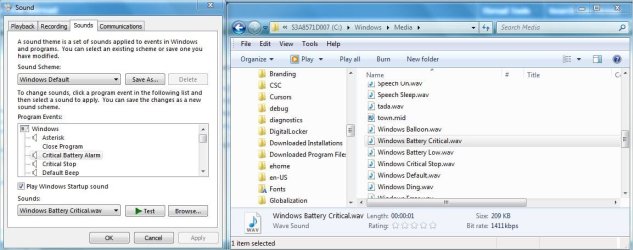
Attachment for comparison.
 

Attachments

  • Sound.JPG
    Sound.JPG
    84.3 KB · Views: 1

My Computer My Computer

At a glance

Windows 7 x64
Computer type
Laptop
Computer Manufacturer/Model Number
Toshiba L630 and L735
OS
Windows 7 x64
Hard Drives
240 GB SSD
Worth a check:

Right click 'Computer' in Windows Explorer. In the context menu of Computer, select Manage. Computer Management window, select Device Manager. Click on the View menu and select Show hidden devices. A new group will then appear in the device list - "Non-Plug and Play Drivers".

Expand "Non-Plug and Play Drivers" and find the item named Beep.

Right click and choose "Properties" and check that startup type is not set to disabled.

Other than that look for exclamation marks against any other sound device or driver.
 

My Computer My Computer

At a glance

Microsoft Windows 7 Home Premium 64-bit 7601 ...AMD C-60 APU with Radeon(tm) HD Graphics4.00 GBAMD Radeon HD 6290 Graphics
Computer type
Laptop
Computer Manufacturer/Model Number
ASUS
OS
Microsoft Windows 7 Home Premium 64-bit 7601 Multiprocessor Free Service Pack 1
CPU
AMD C-60 APU with Radeon(tm) HD Graphics
Motherboard
ASUSTeK COMPUTER INC. X501U
Memory
4.00 GB
Graphics Card(s)
AMD Radeon HD 6290 Graphics
Sound Card
(1) AMD High Definition Audio Device (2) Realtek High Defi
Screen Resolution
1366 x 768 x 32 bits (4294967296 colors) @ 60 Hz
Hard Drives
Hitachi HTS545050A7E380 SATA Disk Device
Antivirus
Comodo CIS & FW, SecureAplus App Whitelisting, Threatfire
Browser
Cyberfox 64bit, Opera 64bit, Airfox
Other Info
Spy-The-Spy, HitmanPro.Alert, Norton Connect Safe, MJRegWatcher, BitDefender TrafficLight, Voodoo Shield, Zemana AntiMalware
Thanks for the suggestions.

I've tried changing my Sound Scheme to Windows Default in Control Panel > Sound > Sounds. When I click "Test" on any of the Windows sounds (the left panel of Eric3742's attachment) there is silence.

I understand that ControlPanel>Sound>Sounds and C:\Windows\Media\*.wav are the same sounds. I can play any of the wav files there using a media player (for example, Windows Media Player) (the right panel in Eric3742's attachment). So the wav files themselves are not corrupted. The problem seems to be that Windows won't play the files for some unknown reason.

I checked Beep/Properties and Status shows Started, with startup type set to System.

It could be a hardware problem, but if so I would have thought that I couldn't play the files with a media player.
 

My Computer My Computer

At a glance

Microsoft Windows 7 Home Premium 64-bit 7601 ...Intel(R) Core(TM) i7 CPU 920 @ 2.67GHz3.00 GBNVIDIA GeForce 210
Computer type
PC/Desktop
Computer Manufacturer/Model Number
Custom build
OS
Microsoft Windows 7 Home Premium 64-bit 7601 Multiprocessor Free Service Pack 1
CPU
Intel(R) Core(TM) i7 CPU 920 @ 2.67GHz
Motherboard
Jetway/Kuroshio JBI-600-LF (or BI-600) [Intel Burnside?]
Memory
3.00 GB
Graphics Card(s)
NVIDIA GeForce 210
Sound Card
Creative Sound Blaster X-Fi Titanium HD with THX SB1270
Screen Resolution
1920 x 1080 x 32 bits (4294967296 colors) @ 60 Hz
Hard Drives
(1) Hitachi HDS721010CLA332 ATA Device (2) ST1500DM003-9YN16G ATA Device (3)
Antivirus
Avast Antivirus
Browser
Firefox
Okay I can reproduce the problem. Speakers play sound fine but do not play system sounds.

The problem is that there are many sound cards and drivers.

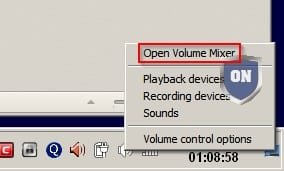
Anyway on my system if I right click the speaker icon in the system tray I get an option to open the volume mixer.

Mixer.jpg

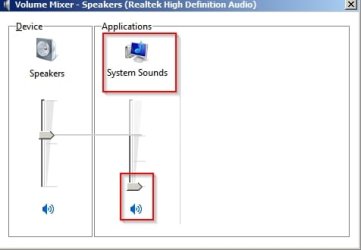
Then if I move the slider for "System Sounds" to the bottom - system sounds remain silent even when playing test sounds.

Volume Mixer - Speakers (Realtek High Definition Audio).jpg

Maybe you could check for similar options?
 

My Computer My Computer

At a glance

Microsoft Windows 7 Home Premium 64-bit 7601 ...AMD C-60 APU with Radeon(tm) HD Graphics4.00 GBAMD Radeon HD 6290 Graphics
Computer type
Laptop
Computer Manufacturer/Model Number
ASUS
OS
Microsoft Windows 7 Home Premium 64-bit 7601 Multiprocessor Free Service Pack 1
CPU
AMD C-60 APU with Radeon(tm) HD Graphics
Motherboard
ASUSTeK COMPUTER INC. X501U
Memory
4.00 GB
Graphics Card(s)
AMD Radeon HD 6290 Graphics
Sound Card
(1) AMD High Definition Audio Device (2) Realtek High Defi
Screen Resolution
1366 x 768 x 32 bits (4294967296 colors) @ 60 Hz
Hard Drives
Hitachi HTS545050A7E380 SATA Disk Device
Antivirus
Comodo CIS & FW, SecureAplus App Whitelisting, Threatfire
Browser
Cyberfox 64bit, Opera 64bit, Airfox
Other Info
Spy-The-Spy, HitmanPro.Alert, Norton Connect Safe, MJRegWatcher, BitDefender TrafficLight, Voodoo Shield, Zemana AntiMalware
Thanks, Callender, I really appreciate your trying to reproduce the problem. Unfortunately, while what you did may cause the same symptoms, it's not the cause of my problem. All playback tracks are set at mid-level, including System Sounds, as shown in the attachment.

However in getting set to capture the image, I moved the slider and noticed that when the slider is repositioned, Windows plays a test beep to judge sound level, and that I *do* hear. So why should Windows *not* play sounds in some cases, but play them in others??
 

Attachments

  • MWSnap_412.gif
    MWSnap_412.gif
    37.7 KB · Views: 0

My Computer My Computer

At a glance

Microsoft Windows 7 Home Premium 64-bit 7601 ...Intel(R) Core(TM) i7 CPU 920 @ 2.67GHz3.00 GBNVIDIA GeForce 210
Computer type
PC/Desktop
Computer Manufacturer/Model Number
Custom build
OS
Microsoft Windows 7 Home Premium 64-bit 7601 Multiprocessor Free Service Pack 1
CPU
Intel(R) Core(TM) i7 CPU 920 @ 2.67GHz
Motherboard
Jetway/Kuroshio JBI-600-LF (or BI-600) [Intel Burnside?]
Memory
3.00 GB
Graphics Card(s)
NVIDIA GeForce 210
Sound Card
Creative Sound Blaster X-Fi Titanium HD with THX SB1270
Screen Resolution
1920 x 1080 x 32 bits (4294967296 colors) @ 60 Hz
Hard Drives
(1) Hitachi HDS721010CLA332 ATA Device (2) ST1500DM003-9YN16G ATA Device (3)
Antivirus
Avast Antivirus
Browser
Firefox
Just a thought. Maybe good or maybe not so good.

Your system has this.

Sound Card Creative Sound Blaster X-Fi Titanium HD with THX SB1270

Find the Control Panel for that card and see if their is any setting that might help you.
Try hooking your speakers to the motherboard and see if that helps.

Your mother board

Jetway Kuroshio BI-600 | TechwareLabs - Part 2

8 – USB 2.0/1.1 ports
1 – PS/2 mouse port
1 – PS/2 keyboard port
1 – SPDIF_OUT port
2 – RJ-45 port
1 – Audio I/O port
2 – e-SATA port
Jack
 

My Computer My Computer

At a glance

Windows 10 Pro. 64/ version 1709 Windows 7 Pr...Intel i7-6800K @ 4.3Corsair Platinum 16 gig @2400EVGA GTX 1070 OC
Computer type
PC/Desktop
Computer Manufacturer/Model Number
Home made Desktop
OS
Windows 10 Pro. 64/ version 1709 Windows 7 Pro/64
CPU
Intel i7-6800K @ 4.3
Motherboard
ASUS X-99 Deluxe II
Memory
Corsair Platinum 16 gig @2400
Graphics Card(s)
EVGA GTX 1070 OC
Monitor(s) Displays
Asus 27" LED LCD/VE278Q
Screen Resolution
1920-1080 or 1280-720 HDMI
Hard Drives
INTEL SSD 730-240 Gb Sata 3.0/
PSU
EVGA Platium 1200W
Case
Phanteks Luxe Tempered Glass 8 fans/ one radiator
Cooling
XSPC/ Water Cooled CPU
Keyboard
Das 4 Professional
Mouse
Logitech M705/MX Anywhere 2-S
Internet Speed
100 mbits
Antivirus
Microsoft Security Essentials/ Malwarebytes Premium 3.0/ SAS
Browser
I.E. 11 default/Firefox/ ISP Time Warner Cable/Spectrum
Other Info
LG BluRay Burner/
Sound system-KLipsch-THX/
Icy Dock ssd Hot Swap bays.
I don't know the answer. I would download the driver (usually the driver from your computer manaufacturer's support site should work) then uninstall the current driver before rebooting and installing the replacement that you downloaded. I'm confident with updating/ replacing drivers on my own machine but not so confident where other machines are involved. Perhaps you could wait and see if someone else thinks that it would be a good idea and offer guidance.

On another note which may or may not be related I did notice that this month's round of windows updates reset my system sounds to default. Usually I set them all to silent and after installing windows updates they were all re-enabled so I had to redo the settings.
 

My Computer My Computer

At a glance

Microsoft Windows 7 Home Premium 64-bit 7601 ...AMD C-60 APU with Radeon(tm) HD Graphics4.00 GBAMD Radeon HD 6290 Graphics
Computer type
Laptop
Computer Manufacturer/Model Number
ASUS
OS
Microsoft Windows 7 Home Premium 64-bit 7601 Multiprocessor Free Service Pack 1
CPU
AMD C-60 APU with Radeon(tm) HD Graphics
Motherboard
ASUSTeK COMPUTER INC. X501U
Memory
4.00 GB
Graphics Card(s)
AMD Radeon HD 6290 Graphics
Sound Card
(1) AMD High Definition Audio Device (2) Realtek High Defi
Screen Resolution
1366 x 768 x 32 bits (4294967296 colors) @ 60 Hz
Hard Drives
Hitachi HTS545050A7E380 SATA Disk Device
Antivirus
Comodo CIS & FW, SecureAplus App Whitelisting, Threatfire
Browser
Cyberfox 64bit, Opera 64bit, Airfox
Other Info
Spy-The-Spy, HitmanPro.Alert, Norton Connect Safe, MJRegWatcher, BitDefender TrafficLight, Voodoo Shield, Zemana AntiMalware
I checked the audio card control panel and everything seemed ok. I tried setting to default with no luck.

Connecting speakers to the motherboard output I get no sound at all - not sure why, though I haven't tried to use this output in a long time.
 

My Computer My Computer

At a glance

Microsoft Windows 7 Home Premium 64-bit 7601 ...Intel(R) Core(TM) i7 CPU 920 @ 2.67GHz3.00 GBNVIDIA GeForce 210
Computer type
PC/Desktop
Computer Manufacturer/Model Number
Custom build
OS
Microsoft Windows 7 Home Premium 64-bit 7601 Multiprocessor Free Service Pack 1
CPU
Intel(R) Core(TM) i7 CPU 920 @ 2.67GHz
Motherboard
Jetway/Kuroshio JBI-600-LF (or BI-600) [Intel Burnside?]
Memory
3.00 GB
Graphics Card(s)
NVIDIA GeForce 210
Sound Card
Creative Sound Blaster X-Fi Titanium HD with THX SB1270
Screen Resolution
1920 x 1080 x 32 bits (4294967296 colors) @ 60 Hz
Hard Drives
(1) Hitachi HDS721010CLA332 ATA Device (2) ST1500DM003-9YN16G ATA Device (3)
Antivirus
Avast Antivirus
Browser
Firefox
Check the drivers for the audio card is another thing to do.

Once you hook to the motherboard go back and check the settings you have already done. They might of changed sense you hook to the motherboard.

Jack
 

My Computer My Computer

At a glance

Windows 10 Pro. 64/ version 1709 Windows 7 Pr...Intel i7-6800K @ 4.3Corsair Platinum 16 gig @2400EVGA GTX 1070 OC
Computer type
PC/Desktop
Computer Manufacturer/Model Number
Home made Desktop
OS
Windows 10 Pro. 64/ version 1709 Windows 7 Pro/64
CPU
Intel i7-6800K @ 4.3
Motherboard
ASUS X-99 Deluxe II
Memory
Corsair Platinum 16 gig @2400
Graphics Card(s)
EVGA GTX 1070 OC
Monitor(s) Displays
Asus 27" LED LCD/VE278Q
Screen Resolution
1920-1080 or 1280-720 HDMI
Hard Drives
INTEL SSD 730-240 Gb Sata 3.0/
PSU
EVGA Platium 1200W
Case
Phanteks Luxe Tempered Glass 8 fans/ one radiator
Cooling
XSPC/ Water Cooled CPU
Keyboard
Das 4 Professional
Mouse
Logitech M705/MX Anywhere 2-S
Internet Speed
100 mbits
Antivirus
Microsoft Security Essentials/ Malwarebytes Premium 3.0/ SAS
Browser
I.E. 11 default/Firefox/ ISP Time Warner Cable/Spectrum
Other Info
LG BluRay Burner/
Sound system-KLipsch-THX/
Icy Dock ssd Hot Swap bays.
I'll check the sound card driver updates, though the Windows sounds were working fine in the past.

Callender's remark about Windows updates changing sound settings makes me think it might be worth trying to uninstall recent updates. Unfortunately I don't exactly when the problem started to occur.
 

My Computer My Computer

At a glance

Microsoft Windows 7 Home Premium 64-bit 7601 ...Intel(R) Core(TM) i7 CPU 920 @ 2.67GHz3.00 GBNVIDIA GeForce 210
Computer type
PC/Desktop
Computer Manufacturer/Model Number
Custom build
OS
Microsoft Windows 7 Home Premium 64-bit 7601 Multiprocessor Free Service Pack 1
CPU
Intel(R) Core(TM) i7 CPU 920 @ 2.67GHz
Motherboard
Jetway/Kuroshio JBI-600-LF (or BI-600) [Intel Burnside?]
Memory
3.00 GB
Graphics Card(s)
NVIDIA GeForce 210
Sound Card
Creative Sound Blaster X-Fi Titanium HD with THX SB1270
Screen Resolution
1920 x 1080 x 32 bits (4294967296 colors) @ 60 Hz
Hard Drives
(1) Hitachi HDS721010CLA332 ATA Device (2) ST1500DM003-9YN16G ATA Device (3)
Antivirus
Avast Antivirus
Browser
Firefox
Callender could be correct because some of Windows 7 update have caused strange problem for some.

Do you have restore points. You should have some because Windows 7 update creates them sometimes before the updates are installed.

Jack
 

My Computer My Computer

At a glance

Windows 10 Pro. 64/ version 1709 Windows 7 Pr...Intel i7-6800K @ 4.3Corsair Platinum 16 gig @2400EVGA GTX 1070 OC
Computer type
PC/Desktop
Computer Manufacturer/Model Number
Home made Desktop
OS
Windows 10 Pro. 64/ version 1709 Windows 7 Pro/64
CPU
Intel i7-6800K @ 4.3
Motherboard
ASUS X-99 Deluxe II
Memory
Corsair Platinum 16 gig @2400
Graphics Card(s)
EVGA GTX 1070 OC
Monitor(s) Displays
Asus 27" LED LCD/VE278Q
Screen Resolution
1920-1080 or 1280-720 HDMI
Hard Drives
INTEL SSD 730-240 Gb Sata 3.0/
PSU
EVGA Platium 1200W
Case
Phanteks Luxe Tempered Glass 8 fans/ one radiator
Cooling
XSPC/ Water Cooled CPU
Keyboard
Das 4 Professional
Mouse
Logitech M705/MX Anywhere 2-S
Internet Speed
100 mbits
Antivirus
Microsoft Security Essentials/ Malwarebytes Premium 3.0/ SAS
Browser
I.E. 11 default/Firefox/ ISP Time Warner Cable/Spectrum
Other Info
LG BluRay Burner/
Sound system-KLipsch-THX/
Icy Dock ssd Hot Swap bays.
I think the problem may not be the sound card.
Also as playing using folder C:\Windows\Media is not an issue.

My guess is that Computer Control Panel Sound is not working.

Conclusion:

When you play in the C:\Windows\Media, it is using the sound card.
As what i meant is that C:\Windows\Media is directly to the software of the sound card.

If you are using ControlPanel>Sound>Sounds this may go thru the Computer Control Panel.
As using Control Panel, the route may be somewhat different.


Do correct me if my logic is wrong.


Try this test, if you want to:

My guess that it is due to the Control Panel; that is Control Panel > Sound > Sounds

Go to Control Panel > Sound > Sounds

Do test on whatever listed in that Sound, such as; Recording & Communication; that is go thru all the options.
On Playback, select speaker and select Configure, click on Test to check if the sound is available or not.
Also go thru the speaker properties and test on everything, if possible.

Edit: If there is no sound on these testing, it will rule out sound driver and software.
Then you now have to focus on the Control Panel Sound on how it work.


Eric.
 
Last edited:

My Computer My Computer

At a glance

Windows 7 x64
Computer type
Laptop
Computer Manufacturer/Model Number
Toshiba L630 and L735
OS
Windows 7 x64
Hard Drives
240 GB SSD
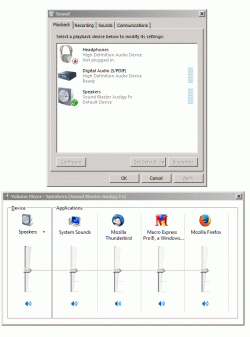
I agree with your logic. I've done these tests and never hear any sounds. On "Playback" I note that Headphones are shown as "Not plugged in" even though they are plugged in. In any case I can hear sounds through the headphones when I play a sound file using a media player.

I tried a Window Restore, but as frequently happens, I got a "Restore failed for an unknown reason". I don't know why Windows Restore is so dicey. However I keep C: drive image backups and am getting ready to restore an earlier image.
 

My Computer My Computer

At a glance

Microsoft Windows 7 Home Premium 64-bit 7601 ...Intel(R) Core(TM) i7 CPU 920 @ 2.67GHz3.00 GBNVIDIA GeForce 210
Computer type
PC/Desktop
Computer Manufacturer/Model Number
Custom build
OS
Microsoft Windows 7 Home Premium 64-bit 7601 Multiprocessor Free Service Pack 1
CPU
Intel(R) Core(TM) i7 CPU 920 @ 2.67GHz
Motherboard
Jetway/Kuroshio JBI-600-LF (or BI-600) [Intel Burnside?]
Memory
3.00 GB
Graphics Card(s)
NVIDIA GeForce 210
Sound Card
Creative Sound Blaster X-Fi Titanium HD with THX SB1270
Screen Resolution
1920 x 1080 x 32 bits (4294967296 colors) @ 60 Hz
Hard Drives
(1) Hitachi HDS721010CLA332 ATA Device (2) ST1500DM003-9YN16G ATA Device (3)
Antivirus
Avast Antivirus
Browser
Firefox
Window Restore, do you mean System Restore Point.

This system restore point having a setting by user on how much storage it need for this.

Go to Control Panel\System and Security\System

Left panel select System Protection.
Select Configure, and adjust the storage space accordingly.

It will remove older System Restore Point if the new Create New System Restore Point has not enough space it required.


Since now you know the cause, see if anyone else to assist you resolve on this issue.

Should there no reply and you want to know, then create a new thread on this issue.


Should you refer to System Image as Backup, this is different.


Eric.
 

My Computer My Computer

At a glance

Windows 7 x64
Computer type
Laptop
Computer Manufacturer/Model Number
Toshiba L630 and L735
OS
Windows 7 x64
Hard Drives
240 GB SSD
On the playback, did you select the other device, the Creative driver, if any.

It is good that you bought Creative sound adapter cards, etc.

Creative is famous for Sound, as should they come out a new product, there will be long queue.
As i am living in Singapore, and did visit there service center, they are helpful staff.


Eric.
 

My Computer My Computer

At a glance

Windows 7 x64
Computer type
Laptop
Computer Manufacturer/Model Number
Toshiba L630 and L735
OS
Windows 7 x64
Hard Drives
240 GB SSD
I agree with your logic. I've done these tests and never hear any sounds. On "Playback" I note that Headphones are shown as "Not plugged in" even though they are plugged in. In any case I can hear sounds through the headphones when I play a sound file using a media player.

You mean you can hear test sounds through headphones?

Windows sounds.jpg

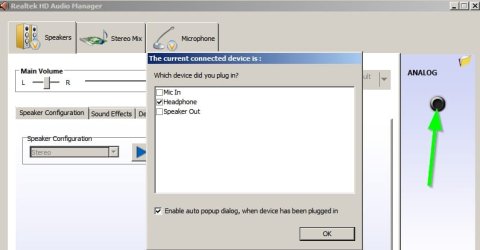
Anyway for me I get a pop up asking what I just plugged in when using the audio jack.

Realtek HD Audio Manager.jpg

Sounds like something screwed up with that.
 

My Computer My Computer

At a glance

Microsoft Windows 7 Home Premium 64-bit 7601 ...AMD C-60 APU with Radeon(tm) HD Graphics4.00 GBAMD Radeon HD 6290 Graphics
Computer type
Laptop
Computer Manufacturer/Model Number
ASUS
OS
Microsoft Windows 7 Home Premium 64-bit 7601 Multiprocessor Free Service Pack 1
CPU
AMD C-60 APU with Radeon(tm) HD Graphics
Motherboard
ASUSTeK COMPUTER INC. X501U
Memory
4.00 GB
Graphics Card(s)
AMD Radeon HD 6290 Graphics
Sound Card
(1) AMD High Definition Audio Device (2) Realtek High Defi
Screen Resolution
1366 x 768 x 32 bits (4294967296 colors) @ 60 Hz
Hard Drives
Hitachi HTS545050A7E380 SATA Disk Device
Antivirus
Comodo CIS & FW, SecureAplus App Whitelisting, Threatfire
Browser
Cyberfox 64bit, Opera 64bit, Airfox
Other Info
Spy-The-Spy, HitmanPro.Alert, Norton Connect Safe, MJRegWatcher, BitDefender TrafficLight, Voodoo Shield, Zemana AntiMalware
Back
Top