
Solved Beep and other Windows sounds no longer work

Hi coffent

Callender is right.

Do refer to his post.

Also attachment on mine, below picture.


Worth a check:

Right click 'Computer' in Windows Explorer. In the context menu of Computer, select Manage. Computer Management window, select Device Manager. Click on the View menu and select Show hidden devices. A new group will then appear in the device list - "Non-Plug and Play Drivers".

Expand "Non-Plug and Play Drivers" and find the item named Beep.

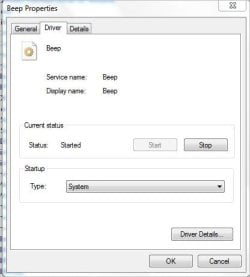
Right click and choose "Properties" and check that startup type is not set to disabled.

Other than that look for exclamation marks against any other sound device or driver.

Callender
You are right, as just checked mine which mentioned "System"
There is an option on Disable.

Refer to picture:
 

Attachments
  • Sound_Beep_System.JPG
    Sound_Beep_System.JPG
    24.9 KB · Views: 18

My Computer My Computer

At a glance

Windows 7 x64
Computer type
Laptop
Computer Manufacturer/Model Number
Toshiba L630 and L735
OS
Windows 7 x64
Hard Drives
240 GB SSD
I'm happy to say the problem is fixed. I restored a C: drive image file that I made (using Macrium Reflect) on Dec. 8, and Windows sounds (e.g. Beep) now work as they used to. I'm almost certain that it was a Windows 7 update that I installed between then and about Dec. 20 that screwed things up. I won't know for sure until I reinstall the updates one by one and see if the problem reoccurs.

Thanks everyone for your help!

[P.S. To respond to Eric3742's query, yes by "Windows Restore" I did mean "System Restore Point". I've had occasion to do a system restore several times in the past, and find that sometimes they work, but often times they fail with the only explanation being "unknown error", so I don't rely on them. But that's another story...]
 
Last edited:

My Computer My Computer

At a glance

Microsoft Windows 7 Home Premium 64-bit 7601 ...Intel(R) Core(TM) i7 CPU 920 @ 2.67GHz3.00 GBNVIDIA GeForce 210
Computer type
PC/Desktop
Computer Manufacturer/Model Number
Custom build
OS
Microsoft Windows 7 Home Premium 64-bit 7601 Multiprocessor Free Service Pack 1
CPU
Intel(R) Core(TM) i7 CPU 920 @ 2.67GHz
Motherboard
Jetway/Kuroshio JBI-600-LF (or BI-600) [Intel Burnside?]
Memory
3.00 GB
Graphics Card(s)
NVIDIA GeForce 210
Sound Card
Creative Sound Blaster X-Fi Titanium HD with THX SB1270
Screen Resolution
1920 x 1080 x 32 bits (4294967296 colors) @ 60 Hz
Hard Drives
(1) Hitachi HDS721010CLA332 ATA Device (2) ST1500DM003-9YN16G ATA Device (3)
Antivirus
Avast Antivirus
Browser
Firefox
My guess was wrong. I've now installed all the Windows 7 updates and Windows sounds continue to work. I guess I'll never know what caused the problem, but at any rate it's fixed.
 

My Computer My Computer

At a glance

Microsoft Windows 7 Home Premium 64-bit 7601 ...Intel(R) Core(TM) i7 CPU 920 @ 2.67GHz3.00 GBNVIDIA GeForce 210
Computer type
PC/Desktop
Computer Manufacturer/Model Number
Custom build
OS
Microsoft Windows 7 Home Premium 64-bit 7601 Multiprocessor Free Service Pack 1
CPU
Intel(R) Core(TM) i7 CPU 920 @ 2.67GHz
Motherboard
Jetway/Kuroshio JBI-600-LF (or BI-600) [Intel Burnside?]
Memory
3.00 GB
Graphics Card(s)
NVIDIA GeForce 210
Sound Card
Creative Sound Blaster X-Fi Titanium HD with THX SB1270
Screen Resolution
1920 x 1080 x 32 bits (4294967296 colors) @ 60 Hz
Hard Drives
(1) Hitachi HDS721010CLA332 ATA Device (2) ST1500DM003-9YN16G ATA Device (3)
Antivirus
Avast Antivirus
Browser
Firefox
Go back and look at all your audio settings and make a note of what they are. This may help down the road.
Create a new backup and Restore point for a little insurance.

Jack
 

My Computer My Computer

At a glance

Windows 10 Pro. 64/ version 1709 Windows 7 Pr...Intel i7-6800K @ 4.3Corsair Platinum 16 gig @2400EVGA GTX 1070 OC
Computer type
PC/Desktop
Computer Manufacturer/Model Number
Home made Desktop
OS
Windows 10 Pro. 64/ version 1709 Windows 7 Pro/64
CPU
Intel i7-6800K @ 4.3
Motherboard
ASUS X-99 Deluxe II
Memory
Corsair Platinum 16 gig @2400
Graphics Card(s)
EVGA GTX 1070 OC
Monitor(s) Displays
Asus 27" LED LCD/VE278Q
Screen Resolution
1920-1080 or 1280-720 HDMI
Hard Drives
INTEL SSD 730-240 Gb Sata 3.0/
PSU
EVGA Platium 1200W
Case
Phanteks Luxe Tempered Glass 8 fans/ one radiator
Cooling
XSPC/ Water Cooled CPU
Keyboard
Das 4 Professional
Mouse
Logitech M705/MX Anywhere 2-S
Internet Speed
100 mbits
Antivirus
Microsoft Security Essentials/ Malwarebytes Premium 3.0/ SAS
Browser
I.E. 11 default/Firefox/ ISP Time Warner Cable/Spectrum
Other Info
LG BluRay Burner/
Sound system-KLipsch-THX/
Icy Dock ssd Hot Swap bays.
Back
Top