Solved {Beginner - HOW TO} Overclock your computer ?

Trinty

New member
Power User
Local time
2:04 AM
Messages
144
Hello SF members.

I'll start with something about me.

I'm not totaly beginner in world of computers. I know a lot starting from
some basic , like using computer to advanced things like programming in
Basic, Microsoft Office Access and C++, virtualization and etc.
Now I want to learn some basics of Ubuntu programming.

But..... That is not enough for me ! I want to know more !
I want to know how to overclock computers. First to learn
basics , later some advanced things and one day I will overclock my then
other computers.

If this forum is not good place , send me to one good , where can I learn it .

My questions are :
How to overclock computer and can I overclock my computer ?
What I need to do this ? I will attach one image with infos about my computer.

I know some about this , like there is overclocking with software or directly in BIOS. I think OC is better in BIOS. I want to know what you think.

Answer when you can... That can be guide for all others who dont know to do this.

Thanks in advance.
Trinty.
http://www.sevenforums.com/virtualization/
 

Attachments
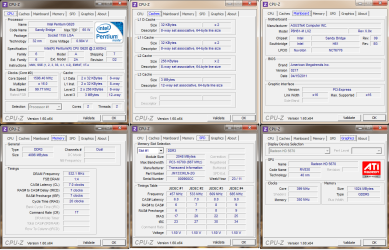
  • cpu-z.png
    cpu-z.png
    68.5 KB · Views: 202

My Computer

Computer Manufacturer/Model Number
Trinty Self Build 2011
OS
Windows 7 Ultimate x64 - Service Pack 1
CPU
Intel(R) Pentium(R) CPU G620 @ 2.60GHz
Motherboard
ASUSTeK Computer INC. P8H61-M LX2
Memory
Transcend Informations - 2*2048GB DDR3 @ 1066MHz
Graphics Card(s)
ATI Radeon HD 5670 - 1024MB DDR5 - Driver : 19.04.2011
Sound Card
AMD High Definition Audio Device
Monitor(s) Displays
SAMSUNG SyncMaster 2220LM 22"
Screen Resolution
1680x1050
Hard Drives
SAMSUNG HD503HI ATA Device - 500GB
PSU
Don't know for now !
Case
Case MSI
Cooling
Stock
Keyboard
MS Industrial 2.4GHz Wirelees Keyboard
Mouse
MS Industrial 2.4GHz Wirelees Optical Mouse
Internet Speed
Download speed : 6,5Mbps / Upload speed : 1Mpbs
Other Info
BIOS version : BIOS Date: 02/05/10 19:13:52 Ver: 08.00.10
Prime95 (4h) : max. 65°C
DirectX 11 version.
Logitech G13 Advanced Gaming Keyboard.
Hello Trinty, welcome to the Forums! First, start out by filling in your system specs, be exact with Manufacturer and model #s(BIOS revision for MOBO also). Even though you have provided a screen shot with some info, we need everything. Second, how much do you want to overclock? Third, what is the primary use of this computer? Fourth, What kind of cooling do you have?

Let us know these things and we can start from there.

Also, some programs you need;
|MG| Prime95 27.4 Download Prime95, for stress testing
Core Temp CoreTemp, for min and max temp monitoring
Download SpeedFan - Access temperature sensor in your computer SpeedFan, for accurate fan and sensor monitoring
 

My Computer

Computer Manufacturer/Model Number
Home Made
OS
Windows 7 Home Premium x64
CPU
Intel 2500k @4.5ghz 66deg max P95/IBT
Motherboard
Gigabyte Z68A-D3-B3
Memory
8 Gigs Patriot Viper 2 Extreme @1600
Graphics Card(s)
EVGA GTX 580 3 GIG 35degrees idle
Sound Card
Nvidia HD audio via HDMI to 7.1 Receiver
Monitor(s) Displays
32" Olevia hdtv
Screen Resolution
1080p
Hard Drives
64gig SSD(OS/Apps)
250gig (Files and Dox)
1tb (imaging and backup)
PSU
Corsair vx550w
Case
Thermaltake V3 black
Cooling
CM 212+(push n pull) 4 case fans
Keyboard
Logitech wireless Combo, G13
Mouse
G300
Internet Speed
40mps
Other Info
Two others up and running; C2D E5200/MSI G41M-P26/Corsair XMS3 8gb/GTS 250 1gb and C2D E8200/xFx 750sli/8gb Corsair Dominator/2x EVGA 550ti
Working on; i2600 Build...
HP DV6
@Work I use a Lenovo 5536B8U + Lenovo U300s
Once you have filled in all of your system specs and given all of the requested information, back up all of your data on your hard drive. It is possible to crash your system while overclocking, so you want to make sure, before you start tweaking, to have everything backed up. After backing up, go ahead and reboot into the BIOS. Select "Load Optimized Defaults", save and exit. After loading into Windows, load CPU-Z, CoreTemp and SpeedFan, then load Prime95 and select "Blend" and start. Let Prime95 run for about 2hrs and at that point take a screen shot with CoreTemp, CPU-Z(main page), and SpeedFan showing, that way we can get a base line to start with.
 

My Computer

Computer Manufacturer/Model Number
Home Made
OS
Windows 7 Home Premium x64
CPU
Intel 2500k @4.5ghz 66deg max P95/IBT
Motherboard
Gigabyte Z68A-D3-B3
Memory
8 Gigs Patriot Viper 2 Extreme @1600
Graphics Card(s)
EVGA GTX 580 3 GIG 35degrees idle
Sound Card
Nvidia HD audio via HDMI to 7.1 Receiver
Monitor(s) Displays
32" Olevia hdtv
Screen Resolution
1080p
Hard Drives
64gig SSD(OS/Apps)
250gig (Files and Dox)
1tb (imaging and backup)
PSU
Corsair vx550w
Case
Thermaltake V3 black
Cooling
CM 212+(push n pull) 4 case fans
Keyboard
Logitech wireless Combo, G13
Mouse
G300
Internet Speed
40mps
Other Info
Two others up and running; C2D E5200/MSI G41M-P26/Corsair XMS3 8gb/GTS 250 1gb and C2D E8200/xFx 750sli/8gb Corsair Dominator/2x EVGA 550ti
Working on; i2600 Build...
HP DV6
@Work I use a Lenovo 5536B8U + Lenovo U300s
Hello Trinty, welcome to the Forums! First, start out by filling in your system specs, be exact with Manufacturer and model #s(BIOS revision for MOBO also). Even though you have provided a screen shot with some info, we need everything. Second, how much do you want to overclock? Third, what is the primary use of this computer? Fourth, What kind of cooling do you have?

Let us know these things and we can start from there.

Also, some programs you need;
|MG| Prime95 27.4 Download Prime95, for stress testing
Core Temp CoreTemp, for min and max temp monitoring
Download SpeedFan - Access temperature sensor in your computer SpeedFan, for accurate fan and sensor monitoring

Once you have filled in all of your system specs and given all of the requested information, back up all of your data on your hard drive. It is possible to crash your system while overclocking, so you want to make sure, before you start tweaking, to have everything backed up. After backing up, go ahead and reboot into the BIOS. Select "Load Optimized Defaults", save and exit. After loading into Windows, load CPU-Z, CoreTemp and SpeedFan, then load Prime95 and select "Blend" and start. Let Prime95 run for about 2hrs and at that point take a screen shot with CoreTemp, CPU-Z(main page), and SpeedFan showing, that way we can get a base line to start with.

I filled my System Specs section but dont have only PSU and Coling. I forgot it :( I only found for my computer case.

Thanks for this info. How can I check PSU and Cooling ??? Are I need to open my computer and look ???

EDIT : I dont want to overclock a lot. Only CPU to 3 or 3,5GHz. I want to learn and try. For PSU, I think I have 400-500W.

Thanks in advance.
Trinty.
 

My Computer

Computer Manufacturer/Model Number
Trinty Self Build 2011
OS
Windows 7 Ultimate x64 - Service Pack 1
CPU
Intel(R) Pentium(R) CPU G620 @ 2.60GHz
Motherboard
ASUSTeK Computer INC. P8H61-M LX2
Memory
Transcend Informations - 2*2048GB DDR3 @ 1066MHz
Graphics Card(s)
ATI Radeon HD 5670 - 1024MB DDR5 - Driver : 19.04.2011
Sound Card
AMD High Definition Audio Device
Monitor(s) Displays
SAMSUNG SyncMaster 2220LM 22"
Screen Resolution
1680x1050
Hard Drives
SAMSUNG HD503HI ATA Device - 500GB
PSU
Don't know for now !
Case
Case MSI
Cooling
Stock
Keyboard
MS Industrial 2.4GHz Wirelees Keyboard
Mouse
MS Industrial 2.4GHz Wirelees Optical Mouse
Internet Speed
Download speed : 6,5Mbps / Upload speed : 1Mpbs
Other Info
BIOS version : BIOS Date: 02/05/10 19:13:52 Ver: 08.00.10
Prime95 (4h) : max. 65°C
DirectX 11 version.
Logitech G13 Advanced Gaming Keyboard.
The PSU information will be on the side of the PSU. Cooling? Well of you don't know what I'm referring to, it's probably stock. You can upload a picture of the inside of your PC
 

My Computer

Computer Manufacturer/Model Number
Home Made
OS
Windows 7 Home Premium x64
CPU
Intel 2500k @4.5ghz 66deg max P95/IBT
Motherboard
Gigabyte Z68A-D3-B3
Memory
8 Gigs Patriot Viper 2 Extreme @1600
Graphics Card(s)
EVGA GTX 580 3 GIG 35degrees idle
Sound Card
Nvidia HD audio via HDMI to 7.1 Receiver
Monitor(s) Displays
32" Olevia hdtv
Screen Resolution
1080p
Hard Drives
64gig SSD(OS/Apps)
250gig (Files and Dox)
1tb (imaging and backup)
PSU
Corsair vx550w
Case
Thermaltake V3 black
Cooling
CM 212+(push n pull) 4 case fans
Keyboard
Logitech wireless Combo, G13
Mouse
G300
Internet Speed
40mps
Other Info
Two others up and running; C2D E5200/MSI G41M-P26/Corsair XMS3 8gb/GTS 250 1gb and C2D E8200/xFx 750sli/8gb Corsair Dominator/2x EVGA 550ti
Working on; i2600 Build...
HP DV6
@Work I use a Lenovo 5536B8U + Lenovo U300s
The PSU information will be on the side of the PSU. Cooling? Well of you don't know what I'm referring to, it's probably stock. You can upload a picture of the inside of your PC

Cooling is stock ! Now I will check PSU.

Some questions about all :

1. Are I need to update BIOS ?
2. Are I need to add anything to my computer ?
3. What when I do all test ?

I added some Reputation to you for now !

Thanks in advance.
Trinty.
 

My Computer

Computer Manufacturer/Model Number
Trinty Self Build 2011
OS
Windows 7 Ultimate x64 - Service Pack 1
CPU
Intel(R) Pentium(R) CPU G620 @ 2.60GHz
Motherboard
ASUSTeK Computer INC. P8H61-M LX2
Memory
Transcend Informations - 2*2048GB DDR3 @ 1066MHz
Graphics Card(s)
ATI Radeon HD 5670 - 1024MB DDR5 - Driver : 19.04.2011
Sound Card
AMD High Definition Audio Device
Monitor(s) Displays
SAMSUNG SyncMaster 2220LM 22"
Screen Resolution
1680x1050
Hard Drives
SAMSUNG HD503HI ATA Device - 500GB
PSU
Don't know for now !
Case
Case MSI
Cooling
Stock
Keyboard
MS Industrial 2.4GHz Wirelees Keyboard
Mouse
MS Industrial 2.4GHz Wirelees Optical Mouse
Internet Speed
Download speed : 6,5Mbps / Upload speed : 1Mpbs
Other Info
BIOS version : BIOS Date: 02/05/10 19:13:52 Ver: 08.00.10
Prime95 (4h) : max. 65°C
DirectX 11 version.
Logitech G13 Advanced Gaming Keyboard.
Well, Trinty, I hate to have to start off like this, but you have a processor that is going to have a lot of limitations with overclocking. To start with, the multiplier is locked on this processor, add to that the fact that SandyBridge processors don't like to have their Bus Frequency changed, and the outcome may be an overall gain of.10-.15ghz of an overclock. You can, however, lower the multiplier, this will allow for a little more flexibility in the clock, but still not much more.
 

My Computer

Computer Manufacturer/Model Number
Home Made
OS
Windows 7 Home Premium x64
CPU
Intel 2500k @4.5ghz 66deg max P95/IBT
Motherboard
Gigabyte Z68A-D3-B3
Memory
8 Gigs Patriot Viper 2 Extreme @1600
Graphics Card(s)
EVGA GTX 580 3 GIG 35degrees idle
Sound Card
Nvidia HD audio via HDMI to 7.1 Receiver
Monitor(s) Displays
32" Olevia hdtv
Screen Resolution
1080p
Hard Drives
64gig SSD(OS/Apps)
250gig (Files and Dox)
1tb (imaging and backup)
PSU
Corsair vx550w
Case
Thermaltake V3 black
Cooling
CM 212+(push n pull) 4 case fans
Keyboard
Logitech wireless Combo, G13
Mouse
G300
Internet Speed
40mps
Other Info
Two others up and running; C2D E5200/MSI G41M-P26/Corsair XMS3 8gb/GTS 250 1gb and C2D E8200/xFx 750sli/8gb Corsair Dominator/2x EVGA 550ti
Working on; i2600 Build...
HP DV6
@Work I use a Lenovo 5536B8U + Lenovo U300s
Well, Trinty, I hate to have to start off like this, but you have a processor that is going to have a lot of limitations with overclocking. To start with, the multiplier is locked on this processor, add to that the fact that SandyBridge processors don't like to have their Bus Frequency changed, and the outcome may be an overall gain of.10-.15ghz of an overclock. You can, however, lower the multiplier, this will allow for a little more flexibility in the clock, but still not much more.

Can I try with lower the multiplier ? One day I will buy new processor, when I learn more about computers, OC and much more :)

Tommorow , I will try to "Load Optimized Defaults" in BIOS and run tests. Then I will post images and we will know can I continue . Is it OK ?

Maybe I cant do high overclock.

One question :
What you think , How much I can overclock my computer ?

Thanks in advance.
Trinty.
 

My Computer

Computer Manufacturer/Model Number
Trinty Self Build 2011
OS
Windows 7 Ultimate x64 - Service Pack 1
CPU
Intel(R) Pentium(R) CPU G620 @ 2.60GHz
Motherboard
ASUSTeK Computer INC. P8H61-M LX2
Memory
Transcend Informations - 2*2048GB DDR3 @ 1066MHz
Graphics Card(s)
ATI Radeon HD 5670 - 1024MB DDR5 - Driver : 19.04.2011
Sound Card
AMD High Definition Audio Device
Monitor(s) Displays
SAMSUNG SyncMaster 2220LM 22"
Screen Resolution
1680x1050
Hard Drives
SAMSUNG HD503HI ATA Device - 500GB
PSU
Don't know for now !
Case
Case MSI
Cooling
Stock
Keyboard
MS Industrial 2.4GHz Wirelees Keyboard
Mouse
MS Industrial 2.4GHz Wirelees Optical Mouse
Internet Speed
Download speed : 6,5Mbps / Upload speed : 1Mpbs
Other Info
BIOS version : BIOS Date: 02/05/10 19:13:52 Ver: 08.00.10
Prime95 (4h) : max. 65°C
DirectX 11 version.
Logitech G13 Advanced Gaming Keyboard.
Well, let's see some baseline numbers first. We need to see where your temperatures are at currently.

But, I think at most, if your current clock is 2.6ghz, you may be able to get up to around 2.9ghz, but that's pushing it.
 

My Computer

Computer Manufacturer/Model Number
Home Made
OS
Windows 7 Home Premium x64
CPU
Intel 2500k @4.5ghz 66deg max P95/IBT
Motherboard
Gigabyte Z68A-D3-B3
Memory
8 Gigs Patriot Viper 2 Extreme @1600
Graphics Card(s)
EVGA GTX 580 3 GIG 35degrees idle
Sound Card
Nvidia HD audio via HDMI to 7.1 Receiver
Monitor(s) Displays
32" Olevia hdtv
Screen Resolution
1080p
Hard Drives
64gig SSD(OS/Apps)
250gig (Files and Dox)
1tb (imaging and backup)
PSU
Corsair vx550w
Case
Thermaltake V3 black
Cooling
CM 212+(push n pull) 4 case fans
Keyboard
Logitech wireless Combo, G13
Mouse
G300
Internet Speed
40mps
Other Info
Two others up and running; C2D E5200/MSI G41M-P26/Corsair XMS3 8gb/GTS 250 1gb and C2D E8200/xFx 750sli/8gb Corsair Dominator/2x EVGA 550ti
Working on; i2600 Build...
HP DV6
@Work I use a Lenovo 5536B8U + Lenovo U300s
But, I think at most, if your current clock is 2.6ghz, you may be able to get up to around 2.9ghz, but that's pushing it.

I wouldn't count on it if this is any indication of how those CPU's respond to overclocking,

Intel Pentium G620 Sandy Bridge 2.6GHz CPU Review - Intel Pentium G620 Overclocking - Legit Reviews

The Pentium G620 also doesn't have Turbo Boost, so the only thing that we can do to really overclock the CPU is to increase the bus frequency. Intel 'Sandy Bridge' processors don't like to have the bus increased much, so overclocking on this processor is going to be rather tough.

and the best I can find here at the moment is a shade of 2700 MHz,

Pentium G620 overclocking

which all things considering wouldn't even be noticeable outside of anything short of the odd benchmark, definitely not enough to warrant the effort of overclocking it.
 

My Computer

Computer type
PC/Desktop
Computer Manufacturer/Model Number
Me
OS
Win 7 Ultimate x64
CPU
FX-8350 @ 4.6 GHz so far
Motherboard
Asus M5A97 EVO
Memory
ADATA XPG V1 Series Black 8GB DDR3 1600
Graphics Card(s)
Sapphire R9 270x Dual-X
Sound Card
Xonar DGX w/ Corsair Vengence 1300
Monitor(s) Displays
Acer S232HL Abid
Screen Resolution
1920x1080
Hard Drives
120 GB OCZ Vertex 3
500 GB Seagate 7200.12
PSU
Antec Earthwatts 650W Green
Case
Antec Three Hundred
Cooling
Cooler Master 212 EVO
Keyboard
Logitech G510
Mouse
Logitech G500s
Internet Speed
35000/3000
I agree completely, that's what I was getting at with the lack of optimism and negative remarks about the processor.

Just not a good potential for overclocking.
 

My Computer

Computer Manufacturer/Model Number
Home Made
OS
Windows 7 Home Premium x64
CPU
Intel 2500k @4.5ghz 66deg max P95/IBT
Motherboard
Gigabyte Z68A-D3-B3
Memory
8 Gigs Patriot Viper 2 Extreme @1600
Graphics Card(s)
EVGA GTX 580 3 GIG 35degrees idle
Sound Card
Nvidia HD audio via HDMI to 7.1 Receiver
Monitor(s) Displays
32" Olevia hdtv
Screen Resolution
1080p
Hard Drives
64gig SSD(OS/Apps)
250gig (Files and Dox)
1tb (imaging and backup)
PSU
Corsair vx550w
Case
Thermaltake V3 black
Cooling
CM 212+(push n pull) 4 case fans
Keyboard
Logitech wireless Combo, G13
Mouse
G300
Internet Speed
40mps
Other Info
Two others up and running; C2D E5200/MSI G41M-P26/Corsair XMS3 8gb/GTS 250 1gb and C2D E8200/xFx 750sli/8gb Corsair Dominator/2x EVGA 550ti
Working on; i2600 Build...
HP DV6
@Work I use a Lenovo 5536B8U + Lenovo U300s
But, I think at most, if your current clock is 2.6ghz, you may be able to get up to around 2.9ghz, but that's pushing it.

I wouldn't count on it if this is any indication of how those CPU's respond to overclocking,

Intel Pentium G620 Sandy Bridge 2.6GHz CPU Review - Intel Pentium G620 Overclocking - Legit Reviews

The Pentium G620 also doesn't have Turbo Boost, so the only thing that we can do to really overclock the CPU is to increase the bus frequency. Intel 'Sandy Bridge' processors don't like to have the bus increased much, so overclocking on this processor is going to be rather tough.
and the best I can find here at the moment is a shade of 2700 MHz,

Pentium G620 overclocking

which all things considering wouldn't even be noticeable outside of anything short of the odd benchmark, definitely not enough to warrant the effort of overclocking it.

I agree completely, that's what I was getting at with the lack of optimism and negative remarks about the processor.

Just not a good potential for overclocking.

OK. Im angry now. I bought processor with max. overclock ever is 2826.2 MHz !!!
I know what you want say. That is good processor for office , films and light 3D games.

I don't want to be more borning.
I have only three questions if you want to answer.

1. Is there any good processor for Overclock around 100$ - 120$ with shipping ?
2. Is overclocking hard ?
3. I dont know anything for overclock. Can I learn basics on it ? In this moment 20 MHz is a lot for me. I know a lot about computers. I have talent for it but never do this.

Sorry if I am boring. I'm only curious :)
Trinty.
 

My Computer

Computer Manufacturer/Model Number
Trinty Self Build 2011
OS
Windows 7 Ultimate x64 - Service Pack 1
CPU
Intel(R) Pentium(R) CPU G620 @ 2.60GHz
Motherboard
ASUSTeK Computer INC. P8H61-M LX2
Memory
Transcend Informations - 2*2048GB DDR3 @ 1066MHz
Graphics Card(s)
ATI Radeon HD 5670 - 1024MB DDR5 - Driver : 19.04.2011
Sound Card
AMD High Definition Audio Device
Monitor(s) Displays
SAMSUNG SyncMaster 2220LM 22"
Screen Resolution
1680x1050
Hard Drives
SAMSUNG HD503HI ATA Device - 500GB
PSU
Don't know for now !
Case
Case MSI
Cooling
Stock
Keyboard
MS Industrial 2.4GHz Wirelees Keyboard
Mouse
MS Industrial 2.4GHz Wirelees Optical Mouse
Internet Speed
Download speed : 6,5Mbps / Upload speed : 1Mpbs
Other Info
BIOS version : BIOS Date: 02/05/10 19:13:52 Ver: 08.00.10
Prime95 (4h) : max. 65°C
DirectX 11 version.
Logitech G13 Advanced Gaming Keyboard.
lol, Trinty, relax bud. Overclocking costs money. Most of us who overclock, have spent thousands of dollars on our systems. You have to keep in mind, it's not just the CPU you have to look at for overclocking, you have to look at the MotherBoard, cooling, case, memory and Power Supply as well.
 

My Computer

Computer Manufacturer/Model Number
Home Made
OS
Windows 7 Home Premium x64
CPU
Intel 2500k @4.5ghz 66deg max P95/IBT
Motherboard
Gigabyte Z68A-D3-B3
Memory
8 Gigs Patriot Viper 2 Extreme @1600
Graphics Card(s)
EVGA GTX 580 3 GIG 35degrees idle
Sound Card
Nvidia HD audio via HDMI to 7.1 Receiver
Monitor(s) Displays
32" Olevia hdtv
Screen Resolution
1080p
Hard Drives
64gig SSD(OS/Apps)
250gig (Files and Dox)
1tb (imaging and backup)
PSU
Corsair vx550w
Case
Thermaltake V3 black
Cooling
CM 212+(push n pull) 4 case fans
Keyboard
Logitech wireless Combo, G13
Mouse
G300
Internet Speed
40mps
Other Info
Two others up and running; C2D E5200/MSI G41M-P26/Corsair XMS3 8gb/GTS 250 1gb and C2D E8200/xFx 750sli/8gb Corsair Dominator/2x EVGA 550ti
Working on; i2600 Build...
HP DV6
@Work I use a Lenovo 5536B8U + Lenovo U300s
lol, Trinty, relax bud. Overclocking costs money. Most of us who overclock, have spent thousands of dollars on our systems. You have to keep in mind, it's not just the CPU you have to look at for overclocking, you have to look at the MotherBoard, cooling, case, memory and Power Supply as well.

I know that. That is expensive hobby. But it's funny experience.
And Im planing to give money on overclocking but later. When I got good
experience and more money. I'm now going to relax.

Thanks for helping. If anyone can answer more , I will not cclose this theard for today.

Trinty. :)
 

My Computer

Computer Manufacturer/Model Number
Trinty Self Build 2011
OS
Windows 7 Ultimate x64 - Service Pack 1
CPU
Intel(R) Pentium(R) CPU G620 @ 2.60GHz
Motherboard
ASUSTeK Computer INC. P8H61-M LX2
Memory
Transcend Informations - 2*2048GB DDR3 @ 1066MHz
Graphics Card(s)
ATI Radeon HD 5670 - 1024MB DDR5 - Driver : 19.04.2011
Sound Card
AMD High Definition Audio Device
Monitor(s) Displays
SAMSUNG SyncMaster 2220LM 22"
Screen Resolution
1680x1050
Hard Drives
SAMSUNG HD503HI ATA Device - 500GB
PSU
Don't know for now !
Case
Case MSI
Cooling
Stock
Keyboard
MS Industrial 2.4GHz Wirelees Keyboard
Mouse
MS Industrial 2.4GHz Wirelees Optical Mouse
Internet Speed
Download speed : 6,5Mbps / Upload speed : 1Mpbs
Other Info
BIOS version : BIOS Date: 02/05/10 19:13:52 Ver: 08.00.10
Prime95 (4h) : max. 65°C
DirectX 11 version.
Logitech G13 Advanced Gaming Keyboard.
1. Is there any good processor for Overclock around 100$ - 120$ with shipping ?
2. Is overclocking hard ?
3. I dont know anything for overclock. Can I learn basics on it ? In this moment 20 MHz is a lot for me. I know a lot about computers. I have talent for it but never do this.

Sorry if I am boring. I'm only curious :)
Trinty.
1. As I already told you, it's not just the CPU that you have to take into consideration when overclocking. And to further answer your question, for the motherboard(socket type) you have, you cannot get an overclockable cpu for that price point.
2. Overclocking is easy, once you have the right tools, money and knowledge.
3. Yes, you can go to www.overclock.net and read all you could possibly ever want to know about overclocking.

James
 

My Computer

Computer Manufacturer/Model Number
Home Made
OS
Windows 7 Home Premium x64
CPU
Intel 2500k @4.5ghz 66deg max P95/IBT
Motherboard
Gigabyte Z68A-D3-B3
Memory
8 Gigs Patriot Viper 2 Extreme @1600
Graphics Card(s)
EVGA GTX 580 3 GIG 35degrees idle
Sound Card
Nvidia HD audio via HDMI to 7.1 Receiver
Monitor(s) Displays
32" Olevia hdtv
Screen Resolution
1080p
Hard Drives
64gig SSD(OS/Apps)
250gig (Files and Dox)
1tb (imaging and backup)
PSU
Corsair vx550w
Case
Thermaltake V3 black
Cooling
CM 212+(push n pull) 4 case fans
Keyboard
Logitech wireless Combo, G13
Mouse
G300
Internet Speed
40mps
Other Info
Two others up and running; C2D E5200/MSI G41M-P26/Corsair XMS3 8gb/GTS 250 1gb and C2D E8200/xFx 750sli/8gb Corsair Dominator/2x EVGA 550ti
Working on; i2600 Build...
HP DV6
@Work I use a Lenovo 5536B8U + Lenovo U300s
1. Is there any good processor for Overclock around 100$ - 120$ with shipping ?
2. Is overclocking hard ?
3. I dont know anything for overclock. Can I learn basics on it ? In this moment 20 MHz is a lot for me. I know a lot about computers. I have talent for it but never do this.

Sorry if I am boring. I'm only curious :)
Trinty.
1. As I already told you, it's not just the CPU that you have to take into consideration when overclocking. And to further answer your question, for the motherboard(socket type) you have, you cannot get an overclockable cpu for that price point.
2. Overclocking is easy, once you have the right tools, money and knowledge.
3. Yes, you can go to www.overclock.net and read all you could possibly ever want to know about overclocking.

James

Thanks all who helped me.

Problem SLOVED for now !!!

Thanks to James7679. He helped me a lot.
Trinty.
 

My Computer

Computer Manufacturer/Model Number
Trinty Self Build 2011
OS
Windows 7 Ultimate x64 - Service Pack 1
CPU
Intel(R) Pentium(R) CPU G620 @ 2.60GHz
Motherboard
ASUSTeK Computer INC. P8H61-M LX2
Memory
Transcend Informations - 2*2048GB DDR3 @ 1066MHz
Graphics Card(s)
ATI Radeon HD 5670 - 1024MB DDR5 - Driver : 19.04.2011
Sound Card
AMD High Definition Audio Device
Monitor(s) Displays
SAMSUNG SyncMaster 2220LM 22"
Screen Resolution
1680x1050
Hard Drives
SAMSUNG HD503HI ATA Device - 500GB
PSU
Don't know for now !
Case
Case MSI
Cooling
Stock
Keyboard
MS Industrial 2.4GHz Wirelees Keyboard
Mouse
MS Industrial 2.4GHz Wirelees Optical Mouse
Internet Speed
Download speed : 6,5Mbps / Upload speed : 1Mpbs
Other Info
BIOS version : BIOS Date: 02/05/10 19:13:52 Ver: 08.00.10
Prime95 (4h) : max. 65°C
DirectX 11 version.
Logitech G13 Advanced Gaming Keyboard.
Hello SF members.

Note : For just little more I will open this topic again. That is because , I have some questions about all.

After I relaxed and played some sports I backed here with some questions about my computer. I don't want to open new topic. I want to have all on one place.

Today , I downloaded :
1. Latest version of CPU-Z
2. SpeedFan
3. CoreTemp
and Prime95.
After this I made backup and I rebooted computer to BIOS and selected "Load Optimized Defaults". Next was Save and Reboot. I didnt had any problems with starting Windows.

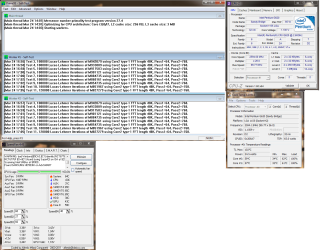
When my Windows loaded, I close some Gaming Apps ( I use it very rarely ) and started Prime95 (with Blend settings) , CoreTemp , SpeedFan and CPU-Z. I wanted to do some tests on my computer.

Ok, I want anyone who know to read this , to look at my results.
Results attached. There is two pictures :
1. Prime95BS - While testing.
2. Prime95AS - After Stop , When I stoped this app.

Questions :
1. Is results good ?
2. Is there anything what I need better like Cooling, PSU or etc. (I already know for processor) ?
3. Is Water Cooling for PC good or there is better ?


That's all (for now) from one curious person , how want to know all about computers and to explore it :p
Thanks in advance.
Trinty.
 

Attachments

  • Prime95BS.png
    Prime95BS.png
    75.3 KB · Views: 34
  • Prime95AS.png
    Prime95AS.png
    227.5 KB · Views: 30

My Computer

Computer Manufacturer/Model Number
Trinty Self Build 2011
OS
Windows 7 Ultimate x64 - Service Pack 1
CPU
Intel(R) Pentium(R) CPU G620 @ 2.60GHz
Motherboard
ASUSTeK Computer INC. P8H61-M LX2
Memory
Transcend Informations - 2*2048GB DDR3 @ 1066MHz
Graphics Card(s)
ATI Radeon HD 5670 - 1024MB DDR5 - Driver : 19.04.2011
Sound Card
AMD High Definition Audio Device
Monitor(s) Displays
SAMSUNG SyncMaster 2220LM 22"
Screen Resolution
1680x1050
Hard Drives
SAMSUNG HD503HI ATA Device - 500GB
PSU
Don't know for now !
Case
Case MSI
Cooling
Stock
Keyboard
MS Industrial 2.4GHz Wirelees Keyboard
Mouse
MS Industrial 2.4GHz Wirelees Optical Mouse
Internet Speed
Download speed : 6,5Mbps / Upload speed : 1Mpbs
Other Info
BIOS version : BIOS Date: 02/05/10 19:13:52 Ver: 08.00.10
Prime95 (4h) : max. 65°C
DirectX 11 version.
Logitech G13 Advanced Gaming Keyboard.
Back
Top