Belkin usb G f5d7051

sion

New member
Local time
12:48 PM
Messages
16
Location
England
Hey,

i updated my pc from vista to windows 7 yesterday, when i had vista my internet work perfectly!! never a problem... but when i installed belkin software off the disk that it came up with, plug your usb in.... so i did, but after a 10min wait, nothing happend. i have uninstalled and tryed again, but no luck.... still the same problem..
any one know any good ideas to get the wireless usb working?
running on windows 7 32bit

Thanks :D
 

My Computer My Computer

At a glance

Windows 7 32bit3gb ram512 Gigabyte
Computer Manufacturer/Model Number
Icute :)
OS
Windows 7 32bit
Motherboard
Intell...
Memory
3gb ram
Graphics Card(s)
512 Gigabyte
Sound Card
Standard
Monitor(s) Displays
Flatron W1934S
Case
Icute
Cooling
Air/
Keyboard
logitech
Mouse
logitech
thanks,,, but still, i cannot get it to work.. thats just telling me that it will work,, but i cant get it to :(
 

My Computer My Computer

At a glance

Windows 7 32bit3gb ram512 Gigabyte
Computer Manufacturer/Model Number
Icute :)
OS
Windows 7 32bit
Motherboard
Intell...
Memory
3gb ram
Graphics Card(s)
512 Gigabyte
Sound Card
Standard
Monitor(s) Displays
Flatron W1934S
Case
Icute
Cooling
Air/
Keyboard
logitech
Mouse
logitech
anyone got any ideas?
 

My Computer My Computer

At a glance

Windows 7 32bit3gb ram512 Gigabyte
Computer Manufacturer/Model Number
Icute :)
OS
Windows 7 32bit
Motherboard
Intell...
Memory
3gb ram
Graphics Card(s)
512 Gigabyte
Sound Card
Standard
Monitor(s) Displays
Flatron W1934S
Case
Icute
Cooling
Air/
Keyboard
logitech
Mouse
logitech
Does it work if you hardwire the system into the router?
 

My Computer My Computer

At a glance

Windows 7 x64 HP, Windows 7 HP, Windows 7 UltIntel I3, Cerelon, Pentium 4 @ 3Ghz8G, 3G, 3GOn-board Intel, On-board nVidia, nVIDIA card
Computer Manufacturer/Model Number
Gateway, Toshiba Laptop, and Home Brew
OS
Windows 7 x64 HP, Windows 7 HP, Windows 7 Ult
CPU
Intel I3, Cerelon, Pentium 4 @ 3Ghz
Motherboard
Intel, Intel, Asus
Memory
8G, 3G, 3G
Graphics Card(s)
On-board Intel, On-board nVidia, nVIDIA card
Sound Card
on-board, on-board, SoundBlaster
Monitor(s) Displays
Hannspree HF237, Toshiba, SyncMaster 931B
Screen Resolution
default (all)
Hard Drives
1T internal, 320G internal, 160G internal, 1T networked
PSU
300w, unk, 650w
Case
black, black, grey
Cooling
air (all)
Keyboard
standard wired (all)
Mouse
standard wired (all)
Internet Speed
6M down, 768K up
Other Info
Home LAN through Linksys hub to 4 port and wireless switch/router. Networked HP 2600n. Wife's computer running Windows 7, and spare laptop running Ubuntu "Karmic Kola" (9.10).
yes thats how i get on the internet, but i had to move my pc to get to the box, its a netgear box, but never had anyproblems on vista with it... i tryed again, and it said it will actavate the driver one the usb has been pluged in... but it was plugged in?
 

My Computer My Computer

At a glance

Windows 7 32bit3gb ram512 Gigabyte
Computer Manufacturer/Model Number
Icute :)
OS
Windows 7 32bit
Motherboard
Intell...
Memory
3gb ram
Graphics Card(s)
512 Gigabyte
Sound Card
Standard
Monitor(s) Displays
Flatron W1934S
Case
Icute
Cooling
Air/
Keyboard
logitech
Mouse
logitech
When the USB is plugged in, you should get a notification that Windows has recognized it. At that point, Windows should try to load a driver, and, if it cannot, it should pop up a message that it cannot find the driver. Is that what is happening?

Also, go into the hardware listing and check to see if there is a yellow triangle next to the USB hub. (Control Panel - Small Icons - System - Advanced System Settings on the left side - Hardware - Device Manager)
 

My Computer My Computer

At a glance

Windows 7 x64 HP, Windows 7 HP, Windows 7 UltIntel I3, Cerelon, Pentium 4 @ 3Ghz8G, 3G, 3GOn-board Intel, On-board nVidia, nVIDIA card
Computer Manufacturer/Model Number
Gateway, Toshiba Laptop, and Home Brew
OS
Windows 7 x64 HP, Windows 7 HP, Windows 7 Ult
CPU
Intel I3, Cerelon, Pentium 4 @ 3Ghz
Motherboard
Intel, Intel, Asus
Memory
8G, 3G, 3G
Graphics Card(s)
On-board Intel, On-board nVidia, nVIDIA card
Sound Card
on-board, on-board, SoundBlaster
Monitor(s) Displays
Hannspree HF237, Toshiba, SyncMaster 931B
Screen Resolution
default (all)
Hard Drives
1T internal, 320G internal, 160G internal, 1T networked
PSU
300w, unk, 650w
Case
black, black, grey
Cooling
air (all)
Keyboard
standard wired (all)
Mouse
standard wired (all)
Internet Speed
6M down, 768K up
Other Info
Home LAN through Linksys hub to 4 port and wireless switch/router. Networked HP 2600n. Wife's computer running Windows 7, and spare laptop running Ubuntu "Karmic Kola" (9.10).
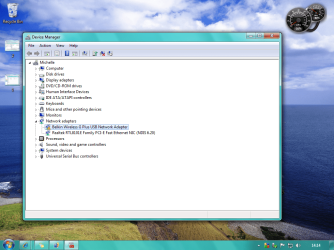
No... when i plug it in, it comes up with the sound to say it has been pluged in, but no driver install...if i press scan for hardware changes it does but fails. i went to device manager, it has got the triangle, tryed updateing it but it failed
 

My Computer My Computer

At a glance

Windows 7 32bit3gb ram512 Gigabyte
Computer Manufacturer/Model Number
Icute :)
OS
Windows 7 32bit
Motherboard
Intell...
Memory
3gb ram
Graphics Card(s)
512 Gigabyte
Sound Card
Standard
Monitor(s) Displays
Flatron W1934S
Case
Icute
Cooling
Air/
Keyboard
logitech
Mouse
logitech
OK. Right click on the device with the yellow triangle, go to "Update driver", select "Browse my computer for software driver" and there are two choices.

The first is to put in a path to where the driver software is located - find where Belkin loaded the driver (there should be an ".inf" file in there.) The drivers probably are under Program files\Belkin, or some such. See if that works.

If that didn't work, select "Let me pick from a list of device drivers". I just click next at that point, and click "Have disk" and then point it to the CD/DVD drive and put in the driver disk.
 

My Computer My Computer

At a glance

Windows 7 x64 HP, Windows 7 HP, Windows 7 UltIntel I3, Cerelon, Pentium 4 @ 3Ghz8G, 3G, 3GOn-board Intel, On-board nVidia, nVIDIA card
Computer Manufacturer/Model Number
Gateway, Toshiba Laptop, and Home Brew
OS
Windows 7 x64 HP, Windows 7 HP, Windows 7 Ult
CPU
Intel I3, Cerelon, Pentium 4 @ 3Ghz
Motherboard
Intel, Intel, Asus
Memory
8G, 3G, 3G
Graphics Card(s)
On-board Intel, On-board nVidia, nVIDIA card
Sound Card
on-board, on-board, SoundBlaster
Monitor(s) Displays
Hannspree HF237, Toshiba, SyncMaster 931B
Screen Resolution
default (all)
Hard Drives
1T internal, 320G internal, 160G internal, 1T networked
PSU
300w, unk, 650w
Case
black, black, grey
Cooling
air (all)
Keyboard
standard wired (all)
Mouse
standard wired (all)
Internet Speed
6M down, 768K up
Other Info
Home LAN through Linksys hub to 4 port and wireless switch/router. Networked HP 2600n. Wife's computer running Windows 7, and spare laptop running Ubuntu "Karmic Kola" (9.10).
not worked.

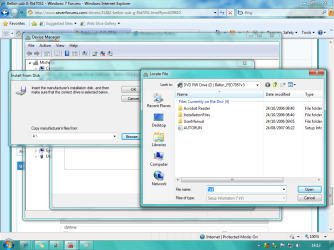
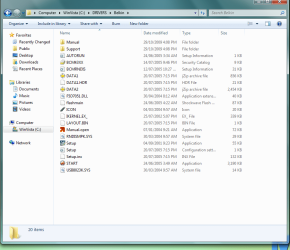
first of all there is no inf file in /programs/belkin Attachment 1

second of all... i cannot load just the disk it opens what is inside the disk, number 2
 

Attachments

  • 1.png
    1.png
    76.7 KB · Views: 155
  • 2.png
    2.png
    91.6 KB · Views: 223
  • 3.png
    3.png
    166.3 KB · Views: 265

My Computer My Computer

At a glance

Windows 7 32bit3gb ram512 Gigabyte
Computer Manufacturer/Model Number
Icute :)
OS
Windows 7 32bit
Motherboard
Intell...
Memory
3gb ram
Graphics Card(s)
512 Gigabyte
Sound Card
Standard
Monitor(s) Displays
Flatron W1934S
Case
Icute
Cooling
Air/
Keyboard
logitech
Mouse
logitech
The ".inf" file should be in the Installation Files folder on the DVD (picture 2). You don't have to specify the file type, it will be the only one that the installer will look for.
 

My Computer My Computer

At a glance

Windows 7 x64 HP, Windows 7 HP, Windows 7 UltIntel I3, Cerelon, Pentium 4 @ 3Ghz8G, 3G, 3GOn-board Intel, On-board nVidia, nVIDIA card
Computer Manufacturer/Model Number
Gateway, Toshiba Laptop, and Home Brew
OS
Windows 7 x64 HP, Windows 7 HP, Windows 7 Ult
CPU
Intel I3, Cerelon, Pentium 4 @ 3Ghz
Motherboard
Intel, Intel, Asus
Memory
8G, 3G, 3G
Graphics Card(s)
On-board Intel, On-board nVidia, nVIDIA card
Sound Card
on-board, on-board, SoundBlaster
Monitor(s) Displays
Hannspree HF237, Toshiba, SyncMaster 931B
Screen Resolution
default (all)
Hard Drives
1T internal, 320G internal, 160G internal, 1T networked
PSU
300w, unk, 650w
Case
black, black, grey
Cooling
air (all)
Keyboard
standard wired (all)
Mouse
standard wired (all)
Internet Speed
6M down, 768K up
Other Info
Home LAN through Linksys hub to 4 port and wireless switch/router. Networked HP 2600n. Wife's computer running Windows 7, and spare laptop running Ubuntu "Karmic Kola" (9.10).
Here is my problem and how I got it to work:

System: Windows 7 32 bit
Problem: Belkin F5D7051 not working. Can't find drivers, tried from the CD and drivers from Belkin website.

Solution:
First I downloaded the driver for my FD57051:
http://cache-www.belkin.com/support/dl/f5d7051.exe

(Not sure how I found that file actually. By going to the F5D7051 support site I can't find any drivers. I did find it somehow, but not where, so I just give you the direct link instead)

I ran the executable and let it extract all the files. Here the Belkin install tool started.
Instead of running the installation, I clicked on "Manual". Not to see the manual, but to find the place where the Winzip extraction put the files.

For me this was here: C:\User\Username\AppData\Local\Temp\WZSE2.TMP\manual

A window with that adress opened up. I went back one folder to the WZSE2.TMP folder and found the rest of the installation files. I copied the entire folder and put in into my C:\Drivers folder for keeping and easier access.

From there I went to Device Manager, chose Update Driver Manually, selected the folder I'd copied the content to. The AppData folder is normally hidden, so you don't find it at once by browsing with the Device Manager. Chose the folder with the installation files and clicked Next.

Installation completed successfully and I was online in a matter of 10 seconds. Hope this helps!
 

My Computer My Computer

At a glance

Windows XP, Vista, 7
OS
Windows XP, Vista, 7
THANK YOU VERY MUCH!!!!!ZEPH, AND the scaft!! that worked... thank you very much! you have saved me 30£ to go buy a new one and hastle!! thank you
 

My Computer My Computer

At a glance

Windows 7 32bit3gb ram512 Gigabyte
Computer Manufacturer/Model Number
Icute :)
OS
Windows 7 32bit
Motherboard
Intell...
Memory
3gb ram
Graphics Card(s)
512 Gigabyte
Sound Card
Standard
Monitor(s) Displays
Flatron W1934S
Case
Icute
Cooling
Air/
Keyboard
logitech
Mouse
logitech
Here is my problem and how I got it to work:

System: Windows 7 32 bit
Problem: Belkin F5D7051 not working. Can't find drivers, tried from the CD and drivers from Belkin website.

Solution:
First I downloaded the driver for my FD57051:
http://cache-www.belkin.com/support/dl/f5d7051.exe

(Not sure how I found that file actually. By going to the F5D7051 support site I can't find any drivers. I did find it somehow, but not where, so I just give you the direct link instead)

I ran the executable and let it extract all the files. Here the Belkin install tool started.
Instead of running the installation, I clicked on "Manual". Not to see the manual, but to find the place where the Winzip extraction put the files.

For me this was here: C:\User\Username\AppData\Local\Temp\WZSE2.TMP\manual

A window with that adress opened up. I went back one folder to the WZSE2.TMP folder and found the rest of the installation files. I copied the entire folder and put in into my C:\Drivers folder for keeping and easier access.

From there I went to Device Manager, chose Update Driver Manually, selected the folder I'd copied the content to. The AppData folder is normally hidden, so you don't find it at once by browsing with the Device Manager. Chose the folder with the installation files and clicked Next.

Installation completed successfully and I was online in a matter of 10 seconds. Hope this helps!

Welcome to Seven Forums, Zeph, and thanks for helping out with your very first post!
 

My Computer My Computer

At a glance

Windows 7 x64 HP, Windows 7 HP, Windows 7 UltIntel I3, Cerelon, Pentium 4 @ 3Ghz8G, 3G, 3GOn-board Intel, On-board nVidia, nVIDIA card
Computer Manufacturer/Model Number
Gateway, Toshiba Laptop, and Home Brew
OS
Windows 7 x64 HP, Windows 7 HP, Windows 7 Ult
CPU
Intel I3, Cerelon, Pentium 4 @ 3Ghz
Motherboard
Intel, Intel, Asus
Memory
8G, 3G, 3G
Graphics Card(s)
On-board Intel, On-board nVidia, nVIDIA card
Sound Card
on-board, on-board, SoundBlaster
Monitor(s) Displays
Hannspree HF237, Toshiba, SyncMaster 931B
Screen Resolution
default (all)
Hard Drives
1T internal, 320G internal, 160G internal, 1T networked
PSU
300w, unk, 650w
Case
black, black, grey
Cooling
air (all)
Keyboard
standard wired (all)
Mouse
standard wired (all)
Internet Speed
6M down, 768K up
Other Info
Home LAN through Linksys hub to 4 port and wireless switch/router. Networked HP 2600n. Wife's computer running Windows 7, and spare laptop running Ubuntu "Karmic Kola" (9.10).
Many thanks to Zeph - followed your post and the Belkin F5D7051 is now working fine on W7.
Cheers mate :D
MJW
 

My Computer My Computer

At a glance

Windows 7 / XP / Ubuntu 8.04
OS
Windows 7 / XP / Ubuntu 8.04
I followed all those steps and still no luck I may be doing it wrong as Im not sure when to plug the adapter in.....if I dont plug it in the adapter doesnt show up in device manager and when I do it shows up in other devices not the network adapters!!!


I did it thankyou so much zeph....awesome :)
 
Last edited:

My Computer My Computer

At a glance

windows 7 64 bit
OS
windows 7 64 bit
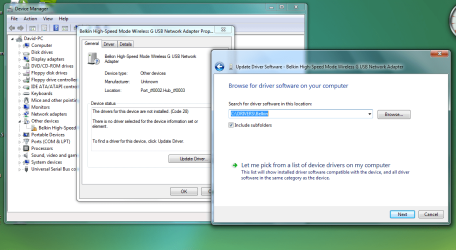
From there I went to Device Manager, chose Update Driver Manually, selected the folder I'd copied the content to. The AppData folder is normally hidden, so you don't find it at once by browsing with the Device Manager. Chose the folder with the installation files and clicked Next.

Hi, i followed these steps but when i got to the part of finding the file using Update Driver all i got in return is a message saying "Windows could not find driver software" however i have followed the instructions, so it should work!!

Help please - Dave

Screen shots -
 

Attachments

  • Capture 0.PNG
    Capture 0.PNG
    46.6 KB · Views: 291
  • Capture.PNG
    Capture.PNG
    87.8 KB · Views: 334
  • Capture 2.PNG
    Capture 2.PNG
    87.3 KB · Views: 272

My Computer My Computer

At a glance

Windows 7
OS
Windows 7
I'm having exactly the same issues as the post above. My Windows 7 is 64 bit, could this be the problem?

Belkin seem pretty useless, maybe i need a new wireless adapter?

Help would be appreciated.

Thanks, RichD
 

My Computer My Computer

At a glance

Windows 7 64
OS
Windows 7 64
j'ai le driver qui fonctionne avec seven. Pour ceux qui le veulle je l'envoie par mail
 

My Computer My Computer

At a glance

sevenP4 3G° dual core4 G°Nvidia 96 GT 1G°
OS
seven
CPU
P4 3G° dual core
Motherboard
EP45-UD3P
Memory
4 G°
Graphics Card(s)
Nvidia 96 GT 1G°
Monitor(s) Displays
Nfren 18", Samsung 225BW
Hard Drives
Maxtor 350 G°, Samsung 500 G°
Cooling
Cool Master
j'ai le driver qui fonctionne avec seven. Pour ceux qui le veux je l'envoie par mail
 

My Computer My Computer

At a glance

sevenP4 3G° dual core4 G°Nvidia 96 GT 1G°
OS
seven
CPU
P4 3G° dual core
Motherboard
EP45-UD3P
Memory
4 G°
Graphics Card(s)
Nvidia 96 GT 1G°
Monitor(s) Displays
Nfren 18", Samsung 225BW
Hard Drives
Maxtor 350 G°, Samsung 500 G°
Cooling
Cool Master
Back
Top