belkin wireless g adapter unknown device

betg1492

New member
Local time
1:21 AM
Messages
8
so i have searched the internet back and forth for an answer to this so i thought i would ask here! So i have an Belkin wireless g adapter f5d7050 version 4XXX drivers i have two computers one is a desktop and another a laptop both running windows 7 64 bit home premium! i plug in the adapter on my desktop it said cannot load drivers on WLAN 2.0 i install the drivers and restart and it works perfectly! Not the case with my laptop i plug it in it says can not find drivers for unknown device! I load the drivers and restart and nothing still the same message i go to device manager and there it is unknown device under universal serial buss controllers! so the device works that i know so does anyone know what the problem is?
 

My Computer

OS
windows 7 64 bit
Welcome to the Seven forums.

On the laptop, find the folder in the applicable program files area
Belkin\USB F5D7050\Wireless Utility\Win7_32 (probably Win7_64 for you)

Double click on InstallDriver.exe and see if that works for you.

If that fails, you can contact Belkin directly:
Belkin : Support : Support Options
 

My Computer

Computer type
Laptop
Computer Manufacturer/Model Number
Employer provided Dell Latitude
OS
W7 Pro SP1 64bit
CPU
i7
Memory
8GB
Graphics Card(s)
Intel HD Graphics
Hard Drives
crappy SSD
Antivirus
Employer mandated Symantec Endpoint Protection
Browser
Pale Moon 64bit, IE11 64bit & Chrome 64bit
i did that a cmd screen quickly popped up and went away! i have been in a live chat for 3 hours with belkin and they are blaming my laptop ports but that is not the case since every usb device i use does not have this problem!
 

My Computer

OS
windows 7 64 bit
The cmd window flashes by for me too.

You can try this:
Remove the USB Wireless adapter from the laptop.
Uninstall the Belkin drivers (program?)
Restart the laptop

Use USBDeview to remove each entry that shows Belkin
(There might only be one or maybe none.)
Restart the laptop if you removed anything

Reinstall the Belkin drivers.
Attach the USB Wireless adapter only after the install program asks for it.
 

My Computer

Computer type
Laptop
Computer Manufacturer/Model Number
Employer provided Dell Latitude
OS
W7 Pro SP1 64bit
CPU
i7
Memory
8GB
Graphics Card(s)
Intel HD Graphics
Hard Drives
crappy SSD
Antivirus
Employer mandated Symantec Endpoint Protection
Browser
Pale Moon 64bit, IE11 64bit & Chrome 64bit
okay well i ran into an issue my laptop recognizes the adapter as an "unknown device" so there was no belkin to remove in the USBDeview anyways i just removed all the unknown devices from there and the ones that were important just re installed themselves! anyways before i get on to much of a ramble here i realized something on my desktop when windows tried to install the drivers it said that the WLAN 2.0 drivers could not be found on my laptop it says unknown device drivers could not be found dont know if this will help or not but thought i would put the info out there! btw the USBD method did not work still unknown device
 

My Computer

OS
windows 7 64 bit

My Computer

Computer type
Laptop
Computer Manufacturer/Model Number
Employer provided Dell Latitude
OS
W7 Pro SP1 64bit
CPU
i7
Memory
8GB
Graphics Card(s)
Intel HD Graphics
Hard Drives
crappy SSD
Antivirus
Employer mandated Symantec Endpoint Protection
Browser
Pale Moon 64bit, IE11 64bit & Chrome 64bit

My Computer

Computer type
Laptop
Computer Manufacturer/Model Number
Employer provided Dell Latitude
OS
W7 Pro SP1 64bit
CPU
i7
Memory
8GB
Graphics Card(s)
Intel HD Graphics
Hard Drives
crappy SSD
Antivirus
Employer mandated Symantec Endpoint Protection
Browser
Pale Moon 64bit, IE11 64bit & Chrome 64bit
Okay - one last straw to grasp at:
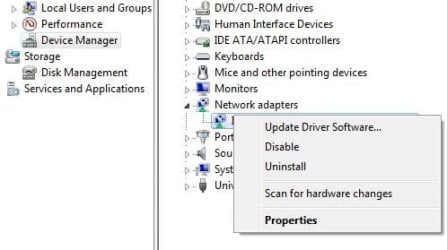
Go into device manager and right click on that unknown USB device
What are the options on the context menu?
 

My Computer

Computer type
Laptop
Computer Manufacturer/Model Number
Employer provided Dell Latitude
OS
W7 Pro SP1 64bit
CPU
i7
Memory
8GB
Graphics Card(s)
Intel HD Graphics
Hard Drives
crappy SSD
Antivirus
Employer mandated Symantec Endpoint Protection
Browser
Pale Moon 64bit, IE11 64bit & Chrome 64bit
well here is the weird thing i went to my college and tried all the computers in the computer lab and it showed up as wlan 2.0 but only on my laptop does it say unknown device! i dont know if this will help but i thought i would put this in!
 

My Computer

OS
windows 7 64 bit
When you get a chance - let me know what you find from this post.
 

My Computer

Computer type
Laptop
Computer Manufacturer/Model Number
Employer provided Dell Latitude
OS
W7 Pro SP1 64bit
CPU
i7
Memory
8GB
Graphics Card(s)
Intel HD Graphics
Hard Drives
crappy SSD
Antivirus
Employer mandated Symantec Endpoint Protection
Browser
Pale Moon 64bit, IE11 64bit & Chrome 64bit
general driver and details along with an error code 43
 

My Computer

OS
windows 7 64 bit
Okay - one last straw to grasp at:
Go into device manager and right click on that unknown USB device
What are the options on the context menu?

general driver and details along with an error code 43

I'm sorry that I was not clear. The context menu is the options that comes up when you first right click on the item of interest.

I was wondering what the context menu shows once you right click on the unknown USB device entry within the device manager. I do not have such an entry so I'm guessing that my menu will not be the same as the one that you see.

USB.JPG

What I was hoping to do - was to try something like the option to "Update Driver Software" [not sure if you will have that option]. Then find a step that lets you point it to the folder where that INF file is. You might end up just like you did on step 11 of that tutorial, but I thought it was worth a try.
 

My Computer

Computer type
Laptop
Computer Manufacturer/Model Number
Employer provided Dell Latitude
OS
W7 Pro SP1 64bit
CPU
i7
Memory
8GB
Graphics Card(s)
Intel HD Graphics
Hard Drives
crappy SSD
Antivirus
Employer mandated Symantec Endpoint Protection
Browser
Pale Moon 64bit, IE11 64bit & Chrome 64bit
when i try to install the inf it says it is not a valid x64 driver
 

My Computer

OS
windows 7 64 bit
Just out of curiosity, is the path to that inf:
....Belkin\USB F5D7050\Wireless Utility\Win7_64
or
....Belkin\USB F5D7050\Wireless Utility\Win7_32
 

My Computer

Computer type
Laptop
Computer Manufacturer/Model Number
Employer provided Dell Latitude
OS
W7 Pro SP1 64bit
CPU
i7
Memory
8GB
Graphics Card(s)
Intel HD Graphics
Hard Drives
crappy SSD
Antivirus
Employer mandated Symantec Endpoint Protection
Browser
Pale Moon 64bit, IE11 64bit & Chrome 64bit
Back
Top