Best Fan Setup?

monster528

New member
Member
VIP
Local time
3:18 PM
Messages
106
i built my own computer recently and i understand for the best temperature control that i should make a single stream of air go one way through my computer case, but im not sure what the most effective way to go is

i have 1 back 120mm fan, 1 front 120mm fan, 2 side 120mm fans, and 1 top 140mm fan

what is the best way to cool my system? im not sure what i should do with the side fans and the top fan at all

as for the back and front fans, which way should i make the air go in and go out for the best result? out of the back (towards my CPU) or out the front (towards my Hard drive)?
 

My Computer

Computer type
PC/Desktop
OS
Windows 7 64 Bit
CPU
Intel Core i5 4670K 3.4GHz Socket LGA 1150
Motherboard
MSI Z87-G41 PC Mate Socket LGA 1150 ATX Intel Motherboard
Memory
8GB
Graphics Card(s)
ATI HD 6950
Sound Card
ASUS GTX760-DC2OC-2GD5
Hard Drives
1TB
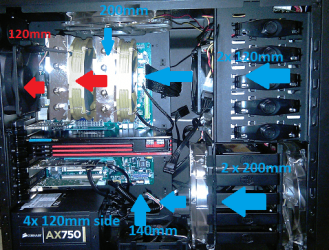
Here's what works best for me. It builds up good air pressure and exhausts out the back

airflow.png
 

My Computer

Computer Manufacturer/Model Number
tw33k
OS
Windows 7 Ultimate (x64) SP1
CPU
Intel 3770k 4.6GHz
Motherboard
ASUS Maximus V Formula
Memory
8GB (2x 4GB) Crucial Ballistix
Graphics Card(s)
Sapphire 7950 (1060/1600)
Sound Card
On Board Realtek HD Audio
Monitor(s) Displays
27" Acer B273HU (via HDMI)
Screen Resolution
2048 x 1152
Hard Drives
Crucial M4 128GB
2TB WD Black
1TB Samsung F3 SATA
1TB WD Elite External
2TB WD USB 3.0
PSU
Corsair AX750 Gold
Case
Corsair Obsidian 800DW
Cooling
Corsair H100 (2x AP-121/2x UK-3000 push/pull)
Keyboard
Microsoft Wireless 5000
Mouse
Microsoft Wireless 5000
Internet Speed
5mb/s
Other Info
Logitech z-2300 2.1 speakers
Lamptron FC-5 v2
Here's what works best for me. It builds up good air pressure and exhausts out the back

View attachment 157157

thats what i was thinking, but is the back fan strong enough to push out all the air? basically its a single fan moving all the air out. would it be better to put a stronger fan on the back?
 

My Computer

Computer type
PC/Desktop
OS
Windows 7 64 Bit
CPU
Intel Core i5 4670K 3.4GHz Socket LGA 1150
Motherboard
MSI Z87-G41 PC Mate Socket LGA 1150 ATX Intel Motherboard
Memory
8GB
Graphics Card(s)
ATI HD 6950
Sound Card
ASUS GTX760-DC2OC-2GD5
Hard Drives
1TB
I agree. You should change the direction of the top fan so that it exhausts air out. Hot air naturally rises, so why would you want to force it back down? As regards correct airflow, my understanding of it is that it should be balanced, and in your case it very clearly is not. Fans should not be used to force air through a system, rather they should be used to assist the natural flow of air through it. A quick test of its effectiveness is to feel the temperature of the air from your exhaust fan with your hand, or measure it with a suitable thermometer, after several hours of running. Mine feels quite cool, but if it feels warm or even hot, then I would check the cooling arrangement and fan location/orientation/speed and make suitable changes so that the temperature of exhausted air is no longer excessive.

A simple analogy to your situation is a funnel. This has a wide reservoir that you pour water into, and a narrow spout from which it comes out. Upto a certain flow rate, water is able to leave through the spout at the same rate as what it enters the funnel at the other side. This is what you're aiming for. However, if you increase the speed at which water is poured into the spout, there comes a point where the flow balance is such that, although water is coming through the spout at a steady rate, it is no longer fast enough to stop a build up of water in the main body of the funnel. With a funnel, this simply needs to water overflowing. With air, as in the case of computer cooling, this leads to a rise in temperature as the air molecules are forced into a much tighter space than they would otherwise occupy. Thus, when the air finally does manage to exhaust your system it is already at a higher temperature than it should be, and that is before factoring in any heat that is generated by the components in the system.

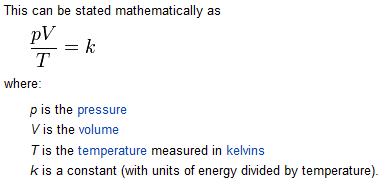
See http://en.wikipedia.org/wiki/Combined_gas_law

Capture.PNG

From the above equation, it can be seen that in order to maintain the constant k at the same value the value of T needs to rise in proportion to the ratio of p and V. Since V is a constant (the inside volume of your system), T varies in direct proportion to p. Thus, as the pressure increases, so does the temperature.
 

My Computer

Computer type
PC/Desktop
Computer Manufacturer/Model Number
Dwarf Dwf/11/2012 r09/2013
OS
Windows 8.1 Pro RTM x64
CPU
Intel Core-i5-3570K 4-core @ 3.4GHz (Ivy Bridge) (OC 4.4GHz)
Motherboard
ASRock Z77 Extreme4-M
Memory
4 x 4GB DDR3-1600 Corsair Vengeance CMZ8GX3M2A1600C9B (16GB)
Graphics Card(s)
MSI GeForce GTX770 Gaming OC 2GB
Sound Card
Realtek High Definition on board solution (ALC 898)
Monitor(s) Displays
ViewSonic VA1912w Widescreen (VGA)
Screen Resolution
1440x900
Hard Drives
OCZ Agility 3 SSD 120GB SATA III x2 (RAID 0)
Samsung HD501LJ 500GB SATA II x2
Hitachi HDS721010CLA332 1TB SATA II
Iomega 1.5TB Ext USB 2.0
WD 2.0TB Ext USB 3.0
PSU
XFX Pro Series 850W Semi-Modular
Case
Gigabyte IF233
Cooling
1 x 120mm Front Inlet 1 x 120mm Rear Exhaust
Keyboard
Microsoft Comfort Curve Keyboard 3000 (USB)
Mouse
Microsoft Comfort Mouse 3000 for Business (USB)
Internet Speed
NetGear DG834Gv3 ADSL Modem/Router (Ethernet) ~4.0 Mb/s (O2)
Antivirus
Avast! 8.0.1497
Browser
IE 11
Other Info
Optical Drive: HL-DT-ST BD-RE BH10LS30 SATA Bluray
Lexmark S305 Printer/Scanner/Copier (USB)
WEI Score: 8.1/8.1/8.5/8.5/8.25
Asus Eee PC 1011PX Netbook (Windows 7 x86 Starter)
Front to back air flow is generally the best, some fancier cases allow for you to divide the air flow up a little but I've generally found those cases to do so at the cost of airflow to some specific component that needs it.
The basic front to back works best in almost all situations. I also suggest keeping both front and back clear of objects, many people jam their computers into desks in one way or another and this generally leads to the hot air not clearing the back of the case properly and leading to heat build up over time especially if the machine is being used for any intensive process i.e. video editing/conversion, rendering, gaming etc..
 

My Computer

Computer Manufacturer/Model Number
Insane hobo technologies. ;-)
OS
Windows 7 x64
CPU
Intel i7 2600k
Motherboard
Asrock z68 extreme 4 gen 3
Memory
G.skill Ripjaw 16gigs @ 1866
Graphics Card(s)
Nvidia gtx580 (evga)
Sound Card
Integrated HD audio + hdmi
Monitor(s) Displays
24" ASUS widescreen + 42" insignia
Screen Resolution
1080p (1920x1080)
Hard Drives
128 Samsung 830
256 Samsung 840
3 x 1tb storage drive (various)
1 western digital 1tb (eSATA)
1 Seagate 1tb (eSATA)
PSU
1 kilowatt SLI/Crossfire rated Silverstone modular
Case
NZXT Phantom + additional 220 fan
Cooling
Zalmann
Keyboard
Microsoft wireless 3000 (v2)
Mouse
MS - wireless 5000 (bluetrack)
Internet Speed
depends on if you ask me or my provider.
Other Info
The above information is provided as is, and the author assumes no responsibility for issues it may cause with your sanity or fanboyism.
To answer your original question, you should arrange that the front and side fans bring air into the case, whilst the top and rear fans exhaust it out. Size wise, you should be OK, but you might need to reduce the speed of the side fans slightly so as not to unbalance the air flow. You need to ensure that the volume of air flowing in equals the volume flowing out (see my explanation above).
 

My Computer

Computer type
PC/Desktop
Computer Manufacturer/Model Number
Dwarf Dwf/11/2012 r09/2013
OS
Windows 8.1 Pro RTM x64
CPU
Intel Core-i5-3570K 4-core @ 3.4GHz (Ivy Bridge) (OC 4.4GHz)
Motherboard
ASRock Z77 Extreme4-M
Memory
4 x 4GB DDR3-1600 Corsair Vengeance CMZ8GX3M2A1600C9B (16GB)
Graphics Card(s)
MSI GeForce GTX770 Gaming OC 2GB
Sound Card
Realtek High Definition on board solution (ALC 898)
Monitor(s) Displays
ViewSonic VA1912w Widescreen (VGA)
Screen Resolution
1440x900
Hard Drives
OCZ Agility 3 SSD 120GB SATA III x2 (RAID 0)
Samsung HD501LJ 500GB SATA II x2
Hitachi HDS721010CLA332 1TB SATA II
Iomega 1.5TB Ext USB 2.0
WD 2.0TB Ext USB 3.0
PSU
XFX Pro Series 850W Semi-Modular
Case
Gigabyte IF233
Cooling
1 x 120mm Front Inlet 1 x 120mm Rear Exhaust
Keyboard
Microsoft Comfort Curve Keyboard 3000 (USB)
Mouse
Microsoft Comfort Mouse 3000 for Business (USB)
Internet Speed
NetGear DG834Gv3 ADSL Modem/Router (Ethernet) ~4.0 Mb/s (O2)
Antivirus
Avast! 8.0.1497
Browser
IE 11
Other Info
Optical Drive: HL-DT-ST BD-RE BH10LS30 SATA Bluray
Lexmark S305 Printer/Scanner/Copier (USB)
WEI Score: 8.1/8.1/8.5/8.5/8.25
Asus Eee PC 1011PX Netbook (Windows 7 x86 Starter)
Here's what works best for me. It builds up good air pressure and exhausts out the back

View attachment 157157

thats what i was thinking, but is the back fan strong enough to push out all the air? basically its a single fan moving all the air out. would it be better to put a stronger fan on the back?

I have an Ultra Kaze 3000 on the back. More than powerful enough
 

My Computer

Computer Manufacturer/Model Number
tw33k
OS
Windows 7 Ultimate (x64) SP1
CPU
Intel 3770k 4.6GHz
Motherboard
ASUS Maximus V Formula
Memory
8GB (2x 4GB) Crucial Ballistix
Graphics Card(s)
Sapphire 7950 (1060/1600)
Sound Card
On Board Realtek HD Audio
Monitor(s) Displays
27" Acer B273HU (via HDMI)
Screen Resolution
2048 x 1152
Hard Drives
Crucial M4 128GB
2TB WD Black
1TB Samsung F3 SATA
1TB WD Elite External
2TB WD USB 3.0
PSU
Corsair AX750 Gold
Case
Corsair Obsidian 800DW
Cooling
Corsair H100 (2x AP-121/2x UK-3000 push/pull)
Keyboard
Microsoft Wireless 5000
Mouse
Microsoft Wireless 5000
Internet Speed
5mb/s
Other Info
Logitech z-2300 2.1 speakers
Lamptron FC-5 v2
tw33k: That really seems like a lot of fans to me. I usually run with 1 front intake, 1 rear exhaust and 1 roof exhaust. Out of curiosity, do you see a massive temp increase if you were to shut off at least 1/2 of those fans? I'm just trying to figure out why some people run with just a few fans and others seem to feel that tons of fans are necessary. I've overclocked a number of machines, built at least 10 over the years, never put in tons of cooling and have never (as far as I know), ever had a heat related hardware death.
 

My Computer

Computer Manufacturer/Model Number
Self-Built in July 2009
OS
Windows 7 Ultimate x64
CPU
Intel Q9550 2.83Ghz OC'd to 3.40Ghz
Motherboard
Gigabyte GA-EP45-UD3R rev. 1.1, F12 BIOS
Memory
8GB G.Skill PI DDR2-800, 4-4-4-12 timings
Graphics Card(s)
EVGA 1280MB Nvidia GeForce GTX570
Sound Card
Realtek ALC899A 8 channel onboard audio
Monitor(s) Displays
23" Acer x233H
Screen Resolution
1920x1080
Hard Drives
Intel X25-M 80GB Gen 2 SSD
Western Digital 1TB Caviar Black, 32MB cache. WD1001FALS
PSU
Corsair 620HX modular
Case
Antec P182
Cooling
stock
Keyboard
ABS M1 Mechanical
Mouse
Logitech G9 Laser Mouse
Internet Speed
15/2 cable modem
Other Info
Windows and Linux enthusiast. Logitech G35 Headset.
It's all about ACFM regardless of whether it's actually true in daily practice the ideal that the more air moved the better the heat is dissipated makes basic sense.
Actual cubic feet per minute - Wikipedia, the free encyclopedia

Of course most computer fans are just measured in plain CFM, same basic measure though.
 

My Computer

Computer Manufacturer/Model Number
Insane hobo technologies. ;-)
OS
Windows 7 x64
CPU
Intel i7 2600k
Motherboard
Asrock z68 extreme 4 gen 3
Memory
G.skill Ripjaw 16gigs @ 1866
Graphics Card(s)
Nvidia gtx580 (evga)
Sound Card
Integrated HD audio + hdmi
Monitor(s) Displays
24" ASUS widescreen + 42" insignia
Screen Resolution
1080p (1920x1080)
Hard Drives
128 Samsung 830
256 Samsung 840
3 x 1tb storage drive (various)
1 western digital 1tb (eSATA)
1 Seagate 1tb (eSATA)
PSU
1 kilowatt SLI/Crossfire rated Silverstone modular
Case
NZXT Phantom + additional 220 fan
Cooling
Zalmann
Keyboard
Microsoft wireless 3000 (v2)
Mouse
MS - wireless 5000 (bluetrack)
Internet Speed
depends on if you ask me or my provider.
Other Info
The above information is provided as is, and the author assumes no responsibility for issues it may cause with your sanity or fanboyism.
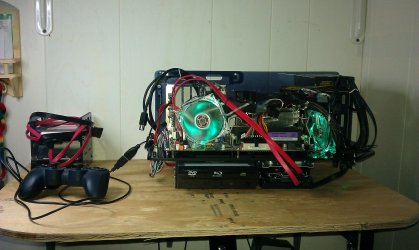
this is what i did DOMA Pro PCI but i bought it from newegg cheaper very quiet and over clock from 2.8 to 3.4 the temperature is write now 33 C. this what it looks likeIMAG0023.jpg
 

My Computer

Computer Manufacturer/Model Number
jorge's first
OS
64
CPU
intel core 2 quad Q9550
Motherboard
asus p5qpro turbo
Memory
8 GB
Graphics Card(s)
asus EAH5770
Sound Card
in motherboard
Monitor(s) Displays
syncMaster T26HD
Screen Resolution
1920 - 1200
Hard Drives
intel x25-M sata

hitachi sata 1 TB
PSU
750 watt
Case
thermaltake
Cooling
ultr x wind for 775
tw33k: That really seems like a lot of fans to me. I usually run with 1 front intake, 1 rear exhaust and 1 roof exhaust. Out of curiosity, do you see a massive temp increase if you were to shut off at least 1/2 of those fans? I'm just trying to figure out why some people run with just a few fans and others seem to feel that tons of fans are necessary. I've overclocked a number of machines, built at least 10 over the years, never put in tons of cooling and have never (as far as I know), ever had a heat related hardware death.

I added the fans in stages and my temps continued to get lower each time. Do I need this many...probably not but air cooling's kind of my thing and I wanted to see how low I could get. Plus I had fun working out the best position for them and how to add them
 

My Computer

Computer Manufacturer/Model Number
tw33k
OS
Windows 7 Ultimate (x64) SP1
CPU
Intel 3770k 4.6GHz
Motherboard
ASUS Maximus V Formula
Memory
8GB (2x 4GB) Crucial Ballistix
Graphics Card(s)
Sapphire 7950 (1060/1600)
Sound Card
On Board Realtek HD Audio
Monitor(s) Displays
27" Acer B273HU (via HDMI)
Screen Resolution
2048 x 1152
Hard Drives
Crucial M4 128GB
2TB WD Black
1TB Samsung F3 SATA
1TB WD Elite External
2TB WD USB 3.0
PSU
Corsair AX750 Gold
Case
Corsair Obsidian 800DW
Cooling
Corsair H100 (2x AP-121/2x UK-3000 push/pull)
Keyboard
Microsoft Wireless 5000
Mouse
Microsoft Wireless 5000
Internet Speed
5mb/s
Other Info
Logitech z-2300 2.1 speakers
Lamptron FC-5 v2
Back
Top