Best method for secured sharing ?

mml33

New member
Local time
12:22 PM
Messages
6
Trying to setup an external USB drive for media streaming to several devices. Im trying to set this up via SMB through router.

Problem is I would like to keep some away from certain folders and one away from ALL sharing.

Ex.

PC- ALL shared.
Laptop 1- "Family friendly" folder only.
Laptop 2- No access to anything. Would prefer they be invisible altogether.

Would creating different USER accounts for the "safe" folders and another for "all" be the best way ?

On my router , if I use the "guest" option for WiFi access will that exempt them from seeing available shared folders ?

Lastly If i decide to add personal files at anypoint is there anyway to stream media from a Bitlocker protected drive via NAS ?
 

My Computer

OS
Win 7
CPU
E6300
Motherboard
Gigabyte EG41M
Memory
G skill 4 gigs DDR800
Graphics Card(s)
On board
Sound Card
On board
Cooling
Hamster breath
Hi Mml33, welcome to Sevenforums

Firstly, what make/model is your router? If the drive is physically attached to this, you'll need to explore the router settings regarding it being a fileserver.
 

My Computer

OS
Windows 7 Enterprise
CPU
Intel Pentium Dual E2200 @2.2GHz
Motherboard
Gigabyte II-G31
Memory
4GB
Graphics Card(s)
Palit GForce 9500GT 1GB
Sound Card
onBoard
Hard Drives
WesternDigital: 250GB + 1TB + 1TB + 2TB
PSU
450W
Case
CoolerMaster CM690
Cooling
Corsair H50
Mouse
Logitech MX518
Thanks xarden!
Long time lurker forgot it was my first post.

asus wl-520g.
I actually am still waiting for the delivery.
I do know it is DD-WRT/Tomato flashable.

The drive will be attached to it. Would these setting end up being different then the sharing settings set up from within Win7 ?

i.e if User1 pw 1111 is able to access music folder will simply enabling SMB on the routers USB work the same ?
Or will the router have a different method of sharing.

Reason I ask is Im transferring files to the external now so if I can set things up prior to the router arriving itll save me setup time later.
 

My Computer

OS
Win 7
CPU
E6300
Motherboard
Gigabyte EG41M
Memory
G skill 4 gigs DDR800
Graphics Card(s)
On board
Sound Card
On board
Cooling
Hamster breath
If you're in a "workgroup" environment, you already have limited or NO access from other machines unless specifically designated.

You would have to share a local un/pw for them to connect to a non shared c$ drive...

If you DO have something shared, the only way they have unsecured connectivity is if you have the group "everyone" set in the ACL
 

My Computer

OS
7 Pro
Trying to setup an external USB drive for media streaming to several devices. Im trying to set this up via SMB through router.

Problem is I would like to keep some away from certain folders and one away from ALL sharing.

Ex.

PC- ALL shared.
Laptop 1- "Family friendly" folder only.
Laptop 2- No access to anything. Would prefer they be invisible altogether.

Would creating different USER accounts for the "safe" folders and another for "all" be the best way ?

On my router , if I use the "guest" option for WiFi access will that exempt them from seeing available shared folders ?

Lastly If i decide to add personal files at anypoint is there anyway to stream media from a Bitlocker protected drive via NAS ?

That is correct, to share files with only certain users you would need to set up a seperate User group then share through that User group.

The guest account on your router will prevent the "guest" from accessing any shared folders or files on your network.

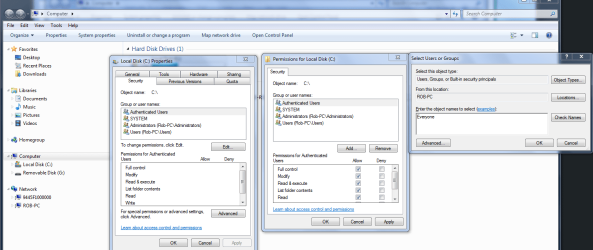
I might also add that once you change the drive over from another machine you will need to use the Security tab, if you want everyone to have access to the drive you will need to add "Everyone" where the picture below shows it.
 

Attachments

  • Sharing entire C drive authenticated users.PNG
    Sharing entire C drive authenticated users.PNG
    232.3 KB · Views: 33
Last edited:

My Computer

Computer type
PC/Desktop
Computer Manufacturer/Model Number
Home built
OS
Windows 7 Ult, Windows 8.1 Pro,
CPU
Q9650-4.275GHz, E8600 4.5GHz, E6750-3.8GHz
Motherboard
Evga 780i FTW
Memory
G.Skill PC2 9600 1200Mhz 5 5 5 15 2T
Graphics Card(s)
GTX480
Sound Card
Asus Xonar D2
Monitor(s) Displays
HannsG
Screen Resolution
1680X1050
Hard Drives
GSkill Phoenix Pro 120GB SSD
PSU
ThermalTake Toughpower 1000Watt modular
Case
ThermalTake XaserV
Cooling
Xigmatek S1283
Keyboard
Logitech G15
Mouse
Logitech G9
Internet Speed
T1
Hey Guys thanks for the responses.

Im currently VERY confused.

I have an Asus 520g router with Tomato USB installed.
An external WD drive attached to the USB port.

The drive is mounted and with these settings

47038907.jpg


I can pick it up when I click "map network drive"

Problem is there is ZERO security. All folders are visible.


When I select "yes with authorization" it will lock up access to the folders and will prompt me for a Username Pw.
But NO username and pws works. Im dumbfounded.

From within the above window I tried setting it to the username which is the owner of folder set by win7
Making up an entirely new UN/PW
Using the UN/PW of the router.


Right clicking to change permissions keeps resulting in error messages.

Using the CIFS option ends up with it showing up but with the same issues where all folders are open to everyone.

What am I doing wrong ?


((p.s when the drive was connected to Win7 pic all sharing/restrictions PWs etc worked as they should have))
 

My Computer

OS
Win 7
CPU
E6300
Motherboard
Gigabyte EG41M
Memory
G skill 4 gigs DDR800
Graphics Card(s)
On board
Sound Card
On board
Cooling
Hamster breath
Let's see if we can clear up some of the confusion. First, what everyone else has been talking about is Windows network security, ie: workgroup/sharing settings for the Windows computers. What you have is something completely different. You have a drive connected to your router, which does not use Windows at all. I haven't messed with Tomato firmware in a very long time, but there should be some sort of documentation available from wherever you got the firmware that should help explain how to connect the drive and set up sharing.
 

My Computer

Computer Manufacturer/Model Number
Dell XPS 15 L502x
OS
Windows 7 Ultimate x64 SP1
CPU
Core i7-2670QM
Memory
8GB DDR3 PC3-10600
Graphics Card(s)
Intel HD Graphics 3000 + GeForce GT 540M
Screen Resolution
1920x1080
Hard Drives
1TB 5400RPM Seagate
Let's see if we can clear up some of the confusion. First, what everyone else has been talking about is Windows network security, ie: workgroup/sharing settings for the Windows computers. What you have is something completely different. You have a drive connected to your router, which does not use Windows at all. I haven't messed with Tomato firmware in a very long time, but there should be some sort of documentation available from wherever you got the firmware that should help explain how to connect the drive and set up sharing.

Sorry , I was under the impression that permissions etc I set on the folders within Windows would be the basis of permissions when SMB is sharing from the router as well.
 

My Computer

OS
Win 7
CPU
E6300
Motherboard
Gigabyte EG41M
Memory
G skill 4 gigs DDR800
Graphics Card(s)
On board
Sound Card
On board
Cooling
Hamster breath
Sorry , I was under the impression that permissions etc I set on the folders within Windows would be the basis of permissions when SMB is sharing from the router as well.

Nope. Two completely different animals. You have to configure sharing on the router. I believe the sharing is pretty basic and limited with the SMB implementation on the router, but check out the documentation for the specifics.
 

My Computer

Computer Manufacturer/Model Number
Dell XPS 15 L502x
OS
Windows 7 Ultimate x64 SP1
CPU
Core i7-2670QM
Memory
8GB DDR3 PC3-10600
Graphics Card(s)
Intel HD Graphics 3000 + GeForce GT 540M
Screen Resolution
1920x1080
Hard Drives
1TB 5400RPM Seagate
Two things you could do...
1. There is FreeNas which you could explore. Its a network file sharing OS, all you need is a machine to install it to... or it runs off a USB key too. Check the documentation on that though.
It can be interfaced on the pc, or remotely from a browser which would make your administering of it a bit easier.

or;
2. If you have a spare or unused copy of XP, you could install that on another machine and connect it to the router.
Then just set up as many folders and shares as you'd like. You could also use internal drives.
I think this may be the easier option.

Either way, it requires a low-end pc. And once you get it up and running, you wouldnt need the keyboard or monitor. It'l just need to sit quietly somewhere in the corner.
 

My Computer

OS
Windows 7 Enterprise
CPU
Intel Pentium Dual E2200 @2.2GHz
Motherboard
Gigabyte II-G31
Memory
4GB
Graphics Card(s)
Palit GForce 9500GT 1GB
Sound Card
onBoard
Hard Drives
WesternDigital: 250GB + 1TB + 1TB + 2TB
PSU
450W
Case
CoolerMaster CM690
Cooling
Corsair H50
Mouse
Logitech MX518
Thank you guys for the feedback.

Im going to share off the PC for now. Will likely use some spare part I have around for that type of build. Just gonna wait till after holidays to figure out what else I need.

Thanks!
 

My Computer

OS
Win 7
CPU
E6300
Motherboard
Gigabyte EG41M
Memory
G skill 4 gigs DDR800
Graphics Card(s)
On board
Sound Card
On board
Cooling
Hamster breath
Back
Top