Solved Best Program For Most Secure Backup

One thing that irked me about Macrium is there is essentially no support for users of the free version. Even the Forum is locked to free version users! You can only browse posts, not post. So, essentially you'e on your own except for troubleshooting on Forums like this. I may just buy the Pro version (30-day guarantee) so I can get support

What do you expect if you do not pay any money. Try to get a car for free and then ask the dealer to service it for free too.

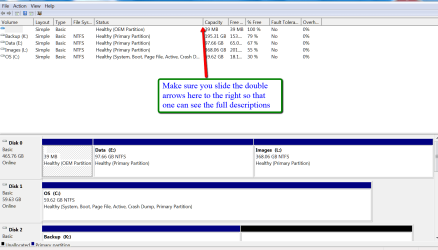
But your problem is strange. Post a picture of your full diskl management so that we can have a look.
 

My Computer

Computer Manufacturer/Model Number
HP, Dell, Gateway, Toshiba - 4 laptops and 2 desktops
OS
Vista, Windows7, Mint Mate, Zorin, Windows 8
CPU
from 1.6GHz Duo to i7
Monitor(s) Displays
2x HP w2207
Hard Drives
5x HDD, 7x SSD, 12x Externals
Keyboard
with trackball - no mices
Mouse
Trackball mice
Internet Speed
DSL 6000
One thing that irked me about Macrium is there is essentially no support for users of the free version. Even the Forum is locked to free version users! You can only browse posts, not post. So, essentially you'e on your own except for troubleshooting on Forums like this. I may just buy the Pro version (30-day guarantee) so I can get support

What do you expect if you do not pay any money. Try to get a car for free and then ask the dealer to service it for free too.

But your problem is strange. Post a picture of your full diskl management so that we can have a look.

I've never run across a vendor that doesn't at least allow trial users access to posting on their Forms.

Please provide further detail as to "Post a picture of your full diskl management..." & I'll be happy to do so.
 

My Computer

Computer Manufacturer/Model Number
Sony VAIO® L Series All-in-One Touch Screen Model # VPCL22SFX
OS
Windows 7 Home Ultimate 64-bit
CPU
Processor Intel(R) Core(TM) i7-2720QM CPU @ 2.20GHz, 2201 Mh
Memory
8 GB DDR3 SDRAM
Graphics Card(s)
NVIDIA GeForce GT 540M
Sound Card
Realtek High Definition Audio
Monitor(s) Displays
Active Matrix TFT Color LCD, Display Size: 24"
Screen Resolution
Max Resolution: 1920 x 1080
Hard Drives
WDC WD30EZRS-55J99B0, 3TB
Case
All-In-One
Keyboard
Standard PS/2 Keyboard
Mouse
HID-compliant mouse
Internet Speed
18 MBps
Other Info
Product Series: L
Screen Mode: Full HD
Processor Model: i7-2720QM
Memory Card Reader: Yes
64-bit Processing: Yes
Hard Drive RPM: 5400
Analog Tuner: NTSC
Hyper-Threading: Yes
HyperTransport Speed: Not Applicable
TV Card: Yes
Network (RJ-45): Yes
Hybrid Hard Drive Capacity:Not Applicable
Maximum Power Supply Wattage: 240 W
Audio Line In: Yes
Audio Line Out: Yes
Media Ce
Take a snip of your Disk Management like the one below with your snipping tool and attach it with the paperclip.
 

Attachments

  • 2012-03-04_1606.png
    2012-03-04_1606.png
    38.6 KB · Views: 12

My Computer

Computer Manufacturer/Model Number
HP, Dell, Gateway, Toshiba - 4 laptops and 2 desktops
OS
Vista, Windows7, Mint Mate, Zorin, Windows 8
CPU
from 1.6GHz Duo to i7
Monitor(s) Displays
2x HP w2207
Hard Drives
5x HDD, 7x SSD, 12x Externals
Keyboard
with trackball - no mices
Mouse
Trackball mice
Internet Speed
DSL 6000
Take a snip of your Disk Management like the one below with your snipping tool and attach it with the paperclip.

Got it. Will do, but let me hear back from Macrium TS first. Turns out that I misinterpreted their support of free vs. trial products..."The support restriction is for the Free Edition not the trial." They're reviewing screenshots & logs now.
 

My Computer

Computer Manufacturer/Model Number
Sony VAIO® L Series All-in-One Touch Screen Model # VPCL22SFX
OS
Windows 7 Home Ultimate 64-bit
CPU
Processor Intel(R) Core(TM) i7-2720QM CPU @ 2.20GHz, 2201 Mh
Memory
8 GB DDR3 SDRAM
Graphics Card(s)
NVIDIA GeForce GT 540M
Sound Card
Realtek High Definition Audio
Monitor(s) Displays
Active Matrix TFT Color LCD, Display Size: 24"
Screen Resolution
Max Resolution: 1920 x 1080
Hard Drives
WDC WD30EZRS-55J99B0, 3TB
Case
All-In-One
Keyboard
Standard PS/2 Keyboard
Mouse
HID-compliant mouse
Internet Speed
18 MBps
Other Info
Product Series: L
Screen Mode: Full HD
Processor Model: i7-2720QM
Memory Card Reader: Yes
64-bit Processing: Yes
Hard Drive RPM: 5400
Analog Tuner: NTSC
Hyper-Threading: Yes
HyperTransport Speed: Not Applicable
TV Card: Yes
Network (RJ-45): Yes
Hybrid Hard Drive Capacity:Not Applicable
Maximum Power Supply Wattage: 240 W
Audio Line In: Yes
Audio Line Out: Yes
Media Ce
Take a snip of your Disk Management like the one below with your snipping tool and attach it with the paperclip.

Got it. Will do, but let me hear back from Macrium TS first. Turns out that I misinterpreted their support of free vs. trial products..."The support restriction is for the Free Edition not the trial." They're reviewing screenshots & logs now.

I totally forgot to report back!

With the dedicated, almost real-time, assistance of Macrium TS, I got the Pro Trial version to successfully image, create a full backup, then incremental scheduled backup of my > 2TB drive. I will most definitely buy the full Pro package. It's worth every penny. Thanks for the tip on this product!
 

My Computer

Computer Manufacturer/Model Number
Sony VAIO® L Series All-in-One Touch Screen Model # VPCL22SFX
OS
Windows 7 Home Ultimate 64-bit
CPU
Processor Intel(R) Core(TM) i7-2720QM CPU @ 2.20GHz, 2201 Mh
Memory
8 GB DDR3 SDRAM
Graphics Card(s)
NVIDIA GeForce GT 540M
Sound Card
Realtek High Definition Audio
Monitor(s) Displays
Active Matrix TFT Color LCD, Display Size: 24"
Screen Resolution
Max Resolution: 1920 x 1080
Hard Drives
WDC WD30EZRS-55J99B0, 3TB
Case
All-In-One
Keyboard
Standard PS/2 Keyboard
Mouse
HID-compliant mouse
Internet Speed
18 MBps
Other Info
Product Series: L
Screen Mode: Full HD
Processor Model: i7-2720QM
Memory Card Reader: Yes
64-bit Processing: Yes
Hard Drive RPM: 5400
Analog Tuner: NTSC
Hyper-Threading: Yes
HyperTransport Speed: Not Applicable
TV Card: Yes
Network (RJ-45): Yes
Hybrid Hard Drive Capacity:Not Applicable
Maximum Power Supply Wattage: 240 W
Audio Line In: Yes
Audio Line Out: Yes
Media Ce
That's good to know randun. I haven't needed their support yet except to post a general question.
 

My Computer

Computer type
Laptop
Computer Manufacturer/Model Number
Hewlett-Packard/G62-107SA Notebook
OS
Microsoft Windows 7 Home Premium 64-bit Service Pack 1
CPU
Intel(R) Core(TM) i3 CPU M 330 @ 2.13GHz
Motherboard
Hewlett-Packard 1425
Memory
8 GB DDR3
Graphics Card(s)
Intel(R) HD Graphics
Sound Card
Realtek High Definition Audio
Monitor(s) Displays
Builtin
Screen Resolution
1366 x 768 x 32 bits (4294967296 colors) @ 60 Hz
Hard Drives
250 GB SATA Hard Disk Drive 7200 rpm
2TB Seagate GoFlex USB 2 Drive
1TB Iomega Prestige USB 2 Drive
1.5TB Iomega Prestige USB 2 Drive (Samsung)
2TB WD MyBook Live NAS.
Mouse
Logitech Anywhere MX
Internet Speed
152 Mbs download 10 Mbs upload
Antivirus
Norton 360
Browser
Chrome
Please excuse me, I dont want to hijack this thread but as it seems inactive I thought it might not matter as much.

randun, your thread interested me because I have the same system parameters and was wondering what worked for you?
I also have a W7 64 bit home premium machine with a 3Tb Hitachi external HDD and have had no luck finding a program that works. I dont really need incremental/differential backups as I do a complete disk backup manually each time.

What program works for this configuration?

I have tried Acronis also, actually paid for it but it doesnt recognize my 3Tb HDD. Also EaseUS Todo backup wouldnt recognize the drive either. W7 backup gave me a "insufficient disk space" despite that fact that there was more than enough space (I actually tried this particular backup on a 1Tb external HDD as I gave up hope of finding anything to work with my 3 TB) so now I have no solution to save me from complete drive failure/corruption.
 

My Computer

Computer Manufacturer/Model Number
HP model HPE-519C
OS
Windows 7 home premium 64 bit
CPU
AMD Phenom IIx6 1065T 2.90 GHz
Motherboard
Foxconn H-RS880-UATX (ALOE)
Memory
8 GB
Graphics Card(s)
ATI Radeon HD 5570
Back
Top