Best protection against malware?

Tookeri

Security enthusiast
Guru
VIP
Local time
12:42 PM
Messages
1,049
I came across this article that demonstrates how extremely effective a feature like AppLocker is. It becomes very reliable when applied to 500 Windows 7 computers over 3 years as in this case. The result: Not a single malware infection compared to several a week prior to applying AppLocker! Amazing :)

Free, almost perfect, malware protection with GPO App Locker - Spiceworks

Windows 7 versions:


Personal experience
I'm using SRP and have configured it to only allow executable files to start from the Windows and Program Files folder, folders that require admin permissions to write to. Executable files include exe, com, bat, vbs, dll and more. This basically mean that only installed programs and those part of Windows can start. Any downloaded executable files or files from other drives including USB ones will not be allowed to execute.
Many automatic program updates(including Windows Update) will still work, but apps using files in user folders or in temp folders won't, for example Firefox. So to update such a program or install a new program you'll have to temporarily turn SRP off. It only takes a few seconds extra once you've set it up the way you want to, a small price to pay for a great protection. You might have to add additional exceptions for programs that for example run from AppData instead of Program Files.

Example if you copy the Windows Calculator(calc.exe) to the desktop and try to run it. (your desktop should only contain links/shortcuts to executables)
srp_block_prompt.png


Stay safe! :cool:
 
Last edited:

My Computer My Computer

At a glance

Windows 7 Pro 32Intel(R) Core(TM) i5 CPU M 540 @ 2.53GHz4,00 GB (Usable 2,98)NVIDIA NVS 5100M
Computer type
Laptop
Computer Manufacturer/Model Number
HP Elitebook 8540p
OS
Windows 7 Pro 32
CPU
Intel(R) Core(TM) i5 CPU M 540 @ 2.53GHz
Motherboard
Hewlett-Packard 1521
Memory
4,00 GB (Usable 2,98)
Graphics Card(s)
NVIDIA NVS 5100M
Sound Card
NVIDIA High Definition Audio
Screen Resolution
1600x900
Hard Drives
INTEL SSDSA2CW120G3
Antivirus
F-Secure Internet Security
Browser
IE, Firefox, Opera
Other Info
Sandboxie,
SRP (Software Restriction Policy),
EMET (Enhanced Mitigation Experience Toolkit),
WFC (Windows Firewall Control by BiniSoft),
Malwarebytes Premium
Hi,
Sounds like pretty extreme measures
I suppose that last popup message needs a "Mother may I" if I promise to eat all my veg's :p
 

My Computer My Computer

At a glance

Win-7-Pro64bit 7-H-Prem-64biti7-5930K 2nd i9-9940x both water blocked VRM'...Trident-z 3200C14 2nd Trident-z 3600C16EVGA 1080ti ftw3 2nd Titan Xp both water blocked
Computer type
PC/Desktop
Computer Manufacturer/Model Number
Custom assembled by me :}
OS
Win-7-Pro64bit 7-H-Prem-64bit
CPU
i7-5930K 2nd i9-9940x both water blocked VRM's too
Motherboard
ASUS SABERTOOTH X99 2nd ASUS x299 Apex
Memory
Trident-z 3200C14 2nd Trident-z 3600C16
Graphics Card(s)
EVGA 1080ti ftw3 2nd Titan Xp both water blocked
Sound Card
Built-in Realtek
Monitor(s) Displays
1-AOC G2460PG 24"G-Sync 144Hz/ 2nd 1-ASUS VG248QE 24" 144Hz
Screen Resolution
1920 x 1080 144Hz
Hard Drives
2-Samsung M.2 Evo & Evo Plus
2-Samsung 850 EVO 500GB SSD's/ 3-2.5 W.D. Black 1tb-&3-1tb/3-3.5 WD Black 1tb hdd's
PSU
EVGA SuperNOVA 1000-P2 2nd 1200-P2
Case
2-Corsair Obsidian Series 450D Black ATX Mid Tower
Cooling
Custom water loops
Keyboard
Logitech G710+/ 2nd Logitech G910
Mouse
2-RedDragon M901 Perdition 16400 dpi Gaming mouse = wired
Internet Speed
Comcast Ping 19ms 89.31mbps download speed 6.12mbps upload
Antivirus
Malwarebytes Pro/ Superantispyware Pro
Browser
FireFox & Pale moon
Other Info
2nd ASUS X299 Apex/Intel i9-9940x with Custom water loop/7H-Prem-x64/Corsair 450D case/Ram Trident-z 3600C16 4x8gb / Samsung970Evo plus 500gb SSD/Dual ssd EZ swap evo/PSU EVGA SuperNova 1200w-P2 80+Platinum/GPU Titan Xp /8-ML-140 on push-pull on 2-280GTX rads
I don't think so, it once again proves how anti-virus and anti-malware products fails to protect you. The article mentions prior to AppLocker dealing with 3-5 infections a week, some in need of a complete reimaging. And note that they weren't even using admin accounts.
Monitoring 500 computers over 3 years is not something a home users can do and that's why I think this is an excellent article.
 

My Computer My Computer

At a glance

Windows 7 Pro 32Intel(R) Core(TM) i5 CPU M 540 @ 2.53GHz4,00 GB (Usable 2,98)NVIDIA NVS 5100M
Computer type
Laptop
Computer Manufacturer/Model Number
HP Elitebook 8540p
OS
Windows 7 Pro 32
CPU
Intel(R) Core(TM) i5 CPU M 540 @ 2.53GHz
Motherboard
Hewlett-Packard 1521
Memory
4,00 GB (Usable 2,98)
Graphics Card(s)
NVIDIA NVS 5100M
Sound Card
NVIDIA High Definition Audio
Screen Resolution
1600x900
Hard Drives
INTEL SSDSA2CW120G3
Antivirus
F-Secure Internet Security
Browser
IE, Firefox, Opera
Other Info
Sandboxie,
SRP (Software Restriction Policy),
EMET (Enhanced Mitigation Experience Toolkit),
WFC (Windows Firewall Control by BiniSoft),
Malwarebytes Premium
Over time, I've become more aware of "whitelisting" with my security programs, whether it be Classic HIPS, anti-exes, firewalls and so on. APPlocker, among others, are very solid programs, but require a bit of learning and patience, but once you get the hang of things, I think you'll be surprised of how effective they can be. My current set up is almost entirely based on that principal, even while web browsing as I don't allow anything in the page to load, unless its a trusted page, or I go through and manually allow objects.

For the most part, everything that needs to connect to the internet, or have access to certain folders has been white listed in my setup, so that if anything, even if its a non-threat attempts to run, such as the calculator, it will be blocked once, then I can allow it for future use. I like to know what's trying to run and even if sometimes it can be a hassle (forget to temporarily white list objects of decrease protection levels for installs and what not) it's better than getting caught off guard.

Of course, common sense is your best anti-malware tool, but even the best of us slip up now and again, but I've been malware free for years, even in the days of using Anti-viruses, but I prefer prevention over reaction or detection, since I would do a image restore if I became infected anyhow, so removal of malware for me is to nuke it:devil:
 

My Computer My Computer

At a glance

Microsoft Windows 7 Professional 64-bit SP1Intel(R) Core(TM) i5 CPU M 520 @ 2.40GHz8.00 GBNVIDIA NVS 3100M
Computer type
PC/Desktop
OS
Microsoft Windows 7 Professional 64-bit SP1
CPU
Intel(R) Core(TM) i5 CPU M 520 @ 2.40GHz
Motherboard
Dell Inc. 0K42JR
Memory
8.00 GB
Graphics Card(s)
NVIDIA NVS 3100M
Sound Card
(1) NVIDIA High Definition Audio (2) IDT High Definition A
Monitor(s) Displays
1
Screen Resolution
1440 x 900 x 32 bits (4294967296 colors) @ 59 Hz
Hard Drives
Samsung SSD 840 PRO Series ATA Device
Berkey, we think the same you and I. I would say prevention is the ONLY true defense :)

I see you have both ERP and AppGuard. In case you didn't know: SRP is built-in and free in Win 7 Pro.

About UAC and Standard vs Admin account I recommend reading this if you haven't seen it already:
http://www.sevenforums.com/general-...ices-user-account-type-uac-2.html#post2988364

If there's one thing you could add in your arsenal of protection it's an anti-exploit like EMET or MBAE.

The above are only my thoughts to your list of protection apps. But not many have such a good security setup as you have so I'm not sure any of my "tips" come as news to you ;)
 

My Computer My Computer

At a glance

Windows 7 Pro 32Intel(R) Core(TM) i5 CPU M 540 @ 2.53GHz4,00 GB (Usable 2,98)NVIDIA NVS 5100M
Computer type
Laptop
Computer Manufacturer/Model Number
HP Elitebook 8540p
OS
Windows 7 Pro 32
CPU
Intel(R) Core(TM) i5 CPU M 540 @ 2.53GHz
Motherboard
Hewlett-Packard 1521
Memory
4,00 GB (Usable 2,98)
Graphics Card(s)
NVIDIA NVS 5100M
Sound Card
NVIDIA High Definition Audio
Screen Resolution
1600x900
Hard Drives
INTEL SSDSA2CW120G3
Antivirus
F-Secure Internet Security
Browser
IE, Firefox, Opera
Other Info
Sandboxie,
SRP (Software Restriction Policy),
EMET (Enhanced Mitigation Experience Toolkit),
WFC (Windows Firewall Control by BiniSoft),
Malwarebytes Premium
Berkey, we think the same you and I. I would say prevention is the ONLY true defense :)

I see you have both ERP and AppGuard. In case you didn't know: SRP is built-in and free in Win 7 Pro.

About UAC and Standard vs Admin account I recommend reading this if you haven't seen it already:
http://www.sevenforums.com/general-...ices-user-account-type-uac-2.html#post2988364

If there's one thing you could add in your arsenal of protection it's an anti-exploit like EMET or MBAE.

The above are only my thoughts to your list of protection apps. But not many have such a good security setup as you have so I'm not sure any of my "tips" come as news to you ;)

Indeed. Prevention will save a lot of headaches.

I've used SRP, with great success, but once I started to test applications such as Appguard and NVT, I just got hooked on them, so I've been a user ever since.

The UAC isn't so much as a security setup as much as it is a "are you sure you want to do this" setup, as I learned a hard and valuable lesson a few years ago about being too hasty with decision making, which essentially led to a clean re-install, so more of a double checker if you will.

I've been testing Hitman Pro Alert 3 as my anti-exploit, which has been pretty light weight and seems to be getting stronger and stronger with each build release. Has a nice keystroke encryption, which can be applied to programs like Word and Notepad.

Umatirx I feel is one of the best defenses above all, since when you tweak it the way I have it, nothing will load in a webpage unless whitelisted, which can completely prevent a page from showing anything, or if a particular domain is un-trusted, wont' even all you the chance to whitelist, unless you override it.

Then again, good ol sandboxie always has my back for the "how in the world", but I haven't had any malware detection in ages and that was before I had really anything in this setup, because as we all know, common sense is the best tool for prevention:D

Thanks for the input!
 

My Computer My Computer

At a glance

Microsoft Windows 7 Professional 64-bit SP1Intel(R) Core(TM) i5 CPU M 520 @ 2.40GHz8.00 GBNVIDIA NVS 3100M
Computer type
PC/Desktop
OS
Microsoft Windows 7 Professional 64-bit SP1
CPU
Intel(R) Core(TM) i5 CPU M 520 @ 2.40GHz
Motherboard
Dell Inc. 0K42JR
Memory
8.00 GB
Graphics Card(s)
NVIDIA NVS 3100M
Sound Card
(1) NVIDIA High Definition Audio (2) IDT High Definition A
Monitor(s) Displays
1
Screen Resolution
1440 x 900 x 32 bits (4294967296 colors) @ 59 Hz
Hard Drives
Samsung SSD 840 PRO Series ATA Device
Thank you too! I've been close myself a few times to install additional security products but I've managed to stop myself in time and realize I don't need more. But it's always interesting to at least read about them :)

I don't use Chrome but I recognize the concept which sounds like NoScript for Firefox. An excellent extension for the more advanced users.

I've been following the development for Alert 3 for the last year and I'm very impressed. It's no doubt better than MBAE and EMET. I must have read your signature wrong and missed "Alert" so I only saw "Hitman Pro". You had it already covered!

I agree Sandboxie is a product you can count on. Seen this? http://www.sevenforums.com/security...are-variant-has-new-defenses.html#post2981906
A nice proof how good it is when ransomware quits if it detects it's running. For two reasons I believe: they know it's hard to break out from it, and they don't want to leave traces of the malware in a sandbox since it's easier to trace it there.

About UAC I get the feeling maybe you didn't check out the link. A malware only needs standard user access to be able to get around UAC if the user is logged in as an administrator (or Protected Admin as it's called). The link shows one way how this can be done.
Bottom line: You can and should only trust UAC in a standard user account. Not in an admin account.
 

My Computer My Computer

At a glance

Windows 7 Pro 32Intel(R) Core(TM) i5 CPU M 540 @ 2.53GHz4,00 GB (Usable 2,98)NVIDIA NVS 5100M
Computer type
Laptop
Computer Manufacturer/Model Number
HP Elitebook 8540p
OS
Windows 7 Pro 32
CPU
Intel(R) Core(TM) i5 CPU M 540 @ 2.53GHz
Motherboard
Hewlett-Packard 1521
Memory
4,00 GB (Usable 2,98)
Graphics Card(s)
NVIDIA NVS 5100M
Sound Card
NVIDIA High Definition Audio
Screen Resolution
1600x900
Hard Drives
INTEL SSDSA2CW120G3
Antivirus
F-Secure Internet Security
Browser
IE, Firefox, Opera
Other Info
Sandboxie,
SRP (Software Restriction Policy),
EMET (Enhanced Mitigation Experience Toolkit),
WFC (Windows Firewall Control by BiniSoft),
Malwarebytes Premium
I've read the link. I use a standard account, as one of the reasons I started to get more into security was way back in college with XP, I always use to create my standard account as the ADMIN, then I'd keep getting infested, until one of the IT guys in the lab sat me down and showed me a few simple "duh" things to do and help your cause.

I like running as standard, with UAC, it allows me to elevate whenever I need to from within a standard user account. Like last week on my VM I was playing with pre made reg files and had them side to side on my desktop, which I boneheadly clicked the wrong on and when the UAC popped up, I read that it was the wrong file, so it saved me from granted the permission. Then again, I read when those boxes pop up, most average users do not, so they generally disable it.

I would hope MS would enhance the meaning behind UAC, as most people are annoyed with it (if they dont' disable it) and just click yes anyhow, so they might as well disable it. However, if the warning box said something like; "Do you want to grant XYZ administrator rights? If yes, you understand that then viruses and malware can be more dangerous if it is contained within the file as they will have the most permission" or something along those lines.


Great input on that thread and your post in particular! I remember reading a very in depth study on UAC and the difference between Standard and ADMIN account. I'll see if I can dig it up and send it to you as it was a fun read.
 
Last edited:

My Computer My Computer

At a glance

Microsoft Windows 7 Professional 64-bit SP1Intel(R) Core(TM) i5 CPU M 520 @ 2.40GHz8.00 GBNVIDIA NVS 3100M
Computer type
PC/Desktop
OS
Microsoft Windows 7 Professional 64-bit SP1
CPU
Intel(R) Core(TM) i5 CPU M 520 @ 2.40GHz
Motherboard
Dell Inc. 0K42JR
Memory
8.00 GB
Graphics Card(s)
NVIDIA NVS 3100M
Sound Card
(1) NVIDIA High Definition Audio (2) IDT High Definition A
Monitor(s) Displays
1
Screen Resolution
1440 x 900 x 32 bits (4294967296 colors) @ 59 Hz
Hard Drives
Samsung SSD 840 PRO Series ATA Device
HitmanPro.Alert3

I've been testing Hitman Pro Alert 3 as my anti-exploit, which has been pretty light weight and seems to be getting stronger and stronger with each build release. Has a nice keystroke encryption, which can be applied to programs like Word and Notepad.

I tried HitmanPro.Alert3 beta and more recently HitmanPro.Alert3 RC but it didn't want to protect any non standard browsers or non standard internet facing apps and also blocked VLC and Thunderbird. I suspect that's because i've got EMET installed. Do you have EMET or did you need to remove it before installing HitmanPro.Alert3 ?

Thanks!
 

My Computer My Computer

At a glance

Microsoft Windows 7 Home Premium 64-bit 7601 ...AMD C-60 APU with Radeon(tm) HD Graphics4.00 GBAMD Radeon HD 6290 Graphics
Computer type
Laptop
Computer Manufacturer/Model Number
ASUS
OS
Microsoft Windows 7 Home Premium 64-bit 7601 Multiprocessor Free Service Pack 1
CPU
AMD C-60 APU with Radeon(tm) HD Graphics
Motherboard
ASUSTeK COMPUTER INC. X501U
Memory
4.00 GB
Graphics Card(s)
AMD Radeon HD 6290 Graphics
Sound Card
(1) AMD High Definition Audio Device (2) Realtek High Defi
Screen Resolution
1366 x 768 x 32 bits (4294967296 colors) @ 60 Hz
Hard Drives
Hitachi HTS545050A7E380 SATA Disk Device
Antivirus
Comodo CIS & FW, SecureAplus App Whitelisting, Threatfire
Browser
Cyberfox 64bit, Opera 64bit, Airfox
Other Info
Spy-The-Spy, HitmanPro.Alert, Norton Connect Safe, MJRegWatcher, BitDefender TrafficLight, Voodoo Shield, Zemana AntiMalware
I've been testing Hitman Pro Alert 3 as my anti-exploit, which has been pretty light weight and seems to be getting stronger and stronger with each build release. Has a nice keystroke encryption, which can be applied to programs like Word and Notepad.

I tried HitmanPro.Alert3 beta and more recently HitmanPro.Alert3 RC but it didn't want to protect any non standard browsers or non standard internet facing apps and also blocked VLC and Thunderbird. I suspect that's because i've got EMET installed. Do you have EMET or did you need to remove it before installing HitmanPro.Alert3 ?

Thanks!

Hi Callender,

EMET and MHPAshould be compatible but I don't see much use of running both EMET and Alert with Exploit Mitigations, since they are rooted in similar backgrounds. Obviously different software, but it's how I would view running multiple Anti-viruses at the same time (although you might be able to do that now, but I haven;t used an AV in so long I'm not sure)


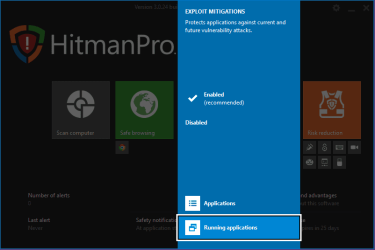
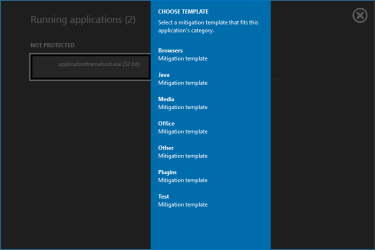
This should do the trick for adding custom apps

1. If you haven't done so put the GUI in advanced mode. Click on the little gear in upper right hand corner and select advanced GUI
2. Start the app you want to add
3. In the gui click on the big blue box exploit mitigations
4. Select running applications
5. You should see your app as unprotected.
6. Click on it, and then select the protection type that best fits the applications

Then you restart the application and you are good to go.

Let me know how it works out for you
 

Attachments

  • hm1.png
    hm1.png
    12.9 KB · Views: 2
  • hm2.png
    hm2.png
    4 KB · Views: 2
  • hm3.png
    hm3.png
    7.9 KB · Views: 2

My Computer My Computer

At a glance

Microsoft Windows 7 Professional 64-bit SP1Intel(R) Core(TM) i5 CPU M 520 @ 2.40GHz8.00 GBNVIDIA NVS 3100M
Computer type
PC/Desktop
OS
Microsoft Windows 7 Professional 64-bit SP1
CPU
Intel(R) Core(TM) i5 CPU M 520 @ 2.40GHz
Motherboard
Dell Inc. 0K42JR
Memory
8.00 GB
Graphics Card(s)
NVIDIA NVS 3100M
Sound Card
(1) NVIDIA High Definition Audio (2) IDT High Definition A
Monitor(s) Displays
1
Screen Resolution
1440 x 900 x 32 bits (4294967296 colors) @ 59 Hz
Hard Drives
Samsung SSD 840 PRO Series ATA Device
HimanPro Alert 3

Okay thanks for the info. I'll try reinstalling HMPA 3 again later this week and see how it goes. Really I was trying to test it without removing EMET. I've got an idea that if I disable all mitigations in EMET without actually uninstalling it then it maybe won't interfere with HMPA 3.
 

My Computer My Computer

At a glance

Microsoft Windows 7 Home Premium 64-bit 7601 ...AMD C-60 APU with Radeon(tm) HD Graphics4.00 GBAMD Radeon HD 6290 Graphics
Computer type
Laptop
Computer Manufacturer/Model Number
ASUS
OS
Microsoft Windows 7 Home Premium 64-bit 7601 Multiprocessor Free Service Pack 1
CPU
AMD C-60 APU with Radeon(tm) HD Graphics
Motherboard
ASUSTeK COMPUTER INC. X501U
Memory
4.00 GB
Graphics Card(s)
AMD Radeon HD 6290 Graphics
Sound Card
(1) AMD High Definition Audio Device (2) Realtek High Defi
Screen Resolution
1366 x 768 x 32 bits (4294967296 colors) @ 60 Hz
Hard Drives
Hitachi HTS545050A7E380 SATA Disk Device
Antivirus
Comodo CIS & FW, SecureAplus App Whitelisting, Threatfire
Browser
Cyberfox 64bit, Opera 64bit, Airfox
Other Info
Spy-The-Spy, HitmanPro.Alert, Norton Connect Safe, MJRegWatcher, BitDefender TrafficLight, Voodoo Shield, Zemana AntiMalware
Okay thanks for the info. I'll try reinstalling HMPA 3 again later this week and see how it goes. Really I was trying to test it without removing EMET. I've got an idea that if I disable all mitigations in EMET without actually uninstalling it then it maybe won't interfere with HMPA 3.

No problem, I still think the latest builds should work with EMET and even MBAE running side by side, as I read HMPA likes to test with similar software running. Anyhow keep me posted:)
 

My Computer My Computer

At a glance

Microsoft Windows 7 Professional 64-bit SP1Intel(R) Core(TM) i5 CPU M 520 @ 2.40GHz8.00 GBNVIDIA NVS 3100M
Computer type
PC/Desktop
OS
Microsoft Windows 7 Professional 64-bit SP1
CPU
Intel(R) Core(TM) i5 CPU M 520 @ 2.40GHz
Motherboard
Dell Inc. 0K42JR
Memory
8.00 GB
Graphics Card(s)
NVIDIA NVS 3100M
Sound Card
(1) NVIDIA High Definition Audio (2) IDT High Definition A
Monitor(s) Displays
1
Screen Resolution
1440 x 900 x 32 bits (4294967296 colors) @ 59 Hz
Hard Drives
Samsung SSD 840 PRO Series ATA Device

My Computer My Computer

At a glance

Windows 7 Pro 32Intel(R) Core(TM) i5 CPU M 540 @ 2.53GHz4,00 GB (Usable 2,98)NVIDIA NVS 5100M
Computer type
Laptop
Computer Manufacturer/Model Number
HP Elitebook 8540p
OS
Windows 7 Pro 32
CPU
Intel(R) Core(TM) i5 CPU M 540 @ 2.53GHz
Motherboard
Hewlett-Packard 1521
Memory
4,00 GB (Usable 2,98)
Graphics Card(s)
NVIDIA NVS 5100M
Sound Card
NVIDIA High Definition Audio
Screen Resolution
1600x900
Hard Drives
INTEL SSDSA2CW120G3
Antivirus
F-Secure Internet Security
Browser
IE, Firefox, Opera
Other Info
Sandboxie,
SRP (Software Restriction Policy),
EMET (Enhanced Mitigation Experience Toolkit),
WFC (Windows Firewall Control by BiniSoft),
Malwarebytes Premium
HMPA RC 3 vs EMET

Okay so I reinstalled HMPA RC alongside EMET - just to test HMPA. I don't wish to remove EMET just yet. This time it actually works. Last time I installed it no browsers would launch nor Thunderbird or VLC.

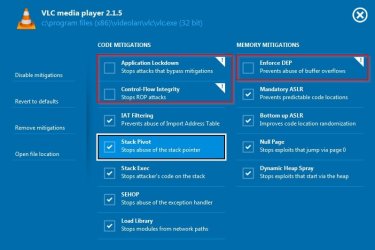
Still had a problem with VLC:

VLC.jpg

Solved by disabling the following:

VLC 2.jpg

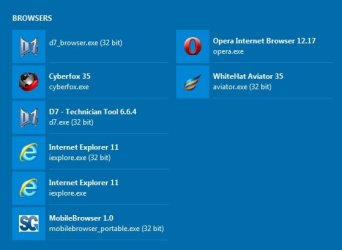
Browsers all protected and launching okay:

Browsers.jpg

Added EM Editor and a few other apps - all okay.

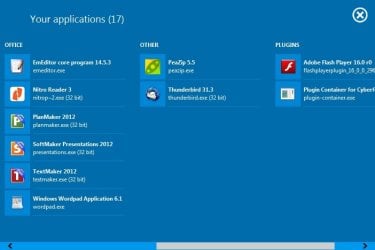
Apps.jpg

I'm fairly impressed with HMPA 3 but I'm not sure if there's any additional protection worth paying for over and above running EMET (free), VoodooShield (Pro) , HitmanPro Alert 2.6.5 (free) and SecureAPlus (free). In particular if any new process is spawned through an exploit, VS will kill it.
 

My Computer My Computer

At a glance

Microsoft Windows 7 Home Premium 64-bit 7601 ...AMD C-60 APU with Radeon(tm) HD Graphics4.00 GBAMD Radeon HD 6290 Graphics
Computer type
Laptop
Computer Manufacturer/Model Number
ASUS
OS
Microsoft Windows 7 Home Premium 64-bit 7601 Multiprocessor Free Service Pack 1
CPU
AMD C-60 APU with Radeon(tm) HD Graphics
Motherboard
ASUSTeK COMPUTER INC. X501U
Memory
4.00 GB
Graphics Card(s)
AMD Radeon HD 6290 Graphics
Sound Card
(1) AMD High Definition Audio Device (2) Realtek High Defi
Screen Resolution
1366 x 768 x 32 bits (4294967296 colors) @ 60 Hz
Hard Drives
Hitachi HTS545050A7E380 SATA Disk Device
Antivirus
Comodo CIS & FW, SecureAplus App Whitelisting, Threatfire
Browser
Cyberfox 64bit, Opera 64bit, Airfox
Other Info
Spy-The-Spy, HitmanPro.Alert, Norton Connect Safe, MJRegWatcher, BitDefender TrafficLight, Voodoo Shield, Zemana AntiMalware
I would say if you like EMET, then yes, the free version is the way to go. Its a nice little browser add on.
 

My Computer My Computer

At a glance

Microsoft Windows 7 Professional 64-bit SP1Intel(R) Core(TM) i5 CPU M 520 @ 2.40GHz8.00 GBNVIDIA NVS 3100M
Computer type
PC/Desktop
OS
Microsoft Windows 7 Professional 64-bit SP1
CPU
Intel(R) Core(TM) i5 CPU M 520 @ 2.40GHz
Motherboard
Dell Inc. 0K42JR
Memory
8.00 GB
Graphics Card(s)
NVIDIA NVS 3100M
Sound Card
(1) NVIDIA High Definition Audio (2) IDT High Definition A
Monitor(s) Displays
1
Screen Resolution
1440 x 900 x 32 bits (4294967296 colors) @ 59 Hz
Hard Drives
Samsung SSD 840 PRO Series ATA Device
I'm fine with EMET too along the free version of HMPA 3 (eventually). But only because I have several other great security layers in place. But I'm very impressed with HMPA 3 including the exploit mitigations!

Here a quick summary of HMPA 3 free/paid if anyone's interested:

HitmanPro.Alert requires a license for Exploit Mitigations and Active Vaccination. All other features are free.
HitmanPro.Alert Support and Discussion Thread | Page 154 | Wilders Security Forums

HITMANPRO.ALERT 3 FEATURE OVERVIEW

  • Install-and-Forget Signature-less protection suitable for Home Users, Power Users and IT Professionals
  • Exploit Mitigations (Anti-Exploit) Aims to stop attackers from exploiting software vulnerabilities
  • Fine-grained Exploit Mitigation Settings Allows experienced computer users to change individual mitigations, per application
  • On-demand Malware Detection and Remediation Integrated Anti-Malware scanner
  • BadUSB Protection Blocks malicious USB devices that pose as a keyboard
  • Safe Browsing (Man-in-the-Browser Detection) Warns when malware manipulates the browser; behavior-based
  • Active Vaccination Makes sandbox-aware malware self-terminate
  • CryptoGuard Protects your data against CryptoLocker, CryptoWall, TorrentLocker, OphionLocker, CoinVault and variants; behavior-based
  • Webcam Notifier Blocks the webcam when it is (secretly) accessed
  • Keystroke Encryption Protects credentials against keyloggers in the browser
  • Hollow Process Protection Protects the main executable of a process against unmapping
  • Network Lockdown Helps to stop attacks that connect back to command-and-control
  • Full 64-bit Support Offers 64-bit applications same protection as 32-bit applications
  • Software Radar Automatically protects new browsers, plug-ins, media and office applications
  • Easy-to-Use High DPI User Interface Suitable for Home Users, Power Users and IT Pros
  • Advanced Exploit Reporting Logs advanced technical data for forensic threat analysis
  • Multilingual User Interface English, Chinese (Simplified), Chinese (Traditional), Dutch, French, German, Italian, Brazilian Portuguese, Russian, Spanish
  • Antivirus Compatible Runs alongside third-party antivirus or internet security software
ANTI-EXPLOIT // CODE MITIGATIONS

  • SEHOP Stops abuse of the structured exception handler
  • Stack Pivot Stops abuse of the stack pointer
  • Stack Exec Stops attacker's code on the stack
  • Software Stack-based Anti-ROP Stops return-oriented programming (ROP) attacks (part of Control-Flow Integrity)
  • Hardware-assisted Branch-based Anti-ROP Programs microprocessor to stop ROP attacks (part of Control-Flow Integrity)
  • Import Address Table Filtering (IAF) Prevents attackers from snooping function addresses (part of Control-Flow Integrity)
  • Caller Check Stops processes called from attacker-controlled memory (part of Control-Flow Integrity)
  • Load Library Stops modules that load from insecure network paths
  • Application Lockdown Prevents abuse of logic flaws and stops attacks that bypass mitigations (incl. Office macros)
ANTI-EXPLOIT // MEMORY MITIGATIONS

  • Enforce DEP Prevents abuse of buffer overflows
  • Mandatory ASLR Prevents predictable code locations
  • Pseudo ASLR for Windows XP and Windows Server 2003 Prevents predictable code locations of modules on legacy Windows (part of Mandatory ASLR)
  • Bottom Up ASLR Improves code location randomization (ASLR)
  • Null Page Stops exploits that jump via page 0
  • Heap Spray Pre-Allocation Stops attacks that start via common memory addresses on the heap (part of Dynamic Heap Spray)
  • Dynamic Heap Spray Stops exploits that start via the heap; behavior-based
HitmanPro.Alert Support and Discussion Thread | Page 128 | Wilders Security Forums
 

My Computer My Computer

At a glance

Windows 7 Pro 32Intel(R) Core(TM) i5 CPU M 540 @ 2.53GHz4,00 GB (Usable 2,98)NVIDIA NVS 5100M
Computer type
Laptop
Computer Manufacturer/Model Number
HP Elitebook 8540p
OS
Windows 7 Pro 32
CPU
Intel(R) Core(TM) i5 CPU M 540 @ 2.53GHz
Motherboard
Hewlett-Packard 1521
Memory
4,00 GB (Usable 2,98)
Graphics Card(s)
NVIDIA NVS 5100M
Sound Card
NVIDIA High Definition Audio
Screen Resolution
1600x900
Hard Drives
INTEL SSDSA2CW120G3
Antivirus
F-Secure Internet Security
Browser
IE, Firefox, Opera
Other Info
Sandboxie,
SRP (Software Restriction Policy),
EMET (Enhanced Mitigation Experience Toolkit),
WFC (Windows Firewall Control by BiniSoft),
Malwarebytes Premium
I am very happy with the paid version of HMPA, I feel it compliments y setup very nicely and of course offers more than just one layer
 

My Computer My Computer

At a glance

Microsoft Windows 7 Professional 64-bit SP1Intel(R) Core(TM) i5 CPU M 520 @ 2.40GHz8.00 GBNVIDIA NVS 3100M
Computer type
PC/Desktop
OS
Microsoft Windows 7 Professional 64-bit SP1
CPU
Intel(R) Core(TM) i5 CPU M 520 @ 2.40GHz
Motherboard
Dell Inc. 0K42JR
Memory
8.00 GB
Graphics Card(s)
NVIDIA NVS 3100M
Sound Card
(1) NVIDIA High Definition Audio (2) IDT High Definition A
Monitor(s) Displays
1
Screen Resolution
1440 x 900 x 32 bits (4294967296 colors) @ 59 Hz
Hard Drives
Samsung SSD 840 PRO Series ATA Device
HMPA 3 free?

I'm fine with EMET too along the free version of HMPA 3 (eventually). But only because I have several other great security layers in place. But I'm very impressed with HMPA 3 including the exploit mitigations!

Here a quick summary of HMPA 3 free/paid if anyone's interested:
HitmanPro.Alert Support and Discussion Thread | Page 154 | Wilders Security Forums

Thanks for the info. I'd assumed that there was only a paid for version available. Free will do just fine.

On another note I heard that NVT ERP is going to be free soon. Already tried their Driver Radar Pro.

:thumbsup:
 

My Computer My Computer

At a glance

Microsoft Windows 7 Home Premium 64-bit 7601 ...AMD C-60 APU with Radeon(tm) HD Graphics4.00 GBAMD Radeon HD 6290 Graphics
Computer type
Laptop
Computer Manufacturer/Model Number
ASUS
OS
Microsoft Windows 7 Home Premium 64-bit 7601 Multiprocessor Free Service Pack 1
CPU
AMD C-60 APU with Radeon(tm) HD Graphics
Motherboard
ASUSTeK COMPUTER INC. X501U
Memory
4.00 GB
Graphics Card(s)
AMD Radeon HD 6290 Graphics
Sound Card
(1) AMD High Definition Audio Device (2) Realtek High Defi
Screen Resolution
1366 x 768 x 32 bits (4294967296 colors) @ 60 Hz
Hard Drives
Hitachi HTS545050A7E380 SATA Disk Device
Antivirus
Comodo CIS & FW, SecureAplus App Whitelisting, Threatfire
Browser
Cyberfox 64bit, Opera 64bit, Airfox
Other Info
Spy-The-Spy, HitmanPro.Alert, Norton Connect Safe, MJRegWatcher, BitDefender TrafficLight, Voodoo Shield, Zemana AntiMalware
I'm fine with EMET too along the free version of HMPA 3 (eventually). But only because I have several other great security layers in place. But I'm very impressed with HMPA 3 including the exploit mitigations!

Here a quick summary of HMPA 3 free/paid if anyone's interested:
HitmanPro.Alert Support and Discussion Thread | Page 154 | Wilders Security Forums

Thanks for the info. I'd assumed that there was only a paid for version available. Free will do just fine.

On another note I heard that NVT ERP is going to be free soon. Already tried their Driver Radar Pro.

:thumbsup:

It has already become freeware like radar pro. I hope it is not a sign to come for many of the past programs that went from paid, then freeware (with donations) then abadonware. I was speaking with the developer and suggested that ERP free would be just fine, but if he could somehow roll up ERP, Driver radar, Kernel mode, drivers manager,Ring 3 api hook scanner, Dll uninjector, Anti rootkit, Write Process Memory manager, Handle tracer just to name a few into one paid version, as they are all great free or separate tools. In any case, a great program just became free so don't miss out
 

My Computer My Computer

At a glance

Microsoft Windows 7 Professional 64-bit SP1Intel(R) Core(TM) i5 CPU M 520 @ 2.40GHz8.00 GBNVIDIA NVS 3100M
Computer type
PC/Desktop
OS
Microsoft Windows 7 Professional 64-bit SP1
CPU
Intel(R) Core(TM) i5 CPU M 520 @ 2.40GHz
Motherboard
Dell Inc. 0K42JR
Memory
8.00 GB
Graphics Card(s)
NVIDIA NVS 3100M
Sound Card
(1) NVIDIA High Definition Audio (2) IDT High Definition A
Monitor(s) Displays
1
Screen Resolution
1440 x 900 x 32 bits (4294967296 colors) @ 59 Hz
Hard Drives
Samsung SSD 840 PRO Series ATA Device
I've been testing Hitman Pro Alert 3 as my anti-exploit, which has been pretty light weight and seems to be getting stronger and stronger with each build release. Has a nice keystroke encryption, which can be applied to programs like Word and Notepad.


Stronger and stronger with each build? Since when have they last updated it? Not for quite some time! I personally feel more confident with Malwarebytes Anti-Exploit Premium.
 

My Computer My Computer

At a glance

Windows 7 64 bitIntel Core i7 4770 @ 3.40GHz Haswell 22nm Tec...12.0 GB of PC3-12800; Mix of Hyundai and Micr...NVIDIA GeForce GT 635
Computer type
PC/Desktop
Computer Manufacturer/Model Number
Dell
OS
Windows 7 64 bit
CPU
Intel Core i7 4770 @ 3.40GHz Haswell 22nm Technology
Motherboard
Dell 0KWVT8
Memory
12.0 GB of PC3-12800; Mix of Hyundai and Micron memory
Graphics Card(s)
NVIDIA GeForce GT 635
Monitor(s) Displays
DELL U2311H
Screen Resolution
1920x1080
Hard Drives
Seagate Barracuda ST1000DM003 1TB
Antivirus
Avira Antivirus Pro
Browser
Firefox
Back
Top