Best video player?

Media Player Classic Home Cinema x64 for me.
 

My Computer

OS
Windows 7 Professional x64 SP1
CPU
Intel Core i5-2500K
Motherboard
Gigabyte P67X-UD3-B3
Memory
8 GB Corsair Vengeance Blue DDR3-1600
Graphics Card(s)
Sapphire Radeon HD 6870 1 GB GDDR5
Monitor(s) Displays
Samsung SyncMaster T220HD
Screen Resolution
1680x1050
Hard Drives
120 GB Corsair Force SSD + 320 GB Seagate Barracuda SATA2 + 2 TB My Book Elite
PSU
Corsair 650W
Internet Speed
50 Mbps

My Computer

Computer Manufacturer/Model Number
Fujitsu Siemens
OS
XP SP2
CPU
Intel Celeron D 3.07 GHz
Motherboard
/
Memory
1GB
Graphics Card(s)
Nvidia GeForce 6200 SE 256mb
Sound Card
Realtek
Monitor(s) Displays
17 "
Screen Resolution
1280x1024
Hard Drives
160GB
Internet Speed
2mb
I've just discovered this and will never use anything else again. Hands down, The KMPlayer is, by far, the most powerful, slender and effective media player around. It's entirely free, skinnable, supports Win7 and has built-in codecs for all media types.

the_kmplayer_screenshot.png
 

My Computer

Computer type
PC/Desktop
Computer Manufacturer/Model Number
Custom Build/Mod
OS
Windows 7 Home Premium x64
CPU
Intel QX9650 Extreme 4.0 GHz
Motherboard
ASUS Rampage Extreme Rev2
Memory
8GB (4x2) Corsair Dominator DDR3
Graphics Card(s)
2x Radeon R390X [8GB]
Sound Card
SupremeFX X-Fi
Monitor(s) Displays
Dell 2408WFP 26" Panel
Screen Resolution
1920x1200
Hard Drives
4x WD 2TB (8TB+ Total)
2x Crucial SSD 128GB (RAID-0)
1x LG Blu-ray read/write
1x Phillips LightScribe DVD read/write
PSU
Corsair HX1000
Case
CoolerMaster - Cosmos S
Cooling
Custom Liquid - 320mm rad w/ 3x 80mm fans, CPU/NB/SB Blocks
Keyboard
Logitech Illuminater Pro
Mouse
Logitech
Internet Speed
Fractional T1 - 125Mbps
Antivirus
ESET Security Suite / Microsoft Security Essentials
Browser
Cyberfox Intel x64
Other Info
OC'd to 5.0GHz @ 44c under full load
i have on my 26lcd big pixels in kmp if divx running in fullscreen(btw same in crystal player),i just try GOM and its very good,no pixelisation. VLC and win media clasic is too ugly:sick:
 

My Computer

OS
Windows 7 Ultimate x64 SP1
No problem. I got homecinema x64 aswell, really cool. What .dlls do you mean?

@codecs: I use shark007's codecs for mkvs since that was the only way for me to get my bluray rips 1080p h264 to run properly in 16:10 with MPC. Of course you only need the haali media splitter to watch them on WMP, but i don't like black borders. I hate them, tbh. I never had any problems with them, no spyware, no computer crashes etc. Trust codecs!

After a closer look, I see they are language resources.
 

My Computer

Computer Manufacturer/Model Number
MasterB/Custom
OS
Windows 7 Professional x64
CPU
QuadCore AMD Phenom II X4 Black Edition 955 3.2 GHz
Motherboard
Asus M4A785TD-V Evo
Memory
8 GB Crucial DDR3
Graphics Card(s)
SAPPHIRE Radeon HD 4890 1GB HDMI New Edition
Sound Card
VIA VT1708S HD Audio 7.1 onboard/ ATI HDMI video card
Monitor(s) Displays
Acer H233H 23'' LCD HDMI
Screen Resolution
1920x1080
Hard Drives
1x 500GB and 1x 1TB 7200RPM 32MB Cache WD Caviar Black
PSU
CORSAIR CMPSU-620HX 620W
Case
COOLER MASTER Storm Scout SGC-2000
Cooling
2x 140mm and 1x 120mm case fans, Stock CPU fan
Keyboard
Logitech MX 3200
Mouse
Logitech MX 3200
Internet Speed
15 Mbps
Other Info
My first build!
i don't know if it's the best, but i use kmp, the km player - and no codec packs!

I only install codecs for encoding.

Me too, I use KMPlayer build 1435 pre2 with it's internal decoders, the video and album art preview is so niice:D.... I only install K-lite codec pack at it's default settings, with thumbnail disabled, otherwise explorer will randomly crash unexpectedly(even if you're not on a videos folder), it's a bummer when explorer crashes while you're batch copying some files(to fix that I use TeraCopy as an alternative)....
I use K-lite only for encoding purposes too and I don't use Media Player Classic.

anyways, Those are just my preferences, if you know what I mean...
 

My Computer

Computer Manufacturer/Model Number
It's a Custom Build.....
OS
Windows 7 Ultimate x64, 7600.20647 RTM
CPU
Intel Core2Quad Q9505 @ 4.0Ghz
Motherboard
Intel Skyburg DP45SG
Memory
6GB Transcend DDR3-1333 Dual Channel
Graphics Card(s)
ASUS GTX285 1GB GDDR3
Sound Card
OnBoard Intel IDT HD Audio
Monitor(s) Displays
HP w2207h 22" WideScreen LCD, VGA & HDMI
Screen Resolution
1680x1050, 60Hz
Hard Drives
1TB WD Caviar Black, Green Power...
1TB Dell, 32Mb/s, Internal SATA
320GB Seagate Internal SATA (3 Partitions)
PSU
Omega 600W ATX2.0 Dual Rail, 2x Fans
Case
Cooler Master HAF 922
Cooling
Corsair Hydro H50 in Push-Pull mode, 4 Case Fans with LED
Keyboard
White aigo keyboard with blue LED on the keys....
Mouse
Genius Mini Tracer
Internet Speed
I'm ashamed to say...
Other Info
Aigo wireless keyboard(black) and a 2.1 Speaker System(white)
sharkoon 007 kodeks + x64 MPC (bouth it's latest) what is configuration in MPC for output and internal filters...:)
 

My Computer

OS
windows 7 (64bit) - LastXp v21
CPU
E8400 (2x3.0ghz)
Motherboard
P35-DS3L (rev 2.0)
Memory
2x1gb kingstom - 1x2gb kingmax (ddr2)
Graphics Card(s)
HD4850 + accelero turbo twin
Sound Card
integrate on motherboard
Monitor(s) Displays
T200
Screen Resolution
1680X1050 (1920X1080)
Hard Drives
2x seagathe 640gb (32mb cache)
1x seagathe 250gb (16mb cache)
1x maxtor 80gb (only for testing)
PSU
corsair VX550
Case
chieftec big tower
Cooling
air
Keyboard
logitech flat
Mouse
trust
Internet Speed
4mbit
I've just discovered this and will never use anything else again. Hands down, The KMPlayer is, by far, the most powerful, slender and effective media player around. It's entirely free, skinnable, supports Win7 and has built-in codecs for all media types.

I like it, but trying to play audio in it is causing me some issues. I don't get the whole album art thing. It just works in WinAmp, but I can't seem to get it to work in this. I can load an album art image, but it simply stays they for all tracks. I must be doing something wrong.

The other thing I really like about WinAmp is the Enque in WinAmp context menu option. I like searching through tracks in folders and adding them to a playlist that way.

Maybe I'll just keep WinAmp for audio - although the tracks do seem to sound even better in this player.

I do like the looks of this though and it's making me "think" about using it instead of VLC, which works great but doesn't look all that great.
 

My Computer

Computer Manufacturer/Model Number
HP
OS
Windows 7 Home Premium 64-bit
CPU
Intel Core2 Quad Q6600 @ 2.40 Ghz
Memory
8GB RAM
Graphics Card(s)
ATI Radeon HD 4600
Monitor(s) Displays
HP w2007
Screen Resolution
1680 x 1050
Hard Drives
700 GB
The KMPlayer for video and WinAMP for music...
 

My Computer

OS
Windows7 x86 build 7127
CPU
DualCore Intel Pentium E2220 @ 2748 MHz
Motherboard
Gigabyte GA-P31-DS3L
Memory
Patriot Memory 4096 MB (DDR2-800)
Graphics Card(s)
Gainward GeForce 9600 GT
Sound Card
onboard
Monitor(s) Displays
Asus VW222
Screen Resolution
1680 x 1050
Hard Drives
Seagate (300 GB, 7200 RPM, SATA-II)
Seagate (120 GB, 7200 RPM, SATA)
PSU
OCZ gameXstream 600W
Case
NZXT Hush
Cooling
-
Keyboard
-
Mouse
Logitech G5
Internet Speed
Down 4,05 Mb/s Up 0,26 Mb/s

My Computer

Computer Manufacturer/Model Number
mickey megabyte 1234
OS
ultimate 64 sp1
CPU
i5 2500K [email protected]
Motherboard
MSI P67A-GD53
Memory
8 gigs GSkill Ripjaws 1600
Graphics Card(s)
amd hd6950
Sound Card
creative x-fi gamer
Monitor(s) Displays
samsung 24"
Screen Resolution
1920x1080
Hard Drives
ocz vertex 2e 60 gig, samsung f3 1tb, buffalo 2tb ext
PSU
antec 550
Case
antec three hundred
Cooling
i'm a cooling fan
Keyboard
saitek eclipse ii
Mouse
logitech g3
Internet Speed
about 4 Mbps
Other Info
i love win7
I like it, but trying to play audio in it is causing me some issues.

What version are you using? I don't have any issues with the version I'm using, you have to use build 14.35 pre2, because the first build 14.35 is buggy, you can get it here: 4shared.com - online file sharing and storage - download The KMPlayer.exe... It's a sfx archive, just extract it to your program files directory and run "KMPsetup.exe" to configure the player.

I don't get the whole album art thing. It just works in WinAmp, but I can't seem to get it to work in this. I can load an album art image, but it simply stays they for all tracks. I must be doing something wrong.
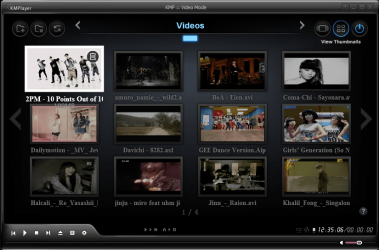
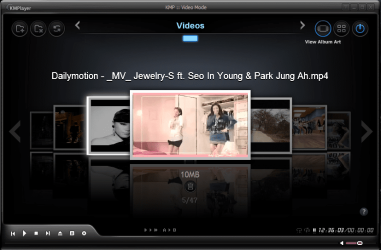
Look at the screen shots below with "video" album art preview.

The other thing I really like about WinAmp is the Enque in WinAmp context menu option. I like searching through tracks in folders and adding them to a playlist that way.

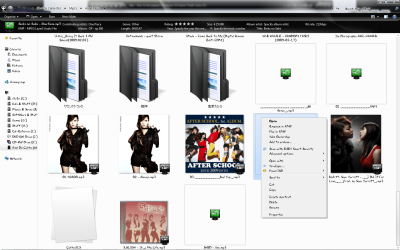
There's a screeshot with that context menu active for KMP, you just have to associate KMP with your MP3's...

Maybe I'll just keep WinAmp for audio - although the tracks do seem to sound even better in this player.

I've noticed that too, and you can enhance the sound quality even more by choosing the options I've displayed on one of the screen shots, remember to turn the EQ on first otherwise selecting those options won't have any effect...

I do like the looks of this though and it's making me "think" about using it instead of VLC, which works great but doesn't look all that great.
Yea, the issues I have with issues are the GUI and the inability to remember custom EQ settings, I'd spend a few minutes setting up the EQ to my liking only to notice that after closing the settings disappear after closing the player....
 

Attachments

  • Audio 2.PNG
    Audio 2.PNG
    154.9 KB · Views: 52
  • Audio.PNG
    Audio.PNG
    97.9 KB · Views: 98
  • Capture.PNG
    Capture.PNG
    380.9 KB · Views: 332
  • Capture2.PNG
    Capture2.PNG
    325.5 KB · Views: 287
  • Context.png
    Context.png
    676.6 KB · Views: 156

My Computer

Computer Manufacturer/Model Number
It's a Custom Build.....
OS
Windows 7 Ultimate x64, 7600.20647 RTM
CPU
Intel Core2Quad Q9505 @ 4.0Ghz
Motherboard
Intel Skyburg DP45SG
Memory
6GB Transcend DDR3-1333 Dual Channel
Graphics Card(s)
ASUS GTX285 1GB GDDR3
Sound Card
OnBoard Intel IDT HD Audio
Monitor(s) Displays
HP w2207h 22" WideScreen LCD, VGA & HDMI
Screen Resolution
1680x1050, 60Hz
Hard Drives
1TB WD Caviar Black, Green Power...
1TB Dell, 32Mb/s, Internal SATA
320GB Seagate Internal SATA (3 Partitions)
PSU
Omega 600W ATX2.0 Dual Rail, 2x Fans
Case
Cooler Master HAF 922
Cooling
Corsair Hydro H50 in Push-Pull mode, 4 Case Fans with LED
Keyboard
White aigo keyboard with blue LED on the keys....
Mouse
Genius Mini Tracer
Internet Speed
I'm ashamed to say...
Other Info
Aigo wireless keyboard(black) and a 2.1 Speaker System(white)
Hey guys,

I am a long term reader ... but just made an account.
Hell, I`m reading these pages since I got my hands on the beta version of 7. & since then a proud user of beta, rc & now RTM.

So ... to my problem.
I have found solutions to my past problems by searching this forum or google.
Basicly with this ... I am stuck.

Here is the problem.
My hd video playback is a biatch.
The problem is not sound or video quality. Those are great, even if I connect to a 1080p native sony, a 1080p movie is awsome to look at.

But the problem is, it freezes every 5 to 10minutes orso ... nothing, I see my hdd lamp burning like their is no tomorrow. Then after a minute or 2, sound starts again where it left off but video plays really fast for a few second then slows down until the sound catches up. When they are both in sync, the screen flikkers once and the movie continues.

Now this is only with hd films ... in a hd container.
With dvd playback, or playback of a dvix (...quality is a pain) nothing is wrong. First I taught it`s my windows, so I did a clean install of 7 RTM (64bits btw)

The thing that bother me though, was that with 7 beta, everything went well. With 7 rc, I didn`t wach alot of movies because I was in my university`s session and had to studie. And then gone on holliday with my girl for a good few weeks so ... I wached tops 4 movies. And all of them had this problem.
So I taught: clean install 7, and it should work.

But nope! still the same problem.
I have downloaded sharks`s packedge. Didn`t help. Tryed out multiple drivers ... nothing helped. Problem is still here and annying the crap out of me (to be honest) - should I try out cccp pack or what?

So anywho: my specs are (laptop)
8700m GT (using the Forceware 182.46 drivers - with other drivers, I have screen tearing every few seconds so ... this looks promissing right now - its the DOX moddified driver)
17` 1680x1050 screen.
windows 7 RTM 64bits.

ps: this happens with: wmp, media player classic home cinema edition 64bits & vlc player.
pps: this is with 720p & 1080p.

 
Last edited:

My Computer

Computer Manufacturer/Model Number
Toshiba x-200
OS
Windows 7 RTM 64bits
CPU
t7500
Memory
4 gigs
Graphics Card(s)
8700m GT
Monitor(s) Displays
1680x1050
Look at the screen shots below with "video" album art preview.

I'm talking about "audio" album art though. When I load an MP3 in WMP or WinAmp, it will automatically load album art for the song. KM does not. All I'm stuck with is a screen that says Open Album Art. What are we supposed to do with that? Why does it not load automatically?

There's a screeshot with that context menu active for KMP, you just have to associate KMP with your MP3's...

Yes, I was just wondering if that option was going to be there or not as I hadn't bothered to change associations yet.
 

My Computer

Computer Manufacturer/Model Number
HP
OS
Windows 7 Home Premium 64-bit
CPU
Intel Core2 Quad Q6600 @ 2.40 Ghz
Memory
8GB RAM
Graphics Card(s)
ATI Radeon HD 4600
Monitor(s) Displays
HP w2007
Screen Resolution
1680 x 1050
Hard Drives
700 GB
Hey guys,

I am a long term reader ... but just made an account.
Hell, I`m reading these pages since I got my hands on the beta version of 7. & since then a proud user of beta, rc & now RTM.

So ... to my problem.
I have found solutions to my past problems by searching this forum or google.
Basicly with this ... I am stuck.

Here is the problem.
My hd video playback is a biatch.
The problem is not sound or video quality. Those are great, even if I connect to a 1080p native sony, a 1080p movie is awsome to look at.

But the problem is, it freezes every 5 to 10minutes orso ... nothing, I see my hdd lamp burning like their is no tomorrow. Then after a minute or 2, sound starts again where it left off but video plays really fast for a few second then slows down until the sound catches up. When they are both in sync, the screen flikkers once and the movie continues.

Now this is only with hd films ... in a hd container.
With dvd playback, or playback of a dvix (...quality is a pain) nothing is wrong. First I taught it`s my windows, so I did a clean install of 7 RTM (64bits btw)

The thing that bother me though, was that with 7 beta, everything went well. With 7 rc, I didn`t wach alot of movies because I was in my university`s session and had to studie. And then gone on holliday with my girl for a good few weeks so ... I wached tops 4 movies. And all of them had this problem.
So I taught: clean install 7, and it should work.

But nope! still the same problem.
I have downloaded sharks`s packedge. Didn`t help. Tryed out multiple drivers ... nothing helped. Problem is still here and annying the crap out of me (to be honest) - should I try out cccp pack or what?

So anywho: my specs are (laptop)
8700m GT (using the Forceware 182.46 drivers - with other drivers, I have screen tearing every few seconds so ... this looks promissing right now - its the DOX moddified driver)
17` 1680x1050 screen.
windows 7 RTM 64bits.

ps: this happens with: wmp, media player classic home cinema edition 64bits & vlc player.
pps: this is with 720p & 1080p.

Dude, first off you should avoid using that kind of language/slang or whatever, find creative ways to express your dismay... I'd advise you to go read the rules right away... I think the moderators will agree with me.

On to the problem, it's always good to use up to date display drivers, download the latest from nVidia's website, the ones you've specified are outdated, Uninstall all your codec packs(If you have more than one), install one codec package at it's default settings(I suggest k-lite Mega codec pack) and try to playback again...

Let me point out to you in case you didn't already know; playback of HD Movies or videos consumes a lot of CPU Resources, and the screen flickering/fast playback issue might be due to fact that when you're doing a long seek for a specific timeline in the video it takes a while for the CPU to process, you'll just have to wait it out... CPU usage get's at about 63-70% when I'm playing an 1080p video, the flickering I got when I tried seeking with Media Player Classic homecinema, but with KMPlayer it's just a brief lag, but that's only with 1080p videos, 720p ones aren't that heavy. How good is your CPU?(that really counts too), how many Ghz are you at now?

So try to do what I did, use K-lite as a codec pack and afterwards install KMPlayer and use it as your default Video Player and then tell me how it goes....

I'm talking about "audio" album art though. When I load an MP3 in WMP or WinAmp, it will automatically load album art for the song. KM does not. All I'm stuck with is a screen that says Open Album Art. What are we supposed to do with that? Why does it not load automatically?
I haven't been able to display the album arts of my mp3's on KMPlayer, I'm not sure if it's possible or not, but I don't really concentrate on that, there's no difference for me, I kinda like it like that, because in my case with Winamp, in order to view the album art I'd have to playback my mp3's with the player expanded, and I don't really like that, I prefer playback in docked/reduced mode for mp3's... I'd like to see a screen shot of that option says 'Open Album Art', does it appear while you're playing an mp3 or when you're at a stopped state?
 

My Computer

Computer Manufacturer/Model Number
It's a Custom Build.....
OS
Windows 7 Ultimate x64, 7600.20647 RTM
CPU
Intel Core2Quad Q9505 @ 4.0Ghz
Motherboard
Intel Skyburg DP45SG
Memory
6GB Transcend DDR3-1333 Dual Channel
Graphics Card(s)
ASUS GTX285 1GB GDDR3
Sound Card
OnBoard Intel IDT HD Audio
Monitor(s) Displays
HP w2207h 22" WideScreen LCD, VGA & HDMI
Screen Resolution
1680x1050, 60Hz
Hard Drives
1TB WD Caviar Black, Green Power...
1TB Dell, 32Mb/s, Internal SATA
320GB Seagate Internal SATA (3 Partitions)
PSU
Omega 600W ATX2.0 Dual Rail, 2x Fans
Case
Cooler Master HAF 922
Cooling
Corsair Hydro H50 in Push-Pull mode, 4 Case Fans with LED
Keyboard
White aigo keyboard with blue LED on the keys....
Mouse
Genius Mini Tracer
Internet Speed
I'm ashamed to say...
Other Info
Aigo wireless keyboard(black) and a 2.1 Speaker System(white)
I'm a big BS Player fan. It plays everything I throw at it and it also finds subtitles for movies if so you wish. Worth a look imo
http://www.bsplayer.org/
 

My Computer

Computer type
PC/Desktop
Computer Manufacturer/Model Number
Elsa
OS
windows 8.1 Pro x64
CPU
intel [email protected]
Motherboard
msi mpower max ac
Memory
2x8gb ripjaws x @2133
Graphics Card(s)
asus r9-290@1100/1300
Sound Card
creative sbz
Monitor(s) Displays
dell u3011
Hard Drives
840 evo 250 & 8.5tb
PSU
evga supernova p2-1000
Case
corsair air 540
Cooling
corsair h100
Keyboard
logitech g710+
Mouse
logitech g502
Internet Speed
50/10
Antivirus
avg
Browser
firefox
The KMPlayer
\thread

But I've heard that it doesn't work well on 64-bit though...
 

My Computer

Computer type
PC/Desktop
Computer Manufacturer/Model Number
Custom build
OS
Windows 10 Professional 64-bit
CPU
Ryzen 9 5900X
Motherboard
Gigabyte X570 Aorus Master
Memory
G.Skill 3600Mhz CL16 16GB × 4
Graphics Card(s)
EVGA GeForce RTX 3070 Ti FTW3 Ultra Gaming
Sound Card
On-board
Monitor(s) Displays
Dell Alienware AW3418DW
Screen Resolution
3440x1440
Hard Drives
1×Sabrent Rocket 4 Plus 2TB nvme SSD (System, internal)
2x4TB Western Digital Blue (Internal)
1x4TB HDST 7200RPM (Internal)
PSU
Seasonic Focus Plus 850W Platinum
Case
Corsair 680X
Cooling
Stock fans + 3× Corsair QL120, Corsair H100i Platinum
Keyboard
Logitech K350
Mouse
Logitech M510
Internet Speed
120Mbits dl - 20Mbits up
Antivirus
ESET NOD32 Antivirus
Browser
Firefox (latest version)
Other Info
Headphones : Audio-Technica ATH-M50x
Scanner : Canon Canoscan LiDE 220 + Plustek OptiBook 4800

My Computer

Computer type
PC/Desktop
Computer Manufacturer/Model Number
Custom Build/Mod
OS
Windows 7 Home Premium x64
CPU
Intel QX9650 Extreme 4.0 GHz
Motherboard
ASUS Rampage Extreme Rev2
Memory
8GB (4x2) Corsair Dominator DDR3
Graphics Card(s)
2x Radeon R390X [8GB]
Sound Card
SupremeFX X-Fi
Monitor(s) Displays
Dell 2408WFP 26" Panel
Screen Resolution
1920x1200
Hard Drives
4x WD 2TB (8TB+ Total)
2x Crucial SSD 128GB (RAID-0)
1x LG Blu-ray read/write
1x Phillips LightScribe DVD read/write
PSU
Corsair HX1000
Case
CoolerMaster - Cosmos S
Cooling
Custom Liquid - 320mm rad w/ 3x 80mm fans, CPU/NB/SB Blocks
Keyboard
Logitech Illuminater Pro
Mouse
Logitech
Internet Speed
Fractional T1 - 125Mbps
Antivirus
ESET Security Suite / Microsoft Security Essentials
Browser
Cyberfox Intel x64
Other Info
OC'd to 5.0GHz @ 44c under full load
The KMPlayer
\thread

But I've heard that it doesn't work well on 64-bit though...

i've also had zero problems running kmp on x64.

kmp plays them all, and now that i've worked out how to use dvd subtitles, i've ditched vlc completely.
 

My Computer

Computer Manufacturer/Model Number
mickey megabyte 1234
OS
ultimate 64 sp1
CPU
i5 2500K [email protected]
Motherboard
MSI P67A-GD53
Memory
8 gigs GSkill Ripjaws 1600
Graphics Card(s)
amd hd6950
Sound Card
creative x-fi gamer
Monitor(s) Displays
samsung 24"
Screen Resolution
1920x1080
Hard Drives
ocz vertex 2e 60 gig, samsung f3 1tb, buffalo 2tb ext
PSU
antec 550
Case
antec three hundred
Cooling
i'm a cooling fan
Keyboard
saitek eclipse ii
Mouse
logitech g3
Internet Speed
about 4 Mbps
Other Info
i love win7
Ever since W7, i only use WMP.

Why do all of you need codecs for? WMP plays all my files nowadays. Am I missing something here?
 

My Computer

Computer Manufacturer/Model Number
Self assembled
OS
W7 64b - Leopard 10.6.2 - Ubuntu 10.10 (MBP Snow Leopard 10.6.3)
CPU
Intel E6600
Motherboard
Asus P5W DeluxeHome
Memory
4GB
Graphics Card(s)
nVidia 8800GTX
Sound Card
Onboard
Monitor(s) Displays
Samsung 24"
Screen Resolution
1920*1200
Hard Drives
3*250GB
PSU
Antec
Case
Antec
Cooling
3*Fan
Keyboard
Logitec
Mouse
Logitec
Internet Speed
25Mb
i have a friend studying foreign cinema, she often brings mkvs and dvds that she wants to watch. km player has very good subtitle support.

there's a couple of reasons why i don't use wmp: mkv and subtitles - i won't list all the others.
 

My Computer

Computer Manufacturer/Model Number
mickey megabyte 1234
OS
ultimate 64 sp1
CPU
i5 2500K [email protected]
Motherboard
MSI P67A-GD53
Memory
8 gigs GSkill Ripjaws 1600
Graphics Card(s)
amd hd6950
Sound Card
creative x-fi gamer
Monitor(s) Displays
samsung 24"
Screen Resolution
1920x1080
Hard Drives
ocz vertex 2e 60 gig, samsung f3 1tb, buffalo 2tb ext
PSU
antec 550
Case
antec three hundred
Cooling
i'm a cooling fan
Keyboard
saitek eclipse ii
Mouse
logitech g3
Internet Speed
about 4 Mbps
Other Info
i love win7
Back
Top