Optimized Video & Image Quality Settings
If you use KMPlayer full time, all the time, then this post is just for you and for those who haven't noticed this issue:
It happens with VLC, MPClassic Home Cinema and
KMPlayer... It's the video quality, it's not optimized at the default settings, unlike Windows Media Player, that has sound and video quality at optimal settings by default.
Test it out, open an mp3 file with WMP, a file that has noticeable instruments such as bass and treble, and then open the same mp3 with KMP at the same volume level as WMP, and judge for yourself which one sounds better, do the same with a good quality video file. It'll help if you're using a decent sound system, at least a 2.1(because of the SubWoofer)instead of two standard stereo speakers.
I think you'll find that WMP sounds and displays much better, but that should change soon...
I'm going to show you how to optimize sound and video with KMPlayer, bellow are before and after shots with settings...
Before
After
In order to achieve this, open a video with KMPlayer, right click the video screen, choose options and select ''Advanced Menu'' to enable the advanced video menu:
You'll now see that there are 2 new options: "Video(Basic)" and "Video(Advanced)".
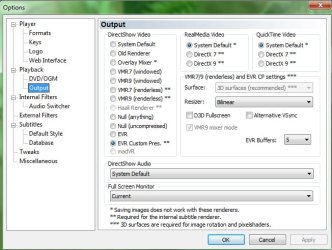
Follow the screen shot bellow to activate the setting, note that selecting any other setting besides the default will cause windows 7(I'm not sure about Vista) to revert to Windows Basic view every time you play a video with KMP....
and as for audio: Follow the screen shot and select "DirectSound: Digital Output(name of your sound card)"...
That should be it, you can try that test again and see.
So if you thought that
KMP,
VLC,
MPClassic sounded good and displayed correctly, than you'll see that you can get even more out of those programs...
I don't recall the setting with
VLC and it doesn't matter anyway because every time I fixed it, the setting wouldn't stick, it would just revert to the default upon closing it, that's why I gave up
VLC as a player, they might have fixed that issue by now but I'm not going back to it, I'm fine with
KMP.
As for
MPClassic Users(I might as well just include the setting here): right click video screen, select shaders, and then the 16-235->0-255 [SD][HD]
Please remember, this is for those of you that didn't already know that configuration process....



 ude
ude