Best Video Player?

i canot speak for shark007's codec pack, however i know for a fact that klite will look at all codecs on your system and offer to remove any that will conflict with of of their codecs. so at least with klite the issue of conflicting codeces is a non issue.

EDIT: as for windows media player.

1. it downloads codecs as it needs them, so you still end up with the same codecs in the end.
2. it is a resource hog.
3. there are a lot of formats that it will not play in fullscreen.
4. it is way to intrusive.
 

My Computer

OS
windows
Shark, I am sure you are trying to do a good job. But that does not change the fact that there are a lot of very bad codec packs on the market. And the layman cannot tell the good ones from the bad ones. I have seen may people getting their system into trouble because of shoddy codec packs and had to bail them out.

This statement is the innitial inncentive behind the begginngs of my releases.

I got so fed-up with re-installing peoples OS's from K-crap destroying them that I began to build a codecpack for personal use. 5 years ago, I began to share this personal pack with a few good friends on a techy forum I used to frequent. These friends convinced me to share with the world and on Feb 4th, 2006 I made my 1st public release.
 
Last edited:

My Computer

Computer Manufacturer/Model Number
Selfbuilt
OS
Windows 7 Ultimate 64bit
CPU
i7 2600k
Motherboard
asus P8Z68-V LE
Memory
16GB (4x4) corsair vengeance
Graphics Card(s)
Intel HD3000 iGPU / AMD HD6870 1024MB
Sound Card
bitstreamed to an Onkyo 609
Monitor(s) Displays
Asus VE278 27" LED / Bravia EX7 60" LED
Screen Resolution
native 1080p x2
Hard Drives
4x 2TB int. + 2x 2TB external and a SSD for the boot drive.
PSU
650w Antec
Case
NZXT tempest evo
Cooling
air/stock
Keyboard
Dell
Mouse
logitech m505
Internet Speed
dual: cable/blackberry tether for travel use
Other Info
BD re-writer //
asus notebook G73Jw
Shark, I am sure you are trying to do a good job. But that does not change the fact that there are a lot of very bad codec packs on the market. And the layman cannot tell the good ones from the bad ones. I have seen may people getting their system into trouble because of shoddy codec packs and had to bail them out.

This statement is the innitial inncentive behind the begginngs of my releases.

I got so fed-up with re-installing peoples OS's from K-crap destroying them that I began to build a codecpack for personal use. 5 years ago, I began to share this personal pack with a few good friends on a techy forum I used to frequent. These friends convinced me to share with the world and on Feb 4th, 2006 I made my 1st public release.


how is your pack with media player classic. i would be willing to try you pack if i can stick with mpc as my main player.
 

My Computer

OS
windows
Shark, I am sure you are trying to do a good job. But that does not change the fact that there are a lot of very bad codec packs on the market. And the layman cannot tell the good ones from the bad ones. I have seen may people getting their system into trouble because of shoddy codec packs and had to bail them out.

This statement is the innitial inncentive behind the begginngs of my releases.

I got so fed-up with re-installing peoples OS's from K-crap destroying them that I began to build a codecpack for personal use. 5 years ago, I began to share this personal pack with a few good friends on a techy forum I used to frequent. These friends convinced me to share with the world and on Feb 4th, 2006 I made my 1st public release.


After all, I think we agree. Keep up the good work. I might become one of your customers one day. LOL
 

My Computer

Computer Manufacturer/Model Number
HP, Dell, Gateway, Toshiba - 4 laptops and 2 desktops
OS
Vista, Windows7, Mint Mate, Zorin, Windows 8
CPU
from 1.6GHz Duo to i7
Monitor(s) Displays
2x HP w2207
Hard Drives
5x HDD, 7x SSD, 12x Externals
Keyboard
with trackball - no mices
Mouse
Trackball mice
Internet Speed
DSL 6000
how is your pack with media player classic. i would be willing to try you pack if i can stick with mpc as my main player.

On my tools page i release pre-configured versions of Media Player Classic (and HomeCinema) for use with my releases. PLEASE read my website to inform yourself of the specific software you are installing. One thing you must know, uninstall can only be performed through the settings interface using the uninstall button provided on the Help TAB.
 
Last edited:

My Computer

Computer Manufacturer/Model Number
Selfbuilt
OS
Windows 7 Ultimate 64bit
CPU
i7 2600k
Motherboard
asus P8Z68-V LE
Memory
16GB (4x4) corsair vengeance
Graphics Card(s)
Intel HD3000 iGPU / AMD HD6870 1024MB
Sound Card
bitstreamed to an Onkyo 609
Monitor(s) Displays
Asus VE278 27" LED / Bravia EX7 60" LED
Screen Resolution
native 1080p x2
Hard Drives
4x 2TB int. + 2x 2TB external and a SSD for the boot drive.
PSU
650w Antec
Case
NZXT tempest evo
Cooling
air/stock
Keyboard
Dell
Mouse
logitech m505
Internet Speed
dual: cable/blackberry tether for travel use
Other Info
BD re-writer //
asus notebook G73Jw
After all, I think we agree. Keep up the good work. I might become one of your customers one day. LOL

I will assure you, uninstall of my software will return your system to a pre-installation state. I wrote my my own uninstall routine just so that I could make this statement. Have fun testing, I work very hard at giving you everything you need without requiring any additional tools what-so-ever. Everything you can think of, is built-in. Have a look on the Misc TAB for builtin tools.
 
Last edited:

My Computer

Computer Manufacturer/Model Number
Selfbuilt
OS
Windows 7 Ultimate 64bit
CPU
i7 2600k
Motherboard
asus P8Z68-V LE
Memory
16GB (4x4) corsair vengeance
Graphics Card(s)
Intel HD3000 iGPU / AMD HD6870 1024MB
Sound Card
bitstreamed to an Onkyo 609
Monitor(s) Displays
Asus VE278 27" LED / Bravia EX7 60" LED
Screen Resolution
native 1080p x2
Hard Drives
4x 2TB int. + 2x 2TB external and a SSD for the boot drive.
PSU
650w Antec
Case
NZXT tempest evo
Cooling
air/stock
Keyboard
Dell
Mouse
logitech m505
Internet Speed
dual: cable/blackberry tether for travel use
Other Info
BD re-writer //
asus notebook G73Jw
If you want to kill your system, you can do that. Not on any of my systems.

there is nothing wrong with the codec packs. it is your choice not to use them, but since you do not use them do not make a broad statement like the one above.

It is not my habit to make statements about things I do not understand - after 50 years in computers I know that this would not be the proper way of doing things. I did provide one reference (which leads to a lot of other references) to demonstrate my position. See here: Why Codec Packs Are Bad - How-To Geek Wiki

PS: Those who read will learn.

Geez, Do computers really exist 50 years ago ? I remember I was sitting at my desk at work trying to play with assembly language in the late 70, so that makes about 30 years. Myself, I built about at least 50 pc's back in the days when Microsoft came out with Windows 2.0.

Yes, there are bad codecs packs out there but all my pc's, I have either Shark or K-lite installed and not once they gave me any problem or even near killing my PC's.

I do get input and advices from people and learn from it and never ever think I am an expert.
 

My Computer

Computer type
PC/Desktop
Computer Manufacturer/Model Number
custom build
OS
win 7 ultimate x64
CPU
Intel(R) Core(TM) i7-4790K @4.7GHZ
Motherboard
Z97A GAMING 7
Memory
16.00 GB
Graphics Card(s)
NVIDIA GeForce GTX 260
Sound Card
X-fi titanium
Monitor(s) Displays
24" Dual HP
Hard Drives
(1) ST5000DM000-1FK178 (2) SAMSUNG MZHPV256HDGL-00000 (3) ST2000DM001-1CH164 (4) Samsung SSD 840 EVO 120GB (5) Samsung SSD 850 EVO 500GB
PSU
850W Antec
Case
1200 Antec
Cooling
Water
Keyboard
Logitech
Mouse
Logitech
Internet Speed
35/12
Antivirus
None
Browser
Firefox
One word: KMPlayer

No need for codec packs or other screwy solutions. Plays every format I've ever tossed at it and handles formats I've never heard of. Outrageously powerful and streamlined, it will download codecs as it needs them. Very powerful features for display configs, etc. This thing does it all and does it better than the rest. Download it here.

1435_en.jpg


- URL redirect support.
- Change playList XP style.
- Open avi file in 0byte fix.
- mx audio file reposition support.
- mx audio file crash fix.
- error with zip file (when title include , it wasn’t play)
- Crash error with unsupported file.
- Error with mkv file (searching five sec. forward and backward)
- Not displayed subtitle in vista EVR.
- Codec update : libcodec.dll.
- Change default install language to English.
- Uninstaller is now English.
- ASK Toolbar installation added.
- Support madVR.
- Support flv (avc, aac codec).
- MediaInfo.dll (ver 0.7.21.0) patch.
- Possible to playback damaged file.
- Support album art(MP3 thumbnail).
 

My Computer

Computer type
PC/Desktop
Computer Manufacturer/Model Number
Custom Build/Mod
OS
Windows 7 Home Premium x64
CPU
Intel QX9650 Extreme 4.0 GHz
Motherboard
ASUS Rampage Extreme Rev2
Memory
8GB (4x2) Corsair Dominator DDR3
Graphics Card(s)
2x Radeon R390X [8GB]
Sound Card
SupremeFX X-Fi
Monitor(s) Displays
Dell 2408WFP 26" Panel
Screen Resolution
1920x1200
Hard Drives
4x WD 2TB (8TB+ Total)
2x Crucial SSD 128GB (RAID-0)
1x LG Blu-ray read/write
1x Phillips LightScribe DVD read/write
PSU
Corsair HX1000
Case
CoolerMaster - Cosmos S
Cooling
Custom Liquid - 320mm rad w/ 3x 80mm fans, CPU/NB/SB Blocks
Keyboard
Logitech Illuminater Pro
Mouse
Logitech
Internet Speed
Fractional T1 - 125Mbps
Antivirus
ESET Security Suite / Microsoft Security Essentials
Browser
Cyberfox Intel x64
Other Info
OC'd to 5.0GHz @ 44c under full load
One word: KMPlayer

No need for codec packs or other screwy solutions. Plays every format I've ever tossed at it and handles formats I've never heard of. Outrageously powerful and streamlined, it will download codecs as it needs them. Very powerful features for display configs, etc. This thing does it all and does it better than the rest. Download it here.

1435_en.jpg


- URL redirect support.
- Change playList XP style.
- Open avi file in 0byte fix.
- mx audio file reposition support.
- mx audio file crash fix.
- error with zip file (when title include , it wasn’t play)
- Crash error with unsupported file.
- Error with mkv file (searching five sec. forward and backward)
- Not displayed subtitle in vista EVR.
- Codec update : libcodec.dll.
- Change default install language to English.
- Uninstaller is now English.
- ASK Toolbar installation added.
- Support madVR.
- Support flv (avc, aac codec).
- MediaInfo.dll (ver 0.7.21.0) patch.
- Possible to playback damaged file.
- Support album art(MP3 thumbnail).

in other words it goes out on the net just like windows media player does to get codecs when it needs them. i do not recommend allowing this behavior to anyone. this is exactly why i was using klite because almost all of the codecs i need are all ready in it. for the couple of movies that will not play in media player classic i have vlc. i am testing sharks codec pack now and the only real difference i see with it over klite is that the sound is better with sharks, otherwise the two codec packs are pretty much equal. i personally recommend that a user never have anything set to auto download updates.
 

My Computer

OS
windows
Geez, Do computers really exist 50 years ago ?

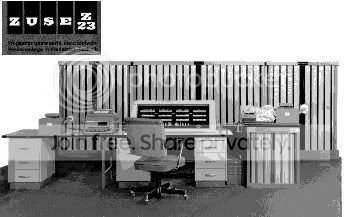
Of course, computers did exist 50 years ago (even 20 years earlier). This was the model I played around with in 1958 - a Zuse:

image351.jpg


Actually the picture shows a slightly younger but similar model (Z23). We used the Z11. And then we had built our own at the mathematical faculty. We gave it the big name of DERA (Deutscher RechenAutomat). In those days you could not go out and buy motherboards, etc. All the parts came from the radio industry or you had to make them yourself. But it was the same fun as buiding a PC - just more involved.
 
Last edited:

My Computer

Computer Manufacturer/Model Number
HP, Dell, Gateway, Toshiba - 4 laptops and 2 desktops
OS
Vista, Windows7, Mint Mate, Zorin, Windows 8
CPU
from 1.6GHz Duo to i7
Monitor(s) Displays
2x HP w2207
Hard Drives
5x HDD, 7x SSD, 12x Externals
Keyboard
with trackball - no mices
Mouse
Trackball mice
Internet Speed
DSL 6000
Back
Top