Solved Best way to troubleshoot performance issues

epete

New member
Member
Local time
12:14 AM
Messages
63
I have an old Dell XPS 420 running windows 7 Ultimate 64-bit. Lately it has been showing many performance problems such as long freezing, video that slows with corresponding very slow audio, etc. I am suspecting it ius the graphics card but see that there is no on-board graphics to revert to to test. I am wondering if I can use the resource monitor or some other tool to determine what is causing this problem.
 

My Computer My Computer

Computer type
PC/Desktop
Computer Manufacturer/Model Number
Custom Build
OS
Windows 7 Ultimate 64 bit
CPU
Intel Core i7-4790K 4.0GHz Quad-Core Processor
Motherboard
Gigabyte GA-Z97X-GAMING 7 ATX LGA1150 Motherboard
Memory
G.Skill Ripjaws Z Series 32GB (4 x 8GB) DDR3-1600 Memory
Graphics Card(s)
Asus GeForce GTX 970 4GB STRIX Video Card
Hard Drives
Crucial M500 Series 960GB SSD - 2.5" Form Factor, SATA III, Encryption Technology, Advanced Controller Technology, Adaptive Thermal Protection - CT960M500SSD1
PSU
Corsair CX 750W 80+ Bronze Certified Semi-Modular ATX Power
Case
NZXT S340 (Black) ATX Mid Tower Case
Cooling
Cooler Master Hyper 212 EVO 82.9 CFM Sleeve Bearing CPU Cool
Antivirus
MS Security Essentials
Browser
Chrome
Autoruns can help you determine if something is starting up that that shouldn't be. But you need to be careful using that tool. I would suspect a program or driver is causing the hang up.

Autoruns for Windows - Windows Sysinternals | Microsoft Docs


Have you looked in task manager to see if a process is consuming CPU cycles?
 

My Computer My Computer

Computer type
PC/Desktop
OS
Windows 7 Ultimate x64
I am away for a couple days but I recall Chrome was one of the processes taking up cpu cycles. For some reason there are many instances that run. Will check when I am back in front of that PC
 

My Computer My Computer

Computer type
PC/Desktop
Computer Manufacturer/Model Number
Custom Build
OS
Windows 7 Ultimate 64 bit
CPU
Intel Core i7-4790K 4.0GHz Quad-Core Processor
Motherboard
Gigabyte GA-Z97X-GAMING 7 ATX LGA1150 Motherboard
Memory
G.Skill Ripjaws Z Series 32GB (4 x 8GB) DDR3-1600 Memory
Graphics Card(s)
Asus GeForce GTX 970 4GB STRIX Video Card
Hard Drives
Crucial M500 Series 960GB SSD - 2.5" Form Factor, SATA III, Encryption Technology, Advanced Controller Technology, Adaptive Thermal Protection - CT960M500SSD1
PSU
Corsair CX 750W 80+ Bronze Certified Semi-Modular ATX Power
Case
NZXT S340 (Black) ATX Mid Tower Case
Cooling
Cooler Master Hyper 212 EVO 82.9 CFM Sleeve Bearing CPU Cool
Antivirus
MS Security Essentials
Browser
Chrome
Please give us all hardware specs of the XPS 420.
Don't like Chrome as it runs on the background, even when not in use. And it spy everything you do.
 

My Computers My Computers

System One System Two

  • Computer type
    PC/Desktop
    Computer Manufacturer/Model Number
    custom build
    OS
    Windows 7 HP 64
    CPU
    i5 6600K - 800MHz to 4200MHz
    Motherboard
    GA-Z170-HD3P
    Memory
    4+4G GSkill DDR4 3000
    Graphics Card(s)
    IG - Intel 530
    Monitor(s) Displays
    Samsung 226BW
    Screen Resolution
    1680x1050
    Hard Drives
    (1) -1 SM951 – 128GB M.2 AHCI PCIe SSD drive for Windows 7 and Lubuntu
    (2) -1 WD SATA 3 - 1T for Data
    (3) -1 WD SATA 3 - 1T for backup
    PSU
    Thermaltake 450W TR2 gold
    Keyboard
    Old and good Chicony mechanical keyboard
    Mouse
    Logitech mX performance - 9 buttons (had to disable some)
    Internet Speed
    500Mb/s
    Browser
    Firefox 64
    Other Info
    TinyWall firewall
  • Computer type
    Laptop
    System Manufacturer/Model Number
    Asus Q550LF
    OS
    Windows 7 Pro
    CPU
    i7-4500U 800MHz to 3.0GHz
    Motherboard
    Asus Q550LF
    Memory
    (4+4)G DDR3 1600
    Graphics Card(s)
    IG intel 4400 + NVIDIA GeForce GT 745M
    Sound Card
    Realtek
    Monitor(s) Displays
    LG Display LP156WF4-SPH1
    Screen Resolution
    1920 x 1080
    Hard Drives
    BX500 120G SSD for Windows and programs +
    1T HDD for data
    Internet Speed
    500 Mb/s
    Browser
    Firefox
    Other Info
    TinyWall firewall
It is normal for Chrome to use more than one process and a ton of RAM. One reason why I don't use it. When you shut down Chrome do you still see its process running?
 

My Computer My Computer

Computer type
PC/Desktop
OS
Windows 7 Ultimate x64
Hi All,
Greets,
Sir(s),
epete : Sir,
For specs i use: Speccy Portable : Speccy - Builds
Choose 'Speecy-Portable' download (2nd),extract the zip in a folder , run speccy64.exe & 'save file as text' from 'File' menu bar.
Please attach the file.

Thanks & Regards. ...
 

My Computer My Computer

Computer type
Laptop
Computer Manufacturer/Model Number
hp compaq presario c795VU notebook pc
OS
Windows 7 Ultimate x32 With Sp1 + Vista Ultimate x32 with Sp1 & Sp2 !!
CPU
Intel Mobile Core 2 Duo T5750 @ 2.00GHz Merom 65nm Technolog
Motherboard
Hewlett-Packard 30D9 (CPU)
Memory
2.00GB Dual-Channel DDR2 @ 332MHz (5-5-5-15)
Graphics Card(s)
Mobile Intel(R) 965 Express Chipset Family
Sound Card
High Definition Audio Device
Monitor(s) Displays
LP154WX4-TLCB on Mobile Intel 965 Express Chipset Family
Screen Resolution
1280x800 @ 60Hz
Hard Drives
149GB Western Digital WDC WD1600BEVS-60VAT0 ATA Device (SATA)
Keyboard
Standard 101/102-Key or Microsoft Natural PS/2 Key + HP QLB
Mouse
ALPS pointing device
Antivirus
Kaspersky AV 2017(Win 7) & AVG AntiVirus Free 2016 (VISTA)
Browser
google chrome
thanks for Speccy. Nice little utility

Operating System
Windows 7 Ultimate 64-bit SP1
CPU
Intel Core 2 Quad Q9300 @ 2.50GHz 65 °C
Yorkfield 45nm Technology
RAM
4.00GB Dual-Channel DDR2 @ 399MHz (6-6-6-18)
Motherboard
Dell Inc. 0TP406 (CPU)
Graphics
LI2341t Wide (1920x1080@60Hz)
512MB ATI Radeon HD 3800 Series (Dell) 61 °C
Storage
238GB Crucial_CT256MX100SSD1 (SATA (SSD)) 38 °C
1397GB Western Digital WDC WD15EARS-00Z5B1 (SATA ) 36 °C
1863GB Hitachi HDS722020ALA330 (SATA ) 36 °C
931GB Western Digital WDC WD10EADS-00L5B1 (SATA ) 30 °C
Optical Drives
PLDS BD-RE DH-4B1S
Audio
AMD High Definition Audio Device
 

My Computer My Computer

Computer type
PC/Desktop
Computer Manufacturer/Model Number
Custom Build
OS
Windows 7 Ultimate 64 bit
CPU
Intel Core i7-4790K 4.0GHz Quad-Core Processor
Motherboard
Gigabyte GA-Z97X-GAMING 7 ATX LGA1150 Motherboard
Memory
G.Skill Ripjaws Z Series 32GB (4 x 8GB) DDR3-1600 Memory
Graphics Card(s)
Asus GeForce GTX 970 4GB STRIX Video Card
Hard Drives
Crucial M500 Series 960GB SSD - 2.5" Form Factor, SATA III, Encryption Technology, Advanced Controller Technology, Adaptive Thermal Protection - CT960M500SSD1
PSU
Corsair CX 750W 80+ Bronze Certified Semi-Modular ATX Power
Case
NZXT S340 (Black) ATX Mid Tower Case
Cooling
Cooler Master Hyper 212 EVO 82.9 CFM Sleeve Bearing CPU Cool
Antivirus
MS Security Essentials
Browser
Chrome
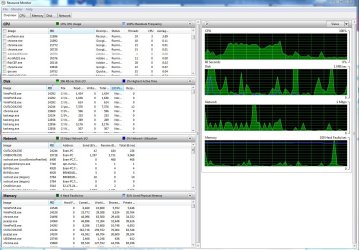
Attached is a picture of my resource monitor. Lots of Chrome items using resources.
 

Attachments

  • resource monitor.jpg
    resource monitor.jpg
    189.6 KB · Views: 5

My Computer My Computer

Computer type
PC/Desktop
Computer Manufacturer/Model Number
Custom Build
OS
Windows 7 Ultimate 64 bit
CPU
Intel Core i7-4790K 4.0GHz Quad-Core Processor
Motherboard
Gigabyte GA-Z97X-GAMING 7 ATX LGA1150 Motherboard
Memory
G.Skill Ripjaws Z Series 32GB (4 x 8GB) DDR3-1600 Memory
Graphics Card(s)
Asus GeForce GTX 970 4GB STRIX Video Card
Hard Drives
Crucial M500 Series 960GB SSD - 2.5" Form Factor, SATA III, Encryption Technology, Advanced Controller Technology, Adaptive Thermal Protection - CT960M500SSD1
PSU
Corsair CX 750W 80+ Bronze Certified Semi-Modular ATX Power
Case
NZXT S340 (Black) ATX Mid Tower Case
Cooling
Cooler Master Hyper 212 EVO 82.9 CFM Sleeve Bearing CPU Cool
Antivirus
MS Security Essentials
Browser
Chrome
As you can see from the graphics, you had high CPU+disk+network. I would say it's WU.
Open Control Panel\All Control Panel Items\Windows Update and manually check for updates. Does it run forever?
 

My Computers My Computers

System One System Two

  • Computer type
    PC/Desktop
    Computer Manufacturer/Model Number
    custom build
    OS
    Windows 7 HP 64
    CPU
    i5 6600K - 800MHz to 4200MHz
    Motherboard
    GA-Z170-HD3P
    Memory
    4+4G GSkill DDR4 3000
    Graphics Card(s)
    IG - Intel 530
    Monitor(s) Displays
    Samsung 226BW
    Screen Resolution
    1680x1050
    Hard Drives
    (1) -1 SM951 – 128GB M.2 AHCI PCIe SSD drive for Windows 7 and Lubuntu
    (2) -1 WD SATA 3 - 1T for Data
    (3) -1 WD SATA 3 - 1T for backup
    PSU
    Thermaltake 450W TR2 gold
    Keyboard
    Old and good Chicony mechanical keyboard
    Mouse
    Logitech mX performance - 9 buttons (had to disable some)
    Internet Speed
    500Mb/s
    Browser
    Firefox 64
    Other Info
    TinyWall firewall
  • Computer type
    Laptop
    System Manufacturer/Model Number
    Asus Q550LF
    OS
    Windows 7 Pro
    CPU
    i7-4500U 800MHz to 3.0GHz
    Motherboard
    Asus Q550LF
    Memory
    (4+4)G DDR3 1600
    Graphics Card(s)
    IG intel 4400 + NVIDIA GeForce GT 745M
    Sound Card
    Realtek
    Monitor(s) Displays
    LG Display LP156WF4-SPH1
    Screen Resolution
    1920 x 1080
    Hard Drives
    BX500 120G SSD for Windows and programs +
    1T HDD for data
    Internet Speed
    500 Mb/s
    Browser
    Firefox
    Other Info
    TinyWall firewall
Hi, epete : Sir,
Its a fine, small utility but you did not make the best of it! I think you just stopped @ the summary section & did not go in the detailed section. I asked you to ''launch it, go to the top menu, click 'File' > 'Save file as text' and attach the text file". It gives comprehensive report of your system. ( You can view & edit the text file before attaching if you are uncomfortable sharing the info! )

Thanks & Regards. ...
 

My Computer My Computer

Computer type
Laptop
Computer Manufacturer/Model Number
hp compaq presario c795VU notebook pc
OS
Windows 7 Ultimate x32 With Sp1 + Vista Ultimate x32 with Sp1 & Sp2 !!
CPU
Intel Mobile Core 2 Duo T5750 @ 2.00GHz Merom 65nm Technolog
Motherboard
Hewlett-Packard 30D9 (CPU)
Memory
2.00GB Dual-Channel DDR2 @ 332MHz (5-5-5-15)
Graphics Card(s)
Mobile Intel(R) 965 Express Chipset Family
Sound Card
High Definition Audio Device
Monitor(s) Displays
LP154WX4-TLCB on Mobile Intel 965 Express Chipset Family
Screen Resolution
1280x800 @ 60Hz
Hard Drives
149GB Western Digital WDC WD1600BEVS-60VAT0 ATA Device (SATA)
Keyboard
Standard 101/102-Key or Microsoft Natural PS/2 Key + HP QLB
Mouse
ALPS pointing device
Antivirus
Kaspersky AV 2017(Win 7) & AVG AntiVirus Free 2016 (VISTA)
Browser
google chrome
Based on what I can see thuse far, it looks like Outlook is doing a lot of activity. If it is indeed Outlook you may want to try Thunderbird instead.

Was Chrome running you ran Resource Monitor?
 

My Computer My Computer

Computer type
PC/Desktop
OS
Windows 7 Ultimate x64
Hi, epete : Sir,
Its a fine, small utility but you did not make the best of it! I think you just stopped @ the summary section & did not go in the detailed section. I asked you to ''launch it, go to the top menu, click 'File' > 'Save file as text' and attach the text file". It gives comprehensive report of your system. ( You can view & edit the text file before attaching if you are uncomfortable sharing the info! )

Thanks & Regards. ...

Sorry, I read your instructions quickly and thought that was part of teh instructions on extracting. I have now completed your steps and attached.
 

Attachments

My Computer My Computer

Computer type
PC/Desktop
Computer Manufacturer/Model Number
Custom Build
OS
Windows 7 Ultimate 64 bit
CPU
Intel Core i7-4790K 4.0GHz Quad-Core Processor
Motherboard
Gigabyte GA-Z97X-GAMING 7 ATX LGA1150 Motherboard
Memory
G.Skill Ripjaws Z Series 32GB (4 x 8GB) DDR3-1600 Memory
Graphics Card(s)
Asus GeForce GTX 970 4GB STRIX Video Card
Hard Drives
Crucial M500 Series 960GB SSD - 2.5" Form Factor, SATA III, Encryption Technology, Advanced Controller Technology, Adaptive Thermal Protection - CT960M500SSD1
PSU
Corsair CX 750W 80+ Bronze Certified Semi-Modular ATX Power
Case
NZXT S340 (Black) ATX Mid Tower Case
Cooling
Cooler Master Hyper 212 EVO 82.9 CFM Sleeve Bearing CPU Cool
Antivirus
MS Security Essentials
Browser
Chrome
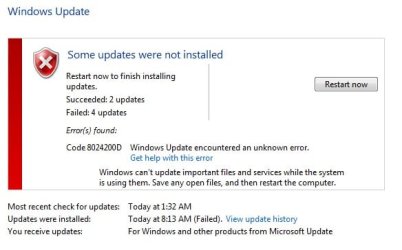
As you can see from the graphics, you had high CPU+disk+network. I would say it's WU.
Open Control Panel\All Control Panel Items\Windows Update and manually check for updates. Does it run forever?

There are several WU files that have been failing for about a year now. I try looking up the failure code but I am unable to figure out the way to resolve it. These have been failing long before my pc began its sluggish behavior.
 

Attachments

  • wu.jpg
    wu.jpg
    25.6 KB · Views: 43

My Computer My Computer

Computer type
PC/Desktop
Computer Manufacturer/Model Number
Custom Build
OS
Windows 7 Ultimate 64 bit
CPU
Intel Core i7-4790K 4.0GHz Quad-Core Processor
Motherboard
Gigabyte GA-Z97X-GAMING 7 ATX LGA1150 Motherboard
Memory
G.Skill Ripjaws Z Series 32GB (4 x 8GB) DDR3-1600 Memory
Graphics Card(s)
Asus GeForce GTX 970 4GB STRIX Video Card
Hard Drives
Crucial M500 Series 960GB SSD - 2.5" Form Factor, SATA III, Encryption Technology, Advanced Controller Technology, Adaptive Thermal Protection - CT960M500SSD1
PSU
Corsair CX 750W 80+ Bronze Certified Semi-Modular ATX Power
Case
NZXT S340 (Black) ATX Mid Tower Case
Cooling
Cooler Master Hyper 212 EVO 82.9 CFM Sleeve Bearing CPU Cool
Antivirus
MS Security Essentials
Browser
Chrome
It is normal for Chrome to use more than one process and a ton of RAM. One reason why I don't use it. When you shut down Chrome do you still see its process running?

I am not happy about the resources Chrome uses either, but I think I am experiencing something outside of the ordinary. If Chrome was causing this for everyone, it would not be a viable product.
 

My Computer My Computer

Computer type
PC/Desktop
Computer Manufacturer/Model Number
Custom Build
OS
Windows 7 Ultimate 64 bit
CPU
Intel Core i7-4790K 4.0GHz Quad-Core Processor
Motherboard
Gigabyte GA-Z97X-GAMING 7 ATX LGA1150 Motherboard
Memory
G.Skill Ripjaws Z Series 32GB (4 x 8GB) DDR3-1600 Memory
Graphics Card(s)
Asus GeForce GTX 970 4GB STRIX Video Card
Hard Drives
Crucial M500 Series 960GB SSD - 2.5" Form Factor, SATA III, Encryption Technology, Advanced Controller Technology, Adaptive Thermal Protection - CT960M500SSD1
PSU
Corsair CX 750W 80+ Bronze Certified Semi-Modular ATX Power
Case
NZXT S340 (Black) ATX Mid Tower Case
Cooling
Cooler Master Hyper 212 EVO 82.9 CFM Sleeve Bearing CPU Cool
Antivirus
MS Security Essentials
Browser
Chrome
Based on what I can see thuse far, it looks like Outlook is doing a lot of activity. If it is indeed Outlook you may want to try Thunderbird instead.

Was Chrome running you ran Resource Monitor?

Same comment for outlook, If outlook is causing the problem for everyone then it would not be sold. If there is a specific problem I am having related to outlook, there should be a solution to make it work as well as it works on all of my other PCs
 

My Computer My Computer

Computer type
PC/Desktop
Computer Manufacturer/Model Number
Custom Build
OS
Windows 7 Ultimate 64 bit
CPU
Intel Core i7-4790K 4.0GHz Quad-Core Processor
Motherboard
Gigabyte GA-Z97X-GAMING 7 ATX LGA1150 Motherboard
Memory
G.Skill Ripjaws Z Series 32GB (4 x 8GB) DDR3-1600 Memory
Graphics Card(s)
Asus GeForce GTX 970 4GB STRIX Video Card
Hard Drives
Crucial M500 Series 960GB SSD - 2.5" Form Factor, SATA III, Encryption Technology, Advanced Controller Technology, Adaptive Thermal Protection - CT960M500SSD1
PSU
Corsair CX 750W 80+ Bronze Certified Semi-Modular ATX Power
Case
NZXT S340 (Black) ATX Mid Tower Case
Cooling
Cooler Master Hyper 212 EVO 82.9 CFM Sleeve Bearing CPU Cool
Antivirus
MS Security Essentials
Browser
Chrome
Lets try to disable WU to see if things get better.
- Open services (%windir%\system32\services.msc) and set WU to manual.
- Open WU page (Control Panel\All Control Panel Items\Windows Update) and set to never check.
Use the computer for a week with this configuration. If it doesn't change anything, return WU to normal settings.
 

My Computers My Computers

System One System Two

  • Computer type
    PC/Desktop
    Computer Manufacturer/Model Number
    custom build
    OS
    Windows 7 HP 64
    CPU
    i5 6600K - 800MHz to 4200MHz
    Motherboard
    GA-Z170-HD3P
    Memory
    4+4G GSkill DDR4 3000
    Graphics Card(s)
    IG - Intel 530
    Monitor(s) Displays
    Samsung 226BW
    Screen Resolution
    1680x1050
    Hard Drives
    (1) -1 SM951 – 128GB M.2 AHCI PCIe SSD drive for Windows 7 and Lubuntu
    (2) -1 WD SATA 3 - 1T for Data
    (3) -1 WD SATA 3 - 1T for backup
    PSU
    Thermaltake 450W TR2 gold
    Keyboard
    Old and good Chicony mechanical keyboard
    Mouse
    Logitech mX performance - 9 buttons (had to disable some)
    Internet Speed
    500Mb/s
    Browser
    Firefox 64
    Other Info
    TinyWall firewall
  • Computer type
    Laptop
    System Manufacturer/Model Number
    Asus Q550LF
    OS
    Windows 7 Pro
    CPU
    i7-4500U 800MHz to 3.0GHz
    Motherboard
    Asus Q550LF
    Memory
    (4+4)G DDR3 1600
    Graphics Card(s)
    IG intel 4400 + NVIDIA GeForce GT 745M
    Sound Card
    Realtek
    Monitor(s) Displays
    LG Display LP156WF4-SPH1
    Screen Resolution
    1920 x 1080
    Hard Drives
    BX500 120G SSD for Windows and programs +
    1T HDD for data
    Internet Speed
    500 Mb/s
    Browser
    Firefox
    Other Info
    TinyWall firewall
Lets try to disable WU to see if things get better.
- Open services (%windir%\system32\services.msc) and set WU to manual.
- Open WU page (Control Panel\All Control Panel Items\Windows Update) and set to never check.
Use the computer for a week with this configuration. If it doesn't change anything, return WU to normal settings.

ok, I have made these changes and will monitor for a week. Thank you.
 

My Computer My Computer

Computer type
PC/Desktop
Computer Manufacturer/Model Number
Custom Build
OS
Windows 7 Ultimate 64 bit
CPU
Intel Core i7-4790K 4.0GHz Quad-Core Processor
Motherboard
Gigabyte GA-Z97X-GAMING 7 ATX LGA1150 Motherboard
Memory
G.Skill Ripjaws Z Series 32GB (4 x 8GB) DDR3-1600 Memory
Graphics Card(s)
Asus GeForce GTX 970 4GB STRIX Video Card
Hard Drives
Crucial M500 Series 960GB SSD - 2.5" Form Factor, SATA III, Encryption Technology, Advanced Controller Technology, Adaptive Thermal Protection - CT960M500SSD1
PSU
Corsair CX 750W 80+ Bronze Certified Semi-Modular ATX Power
Case
NZXT S340 (Black) ATX Mid Tower Case
Cooling
Cooler Master Hyper 212 EVO 82.9 CFM Sleeve Bearing CPU Cool
Antivirus
MS Security Essentials
Browser
Chrome
I have now confirmed WU is not the issue. Wondering if I should uninstall Chrome for 1 week and just use IE. Then if problem goes away, then it was something related to Chrome.
 

My Computer My Computer

Computer type
PC/Desktop
Computer Manufacturer/Model Number
Custom Build
OS
Windows 7 Ultimate 64 bit
CPU
Intel Core i7-4790K 4.0GHz Quad-Core Processor
Motherboard
Gigabyte GA-Z97X-GAMING 7 ATX LGA1150 Motherboard
Memory
G.Skill Ripjaws Z Series 32GB (4 x 8GB) DDR3-1600 Memory
Graphics Card(s)
Asus GeForce GTX 970 4GB STRIX Video Card
Hard Drives
Crucial M500 Series 960GB SSD - 2.5" Form Factor, SATA III, Encryption Technology, Advanced Controller Technology, Adaptive Thermal Protection - CT960M500SSD1
PSU
Corsair CX 750W 80+ Bronze Certified Semi-Modular ATX Power
Case
NZXT S340 (Black) ATX Mid Tower Case
Cooling
Cooler Master Hyper 212 EVO 82.9 CFM Sleeve Bearing CPU Cool
Antivirus
MS Security Essentials
Browser
Chrome
Ugg, ok. So I now have WU still turned off and all of the Chrome/Google Hangout stuff uninstalled. I am still seeing the same sluggishness and the resource manager is now showing 4 iexplorer tasks consuming the most resources.
 

My Computer My Computer

Computer type
PC/Desktop
Computer Manufacturer/Model Number
Custom Build
OS
Windows 7 Ultimate 64 bit
CPU
Intel Core i7-4790K 4.0GHz Quad-Core Processor
Motherboard
Gigabyte GA-Z97X-GAMING 7 ATX LGA1150 Motherboard
Memory
G.Skill Ripjaws Z Series 32GB (4 x 8GB) DDR3-1600 Memory
Graphics Card(s)
Asus GeForce GTX 970 4GB STRIX Video Card
Hard Drives
Crucial M500 Series 960GB SSD - 2.5" Form Factor, SATA III, Encryption Technology, Advanced Controller Technology, Adaptive Thermal Protection - CT960M500SSD1
PSU
Corsair CX 750W 80+ Bronze Certified Semi-Modular ATX Power
Case
NZXT S340 (Black) ATX Mid Tower Case
Cooling
Cooler Master Hyper 212 EVO 82.9 CFM Sleeve Bearing CPU Cool
Antivirus
MS Security Essentials
Browser
Chrome
Hi All,
Greets,
Sir(s),
epete : Sir,
1.It seems you are using Iobit Uninstaller. Launch the application & From ''Menu bar > Export program list''. Attach the file.
2. Close all the programs, run ''Autoruns as admin > 'File' menu > Save '' & attach the '.arn' file (Inspired by Sir F22 Simpilot )
( It's upload is not supported on this forum. so, please upload to some cloud and share the link )
Autoruns here : Autoruns for Windows - Windows Sysinternals | Microsoft Docs
3. Good direction ' Chrome is taking 1.4 GB of RAM ' too much , mine is normal 0.4 GB! But i think simply uninstalling it may take us away from the diagnosis. Wait ! You didn't answer Sir F22's question & i also have quite same question i.e. when you ran speccy and took '.txt' file, you were using chrome ? If yes, how many tabs/Windows ?
4. Your computer might be infected ! your antivirus is poor. ( The best in job are Bit Defender & then Kaspersky . Both performance & security: latest reports. But it was found that Bit Defender installation on an infected pc is a little tougher )
5. Windows inbuilt firewall does good enough and i consider it the best!
6. Do you use pc for gaming & visual effects ? can we drop visual effects & Aero ? easy ?
7. why did you need JAVA 32 & JAVA 64 both ? Do you use JAVA in IE browser ?
8. Why did you need to install Flash Player ? chrome supports flash player out of the box. Do you use it for Offline purposes ?
9. Always keep them up to date : Browsers, Java, Flash player, PDF reader
10. IE is prone to infections! Would you mind disabling it for ever ? are you easy ? Not right now!
11. You can use Chrome for PDFs if you are easy.
( i prefer chrome because it saves me from installing/maintaining PDF Reader & Adobe Flash Player & because it has dropped JAVA !) But not now!
12. Such problems in chrome are also associated with installed plugins, extensions, apps, etc. There is a way to ''reset it to default settings'' and watch speccy, etc. from time to time. Or you can also try disabling them one by one to see which one is causing the problem.
13. Did you ever clean 'chrome browser history' from within chrome settings. I am not talking about cCleaner. You would be properly running it from time to time. This is in addition to that & you may get surprised as i was! ''History > clear browsing data > advanced > Time range > all time " Not to use any Registry cleaner, not even the one in cCleaner.
14. Always maintain distance from so called performance enhancers !
15. Never mess with Services .
16. I suppose you have done the two things : set windows update service to manual & set windows update to never check for updates.
17. Check for extensions by typing 'chrome://extensions' in the chrome tab address bar & report.
18. check for chrome extensions in ccleaner as well & report.
19. we will also try to go in chrome advanced settings & boost it.
20. keep away from unsuitable password manager programs.

That's for now. Attach the files & Let us know what you are easy with. I understand that these things should work fine on such a pc but everything is not normal and we need some resources to work with !

Thanks & Regards. ...

 
Last edited:

My Computer My Computer

Computer type
Laptop
Computer Manufacturer/Model Number
hp compaq presario c795VU notebook pc
OS
Windows 7 Ultimate x32 With Sp1 + Vista Ultimate x32 with Sp1 & Sp2 !!
CPU
Intel Mobile Core 2 Duo T5750 @ 2.00GHz Merom 65nm Technolog
Motherboard
Hewlett-Packard 30D9 (CPU)
Memory
2.00GB Dual-Channel DDR2 @ 332MHz (5-5-5-15)
Graphics Card(s)
Mobile Intel(R) 965 Express Chipset Family
Sound Card
High Definition Audio Device
Monitor(s) Displays
LP154WX4-TLCB on Mobile Intel 965 Express Chipset Family
Screen Resolution
1280x800 @ 60Hz
Hard Drives
149GB Western Digital WDC WD1600BEVS-60VAT0 ATA Device (SATA)
Keyboard
Standard 101/102-Key or Microsoft Natural PS/2 Key + HP QLB
Mouse
ALPS pointing device
Antivirus
Kaspersky AV 2017(Win 7) & AVG AntiVirus Free 2016 (VISTA)
Browser
google chrome
Back
Top