Big memory bump at startup

Total Cereal

New member
Local time
11:56 PM
Messages
6
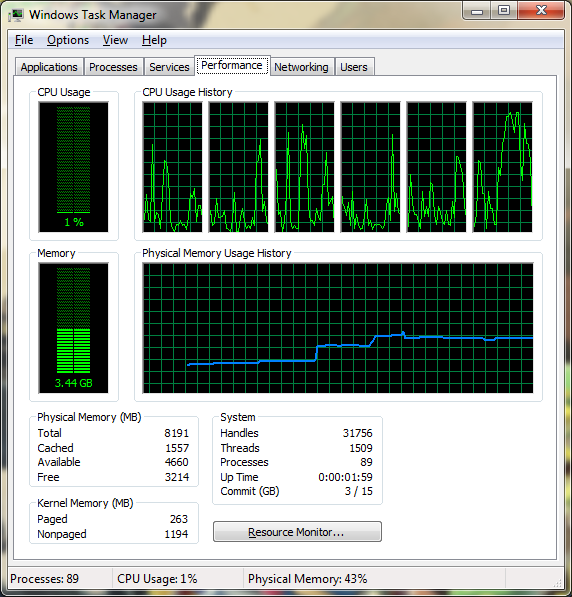
At startup, after a minute my memory suddenly jumps up from about 2GB to 3, then shortly after to about 3.5. I can't find any programs that are causing this unusual memory usage. I've ran both avast and malwarebytes and neither helped, which probably eliminates the possibility of a virus.

Has anyone else had this problem? I can't find anything online that I haven't already tried. Any suggestions would be greatly appreciated!
g8Qqz6m.png
 
Last edited:

My Computer

Computer type
PC/Desktop
OS
Windows 7 Proffesional x64
CPU
AMD Phenom II X6 1100T
Motherboard
ASUS M4A88TD-V EVO/USB3
Memory
8.00 GB Dual-Channel DDR3
Graphics Card(s)
AMD HD 6870
Hard Drives
Samsung SSD 840 EVO 120G
Seagate T3500413AS
Antivirus
avast free
Browser
Chrome
Welcome to the forum.
Post a screenshot of what you see.
 

My Computer

Computer type
PC/Desktop
Computer Manufacturer/Model Number
HP
OS
Windows 7 Pro 64 bit
CPU
Xeon W3520
Memory
8 GB
Graphics Card(s)
Nvidia Geforce 210
Welcome to the forum.
Post a screenshot of what you see.

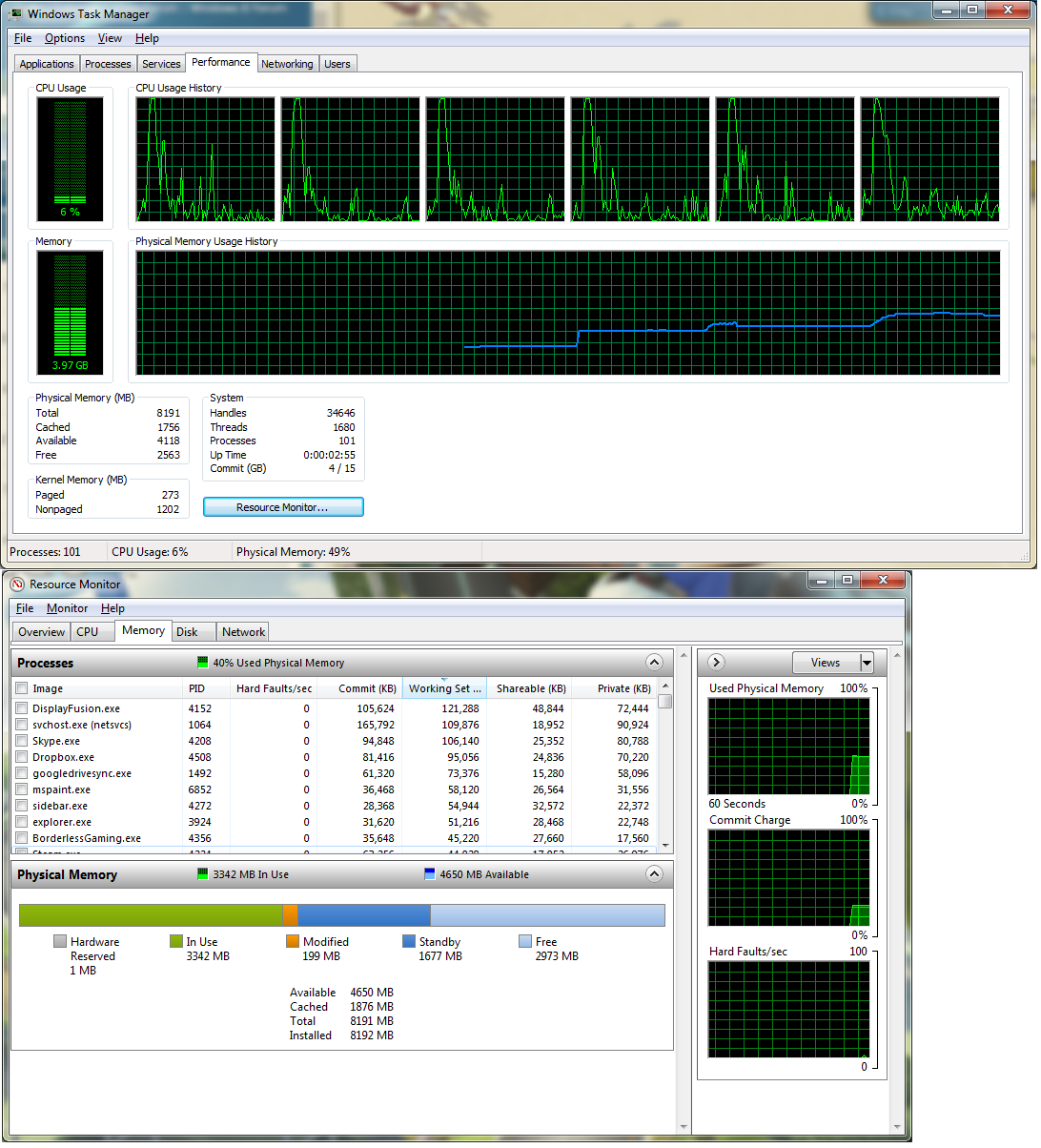
I edited my original post with a picture. I've since rebooted again and got even stranger results.

vKiildG.png


This was all without running anything other than the startup programs.
 

My Computer

Computer type
PC/Desktop
OS
Windows 7 Proffesional x64
CPU
AMD Phenom II X6 1100T
Motherboard
ASUS M4A88TD-V EVO/USB3
Memory
8.00 GB Dual-Channel DDR3
Graphics Card(s)
AMD HD 6870
Hard Drives
Samsung SSD 840 EVO 120G
Seagate T3500413AS
Antivirus
avast free
Browser
Chrome

My Computer

Computer type
PC/Desktop
Computer Manufacturer/Model Number
home built
OS
Multi-Boot W7_Pro_x64 W8.1_Pro_x64 W10_Pro_x64 +Linux_VMs +Chromium_VM
CPU
AMD Athlon II x4 620
Motherboard
Gigabyte GA-MA785G-UD3H
Memory
6GB GSkill DDR2 800
Graphics Card(s)
AMD 4670 GPU + AMD 4200 IGP
Sound Card
on board Realtek ALC889A
Monitor(s) Displays
RCA 40" LCD TV, Insignia 32" LCD TV, HP 15" LCD monitor
Screen Resolution
1680 x 1050
Hard Drives
OCZ Vertex 3 120GB,
Samsung F3 1TB (3),
Several others - WD, Seagate, Hitachi, ...
PSU
Corsair 500 W
Case
Rosewill mid tower
Cooling
CM 90mm rifle
Keyboard
Gyration wireless, Logitech wireless, Dell USB wired
Mouse
Gyration wireless, Logitech wireless, V7 USB wired
Internet Speed
Spectrum - 100Mbps D / 10Mbps U
Antivirus
Avast, MBAM3, EMET, WinPatrol
Browser
Pale Moon, Firefox, IE
Other Info
2 multi-boot PC's
Mainly HTPC/Office/Gen purpose (no gaming).
Trendnet USB KVM.
LG DVD burner/Blue Ray Player.
Tray system for removable SATA backup drives.

Not currently OCd, under-volted.
I use Hybrid sleep, rarely re-boot or shutdown.

Hauppauge HD-PVR, Avermedia PCIe TV Tuner, Hauppauge PCI TV Tuner.
I did, and the jump still happened. I even tried it with the Microsoft services on and it still did it. I'm really at a loss at this point.
 

My Computer

Computer type
PC/Desktop
OS
Windows 7 Proffesional x64
CPU
AMD Phenom II X6 1100T
Motherboard
ASUS M4A88TD-V EVO/USB3
Memory
8.00 GB Dual-Channel DDR3
Graphics Card(s)
AMD HD 6870
Hard Drives
Samsung SSD 840 EVO 120G
Seagate T3500413AS
Antivirus
avast free
Browser
Chrome
I've discovered that the jump doesn't happen when booting in safe mode, so maybe it's a driver issue? How can I tell what driver is causing the problem, though?
 

My Computer

Computer type
PC/Desktop
OS
Windows 7 Proffesional x64
CPU
AMD Phenom II X6 1100T
Motherboard
ASUS M4A88TD-V EVO/USB3
Memory
8.00 GB Dual-Channel DDR3
Graphics Card(s)
AMD HD 6870
Hard Drives
Samsung SSD 840 EVO 120G
Seagate T3500413AS
Antivirus
avast free
Browser
Chrome
The high memory usage is caused by the non-paged kernel memory which is over 1 GB.
Most likely cause would be a driver, in this case one that is not loaded in safe mode. Sorry, but I can't help any further than that.
 

My Computer

Computer type
PC/Desktop
Computer Manufacturer/Model Number
HP
OS
Windows 7 Pro 64 bit
CPU
Xeon W3520
Memory
8 GB
Graphics Card(s)
Nvidia Geforce 210
How long has this been happening?

If fairly recent, what did you do around that time?
Did you install new hardware, update a device driver?
Did you do a Windows Update and was there a device driver update included in that?
Look at Update History to see what happened around the time this started happening.
 

My Computer

Computer type
PC/Desktop
Computer Manufacturer/Model Number
Lenovo IdeaCenter 450
OS
Windows 10 Pro X64
CPU
Intel Quad Core i7-4770 @ 3.4Ghz
Memory
16.0GB PC3-12800 DDR3 SDRAM 1600 MHz
Graphics Card(s)
Intel Integrated HD Graphics
Sound Card
Realtek HD Audio
Monitor(s) Displays
HP 22" LCD
Screen Resolution
1680 x 1050
Hard Drives
250GB Samsung EVO SATA-3 SSD
2TB Seagate ST2000DM001 SATA-2
1.5TB Seagate ST3150041AS SATA
Keyboard
Dell USB
Mouse
Lenovo USB
Internet Speed
Cable via Road Runner 3MB Upload, 30MB Download
Antivirus
Windows Defender, MBAM Pro, MBAE
Browser
Seamonkey
Other Info
UEFI/GPT
PLDS DVD-RW DH16AERSH
I'm honestly not sure when it started happening. I've only had this partition for a few months, and I feel like it's always had fairly high memory usage, I just never looked into it until today. A while ago, I did run a program that automatically downloaded and installed drivers (don't remember the name of the program). I'd have to guess that it gave me a bad driver and that's what's to blame.
 

My Computer

Computer type
PC/Desktop
OS
Windows 7 Proffesional x64
CPU
AMD Phenom II X6 1100T
Motherboard
ASUS M4A88TD-V EVO/USB3
Memory
8.00 GB Dual-Channel DDR3
Graphics Card(s)
AMD HD 6870
Hard Drives
Samsung SSD 840 EVO 120G
Seagate T3500413AS
Antivirus
avast free
Browser
Chrome
Windows has delayed start services so those will be included in your results. Not to mention that Windows does a number of housekeeping tasks like boot preload update, checking the system and updating indexes. Your startup programs can also be performing tasks like checking for updates, uploading your usage stats or other tasks. Just because you get the desktop after the welcome screen doesn't mean "startup" has finished. They are being completed in the background.
 

My Computer

Computer type
PC/Desktop
Computer Manufacturer/Model Number
Built 2/11/2011
OS
Windows 7 Pro-x64
CPU
i7-2600 3.4GHz - 3.8GHz Turbo
Motherboard
Intel DH67BL-B3
Memory
8Gb - 2x4GB, Muskin 991770 PC3-1333
Graphics Card(s)
Integrated Intel HD 2000
Sound Card
Integrated Intel 10.1 HD, RealTek ALC892
Monitor(s) Displays
Asus LCD VH222H, Haier HL24XSL2a
Screen Resolution
1920x1080, 1920x1080
Hard Drives
Crucial SSD C300-128Gb,
Western Digital WD5002AALX - 500Gb,
Western Digital WD7501AALS - 750Gb
PSU
Seasonic 650W 80+ Gold Modular
Case
Rosewill Defender
Cooling
Stock CPU, Four 120mm case fans, PCH fan added
Keyboard
Logitech EX100 Y-RBH94 Wireless
Mouse
Logitech EX100 M-RCE95 Wireless
Internet Speed
3.0/1.5 Mbs
Antivirus
Microsoft Security Essentials
Browser
Microsoft Internet Explorer 11
Other Info
Antec Veris Premier-Multimedia IR Station,
Cyber Accoustics-3602 Speakers,
AFT XM-5U Card Reader,
Hauppauge TV-HVR-2250,
Sony LX300 USB Turntable
A while ago, I did run a program that automatically downloaded and installed drivers (don't remember the name of the program). I'd have to guess that it gave me a bad driver and that's what's to blame.
It may have also given you PUPs and malware. It's not a good idea to get drivers from the "fix all" dealers. You never know what's being installed until it too late. It's better to get your drivers from the original source or OEM site.
 

My Computer

Computer type
PC/Desktop
Computer Manufacturer/Model Number
Built 2/11/2011
OS
Windows 7 Pro-x64
CPU
i7-2600 3.4GHz - 3.8GHz Turbo
Motherboard
Intel DH67BL-B3
Memory
8Gb - 2x4GB, Muskin 991770 PC3-1333
Graphics Card(s)
Integrated Intel HD 2000
Sound Card
Integrated Intel 10.1 HD, RealTek ALC892
Monitor(s) Displays
Asus LCD VH222H, Haier HL24XSL2a
Screen Resolution
1920x1080, 1920x1080
Hard Drives
Crucial SSD C300-128Gb,
Western Digital WD5002AALX - 500Gb,
Western Digital WD7501AALS - 750Gb
PSU
Seasonic 650W 80+ Gold Modular
Case
Rosewill Defender
Cooling
Stock CPU, Four 120mm case fans, PCH fan added
Keyboard
Logitech EX100 Y-RBH94 Wireless
Mouse
Logitech EX100 M-RCE95 Wireless
Internet Speed
3.0/1.5 Mbs
Antivirus
Microsoft Security Essentials
Browser
Microsoft Internet Explorer 11
Other Info
Antec Veris Premier-Multimedia IR Station,
Cyber Accoustics-3602 Speakers,
AFT XM-5U Card Reader,
Hauppauge TV-HVR-2250,
Sony LX300 USB Turntable
Yea, I've kinda figured that out. I might try reinstalling all of my drivers to see if that helps at all.
 

My Computer

Computer type
PC/Desktop
OS
Windows 7 Proffesional x64
CPU
AMD Phenom II X6 1100T
Motherboard
ASUS M4A88TD-V EVO/USB3
Memory
8.00 GB Dual-Channel DDR3
Graphics Card(s)
AMD HD 6870
Hard Drives
Samsung SSD 840 EVO 120G
Seagate T3500413AS
Antivirus
avast free
Browser
Chrome
Back
Top