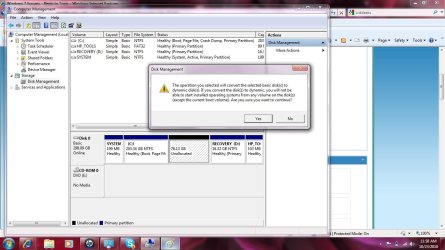
big problem at making new partition

mohamed said

New member
Local time
8:13 PM
Messages
4
hello
i have a new laptop yesterday but there are one drive c: (500 gb)
to add a new partition i have shrink drive c to 250 GB and i have now 250 GB unallocated space
when i create a new simple volume at this unallocated space i have this message before formatting

"the operation you selected will convert the selected basic disk to dynamic disk,if you convert the disk to dynamic you will not be able to start installed OS from any volume(expect the current boot volume)
yes-no
this error doesn't appear at os guide
help please
 

My Computer

OS
Windows 7 Ultimate x64
hello
i have a new laptop yesterday but there are one drive c: (500 gb)
to add a new partition i have shrink drive c to 250 GB and i have now 250 GB unallocated space
when i create a new simple volume at this unallocated space i have this message before formatting

"the operation you selected will convert the selected basic disk to dynamic disk,if you convert the disk to dynamic you will not be able to start installed OS from any volume(expect the current boot volume)
yes-no
this error doesn't appear at os guide
help please

Hello,and Welcome.
Try creating the partition witha program,or from BIOS.
 

My Computer

Computer Manufacturer/Model Number
AMD Athlon 64x2 dual core 4400+
OS
Windows 7 Enterprise x64
CPU
2,3GHz
Motherboard
ASUS
Memory
2GB DDR2
Graphics Card(s)
ATI Radeon HD 2400
Sound Card
Realtek
Monitor(s) Displays
Benq G900W
Screen Resolution
1440x900
Hard Drives
160 GB

My Computer

Computer Manufacturer/Model Number
AMD Athlon 64x2 dual core 4400+
OS
Windows 7 Enterprise x64
CPU
2,3GHz
Motherboard
ASUS
Memory
2GB DDR2
Graphics Card(s)
ATI Radeon HD 2400
Sound Card
Realtek
Monitor(s) Displays
Benq G900W
Screen Resolution
1440x900
Hard Drives
160 GB
but why this error appear???
Hi! mohamed said, welcome to W7F :)

There are two styles of disk operation Basic, and Dynamic.

It is easier to change a Basic disk to Dynamic, than to return a Dynamic back to Basic.

In either scenario there is the possibility of data loss, but more so to go back from Dynamic to Basic.

The question you need to ask yourself is:

"Do I really need the features of a Dynamic Disk?"

This question that is being asked should be considered more as a Final fail-safe, than an error message
"the operation you selected will convert the selected basic disk to dynamic disk,if you convert the disk to dynamic you will not be able to start installed OS from any volume(expect the current boot volume)
yes-no
Have you visited these pages?

http://www.sevenforums.com/tutorials/26823-convert-basic-disk-dynamic-disk.html

http://www.sevenforums.com/tutorials/26829-convert-dynamic-disk-basic-disk.html

Enjoy your stay here...Assalaam-O-Alaikum
 

My Computer

Computer type
PC/Desktop
Computer Manufacturer/Model Number
Gateway DX4831-01e (Mid-Tower Desktop)
OS
Originally Win 7 Hm Prem x64 Ver 6.1.7600 Build 7601-SP1 | Upgraded to Windows 10 December 14, 2019
CPU
Intel i3 530 2.93GHz, 2933MHz 2 Cores 4 Logical Processors
Motherboard
Gateway H57M01 133 megahertz
Memory
6GB of 1,333MHz DDR3 SDRAM
Graphics Card(s)
32MB Intel Graphics Media Accelerator HD IGChip
Sound Card
Realtek High Definition Audio
Monitor(s) Displays
Gateway HX2000 20inch TFT active matrix TN
Screen Resolution
1600 x 900 x 59 hertz
Hard Drives
WDC WD10EADS-00M2B0 [HDD] (1000.20 GB) -- drive 0,
HL-DT-ST DVDRAM GH41N [CD-ROM dr]
Four card readers, and Four USB 2.0
PSU
300watts.
Case
Mid-Tower Desktop
Cooling
Stock from Gateway
Keyboard
Natural Ergonomic Keyboard 4000, see Other Info
Mouse
Orig. Gateway wore out now using Insignia USB wired optical
Internet Speed
Vz FIOS 10ms png 57.64Mbps down 65.53Mbps up Speedtest.org
Antivirus
Zamana Anti-logger with Anti-malware, MSE, Windows Firewall,
Browser
IE11.0.9600.19399-Upd ver11.0.135, Firefox 68.0.1 x64
Other Info
System Specs by Belarc.

BIOS: American Megatrends Inc. P01-A0 11/17/2009

Replaced the MS 'Natural' Standard PS/2 Enhanced 101-102 Keyboard with a new Natural Ergonomic Keyboard 4000 on August 1st 2014.

Canon Pixma MG3222 Printer.

Updated to IE11 on 12102015 | Fios Quantum Router g1100

Additional AV: SpywareBlaster, manual Mbam, SAS
I think the main question is why on earth is a disk in a new laptop, with one partition formatted in dynamic disk format?

Can you post a screenshot of your Disk Management's window? (Rightclick on Computer > Manage > Disk Management)
 

My Computer

Computer Manufacturer/Model Number
home made
OS
Windows 7 RTM x64
CPU
AMD X2 5000+
Motherboard
Asrock
Memory
4GB
Graphics Card(s)
Nvidia 9400GT
Sound Card
onboard 6Ch
Monitor(s) Displays
Medion 22" + HannSpree 22"
Screen Resolution
1680X1050 + 1920X1080
Hard Drives
Intel SSD 80GB
WD 1.5 TB
WD 1 TB
Samsung 1TB X 3
PSU
noname
Case
noname
Cooling
Zalman
Keyboard
DeLUX multimedia keyboard
Mouse
Microsoft
Internet Speed
25MB/s

My Computer

Computer type
PC/Desktop
Computer Manufacturer/Model Number
Gateway DX4831-01e (Mid-Tower Desktop)
OS
Originally Win 7 Hm Prem x64 Ver 6.1.7600 Build 7601-SP1 | Upgraded to Windows 10 December 14, 2019
CPU
Intel i3 530 2.93GHz, 2933MHz 2 Cores 4 Logical Processors
Motherboard
Gateway H57M01 133 megahertz
Memory
6GB of 1,333MHz DDR3 SDRAM
Graphics Card(s)
32MB Intel Graphics Media Accelerator HD IGChip
Sound Card
Realtek High Definition Audio
Monitor(s) Displays
Gateway HX2000 20inch TFT active matrix TN
Screen Resolution
1600 x 900 x 59 hertz
Hard Drives
WDC WD10EADS-00M2B0 [HDD] (1000.20 GB) -- drive 0,
HL-DT-ST DVDRAM GH41N [CD-ROM dr]
Four card readers, and Four USB 2.0
PSU
300watts.
Case
Mid-Tower Desktop
Cooling
Stock from Gateway
Keyboard
Natural Ergonomic Keyboard 4000, see Other Info
Mouse
Orig. Gateway wore out now using Insignia USB wired optical
Internet Speed
Vz FIOS 10ms png 57.64Mbps down 65.53Mbps up Speedtest.org
Antivirus
Zamana Anti-logger with Anti-malware, MSE, Windows Firewall,
Browser
IE11.0.9600.19399-Upd ver11.0.135, Firefox 68.0.1 x64
Other Info
System Specs by Belarc.

BIOS: American Megatrends Inc. P01-A0 11/17/2009

Replaced the MS 'Natural' Standard PS/2 Enhanced 101-102 Keyboard with a new Natural Ergonomic Keyboard 4000 on August 1st 2014.

Canon Pixma MG3222 Printer.

Updated to IE11 on 12102015 | Fios Quantum Router g1100

Additional AV: SpywareBlaster, manual Mbam, SAS
The error message is because the laptop has already used the maximum allowed Primary partitions.

You do not want to convert it to Dynamic under any circumstances!

Use free Partition Wizard bootable CD to create Logical data partitions in the Unallocated space. It can also resize or otherwise manage your partitions perfectly with near-zero failure rate. But back up your files anyway.

http://www.partitionwizard.com/partition-wizard-bootable-cd.html
 
The error message is because the laptop has already used the maximum allowed Primary partitions.

He told that he has only one partition (C).

May be there is a hidden partition, but those are only two.

We can have four primary partitions on one disk.

He did not used the maximum allowed partitions, or he doesn't know how many partitions he really has.

I'm still waiting for the screenshot.
 

My Computer

Computer Manufacturer/Model Number
home made
OS
Windows 7 RTM x64
CPU
AMD X2 5000+
Motherboard
Asrock
Memory
4GB
Graphics Card(s)
Nvidia 9400GT
Sound Card
onboard 6Ch
Monitor(s) Displays
Medion 22" + HannSpree 22"
Screen Resolution
1680X1050 + 1920X1080
Hard Drives
Intel SSD 80GB
WD 1.5 TB
WD 1 TB
Samsung 1TB X 3
PSU
noname
Case
noname
Cooling
Zalman
Keyboard
DeLUX multimedia keyboard
Mouse
Microsoft
Internet Speed
25MB/s
On a new factory installed laptop he likely has hidden OEM, Recovery and 100mb SysReserved partition, which in addition to C makes the maximum. This is standard.

As you say we won't know until he posts the screenshot, but that is what the error message is usually about.
 
On a new factory installed laptop he likely has hidden OEM, Recovery and 100mb SysReserved partition, which in addition to C makes the maximum. This is standard.

As you say we won't know until he posts the screenshot, but that is what the error message is usually about.
exact i have
c+recovery+hptools(100mb)
which screen shots do u want (mycomputer-or data management
 

My Computer

OS
Windows 7 Ultimate x64
about the disk management
 
Last edited:

My Computer

Computer Manufacturer/Model Number
home made
OS
Windows 7 RTM x64
CPU
AMD X2 5000+
Motherboard
Asrock
Memory
4GB
Graphics Card(s)
Nvidia 9400GT
Sound Card
onboard 6Ch
Monitor(s) Displays
Medion 22" + HannSpree 22"
Screen Resolution
1680X1050 + 1920X1080
Hard Drives
Intel SSD 80GB
WD 1.5 TB
WD 1 TB
Samsung 1TB X 3
PSU
noname
Case
noname
Cooling
Zalman
Keyboard
DeLUX multimedia keyboard
Mouse
Microsoft
Internet Speed
25MB/s
Could not create a new partition after shrinking the volumw

I just bought a new laptop with windows 7 home premium and I would like to dual boot with xp by shrinking c. I am facing same problem. I think the laptop has the max partitions allowed. I am attaching a picture of the error and the partition table.
I would like to know what are my options to accomplish without touching the recovery partition and windows 7 partition. I am thinking about deleting the hp tools.
Thank you in advance
 

Attachments

  • error.jpg
    error.jpg
    249.4 KB · Views: 275

My Computer

Computer Manufacturer/Model Number
HP G62-340US notebook
OS
win 7 home premium
Raub

You can only put four primary partitions on a hard drive.

You are trying to put on five.


notesmall1.png
Note

A primary partition is a type of partition created on a hard drive that can have a operating system installed on it. A primary partition functions as though it were a physically separate hard drive. By default on a MBR disk, you can create a maximum of 3 Primary partitions and 1 Extended partition with up to 128 logical volumes in the extended partition on a single hard disk.

*You must be logged on in an administrator account to be able to do this tutorial.


Find more info here.
http://www.sevenforums.com/tutorials/2674-partition-volume-create-new.html
 

My Computer

Computer Manufacturer/Model Number
Hopalong/ Godzilla
OS
Windows7 Pro 64bit SP-1; Windows XP Pro 32bit
CPU
Intel Core i7-870 Lynnfield 2.93GHz LGA 1156 95W Quad-Core
Motherboard
ASUS P7P55D-E PRO
Memory
8GB@1400MHz Crucial Ballistix DDR3-1600 4x2GB
Graphics Card(s)
ASUS ENGTX460 DirectCU/2DI/1GD5 1GB 256-bit GDDR5
Sound Card
VIA Onboard
Monitor(s) Displays
Asus VS248H-P 24"; Samsung SyncMaster 941BW 19"ws
Screen Resolution
1920x1080; 1440x900
Hard Drives
Samsung 830 120GB SSD
Intel 320 120GB SSD
Western Digital Caviar Black WD7501AALS 750GB 7200 RPM SATA 3.0Gb/s
Western Digital Caviar Black WD6401AALS 640GB 7200 RPM SATA 3.0Gb/s
PSU
COOLER MASTER Silent Pro RS850-AMBAJ3-US 850W Modular
Case
COOLER MASTER HAF 932 RC-932-KKN5-GP Black
Cooling
Scythe "Mugen-2 Rev.B" (2 ScytheKaze-Jyuni PWM fans)
Keyboard
Logitech K-320
Mouse
Kensington
Antivirus
Avast Inernet Suite
Browser
IE 9 ; Chrome
Thank u Hopalong X,
Would recommand deleting hp tools partition and replacing it with a new one primary?
 

My Computer

Computer Manufacturer/Model Number
HP G62-340US notebook
OS
win 7 home premium
You can but you may miss those tools. I'm not sure what is in there. See what is in there and post a snip of the files. Right click HP Tools and then left click "Open". It will show list of files.
FYI- I marked where to right click in your picture below in yellow.

FYI
Did you burn the HP recovery DVD's? If not that should be done. I realize it is on the hard drive but what if the hard drive messes up? All gone!

raub
I'll check back on you. Send me a PM or public message if I forget.;)

Mike
 
Last edited:

My Computer

Computer Manufacturer/Model Number
Hopalong/ Godzilla
OS
Windows7 Pro 64bit SP-1; Windows XP Pro 32bit
CPU
Intel Core i7-870 Lynnfield 2.93GHz LGA 1156 95W Quad-Core
Motherboard
ASUS P7P55D-E PRO
Memory
8GB@1400MHz Crucial Ballistix DDR3-1600 4x2GB
Graphics Card(s)
ASUS ENGTX460 DirectCU/2DI/1GD5 1GB 256-bit GDDR5
Sound Card
VIA Onboard
Monitor(s) Displays
Asus VS248H-P 24"; Samsung SyncMaster 941BW 19"ws
Screen Resolution
1920x1080; 1440x900
Hard Drives
Samsung 830 120GB SSD
Intel 320 120GB SSD
Western Digital Caviar Black WD7501AALS 750GB 7200 RPM SATA 3.0Gb/s
Western Digital Caviar Black WD6401AALS 640GB 7200 RPM SATA 3.0Gb/s
PSU
COOLER MASTER Silent Pro RS850-AMBAJ3-US 850W Modular
Case
COOLER MASTER HAF 932 RC-932-KKN5-GP Black
Cooling
Scythe "Mugen-2 Rev.B" (2 ScytheKaze-Jyuni PWM fans)
Keyboard
Logitech K-320
Mouse
Kensington
Antivirus
Avast Inernet Suite
Browser
IE 9 ; Chrome
HP's are so loaded with bloatware that many tech enthusiasts find a clean copy Win7 DVD to clean reinstall without the factory bloatware. Until then, they turn off all the useless utilities in msconfig>Startup including the HP Wireless Manager which adds 30 seconds to bootup and drags on the CPU - config Win7 superior wireless connection in System tray.

If you find you don't need or want those useless utilties as well as other programs, you can uninstall them using Revo uninstaller in Advanced mode: it will run Windows uninstaller, but when prompted to restart, click Next instead to delete all the leftover registry keys and files Revo cues up in bold.

As suggested, if you browse that HP utilities partition with folders unhidden in Control Panel>Folders options>View you can decide whether you want to keep any of those utilities. If not go ahead and delete it to create your fourth Primary partition. You may need to use free Partition Wizard to do so: http://www.sevenforums.com/tutorials/93322-partition-wizard-use-bootable-cd.html
 
Thank you Hopalong X for taking time to explain things for me. I appreciate it very much. I did find another video guide from hp forums to partition the extra space without touching other partitions. you can take a look at it [Video] How to Dual Boot Windows 7 & Windows XP - HP Support Forum

Thank you gregrocker for sharing some great infos about hp software and tools. I will keep that in mind for future installations.
 

My Computer

Computer Manufacturer/Model Number
HP G62-340US notebook
OS
win 7 home premium
Raub

Glad I could be of some help.

Mike
 

My Computer

Computer Manufacturer/Model Number
Hopalong/ Godzilla
OS
Windows7 Pro 64bit SP-1; Windows XP Pro 32bit
CPU
Intel Core i7-870 Lynnfield 2.93GHz LGA 1156 95W Quad-Core
Motherboard
ASUS P7P55D-E PRO
Memory
8GB@1400MHz Crucial Ballistix DDR3-1600 4x2GB
Graphics Card(s)
ASUS ENGTX460 DirectCU/2DI/1GD5 1GB 256-bit GDDR5
Sound Card
VIA Onboard
Monitor(s) Displays
Asus VS248H-P 24"; Samsung SyncMaster 941BW 19"ws
Screen Resolution
1920x1080; 1440x900
Hard Drives
Samsung 830 120GB SSD
Intel 320 120GB SSD
Western Digital Caviar Black WD7501AALS 750GB 7200 RPM SATA 3.0Gb/s
Western Digital Caviar Black WD6401AALS 640GB 7200 RPM SATA 3.0Gb/s
PSU
COOLER MASTER Silent Pro RS850-AMBAJ3-US 850W Modular
Case
COOLER MASTER HAF 932 RC-932-KKN5-GP Black
Cooling
Scythe "Mugen-2 Rev.B" (2 ScytheKaze-Jyuni PWM fans)
Keyboard
Logitech K-320
Mouse
Kensington
Antivirus
Avast Inernet Suite
Browser
IE 9 ; Chrome
Back
Top