Solved Need a new partition

Uchiha

New member
Member
VIP
Local time
11:34 PM
Messages
126
I need the unallocated space to form another drive. And I supposedly have maximum no. of partitions.
I don't think converting to a dynamic disk is beneficial either.
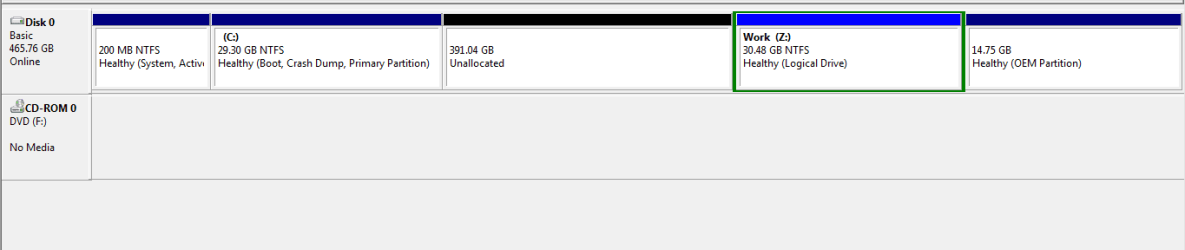

Capture.PNG
 

My Computer

Computer Manufacturer/Model Number
Lenovo Y560
OS
Windows 7 Home Premium x64
CPU
Intel Core i5
Motherboard
M460 @ 2.53GHz
Memory
4 GB
Graphics Card(s)
ATI Mobility Radeon HD 5370
DO NOT convert the drive to a Dynamic Disk. Seeing as your C: drive is so small I would extend C: into the unallocated space otherwise you will soon run out room on there. You can segregate your files using folders, in this instance you don't want to be creating any more partitions. The only viable way of adding partitions to that system is by adding a second HDD.
 

My Computer

Computer type
PC/Desktop
Computer Manufacturer/Model Number
Custom Build
OS
W7 Pro x64 SP1 | W10 Pro IP x64 | W8.1 Pro x64 VM | Linux Mint VM
CPU
i7-4790k @ 4GHz (4.4GHz Boost)
Motherboard
ASUS Sabertooth Z87 (BIOS Rev 2004)
Memory
16GB DDR3 Kingston HyperX Fury @ 1600MHz CL 9-9-9-27
Graphics Card(s)
EVGA GTX 980 Classified
Sound Card
Realtek Onboard
Monitor(s) Displays
Samsung S27D390
Screen Resolution
1920 x 1080
Hard Drives
240GB Intel 520 Series SSD |
Samsung 850 EVO 120GB SSD |
2TB WD Caviar Black |
2TB WD Caviar Green
PSU
Corsair HX850-80 Gold Modular
Case
Cooler Master Silencio 650
Cooling
Corsair H80i w/2 x Corsair SP120 | 2 x 120mm Noctua NF-S12B
Keyboard
Microsoft Sidewinder X4
Mouse
Gigabyte M6900 optical
Internet Speed
152mb
Antivirus
F-Secure
Browser
Firefox 38.0
Other Info
Backup Rig: Win 7 Pro 64-bit | AMD A10-5800k | ASUS F2A85-V Pro | 8GB Samsung DDR3 @1600MHz | 120GB Toshiba SDD | 2TB Seagate HDD | Cooler Master Silencio 550
DO NOT convert the drive to a Dynamic Disk. Seeing as your C: drive is so small I would extend C: into the unallocated space otherwise you will soon run out room on there. You can segregate your files using folders, in this instance you don't want to be creating any more partitions. The only viable way of adding partitions to that system is by adding a second HDD.

So are you telling me THERE'S NO WAY I could make one more partition?
I myself took out that unallocated space from C drive cause my computer just crashed and i lost all my software and games in the C drive. It was 430 GB previously.
 

My Computer

Computer Manufacturer/Model Number
Lenovo Y560
OS
Windows 7 Home Premium x64
CPU
Intel Core i5
Motherboard
M460 @ 2.53GHz
Memory
4 GB
Graphics Card(s)
ATI Mobility Radeon HD 5370
You can only have four partitions on a hard drive without becoming a Dynamic Disk, you already have four partitions. I would be more concerned as to why the PC crashed in the first placed and resolving the issue, creating another partition on that system will stop your system from booting.
 

My Computer

Computer type
PC/Desktop
Computer Manufacturer/Model Number
Custom Build
OS
W7 Pro x64 SP1 | W10 Pro IP x64 | W8.1 Pro x64 VM | Linux Mint VM
CPU
i7-4790k @ 4GHz (4.4GHz Boost)
Motherboard
ASUS Sabertooth Z87 (BIOS Rev 2004)
Memory
16GB DDR3 Kingston HyperX Fury @ 1600MHz CL 9-9-9-27
Graphics Card(s)
EVGA GTX 980 Classified
Sound Card
Realtek Onboard
Monitor(s) Displays
Samsung S27D390
Screen Resolution
1920 x 1080
Hard Drives
240GB Intel 520 Series SSD |
Samsung 850 EVO 120GB SSD |
2TB WD Caviar Black |
2TB WD Caviar Green
PSU
Corsair HX850-80 Gold Modular
Case
Cooler Master Silencio 650
Cooling
Corsair H80i w/2 x Corsair SP120 | 2 x 120mm Noctua NF-S12B
Keyboard
Microsoft Sidewinder X4
Mouse
Gigabyte M6900 optical
Internet Speed
152mb
Antivirus
F-Secure
Browser
Firefox 38.0
Other Info
Backup Rig: Win 7 Pro 64-bit | AMD A10-5800k | ASUS F2A85-V Pro | 8GB Samsung DDR3 @1600MHz | 120GB Toshiba SDD | 2TB Seagate HDD | Cooler Master Silencio 550
Why can't I delete the first partition?
Or expand the Work partition?
 

My Computer

Computer Manufacturer/Model Number
Lenovo Y560
OS
Windows 7 Home Premium x64
CPU
Intel Core i5
Motherboard
M460 @ 2.53GHz
Memory
4 GB
Graphics Card(s)
ATI Mobility Radeon HD 5370
That's your System Reserved partition, that's placed there by Windows as it installs. If you really want to delete that partition I'd read through through this tutorial until you fully understand it, and read the tutorial linked at the bottom which you'll also need to fully understand.

http://www.sevenforums.com/tutorials/71363-system-reserved-partition-delete.html

Again, I'd extend C: into the unallocated space (your C: drive is tiny) and figure out what your problem was that caused the crash. Segregate your files with folders, that really is the best way forward in my opinion. If you're afraid of losing software and games or whatever from your C: drive you should image regularly with Free Macrium Reflect

http://www.sevenforums.com/tutorials/73828-imaging-free-macrium.html
 

My Computer

Computer type
PC/Desktop
Computer Manufacturer/Model Number
Custom Build
OS
W7 Pro x64 SP1 | W10 Pro IP x64 | W8.1 Pro x64 VM | Linux Mint VM
CPU
i7-4790k @ 4GHz (4.4GHz Boost)
Motherboard
ASUS Sabertooth Z87 (BIOS Rev 2004)
Memory
16GB DDR3 Kingston HyperX Fury @ 1600MHz CL 9-9-9-27
Graphics Card(s)
EVGA GTX 980 Classified
Sound Card
Realtek Onboard
Monitor(s) Displays
Samsung S27D390
Screen Resolution
1920 x 1080
Hard Drives
240GB Intel 520 Series SSD |
Samsung 850 EVO 120GB SSD |
2TB WD Caviar Black |
2TB WD Caviar Green
PSU
Corsair HX850-80 Gold Modular
Case
Cooler Master Silencio 650
Cooling
Corsair H80i w/2 x Corsair SP120 | 2 x 120mm Noctua NF-S12B
Keyboard
Microsoft Sidewinder X4
Mouse
Gigabyte M6900 optical
Internet Speed
152mb
Antivirus
F-Secure
Browser
Firefox 38.0
Other Info
Backup Rig: Win 7 Pro 64-bit | AMD A10-5800k | ASUS F2A85-V Pro | 8GB Samsung DDR3 @1600MHz | 120GB Toshiba SDD | 2TB Seagate HDD | Cooler Master Silencio 550
And I can't expand the Work partition (third one) because?
 

My Computer

Computer Manufacturer/Model Number
Lenovo Y560
OS
Windows 7 Home Premium x64
CPU
Intel Core i5
Motherboard
M460 @ 2.53GHz
Memory
4 GB
Graphics Card(s)
ATI Mobility Radeon HD 5370
Or expand the Work partition?

You can't expand the Work partition as there's nothing to expand into, you can only expand into space on the right of the partition you want to expand.
 

My Computer

Computer type
PC/Desktop
Computer Manufacturer/Model Number
Custom Build
OS
W7 Pro x64 SP1 | W10 Pro IP x64 | W8.1 Pro x64 VM | Linux Mint VM
CPU
i7-4790k @ 4GHz (4.4GHz Boost)
Motherboard
ASUS Sabertooth Z87 (BIOS Rev 2004)
Memory
16GB DDR3 Kingston HyperX Fury @ 1600MHz CL 9-9-9-27
Graphics Card(s)
EVGA GTX 980 Classified
Sound Card
Realtek Onboard
Monitor(s) Displays
Samsung S27D390
Screen Resolution
1920 x 1080
Hard Drives
240GB Intel 520 Series SSD |
Samsung 850 EVO 120GB SSD |
2TB WD Caviar Black |
2TB WD Caviar Green
PSU
Corsair HX850-80 Gold Modular
Case
Cooler Master Silencio 650
Cooling
Corsair H80i w/2 x Corsair SP120 | 2 x 120mm Noctua NF-S12B
Keyboard
Microsoft Sidewinder X4
Mouse
Gigabyte M6900 optical
Internet Speed
152mb
Antivirus
F-Secure
Browser
Firefox 38.0
Other Info
Backup Rig: Win 7 Pro 64-bit | AMD A10-5800k | ASUS F2A85-V Pro | 8GB Samsung DDR3 @1600MHz | 120GB Toshiba SDD | 2TB Seagate HDD | Cooler Master Silencio 550
So, if backup all my data in that drive, and delete it; I can make a new partition combining the space of this and the unallocated space?
 

My Computer

Computer Manufacturer/Model Number
Lenovo Y560
OS
Windows 7 Home Premium x64
CPU
Intel Core i5
Motherboard
M460 @ 2.53GHz
Memory
4 GB
Graphics Card(s)
ATI Mobility Radeon HD 5370
No, backing up let's you restore your system to the way it was prior to any crashes and/or loss of data. If you'd imaged before your crash you could boot into a WinPE environment (bootable media created through Macrium) and restore your image so your system would revert to how it was prior to the crash/data loss.

Extend your C: drive into the unallocated space so your setup is back to how it was previously. Reinstall all of your software and games etc onto the C: drive then make regular images you can revert to in case of any future crashes and/or data loss.
 

My Computer

Computer type
PC/Desktop
Computer Manufacturer/Model Number
Custom Build
OS
W7 Pro x64 SP1 | W10 Pro IP x64 | W8.1 Pro x64 VM | Linux Mint VM
CPU
i7-4790k @ 4GHz (4.4GHz Boost)
Motherboard
ASUS Sabertooth Z87 (BIOS Rev 2004)
Memory
16GB DDR3 Kingston HyperX Fury @ 1600MHz CL 9-9-9-27
Graphics Card(s)
EVGA GTX 980 Classified
Sound Card
Realtek Onboard
Monitor(s) Displays
Samsung S27D390
Screen Resolution
1920 x 1080
Hard Drives
240GB Intel 520 Series SSD |
Samsung 850 EVO 120GB SSD |
2TB WD Caviar Black |
2TB WD Caviar Green
PSU
Corsair HX850-80 Gold Modular
Case
Cooler Master Silencio 650
Cooling
Corsair H80i w/2 x Corsair SP120 | 2 x 120mm Noctua NF-S12B
Keyboard
Microsoft Sidewinder X4
Mouse
Gigabyte M6900 optical
Internet Speed
152mb
Antivirus
F-Secure
Browser
Firefox 38.0
Other Info
Backup Rig: Win 7 Pro 64-bit | AMD A10-5800k | ASUS F2A85-V Pro | 8GB Samsung DDR3 @1600MHz | 120GB Toshiba SDD | 2TB Seagate HDD | Cooler Master Silencio 550
By backup, I meant transfer all my data onto an HDD.....
 

My Computer

Computer Manufacturer/Model Number
Lenovo Y560
OS
Windows 7 Home Premium x64
CPU
Intel Core i5
Motherboard
M460 @ 2.53GHz
Memory
4 GB
Graphics Card(s)
ATI Mobility Radeon HD 5370
Apologies, yes you can. Make sure all of your data is backed up then right click on the Z: drive and click Delete. Once you have done this you will have two unallocated partitions, my advice would be to extend C: into the first unallocated space, even it's just by 30Gb, just to give your OS room to breath, the C: drive really will fill up quickly at the size it is now.

Once that is done you can then create a new partition in the first unallocated space and then extend it into the second unallocated space.

http://www.sevenforums.com/tutorials/2668-partition-volume-delete.html

http://www.sevenforums.com/tutorials/2674-partition-volume-create-new.html

http://www.sevenforums.com/tutorials/2670-partition-volume-extend.html
 

My Computer

Computer type
PC/Desktop
Computer Manufacturer/Model Number
Custom Build
OS
W7 Pro x64 SP1 | W10 Pro IP x64 | W8.1 Pro x64 VM | Linux Mint VM
CPU
i7-4790k @ 4GHz (4.4GHz Boost)
Motherboard
ASUS Sabertooth Z87 (BIOS Rev 2004)
Memory
16GB DDR3 Kingston HyperX Fury @ 1600MHz CL 9-9-9-27
Graphics Card(s)
EVGA GTX 980 Classified
Sound Card
Realtek Onboard
Monitor(s) Displays
Samsung S27D390
Screen Resolution
1920 x 1080
Hard Drives
240GB Intel 520 Series SSD |
Samsung 850 EVO 120GB SSD |
2TB WD Caviar Black |
2TB WD Caviar Green
PSU
Corsair HX850-80 Gold Modular
Case
Cooler Master Silencio 650
Cooling
Corsair H80i w/2 x Corsair SP120 | 2 x 120mm Noctua NF-S12B
Keyboard
Microsoft Sidewinder X4
Mouse
Gigabyte M6900 optical
Internet Speed
152mb
Antivirus
F-Secure
Browser
Firefox 38.0
Other Info
Backup Rig: Win 7 Pro 64-bit | AMD A10-5800k | ASUS F2A85-V Pro | 8GB Samsung DDR3 @1600MHz | 120GB Toshiba SDD | 2TB Seagate HDD | Cooler Master Silencio 550
Thanks a lot!
I'll follow your advice and extend the C drive to 60 GB.

But may I ask why you ask me to extend the C drive?
 

My Computer

Computer Manufacturer/Model Number
Lenovo Y560
OS
Windows 7 Home Premium x64
CPU
Intel Core i5
Motherboard
M460 @ 2.53GHz
Memory
4 GB
Graphics Card(s)
ATI Mobility Radeon HD 5370
But may I ask why you ask me to extend the C drive?

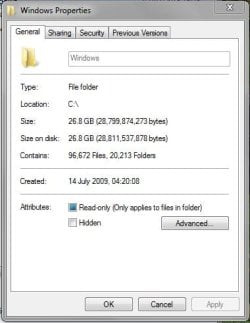
This is my Windows folder at the moment.

Capture.JPG

As you continue to use your installation that folder will grow, and 30GB is extremely small for an OS drive. Once it's nearly full your performance will take a huge hit so you need to give the OS drive room to grow. I personally wouldn't use anything under 100GB, but if you're careful about where you install things in future 60GB should be OK and you can always extend it at a later date if needs be.
 

My Computer

Computer type
PC/Desktop
Computer Manufacturer/Model Number
Custom Build
OS
W7 Pro x64 SP1 | W10 Pro IP x64 | W8.1 Pro x64 VM | Linux Mint VM
CPU
i7-4790k @ 4GHz (4.4GHz Boost)
Motherboard
ASUS Sabertooth Z87 (BIOS Rev 2004)
Memory
16GB DDR3 Kingston HyperX Fury @ 1600MHz CL 9-9-9-27
Graphics Card(s)
EVGA GTX 980 Classified
Sound Card
Realtek Onboard
Monitor(s) Displays
Samsung S27D390
Screen Resolution
1920 x 1080
Hard Drives
240GB Intel 520 Series SSD |
Samsung 850 EVO 120GB SSD |
2TB WD Caviar Black |
2TB WD Caviar Green
PSU
Corsair HX850-80 Gold Modular
Case
Cooler Master Silencio 650
Cooling
Corsair H80i w/2 x Corsair SP120 | 2 x 120mm Noctua NF-S12B
Keyboard
Microsoft Sidewinder X4
Mouse
Gigabyte M6900 optical
Internet Speed
152mb
Antivirus
F-Secure
Browser
Firefox 38.0
Other Info
Backup Rig: Win 7 Pro 64-bit | AMD A10-5800k | ASUS F2A85-V Pro | 8GB Samsung DDR3 @1600MHz | 120GB Toshiba SDD | 2TB Seagate HDD | Cooler Master Silencio 550
Damn. You've said enough.

And thanks again.
 

My Computer

Computer Manufacturer/Model Number
Lenovo Y560
OS
Windows 7 Home Premium x64
CPU
Intel Core i5
Motherboard
M460 @ 2.53GHz
Memory
4 GB
Graphics Card(s)
ATI Mobility Radeon HD 5370
You're welcome. Let us know how it goes.

Just out of interest, do you have any idea of what caused the initial crash? Or what happened when it did crash?
 

My Computer

Computer type
PC/Desktop
Computer Manufacturer/Model Number
Custom Build
OS
W7 Pro x64 SP1 | W10 Pro IP x64 | W8.1 Pro x64 VM | Linux Mint VM
CPU
i7-4790k @ 4GHz (4.4GHz Boost)
Motherboard
ASUS Sabertooth Z87 (BIOS Rev 2004)
Memory
16GB DDR3 Kingston HyperX Fury @ 1600MHz CL 9-9-9-27
Graphics Card(s)
EVGA GTX 980 Classified
Sound Card
Realtek Onboard
Monitor(s) Displays
Samsung S27D390
Screen Resolution
1920 x 1080
Hard Drives
240GB Intel 520 Series SSD |
Samsung 850 EVO 120GB SSD |
2TB WD Caviar Black |
2TB WD Caviar Green
PSU
Corsair HX850-80 Gold Modular
Case
Cooler Master Silencio 650
Cooling
Corsair H80i w/2 x Corsair SP120 | 2 x 120mm Noctua NF-S12B
Keyboard
Microsoft Sidewinder X4
Mouse
Gigabyte M6900 optical
Internet Speed
152mb
Antivirus
F-Secure
Browser
Firefox 38.0
Other Info
Backup Rig: Win 7 Pro 64-bit | AMD A10-5800k | ASUS F2A85-V Pro | 8GB Samsung DDR3 @1600MHz | 120GB Toshiba SDD | 2TB Seagate HDD | Cooler Master Silencio 550
I had at one point used some sort of a driver patch to link a Dualshock 3 to my bluetooth. I didn't realize that it totally hogged up the bluetooth driver and restricted its use to just the controller.
I went to uninstall the software and boom! Couldn't even boot. Tried a repair disc, but that just deleted my restore points and what not.
 

My Computer

Computer Manufacturer/Model Number
Lenovo Y560
OS
Windows 7 Home Premium x64
CPU
Intel Core i5
Motherboard
M460 @ 2.53GHz
Memory
4 GB
Graphics Card(s)
ATI Mobility Radeon HD 5370
How did you go about overcoming that? Have you performed a clean install of Windows at all?
 

My Computer

Computer type
PC/Desktop
Computer Manufacturer/Model Number
Custom Build
OS
W7 Pro x64 SP1 | W10 Pro IP x64 | W8.1 Pro x64 VM | Linux Mint VM
CPU
i7-4790k @ 4GHz (4.4GHz Boost)
Motherboard
ASUS Sabertooth Z87 (BIOS Rev 2004)
Memory
16GB DDR3 Kingston HyperX Fury @ 1600MHz CL 9-9-9-27
Graphics Card(s)
EVGA GTX 980 Classified
Sound Card
Realtek Onboard
Monitor(s) Displays
Samsung S27D390
Screen Resolution
1920 x 1080
Hard Drives
240GB Intel 520 Series SSD |
Samsung 850 EVO 120GB SSD |
2TB WD Caviar Black |
2TB WD Caviar Green
PSU
Corsair HX850-80 Gold Modular
Case
Cooler Master Silencio 650
Cooling
Corsair H80i w/2 x Corsair SP120 | 2 x 120mm Noctua NF-S12B
Keyboard
Microsoft Sidewinder X4
Mouse
Gigabyte M6900 optical
Internet Speed
152mb
Antivirus
F-Secure
Browser
Firefox 38.0
Other Info
Backup Rig: Win 7 Pro 64-bit | AMD A10-5800k | ASUS F2A85-V Pro | 8GB Samsung DDR3 @1600MHz | 120GB Toshiba SDD | 2TB Seagate HDD | Cooler Master Silencio 550
I sent it over to the Lenovo dealer I got it from. They fixed it after a week. :P
 

My Computer

Computer Manufacturer/Model Number
Lenovo Y560
OS
Windows 7 Home Premium x64
CPU
Intel Core i5
Motherboard
M460 @ 2.53GHz
Memory
4 GB
Graphics Card(s)
ATI Mobility Radeon HD 5370
Good to hear.

Let us know how you get on with the repartitioning and if you need any more help just give us a shout.
 

My Computer

Computer type
PC/Desktop
Computer Manufacturer/Model Number
Custom Build
OS
W7 Pro x64 SP1 | W10 Pro IP x64 | W8.1 Pro x64 VM | Linux Mint VM
CPU
i7-4790k @ 4GHz (4.4GHz Boost)
Motherboard
ASUS Sabertooth Z87 (BIOS Rev 2004)
Memory
16GB DDR3 Kingston HyperX Fury @ 1600MHz CL 9-9-9-27
Graphics Card(s)
EVGA GTX 980 Classified
Sound Card
Realtek Onboard
Monitor(s) Displays
Samsung S27D390
Screen Resolution
1920 x 1080
Hard Drives
240GB Intel 520 Series SSD |
Samsung 850 EVO 120GB SSD |
2TB WD Caviar Black |
2TB WD Caviar Green
PSU
Corsair HX850-80 Gold Modular
Case
Cooler Master Silencio 650
Cooling
Corsair H80i w/2 x Corsair SP120 | 2 x 120mm Noctua NF-S12B
Keyboard
Microsoft Sidewinder X4
Mouse
Gigabyte M6900 optical
Internet Speed
152mb
Antivirus
F-Secure
Browser
Firefox 38.0
Other Info
Backup Rig: Win 7 Pro 64-bit | AMD A10-5800k | ASUS F2A85-V Pro | 8GB Samsung DDR3 @1600MHz | 120GB Toshiba SDD | 2TB Seagate HDD | Cooler Master Silencio 550
Back
Top