
Solved Billion BiPAC 7800N - Low Wireless Speed

lehnerus2000

New member
Guru
Gold Member
VIP
Local time
12:25 PM
Messages
4,058
Location
Adelaide
We have Billion BiPAC 7800N (802.11n) router set up in our house.

The wireless performance is awful.
The maximum speed (even at 30cm range) is 15Mb/s (with 802.11g or 802.11n dongles).

Any suggestions as to what might be causing this issue and how to fix it?
 

My Computer My Computer

At a glance

W7 Ultimate SP1, LM19.2 MATE, W10 Home 1703, ...AMD Phenom II x6 1100T, 3.3 GHz12GB DDR3 1333 G-Skill (4GB x 2), G-Skill (2G...NVIDIA GeForce GTX 660
Computer type
PC/Desktop
Computer Manufacturer/Model Number
n/a
OS
W7 Ultimate SP1, LM19.2 MATE, W10 Home 1703, W10 Pro 1703 VM, #All 64 bit
CPU
AMD Phenom II x6 1100T, 3.3 GHz
Motherboard
ASUS M4A88T-M/USB3 (AM3)
Memory
12GB DDR3 1333 G-Skill (4GB x 2), G-Skill (2GB x 2)
Graphics Card(s)
NVIDIA GeForce GTX 660
Sound Card
Realtek?
Monitor(s) Displays
Samsung S23B350
Screen Resolution
1920x1080
Hard Drives
WD Green 2TB (SATA), WD Green 3TB (SATA), WD Blue 4TB (SATA), WD Blue 6TB (SATA)
PSU
Cooler Master
Case
Antec GX300 Tower
Cooling
3x Antec TRICOOL 120mm Fans
Mouse
Wired Optical
Internet Speed
DSL
Antivirus
Avast
Browser
Pale Moon (64 bit)
Other Info
2018-12-27 Upgraded HDDs
2015-12-10 Upgraded case, graphics card, storage
2015-08-15 Upgraded motherboard & RAM
2015-07-15 Upgraded LM17.1 to LM17.2
We have Billion BiPAC 7800N (802.11n) router set up in our house.

The wireless performance is awful.
The maximum speed (even at 30cm range) is 15Mb/s (with 802.11g or 802.11n dongles).

Any suggestions as to what might be causing this issue and how to fix it?

Using the 802.11n Only setting with WPA2 security and AES encryption should at least give the N capable clients much better speeds but the problem is that the wireless G clients won't be able to connect any more. You can also use channel bonding "20-40Mhz" setting to increase bandwidth.

The mixed wireless settings are holding the router back although using mixed N+G you should see at least 54Mbps assuming 5 bars signal strength.
 

My Computer My Computer

At a glance

Windows 7 Ult, Windows 8.1 Pro,Q9650-4.275GHz, E8600 4.5GHz, E6750-3.8GHzG.Skill PC2 9600 1200Mhz 5 5 5 15 2TGTX480
Computer type
PC/Desktop
Computer Manufacturer/Model Number
Home built
OS
Windows 7 Ult, Windows 8.1 Pro,
CPU
Q9650-4.275GHz, E8600 4.5GHz, E6750-3.8GHz
Motherboard
Evga 780i FTW
Memory
G.Skill PC2 9600 1200Mhz 5 5 5 15 2T
Graphics Card(s)
GTX480
Sound Card
Asus Xonar D2
Monitor(s) Displays
HannsG
Screen Resolution
1680X1050
Hard Drives
GSkill Phoenix Pro 120GB SSD
PSU
ThermalTake Toughpower 1000Watt modular
Case
ThermalTake XaserV
Cooling
Xigmatek S1283
Keyboard
Logitech G15
Mouse
Logitech G9
Internet Speed
T1
It's Weird

Using the 802.11n Only setting with WPA2 security and AES encryption should at least give the N capable clients much better speeds but the problem is that the wireless G clients won't be able to connect any more. You can also use channel bonding "20-40Mhz" setting to increase bandwidth.

The mixed wireless settings are holding the router back although using mixed N+G you should see at least 54Mbps assuming 5 bars signal strength.

We tried adjusting the (obvious) settings in the web GUI, including changing to N only (the 20-40Mhz option was already set).

We get about 4 bars at about 5m between the router and the Noontec media box (the Noontec has an unlabelled percentage bar graph).

The speed doesn't improve if we connect a wireless N dongle to my friend's laptop (even at point blank range and we tried 2 different N dongles).

I believe that the power output is set to maximum.
Maybe we should turn it down (perhaps we are getting signal distortion effects).

I would have expected to see ~27Mb/s effective speed. :confused:

Could it be an antenna problem (we are using the default antennae)?
 

My Computer My Computer

At a glance

W7 Ultimate SP1, LM19.2 MATE, W10 Home 1703, ...AMD Phenom II x6 1100T, 3.3 GHz12GB DDR3 1333 G-Skill (4GB x 2), G-Skill (2G...NVIDIA GeForce GTX 660
Computer type
PC/Desktop
Computer Manufacturer/Model Number
n/a
OS
W7 Ultimate SP1, LM19.2 MATE, W10 Home 1703, W10 Pro 1703 VM, #All 64 bit
CPU
AMD Phenom II x6 1100T, 3.3 GHz
Motherboard
ASUS M4A88T-M/USB3 (AM3)
Memory
12GB DDR3 1333 G-Skill (4GB x 2), G-Skill (2GB x 2)
Graphics Card(s)
NVIDIA GeForce GTX 660
Sound Card
Realtek?
Monitor(s) Displays
Samsung S23B350
Screen Resolution
1920x1080
Hard Drives
WD Green 2TB (SATA), WD Green 3TB (SATA), WD Blue 4TB (SATA), WD Blue 6TB (SATA)
PSU
Cooler Master
Case
Antec GX300 Tower
Cooling
3x Antec TRICOOL 120mm Fans
Mouse
Wired Optical
Internet Speed
DSL
Antivirus
Avast
Browser
Pale Moon (64 bit)
Other Info
2018-12-27 Upgraded HDDs
2015-12-10 Upgraded case, graphics card, storage
2015-08-15 Upgraded motherboard & RAM
2015-07-15 Upgraded LM17.1 to LM17.2
Using the 802.11n Only setting with WPA2 security and AES encryption should at least give the N capable clients much better speeds but the problem is that the wireless G clients won't be able to connect any more. You can also use channel bonding "20-40Mhz" setting to increase bandwidth.

The mixed wireless settings are holding the router back although using mixed N+G you should see at least 54Mbps assuming 5 bars signal strength.

We tried adjusting the (obvious) settings in the web GUI, including changing to N only (the 20-40Mhz option was already set).

We get about 4 bars at about 5m between the router and the Noontec media box (the Noontec has an unlabelled percentage bar graph).

The speed doesn't improve if we connect a wireless N dongle to my friend's laptop (even at point blank range and we tried 2 different N dongles).

I believe that the power output is set to maximum.
Maybe we should turn it down (perhaps we are getting signal distortion effects).

I would have expected to see ~27Mb/s effective speed. :confused:

Could it be an antenna problem (we are using the default antennae)?

I think you are referring to the ISP speed which is always greatly reduced when using wireless compared to the wired speed.

That isn't a good number to go by because it's showing the total throughput for the ISP connection after it's slowed down with wireless. About all you can do is work on the WLAN speed and therefore get the most possible throughput to your ISP.

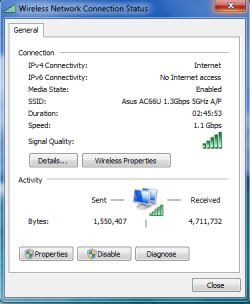
The one to check is the status speed of the wireless connection. If you are seeing 54Mbps or a bit less with 4 bars then that is the best you can do using the mixed settings. I'll post a picture of mine to show. With the n only setting you can do 300-450Mbps depending on the router and NIC.

This is using the new tech standard 802.11ac at 1.1 Gbps which is actually faster than a 1Gb wired connection, this keeps my wireless speed on the LAN the same as my wired one which means my connection speed to the ISP isn't hindered by the wireless connection at all.
 

Attachments

  • 1.1Gbps.PNG
    1.1Gbps.PNG
    13.4 KB · Views: 13

My Computer My Computer

At a glance

Windows 7 Ult, Windows 8.1 Pro,Q9650-4.275GHz, E8600 4.5GHz, E6750-3.8GHzG.Skill PC2 9600 1200Mhz 5 5 5 15 2TGTX480
Computer type
PC/Desktop
Computer Manufacturer/Model Number
Home built
OS
Windows 7 Ult, Windows 8.1 Pro,
CPU
Q9650-4.275GHz, E8600 4.5GHz, E6750-3.8GHz
Motherboard
Evga 780i FTW
Memory
G.Skill PC2 9600 1200Mhz 5 5 5 15 2T
Graphics Card(s)
GTX480
Sound Card
Asus Xonar D2
Monitor(s) Displays
HannsG
Screen Resolution
1680X1050
Hard Drives
GSkill Phoenix Pro 120GB SSD
PSU
ThermalTake Toughpower 1000Watt modular
Case
ThermalTake XaserV
Cooling
Xigmatek S1283
Keyboard
Logitech G15
Mouse
Logitech G9
Internet Speed
T1
Some Confusion

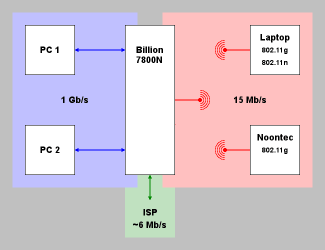
I guess I did a poor job of explaining the setup. :o

Perhaps this picture will help.
Network.png
PC 1 and PC 2 can communicate with:

  • Each other at 1 Gb/s
  • The Internet at ~6 Mb/s (cable limited by ISP)
  • Laptop at 15 Mb/s (wireless)
  • Nootec at 15 Mb/s (wireless)
Laptop can communicate with:

  • The Internet at ~6 Mb/s (wireless - cable limited by ISP)
  • PC 1 and PC 2 at 15 Mb/s (wireless)
  • Nootec at 15 Mb/s (wireless)
 
Last edited:

My Computer My Computer

At a glance

W7 Ultimate SP1, LM19.2 MATE, W10 Home 1703, ...AMD Phenom II x6 1100T, 3.3 GHz12GB DDR3 1333 G-Skill (4GB x 2), G-Skill (2G...NVIDIA GeForce GTX 660
Computer type
PC/Desktop
Computer Manufacturer/Model Number
n/a
OS
W7 Ultimate SP1, LM19.2 MATE, W10 Home 1703, W10 Pro 1703 VM, #All 64 bit
CPU
AMD Phenom II x6 1100T, 3.3 GHz
Motherboard
ASUS M4A88T-M/USB3 (AM3)
Memory
12GB DDR3 1333 G-Skill (4GB x 2), G-Skill (2GB x 2)
Graphics Card(s)
NVIDIA GeForce GTX 660
Sound Card
Realtek?
Monitor(s) Displays
Samsung S23B350
Screen Resolution
1920x1080
Hard Drives
WD Green 2TB (SATA), WD Green 3TB (SATA), WD Blue 4TB (SATA), WD Blue 6TB (SATA)
PSU
Cooler Master
Case
Antec GX300 Tower
Cooling
3x Antec TRICOOL 120mm Fans
Mouse
Wired Optical
Internet Speed
DSL
Antivirus
Avast
Browser
Pale Moon (64 bit)
Other Info
2018-12-27 Upgraded HDDs
2015-12-10 Upgraded case, graphics card, storage
2015-08-15 Upgraded motherboard & RAM
2015-07-15 Upgraded LM17.1 to LM17.2
I guess I did a poor job of explaining the setup. :o

Perhaps this picture will help.
PC 1 and PC 2 can communicate with:

  • Each other at 1 Gb/s
  • The Internet at ~6 Mb/s (cable limited by ISP)
  • Laptop at 15 Mb/s (wireless)
  • Nootec at 15 Mb/s (wireless)
Laptop can communicate with:

  • The Internet at ~6 Mb/s (wireless limited by ISP)
  • PC 1 and PC 2 at 15 Mb/s (wireless)
  • Nootec at 15 Mb/s (wireless)

The difference you are seeing in ISP speed between the wired and the wireless machines is fairly typical.

About the only way to improve on the wireless performance is to upgrade the one wireless G machine to a wireless N USB NIC then set the router to use the 802.11n Only setting. Wireless N USB NIC's are going for maybe 12-15 bucks these days as the newer standard wireless "ac" brought down the prices on the older technology.

This one setting alone can increase your wireless speed by up to 6 times which would remove a big part of the bottle neck created by this G client.

It's not that the ISP is limiting this it's the one G client forcing the router to work at a much slower rate.
 

My Computer My Computer

At a glance

Windows 7 Ult, Windows 8.1 Pro,Q9650-4.275GHz, E8600 4.5GHz, E6750-3.8GHzG.Skill PC2 9600 1200Mhz 5 5 5 15 2TGTX480
Computer type
PC/Desktop
Computer Manufacturer/Model Number
Home built
OS
Windows 7 Ult, Windows 8.1 Pro,
CPU
Q9650-4.275GHz, E8600 4.5GHz, E6750-3.8GHz
Motherboard
Evga 780i FTW
Memory
G.Skill PC2 9600 1200Mhz 5 5 5 15 2T
Graphics Card(s)
GTX480
Sound Card
Asus Xonar D2
Monitor(s) Displays
HannsG
Screen Resolution
1680X1050
Hard Drives
GSkill Phoenix Pro 120GB SSD
PSU
ThermalTake Toughpower 1000Watt modular
Case
ThermalTake XaserV
Cooling
Xigmatek S1283
Keyboard
Logitech G15
Mouse
Logitech G9
Internet Speed
T1
Wrong Network Link

The difference you are seeing in ISP speed between the wired and the wireless machines is fairly typical.
...
It's not that the ISP is limiting this it's the one G client forcing the router to work at a much slower rate.

I realise that I will never see more than 6Mb/s when I connect to the Internet (with any device). :)

The ISP speed is limited by our crappy copper pair connection to, and our distance from, the exchange.

The wireless network has no effect.

What I'm referring to is the speed between the Billion 7800N and the other wireless devices.

About the only way to improve on the wireless performance is to upgrade the one wireless G machine to a wireless N USB NIC then set the router to use the 802.11n Only setting. Wireless N USB NIC's are going for maybe 12-15 bucks these days as the newer standard wireless "ac" brought down the prices on the older technology.

This one setting alone can increase your wireless speed by up to 6 times which would remove a big part of the bottle neck created by this G client.

Neither mode achieves its effective maximum speed, regardless of the range between the router and the device.

802.11g is supposed to have a maximum speed of 54Mb/s.
Even given that 50% of the transmission bits are wasted in overhead, that should still be 27Mb/s (Wikipedia suggests that the speed will be 22Mb/s).

That means that sending a file from either PC should be basically 1.5x - 2x what I currently see when using 802.11g dongles. :(

802.11n is supposed to have a maximum speed range of 54Mb/s - 600Mb/s.
I should see a Tx/Rx improvement when I use 802.11n dongles only (Noontec disconnected and powered off).

In fact, the 802.11n ONLY network setup still only runs at 15Mb/s (PC to Laptop). :shock:

This leads to two options:

  1. There is an obscure setting somewhere, which has to be changed
  2. The router is broken and only the 802.11g mode actually works
 

My Computer My Computer

At a glance

W7 Ultimate SP1, LM19.2 MATE, W10 Home 1703, ...AMD Phenom II x6 1100T, 3.3 GHz12GB DDR3 1333 G-Skill (4GB x 2), G-Skill (2G...NVIDIA GeForce GTX 660
Computer type
PC/Desktop
Computer Manufacturer/Model Number
n/a
OS
W7 Ultimate SP1, LM19.2 MATE, W10 Home 1703, W10 Pro 1703 VM, #All 64 bit
CPU
AMD Phenom II x6 1100T, 3.3 GHz
Motherboard
ASUS M4A88T-M/USB3 (AM3)
Memory
12GB DDR3 1333 G-Skill (4GB x 2), G-Skill (2GB x 2)
Graphics Card(s)
NVIDIA GeForce GTX 660
Sound Card
Realtek?
Monitor(s) Displays
Samsung S23B350
Screen Resolution
1920x1080
Hard Drives
WD Green 2TB (SATA), WD Green 3TB (SATA), WD Blue 4TB (SATA), WD Blue 6TB (SATA)
PSU
Cooler Master
Case
Antec GX300 Tower
Cooling
3x Antec TRICOOL 120mm Fans
Mouse
Wired Optical
Internet Speed
DSL
Antivirus
Avast
Browser
Pale Moon (64 bit)
Other Info
2018-12-27 Upgraded HDDs
2015-12-10 Upgraded case, graphics card, storage
2015-08-15 Upgraded motherboard & RAM
2015-07-15 Upgraded LM17.1 to LM17.2
I just tried a completely different brand of 802.11n router (Tenda W311R).

Its performance is identical to the Billion BiPAC 7800N.

The performance is identical using W7, Arch Linux and Linux Mint 14.
 

My Computer My Computer

At a glance

W7 Ultimate SP1, LM19.2 MATE, W10 Home 1703, ...AMD Phenom II x6 1100T, 3.3 GHz12GB DDR3 1333 G-Skill (4GB x 2), G-Skill (2G...NVIDIA GeForce GTX 660
Computer type
PC/Desktop
Computer Manufacturer/Model Number
n/a
OS
W7 Ultimate SP1, LM19.2 MATE, W10 Home 1703, W10 Pro 1703 VM, #All 64 bit
CPU
AMD Phenom II x6 1100T, 3.3 GHz
Motherboard
ASUS M4A88T-M/USB3 (AM3)
Memory
12GB DDR3 1333 G-Skill (4GB x 2), G-Skill (2GB x 2)
Graphics Card(s)
NVIDIA GeForce GTX 660
Sound Card
Realtek?
Monitor(s) Displays
Samsung S23B350
Screen Resolution
1920x1080
Hard Drives
WD Green 2TB (SATA), WD Green 3TB (SATA), WD Blue 4TB (SATA), WD Blue 6TB (SATA)
PSU
Cooler Master
Case
Antec GX300 Tower
Cooling
3x Antec TRICOOL 120mm Fans
Mouse
Wired Optical
Internet Speed
DSL
Antivirus
Avast
Browser
Pale Moon (64 bit)
Other Info
2018-12-27 Upgraded HDDs
2015-12-10 Upgraded case, graphics card, storage
2015-08-15 Upgraded motherboard & RAM
2015-07-15 Upgraded LM17.1 to LM17.2
I just tried a completely different brand of 802.11n router (Tenda W311R).

Its performance is identical to the Billion BiPAC 7800N.

The performance is identical using W7, Arch Linux and Linux Mint 14.

That router also maxes out at 150Mbps, same as the first one. There are quite a few wireless n routers that will do 450Mbps using a pci-e NIC, and 300Mbps using a USB dongle.

Yes I'm aware that the actual transfer rate is about half that. Not to mention that the WiFi speeds on most built in NIC's are only good for 150Mbps max so you should see maybe 70Mbps. The USB dongles are good for 300Mbps but that won't help with these routers.

So you could do better with a different router but no idea why the N Only settings on your wireless are limited to 15Mbps but it usually has to do with the incorrect settings and changing to N only should have helped big time. Of course signal strength is the other factor, less signal strength means slower speeds.

You might try using InSSIDer to determine the best channel to use. Posting the results here might also help me figure out what is wrong.
http://www.metageek.net/products/inssider/

A decent N dongle plus one of the faster routers using the 802.11n Only settings plus channel bonding which shows as the 40Mhz setting should be pretty fast.
 
Last edited:

My Computer My Computer

At a glance

Windows 7 Ult, Windows 8.1 Pro,Q9650-4.275GHz, E8600 4.5GHz, E6750-3.8GHzG.Skill PC2 9600 1200Mhz 5 5 5 15 2TGTX480
Computer type
PC/Desktop
Computer Manufacturer/Model Number
Home built
OS
Windows 7 Ult, Windows 8.1 Pro,
CPU
Q9650-4.275GHz, E8600 4.5GHz, E6750-3.8GHz
Motherboard
Evga 780i FTW
Memory
G.Skill PC2 9600 1200Mhz 5 5 5 15 2T
Graphics Card(s)
GTX480
Sound Card
Asus Xonar D2
Monitor(s) Displays
HannsG
Screen Resolution
1680X1050
Hard Drives
GSkill Phoenix Pro 120GB SSD
PSU
ThermalTake Toughpower 1000Watt modular
Case
ThermalTake XaserV
Cooling
Xigmatek S1283
Keyboard
Logitech G15
Mouse
Logitech G9
Internet Speed
T1
We have Billion BiPAC 7800N (802.11n) router set up in our house.

The wireless performance is awful.
The maximum speed (even at 30cm range) is 15Mb/s (with 802.11g or 802.11n dongles).

Any suggestions as to what might be causing this issue and how to fix it?

Did the degradation in performance happen recently or has it always been this way? Any new electronics come into or near your home recently? Any new businesses or factories?

You have tried other known working wireless routers, correct? Have you tried other WiFi dongles on your other PCs?

I understand that this issue has nothing to do with your ISP, correct? You are getting your advertised speeds even with the current wireless performance degradation?
 

My Computer My Computer

At a glance

Windows 7 Professional 64bitAMD Athlon II X3 44012.0 GB Dual-Channel DDR3 @ 669MHzAMD Radeon HD 6850
OS
Windows 7 Professional 64bit
CPU
AMD Athlon II X3 440
Motherboard
ASUS M4A77TD
Memory
12.0 GB Dual-Channel DDR3 @ 669MHz
Graphics Card(s)
AMD Radeon HD 6850
Sound Card
AMD High Definition Audio Device
Monitor(s) Displays
Dell 317FP, Generic PnP Monitor
Screen Resolution
1920x1080
Hard Drives
112GB OCZ OCZ-AGIL ITY3 SATA Disk Device (SSD)
932GB Western Digital WDC WD10 01FALS-00E3A0 SATA Disk Device (SATA)
466GB Western Digital WDC WD50 01AALS-00L3B2 SATA Disk Device (SATA)
Case
ANTEC 300 ILLUSION
Cooling
CoolerMaster Hyper 212 plus
Other Info
I have two 4GB Corsair XMS3 modules and two 2GB Corsair XMS3 modules.
Yes I'm aware that the actual transfer rate is about half that. Not to mention that the WiFi speeds on most built in NIC's are only good for 150Mbps max so you should see maybe 70Mbps. The USB dongles are good for 300Mbps but that won't help with these routers.

So you could do better with a different router but no idea why the N Only settings on your wireless are limited to 15Mbps but it usually has to do with the incorrect settings and changing to N only should have helped big time. Of course signal strength is the other factor, less signal strength means slower speeds.

That is why I'm "confused and antagonised". :D

Signal Strength shouldn't be an issue as the transfer speeds don't improve at point blank range.
Also in my experience Signal Quality is more important than Signal Strength.

I'm actually wondering if the wireless power output is too high (i.e. creating reflections which are causing errors and lowering the effective transfer speed).

You might try using InSSIDer to determine the best channel to use. Posting the results here might also help me figure out what is wrong.
inSSIDer for Home – Discover The Wi-Fi Around You | MetaGeek

A decent N dongle plus one of the faster routers using the 802.11n Only settings plus channel bonding which shows as the 40Mhz setting should be pretty fast.

I've considered installing inssider.
One of our other friends uses his laptop at our house and he has it installed.
We didn't notice any clashes with other nearby wireless networks (and our signal strength was far higher than those networks).

Another thing I'm considering is seeing if the 2 wireless routers can transfer between each other at higher speeds.

Did the degradation in performance happen recently or has it always been this way? Any new electronics come into or near your home recently? Any new businesses or factories?

You have tried other known working wireless routers, correct? Have you tried other WiFi dongles on your other PCs?

I understand that this issue has nothing to do with your ISP, correct? You are getting your advertised speeds even with the current wireless performance degradation?

The performance is actually better here than at our previous house.
My friend's copy of inssider shows that we are pretty much alone here (i.e. only one or two other networks have shown up when we have run inssider).

We have tried a couple of different dongles.
I just tried another router recently.

We are connected to our ISP by cable (copper pair).
The PCs are connected via a 1 Gb/s switch.
My issue is the internal transfer speeds between the wireless router and other wireless devices inside our house.
270955-billion-bipac-7800n-low-wireless-speed-network.png
 

My Computer My Computer

At a glance

W7 Ultimate SP1, LM19.2 MATE, W10 Home 1703, ...AMD Phenom II x6 1100T, 3.3 GHz12GB DDR3 1333 G-Skill (4GB x 2), G-Skill (2G...NVIDIA GeForce GTX 660
Computer type
PC/Desktop
Computer Manufacturer/Model Number
n/a
OS
W7 Ultimate SP1, LM19.2 MATE, W10 Home 1703, W10 Pro 1703 VM, #All 64 bit
CPU
AMD Phenom II x6 1100T, 3.3 GHz
Motherboard
ASUS M4A88T-M/USB3 (AM3)
Memory
12GB DDR3 1333 G-Skill (4GB x 2), G-Skill (2GB x 2)
Graphics Card(s)
NVIDIA GeForce GTX 660
Sound Card
Realtek?
Monitor(s) Displays
Samsung S23B350
Screen Resolution
1920x1080
Hard Drives
WD Green 2TB (SATA), WD Green 3TB (SATA), WD Blue 4TB (SATA), WD Blue 6TB (SATA)
PSU
Cooler Master
Case
Antec GX300 Tower
Cooling
3x Antec TRICOOL 120mm Fans
Mouse
Wired Optical
Internet Speed
DSL
Antivirus
Avast
Browser
Pale Moon (64 bit)
Other Info
2018-12-27 Upgraded HDDs
2015-12-10 Upgraded case, graphics card, storage
2015-08-15 Upgraded motherboard & RAM
2015-07-15 Upgraded LM17.1 to LM17.2
Sorry

You might try using InSSIDer to determine the best channel to use. Posting the results here might also help me figure out what is wrong.
inSSIDer for Home – Discover The Wi-Fi Around You | MetaGeek

Sorry about the delay.
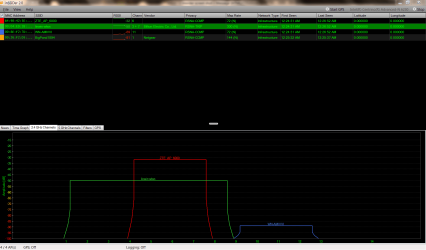
Here is an InSSIDer screenshot from my friend's laptop.
Inssider (2013-08-10).png
The green signal is our home network.
The red signal is my friend's tablet, which was alongside his laptop at the time.
I have no idea who the blue signal is (one of our neighbours?).
 

My Computer My Computer

At a glance

W7 Ultimate SP1, LM19.2 MATE, W10 Home 1703, ...AMD Phenom II x6 1100T, 3.3 GHz12GB DDR3 1333 G-Skill (4GB x 2), G-Skill (2G...NVIDIA GeForce GTX 660
Computer type
PC/Desktop
Computer Manufacturer/Model Number
n/a
OS
W7 Ultimate SP1, LM19.2 MATE, W10 Home 1703, W10 Pro 1703 VM, #All 64 bit
CPU
AMD Phenom II x6 1100T, 3.3 GHz
Motherboard
ASUS M4A88T-M/USB3 (AM3)
Memory
12GB DDR3 1333 G-Skill (4GB x 2), G-Skill (2GB x 2)
Graphics Card(s)
NVIDIA GeForce GTX 660
Sound Card
Realtek?
Monitor(s) Displays
Samsung S23B350
Screen Resolution
1920x1080
Hard Drives
WD Green 2TB (SATA), WD Green 3TB (SATA), WD Blue 4TB (SATA), WD Blue 6TB (SATA)
PSU
Cooler Master
Case
Antec GX300 Tower
Cooling
3x Antec TRICOOL 120mm Fans
Mouse
Wired Optical
Internet Speed
DSL
Antivirus
Avast
Browser
Pale Moon (64 bit)
Other Info
2018-12-27 Upgraded HDDs
2015-12-10 Upgraded case, graphics card, storage
2015-08-15 Upgraded motherboard & RAM
2015-07-15 Upgraded LM17.1 to LM17.2
Where it says privacy, I should be seeing something about WPA-2 and AES encryption, instead I see that TKIP encryption is enabled for your connection, you really should be using WPA-2 with AES encryption in order to achieve full wireless N speeds. TKIP is outdated and not capable of achieving full wireless N speeds.

I'm also wondering why a tablet connection would show up as another access point "red line" instead it's showing up as an access point with a stronger connection than the one you are using?

The fact that this secondary access point with a strong signal is using the same channel as you isn't helping at all, I'm not sure why that access point is required but the channel it's using should be moved to channel 11 to move it out of the range of channels that you are using.

I'm not sure what is up with that. The blue one is a neighbor correct.
 

My Computer My Computer

At a glance

Windows 7 Ult, Windows 8.1 Pro,Q9650-4.275GHz, E8600 4.5GHz, E6750-3.8GHzG.Skill PC2 9600 1200Mhz 5 5 5 15 2TGTX480
Computer type
PC/Desktop
Computer Manufacturer/Model Number
Home built
OS
Windows 7 Ult, Windows 8.1 Pro,
CPU
Q9650-4.275GHz, E8600 4.5GHz, E6750-3.8GHz
Motherboard
Evga 780i FTW
Memory
G.Skill PC2 9600 1200Mhz 5 5 5 15 2T
Graphics Card(s)
GTX480
Sound Card
Asus Xonar D2
Monitor(s) Displays
HannsG
Screen Resolution
1680X1050
Hard Drives
GSkill Phoenix Pro 120GB SSD
PSU
ThermalTake Toughpower 1000Watt modular
Case
ThermalTake XaserV
Cooling
Xigmatek S1283
Keyboard
Logitech G15
Mouse
Logitech G9
Internet Speed
T1
We'll try changing the security protocol

Where it says privacy, I should be seeing something about WPA-2 and AES encryption, instead I see that TKIP encryption is enabled for your connection, you really should be using WPA-2 with AES encryption in order to achieve full wireless N speeds. TKIP is outdated and not capable of achieving full wireless N speeds.

That's weird (I thought that we were using WPA-2).
I would've thought that my friend (housemate) would have selected the strongest security available.

I'll get him to adjust our router and see if that improves things.
Thanks. :)

Would that also explain the slow 802.11g speeds?

Would swapping to the superior security protocol affect any 802.11g devices?

The media streaming box is 5 or 6 years old and there is no way to update any of the drivers in it (audio, video, network, wireless, etc.).
Also, it will only work with the 802.11g dongle supplied by the manufacturer.

It's not possible to update the firmware, as the version I have is too old to update to the latest version and the manufacturer doesn't have a "back catalogue" of updates (i.e. I can't update in steps).

I'm also wondering why a tablet connection would show up as another access point "red line" instead it's showing up as an access point with a stronger connection than the one you are using?

The fact that this secondary access point with a strong signal is using the same channel as you isn't helping at all, I'm not sure why that access point is required but the channel it's using should be moved to channel 11 to move it out of the range of channels that you are using.

That is my other friend's work tablet (he is a visitor).
I knew that he had InSSIDer on his laptop and I got him to take the screenshot.

He uses the tablet as an access point for his laptop (when he is on the bus) because it has 4G (he works for Australia's largest Telecom company).
The tablet is almost never present in our house, so it isn't an issue (i.e. his absence/presence doesn't affect the performance of our wireless network).

The signal strength doesn't surprise me as the tablet was literally less than 60cm away from his laptop.
The Billion was about 4m - 5m away.

The blue one is a neighbor correct.

It could have been someone lurking outside. :D
 

My Computer My Computer

At a glance

W7 Ultimate SP1, LM19.2 MATE, W10 Home 1703, ...AMD Phenom II x6 1100T, 3.3 GHz12GB DDR3 1333 G-Skill (4GB x 2), G-Skill (2G...NVIDIA GeForce GTX 660
Computer type
PC/Desktop
Computer Manufacturer/Model Number
n/a
OS
W7 Ultimate SP1, LM19.2 MATE, W10 Home 1703, W10 Pro 1703 VM, #All 64 bit
CPU
AMD Phenom II x6 1100T, 3.3 GHz
Motherboard
ASUS M4A88T-M/USB3 (AM3)
Memory
12GB DDR3 1333 G-Skill (4GB x 2), G-Skill (2GB x 2)
Graphics Card(s)
NVIDIA GeForce GTX 660
Sound Card
Realtek?
Monitor(s) Displays
Samsung S23B350
Screen Resolution
1920x1080
Hard Drives
WD Green 2TB (SATA), WD Green 3TB (SATA), WD Blue 4TB (SATA), WD Blue 6TB (SATA)
PSU
Cooler Master
Case
Antec GX300 Tower
Cooling
3x Antec TRICOOL 120mm Fans
Mouse
Wired Optical
Internet Speed
DSL
Antivirus
Avast
Browser
Pale Moon (64 bit)
Other Info
2018-12-27 Upgraded HDDs
2015-12-10 Upgraded case, graphics card, storage
2015-08-15 Upgraded motherboard & RAM
2015-07-15 Upgraded LM17.1 to LM17.2
As long as you are running in mixed mode "a,b,g,n" etc. with the router then you can't expect to see anything more than 54Mbps. Basically running in mixed modes kills the functionality of wireless N because the router needs to slow down in order to 'talk to' the slower G clients.

Upgrading the wireless NIC's for the G clients and changing the router to use the 802.11n Only setting plus WPA-2 with AES encryption is about the only way to achieve true wireless n speeds.
 

My Computer My Computer

At a glance

Windows 7 Ult, Windows 8.1 Pro,Q9650-4.275GHz, E8600 4.5GHz, E6750-3.8GHzG.Skill PC2 9600 1200Mhz 5 5 5 15 2TGTX480
Computer type
PC/Desktop
Computer Manufacturer/Model Number
Home built
OS
Windows 7 Ult, Windows 8.1 Pro,
CPU
Q9650-4.275GHz, E8600 4.5GHz, E6750-3.8GHz
Motherboard
Evga 780i FTW
Memory
G.Skill PC2 9600 1200Mhz 5 5 5 15 2T
Graphics Card(s)
GTX480
Sound Card
Asus Xonar D2
Monitor(s) Displays
HannsG
Screen Resolution
1680X1050
Hard Drives
GSkill Phoenix Pro 120GB SSD
PSU
ThermalTake Toughpower 1000Watt modular
Case
ThermalTake XaserV
Cooling
Xigmatek S1283
Keyboard
Logitech G15
Mouse
Logitech G9
Internet Speed
T1
Router to Router

As long as you are running in mixed mode "a,b,g,n" etc. with the router then you can't expect to see anything more than 54Mbps. Basically running in mixed modes kills the functionality of wireless N because the router needs to slow down in order to 'talk to' the slower G clients.

My issue has always been that using any 802.11n router to talk to any 802.11g device, we have never been able to achieve 802.11g speeds.

I've never expected to see 802.11n speeds with our current set up, but I'd like to see 802.11g speeds.
I'd love to see 54 Mb/s, that's 3x faster than what we get now.

Wireless 802.11n speeds are a "pipe dream".
The main use for the wireless network is sending data to the 802.11g media streaming box. :(

Upgrading the wireless NIC's for the G clients and changing the router to use the 802.11n Only setting plus WPA-2 with AES encryption is about the only way to achieve true wireless n speeds.

The media streaming box can't be upgraded from 802.11g.

That said, since I have found a second 802.11n wireless router, shouldn't I be able to get both routers to talk to each other and use an Ethernet cable to connect the second router to the media streaming box?

Theoretically that would allow communications at 100 Mb/s (the second router only has 100 Mb switch ports), which is ~7x faster than what we see now.

Anyhow, I'll ask my housemate to change our security settings and see if that helps. :)
 

My Computer My Computer

At a glance

W7 Ultimate SP1, LM19.2 MATE, W10 Home 1703, ...AMD Phenom II x6 1100T, 3.3 GHz12GB DDR3 1333 G-Skill (4GB x 2), G-Skill (2G...NVIDIA GeForce GTX 660
Computer type
PC/Desktop
Computer Manufacturer/Model Number
n/a
OS
W7 Ultimate SP1, LM19.2 MATE, W10 Home 1703, W10 Pro 1703 VM, #All 64 bit
CPU
AMD Phenom II x6 1100T, 3.3 GHz
Motherboard
ASUS M4A88T-M/USB3 (AM3)
Memory
12GB DDR3 1333 G-Skill (4GB x 2), G-Skill (2GB x 2)
Graphics Card(s)
NVIDIA GeForce GTX 660
Sound Card
Realtek?
Monitor(s) Displays
Samsung S23B350
Screen Resolution
1920x1080
Hard Drives
WD Green 2TB (SATA), WD Green 3TB (SATA), WD Blue 4TB (SATA), WD Blue 6TB (SATA)
PSU
Cooler Master
Case
Antec GX300 Tower
Cooling
3x Antec TRICOOL 120mm Fans
Mouse
Wired Optical
Internet Speed
DSL
Antivirus
Avast
Browser
Pale Moon (64 bit)
Other Info
2018-12-27 Upgraded HDDs
2015-12-10 Upgraded case, graphics card, storage
2015-08-15 Upgraded motherboard & RAM
2015-07-15 Upgraded LM17.1 to LM17.2
I've added another pair of wireless routers (in Bridge mode) to our setup.
That has doubled the data rate.

It's not high enough to (reliably) stream Blu-ray data, but everything else is fine.
 

My Computer My Computer

At a glance

W7 Ultimate SP1, LM19.2 MATE, W10 Home 1703, ...AMD Phenom II x6 1100T, 3.3 GHz12GB DDR3 1333 G-Skill (4GB x 2), G-Skill (2G...NVIDIA GeForce GTX 660
Computer type
PC/Desktop
Computer Manufacturer/Model Number
n/a
OS
W7 Ultimate SP1, LM19.2 MATE, W10 Home 1703, W10 Pro 1703 VM, #All 64 bit
CPU
AMD Phenom II x6 1100T, 3.3 GHz
Motherboard
ASUS M4A88T-M/USB3 (AM3)
Memory
12GB DDR3 1333 G-Skill (4GB x 2), G-Skill (2GB x 2)
Graphics Card(s)
NVIDIA GeForce GTX 660
Sound Card
Realtek?
Monitor(s) Displays
Samsung S23B350
Screen Resolution
1920x1080
Hard Drives
WD Green 2TB (SATA), WD Green 3TB (SATA), WD Blue 4TB (SATA), WD Blue 6TB (SATA)
PSU
Cooler Master
Case
Antec GX300 Tower
Cooling
3x Antec TRICOOL 120mm Fans
Mouse
Wired Optical
Internet Speed
DSL
Antivirus
Avast
Browser
Pale Moon (64 bit)
Other Info
2018-12-27 Upgraded HDDs
2015-12-10 Upgraded case, graphics card, storage
2015-08-15 Upgraded motherboard & RAM
2015-07-15 Upgraded LM17.1 to LM17.2
Back
Top