
How to enable firewall on Billion BiPAC 7800N?

silentsal

New member
Local time
8:37 PM
Messages
10
Hi

I've got a problem with McAfee causing BSODs and have been advised in another thread to uninstall it and use MS Security Essentials in combination with Malwarebytes and SuperAntiSpyware instead.

I was also advised to enable my firewall and therein lies my problem.

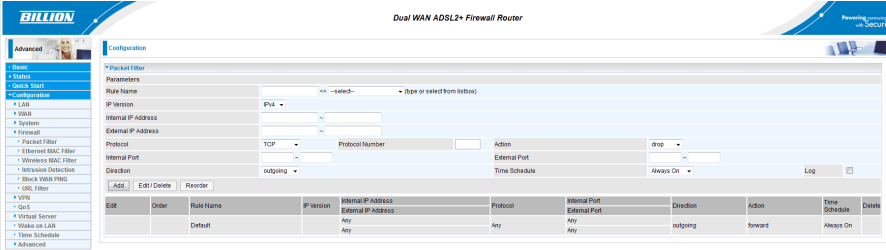
The user manual for the 7800N is not great and doesn't mention anything about being able to enable or disable the firewall. It just talks about Packet Filtering and blocking WAN ping.

I have no idea if the firewall is on or off by default and can find no obvious settings in the router's setup page.

Should I enable WAN ping blocking or Intrusion detection? I want to ensure that my computer is safe when I uninstall McAfee.

Screenshot of the setup page is attached.

Thanks

Sally
 

Attachments
  • billion firewall.PNG
    billion firewall.PNG
    27.7 KB · Views: 128

My Computer My Computer

At a glance

Windows 7 Home Premium 64 bitIntel Core i5-2410M CPU @ 2.30GHz, 2301 Mhz6GB (1X4GB + 1X2GB) 1333MHz DDR3 Dual Channel1GB NVIDIA GeForce GT 550M
Computer Manufacturer/Model Number
Dell XPS L702x
OS
Windows 7 Home Premium 64 bit
CPU
Intel Core i5-2410M CPU @ 2.30GHz, 2301 Mhz
Memory
6GB (1X4GB + 1X2GB) 1333MHz DDR3 Dual Channel
Graphics Card(s)
1GB NVIDIA GeForce GT 550M
Monitor(s) Displays
17.3in HD+ WLED True-Life / Samsung Syncmaster B2230
Hard Drives
500GB Serial ATA (7200RPM)
Buffalo Ministation 1TB (external drive)
The firewall that you should be enabling is built into windows.

Click your start button, and enter "firewall" in the search box. Windows Firewall should be on the list. Click it. On the left side of the window is a "link" that says "Turn Windows Firewall on or off". In the next window, enable the firewall, and hit ok.
 

My Computer My Computer

At a glance

Microsoft Windows 10 Home Build 15036Intel(R) Core(TM) i7-860 @ 2.80GHz4.00 GBNVIDIA GeForce GTX 750
Computer type
PC/Desktop
Computer Manufacturer/Model Number
iBuyPower NZXT
OS
Microsoft Windows 10 Home Build 15036
CPU
Intel(R) Core(TM) i7-860 @ 2.80GHz
Motherboard
Gigabyte Technology Co., Ltd. P55-UD3L
Memory
4.00 GB
Graphics Card(s)
NVIDIA GeForce GTX 750
Sound Card
(1) Line 6 UX2 (2) Realtek High Definition Audio
Monitor(s) Displays
23" acer
Screen Resolution
1920 x 1080 x 32 bits (4294967296 colors) @ 60 Hz
Hard Drives
(1) WDC WD5000AAKS-00D2B0 ATA Device (2) Seagate FreeAgent Go 250G USB Device
Cooling
Corsair H75 liquid cooler (Very easy to install, actually)
Internet Speed
60M cable modem-->Linksys E1200-->1Gbps net card
Browser
Chrome
Other Info
This is probably the longest I've ever had a Windows machine run without having to restore it to scratch. I'm used to restoring to "factory" about every 2 yrs. I've run with Win7 since new in 2009 and only recently (Nov, '14) restored to clean up the machine from all my 'xperimenting. LOL!! I may never need another machine.

Upgraded to 10 when it was still free, then installed 2017 update.

My Computer My Computer

At a glance

Windows 7 Ultimate 32bit SP1Intel(R) Core(TM)2 Quad CPU @ 2.40GHz, 2400 MHz4 GBATI Radeon HD 2600 Pro
Computer type
PC/Desktop
Computer Manufacturer/Model Number
Bruce ... somewhere in his 40's
OS
Windows 7 Ultimate 32bit SP1
CPU
Intel(R) Core(TM)2 Quad CPU @ 2.40GHz, 2400 MHz
Motherboard
INTEL/D975XBX2
Memory
4 GB
Graphics Card(s)
ATI Radeon HD 2600 Pro
Monitor(s) Displays
Samsung SyncMaster 914v
Screen Resolution
1280 x 1024
Hard Drives
2/500GB each ... ST3500630AS ATA Device.
One is not connected
PSU
Rocketfish 700 W
Case
G.Skill Gigabyte Chassis
Keyboard
Standard PS/2 Keyboard
Mouse
Microsoft PS/2 Mouse
Internet Speed
DSL
Antivirus
Avira Internet Security
Browser
IE 11
Other Info
ATI HDMI Audio
The firewall that you should be enabling is built into windows.
I thought the best option was to enable the firewall on the router, that's what my ISP say anyway :confused: ?
I have the same router and it seems the OP comes from the UK (from the flag) so maybe this would be better;
Billion Products for SSL VPN, ADSL Modem/Router, Wireless ADSL Router, Powerline ADSL Router and Adapter, VoIP ADSL Modem/Router, Security Router, Broadband Router, SHDSL Bridge/Router, iBusiness Security, ISDN Product
Billion support is very good in my experience and they should give you some good advice.
 

My Computer My Computer

At a glance

windows 7 home premium 64bitIntel Celeron4GB
Computer Manufacturer/Model Number
Dell
OS
windows 7 home premium 64bit
CPU
Intel Celeron
Memory
4GB
Cooling
Notebook Cooler ZM-NC2000
Internet Speed
>10Mb
Hi, Jellycat.

If you have an antivirus suite that includes a software firewall, then it is an excellent idea to supplement with a router. If it is antivirus only, then it is important to turn on the Windows firewall. A router is a supplemental layer of protection.
 

My Computer My Computer

At a glance

Windows 7 & Windows Vista Ultimate
OS
Windows 7 & Windows Vista Ultimate
Back
Top