Solved BIOS Locking Up File About Press Any Key

goodwill

New member
Local time
2:31 AM
Messages
23
Dear Sevenforums,


Thank you for your help


BIOS continues to freeze (I should have used this word in the subject headline instead of lock) when I am in it and navigate

One example is the path "File" "About" "Press any key to continue" -

I am pressing "any key" and it is not letting me continue

Frozen


:axe:


Any help greatly appreciated


Best
goodwill
 

My Computer My Computer

Computer type
PC/Desktop
Computer Manufacturer/Model Number
HP
OS
Windows 7 Professional 64 Bit
Motherboard
Jasmine
Memory
32 Gig
What is the exact model of HP computer you have? Have you ever, or do you know how to update BIOS? It is risky, but it may be what you need. Or you have some kind of hardware there that is making BIOS misbehave. Did BIOS ever do this prior? If not, do you remember what hardware you have added prior to this happening?
 

My Computer My Computer

Computer type
PC/Desktop
OS
Windows 7 Ultimate x64
How old is your laptop?
Did you ever changed the BIOS battery?
When you enter BIOS is time and date correct?

Where do you find the path "File" "About" "Press any key to continue" ? Is it in Windows or in BIOS?
 

My Computers My Computers

System One System Two

  • Computer type
    PC/Desktop
    Computer Manufacturer/Model Number
    custom build
    OS
    Windows 7 HP 64
    CPU
    i5 6600K - 800MHz to 4200MHz
    Motherboard
    GA-Z170-HD3P
    Memory
    4+4G GSkill DDR4 3000
    Graphics Card(s)
    IG - Intel 530
    Monitor(s) Displays
    Samsung 226BW
    Screen Resolution
    1680x1050
    Hard Drives
    (1) -1 SM951 – 128GB M.2 AHCI PCIe SSD drive for Windows 7 and Lubuntu
    (2) -1 WD SATA 3 - 1T for Data
    (3) -1 WD SATA 3 - 1T for backup
    PSU
    Thermaltake 450W TR2 gold
    Keyboard
    Old and good Chicony mechanical keyboard
    Mouse
    Logitech mX performance - 9 buttons (had to disable some)
    Internet Speed
    500Mb/s
    Browser
    Firefox 64
    Other Info
    TinyWall firewall
  • Computer type
    Laptop
    System Manufacturer/Model Number
    Asus Q550LF
    OS
    Windows 7 Pro
    CPU
    i7-4500U 800MHz to 3.0GHz
    Motherboard
    Asus Q550LF
    Memory
    (4+4)G DDR3 1600
    Graphics Card(s)
    IG intel 4400 + NVIDIA GeForce GT 745M
    Sound Card
    Realtek
    Monitor(s) Displays
    LG Display LP156WF4-SPH1
    Screen Resolution
    1920 x 1080
    Hard Drives
    BX500 120G SSD for Windows and programs +
    1T HDD for data
    Internet Speed
    500 Mb/s
    Browser
    Firefox
    Other Info
    TinyWall firewall
Thanks


Megahertz, normally I fly my hang glider to Brazil and ask a question
just kidding


The desktop is six years old
.
HP Pavilion p7-1235
Check BIOS battery and it is OK
Also took the battery out and put it back in again
After I put battery back in I had to make corrections to the time and date
but before that time and date were good


The path "File" "About" "Press any key to continue" is in the BIOS
Great to be able to come here for help


Best
goodwill
 

My Computer My Computer

Computer type
PC/Desktop
Computer Manufacturer/Model Number
HP
OS
Windows 7 Professional 64 Bit
Motherboard
Jasmine
Memory
32 Gig
Thanks F22 Simpilot

HP Pavilion p7-1235


Apparently both you and Megahertz like to fly

No I do not know how to update BIOS


I am doing a clean install

No BIOS did not do this prior - has never done this before


Not aware of any hardware causing a problem
I have three external hard drives

The hardware has been the same for maybe four years
The monitor is a HUION art tablet


Great to be able to come for help here
Best
goodwill
 

My Computer My Computer

Computer type
PC/Desktop
Computer Manufacturer/Model Number
HP
OS
Windows 7 Professional 64 Bit
Motherboard
Jasmine
Memory
32 Gig
Update


Freezing 'went away' - BIOS not freezing now


Unplugged three external hard drives


When into BIOS and it did not freeze when

going through he path "File" "About" "Press any key to continue" in the BIOS
 

My Computer My Computer

Computer type
PC/Desktop
Computer Manufacturer/Model Number
HP
OS
Windows 7 Professional 64 Bit
Motherboard
Jasmine
Memory
32 Gig

My Computers My Computers

System One System Two

  • Computer type
    PC/Desktop
    Computer Manufacturer/Model Number
    custom build
    OS
    Windows 7 HP 64
    CPU
    i5 6600K - 800MHz to 4200MHz
    Motherboard
    GA-Z170-HD3P
    Memory
    4+4G GSkill DDR4 3000
    Graphics Card(s)
    IG - Intel 530
    Monitor(s) Displays
    Samsung 226BW
    Screen Resolution
    1680x1050
    Hard Drives
    (1) -1 SM951 – 128GB M.2 AHCI PCIe SSD drive for Windows 7 and Lubuntu
    (2) -1 WD SATA 3 - 1T for Data
    (3) -1 WD SATA 3 - 1T for backup
    PSU
    Thermaltake 450W TR2 gold
    Keyboard
    Old and good Chicony mechanical keyboard
    Mouse
    Logitech mX performance - 9 buttons (had to disable some)
    Internet Speed
    500Mb/s
    Browser
    Firefox 64
    Other Info
    TinyWall firewall
  • Computer type
    Laptop
    System Manufacturer/Model Number
    Asus Q550LF
    OS
    Windows 7 Pro
    CPU
    i7-4500U 800MHz to 3.0GHz
    Motherboard
    Asus Q550LF
    Memory
    (4+4)G DDR3 1600
    Graphics Card(s)
    IG intel 4400 + NVIDIA GeForce GT 745M
    Sound Card
    Realtek
    Monitor(s) Displays
    LG Display LP156WF4-SPH1
    Screen Resolution
    1920 x 1080
    Hard Drives
    BX500 120G SSD for Windows and programs +
    1T HDD for data
    Internet Speed
    500 Mb/s
    Browser
    Firefox
    Other Info
    TinyWall firewall
Update


Frozen


Frozen again


Hewlett Packard Setup Utility


1982 - 2012


1985 - 2012 American Megatrends Inc


Version 2.14.1219


"File" "About" "Press any key to continue"


Pressing any key to continue does nothing


Frozen
 

My Computer My Computer

Computer type
PC/Desktop
Computer Manufacturer/Model Number
HP
OS
Windows 7 Professional 64 Bit
Motherboard
Jasmine
Memory
32 Gig
Did you ever changed your drive and did a clean install?

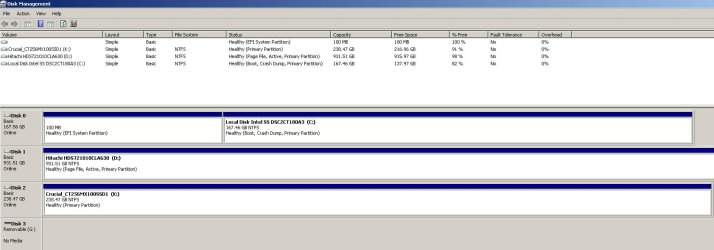
Open Disk Manager (C:\Windows\System32\diskmgmt.msc), expand the window and columns so we can read them and with the snipping tool take a snapshot. Post it here as an attachment.
 

My Computers My Computers

System One System Two

  • Computer type
    PC/Desktop
    Computer Manufacturer/Model Number
    custom build
    OS
    Windows 7 HP 64
    CPU
    i5 6600K - 800MHz to 4200MHz
    Motherboard
    GA-Z170-HD3P
    Memory
    4+4G GSkill DDR4 3000
    Graphics Card(s)
    IG - Intel 530
    Monitor(s) Displays
    Samsung 226BW
    Screen Resolution
    1680x1050
    Hard Drives
    (1) -1 SM951 – 128GB M.2 AHCI PCIe SSD drive for Windows 7 and Lubuntu
    (2) -1 WD SATA 3 - 1T for Data
    (3) -1 WD SATA 3 - 1T for backup
    PSU
    Thermaltake 450W TR2 gold
    Keyboard
    Old and good Chicony mechanical keyboard
    Mouse
    Logitech mX performance - 9 buttons (had to disable some)
    Internet Speed
    500Mb/s
    Browser
    Firefox 64
    Other Info
    TinyWall firewall
  • Computer type
    Laptop
    System Manufacturer/Model Number
    Asus Q550LF
    OS
    Windows 7 Pro
    CPU
    i7-4500U 800MHz to 3.0GHz
    Motherboard
    Asus Q550LF
    Memory
    (4+4)G DDR3 1600
    Graphics Card(s)
    IG intel 4400 + NVIDIA GeForce GT 745M
    Sound Card
    Realtek
    Monitor(s) Displays
    LG Display LP156WF4-SPH1
    Screen Resolution
    1920 x 1080
    Hard Drives
    BX500 120G SSD for Windows and programs +
    1T HDD for data
    Internet Speed
    500 Mb/s
    Browser
    Firefox
    Other Info
    TinyWall firewall

My Computer My Computer

Computer type
Laptop
Computer Manufacturer/Model Number
Dell M6500 Precision Work Station
OS
Windows 7 Pro SP1 64 bit
Memory
8 GB
Screen Resolution
1920x
Internet Speed
30 Mbps
Antivirus
Norton Security
Browser
IE 11
Update


Frozen


Frozen again


Hewlett Packard Setup Utility


1982 - 2012


1985 - 2012 American Megatrends Inc


Version 2.14.1219


"File" "About" "Press any key to continue"


Pressing any key to continue does nothing


Frozen


Were the external hard dives plugged in when this happened? Are there other peripherals plugged in as well besides the mouse and keyboard or its USB wireless dongle? My thinking here is that perhaps external hardware is causing an issue with the boot procedure. But since I'm not there I'm not completely sure. Did you mange to install version 8 of the UEFI/BIOS update?
 

My Computer My Computer

Computer type
PC/Desktop
OS
Windows 7 Ultimate x64
Thanks for BIOS update link,

wither2

Best
goodwill
 

My Computer My Computer

Computer type
PC/Desktop
Computer Manufacturer/Model Number
HP
OS
Windows 7 Professional 64 Bit
Motherboard
Jasmine
Memory
32 Gig
Thanks for help,


F22 Simpilot

No longer freezing

Do not think ever updated BIOS do not know how


Have not tried update to BIOS 8


Harware added is external hard drives (no internal hardware added)


May have been USB stick attached too


These things happening after clean install


Best
goodwill
 

My Computer My Computer

Computer type
PC/Desktop
Computer Manufacturer/Model Number
HP
OS
Windows 7 Professional 64 Bit
Motherboard
Jasmine
Memory
32 Gig
Thanks for help and BIOS link,

Megahertz07

Apologies late reply

No longer freezing

Never have changed battery
Battery check came back OK

Attached requested disk management screen shot

Agreed seems removing reinserting battery fixed problem

This all happening after clean install

Best
goodwill
 

Attachments

  • goodwill disk management.jpg
    goodwill disk management.jpg
    75.6 KB · Views: 1

My Computer My Computer

Computer type
PC/Desktop
Computer Manufacturer/Model Number
HP
OS
Windows 7 Professional 64 Bit
Motherboard
Jasmine
Memory
32 Gig
Back
Top