BIOS Update cancelled, computer won't start

jbrownsts

New member
Local time
10:37 PM
Messages
1
Hi everyone, last night my Asus laptop randomly started updating my BIOS, I had no idea what it was so I cancelled it. I restarted my laptop but only the LEDS work, no display, no keyboard function...this is a brand new laptop, please help.
 

My Computer My Computer

At a glance

Windows 7 Home Premium 64bit
OS
Windows 7 Home Premium 64bit
Any way you could get the latest bios onto a CD and try to flash it again, letting it finish this time?
 

My Computer My Computer

At a glance

Windows 7 Ultimate SP1 x64i7 950 4ghz6GB G.Skill pc12800EVGA GTX 580 SC
Computer Manufacturer/Model Number
Custom build
OS
Windows 7 Ultimate SP1 x64
CPU
i7 950 4ghz
Motherboard
EVGA x58 FTW3
Memory
6GB G.Skill pc12800
Graphics Card(s)
EVGA GTX 580 SC
Sound Card
Xfi Titanium
Monitor(s) Displays
Samsung 24"
Screen Resolution
1920x1200
Hard Drives
Vertex 3 SSD 120Gb x2 RAID 0
4 x 1TB WD Black RAID 0
PSU
Thermaltake 850
Case
Mountain Mods U2-UFO Horizon
Cooling
Custom watercooling
Internet Speed
100 down 5 up
unlikely your gonna be able to boot a CD or HDD or USB or anything!

A failed flash leaves you with a dead BIOS! To me automatic BIOS updates are unheard of and they should give you clear warning not to power off a machine when an update is in progress.

Since your machine is new and if this update truely was automatic and you were not advised of the consiquences of aborting it they should be sending you a replacement machine pronto!

If you thought you'd get the latest BIOS for kicks n giggles then forgot to charge your battery and pay your utility bill then yeah your screwed. On a desktop it's possible you would have a dual bios which would save you or even a bios reset jumper which probably wouldnt work but would be worth a try but on a laptop these features are not mainstream if existent at all.

If you bought it on the high street you should take it back ASAP and not leave without a replacement. For online shops follow the RMA procedure and you will get another one.
 

My Computer My Computer

At a glance

Windows 7 Ultimate x64Intel Core2 Quad Q8300 2.5GhzKingston HyperX 4x1GB DDR2 1066MhzAsus/Nvidia 9500GT 1GB
Computer type
PC/Desktop
Computer Manufacturer/Model Number
Self Build
OS
Windows 7 Ultimate x64
CPU
Intel Core2 Quad Q8300 2.5Ghz
Motherboard
Asus P5QD Turbo
Memory
Kingston HyperX 4x1GB DDR2 1066Mhz
Graphics Card(s)
Asus/Nvidia 9500GT 1GB
Sound Card
On-Board HD
Monitor(s) Displays
22" Widescreen TFT
Screen Resolution
1920x1080
Hard Drives
2x 320Gb Seagate SATAII RAID 0
2x 80Gb Seagate SATAII RAID 0
1x 1tb hybrid (8gb ssd)
PSU
650w
Case
ATX
Cooling
140mm front, 120mm Rear, 80mm Chipset + stock CPU and GPU
Keyboard
Plastic one
Mouse
Plastic one
Internet Speed
4Mbps
Other Info
Laptop: HP Elitebook 2560p
i5 @2.7Ghz 4GB DDR3
You will have to attempt to RMA it...Failed Bios Flash = Dead Mobo...and unless you have a dual bios board which is unlikely then you're pretty much screwed is my belief.

First time I ever heard of a Bios auto updating itself btw..If that is the case it's pretty pathetic that you didn't get some form of warning as in DO NOT POWER OFF YOUR MACHINE lol.
And it should have asked
politely :) first.
 

My Computer My Computer

At a glance

Windows 7 Professional 64 bit930 i7 quad O/C 4ghzG Skill 3x2gb O/C to 1603mhz 1T timingEVGA 570
Computer Manufacturer/Model Number
home built
OS
Windows 7 Professional 64 bit
CPU
930 i7 quad O/C 4ghz
Motherboard
Asus P6X58D premium
Memory
G Skill 3x2gb O/C to 1603mhz 1T timing
Graphics Card(s)
EVGA 570
Sound Card
creative titanium
Monitor(s) Displays
samsung s23a950d..120hz 3D
Screen Resolution
1920x1080
Hard Drives
Western Digital 3X150 Velocoraptors in Raid 5
PSU
Antec Quattro 1000 watt
Case
Xigmatek Elysium
Cooling
Custom Loop..Kryos block.360rad..BP comp fittings etc
Keyboard
Razor arcosa
Mouse
Razer Diamondback
Internet Speed
Wireless so w/e I get at the time
You will have to attempt to RMA it...Failed Bios Flash = Dead Mobo...and unless you have a dual bios board which is unlikely then you're pretty much screwed is my belief.

First time I ever heard of a Bios auto updating itself btw..If that is the case it's pretty pathetic that you didn't get some form of warning as in DO NOT POWER OFF YOUR MACHINE lol.
And it should have asked politely
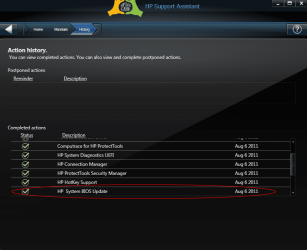
That's how they're doing it now. Download the BIOS update along with all the other updates. Surprised the hell out of me. It did save the install for last & gave all the appropriate warnings once the install commenced. My HP laptop has the BIOS backup function, what you refer to as the dual bios, so it can be rolled back.

Looks like Asus doesn't do this. Return the laptop for warranty replacement.
 

My Computer My Computer

At a glance

Windows 7 Home Premium 64bitIntel Core i3-32408GB DDR3 SDRAMEVGA GeForce GT 620
Computer type
PC/Desktop
Computer Manufacturer/Model Number
Dell Inspiron 660
OS
Windows 7 Home Premium 64bit
CPU
Intel Core i3-3240
Motherboard
Dell 084J0R
Memory
8GB DDR3 SDRAM
Graphics Card(s)
EVGA GeForce GT 620
Sound Card
Intel Panther Point PCH High Definition Audio
Monitor(s) Displays
Acer G205HV
Screen Resolution
1600 x 900
Hard Drives
Sandisk SSD 64GB SDSSDP064G
Seagate HDD 1TB ST1000DM003-1CH162
PSU
Dell 300W
Case
Dell Inspiron
Keyboard
Logitech Wireless K320/B350
Mouse
Microsoft
Internet Speed
25Mbps/4Mbps
Antivirus
Avast
Browser
Mozilla Firefox
I had a similar situation to this when i bought my MSI gx740 gaming laptop, but i updated the bios threw windows (Not Adviasable) and it said it passed, but after i restarted the laptop it was dead, only the LED's would work.

So what i did because it was still under 12month warranty, i pleaded ignorant and said it just died when i was gaming. Obviouslly they tested it and was found to be a dead Mobo (According to them) hehehe.

I got a replacement 3 days later as it had to come from London somewhere.

So find your reciept, pack your latop up, take it back to the shop and plead ignorant (DONT TELL THEM YOU TRIED TO FLASH BIOS) they probably blame you and wont replace it.

I wont tell them that you turned it of because like a couple of posts said, you should of got at least some warning it was updating bios.
 

My Computer My Computer

At a glance

Genuine Windows 7 SP1 Home Premium 64BitIntel Core i5-450m 2.40Ghz (4 Threads)4GB ASint DDR3 1333Mhz (2X2GB Sticks)ATI Mobility Radeon HD 5870 (1GB Dedicated DDR5)
Computer Manufacturer/Model Number
MSi GX740 Gaming Laptop
OS
Genuine Windows 7 SP1 Home Premium 64Bit
CPU
Intel Core i5-450m 2.40Ghz (4 Threads)
Motherboard
MSI MegaBook GT740 (MS-1727)
Memory
4GB ASint DDR3 1333Mhz (2X2GB Sticks)
Graphics Card(s)
ATI Mobility Radeon HD 5870 (1GB Dedicated DDR5)
Sound Card
Realtek HD Audio 7.1 SRS Premium Sourround With Sub Woofer
Monitor(s) Displays
Samsung 170MT02-M01 17" Widescreen
Screen Resolution
1680 X 1050
Hard Drives
Western Digital 640GB 7200Rpm SATA2
PSU
Battery and Mains Powered
Case
Generic Laptop Casing
Cooling
Air Cooling + Targus Laptop Cooler
Keyboard
Standard
Mouse
JSCO Quite Click Mouse USB
Internet Speed
Virgin Media 30MB Broadband
First time I ever heard of a Bios auto updating itself btw..If that is the case it's pretty pathetic that you didn't get some form of warning as in DO NOT POWER OFF YOUR MACHINE lol.
And it should have asked politely
That's how they're doing it now. Download the BIOS update along with all the other updates. Surprised the hell out of me.

Hmmm.... I've never seen/heard of an "auto" update for a motherboard BIOS. That can be dangerous and costly if a user didn't know they were updating a BIOS and shut down the PC :o

Anyway a BIOS update will always warn about shutting the PC/item down before the flash is finished, or else trouble awaits. In addition there are warnings that you have to acknowledge before proceeding.

@ Archer1978

While it's generally not recommended to flash through Windows, it's actually the easiest way to do so, and the way I've done mine for awhile now.
 

My Computer My Computer

At a glance

Windows 10 ProIntel Core i7-4770K (3.5Ghz)32 gig Corsair Dominator Platinum (4x8Gig)Sapphire Tri-X R9 Fury
Computer type
PC/Desktop
Computer Manufacturer/Model Number
Custom built by me.
OS
Windows 10 Pro
CPU
Intel Core i7-4770K (3.5Ghz)
Motherboard
Gigabyte G1 Sniper 5 (F10 Bios)
Memory
32 gig Corsair Dominator Platinum (4x8Gig)
Graphics Card(s)
Sapphire Tri-X R9 Fury
Sound Card
Soundblaster ZXR
Monitor(s) Displays
NEC PA242W 24" LCD Monitor
Screen Resolution
1920 x 1200
Hard Drives
Primary - Samsung 850 Pro (512gig), Samsung 840 Pro (256gig), 2TB WD Caviar Black.
PSU
EVGA Supernova 1000 G2
Case
Cooler Master HAF X
Cooling
Corsair H100i with Corsair Air Series SP120 Quiet Fans
Keyboard
Logitech Wireless Wave
Mouse
Logitech Performance MX
Internet Speed
High Speed Cable
Antivirus
Norton Security
Browser
IE11
Other Info
Memory Timings - 1866MHz @ 9-9-9-27-1T @ 1.5 volts

Attachments

  • 2011-08-23_055750.png
    2011-08-23_055750.png
    36 KB · Views: 200

My Computer My Computer

At a glance

Windows 7 Home Premium 64bitIntel Core i3-32408GB DDR3 SDRAMEVGA GeForce GT 620
Computer type
PC/Desktop
Computer Manufacturer/Model Number
Dell Inspiron 660
OS
Windows 7 Home Premium 64bit
CPU
Intel Core i3-3240
Motherboard
Dell 084J0R
Memory
8GB DDR3 SDRAM
Graphics Card(s)
EVGA GeForce GT 620
Sound Card
Intel Panther Point PCH High Definition Audio
Monitor(s) Displays
Acer G205HV
Screen Resolution
1600 x 900
Hard Drives
Sandisk SSD 64GB SDSSDP064G
Seagate HDD 1TB ST1000DM003-1CH162
PSU
Dell 300W
Case
Dell Inspiron
Keyboard
Logitech Wireless K320/B350
Mouse
Microsoft
Internet Speed
25Mbps/4Mbps
Antivirus
Avast
Browser
Mozilla Firefox
Hi,

HP can do some odd stuff sometimes - I use a ZX800 workstation at work, and as part of the installation (unbeknownst to me and our support technicians) there was a software suite that ran an invisible health check on the PC, and then rebooted the PC at 00:01 on the 1st of every month. Since my work involves running a lot of modelling that can take several days, you can imagine my annoyance at coming to work on the 1st on each month to discover the PC rebooted, and all my work corrupted.

I spent some time in GPEDIT.MSC disabling automatic updates without luck, and then by chance found the HP health check software and its schedule. Turning off the schedule didin't work - it just turned itself back on, so a....ermmmm....."enforced uninstallation" of the health check software "happened" with a good bout of solid cursing of HP and all and sundry associated with it, and all was well again.

Regards,
Golden
 

My Computer My Computer

At a glance

Windows 10 Pro x64 ; Xubuntu x64Intel i7 860 @ 2.80 GHz O/C'ed to 4.0GHz16GB Corsair Vengance DDR3 @ 661 MHz Dual Cha...EVGA NVidia GTX 560 1024MB
Computer type
PC/Desktop
Computer Manufacturer/Model Number
Golden Mk. I.4
OS
Windows 10 Pro x64 ; Xubuntu x64
CPU
Intel i7 860 @ 2.80 GHz O/C'ed to 4.0GHz
Motherboard
Gigabyte P55A-UD3R Rev.1. Award BIOS F13
Memory
16GB Corsair Vengance DDR3 @ 661 MHz Dual Channel (9-9-9-24)
Graphics Card(s)
EVGA NVidia GTX 560 1024MB
Sound Card
Realtek Integrated
Monitor(s) Displays
Dual Samsung SyncMaster 2494HS
Screen Resolution
1920*1080 and 1920*1080
Hard Drives
1*Samsung 840 EVO 120GB SSD;
1*OCZ Vertex 2 60GB SSD;
2*Samsung F3 SpinPoint 1TB in RAID0;
1*Samsung F1 SpinPoint 1TB;
2*Western Digital 1TB External USB 3.0
1*Western Digital 500GB External USB 3.0
1*Seagate 500GB External USB 2.0
PSU
Thermaltake ToughPower QFan 750W
Case
Thermaltake Element S VK60001W2Z
Cooling
Corsair H60 Water Cooling, 2*230mm and 2*80mm case fans
Keyboard
Logitech G110
Mouse
Logitech MX518
Not limited to HP. Sony has something similar called Vaio updater and I have seen a bios update included in its list on at least one VPC notebook. Being a control freak, I immediately uninstall such useless apps.
 

My Computer My Computer

At a glance

Windows 7 x64 pro/ Windows 7 x86 Pro/ XP SP3 x86
Computer Manufacturer/Model Number
Too many to describe...
OS
Windows 7 x64 pro/ Windows 7 x86 Pro/ XP SP3 x86
.... I've never seen/heard of an "auto" update for a motherboard BIOS...


Proof enough for you?

OK, but does it "auto" update? Meaning does it download and install itself without user action? That's what I mean when I say auto.

Contrast that to Windows Update which "automatically" updates the OS (provided you allow this), but will never "automatically" updates drivers, and does not include BIOS updates.

Anyway my point is the automatically updating a BIOS without user intervention.
 

My Computer My Computer

At a glance

Windows 10 ProIntel Core i7-4770K (3.5Ghz)32 gig Corsair Dominator Platinum (4x8Gig)Sapphire Tri-X R9 Fury
Computer type
PC/Desktop
Computer Manufacturer/Model Number
Custom built by me.
OS
Windows 10 Pro
CPU
Intel Core i7-4770K (3.5Ghz)
Motherboard
Gigabyte G1 Sniper 5 (F10 Bios)
Memory
32 gig Corsair Dominator Platinum (4x8Gig)
Graphics Card(s)
Sapphire Tri-X R9 Fury
Sound Card
Soundblaster ZXR
Monitor(s) Displays
NEC PA242W 24" LCD Monitor
Screen Resolution
1920 x 1200
Hard Drives
Primary - Samsung 850 Pro (512gig), Samsung 840 Pro (256gig), 2TB WD Caviar Black.
PSU
EVGA Supernova 1000 G2
Case
Cooler Master HAF X
Cooling
Corsair H100i with Corsair Air Series SP120 Quiet Fans
Keyboard
Logitech Wireless Wave
Mouse
Logitech Performance MX
Internet Speed
High Speed Cable
Antivirus
Norton Security
Browser
IE11
Other Info
Memory Timings - 1866MHz @ 9-9-9-27-1T @ 1.5 volts
Add me to the club of "never saw it before" There had to be some kind of user intervention to cause a BIOS to update. What if the laptop was running on battery and didn't have enough juice to get through it?

I've used many HP laptops in the past, but I'll be the first to say they get wiped clean and none of the bloatware gets reinstalled. I wouldn't need a software app updating drivers or the BIOS for me. OEM's make that process simple enough already.

That all being said, you should have let the update go through, rather than canel in the middle. It looks like you'll be getting an RMA (hopefully) to return your laptop.
 

My Computer My Computer

At a glance

Windows 7 Ultimate x64 SP1Intel Core i7-260012 GB Patriot Extreme DDR3-1333Nvidia GTX 470
OS
Windows 7 Ultimate x64 SP1
CPU
Intel Core i7-2600
Motherboard
Gigabyte GA-P67A-UD3P-B3
Memory
12 GB Patriot Extreme DDR3-1333
Graphics Card(s)
Nvidia GTX 470
Monitor(s) Displays
Dell UltraSharp 2209WA
Hard Drives
OCZ Agility3 240 GB, WD5001AALS, WD7501AALS
PSU
OCZ ModStream 700W
Case
CoolerMaster HAF 912 Advanced
Cooling
CoolerMaster Hyper 212 Plus
Wow this is sort of scary stuff to me!

While most users are pretty ignorant even the most basic PC users probably have never seen a auto update for the BIOS, and it would maybe surprise them or catch them unaware, resulting in a significant chance of damage to the computer.

Folks like us are vigilant about checking the settings for updates, and also blocking something like this from automatically occuring, but many users would have no clue about how potentially damaging a failed BIOS update can be.
 

My Computer My Computer

At a glance

win 7 home premium 64 bitcore i5 7606 gbati 5450
Computer Manufacturer/Model Number
hp pavilion 6680t
OS
win 7 home premium 64 bit
CPU
core i5 760
Motherboard
iona (from MSI)
Memory
6 gb
Graphics Card(s)
ati 5450
Sound Card
real tek 888
To me automatic BIOS updates are unheard of ...
Automatic BIOS updates should remain unheard of. Even with a manual update the warnings should be very clear about the consequences of a bjorked BIOS update.
 

My Computer My Computer

At a glance

Windows Home Premium 64 BitIntel i34GB
Computer Manufacturer/Model Number
HP-G72
OS
Windows Home Premium 64 Bit
CPU
Intel i3
Memory
4GB
Monitor(s) Displays
LGE2750
Screen Resolution
1920x1080
Keyboard
MS Comfort Curve 2000
Mouse
MS 3500
To me automatic BIOS updates are unheard of ...
Automatic BIOS updates should remain unheard of. Even with a manual update the warnings should be very clear about the consequences of a bjorked BIOS update.
Agreed.

If your system is working properly, there is generally no need to install a BIOS update. Most of these updates just extend the board's compatibility with CPUs and RAM, although some also fix errors in the existing code. It is very important to read the documentation that comes with the upgrade prior to applying it to see what fixes are implemented and if it pertains to your situation. If it doesn't, and you aren't having any problems, then leave well alone. A botched BIOS upgrade can render your system an expensive paperweight. This sort of update is one where you should be notified first, and given the option to install or not.
 

My Computer My Computer

At a glance

Windows 8.1 Pro RTM x64Intel Core-i5-3570K 4-core @ 3.4GHz (Ivy Brid...4 x 4GB DDR3-1600 Corsair Vengeance CMZ8GX3M2...MSI GeForce GTX770 Gaming OC 2GB
Computer type
PC/Desktop
Computer Manufacturer/Model Number
Dwarf Dwf/11/2012 r09/2013
OS
Windows 8.1 Pro RTM x64
CPU
Intel Core-i5-3570K 4-core @ 3.4GHz (Ivy Bridge) (OC 4.4GHz)
Motherboard
ASRock Z77 Extreme4-M
Memory
4 x 4GB DDR3-1600 Corsair Vengeance CMZ8GX3M2A1600C9B (16GB)
Graphics Card(s)
MSI GeForce GTX770 Gaming OC 2GB
Sound Card
Realtek High Definition on board solution (ALC 898)
Monitor(s) Displays
ViewSonic VA1912w Widescreen (VGA)
Screen Resolution
1440x900
Hard Drives
OCZ Agility 3 SSD 120GB SATA III x2 (RAID 0)
Samsung HD501LJ 500GB SATA II x2
Hitachi HDS721010CLA332 1TB SATA II
Iomega 1.5TB Ext USB 2.0
WD 2.0TB Ext USB 3.0
PSU
XFX Pro Series 850W Semi-Modular
Case
Gigabyte IF233
Cooling
1 x 120mm Front Inlet 1 x 120mm Rear Exhaust
Keyboard
Microsoft Comfort Curve Keyboard 3000 (USB)
Mouse
Microsoft Comfort Mouse 3000 for Business (USB)
Internet Speed
NetGear DG834Gv3 ADSL Modem/Router (Ethernet) ~4.0 Mb/s (O2)
Antivirus
Avast! 8.0.1497
Browser
IE 11
Other Info
Optical Drive: HL-DT-ST BD-RE BH10LS30 SATA Bluray
Lexmark S305 Printer/Scanner/Copier (USB)
WEI Score: 8.1/8.1/8.5/8.5/8.25
Asus Eee PC 1011PX Netbook (Windows 7 x86 Starter)
.... I've never seen/heard of an "auto" update for a motherboard BIOS...


Proof enough for you?

OK, but does it "auto" update? Meaning does it download and install itself without user action? That's what I mean when I say auto.

Contrast that to Windows Update which "automatically" updates the OS (provided you allow this), but will never "automatically" updates drivers, and does not include BIOS updates.

Anyway my point is the automatically updating a BIOS without user intervention.
No, it does not "auto" update. Never said it did.
 

My Computer My Computer

At a glance

Windows 7 Home Premium 64bitIntel Core i3-32408GB DDR3 SDRAMEVGA GeForce GT 620
Computer type
PC/Desktop
Computer Manufacturer/Model Number
Dell Inspiron 660
OS
Windows 7 Home Premium 64bit
CPU
Intel Core i3-3240
Motherboard
Dell 084J0R
Memory
8GB DDR3 SDRAM
Graphics Card(s)
EVGA GeForce GT 620
Sound Card
Intel Panther Point PCH High Definition Audio
Monitor(s) Displays
Acer G205HV
Screen Resolution
1600 x 900
Hard Drives
Sandisk SSD 64GB SDSSDP064G
Seagate HDD 1TB ST1000DM003-1CH162
PSU
Dell 300W
Case
Dell Inspiron
Keyboard
Logitech Wireless K320/B350
Mouse
Microsoft
Internet Speed
25Mbps/4Mbps
Antivirus
Avast
Browser
Mozilla Firefox
That was the point I was making with my post. It wasn't meant as a personal attack :)
 

My Computer My Computer

At a glance

Windows 10 ProIntel Core i7-4770K (3.5Ghz)32 gig Corsair Dominator Platinum (4x8Gig)Sapphire Tri-X R9 Fury
Computer type
PC/Desktop
Computer Manufacturer/Model Number
Custom built by me.
OS
Windows 10 Pro
CPU
Intel Core i7-4770K (3.5Ghz)
Motherboard
Gigabyte G1 Sniper 5 (F10 Bios)
Memory
32 gig Corsair Dominator Platinum (4x8Gig)
Graphics Card(s)
Sapphire Tri-X R9 Fury
Sound Card
Soundblaster ZXR
Monitor(s) Displays
NEC PA242W 24" LCD Monitor
Screen Resolution
1920 x 1200
Hard Drives
Primary - Samsung 850 Pro (512gig), Samsung 840 Pro (256gig), 2TB WD Caviar Black.
PSU
EVGA Supernova 1000 G2
Case
Cooler Master HAF X
Cooling
Corsair H100i with Corsair Air Series SP120 Quiet Fans
Keyboard
Logitech Wireless Wave
Mouse
Logitech Performance MX
Internet Speed
High Speed Cable
Antivirus
Norton Security
Browser
IE11
Other Info
Memory Timings - 1866MHz @ 9-9-9-27-1T @ 1.5 volts
Wow this is sort of scary stuff to me!

While most users are pretty ignorant even the most basic PC users probably have never seen a auto update for the BIOS, and it would maybe surprise them or catch them unaware, resulting in a significant chance of damage to the computer.

Folks like us are vigilant about checking the settings for updates, and also blocking something like this from automatically occuring, but many users would have no clue about how potentially damaging a failed BIOS update can be.

I think if you install a program like the one Comp Cmndo shows here, or something like say Gigabyte has which shows all updates available for your motherboard, than yeah, those will show you BIOS updates as well, but they won't (shouldn't) install without user intervention. And as I said, you won't see BIOS updates in Windows Update (at least not yet, though though UEFI might change things. Just a wild guess).
 

My Computer My Computer

At a glance

Windows 10 ProIntel Core i7-4770K (3.5Ghz)32 gig Corsair Dominator Platinum (4x8Gig)Sapphire Tri-X R9 Fury
Computer type
PC/Desktop
Computer Manufacturer/Model Number
Custom built by me.
OS
Windows 10 Pro
CPU
Intel Core i7-4770K (3.5Ghz)
Motherboard
Gigabyte G1 Sniper 5 (F10 Bios)
Memory
32 gig Corsair Dominator Platinum (4x8Gig)
Graphics Card(s)
Sapphire Tri-X R9 Fury
Sound Card
Soundblaster ZXR
Monitor(s) Displays
NEC PA242W 24" LCD Monitor
Screen Resolution
1920 x 1200
Hard Drives
Primary - Samsung 850 Pro (512gig), Samsung 840 Pro (256gig), 2TB WD Caviar Black.
PSU
EVGA Supernova 1000 G2
Case
Cooler Master HAF X
Cooling
Corsair H100i with Corsair Air Series SP120 Quiet Fans
Keyboard
Logitech Wireless Wave
Mouse
Logitech Performance MX
Internet Speed
High Speed Cable
Antivirus
Norton Security
Browser
IE11
Other Info
Memory Timings - 1866MHz @ 9-9-9-27-1T @ 1.5 volts
BIOS updates aren't always necessary or of any benefit for the end user unless you are having some issue with the board. If its doing this as some part of an auto update run by some POS software installed by the manufacturer then I,personally would remove said software asap to the rubbish bin.
 

My Computer My Computer

At a glance

Windows 7 Professional 64 bit930 i7 quad O/C 4ghzG Skill 3x2gb O/C to 1603mhz 1T timingEVGA 570
Computer Manufacturer/Model Number
home built
OS
Windows 7 Professional 64 bit
CPU
930 i7 quad O/C 4ghz
Motherboard
Asus P6X58D premium
Memory
G Skill 3x2gb O/C to 1603mhz 1T timing
Graphics Card(s)
EVGA 570
Sound Card
creative titanium
Monitor(s) Displays
samsung s23a950d..120hz 3D
Screen Resolution
1920x1080
Hard Drives
Western Digital 3X150 Velocoraptors in Raid 5
PSU
Antec Quattro 1000 watt
Case
Xigmatek Elysium
Cooling
Custom Loop..Kryos block.360rad..BP comp fittings etc
Keyboard
Razor arcosa
Mouse
Razer Diamondback
Internet Speed
Wireless so w/e I get at the time
Back
Top