BitLocker Drive Encryption - BitLocker To Go - Turn On or Off

How to Turn Windows 7 BitLocker To Go On or Off for Removable Drives


   Information
BitLocker To Go is used to encrypt and password protect any removable external hard drives and USB flash drives. The drives must be formatted using either the exFAT, FAT16, FAT32, or NTFS file system and must be at least 128 MB. This will show you how to turn on or off BitLocker To Go to encrypt or decrypt a entire external or USB Flash drive in Windows 7.
   Note
External hard drives or flash drives encrypted by BitLocker Drive Encryption - BitLocker To Go can be used on any computer you connect them to by unlocking the encrypted drive with a password or a smart card.

You can use the BitLocker To Go Reader application to provide users read-only access to BitLocker-protected FAT-formatted drives on computers running Windows XP or Windows Vista. When you plug a removable drive encrypted with BitLocker in to a computer running Windows XP or Windows Vista, AutoPlay might open and give you the option to install or run BitLocker To Go Reader. If you click this option, you’ll be prompted to unlock the drive with it's password. Once the drive is unlocked, you’ll have read-only access to the files. To open the files on the drive, you'll need to copy them to your computer. You can copy the files by dragging them to the desktop or to a folder.

   Warning
BitLocker is only available in the Windows 7 Ultimate and Enterprise editions.

When you add new files to a external hard drive or flash drive that is encrypted with BitLocker, BitLocker encrypts them automatically. Files remain encrypted only while they are stored in the encrypted drive. Files that are copied to another drive or computer are decrypted.

EXAMPLE: A USB Flash with BitLocker To Go turned on for it
NOTE: This is what you will see when you connect the encrypted removable USB flash drive or external hard drive to any computer. You will then need to select the option you want to use to unlock the drive to gain access.
Example.jpg


OPTION ONE

Turn On BitLocker to Encrypt Removable Drive


1. Decide if you want 128-bit or 256-bit encryption.
NOTE: By default, Windows 7 will use AES encryption with 128-bit encryption keys and Diffuser unless changed already by you previously.

2. Connect the removable hard drive or USB flash drive.
NOTE: I will be using a USB flash drive in this tutorial as an example. If AutoPlay opens a pop-up window, then just close it.

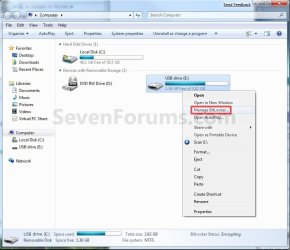
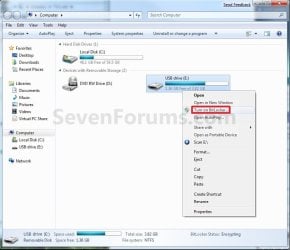
3. Open the Start menu and click on the Computer button, then right click on the drive letter for the removable hard drive or USB flash drive and click on Turn on BitLocker. (See screenshot below)
Computer-1.jpg

A) Go to step 5.
OR

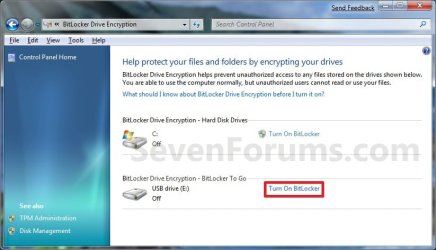
4. Open the Control Panel (All Items view), and click on the BitLocker Drive Encryption icon.
A) Click on Turn On BitLocker for the drive letter for the removable hard drive or USB flash drive that you want to encrypt. (See screenshot below)
Control_Panel_2.jpg
5. Select (check) Use a password to unlock the drive, then type in a password you want to use to unlock the drive with twice and click on the Next button. (See screenshot below)
NOTE: You can select the smart card option if you have this and want to use that instead. I just used the password option as an example in this tutorial.
WARNING: Be sure to write down this password and keep it somewhere safe. The password you enter here will be required to be entered to unlock the drive to gain access to it.
Step2.jpg
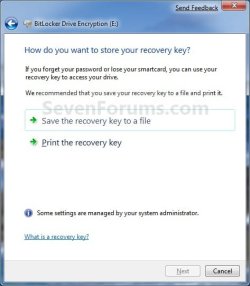
6. Click on Save the recovery key to file option. (See screenshot below)
Step3.jpg

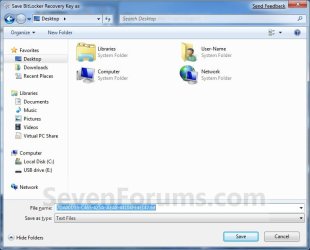
A) Select where you want to save this file at, and click on the Save button. (See screenshot below)
Step4.jpg
B) It is highly recommended that you save this file somewhere safe, and not on the encrypted drive. You will need the recovery key number to gain access to you encrypted drive if you should forget the password, lose the smart card, or BitLocker locks the drive.
File.jpg
C) It is also recommended that you click on the Print the recovery key option as well to have a printed hard copy of the file to be extra safe. (See screenshot below step 6)

D) When done, click on the Next button. (See screenshot below step 6)
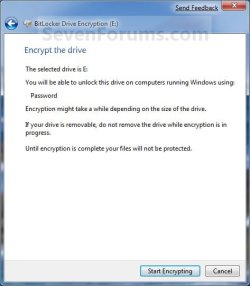
7. Click on the Start Encrypting button. (See screenshot below)
Step5.jpg
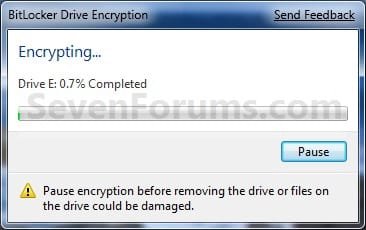
8. BitLocker will now start encrypting the drive. (See screenshot below)
NOTE: This may take a while to finish.
Step6.jpg
9. When finished, click on the Close button. (See screenshot below)
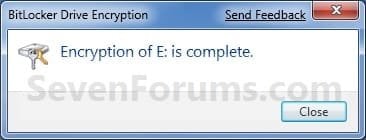
Step9.jpg
10. You will now have a Manage BitLocker option in the Control Panel and Computer for the encrypted drive. (See screenshots below)
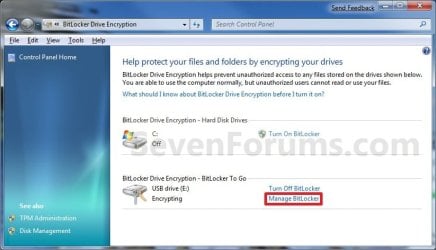
Step7.jpg

Computer-2.jpg
11. If you click on Manage BitLocker, these will be the options that you will have below. (See screenshot below)
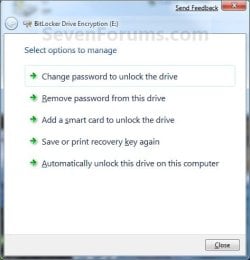
Step8.jpg
12. You're done. The drive is now encrypted with BitLocker To Go turned on.


OPTION TWO

Turn Off BitLocker to Decrypt Removable Drive


1. Connect the removable hard drive or USB flash drive.

2. Type in your password, and click on the Unlock button. (See screenshot below)
NOTE: If you selected to use a Smart Card instead in OPTION ONE (step 5), then you will have that option instead here. If AutoPlay opens a pop-up window, then just close it.
Example.jpg
3. Open the Control Panel (icons view), and click on the BitLocker Drive Encryption icon.

4. Click on Turn Off BitLocker for the drive letter for the removable hard drive or USB flash drive that you want to decrypt. (See screenshot below)
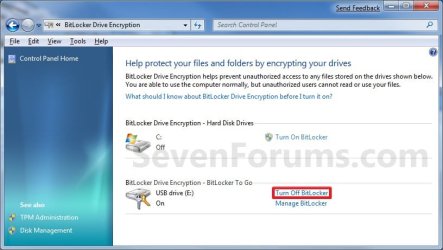
Decrypt_Step1.jpg
5. Click on the Decrypt Drive button. (See screenshot below)
Decrypt_Step2.jpg
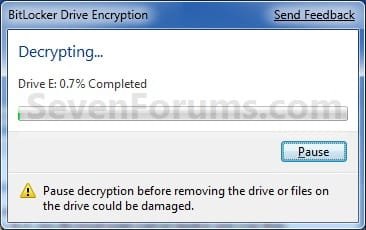
6. BitLocker will now start decrypting the drive. (See screenshot below)
NOTE: This may take a while to finish.
Decrypt_Step3.jpg
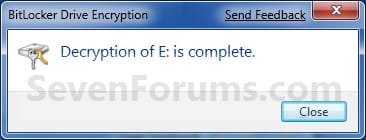
7. When finished, click on the Close button. (See screenshot below)
Decrypt_Step4.jpg
8. The Control Panel and Computer will now have the Turn On BitLocker option again.
Control_Panel_2.jpg

Computer-1.jpg
9. You're done. The drive is now decrypted with BitLocker To Go turned off.
That's it,
Shawn


Last edited:
  • Like
Reactions: Joe
please ... i forget the recovery ker for my hard disk ,,,, please help meeee
 

My Computer My Computer

At a glance

Windows 7 Ultimate 32bit.i3
OS
Windows 7 Ultimate 32bit.
CPU
i3
Hello Shadilami, and welcome to Seven Forums.

Without the recovery key, you're pretty much out of luck on being able to access the HDD without taking the HDD to a expert data recovery shop.

If you did step 6, you could use it to regain access to the HDD.
 

My Computer My Computer

At a glance

64-bit Windows 11 Pro for WorkstationsIntel i7-8700K OC'd to 5 GHz64 GB (4x16GB) G.SKILL TridentZ RGB DDR4 3600...ASUS ROG-STRIX-GTX1080TI-O11G-GAMING
Computer type
PC/Desktop
Computer Manufacturer/Model Number
Self built custom
OS
64-bit Windows 11 Pro for Workstations
CPU
Intel i7-8700K OC'd to 5 GHz
Motherboard
ASUS ROG Maximus XI Formula Z390
Memory
64 GB (4x16GB) G.SKILL TridentZ RGB DDR4 3600 MHz
Graphics Card(s)
ASUS ROG-STRIX-GTX1080TI-O11G-GAMING
Sound Card
Integrated
Monitor(s) Displays
2 x Samsung Odyssey G7 27"
Screen Resolution
2560x1440
Hard Drives
1TB Samsung 990 PRO M.2,
4TB Samsung 990 PRO PRO M.2,
TerraMaster F8 SSD Plus NAS
PSU
Seasonic Prime Titanium 850W
Case
Thermaltake Core P3
Cooling
Corsair Hydro H115i
Keyboard
Logitech wireless K800
Mouse
Logitech MX Master 4
Internet Speed
2 Gb/s Download and 100 Mb/s Upload
Antivirus
Malwarebyte Anti-Malware Premium
Browser
Google Chrome
Other Info
Logitech Z625 speaker system,
Logitech BRIO 4K Pro webcam,
HP Color LaserJet Pro MFP M477fdn,
APC SMART-UPS RT 1000 XL - SURT1000XLI,
Galaxy S23 Plus phone
yes i did step 6 .. but i lose the recovery key .... please hellp me ... all my file on HDD
 

My Computer My Computer

At a glance

Windows 7 Ultimate 32bit.i3
OS
Windows 7 Ultimate 32bit.
CPU
i3
I'm sorry to hear that. Without the recovery key or password to access or unlock the removable drive, you're out of luck. You might be able to recover them by having a professional data recovery service attempt to, but it most likely will not be cheap if they are able to. :(

The HDD could be formatted to be able to use it again, but you will lose what is on it.
 

My Computer My Computer

At a glance

64-bit Windows 11 Pro for WorkstationsIntel i7-8700K OC'd to 5 GHz64 GB (4x16GB) G.SKILL TridentZ RGB DDR4 3600...ASUS ROG-STRIX-GTX1080TI-O11G-GAMING
Computer type
PC/Desktop
Computer Manufacturer/Model Number
Self built custom
OS
64-bit Windows 11 Pro for Workstations
CPU
Intel i7-8700K OC'd to 5 GHz
Motherboard
ASUS ROG Maximus XI Formula Z390
Memory
64 GB (4x16GB) G.SKILL TridentZ RGB DDR4 3600 MHz
Graphics Card(s)
ASUS ROG-STRIX-GTX1080TI-O11G-GAMING
Sound Card
Integrated
Monitor(s) Displays
2 x Samsung Odyssey G7 27"
Screen Resolution
2560x1440
Hard Drives
1TB Samsung 990 PRO M.2,
4TB Samsung 990 PRO PRO M.2,
TerraMaster F8 SSD Plus NAS
PSU
Seasonic Prime Titanium 850W
Case
Thermaltake Core P3
Cooling
Corsair Hydro H115i
Keyboard
Logitech wireless K800
Mouse
Logitech MX Master 4
Internet Speed
2 Gb/s Download and 100 Mb/s Upload
Antivirus
Malwarebyte Anti-Malware Premium
Browser
Google Chrome
Other Info
Logitech Z625 speaker system,
Logitech BRIO 4K Pro webcam,
HP Color LaserJet Pro MFP M477fdn,
APC SMART-UPS RT 1000 XL - SURT1000XLI,
Galaxy S23 Plus phone
ok thank you :(
 

My Computer My Computer

At a glance

Windows 7 Ultimate 32bit.i3
OS
Windows 7 Ultimate 32bit.
CPU
i3
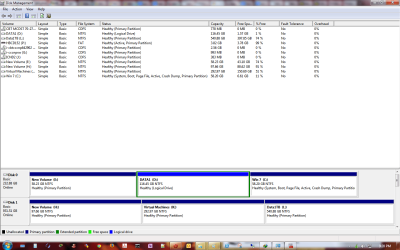
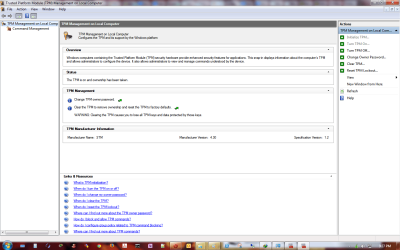
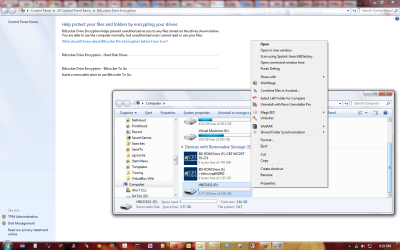
i am not able to see "turn on bitlocker" when right clicking on any partition on any hard drive or on external usb thumb drive.

please find below screenshots and advise.
my system is dell optiplex 755 with tpm 1.2 and windows 7 ultimate


thanks
 

Attachments

  • diskmgmttpm.png
    diskmgmttpm.png
    51.4 KB · Views: 291
  • tpm.msc.png
    tpm.msc.png
    57.5 KB · Views: 431
  • no bitlocker option in right click context menu.png
    no bitlocker option in right click context menu.png
    114.6 KB · Views: 504

My Computer My Computer

At a glance

Windows 7 Ultimate x64E65508GB DDR2
Computer type
PC/Desktop
Computer Manufacturer/Model Number
Dell 755
OS
Windows 7 Ultimate x64
CPU
E6550
Motherboard
Stock Q35 Chipset Based
Memory
8GB DDR2
Hard Drives
1TB
Keyboard
Microsoft Comfort 2000
Mouse
Microsoft
Antivirus
None
Browser
FireFox
Hello plumpf,

Is the removable drive formatted with NTFS instead of FAT32?
 

My Computer My Computer

At a glance

64-bit Windows 11 Pro for WorkstationsIntel i7-8700K OC'd to 5 GHz64 GB (4x16GB) G.SKILL TridentZ RGB DDR4 3600...ASUS ROG-STRIX-GTX1080TI-O11G-GAMING
Computer type
PC/Desktop
Computer Manufacturer/Model Number
Self built custom
OS
64-bit Windows 11 Pro for Workstations
CPU
Intel i7-8700K OC'd to 5 GHz
Motherboard
ASUS ROG Maximus XI Formula Z390
Memory
64 GB (4x16GB) G.SKILL TridentZ RGB DDR4 3600 MHz
Graphics Card(s)
ASUS ROG-STRIX-GTX1080TI-O11G-GAMING
Sound Card
Integrated
Monitor(s) Displays
2 x Samsung Odyssey G7 27"
Screen Resolution
2560x1440
Hard Drives
1TB Samsung 990 PRO M.2,
4TB Samsung 990 PRO PRO M.2,
TerraMaster F8 SSD Plus NAS
PSU
Seasonic Prime Titanium 850W
Case
Thermaltake Core P3
Cooling
Corsair Hydro H115i
Keyboard
Logitech wireless K800
Mouse
Logitech MX Master 4
Internet Speed
2 Gb/s Download and 100 Mb/s Upload
Antivirus
Malwarebyte Anti-Malware Premium
Browser
Google Chrome
Other Info
Logitech Z625 speaker system,
Logitech BRIO 4K Pro webcam,
HP Color LaserJet Pro MFP M477fdn,
APC SMART-UPS RT 1000 XL - SURT1000XLI,
Galaxy S23 Plus phone
Formated with fat in above snapshots

now formated with ntfs but still same.

also why is it not shown for other partitions ?
i have 2 hard drives and it is enable bit locker is not shown in right click context menu for any of them.
 

My Computer My Computer

At a glance

Windows 7 Ultimate x64E65508GB DDR2
Computer type
PC/Desktop
Computer Manufacturer/Model Number
Dell 755
OS
Windows 7 Ultimate x64
CPU
E6550
Motherboard
Stock Q35 Chipset Based
Memory
8GB DDR2
Hard Drives
1TB
Keyboard
Microsoft Comfort 2000
Mouse
Microsoft
Antivirus
None
Browser
FireFox
Hmm, I'm not sure why you don't see the BitLocker context menus.

You might run a sfc /scannow command to see if you may have any corrupted system files responsible.
 

My Computer My Computer

At a glance

64-bit Windows 11 Pro for WorkstationsIntel i7-8700K OC'd to 5 GHz64 GB (4x16GB) G.SKILL TridentZ RGB DDR4 3600...ASUS ROG-STRIX-GTX1080TI-O11G-GAMING
Computer type
PC/Desktop
Computer Manufacturer/Model Number
Self built custom
OS
64-bit Windows 11 Pro for Workstations
CPU
Intel i7-8700K OC'd to 5 GHz
Motherboard
ASUS ROG Maximus XI Formula Z390
Memory
64 GB (4x16GB) G.SKILL TridentZ RGB DDR4 3600 MHz
Graphics Card(s)
ASUS ROG-STRIX-GTX1080TI-O11G-GAMING
Sound Card
Integrated
Monitor(s) Displays
2 x Samsung Odyssey G7 27"
Screen Resolution
2560x1440
Hard Drives
1TB Samsung 990 PRO M.2,
4TB Samsung 990 PRO PRO M.2,
TerraMaster F8 SSD Plus NAS
PSU
Seasonic Prime Titanium 850W
Case
Thermaltake Core P3
Cooling
Corsair Hydro H115i
Keyboard
Logitech wireless K800
Mouse
Logitech MX Master 4
Internet Speed
2 Gb/s Download and 100 Mb/s Upload
Antivirus
Malwarebyte Anti-Malware Premium
Browser
Google Chrome
Other Info
Logitech Z625 speaker system,
Logitech BRIO 4K Pro webcam,
HP Color LaserJet Pro MFP M477fdn,
APC SMART-UPS RT 1000 XL - SURT1000XLI,
Galaxy S23 Plus phone
sfc scannow was run yesterday but no violation was found.

what services needs to be started for bitlocker ? there are two containing bitlocker and they were set to disable i set them to automatic and started them.

i had followed some tweaking guide floating on net long time ago. that only required changes in services ..
 

My Computer My Computer

At a glance

Windows 7 Ultimate x64E65508GB DDR2
Computer type
PC/Desktop
Computer Manufacturer/Model Number
Dell 755
OS
Windows 7 Ultimate x64
CPU
E6550
Motherboard
Stock Q35 Chipset Based
Memory
8GB DDR2
Hard Drives
1TB
Keyboard
Microsoft Comfort 2000
Mouse
Microsoft
Antivirus
None
Browser
FireFox
If you haven't already, restart the computer to see if the context menus come back now that the services have been enabled.
 

My Computer My Computer

At a glance

64-bit Windows 11 Pro for WorkstationsIntel i7-8700K OC'd to 5 GHz64 GB (4x16GB) G.SKILL TridentZ RGB DDR4 3600...ASUS ROG-STRIX-GTX1080TI-O11G-GAMING
Computer type
PC/Desktop
Computer Manufacturer/Model Number
Self built custom
OS
64-bit Windows 11 Pro for Workstations
CPU
Intel i7-8700K OC'd to 5 GHz
Motherboard
ASUS ROG Maximus XI Formula Z390
Memory
64 GB (4x16GB) G.SKILL TridentZ RGB DDR4 3600 MHz
Graphics Card(s)
ASUS ROG-STRIX-GTX1080TI-O11G-GAMING
Sound Card
Integrated
Monitor(s) Displays
2 x Samsung Odyssey G7 27"
Screen Resolution
2560x1440
Hard Drives
1TB Samsung 990 PRO M.2,
4TB Samsung 990 PRO PRO M.2,
TerraMaster F8 SSD Plus NAS
PSU
Seasonic Prime Titanium 850W
Case
Thermaltake Core P3
Cooling
Corsair Hydro H115i
Keyboard
Logitech wireless K800
Mouse
Logitech MX Master 4
Internet Speed
2 Gb/s Download and 100 Mb/s Upload
Antivirus
Malwarebyte Anti-Malware Premium
Browser
Google Chrome
Other Info
Logitech Z625 speaker system,
Logitech BRIO 4K Pro webcam,
HP Color LaserJet Pro MFP M477fdn,
APC SMART-UPS RT 1000 XL - SURT1000XLI,
Galaxy S23 Plus phone
no luck with restart either.

i did a scan with malware bytes free vesion nothing found.
tried spybot nothing found.
tried free avg nothing found.
tried sfc no violation.
chkdsk found no error
 

My Computer My Computer

At a glance

Windows 7 Ultimate x64E65508GB DDR2
Computer type
PC/Desktop
Computer Manufacturer/Model Number
Dell 755
OS
Windows 7 Ultimate x64
CPU
E6550
Motherboard
Stock Q35 Chipset Based
Memory
8GB DDR2
Hard Drives
1TB
Keyboard
Microsoft Comfort 2000
Mouse
Microsoft
Antivirus
None
Browser
FireFox
The only thing I can think of is one of the services that you may have disabled. You might see if doing a system restore using a restore point dated before you changed the services may help.
 

My Computer My Computer

At a glance

64-bit Windows 11 Pro for WorkstationsIntel i7-8700K OC'd to 5 GHz64 GB (4x16GB) G.SKILL TridentZ RGB DDR4 3600...ASUS ROG-STRIX-GTX1080TI-O11G-GAMING
Computer type
PC/Desktop
Computer Manufacturer/Model Number
Self built custom
OS
64-bit Windows 11 Pro for Workstations
CPU
Intel i7-8700K OC'd to 5 GHz
Motherboard
ASUS ROG Maximus XI Formula Z390
Memory
64 GB (4x16GB) G.SKILL TridentZ RGB DDR4 3600 MHz
Graphics Card(s)
ASUS ROG-STRIX-GTX1080TI-O11G-GAMING
Sound Card
Integrated
Monitor(s) Displays
2 x Samsung Odyssey G7 27"
Screen Resolution
2560x1440
Hard Drives
1TB Samsung 990 PRO M.2,
4TB Samsung 990 PRO PRO M.2,
TerraMaster F8 SSD Plus NAS
PSU
Seasonic Prime Titanium 850W
Case
Thermaltake Core P3
Cooling
Corsair Hydro H115i
Keyboard
Logitech wireless K800
Mouse
Logitech MX Master 4
Internet Speed
2 Gb/s Download and 100 Mb/s Upload
Antivirus
Malwarebyte Anti-Malware Premium
Browser
Google Chrome
Other Info
Logitech Z625 speaker system,
Logitech BRIO 4K Pro webcam,
HP Color LaserJet Pro MFP M477fdn,
APC SMART-UPS RT 1000 XL - SURT1000XLI,
Galaxy S23 Plus phone
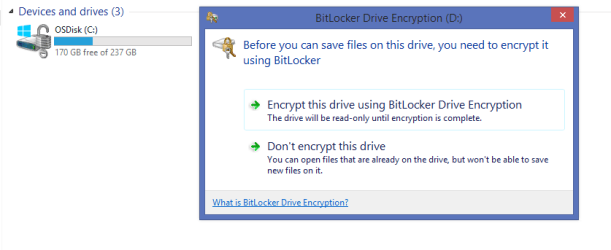
Hi, Is there a way to disable Bitlocker prompting to encrypt removable media devices ? I want to use my removable media freely on my laptop without encrypting.
 

My Computer My Computer

At a glance

Windows 8.1
Computer type
Laptop
Computer Manufacturer/Model Number
HP, Elitebook
OS
Windows 8.1
Hello ksantoshh, and welcome to Seven Forums.

Interesting. I've never had BitLocker prompt to encrypt a removable drive before. Could you post a screenshot of the message to see if it may help to ID the issue.

http://www.sevenforums.com/tutorials/9733-screenshots-files-upload-post-seven-forums.html

Do you have anything else encrypted by BitLocker?

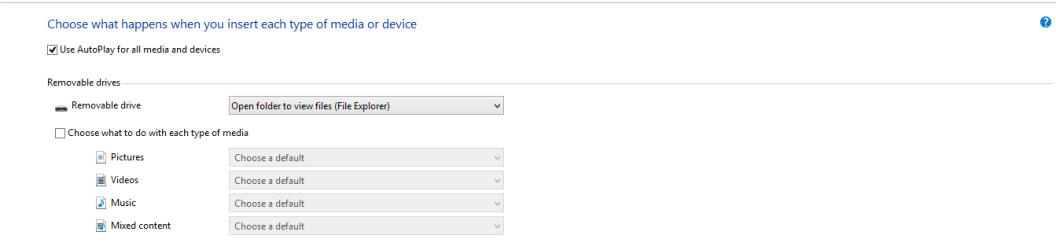
Double check to see what you have AutoPlay set to for removable devices in case it may be from it.

http://www.sevenforums.com/tutorials/174838-autoplay-turn-off.html
 

My Computer My Computer

At a glance

64-bit Windows 11 Pro for WorkstationsIntel i7-8700K OC'd to 5 GHz64 GB (4x16GB) G.SKILL TridentZ RGB DDR4 3600...ASUS ROG-STRIX-GTX1080TI-O11G-GAMING
Computer type
PC/Desktop
Computer Manufacturer/Model Number
Self built custom
OS
64-bit Windows 11 Pro for Workstations
CPU
Intel i7-8700K OC'd to 5 GHz
Motherboard
ASUS ROG Maximus XI Formula Z390
Memory
64 GB (4x16GB) G.SKILL TridentZ RGB DDR4 3600 MHz
Graphics Card(s)
ASUS ROG-STRIX-GTX1080TI-O11G-GAMING
Sound Card
Integrated
Monitor(s) Displays
2 x Samsung Odyssey G7 27"
Screen Resolution
2560x1440
Hard Drives
1TB Samsung 990 PRO M.2,
4TB Samsung 990 PRO PRO M.2,
TerraMaster F8 SSD Plus NAS
PSU
Seasonic Prime Titanium 850W
Case
Thermaltake Core P3
Cooling
Corsair Hydro H115i
Keyboard
Logitech wireless K800
Mouse
Logitech MX Master 4
Internet Speed
2 Gb/s Download and 100 Mb/s Upload
Antivirus
Malwarebyte Anti-Malware Premium
Browser
Google Chrome
Other Info
Logitech Z625 speaker system,
Logitech BRIO 4K Pro webcam,
HP Color LaserJet Pro MFP M477fdn,
APC SMART-UPS RT 1000 XL - SURT1000XLI,
Galaxy S23 Plus phone
Thanks Brink for you prompt response. Attached screenshots for your reference. I have my C drive encrypted with bitlocker on where I have the OS installed.
Autoplay is set to "Open folder to view files (File Explorer)
 

Attachments

  • 2014-11-04_12-32-20.png
    2014-11-04_12-32-20.png
    10.7 KB · Views: 374
  • 2014-11-04_12-25-04.png
    2014-11-04_12-25-04.png
    8.4 KB · Views: 306

My Computer My Computer

At a glance

Windows 8.1
Computer type
Laptop
Computer Manufacturer/Model Number
HP, Elitebook
OS
Windows 8.1

My Computer My Computer

At a glance

64-bit Windows 11 Pro for WorkstationsIntel i7-8700K OC'd to 5 GHz64 GB (4x16GB) G.SKILL TridentZ RGB DDR4 3600...ASUS ROG-STRIX-GTX1080TI-O11G-GAMING
Computer type
PC/Desktop
Computer Manufacturer/Model Number
Self built custom
OS
64-bit Windows 11 Pro for Workstations
CPU
Intel i7-8700K OC'd to 5 GHz
Motherboard
ASUS ROG Maximus XI Formula Z390
Memory
64 GB (4x16GB) G.SKILL TridentZ RGB DDR4 3600 MHz
Graphics Card(s)
ASUS ROG-STRIX-GTX1080TI-O11G-GAMING
Sound Card
Integrated
Monitor(s) Displays
2 x Samsung Odyssey G7 27"
Screen Resolution
2560x1440
Hard Drives
1TB Samsung 990 PRO M.2,
4TB Samsung 990 PRO PRO M.2,
TerraMaster F8 SSD Plus NAS
PSU
Seasonic Prime Titanium 850W
Case
Thermaltake Core P3
Cooling
Corsair Hydro H115i
Keyboard
Logitech wireless K800
Mouse
Logitech MX Master 4
Internet Speed
2 Gb/s Download and 100 Mb/s Upload
Antivirus
Malwarebyte Anti-Malware Premium
Browser
Google Chrome
Other Info
Logitech Z625 speaker system,
Logitech BRIO 4K Pro webcam,
HP Color LaserJet Pro MFP M477fdn,
APC SMART-UPS RT 1000 XL - SURT1000XLI,
Galaxy S23 Plus phone
Brink, I already checked that, no group policy is configured :confused:
 

My Computer My Computer

At a glance

Windows 8.1
Computer type
Laptop
Computer Manufacturer/Model Number
HP, Elitebook
OS
Windows 8.1
Odd. I must admit that I'm not sure why it's wanting to encrypt the USB.

Was the USB ever encrypted? Possibly on another computer?
 

My Computer My Computer

At a glance

64-bit Windows 11 Pro for WorkstationsIntel i7-8700K OC'd to 5 GHz64 GB (4x16GB) G.SKILL TridentZ RGB DDR4 3600...ASUS ROG-STRIX-GTX1080TI-O11G-GAMING
Computer type
PC/Desktop
Computer Manufacturer/Model Number
Self built custom
OS
64-bit Windows 11 Pro for Workstations
CPU
Intel i7-8700K OC'd to 5 GHz
Motherboard
ASUS ROG Maximus XI Formula Z390
Memory
64 GB (4x16GB) G.SKILL TridentZ RGB DDR4 3600 MHz
Graphics Card(s)
ASUS ROG-STRIX-GTX1080TI-O11G-GAMING
Sound Card
Integrated
Monitor(s) Displays
2 x Samsung Odyssey G7 27"
Screen Resolution
2560x1440
Hard Drives
1TB Samsung 990 PRO M.2,
4TB Samsung 990 PRO PRO M.2,
TerraMaster F8 SSD Plus NAS
PSU
Seasonic Prime Titanium 850W
Case
Thermaltake Core P3
Cooling
Corsair Hydro H115i
Keyboard
Logitech wireless K800
Mouse
Logitech MX Master 4
Internet Speed
2 Gb/s Download and 100 Mb/s Upload
Antivirus
Malwarebyte Anti-Malware Premium
Browser
Google Chrome
Other Info
Logitech Z625 speaker system,
Logitech BRIO 4K Pro webcam,
HP Color LaserJet Pro MFP M477fdn,
APC SMART-UPS RT 1000 XL - SURT1000XLI,
Galaxy S23 Plus phone
No Brink. It asks for each and every removable media... usb..portable hard drive.
 

My Computer My Computer

At a glance

Windows 8.1
Computer type
Laptop
Computer Manufacturer/Model Number
HP, Elitebook
OS
Windows 8.1
Back
Top