A question about BitLocker Drive Encryption

reble

New member
Member
VIP
Local time
3:44 PM
Messages
326
Location
Kennewick, Wa
My OS is Win7 Home 32bit. I am thinking of coping some private personal info to a USB flash drive as a backup and then encrypt the flash drive using BitLocker Drive Encryption. I have a question about the prog.

Right now I keep the info in a small notebook that is hidden in a safe place in my room. But like if I go to a Star Trek convention I take my ZTE K90U Android tablet with me. It is a lot easier than unplugging and packing my home laptop. And I take that notebook with me. I am very guarded with that notebook. 1. it is my only copy. 2. if it gets lost (not very likely, I am not one that loses things easily) 3. it gets stolen. I will be in for a big problem. If I take an encrypted USB flash drive. It won't be of any use to anyone else without the password.

The most important thing is. Will I be able to type in the encryption password in on my Android tablet and get into the thumb drive? or do I need a 2nd thumb drive in the Android format?

Steve
 

My Computer

Computer type
Laptop
Computer Manufacturer/Model Number
Dell Inspiron 3541
OS
windows 7 home 32 bit, I just changed back from 64 to 32bit
CPU
amc a6-6310, radon r4 graphics 1800mhz with 4 cores
Memory
6.8gb
Graphics Card(s)
not sure off hand
Sound Card
not shure off hand
Monitor(s) Displays
built in lcd
Screen Resolution
1366 x 768
Hard Drives
1 500gb sata internal HDD and 1 250 gb's sata HDD in a USB external USB case.
Keyboard
Wifi with attached wifi mouse
Internet Speed
don't know
Antivirus
Zone Alarm
Browser
Firefox
Other Info
The gateway laptop model MD2614U died because a voltage regulator on the motherboard went poof. The Gateway laptop has been scraped.
Bitlocker is a Windows application that is only available for the Ultimate and Enterprise versions of Windows 7 and is not available for Home versions and certainly not for android.

You need to find some Encryption application that is available for Windows 7 Home and Android - I am not aware of any

Depending on the Data content type, (Text documents, Images, Video, Etc ), you may be able to purchase a secure USB thumb Drive that you can use, though you would need one that is compatible with both Windows and Android. The USB thumbdrive manufacturers sometimes include this type of application with higher end devices, check their sites for availability
 

My Computers

System One System Two

  • Computer type
    PC/Desktop
    Computer Manufacturer/Model Number
    ChillBlast - Custom to my design
    OS
    Windows 11 Pro x64 [Latest Release and Release Preview]
    CPU
    Ryzen 9 5950X, 3.8 - 5.2 MHz
    Motherboard
    Asus Prime X570-Pro
    Memory
    64GB [2 x 32GB] DDR4 3200MHz
    Graphics Card(s)
    4GB NVIDIA GEFORCE GTX 1650 Ti
    Sound Card
    On-board SPDIF to 5.1 System + HDMI [5.1 system]
    Monitor(s) Displays
    32" UHD 32 Bit HDR Monitor + 43" UHD 4K 32Bit HDR TV
    Screen Resolution
    2 x 3840 x 2160 @60Hz
    Hard Drives
    1TB M2 SSD OS, 500GB Fast Access SSD, 2 x 8TB Data + Various Externals from 1TB to 4TB, 10TB NAS
    PSU
    NZXT C750 80 PLUS Gold 750W Modular PSU
    Case
    Workstation Case [Matt Black]
    Cooling
    NZXT Kraken X63 280mm CPU Cooler +2x Quiet Case fans
    Keyboard
    Logitech Wireless MX Keys & K400 + others
    Mouse
    Logitech Wireless MX Master 3S
    Internet Speed
    920 MB Down 50 MB Up
    Antivirus
    BitDefender Total Security Pro
    Browser
    Chrome (always run latest Non-Beta)
    Other Info
    Also run ...
    Laptop - Quad 8GB - Windows 10 Pro x64
    Nexus 7 Android tablet x2
    Samsung 10.2" tablet
    Blackview TAB 8 4G Android Tablet c/w Keyboard
    Wacom Intuos Pro Medium Pen Pad
    Wacom Intuos Pro Small Pen Pad
    Wacom Expresskeys Remote
    Loopdeck+ Graphics Controller
    Shuttle Pro v2 Control
  • Computer type
    Laptop
    System Manufacturer/Model Number
    Dell XPS 17 10750H
    OS
    Windows 11 Pro x64 Latest RP
    CPU
    Intel I7 10750H 5.0GHz
    Motherboard
    Dell XPS
    Memory
    32GB [2x16GB] DDR4 2933 MHz
    Graphics Card(s)
    nVidia GTX1650Ti 4 GB GDDR6
    Sound Card
    Stock [Realtek] 4 Speaker
    Monitor(s) Displays
    17" IPS UHD+ Infinity Edge Touchscreen
    Screen Resolution
    3840 x 2400
    Hard Drives
    2TB M2 NVMe, 4TB External + various 500GB & 1TB External NVMe (also have access to spinner HDD from
    PSU
    Stock
    Case
    Stock XPS Aluminium & Carbon Fibre
    Cooling
    Stock - Active Fan Control
    Keyboard
    Backlit + Various Logitech
    Mouse
    Stock Track Pad + Logitech MX Trackball
    Internet Speed
    72 MB Down 18MB Up
    Browser
    Chrome
    Other Info
    Also run ...
    Laptop - Quad 8GB - Windows 10 Pro x64
    Nexus 7 Android tablet x2
    10.2" tablet
    Sony Z3 Android Smartphone
    Wacom Intuos Pro Medium Pen Pad
    Wacom Intuos Pro Small Pen Pad
    Wacom Expresskeys Remote
    Loopdeck+ Graphics Controller
    Shuttle Pro v2 Control Pad
    10TB NAS
You can use simple rar files they can be used on both and secure enough for most things unless your a spy
 

My Computer

Computer type
PC/Desktop
OS
win 8 32 bit
I know about RAR and PKZIP, I use them both a lot. But how do you lock the RAR file with a password? The other problem is that the ZTE tablet doesn't have OTG and I haven't figured out how to mount the USB flash drive when the drive is connected to the tablet.

You can use simple rar files they can be used on both and secure enough for most things unless your a spy
 

My Computer

Computer type
Laptop
Computer Manufacturer/Model Number
Dell Inspiron 3541
OS
windows 7 home 32 bit, I just changed back from 64 to 32bit
CPU
amc a6-6310, radon r4 graphics 1800mhz with 4 cores
Memory
6.8gb
Graphics Card(s)
not sure off hand
Sound Card
not shure off hand
Monitor(s) Displays
built in lcd
Screen Resolution
1366 x 768
Hard Drives
1 500gb sata internal HDD and 1 250 gb's sata HDD in a USB external USB case.
Keyboard
Wifi with attached wifi mouse
Internet Speed
don't know
Antivirus
Zone Alarm
Browser
Firefox
Other Info
The gateway laptop model MD2614U died because a voltage regulator on the motherboard went poof. The Gateway laptop has been scraped.
I don't know about RAR, but 7Zip might be the easiest solution - it provides password protected AES256 encryption. With a long enough password containing alpanumeric, numeric and special characters it is practically impossible to crack.

http://www.7-zip.org/
 

My Computer

Computer type
PC/Desktop
Computer Manufacturer/Model Number
Golden Mk. I.4
OS
Windows 10 Pro x64 ; Xubuntu x64
CPU
Intel i7 860 @ 2.80 GHz O/C'ed to 4.0GHz
Motherboard
Gigabyte P55A-UD3R Rev.1. Award BIOS F13
Memory
16GB Corsair Vengance DDR3 @ 661 MHz Dual Channel (9-9-9-24)
Graphics Card(s)
EVGA NVidia GTX 560 1024MB
Sound Card
Realtek Integrated
Monitor(s) Displays
Dual Samsung SyncMaster 2494HS
Screen Resolution
1920*1080 and 1920*1080
Hard Drives
1*Samsung 840 EVO 120GB SSD;
1*OCZ Vertex 2 60GB SSD;
2*Samsung F3 SpinPoint 1TB in RAID0;
1*Samsung F1 SpinPoint 1TB;
2*Western Digital 1TB External USB 3.0
1*Western Digital 500GB External USB 3.0
1*Seagate 500GB External USB 2.0
PSU
Thermaltake ToughPower QFan 750W
Case
Thermaltake Element S VK60001W2Z
Cooling
Corsair H60 Water Cooling, 2*230mm and 2*80mm case fans
Keyboard
Logitech G110
Mouse
Logitech MX518
I know about RAR and PKZIP, I use them both a lot. But how do you lock the RAR file with a password? The other problem is that the ZTE tablet doesn't have OTG and I haven't figured out how to mount the USB flash drive when the drive is connected to the tablet.

You could try this for your tablet access, It was originally released back when the OTG access needed Root access to android - this does not but check the software and hardware requirements


USB Media Explorer
 

My Computers

System One System Two

  • Computer type
    PC/Desktop
    Computer Manufacturer/Model Number
    ChillBlast - Custom to my design
    OS
    Windows 11 Pro x64 [Latest Release and Release Preview]
    CPU
    Ryzen 9 5950X, 3.8 - 5.2 MHz
    Motherboard
    Asus Prime X570-Pro
    Memory
    64GB [2 x 32GB] DDR4 3200MHz
    Graphics Card(s)
    4GB NVIDIA GEFORCE GTX 1650 Ti
    Sound Card
    On-board SPDIF to 5.1 System + HDMI [5.1 system]
    Monitor(s) Displays
    32" UHD 32 Bit HDR Monitor + 43" UHD 4K 32Bit HDR TV
    Screen Resolution
    2 x 3840 x 2160 @60Hz
    Hard Drives
    1TB M2 SSD OS, 500GB Fast Access SSD, 2 x 8TB Data + Various Externals from 1TB to 4TB, 10TB NAS
    PSU
    NZXT C750 80 PLUS Gold 750W Modular PSU
    Case
    Workstation Case [Matt Black]
    Cooling
    NZXT Kraken X63 280mm CPU Cooler +2x Quiet Case fans
    Keyboard
    Logitech Wireless MX Keys & K400 + others
    Mouse
    Logitech Wireless MX Master 3S
    Internet Speed
    920 MB Down 50 MB Up
    Antivirus
    BitDefender Total Security Pro
    Browser
    Chrome (always run latest Non-Beta)
    Other Info
    Also run ...
    Laptop - Quad 8GB - Windows 10 Pro x64
    Nexus 7 Android tablet x2
    Samsung 10.2" tablet
    Blackview TAB 8 4G Android Tablet c/w Keyboard
    Wacom Intuos Pro Medium Pen Pad
    Wacom Intuos Pro Small Pen Pad
    Wacom Expresskeys Remote
    Loopdeck+ Graphics Controller
    Shuttle Pro v2 Control
  • Computer type
    Laptop
    System Manufacturer/Model Number
    Dell XPS 17 10750H
    OS
    Windows 11 Pro x64 Latest RP
    CPU
    Intel I7 10750H 5.0GHz
    Motherboard
    Dell XPS
    Memory
    32GB [2x16GB] DDR4 2933 MHz
    Graphics Card(s)
    nVidia GTX1650Ti 4 GB GDDR6
    Sound Card
    Stock [Realtek] 4 Speaker
    Monitor(s) Displays
    17" IPS UHD+ Infinity Edge Touchscreen
    Screen Resolution
    3840 x 2400
    Hard Drives
    2TB M2 NVMe, 4TB External + various 500GB & 1TB External NVMe (also have access to spinner HDD from
    PSU
    Stock
    Case
    Stock XPS Aluminium & Carbon Fibre
    Cooling
    Stock - Active Fan Control
    Keyboard
    Backlit + Various Logitech
    Mouse
    Stock Track Pad + Logitech MX Trackball
    Internet Speed
    72 MB Down 18MB Up
    Browser
    Chrome
    Other Info
    Also run ...
    Laptop - Quad 8GB - Windows 10 Pro x64
    Nexus 7 Android tablet x2
    10.2" tablet
    Sony Z3 Android Smartphone
    Wacom Intuos Pro Medium Pen Pad
    Wacom Intuos Pro Small Pen Pad
    Wacom Expresskeys Remote
    Loopdeck+ Graphics Controller
    Shuttle Pro v2 Control Pad
    10TB NAS
I looked at "media Explorer". It is a payed APP, only $3.99 on that. The price is not a problem. But it does ask for a " An USB OTG (On-The-Go) cable. Costs range from $1-10 USD, see screenshots for examples".

You could try this for your tablet access, It was originally released back when the OTG access needed Root access to android - this does not but check the software and hardware requirements


USB Media Explorer
 

My Computer

Computer type
Laptop
Computer Manufacturer/Model Number
Dell Inspiron 3541
OS
windows 7 home 32 bit, I just changed back from 64 to 32bit
CPU
amc a6-6310, radon r4 graphics 1800mhz with 4 cores
Memory
6.8gb
Graphics Card(s)
not sure off hand
Sound Card
not shure off hand
Monitor(s) Displays
built in lcd
Screen Resolution
1366 x 768
Hard Drives
1 500gb sata internal HDD and 1 250 gb's sata HDD in a USB external USB case.
Keyboard
Wifi with attached wifi mouse
Internet Speed
don't know
Antivirus
Zone Alarm
Browser
Firefox
Other Info
The gateway laptop model MD2614U died because a voltage regulator on the motherboard went poof. The Gateway laptop has been scraped.
There may be others that are free now that most phones and tablets come with OTG access built in. But this app was one of the first to be able to provide the facility for devices without built in support, such as your tablet,without rooting the device. There is a limited version that is available for free and I would always advise you try this before you consider buying the full version
The OTG Cable required is a micro USB male to regular USB female just to allow connection of the USB stick to the tablet. My last several phones and tablets have included one of these cables and they are often included with phone and tablet accessories,but they are easily obtainable both on and off line. You may well already have one. The price range quoted is due to the fact that various types are available, I have several different types, one of which can connect to multiple USB Sticks, and also various SD card types and sizes, this cost around $10
 

My Computers

System One System Two

  • Computer type
    PC/Desktop
    Computer Manufacturer/Model Number
    ChillBlast - Custom to my design
    OS
    Windows 11 Pro x64 [Latest Release and Release Preview]
    CPU
    Ryzen 9 5950X, 3.8 - 5.2 MHz
    Motherboard
    Asus Prime X570-Pro
    Memory
    64GB [2 x 32GB] DDR4 3200MHz
    Graphics Card(s)
    4GB NVIDIA GEFORCE GTX 1650 Ti
    Sound Card
    On-board SPDIF to 5.1 System + HDMI [5.1 system]
    Monitor(s) Displays
    32" UHD 32 Bit HDR Monitor + 43" UHD 4K 32Bit HDR TV
    Screen Resolution
    2 x 3840 x 2160 @60Hz
    Hard Drives
    1TB M2 SSD OS, 500GB Fast Access SSD, 2 x 8TB Data + Various Externals from 1TB to 4TB, 10TB NAS
    PSU
    NZXT C750 80 PLUS Gold 750W Modular PSU
    Case
    Workstation Case [Matt Black]
    Cooling
    NZXT Kraken X63 280mm CPU Cooler +2x Quiet Case fans
    Keyboard
    Logitech Wireless MX Keys & K400 + others
    Mouse
    Logitech Wireless MX Master 3S
    Internet Speed
    920 MB Down 50 MB Up
    Antivirus
    BitDefender Total Security Pro
    Browser
    Chrome (always run latest Non-Beta)
    Other Info
    Also run ...
    Laptop - Quad 8GB - Windows 10 Pro x64
    Nexus 7 Android tablet x2
    Samsung 10.2" tablet
    Blackview TAB 8 4G Android Tablet c/w Keyboard
    Wacom Intuos Pro Medium Pen Pad
    Wacom Intuos Pro Small Pen Pad
    Wacom Expresskeys Remote
    Loopdeck+ Graphics Controller
    Shuttle Pro v2 Control
  • Computer type
    Laptop
    System Manufacturer/Model Number
    Dell XPS 17 10750H
    OS
    Windows 11 Pro x64 Latest RP
    CPU
    Intel I7 10750H 5.0GHz
    Motherboard
    Dell XPS
    Memory
    32GB [2x16GB] DDR4 2933 MHz
    Graphics Card(s)
    nVidia GTX1650Ti 4 GB GDDR6
    Sound Card
    Stock [Realtek] 4 Speaker
    Monitor(s) Displays
    17" IPS UHD+ Infinity Edge Touchscreen
    Screen Resolution
    3840 x 2400
    Hard Drives
    2TB M2 NVMe, 4TB External + various 500GB & 1TB External NVMe (also have access to spinner HDD from
    PSU
    Stock
    Case
    Stock XPS Aluminium & Carbon Fibre
    Cooling
    Stock - Active Fan Control
    Keyboard
    Backlit + Various Logitech
    Mouse
    Stock Track Pad + Logitech MX Trackball
    Internet Speed
    72 MB Down 18MB Up
    Browser
    Chrome
    Other Info
    Also run ...
    Laptop - Quad 8GB - Windows 10 Pro x64
    Nexus 7 Android tablet x2
    10.2" tablet
    Sony Z3 Android Smartphone
    Wacom Intuos Pro Medium Pen Pad
    Wacom Intuos Pro Small Pen Pad
    Wacom Expresskeys Remote
    Loopdeck+ Graphics Controller
    Shuttle Pro v2 Control Pad
    10TB NAS
This ZTE K90U tablet I got from US Cellular (US Cellular stinks. They told me my 1st month was free then the 2nd month roles around and they tried to bill me for 2 months). Anyways there is no info, fermware or anything else available for rooting it. I ran an app that test's for OTG access. There is no OTG in the tablet. This tablet has a micro USB 3.1 type c jack. I have ordered a "USB 3.1 Type C Male to Micro USB Female Adapter" from eBay.

There may be others that are free now that most phones and tablets come with OTG access built in. But this app was one of the first to be able to provide the facility for devices without built in support, such as your tablet,without rooting the device. There is a limited version that is available for free and I would always advise you try this before you consider buying the full version
The OTG Cable required is a micro USB male to regular USB female just to allow connection of the USB stick to the tablet. My last several phones and tablets have included one of these cables and they are often included with phone and tablet accessories,but they are easily obtainable both on and off line. You may well already have one. The price range quoted is due to the fact that various types are available, I have several different types, one of which can connect to multiple USB Sticks, and also various SD card types and sizes, this cost around $10
 

My Computer

Computer type
Laptop
Computer Manufacturer/Model Number
Dell Inspiron 3541
OS
windows 7 home 32 bit, I just changed back from 64 to 32bit
CPU
amc a6-6310, radon r4 graphics 1800mhz with 4 cores
Memory
6.8gb
Graphics Card(s)
not sure off hand
Sound Card
not shure off hand
Monitor(s) Displays
built in lcd
Screen Resolution
1366 x 768
Hard Drives
1 500gb sata internal HDD and 1 250 gb's sata HDD in a USB external USB case.
Keyboard
Wifi with attached wifi mouse
Internet Speed
don't know
Antivirus
Zone Alarm
Browser
Firefox
Other Info
The gateway laptop model MD2614U died because a voltage regulator on the motherboard went poof. The Gateway laptop has been scraped.
If you look on the play store and search for the USB Media Explorer you should see a lot of Alternatives, I quoted that App as I know it worked for me on similar devices without OTG support, you could, once you have the cable trial a few, apps to find one that meets you needs, (even a free one),

I would definitely recommend following the developer's advice and trying the free version before laying out the money for the full app ;)
 

My Computers

System One System Two

  • Computer type
    PC/Desktop
    Computer Manufacturer/Model Number
    ChillBlast - Custom to my design
    OS
    Windows 11 Pro x64 [Latest Release and Release Preview]
    CPU
    Ryzen 9 5950X, 3.8 - 5.2 MHz
    Motherboard
    Asus Prime X570-Pro
    Memory
    64GB [2 x 32GB] DDR4 3200MHz
    Graphics Card(s)
    4GB NVIDIA GEFORCE GTX 1650 Ti
    Sound Card
    On-board SPDIF to 5.1 System + HDMI [5.1 system]
    Monitor(s) Displays
    32" UHD 32 Bit HDR Monitor + 43" UHD 4K 32Bit HDR TV
    Screen Resolution
    2 x 3840 x 2160 @60Hz
    Hard Drives
    1TB M2 SSD OS, 500GB Fast Access SSD, 2 x 8TB Data + Various Externals from 1TB to 4TB, 10TB NAS
    PSU
    NZXT C750 80 PLUS Gold 750W Modular PSU
    Case
    Workstation Case [Matt Black]
    Cooling
    NZXT Kraken X63 280mm CPU Cooler +2x Quiet Case fans
    Keyboard
    Logitech Wireless MX Keys & K400 + others
    Mouse
    Logitech Wireless MX Master 3S
    Internet Speed
    920 MB Down 50 MB Up
    Antivirus
    BitDefender Total Security Pro
    Browser
    Chrome (always run latest Non-Beta)
    Other Info
    Also run ...
    Laptop - Quad 8GB - Windows 10 Pro x64
    Nexus 7 Android tablet x2
    Samsung 10.2" tablet
    Blackview TAB 8 4G Android Tablet c/w Keyboard
    Wacom Intuos Pro Medium Pen Pad
    Wacom Intuos Pro Small Pen Pad
    Wacom Expresskeys Remote
    Loopdeck+ Graphics Controller
    Shuttle Pro v2 Control
  • Computer type
    Laptop
    System Manufacturer/Model Number
    Dell XPS 17 10750H
    OS
    Windows 11 Pro x64 Latest RP
    CPU
    Intel I7 10750H 5.0GHz
    Motherboard
    Dell XPS
    Memory
    32GB [2x16GB] DDR4 2933 MHz
    Graphics Card(s)
    nVidia GTX1650Ti 4 GB GDDR6
    Sound Card
    Stock [Realtek] 4 Speaker
    Monitor(s) Displays
    17" IPS UHD+ Infinity Edge Touchscreen
    Screen Resolution
    3840 x 2400
    Hard Drives
    2TB M2 NVMe, 4TB External + various 500GB & 1TB External NVMe (also have access to spinner HDD from
    PSU
    Stock
    Case
    Stock XPS Aluminium & Carbon Fibre
    Cooling
    Stock - Active Fan Control
    Keyboard
    Backlit + Various Logitech
    Mouse
    Stock Track Pad + Logitech MX Trackball
    Internet Speed
    72 MB Down 18MB Up
    Browser
    Chrome
    Other Info
    Also run ...
    Laptop - Quad 8GB - Windows 10 Pro x64
    Nexus 7 Android tablet x2
    10.2" tablet
    Sony Z3 Android Smartphone
    Wacom Intuos Pro Medium Pen Pad
    Wacom Intuos Pro Small Pen Pad
    Wacom Expresskeys Remote
    Loopdeck+ Graphics Controller
    Shuttle Pro v2 Control Pad
    10TB NAS
K thanks. Once I get the adapter in the mail I will give it a wack.

If you look on the play store and search for the USB Media Explorer you should see a lot of Alternatives, I quoted that App as I know it worked for me on similar devices without OTG support, you could, once you have the cable trial a few, apps to find one that meets you needs, (even a free one),

I would definitely recommend following the developer's advice and trying the free version before laying out the money for the full app ;)
 

My Computer

Computer type
Laptop
Computer Manufacturer/Model Number
Dell Inspiron 3541
OS
windows 7 home 32 bit, I just changed back from 64 to 32bit
CPU
amc a6-6310, radon r4 graphics 1800mhz with 4 cores
Memory
6.8gb
Graphics Card(s)
not sure off hand
Sound Card
not shure off hand
Monitor(s) Displays
built in lcd
Screen Resolution
1366 x 768
Hard Drives
1 500gb sata internal HDD and 1 250 gb's sata HDD in a USB external USB case.
Keyboard
Wifi with attached wifi mouse
Internet Speed
don't know
Antivirus
Zone Alarm
Browser
Firefox
Other Info
The gateway laptop model MD2614U died because a voltage regulator on the motherboard went poof. The Gateway laptop has been scraped.
I have been thinking of how to accomplish your requirements and it may be possible to achieve without the use of the OTG cable. although this would allow a slightly better security of data, when you are away from he PC

Most if not all Tablets have the capability to transfer data files from a PC to the tablet memory just by the use of a standard USB lead, or even Bluetooth (assuming the PC has Bluetooth where it is less of a standard ).

If you create your secure backup using a Zip file from 7Zip you could copy this file to a USB and to the Tablet directly - the only reason you would need to use a OTG is to access the USB stick directly from the tablet.

What you could do is always treat the PC copy of the data as the master and the USB Stick and Tablet as backup, Any changes to the data on the USB stick or Tablet should be re-written to the PC as soon as possible, (and the file re-written to both of the other media). This would give you three secure copies of your data, and data the USB stick would be accessible when you have access to any PC (even if you do not have the tablet with you), and the USB stick is far easier to carry with you that a tablet.

If you do get the OTG system working you can, when away from the PC, use the OTG to update any changes to the data on the tablet to the USB Stick - Thus having at least two copies of the correct data at all times
 

My Computers

System One System Two

  • Computer type
    PC/Desktop
    Computer Manufacturer/Model Number
    ChillBlast - Custom to my design
    OS
    Windows 11 Pro x64 [Latest Release and Release Preview]
    CPU
    Ryzen 9 5950X, 3.8 - 5.2 MHz
    Motherboard
    Asus Prime X570-Pro
    Memory
    64GB [2 x 32GB] DDR4 3200MHz
    Graphics Card(s)
    4GB NVIDIA GEFORCE GTX 1650 Ti
    Sound Card
    On-board SPDIF to 5.1 System + HDMI [5.1 system]
    Monitor(s) Displays
    32" UHD 32 Bit HDR Monitor + 43" UHD 4K 32Bit HDR TV
    Screen Resolution
    2 x 3840 x 2160 @60Hz
    Hard Drives
    1TB M2 SSD OS, 500GB Fast Access SSD, 2 x 8TB Data + Various Externals from 1TB to 4TB, 10TB NAS
    PSU
    NZXT C750 80 PLUS Gold 750W Modular PSU
    Case
    Workstation Case [Matt Black]
    Cooling
    NZXT Kraken X63 280mm CPU Cooler +2x Quiet Case fans
    Keyboard
    Logitech Wireless MX Keys & K400 + others
    Mouse
    Logitech Wireless MX Master 3S
    Internet Speed
    920 MB Down 50 MB Up
    Antivirus
    BitDefender Total Security Pro
    Browser
    Chrome (always run latest Non-Beta)
    Other Info
    Also run ...
    Laptop - Quad 8GB - Windows 10 Pro x64
    Nexus 7 Android tablet x2
    Samsung 10.2" tablet
    Blackview TAB 8 4G Android Tablet c/w Keyboard
    Wacom Intuos Pro Medium Pen Pad
    Wacom Intuos Pro Small Pen Pad
    Wacom Expresskeys Remote
    Loopdeck+ Graphics Controller
    Shuttle Pro v2 Control
  • Computer type
    Laptop
    System Manufacturer/Model Number
    Dell XPS 17 10750H
    OS
    Windows 11 Pro x64 Latest RP
    CPU
    Intel I7 10750H 5.0GHz
    Motherboard
    Dell XPS
    Memory
    32GB [2x16GB] DDR4 2933 MHz
    Graphics Card(s)
    nVidia GTX1650Ti 4 GB GDDR6
    Sound Card
    Stock [Realtek] 4 Speaker
    Monitor(s) Displays
    17" IPS UHD+ Infinity Edge Touchscreen
    Screen Resolution
    3840 x 2400
    Hard Drives
    2TB M2 NVMe, 4TB External + various 500GB & 1TB External NVMe (also have access to spinner HDD from
    PSU
    Stock
    Case
    Stock XPS Aluminium & Carbon Fibre
    Cooling
    Stock - Active Fan Control
    Keyboard
    Backlit + Various Logitech
    Mouse
    Stock Track Pad + Logitech MX Trackball
    Internet Speed
    72 MB Down 18MB Up
    Browser
    Chrome
    Other Info
    Also run ...
    Laptop - Quad 8GB - Windows 10 Pro x64
    Nexus 7 Android tablet x2
    10.2" tablet
    Sony Z3 Android Smartphone
    Wacom Intuos Pro Medium Pen Pad
    Wacom Intuos Pro Small Pen Pad
    Wacom Expresskeys Remote
    Loopdeck+ Graphics Controller
    Shuttle Pro v2 Control Pad
    10TB NAS
I think I found the answer at eBay #252332821400 "a pluggable USB to Micro SD card reader W/OTG support USB2OTGTF". I can put an micro SD card in it and read/write the file on ether the tablet or my laptop. It is on the way to me.

I have been thinking of how to accomplish your requirements and it may be possible to achieve without the use of the OTG cable. although this would allow a slightly better security of data, when you are away from he PC

Most if not all Tablets have the capability to transfer data files from a PC to the tablet memory just by the use of a standard USB lead, or even Bluetooth (assuming the PC has Bluetooth where it is less of a standard ).

If you create your secure backup using a Zip file from 7Zip you could copy this file to a USB and to the Tablet directly - the only reason you would need to use a OTG is to access the USB stick directly from the tablet.

What you could do is always treat the PC copy of the data as the master and the USB Stick and Tablet as backup, Any changes to the data on the USB stick or Tablet should be re-written to the PC as soon as possible, (and the file re-written to both of the other media). This would give you three secure copies of your data, and data the USB stick would be accessible when you have access to any PC (even if you do not have the tablet with you), and the USB stick is far easier to carry with you that a tablet.

If you do get the OTG system working you can, when away from the PC, use the OTG to update any changes to the data on the tablet to the USB Stick - Thus having at least two copies of the correct data at all times
 

My Computer

Computer type
Laptop
Computer Manufacturer/Model Number
Dell Inspiron 3541
OS
windows 7 home 32 bit, I just changed back from 64 to 32bit
CPU
amc a6-6310, radon r4 graphics 1800mhz with 4 cores
Memory
6.8gb
Graphics Card(s)
not sure off hand
Sound Card
not shure off hand
Monitor(s) Displays
built in lcd
Screen Resolution
1366 x 768
Hard Drives
1 500gb sata internal HDD and 1 250 gb's sata HDD in a USB external USB case.
Keyboard
Wifi with attached wifi mouse
Internet Speed
don't know
Antivirus
Zone Alarm
Browser
Firefox
Other Info
The gateway laptop model MD2614U died because a voltage regulator on the motherboard went poof. The Gateway laptop has been scraped.
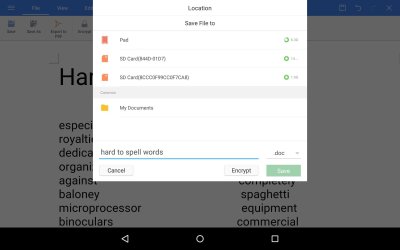
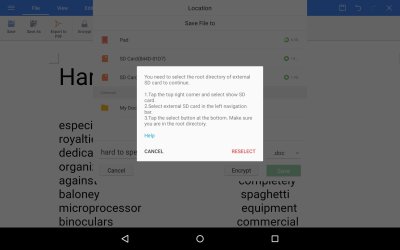
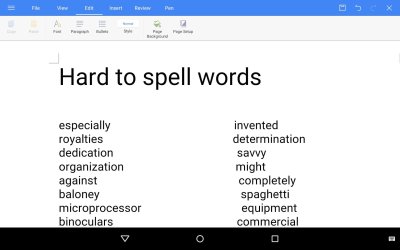
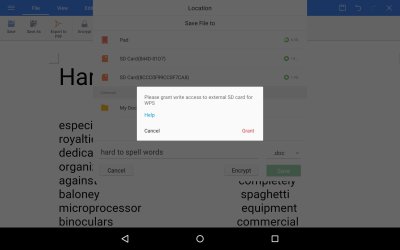
I got the type C micro to regular cell phone adapter for the ZTE K90U tablet. I can now read the file on the USB flash drive in the tablet. But I am having a problem with file save in the Android version of MS Word. I can't figure out how to save the file with "save as" after making changes to the file. The regular save doesn't work. When I use the "save as" button, well take a look at the screen captures. They are in order. Screen capture1 is the file. Screen capture2 is after I hit the "save as" button. Screen capture3 is asking for the ok to write to the file on the USB flash drive. Screen capture 4 is the reselect screen. And I keep going around and around and around. It is driving me nuts. I could use some help please.

Steve
 

Attachments

  • Screenshot1.jpg
    Screenshot1.jpg
    115.7 KB · Views: 3
  • Screenshot2.jpg
    Screenshot2.jpg
    91.5 KB · Views: 2
  • Screenshot3.jpg
    Screenshot3.jpg
    85.2 KB · Views: 2
  • Screenshot4.jpg
    Screenshot4.jpg
    99.6 KB · Views: 3

My Computer

Computer type
Laptop
Computer Manufacturer/Model Number
Dell Inspiron 3541
OS
windows 7 home 32 bit, I just changed back from 64 to 32bit
CPU
amc a6-6310, radon r4 graphics 1800mhz with 4 cores
Memory
6.8gb
Graphics Card(s)
not sure off hand
Sound Card
not shure off hand
Monitor(s) Displays
built in lcd
Screen Resolution
1366 x 768
Hard Drives
1 500gb sata internal HDD and 1 250 gb's sata HDD in a USB external USB case.
Keyboard
Wifi with attached wifi mouse
Internet Speed
don't know
Antivirus
Zone Alarm
Browser
Firefox
Other Info
The gateway laptop model MD2614U died because a voltage regulator on the motherboard went poof. The Gateway laptop has been scraped.
Back
Top