BitLocker Drive Encryption - Internal Data Hard Drives - Turn On or Off

BitLocker Drive Encryption - Internal Data Hard Drives - Turn On or Off

How to Turn On or Off BitLocker for Internal Data Hard Drives in Windows 7


   Information
This will show you how to turn Windows 7 BitLocker Drive Encryption on or off for internal hard drives or partitions without a operating system installed on them. When BitLocker Drive Encryption is turned on for the selected internal data hard drive or partition, you will be required to either use a smart card or enter a password to unlock the drive before allowed access to it.

   Note
When you add new files to the Windows 7 or other operating system drive or partition that is encrypted with BitLocker, BitLocker will encrypt them automatically. Files remain encrypted only while they are stored on the encrypted drive. Files will be decrypted if they are copied on another drive, partition, or computer. You can log on and work with your files normally, but BitLocker can help block hackers from accessing the system files they rely on to discover your password, or from accessing your drive by removing it from your computer and installing it in a different computer.

   Warning
BitLocker is only available in the Windows 7 Ultimate and Enterprise editions.


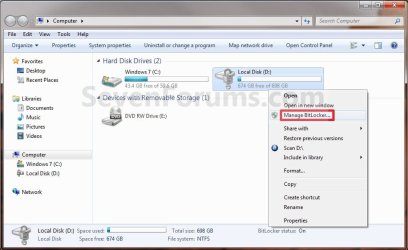
EXAMPLE: A Internal Data (non-OS) Hard Drive with BitLocker turned on for it
NOTE: This is what you will see when you attempt to open or access the encrypted internal data hard drive or partition after you have logged off or restarted the computer. You will then need to enter your password to unlock the drive to gain access.
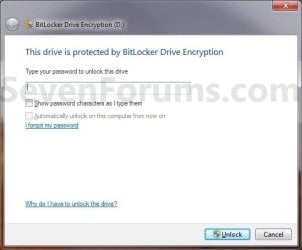
Example_Password.jpg
EXAMPLE: A Internal Data (non-OS) Hard Drive Locked and Unlocked by BitLocker
NOTE: When you have BitLocker Drive Encryption turned on, then this is how you can tell if the drive is currently locked or unlocked in the Computer window.
Example_Locked.jpg

Example_Unlocked.jpg


OPTION ONE

Turn On BitLocker and Encrypt a Internal Drive


1. Decide if you want 128-bit or 256-bit encryption.
NOTE: By default, Windows 7 will use AES encryption with 128-bit encryption keys and Diffuser unless changed already by you previously.

2. Open the Start menu and click on the Computer button, then right click on the non operating system internal drive or partition letter that you want to encrypt with BitLocker and click on Turn on BitLocker. (See screenshot below)
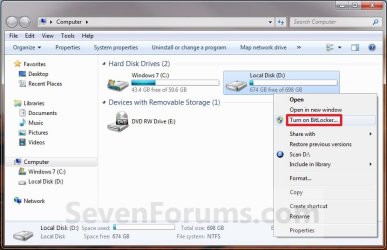
Computer1.jpg

A) Go to step 5.
OR

4. Open the Control Panel (All Items view), and click on the BitLocker Drive Encryption icon.
A) Click on Turn On BitLocker for non operating system internal drive or partition letter that you want to encrypt with BitLocker. (See screenshot below)
Step1.jpg
5. Select a option, say (check) Use a password to unlock the drive, then type in a password that is at least 8 numbers and/or letters long that you would like to use to unlock the drive with twice, and click on the Next button. (See screenshot below)
WARNING: Be sure to write down this password and keep it somewhere safe. The password you enter here will be required to be entered to unlock the drive to gain access to it.
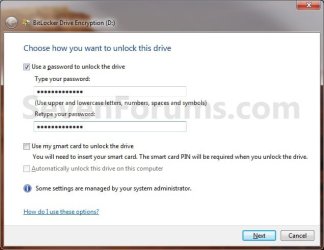
Step2.jpg
   Note
Password
A password is a string of characters used to access information or a computer. For more information about passwords, see Tips for creating strong passwords and passphrases.

  • You can use a password to unlock fixed data drives (such as internal hard drives) and removable data drives (such as external hard drives and USB flash drives).
  • Passwords allow you to use your encrypted drive on both home and work computers or share the drive with other people.
  • The BitLocker To Go Reader allows you to unlock encrypted drives on computers running Windows Vista or Windows XP. To use the BitLocker To Go Reader, the drive must be formatted using the FAT file system and you must use a password to encrypt the drive.
  • You can change your password in the BitLocker Drive Encryption Control Panel.
Smart card
A smart card is a small plastic card containing a computer chip. Smart cards are generally issued by information technology (IT) departments in large companies. To use a smart card, you also need a smart card reader—a device that’s installed in or connected to your computer and can read the information stored on a smart card.

  • Smart cards are used primarily in work environments.
  • You will be required to use a BitLocker certificate that is provided by your system administrator. If you have multiple certificates, you might have to choose one.
  • Smart cards cannot be used with the BitLocker To Go Reader, which allows you to unlock drives on computers running Windows Vista or Windows XP.
  • To unlock the drive, you will insert your smart card and type your smart card PIN.
NOTE: When encrypting a drive using a smart card, a certificate-based protector will be created on the drive. This protector contains some unencrypted information that is required to unlock the drive. In the specific case where a certificate-based protector is used, the public key and certificate thumbprint of the certificate that was used to encrypt the drive will be stored unencrypted in the protector’s metadata. This information could be used to locate the certification authority (CA) that was originally used to generate the certificate and then try to extract some personal information.

Automatically unlock

When you encrypt fixed data drives, you can choose to have the drive automatically unlock when you log on to Windows.
  • Removable data drives can be set to automatically unlock after they are encrypted by right-clicking the drive in the Computer folder, and then clicking Manage BitLocker.
NOTE: To be able to automatically unlock fixed data drives, the drive that Windows is installed on must also be encrypted by BitLocker.


6. Click on Save the recovery key to file option. (See screenshot below)
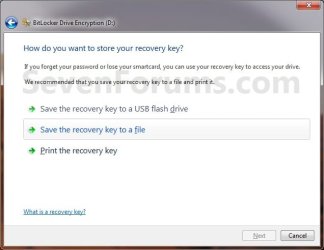
Step3.jpg

A) Select where you want to save this file at, and click on the Save button. (See screenshot below)
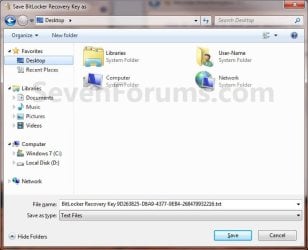
Step4.jpg
B) If prompted, click on Yes. (See screenshot below)
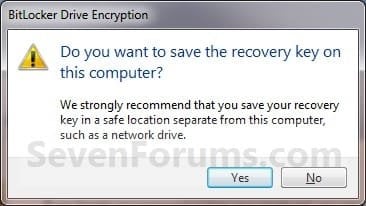
Step5.jpg
C) It is highly recommended that you save this file somewhere safe, and not on the encrypted drive. You will need the "BitLocker recovery key" number (bottom number in screenshot below) to gain access to you encrypted drive if you should forget the password, lose the smart card, or BitLocker locks the drive.
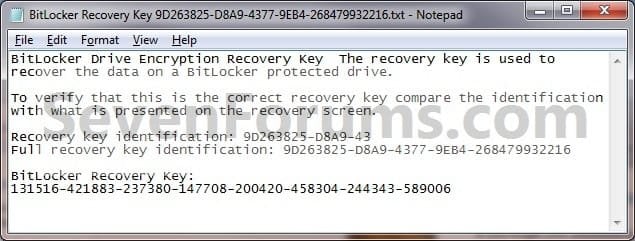
Step6.jpg
D) It is also recommended that you click on the Print the recovery key option as well to have a printed hard copy of the file to be extra safe. (See screenshot below step 6)

E) When done, click on the Next button. (See screenshot below step 6)
7. Click on the Start Encrypting button. (See screenshot below)
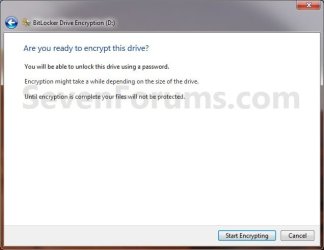
Step7.jpg
8. BitLocker will now start encrypting the drive. (See screenshot below)
NOTE: This may take a while to finish.
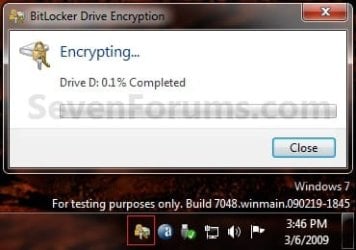
Step8.jpg
9. When it is finished, click on the Close button. (See screenshot below)
Step9.jpg
10. You will now have a Manage BitLocker option in the Control Panel and Computer for the encrypted drive. (See screenshots below)
Step10A.jpg

Step10B.jpg

11. If you click on Manage BitLocker, these will be the options that you will have below. (See screenshot below)
Step11.jpg
12. You're done. The internal data drive or partition is now encrypted with BitLocker (turned on).


OPTION TWO

Turn Off BitLocker and Decrypt a Internal Drive


NOTE: If you do not care about losing all data on the drive/partition, then formating or using the clean command will allso turn off BitLocker for the drive/partition.
1. Open the Control Panel (icons view), and click on the BitLocker Drive Encryption icon.

2. Click on Turn Off BitLocker for the non operating system internal drive or partition letter that you want to turn off BitLocker with. (See screenshot below)
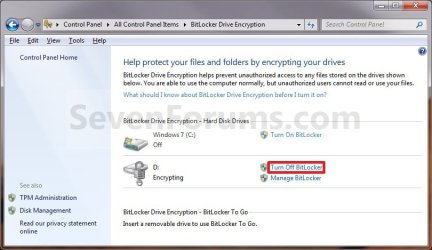
Off-1.jpg
3. Click on the Decrypt Drive button. (See screenshot below)
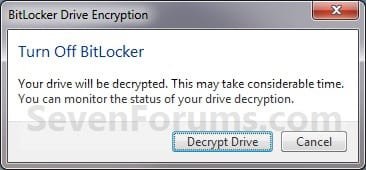
Off-2.jpg
4. BitLocker will now start decrypting the drive. Click on the BitLocker icon in the taskbar notification area (far right) to see the encryption status. (See screenshot below)
NOTE: This may take a while to finish.
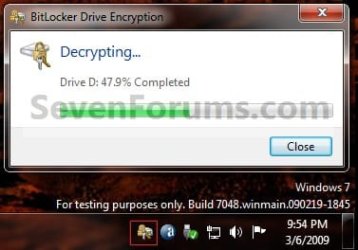
Off-3.jpg
5. When finished, click on the Close button. (See screenshot below)
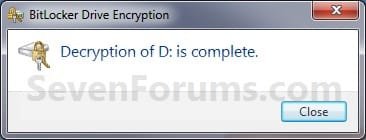
Off-4.jpg
6. The Control Panel and Computer will now have the Turn On BitLocker option again for the selected drive.
Step1.jpg

Computer1.jpg

7. You're done. The internal data drive or partition is now decrypted by BitLocker (turned off).
That's it,
Shawn


Last edited:
guys, what does it mean when my internal sata drive (non OS) doesn't show up in Bitlocker page in Control panel? I don't have the option either when I right-click on the drive on the explorer...

thanks
 

My Computer My Computer

At a glance

Windwos 7 Ultimate 64bitsIntel Q9650 3ghzCorsair 4GB DDR IInVidia Geforce 8500 GT
OS
Windwos 7 Ultimate 64bits
CPU
Intel Q9650 3ghz
Motherboard
Asus P7N5 Premium
Memory
Corsair 4GB DDR II
Graphics Card(s)
nVidia Geforce 8500 GT
Sound Card
5.1
Monitor(s) Displays
BenQ 24"
Screen Resolution
1920x1200
Hard Drives
500GB Sata II (Main) / 2TB Sata II / 1TB WD USB 2
PSU
Cute 700w
Case
cheap one
Cooling
Ventirad Akasa Venom (CPU Fan)
Keyboard
Logitech K800
Mouse
Logitech Mx Performance
Internet Speed
D: 50Mb / U: 5Mb
Hello Tierix, and welcome to Seven Forums.

Sorry for the late reply.

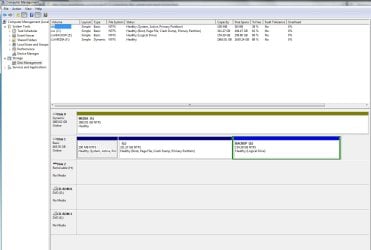
Could you post a screenshot of your Disk Management (diskmgmt.msc) window showing all of your drive's layout? This may be able to help ID what the problem may be.

If this is a dynamic disk, then that would be one reason.
 

My Computer My Computer

At a glance

64-bit Windows 11 Pro for WorkstationsIntel i7-8700K OC'd to 5 GHz64 GB (4x16GB) G.SKILL TridentZ RGB DDR4 3600...ASUS ROG-STRIX-GTX1080TI-O11G-GAMING
Computer type
PC/Desktop
Computer Manufacturer/Model Number
Self built custom
OS
64-bit Windows 11 Pro for Workstations
CPU
Intel i7-8700K OC'd to 5 GHz
Motherboard
ASUS ROG Maximus XI Formula Z390
Memory
64 GB (4x16GB) G.SKILL TridentZ RGB DDR4 3600 MHz
Graphics Card(s)
ASUS ROG-STRIX-GTX1080TI-O11G-GAMING
Sound Card
Integrated
Monitor(s) Displays
2 x Samsung Odyssey G7 27"
Screen Resolution
2560x1440
Hard Drives
1TB Samsung 990 PRO M.2,
4TB Samsung 990 PRO PRO M.2,
TerraMaster F8 SSD Plus NAS
PSU
Seasonic Prime Titanium 850W
Case
Thermaltake Core P3
Cooling
Corsair Hydro H115i
Keyboard
Logitech wireless K800
Mouse
Logitech MX Master 4
Internet Speed
2 Gb/s Download and 100 Mb/s Upload
Antivirus
Malwarebyte Anti-Malware Premium
Browser
Google Chrome
Other Info
Logitech Z625 speaker system,
Logitech BRIO 4K Pro webcam,
HP Color LaserJet Pro MFP M477fdn,
APC SMART-UPS RT 1000 XL - SURT1000XLI,
Galaxy S23 Plus phone
HI

Thanks a lot for your reply. Screenshot attached. Yes it is a Dynamic disk (DRIVE F). Why Dynamic disks can't be bitlocked?
Also, please, how do I change it to whatever it should be?

thanks
 

Attachments

  • Untitled.jpg
    Untitled.jpg
    91.7 KB · Views: 565

My Computer My Computer

At a glance

Windwos 7 Ultimate 64bitsIntel Q9650 3ghzCorsair 4GB DDR IInVidia Geforce 8500 GT
OS
Windwos 7 Ultimate 64bits
CPU
Intel Q9650 3ghz
Motherboard
Asus P7N5 Premium
Memory
Corsair 4GB DDR II
Graphics Card(s)
nVidia Geforce 8500 GT
Sound Card
5.1
Monitor(s) Displays
BenQ 24"
Screen Resolution
1920x1200
Hard Drives
500GB Sata II (Main) / 2TB Sata II / 1TB WD USB 2
PSU
Cute 700w
Case
cheap one
Cooling
Ventirad Akasa Venom (CPU Fan)
Keyboard
Logitech K800
Mouse
Logitech Mx Performance
Internet Speed
D: 50Mb / U: 5Mb
Tierix,

Yes, it will need to be a Basic disk instead of a Dynamic disk to be able to use BitLocker on it.

You could use OPTION FOUR in the tutorial below to convert F: (Disk 0 ) back to a Basic disk without losing the data on it. Be sure to backup the data on F: to another location before continuing just to be extra safe though.

http://www.sevenforums.com/tutorials/26829-convert-dynamic-disk-basic-disk.html

Hope this helps. :)
 

My Computer My Computer

At a glance

64-bit Windows 11 Pro for WorkstationsIntel i7-8700K OC'd to 5 GHz64 GB (4x16GB) G.SKILL TridentZ RGB DDR4 3600...ASUS ROG-STRIX-GTX1080TI-O11G-GAMING
Computer type
PC/Desktop
Computer Manufacturer/Model Number
Self built custom
OS
64-bit Windows 11 Pro for Workstations
CPU
Intel i7-8700K OC'd to 5 GHz
Motherboard
ASUS ROG Maximus XI Formula Z390
Memory
64 GB (4x16GB) G.SKILL TridentZ RGB DDR4 3600 MHz
Graphics Card(s)
ASUS ROG-STRIX-GTX1080TI-O11G-GAMING
Sound Card
Integrated
Monitor(s) Displays
2 x Samsung Odyssey G7 27"
Screen Resolution
2560x1440
Hard Drives
1TB Samsung 990 PRO M.2,
4TB Samsung 990 PRO PRO M.2,
TerraMaster F8 SSD Plus NAS
PSU
Seasonic Prime Titanium 850W
Case
Thermaltake Core P3
Cooling
Corsair Hydro H115i
Keyboard
Logitech wireless K800
Mouse
Logitech MX Master 4
Internet Speed
2 Gb/s Download and 100 Mb/s Upload
Antivirus
Malwarebyte Anti-Malware Premium
Browser
Google Chrome
Other Info
Logitech Z625 speaker system,
Logitech BRIO 4K Pro webcam,
HP Color LaserJet Pro MFP M477fdn,
APC SMART-UPS RT 1000 XL - SURT1000XLI,
Galaxy S23 Plus phone
ok i'll try that. I'll have to do it in a few days though, I'm in the process of backing up the whole drive to an online service and I feel like I defo should do it before trying this!

thanks again
 

My Computer My Computer

At a glance

Windwos 7 Ultimate 64bitsIntel Q9650 3ghzCorsair 4GB DDR IInVidia Geforce 8500 GT
OS
Windwos 7 Ultimate 64bits
CPU
Intel Q9650 3ghz
Motherboard
Asus P7N5 Premium
Memory
Corsair 4GB DDR II
Graphics Card(s)
nVidia Geforce 8500 GT
Sound Card
5.1
Monitor(s) Displays
BenQ 24"
Screen Resolution
1920x1200
Hard Drives
500GB Sata II (Main) / 2TB Sata II / 1TB WD USB 2
PSU
Cute 700w
Case
cheap one
Cooling
Ventirad Akasa Venom (CPU Fan)
Keyboard
Logitech K800
Mouse
Logitech Mx Performance
Internet Speed
D: 50Mb / U: 5Mb
You're welcome Tierix. Please let us know how it went. :)
 

My Computer My Computer

At a glance

64-bit Windows 11 Pro for WorkstationsIntel i7-8700K OC'd to 5 GHz64 GB (4x16GB) G.SKILL TridentZ RGB DDR4 3600...ASUS ROG-STRIX-GTX1080TI-O11G-GAMING
Computer type
PC/Desktop
Computer Manufacturer/Model Number
Self built custom
OS
64-bit Windows 11 Pro for Workstations
CPU
Intel i7-8700K OC'd to 5 GHz
Motherboard
ASUS ROG Maximus XI Formula Z390
Memory
64 GB (4x16GB) G.SKILL TridentZ RGB DDR4 3600 MHz
Graphics Card(s)
ASUS ROG-STRIX-GTX1080TI-O11G-GAMING
Sound Card
Integrated
Monitor(s) Displays
2 x Samsung Odyssey G7 27"
Screen Resolution
2560x1440
Hard Drives
1TB Samsung 990 PRO M.2,
4TB Samsung 990 PRO PRO M.2,
TerraMaster F8 SSD Plus NAS
PSU
Seasonic Prime Titanium 850W
Case
Thermaltake Core P3
Cooling
Corsair Hydro H115i
Keyboard
Logitech wireless K800
Mouse
Logitech MX Master 4
Internet Speed
2 Gb/s Download and 100 Mb/s Upload
Antivirus
Malwarebyte Anti-Malware Premium
Browser
Google Chrome
Other Info
Logitech Z625 speaker system,
Logitech BRIO 4K Pro webcam,
HP Color LaserJet Pro MFP M477fdn,
APC SMART-UPS RT 1000 XL - SURT1000XLI,
Galaxy S23 Plus phone
The problem I have is that I've got a 2TB Fantom external drive that when I purchased it I was running Windows 7 Ultimate so I used Bit Locker and encrypted the drive. No big deal I thought, I've got the key on a USB stick and all - PC died and the new one came with Windows 7 Professional - eeks! I can still access my files but have to type in a password every time I power on the external drive as it's primary use is for backup's. Is there anyway possible to remove the encryption from this external HDD? I would suspect if I backup the data to a different drive and delete the partition, recreate a new one and format it the Bit Locker encryption would be gone then? Lot a work as there is 1.5TB of data on this drive:rolleyes: There has to be an easier way to simply decrypt a drive??
 

My Computer My Computer

At a glance

Windows 7 Professional 64 bitIntel Core i3-3240 CPU @ 3.40 GHz, 2 Cores 4 ...6GBAMD Radeon HD 6350, 512MB
Computer type
PC/Desktop
Computer Manufacturer/Model Number
HP
OS
Windows 7 Professional 64 bit
CPU
Intel Core i3-3240 CPU @ 3.40 GHz, 2 Cores 4 logical process
Motherboard
x64-based PC by Hewlett-Packard
Memory
6GB
Graphics Card(s)
AMD Radeon HD 6350, 512MB
Hard Drives
C:\ - Western Digital WDC1002FAEX 1TB/7200RPM Boot Drive.
D:\ - Seagate ST4000DM000 4TB/7200RPM Secondary Storage Drive.
E:\ - HP DVD/RW SW820
F:\ - ATAPI iHAS 124 DVD/RW
Antivirus
Norton Security Suite
Browser
I. E. 11.0.4 (KB2925418) Product ID: 00150-20000-00003-AA459
Found the solution here on Sevenforums:

Use this command in elevated command prompt
manage-bde
this will pull up drive encryption options via command prompt
to decrypt a drive just type in
manage-bde -off C:
replacing C: with whatever your decrypted drive is.
command prompt reports back Decryption is now in progress
It's a 2TB drive and had been reporting Bit Locker Status: Decrypting for the last 30 minutes now so it might take a while, my only concern will be are my files going to still be there and in tact?
 

My Computer My Computer

At a glance

Windows 7 Professional 64 bitIntel Core i3-3240 CPU @ 3.40 GHz, 2 Cores 4 ...6GBAMD Radeon HD 6350, 512MB
Computer type
PC/Desktop
Computer Manufacturer/Model Number
HP
OS
Windows 7 Professional 64 bit
CPU
Intel Core i3-3240 CPU @ 3.40 GHz, 2 Cores 4 logical process
Motherboard
x64-based PC by Hewlett-Packard
Memory
6GB
Graphics Card(s)
AMD Radeon HD 6350, 512MB
Hard Drives
C:\ - Western Digital WDC1002FAEX 1TB/7200RPM Boot Drive.
D:\ - Seagate ST4000DM000 4TB/7200RPM Secondary Storage Drive.
E:\ - HP DVD/RW SW820
F:\ - ATAPI iHAS 124 DVD/RW
Antivirus
Norton Security Suite
Browser
I. E. 11.0.4 (KB2925418) Product ID: 00150-20000-00003-AA459
Great news luvwknd, and welcome to Seven Forums.

Yes, your files should be fine afterwards since it's only decrypting the hard drive. :)
 

My Computer My Computer

At a glance

64-bit Windows 11 Pro for WorkstationsIntel i7-8700K OC'd to 5 GHz64 GB (4x16GB) G.SKILL TridentZ RGB DDR4 3600...ASUS ROG-STRIX-GTX1080TI-O11G-GAMING
Computer type
PC/Desktop
Computer Manufacturer/Model Number
Self built custom
OS
64-bit Windows 11 Pro for Workstations
CPU
Intel i7-8700K OC'd to 5 GHz
Motherboard
ASUS ROG Maximus XI Formula Z390
Memory
64 GB (4x16GB) G.SKILL TridentZ RGB DDR4 3600 MHz
Graphics Card(s)
ASUS ROG-STRIX-GTX1080TI-O11G-GAMING
Sound Card
Integrated
Monitor(s) Displays
2 x Samsung Odyssey G7 27"
Screen Resolution
2560x1440
Hard Drives
1TB Samsung 990 PRO M.2,
4TB Samsung 990 PRO PRO M.2,
TerraMaster F8 SSD Plus NAS
PSU
Seasonic Prime Titanium 850W
Case
Thermaltake Core P3
Cooling
Corsair Hydro H115i
Keyboard
Logitech wireless K800
Mouse
Logitech MX Master 4
Internet Speed
2 Gb/s Download and 100 Mb/s Upload
Antivirus
Malwarebyte Anti-Malware Premium
Browser
Google Chrome
Other Info
Logitech Z625 speaker system,
Logitech BRIO 4K Pro webcam,
HP Color LaserJet Pro MFP M477fdn,
APC SMART-UPS RT 1000 XL - SURT1000XLI,
Galaxy S23 Plus phone
Great news luvwknd, and welcome to Seven Forums.

Yes, your files should be fine afterwards since it's only decrypting the hard drive. :)

Is the decryption process going to take longer since there is 1.5TB of data on a 2TB HD as compared to a blank encrypted 2TB HD?

Reason I am asking is because I started the decryption process yesterday about this same time and the HD is still reporting Bit Locker Status: Decrypting and when I click on the drive itself it reports 5.99GB free of 1.81TB and I know for a fact that there was plenty of more available space on that drive than 5.99GB.

Any ideas?

TIA
 

My Computer My Computer

At a glance

Windows 7 Professional 64 bitIntel Core i3-3240 CPU @ 3.40 GHz, 2 Cores 4 ...6GBAMD Radeon HD 6350, 512MB
Computer type
PC/Desktop
Computer Manufacturer/Model Number
HP
OS
Windows 7 Professional 64 bit
CPU
Intel Core i3-3240 CPU @ 3.40 GHz, 2 Cores 4 logical process
Motherboard
x64-based PC by Hewlett-Packard
Memory
6GB
Graphics Card(s)
AMD Radeon HD 6350, 512MB
Hard Drives
C:\ - Western Digital WDC1002FAEX 1TB/7200RPM Boot Drive.
D:\ - Seagate ST4000DM000 4TB/7200RPM Secondary Storage Drive.
E:\ - HP DVD/RW SW820
F:\ - ATAPI iHAS 124 DVD/RW
Antivirus
Norton Security Suite
Browser
I. E. 11.0.4 (KB2925418) Product ID: 00150-20000-00003-AA459
It can take a while with that much data and size of HDD.

If you like, you can use the method in the tutorial below to check the status of BitLocker for the "Percentage Decrypted". It'll at least let you know how much more is left.

BitLocker Status - Check for Drive in Windows
 

My Computer My Computer

At a glance

64-bit Windows 11 Pro for WorkstationsIntel i7-8700K OC'd to 5 GHz64 GB (4x16GB) G.SKILL TridentZ RGB DDR4 3600...ASUS ROG-STRIX-GTX1080TI-O11G-GAMING
Computer type
PC/Desktop
Computer Manufacturer/Model Number
Self built custom
OS
64-bit Windows 11 Pro for Workstations
CPU
Intel i7-8700K OC'd to 5 GHz
Motherboard
ASUS ROG Maximus XI Formula Z390
Memory
64 GB (4x16GB) G.SKILL TridentZ RGB DDR4 3600 MHz
Graphics Card(s)
ASUS ROG-STRIX-GTX1080TI-O11G-GAMING
Sound Card
Integrated
Monitor(s) Displays
2 x Samsung Odyssey G7 27"
Screen Resolution
2560x1440
Hard Drives
1TB Samsung 990 PRO M.2,
4TB Samsung 990 PRO PRO M.2,
TerraMaster F8 SSD Plus NAS
PSU
Seasonic Prime Titanium 850W
Case
Thermaltake Core P3
Cooling
Corsair Hydro H115i
Keyboard
Logitech wireless K800
Mouse
Logitech MX Master 4
Internet Speed
2 Gb/s Download and 100 Mb/s Upload
Antivirus
Malwarebyte Anti-Malware Premium
Browser
Google Chrome
Other Info
Logitech Z625 speaker system,
Logitech BRIO 4K Pro webcam,
HP Color LaserJet Pro MFP M477fdn,
APC SMART-UPS RT 1000 XL - SURT1000XLI,
Galaxy S23 Plus phone
Hi Brink,
my company is rolling out bitlocker in the next days. I am fine with BL on C: (SSD) but not with D: (internal HDD), as I have my private data on it. They will use the built in TPM. I have admin rights on my machine.

How can I prevent D: from beeing encrypted ?
 

My Computer My Computer

At a glance

win7_home_64i56GBHD6770
Computer Manufacturer/Model Number
hp-DV7 Notebook
OS
win7_home_64
CPU
i5
Motherboard
hp
Memory
6GB
Graphics Card(s)
HD6770
Hello 5ggggg, :)

It may be best to use an external drive to keep your private data on instead. This way you won't have to worry about the company policy encrypting your data drive.

Encrypting the data drive won't be bad though. It'll actually help make it more secure. Since they will be using the TPM to unlock the drive with, you shouldn't notice any difference in accessing it.
 

My Computer My Computer

At a glance

64-bit Windows 11 Pro for WorkstationsIntel i7-8700K OC'd to 5 GHz64 GB (4x16GB) G.SKILL TridentZ RGB DDR4 3600...ASUS ROG-STRIX-GTX1080TI-O11G-GAMING
Computer type
PC/Desktop
Computer Manufacturer/Model Number
Self built custom
OS
64-bit Windows 11 Pro for Workstations
CPU
Intel i7-8700K OC'd to 5 GHz
Motherboard
ASUS ROG Maximus XI Formula Z390
Memory
64 GB (4x16GB) G.SKILL TridentZ RGB DDR4 3600 MHz
Graphics Card(s)
ASUS ROG-STRIX-GTX1080TI-O11G-GAMING
Sound Card
Integrated
Monitor(s) Displays
2 x Samsung Odyssey G7 27"
Screen Resolution
2560x1440
Hard Drives
1TB Samsung 990 PRO M.2,
4TB Samsung 990 PRO PRO M.2,
TerraMaster F8 SSD Plus NAS
PSU
Seasonic Prime Titanium 850W
Case
Thermaltake Core P3
Cooling
Corsair Hydro H115i
Keyboard
Logitech wireless K800
Mouse
Logitech MX Master 4
Internet Speed
2 Gb/s Download and 100 Mb/s Upload
Antivirus
Malwarebyte Anti-Malware Premium
Browser
Google Chrome
Other Info
Logitech Z625 speaker system,
Logitech BRIO 4K Pro webcam,
HP Color LaserJet Pro MFP M477fdn,
APC SMART-UPS RT 1000 XL - SURT1000XLI,
Galaxy S23 Plus phone
THX for reply. Always carrying the ext. drive is no fun. I thought there could be a reg. key for a policy to exclude certain drives ?
 

My Computer My Computer

At a glance

win7_home_64i56GBHD6770
Computer Manufacturer/Model Number
hp-DV7 Notebook
OS
win7_home_64
CPU
i5
Motherboard
hp
Memory
6GB
Graphics Card(s)
HD6770
If they are only encrypting the OS drive, then the other drive shouldn't be affected unless they separately encrypt it as well.
 

My Computer My Computer

At a glance

64-bit Windows 11 Pro for WorkstationsIntel i7-8700K OC'd to 5 GHz64 GB (4x16GB) G.SKILL TridentZ RGB DDR4 3600...ASUS ROG-STRIX-GTX1080TI-O11G-GAMING
Computer type
PC/Desktop
Computer Manufacturer/Model Number
Self built custom
OS
64-bit Windows 11 Pro for Workstations
CPU
Intel i7-8700K OC'd to 5 GHz
Motherboard
ASUS ROG Maximus XI Formula Z390
Memory
64 GB (4x16GB) G.SKILL TridentZ RGB DDR4 3600 MHz
Graphics Card(s)
ASUS ROG-STRIX-GTX1080TI-O11G-GAMING
Sound Card
Integrated
Monitor(s) Displays
2 x Samsung Odyssey G7 27"
Screen Resolution
2560x1440
Hard Drives
1TB Samsung 990 PRO M.2,
4TB Samsung 990 PRO PRO M.2,
TerraMaster F8 SSD Plus NAS
PSU
Seasonic Prime Titanium 850W
Case
Thermaltake Core P3
Cooling
Corsair Hydro H115i
Keyboard
Logitech wireless K800
Mouse
Logitech MX Master 4
Internet Speed
2 Gb/s Download and 100 Mb/s Upload
Antivirus
Malwarebyte Anti-Malware Premium
Browser
Google Chrome
Other Info
Logitech Z625 speaker system,
Logitech BRIO 4K Pro webcam,
HP Color LaserJet Pro MFP M477fdn,
APC SMART-UPS RT 1000 XL - SURT1000XLI,
Galaxy S23 Plus phone
They said that all internal drives will be encrypted ... can you tell a good place to read about the policies regarding BL and its options
 

My Computer My Computer

At a glance

win7_home_64i56GBHD6770
Computer Manufacturer/Model Number
hp-DV7 Notebook
OS
win7_home_64
CPU
i5
Motherboard
hp
Memory
6GB
Graphics Card(s)
HD6770
The only problem is that if it's a company domain you are joined to, they'll just override any local policies you have set.

One option would be to keep the internal drive as usual with your personal data, but keep an updated backup copy on an external drive.

What fears do you have about the internal drive being encrypted? Maybe I can help with it.
 

My Computer My Computer

At a glance

64-bit Windows 11 Pro for WorkstationsIntel i7-8700K OC'd to 5 GHz64 GB (4x16GB) G.SKILL TridentZ RGB DDR4 3600...ASUS ROG-STRIX-GTX1080TI-O11G-GAMING
Computer type
PC/Desktop
Computer Manufacturer/Model Number
Self built custom
OS
64-bit Windows 11 Pro for Workstations
CPU
Intel i7-8700K OC'd to 5 GHz
Motherboard
ASUS ROG Maximus XI Formula Z390
Memory
64 GB (4x16GB) G.SKILL TridentZ RGB DDR4 3600 MHz
Graphics Card(s)
ASUS ROG-STRIX-GTX1080TI-O11G-GAMING
Sound Card
Integrated
Monitor(s) Displays
2 x Samsung Odyssey G7 27"
Screen Resolution
2560x1440
Hard Drives
1TB Samsung 990 PRO M.2,
4TB Samsung 990 PRO PRO M.2,
TerraMaster F8 SSD Plus NAS
PSU
Seasonic Prime Titanium 850W
Case
Thermaltake Core P3
Cooling
Corsair Hydro H115i
Keyboard
Logitech wireless K800
Mouse
Logitech MX Master 4
Internet Speed
2 Gb/s Download and 100 Mb/s Upload
Antivirus
Malwarebyte Anti-Malware Premium
Browser
Google Chrome
Other Info
Logitech Z625 speaker system,
Logitech BRIO 4K Pro webcam,
HP Color LaserJet Pro MFP M477fdn,
APC SMART-UPS RT 1000 XL - SURT1000XLI,
Galaxy S23 Plus phone
Back
Top