Bitlocker - Lock an Unlocked Drive

How to Lock an Unlocked BitLocker Drive


Currently, if you unlock a drive that has been locked with Bitlocker, you will need to either restart explorer.exe or reboot your PC. Neither of these appeal to me so I found a way of adding "Lock" to the context menu menu which, when clicked, re-locks the drive.

   Warning
Involves editing the registry. Proceed with care if new to registry editing and back up your registry before hand


Here's How:
1. Open Notepad and paste this below in it.
NOTE: Replace x: with the drive letter you wish to apply it to.
manage-bde -lock x: -ForceDismount
2. Save the file as lock.bat to your desktop, then move it into your C:\Windows folder.

3. Open regedit and navigate to: HKEY_CLASSES_ROOT\Drive\shell

4. In the left pane of regedit, right click on shell, click on New and Key, type runas, and press enter.
NOTE: This key may already exist with the value of TakeOwnership. If it does, name the new key runas(2) instead.

5. In the right pane of runas or runas(2), double click on (default) to modify, type in Lock and click on OK.

6. In the left pane of regedit, right click on runas or runas(2), click on New and Key, type command and press enter.

7. In the right pane of command, double click on (default) to modify, type in C:\Windows\lock.bat and click on OK.

8. In the right pane of runas or runas(2), click on a empty space and click on New and String Value, type in AppliesTo and press enter.

9. Double click on AppliesTo to modify, type in X: and click on OK.
NOTE: Replace X: with the same drive location as you did in step 1.

10. Close regedit.
Now, when you right click the drive, you'll see "Lock". Clicking this will re-lock your drive.

Micrsoft needs to fix this IMO but this is an excellent work around. Props to "Jonathon" for coming up with the original method.


Last edited by a moderator:
unable to copy lock.bat into c:\windows

As per your suggestion, I tried to copy the notepad named lock.bat into c:\windows folder but the permission is denied even after logging in as admin.help me..,,
 

My Computer My Computer

OS
windows 7 ultimate x32
Hello Hackerboyessar, and welcome to Seven Forums.

Tutorial updated.

Save the file as lock.bat to your desktop, then move it into your C:\Windows folder.

Hope this helps,
Shawn
 

My Computer My Computer

Computer type
PC/Desktop
Computer Manufacturer/Model Number
Self built custom
OS
64-bit Windows 11 Pro for Workstations
CPU
Intel i7-8700K OC'd to 5 GHz
Motherboard
ASUS ROG Maximus XI Formula Z390
Memory
64 GB (4x16GB) G.SKILL TridentZ RGB DDR4 3600 MHz
Graphics Card(s)
ASUS ROG-STRIX-GTX1080TI-O11G-GAMING
Sound Card
Integrated
Monitor(s) Displays
2 x Samsung Odyssey G7 27"
Screen Resolution
2560x1440
Hard Drives
1TB Samsung 990 PRO M.2,
4TB Samsung 990 PRO PRO M.2,
TerraMaster F8 SSD Plus NAS
PSU
Seasonic Prime Titanium 850W
Case
Thermaltake Core P3
Cooling
Corsair Hydro H115i
Keyboard
Logitech wireless K800
Mouse
Logitech MX Master 4
Internet Speed
2 Gb/s Download and 100 Mb/s Upload
Antivirus
Malwarebyte Anti-Malware Premium
Browser
Google Chrome
Other Info
Logitech Z625 speaker system,
Logitech BRIO 4K Pro webcam,
HP Color LaserJet Pro MFP M477fdn,
APC SMART-UPS RT 1000 XL - SURT1000XLI,
Galaxy S23 Plus phone
sir.,
Thanks for the concern.But even after doing all these things "correctly" as per the given order, I am getting a msg '"Filename,directory name or volume label syntax is incorrect"....what to do?
 

My Computer My Computer

OS
windows 7 ultimate x32
Set known file extensions to be displayed, then double check to make sure that the lock.bat file name is name correctly and not something like lock.bat.txt instead.

Also make sure that the drive letter used in the command is correct for the drive.
 

My Computer My Computer

Computer type
PC/Desktop
Computer Manufacturer/Model Number
Self built custom
OS
64-bit Windows 11 Pro for Workstations
CPU
Intel i7-8700K OC'd to 5 GHz
Motherboard
ASUS ROG Maximus XI Formula Z390
Memory
64 GB (4x16GB) G.SKILL TridentZ RGB DDR4 3600 MHz
Graphics Card(s)
ASUS ROG-STRIX-GTX1080TI-O11G-GAMING
Sound Card
Integrated
Monitor(s) Displays
2 x Samsung Odyssey G7 27"
Screen Resolution
2560x1440
Hard Drives
1TB Samsung 990 PRO M.2,
4TB Samsung 990 PRO PRO M.2,
TerraMaster F8 SSD Plus NAS
PSU
Seasonic Prime Titanium 850W
Case
Thermaltake Core P3
Cooling
Corsair Hydro H115i
Keyboard
Logitech wireless K800
Mouse
Logitech MX Master 4
Internet Speed
2 Gb/s Download and 100 Mb/s Upload
Antivirus
Malwarebyte Anti-Malware Premium
Browser
Google Chrome
Other Info
Logitech Z625 speaker system,
Logitech BRIO 4K Pro webcam,
HP Color LaserJet Pro MFP M477fdn,
APC SMART-UPS RT 1000 XL - SURT1000XLI,
Galaxy S23 Plus phone
I'm following the same exact steps and i get the same error when i try to lock the drive "Filename,directory name or volume label syntax is incorrect"... i triend on my both PC's... :(
 

My Computer My Computer

Computer type
PC/Desktop
Computer Manufacturer/Model Number
Self Built
OS
Windows 10 Pro
CPU
Core i5 9600K
Motherboard
ASUS ROG Strix Z390-F Gaming
Memory
Corsair Vengeance Pro 2x 8GB (16GB) 3200MHz DDR4
Graphics Card(s)
MSI GTX 1070 Gaming X 8GB
Sound Card
ASRock A-Style Purity Sound
Monitor(s) Displays
ASUS VX239H IPS
Screen Resolution
1920x1080
Hard Drives
XPG SPECTRIX S40G 2566GB M.2 NVMe | Patriot P210 512GB SSD | Seagate BarraCuda 4TB 5400RPM
PSU
Thermaltake Smart 600w RGB 80Plus
Case
NZXT H500 with 3x Corsair HD120 RGB w/Node Pro
Cooling
Cryorig H7
Keyboard
Corsair K70 RapidFire RGB (Cherry MX Speed)
Mouse
Logitech G402 Hyperion Fury
Internet Speed
20MB Cable Broadband
Browser
Chrome
Other Info
Corsair MM300 Extended Anti-Fray Mouse Pad | Edifier C2 2.1ch Sound System | XBOX One S Controller | XBOX 360 Wireless Controller for Windows | APC SUA1000i Smart-UPS | PS4 Slim 500GB [Region 1 - USA]
hello

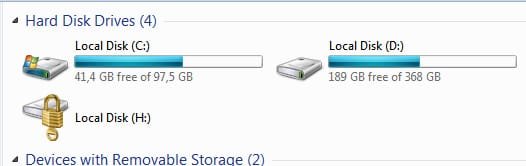
I know I'm new but I need quick help. does this work also on unlocking eksternal drive that has been locked with BitLocker?

I'm trying to unlock it with recovery key but I get error message every time. can somebody help or redirect me to topic that could help? thx
 

My Computer My Computer

Computer Manufacturer/Model Number
Dell Inspirion
OS
Windows 7 Ultimate 32bit
CPU
Intel Core i3 2.2Ghz
Hello Itachi, and welcome to Seven Forums.

What is the error message that you are getting?

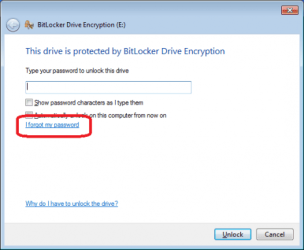
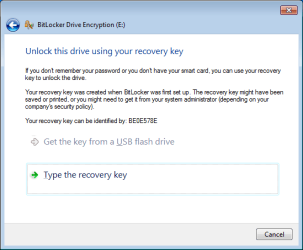
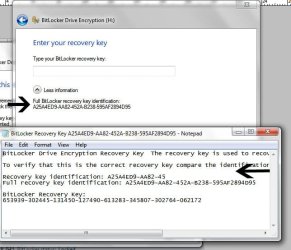
Did you click on the I forgot my password link to be able type in the Bitlocker recovery key as shown in it's .txt file?

image1.pngimage2.png


5212d1235856914-bitlocker-drive-encryption-bitlocker-go-turn-off-file.jpg
 

My Computer My Computer

Computer type
PC/Desktop
Computer Manufacturer/Model Number
Self built custom
OS
64-bit Windows 11 Pro for Workstations
CPU
Intel i7-8700K OC'd to 5 GHz
Motherboard
ASUS ROG Maximus XI Formula Z390
Memory
64 GB (4x16GB) G.SKILL TridentZ RGB DDR4 3600 MHz
Graphics Card(s)
ASUS ROG-STRIX-GTX1080TI-O11G-GAMING
Sound Card
Integrated
Monitor(s) Displays
2 x Samsung Odyssey G7 27"
Screen Resolution
2560x1440
Hard Drives
1TB Samsung 990 PRO M.2,
4TB Samsung 990 PRO PRO M.2,
TerraMaster F8 SSD Plus NAS
PSU
Seasonic Prime Titanium 850W
Case
Thermaltake Core P3
Cooling
Corsair Hydro H115i
Keyboard
Logitech wireless K800
Mouse
Logitech MX Master 4
Internet Speed
2 Gb/s Download and 100 Mb/s Upload
Antivirus
Malwarebyte Anti-Malware Premium
Browser
Google Chrome
Other Info
Logitech Z625 speaker system,
Logitech BRIO 4K Pro webcam,
HP Color LaserJet Pro MFP M477fdn,
APC SMART-UPS RT 1000 XL - SURT1000XLI,
Galaxy S23 Plus phone
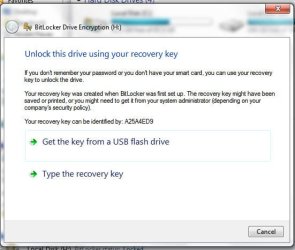
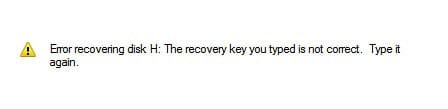
ok so this is the message I get ..

"Error recovering disk H: The recovery key you tipped is not correct.Type it again."

note that I already removed my password, started decrypting my external hard drive (took about 24 hours) and then at the end of unlocking, I guess because I wasn't there, I got message there is an error on drive please run disk check and there was some command but I clicked to close and did not wrote it down..

forgot to upload one more pic.. I am typing that number.. still got the same result

It put's dashes automatically..even if I try to put them nothing happens..

sry about that.. yeah I notice that also but he corrected me and send that one part was wrong.. the part where I put 9 instead of 0

I have a question.. this option that tw33k put here is for locking. so if I follow tutorial in my locked drive I should have option Unlock?
 

Attachments

  • Untitled-2.jpg
    Untitled-2.jpg
    25.9 KB · Views: 15,397
  • Untitled-3.jpg
    Untitled-3.jpg
    33.1 KB · Views: 15,372
  • Untitled-4.jpg
    Untitled-4.jpg
    50.6 KB · Views: 15,495
  • Untitled-5.jpg
    Untitled-5.jpg
    4.5 KB · Views: 15,211
  • Untitled-6.jpg
    Untitled-6.jpg
    49 KB · Views: 16,536
Last edited:

My Computer My Computer

Computer Manufacturer/Model Number
Dell Inspirion
OS
Windows 7 Ultimate 32bit
CPU
Intel Core i3 2.2Ghz
Be sure that you are typing in the real long number at the very bottom of that .txt file, and not the ID numbers above it. I can't remember if the dashes have to be included or not, so try both ways.

653939-.............

EDIT for your addition:
You have a typo in that last number you typed.
 

My Computer My Computer

Computer type
PC/Desktop
Computer Manufacturer/Model Number
Self built custom
OS
64-bit Windows 11 Pro for Workstations
CPU
Intel i7-8700K OC'd to 5 GHz
Motherboard
ASUS ROG Maximus XI Formula Z390
Memory
64 GB (4x16GB) G.SKILL TridentZ RGB DDR4 3600 MHz
Graphics Card(s)
ASUS ROG-STRIX-GTX1080TI-O11G-GAMING
Sound Card
Integrated
Monitor(s) Displays
2 x Samsung Odyssey G7 27"
Screen Resolution
2560x1440
Hard Drives
1TB Samsung 990 PRO M.2,
4TB Samsung 990 PRO PRO M.2,
TerraMaster F8 SSD Plus NAS
PSU
Seasonic Prime Titanium 850W
Case
Thermaltake Core P3
Cooling
Corsair Hydro H115i
Keyboard
Logitech wireless K800
Mouse
Logitech MX Master 4
Internet Speed
2 Gb/s Download and 100 Mb/s Upload
Antivirus
Malwarebyte Anti-Malware Premium
Browser
Google Chrome
Other Info
Logitech Z625 speaker system,
Logitech BRIO 4K Pro webcam,
HP Color LaserJet Pro MFP M477fdn,
APC SMART-UPS RT 1000 XL - SURT1000XLI,
Galaxy S23 Plus phone
I tried the stuff from tutorial but I got the same message as other guys

"Filename,directory name or volume label syntax is incorrect"
 

My Computer My Computer

Computer Manufacturer/Model Number
Dell Inspirion
OS
Windows 7 Ultimate 32bit
CPU
Intel Core i3 2.2Ghz
Did you retype the longer bottom number again? You had a typo in your screenshot that would cause it to not work.

168569d1312493414-bitlocker-lock-unlocked-drive-untitled-6.jpg
 

My Computer My Computer

Computer type
PC/Desktop
Computer Manufacturer/Model Number
Self built custom
OS
64-bit Windows 11 Pro for Workstations
CPU
Intel i7-8700K OC'd to 5 GHz
Motherboard
ASUS ROG Maximus XI Formula Z390
Memory
64 GB (4x16GB) G.SKILL TridentZ RGB DDR4 3600 MHz
Graphics Card(s)
ASUS ROG-STRIX-GTX1080TI-O11G-GAMING
Sound Card
Integrated
Monitor(s) Displays
2 x Samsung Odyssey G7 27"
Screen Resolution
2560x1440
Hard Drives
1TB Samsung 990 PRO M.2,
4TB Samsung 990 PRO PRO M.2,
TerraMaster F8 SSD Plus NAS
PSU
Seasonic Prime Titanium 850W
Case
Thermaltake Core P3
Cooling
Corsair Hydro H115i
Keyboard
Logitech wireless K800
Mouse
Logitech MX Master 4
Internet Speed
2 Gb/s Download and 100 Mb/s Upload
Antivirus
Malwarebyte Anti-Malware Premium
Browser
Google Chrome
Other Info
Logitech Z625 speaker system,
Logitech BRIO 4K Pro webcam,
HP Color LaserJet Pro MFP M477fdn,
APC SMART-UPS RT 1000 XL - SURT1000XLI,
Galaxy S23 Plus phone
yeah I did.. I've been trying to unlock it whole day.. that typo is due to is 1 o'clock in the morning at my place so I'm kind of tired all ready from doing this all day..

tried again correct this time still got same problem... but bitlocker reported at the end of decrypting there was error on drive and I should run disk check or something like that.. and I don't know the command and I can't do nothing now when disk is locked
 

My Computer My Computer

Computer Manufacturer/Model Number
Dell Inspirion
OS
Windows 7 Ultimate 32bit
CPU
Intel Core i3 2.2Ghz

My Computer My Computer

Computer type
PC/Desktop
Computer Manufacturer/Model Number
Self built custom
OS
64-bit Windows 11 Pro for Workstations
CPU
Intel i7-8700K OC'd to 5 GHz
Motherboard
ASUS ROG Maximus XI Formula Z390
Memory
64 GB (4x16GB) G.SKILL TridentZ RGB DDR4 3600 MHz
Graphics Card(s)
ASUS ROG-STRIX-GTX1080TI-O11G-GAMING
Sound Card
Integrated
Monitor(s) Displays
2 x Samsung Odyssey G7 27"
Screen Resolution
2560x1440
Hard Drives
1TB Samsung 990 PRO M.2,
4TB Samsung 990 PRO PRO M.2,
TerraMaster F8 SSD Plus NAS
PSU
Seasonic Prime Titanium 850W
Case
Thermaltake Core P3
Cooling
Corsair Hydro H115i
Keyboard
Logitech wireless K800
Mouse
Logitech MX Master 4
Internet Speed
2 Gb/s Download and 100 Mb/s Upload
Antivirus
Malwarebyte Anti-Malware Premium
Browser
Google Chrome
Other Info
Logitech Z625 speaker system,
Logitech BRIO 4K Pro webcam,
HP Color LaserJet Pro MFP M477fdn,
APC SMART-UPS RT 1000 XL - SURT1000XLI,
Galaxy S23 Plus phone
Itachi,

From your response here, it appears that your drive may be toast and may need to be formated to be restored. :(
 

My Computer My Computer

Computer type
PC/Desktop
Computer Manufacturer/Model Number
Self built custom
OS
64-bit Windows 11 Pro for Workstations
CPU
Intel i7-8700K OC'd to 5 GHz
Motherboard
ASUS ROG Maximus XI Formula Z390
Memory
64 GB (4x16GB) G.SKILL TridentZ RGB DDR4 3600 MHz
Graphics Card(s)
ASUS ROG-STRIX-GTX1080TI-O11G-GAMING
Sound Card
Integrated
Monitor(s) Displays
2 x Samsung Odyssey G7 27"
Screen Resolution
2560x1440
Hard Drives
1TB Samsung 990 PRO M.2,
4TB Samsung 990 PRO PRO M.2,
TerraMaster F8 SSD Plus NAS
PSU
Seasonic Prime Titanium 850W
Case
Thermaltake Core P3
Cooling
Corsair Hydro H115i
Keyboard
Logitech wireless K800
Mouse
Logitech MX Master 4
Internet Speed
2 Gb/s Download and 100 Mb/s Upload
Antivirus
Malwarebyte Anti-Malware Premium
Browser
Google Chrome
Other Info
Logitech Z625 speaker system,
Logitech BRIO 4K Pro webcam,
HP Color LaserJet Pro MFP M477fdn,
APC SMART-UPS RT 1000 XL - SURT1000XLI,
Galaxy S23 Plus phone
yeah I see it now too.. is there any way to bypass bitlocker so that I can save some of the data on the disk? it is related to my work and I don't have backup and that was one of the reason I protected the drive
 

My Computer My Computer

Computer Manufacturer/Model Number
Dell Inspirion
OS
Windows 7 Ultimate 32bit
CPU
Intel Core i3 2.2Ghz
I'm afraid not that I know of without being able to enter the recovery key. :(
 

My Computer My Computer

Computer type
PC/Desktop
Computer Manufacturer/Model Number
Self built custom
OS
64-bit Windows 11 Pro for Workstations
CPU
Intel i7-8700K OC'd to 5 GHz
Motherboard
ASUS ROG Maximus XI Formula Z390
Memory
64 GB (4x16GB) G.SKILL TridentZ RGB DDR4 3600 MHz
Graphics Card(s)
ASUS ROG-STRIX-GTX1080TI-O11G-GAMING
Sound Card
Integrated
Monitor(s) Displays
2 x Samsung Odyssey G7 27"
Screen Resolution
2560x1440
Hard Drives
1TB Samsung 990 PRO M.2,
4TB Samsung 990 PRO PRO M.2,
TerraMaster F8 SSD Plus NAS
PSU
Seasonic Prime Titanium 850W
Case
Thermaltake Core P3
Cooling
Corsair Hydro H115i
Keyboard
Logitech wireless K800
Mouse
Logitech MX Master 4
Internet Speed
2 Gb/s Download and 100 Mb/s Upload
Antivirus
Malwarebyte Anti-Malware Premium
Browser
Google Chrome
Other Info
Logitech Z625 speaker system,
Logitech BRIO 4K Pro webcam,
HP Color LaserJet Pro MFP M477fdn,
APC SMART-UPS RT 1000 XL - SURT1000XLI,
Galaxy S23 Plus phone
Not working

I'm following the same exact steps and i get the same error when i try to lock the drive "Filename,directory name or volume label syntax is incorrect"... i tried so many times please help me its urgent:confused::confused:
 

My Computer My Computer

Computer Manufacturer/Model Number
assembleI
OS
windows 8 dovoloper prview x64
Motherboard
Intel origional
Memory
3 Gb
Graphics Card(s)
inernal
Sound Card
Cretive
Monitor(s) Displays
samsung Syncmaster 798mb plus
Hard Drives
160 gb
administrator rights?

hey hows it goin guys, Im also getting the 'volume label syntax' error message, I think I know why I just dont know how to fix it, lock.bat needs to be run in administrator mode, but in properties the option is unselectable so I cant change it permanently, Im guessing this is because its a .bat file or something? I dont know much about computers I found this thread on google and registered just to ask this question so if anyone could help would be great, thanks
 

My Computer My Computer

OS
Windows 7 Ultimate x64
error

Thanks for the concern. But even after doing all these things correctly as per the given Procedure, I am getting a error massage '"Filename,directory name or volume label syntax is incorrect"....what to do?

Please Help me to fix this issue.

Amarnath
 

My Computer My Computer

OS
Windows 7 Ultimate x32
Back
Top