RiD New member Local time 10:33 PM Messages 42 Jul 19, 2011 #1 I accidentally installed the bittorrent toolbar on Firefox 5.0.1, what do i do. thanks Attachments bt.PNG 8.6 KB · Views: 6 My Computer My Computer OSWindows 7 Home Premium 64bitMemory4GGraphics Card(s)NVIDIA GEforce 210Monitor(s) DisplaysDell S2409WScreen Resolution1920 X 1080Hard Drives600G
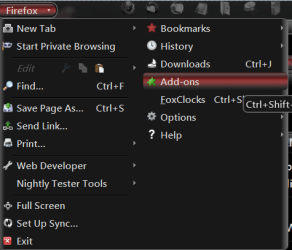
Bongo Jerry ☮ 1956-2019 R.I.P. VIP SF Team Local time 10:33 PM Messages 10,864 Location Iowa Jul 19, 2011 #2 First go to the Add-on page and look through the Extensions and see if it's in there if it is click on Remove then restart. If it's not there open your Control Panel go to Programs and Features and see if it's there. http://www.sevenforums.com/tutorials/77761-programs-features-uninstall-change-program.html If it's there try Revo Uninstallers freeware. Download Revo Uninstaller Freeware - Free and Full Download - Uninstall software, remove programs, solve uninstall problems Jerry My Computer My Computer Computer typeLaptopComputer Manufacturer/Model NumberSager NP9170OSWin 7 Pro x64 / Win 10 ProCPUIntel(R) Core(TM) i7-3630QM CPU @ 2.40GHzMotherboardCLEVO P170EMMemory12 GBGraphics Card(s)(1) Intel(R) HD Graphics 4000 (2) NVIDIA GeForce GTX 675MSound Card(1) Realtek High Definition Audio (2) Intel(R) Display AudMonitor(s) Displays17.3Screen Resolution1920x1080Hard Drives(1) Samsung 860 EVO 500GB(OS) (1) Samsung 860 EVO 500GB(Data)KeyboardBackliteAntivirusMSE, Malwarebytes ProBrowserFirefoxOther InfoDESKTOP: Custom-built. OS: Win 10 Pro x64. CASE: Rosewill R5. CPU: Intel I5 4670K CPU @ 3.40GHz. CPU COOLER: Cool Master Hyper 212 EVO. MOTHERBOARD: Asus Z87-A. MEMORY: Kingston HyperX 2x4 GB. GPU: Nvidia Geforce 650 TI. PSU: Corsair TX750. DRIVES: (1) Samsung 840 120 GB SSD (2) Western Digital blue 500 GB 7200 RPM.
First go to the Add-on page and look through the Extensions and see if it's in there if it is click on Remove then restart. If it's not there open your Control Panel go to Programs and Features and see if it's there. http://www.sevenforums.com/tutorials/77761-programs-features-uninstall-change-program.html If it's there try Revo Uninstallers freeware. Download Revo Uninstaller Freeware - Free and Full Download - Uninstall software, remove programs, solve uninstall problems Jerry
RiD New member Thread Starter Local time 10:33 PM Messages 42 Jul 19, 2011 #3 it was in addons, it worked. thanks! My Computer My Computer OSWindows 7 Home Premium 64bitMemory4GGraphics Card(s)NVIDIA GEforce 210Monitor(s) DisplaysDell S2409WScreen Resolution1920 X 1080Hard Drives600G
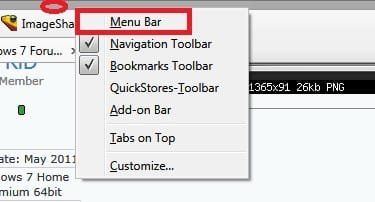
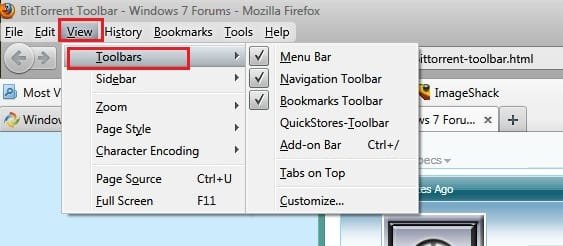
Arc New member SF Team Local time 9:03 AM Messages 35,002 Jul 19, 2011 #4 Another possible way .... Right click below the address bar of firefox, and check "Menu bar" Now, View> Toolbars ..... yours should be there . Just uncheck it . My Computer My Computer Computer typePC/DesktopComputer Manufacturer/Model NumberSelf AssembledOSMicrosoft Windows 10 Pro Insider Preview 64-bitCPUIntel(R) Core(TM) i3-4130 CPU @ 3.40GHzMotherboardGigabyte Technology Co., Ltd. B85M-D3HMemoryCorsair Vengence 4GB x2 (8.00GB Dual-Channel DDR3 @ 798MHz)Graphics Card(s)2047MB GeForce GTS 450 (ZOTAC International)Sound CardOnboard (Realtek High Definition Audio)Monitor(s) DisplaysLG Flatron E2040TScreen Resolution1600x900Hard DrivesWestern Digital 1 TB Seagate 500 GBPSUCorsair VS550CaseCooler Master K380CoolingCooler Master Seidon 120V PlusKeyboardLogitech MK260rMouseLogitech MK260rInternet SpeedPMPL BroadbandAntivirusWindows Defender + MBAMBrowserFirefoxOther InfoDell Studio 15" Laptop
Another possible way .... Right click below the address bar of firefox, and check "Menu bar" Now, View> Toolbars ..... yours should be there . Just uncheck it .
Bongo Jerry ☮ 1956-2019 R.I.P. VIP SF Team Local time 10:33 PM Messages 10,864 Location Iowa Jul 19, 2011 #5 RiD said: it was in addons, it worked. thanks! Click to expand... You're Welcome Jerry My Computer My Computer Computer typeLaptopComputer Manufacturer/Model NumberSager NP9170OSWin 7 Pro x64 / Win 10 ProCPUIntel(R) Core(TM) i7-3630QM CPU @ 2.40GHzMotherboardCLEVO P170EMMemory12 GBGraphics Card(s)(1) Intel(R) HD Graphics 4000 (2) NVIDIA GeForce GTX 675MSound Card(1) Realtek High Definition Audio (2) Intel(R) Display AudMonitor(s) Displays17.3Screen Resolution1920x1080Hard Drives(1) Samsung 860 EVO 500GB(OS) (1) Samsung 860 EVO 500GB(Data)KeyboardBackliteAntivirusMSE, Malwarebytes ProBrowserFirefoxOther InfoDESKTOP: Custom-built. OS: Win 10 Pro x64. CASE: Rosewill R5. CPU: Intel I5 4670K CPU @ 3.40GHz. CPU COOLER: Cool Master Hyper 212 EVO. MOTHERBOARD: Asus Z87-A. MEMORY: Kingston HyperX 2x4 GB. GPU: Nvidia Geforce 650 TI. PSU: Corsair TX750. DRIVES: (1) Samsung 840 120 GB SSD (2) Western Digital blue 500 GB 7200 RPM.