
I am completely stumped by this problem. I will do my best to explain it and see what you fine folks can do.
I had an older bluetooth dongle, off-brand model, 2010-2011 year, that I installed on my new desktop computer. It worked, but sound quality on my Sony Dr-BT101 headset wasn't great. It worked well with my bluetooth-enabled phones and tablets, so I suspected the dongle. I bought a CSR8510 dongle, which came with a CSR Cambridge Radio Harmony software stack. I installed the software, and turned on the headset, paired it, but no sound came out of the headset. I went to Sound, saw no entries. Went to device managers and saw the parts in yellow. I tried to update the driver but all I got was Code 18 error and this weird message in the picture. I clicked on properties and saw this message.

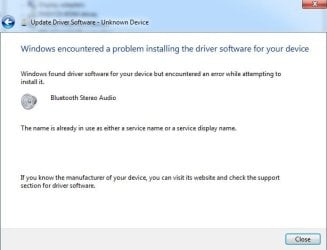
I am stumped. I've tried uninstalling, re-installing, installing other Bluetooth drivers, waving a magic wand, none of it has worked. I'm thinking it's a problem with the Registry, but I am not sure how to proceed.
Any ideas?
I had an older bluetooth dongle, off-brand model, 2010-2011 year, that I installed on my new desktop computer. It worked, but sound quality on my Sony Dr-BT101 headset wasn't great. It worked well with my bluetooth-enabled phones and tablets, so I suspected the dongle. I bought a CSR8510 dongle, which came with a CSR Cambridge Radio Harmony software stack. I installed the software, and turned on the headset, paired it, but no sound came out of the headset. I went to Sound, saw no entries. Went to device managers and saw the parts in yellow. I tried to update the driver but all I got was Code 18 error and this weird message in the picture. I clicked on properties and saw this message.
The drivers for this device are not installed. (Code 28)
There is no driver selected for the device information set or element.
I am stumped. I've tried uninstalling, re-installing, installing other Bluetooth drivers, waving a magic wand, none of it has worked. I'm thinking it's a problem with the Registry, but I am not sure how to proceed.
Any ideas?
My Computer
At a glance
Windows 7 Ultimate x64Intel Core i5-4570 @3.2ghz8gbNVIDIA GeForce GTX660
- Computer type
- PC/Desktop
- Computer Manufacturer/Model Number
- Custom Build
- OS
- Windows 7 Ultimate x64
- CPU
- Intel Core i5-4570 @3.2ghz
- Motherboard
- Custom
- Memory
- 8gb
- Graphics Card(s)
- NVIDIA GeForce GTX660
- Hard Drives
- 128GB SSD
Hitachi 1gb internal (salvaged from old laptop)
Segate 4tb external
- Antivirus
- Bitdefender
- Browser
- many


