Black screen after updating ram to 8GB

kkari

New member
Local time
1:26 PM
Messages
14
Hello, I'm not sure which this thread goes into, but i'm assuming it is drivers.

I've recently upgraded my ram to 8GB, bought 2x2gb - I already had 2x2gb in my tower already.
After upgrading, when I play games, at some point my screen goes black and after a couple seconds, it comes back to normal.
On another account, it goes black screen during a game and everything freezes. But after a while it goes back to normal.
It never happened before, so i'm not sure. Sfc/scan doesn't do the trick.

I've already virus and adware checked, there is nothing.

I've included a dxdiag+CPU info. I'm not sure what else do I need. If you need, please let me know.

Thanks!
 

Attachments

My Computer My Computer

At a glance

Windows 7 Home premium x86/64
Computer type
PC/Desktop
OS
Windows 7 Home premium x86/64
Hello kkari mate I would start by doing this http://www.sevenforums.com/tutorials/105647-ram-test-memtest86.html as this issue has started since you added RAM now this test is the only one we recommend the Windows one is not worth thinking about. It has to be run for at least 8 passes as again it is pointless doing it.
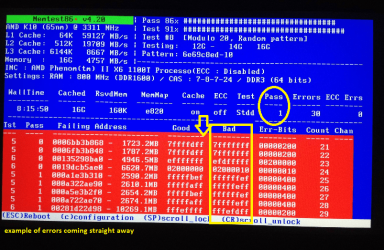
Having said that if the errors come up straight away then the test can be stopped and then you will have to test each stick in turn to find the culprit one/s.

As a by the by it is always recommended that one buys RAM of the same brand and in matched pairs where possible and also try to get RAM with the same timings. It also depends on where or what slots you use for the new sticks - if you have ones that work ok in say slots 1&3 then one would use slots 2&4 for the new stuff - don't be tempted to mix and match.

See my pic for an example of what errors will come like. Oh and if errors do not come up quickly then leave running overnight.
 

Attachments

  • MEM.PNG
    MEM.PNG
    227.6 KB · Views: 0

My Computer My Computer

At a glance

Desk1 7 Home Prem / Desk2 10 Pro / Main lap A...Desk1 i5 3750K / Laptop i7 GTX 860M / Desk2 i...Desk1 8GB (1866) / Desk2 16GB (1333) / Laptop...Desk 1& 2NVidia GTX 650 & Laptops on board Intel
Computer type
PC/Desktop
Computer Manufacturer/Model Number
Own build (new) Desk1 / Asus ROG Win 7 / Desk2 1st build
OS
Desk1 7 Home Prem / Desk2 10 Pro / Main lap Asus ROG 10 Pro 2 laptop Toshiba 7 Pro Asus P2520 7 & 10
CPU
Desk1 i5 3750K / Laptop i7 GTX 860M / Desk2 i5 2500
Motherboard
Desk1 Asus P877-V / Desk2 Gigabyte H67 UD3H / Laptop ?
Memory
Desk1 8GB (1866) / Desk2 16GB (1333) / Laptop 8Gb DDR3
Graphics Card(s)
Desk 1& 2NVidia GTX 650 & Laptops on board Intel
Sound Card
Desk 1 & 2 -XONAR DG Realtek High Def audio Laptop
Monitor(s) Displays
Desk 1 Benq HD 2450 / Desk2 Philips 24" / Laptop 17.5"
Screen Resolution
1920x1080 D1 & D2 & Laptop 1
Hard Drives
Desk1 Samsung 120GB 830 SSD
Asus ROG 256GB 850 Pro SSD
Desk2 Samsung 840 256 SSD
Toshiba 120GB EVO
PSU
Desk 1 Corsair HX 1050/ Laptop ? / Desk 2 Corsair HX 650
Case
Desk 1 Cooler HAF XM ? Toshiba laptop / Desk2 Coolermaster
Cooling
Fans on all Desk1 -2 Desk2 - all Coolermasters 5 Laptop ?
Keyboard
Desk 1 MS Sidewinder X6 Desk 2 MS Sidewinder X 4
Mouse
Desk 1&2 - Gigabyte MS 900 gamer - laptop - Logitec wireless
Internet Speed
ADSL2+
Other Info
One other Desktop (tester) and spare Toshba laptop both with SSD's
Running Kaspersky 2016 ISS on all machines config'd identically
Logitec audio stereo systems on each machine (x3)
Canon MG5250MFC
Router/modem TP-Link running WPA2SK
Back
Top