Black screen at boot

I might have word it wrongly.

Windows Bootup Process

Unless W7 is different, check out the stages.

"Operating System Configuration Phase"
 

My Computer

Computer Manufacturer/Model Number
Lenovo ThinkPad T60
OS
Windows 7 Ultimate 64Bit
CPU
GenuineIntel Intel(R) Core(TM) DuoCore T2400 @ 1.83GHz
Motherboard
Intel(R) 82801G (ICH7 Family)
Memory
2.00 GB
Graphics Card(s)
Mobile Intel(R) 945 Express Chipset
Sound Card
SoundMAX Integrated Digital HD Audio
Monitor(s) Displays
ThinkPad Display
Screen Resolution
1400x1050
Hard Drives
100Gb SATA
Keyboard
Standard Keyboard
Mouse
HID-compliant Mouse
Internet Speed
Cable Broadband - 54Mbps
Other Info
Intel(R) PRO/1000 PL Network Connection
11a/b/g Wireless LAN Mini PCI Express Adapter
Can you have a look at your System Event Logs? Post any "errors" you find.
 

My Computer

Computer Manufacturer/Model Number
Lenovo ThinkPad T60
OS
Windows 7 Ultimate 64Bit
CPU
GenuineIntel Intel(R) Core(TM) DuoCore T2400 @ 1.83GHz
Motherboard
Intel(R) 82801G (ICH7 Family)
Memory
2.00 GB
Graphics Card(s)
Mobile Intel(R) 945 Express Chipset
Sound Card
SoundMAX Integrated Digital HD Audio
Monitor(s) Displays
ThinkPad Display
Screen Resolution
1400x1050
Hard Drives
100Gb SATA
Keyboard
Standard Keyboard
Mouse
HID-compliant Mouse
Internet Speed
Cable Broadband - 54Mbps
Other Info
Intel(R) PRO/1000 PL Network Connection
11a/b/g Wireless LAN Mini PCI Express Adapter
Not really :( But it shouldn't cause a sudden delay while loading Windows.

It's not a sudden delay, it's a delay to bring up the desktop, i would think at this stage the system is loading and configuring the desktop.

Thanks mate, I was referring to the PC booting normally originally, but it 'suddenly' started to do it.

So.. the problem could be;
Hardware
Drivers
Registry

At this stage, it could be anything. The most likely cause is changing a setting within windows somewhere, or a driver update - possibly downloaded and installed automatically from Windows Update that has had a negative impact.

You said you tried a restore point, but did you try the oldest restore point available?
 

My Computer

Computer type
PC/Desktop
Computer Manufacturer/Model Number
Systems by SmartEyeball
OS
8 Pro x64
CPU
i7 3770K 4.6GHz
Motherboard
ASUS P8Z77 WS
Memory
16GB G.Skill Trident X 2666mhz
Graphics Card(s)
x2 EVGA 780 Ti Superclocked SLI
Sound Card
SB X-FI Surround 5.1 PRO USB / ATH-AD900 Headphones
Monitor(s) Displays
x3 Dell U2410 / 58" Samsung
Screen Resolution
5760*1200/ 1920*1200
Hard Drives
2x Intel 520 240GB (RAID 0) * 2x WD Caviar Blacks 2TB (RAID 0) * 2TB WD Caviar Black * Sony Optirac DVD
PSU
Silverstone Strider Evolution 1200W
Case
Thermaltake Level 10 GT Snow Edition
Cooling
Noctua NH-D14
Keyboard
Topre Realforce // Ducky Shine MX Black // Filco Ninja TKL
Mouse
Thermaltake Theron (Highly Recommended) + Razer Imperator
Antivirus
MSE
Browser
IE, FF, WaterFox
Other Info
GT Extreme V2 Sim Racing Cockpit + 40" LCD and K/B Mouse stand ▼
Fanatec CSR Elite Wheel + Clubsport V1 Pedals + CSR shifter/7G-H ▼Saitek X52 Pro ▼ TrackIR 5 Pro
Buttkicker v2 Seat Rumbler with Dedicated 5.1 and Sub Woofer attached to frame ▼
=
Bloody Big Grin
I have read people using dual monitors, some need to install with only one monitor then install latest driver for the video card, then plug in the second. This may help.
 

My Computer

Computer Manufacturer/Model Number
Keeps changing - (Custom)
OS
Windows 7 Professional x64
CPU
Intel Core i7 860
Motherboard
Gigabyte GA-P55-UD4P
Memory
4GB DDR3 Mushkin 1600Mhz @ 7-8-7-20
Graphics Card(s)
MSI GTS250 1GB DDR3 Twin Frozr
Sound Card
Onboard realtek
Monitor(s) Displays
Samsung SyncMaster 24" P2450 + Samsung 20" 2033
Screen Resolution
1920 X 1080 and 1600 X 900 (#2 system 1440 X 900)
Hard Drives
Patriot Inferno 120GB SSD + 3 WD Blue 640GB drives
PSU
Corsair 750 HX Modular
Case
Lancool PC-K62
Cooling
Cooler Master TX3 CPU cooler and 4-140mm and 1-120mm case
Keyboard
Gigabyte USB keyboard
Mouse
Microsoft wireless laser mouse 5000
Internet Speed
7 Mb down 1.5 up
Other Info
System #2: AMD Phenom II X6 1055T (Freezer 7 Pro cooler) - Gigabyte 880GMA-UD2H - WD 500GB Black - 9500GT (1GB) 500W OCZ modular PSU - Antec 200 case. System #3 (LapTop) Core 2 Duo T6670 - 320GB 7200RPM HD - 4GB DDR3 RAM.
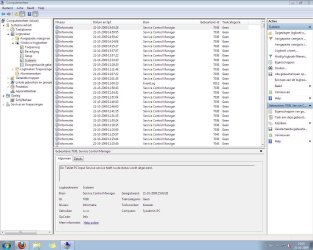
aem: do you mean this window?(attachment)

smarteyeball: yes i tried the oldest restore point

nate42nd: i'm not using dual monitors
 

Attachments

  • logs.JPG
    logs.JPG
    169.2 KB · Views: 21

My Computer

OS
Windows XP, Windows Vista, Windows 7
Ok so there are no Errors in the eventlogs, at this stage i would just get more RAM into her (hmmm) and see if the Os boots any faster.
 

My Computer

Computer Manufacturer/Model Number
Lenovo ThinkPad T60
OS
Windows 7 Ultimate 64Bit
CPU
GenuineIntel Intel(R) Core(TM) DuoCore T2400 @ 1.83GHz
Motherboard
Intel(R) 82801G (ICH7 Family)
Memory
2.00 GB
Graphics Card(s)
Mobile Intel(R) 945 Express Chipset
Sound Card
SoundMAX Integrated Digital HD Audio
Monitor(s) Displays
ThinkPad Display
Screen Resolution
1400x1050
Hard Drives
100Gb SATA
Keyboard
Standard Keyboard
Mouse
HID-compliant Mouse
Internet Speed
Cable Broadband - 54Mbps
Other Info
Intel(R) PRO/1000 PL Network Connection
11a/b/g Wireless LAN Mini PCI Express Adapter
I'm having the same problem. It started two days ago. I dual boot Vista/Win 7. Win 7 starts no problem, but Vista has a black screen with cursor only. I haven't figured out how to get into Vista yet.
 

My Computer

OS
Win 7 x64
CPU
AMD Phenom II X3 2.6ghz Triple Core Socket AM3
Motherboard
Gigabyte 780G
Memory
4gb ram Corsair
Graphics Card(s)
integrated HD3200
Monitor(s) Displays
Asus 23" Sanyo Z3 102" screen
Screen Resolution
1080P and 720P
Hard Drives
WD Cavier 320 GB, WD Cavier GP 500gb, WD Cavier 1TB x2, Seagate barracuda 400gb
Case
Silverstone LC17
there are some errors in that log, but it's a very long list.
Or do i have to check it for one day only?
 

My Computer

OS
Windows XP, Windows Vista, Windows 7
Ok i just mounted a copy of my VHD of w7 dual boot onto VMware just to see how long it takes to bootup. I found that with 256MB RAM the bootup time was 153sec. Compare this to my normal 2GB RAM system it has 22 Sec. Just going by the figures it takes 7x longer with 256Mb RAM than with 2GB RAM.

I'm not sure how much it differs in terms of loading time doing it in VMware and doing it live but those are the figures. Also bootup times i believe is not from the time you restart till the time u see your icons. It's could be till u get to the logon prompt...(i think)

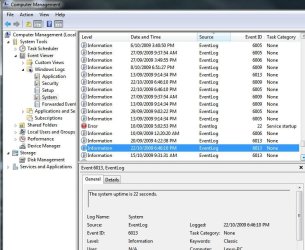
You have twice as much RAM as my VMware W7. Do another reboot of your system, go into EventLogs (system) and look for this entry (highlighted). It tells u the bootup time, and mine is 22 sec.

What is yours?
 

Attachments

  • Noname.jpg
    Noname.jpg
    83.1 KB · Views: 14

My Computer

Computer Manufacturer/Model Number
Lenovo ThinkPad T60
OS
Windows 7 Ultimate 64Bit
CPU
GenuineIntel Intel(R) Core(TM) DuoCore T2400 @ 1.83GHz
Motherboard
Intel(R) 82801G (ICH7 Family)
Memory
2.00 GB
Graphics Card(s)
Mobile Intel(R) 945 Express Chipset
Sound Card
SoundMAX Integrated Digital HD Audio
Monitor(s) Displays
ThinkPad Display
Screen Resolution
1400x1050
Hard Drives
100Gb SATA
Keyboard
Standard Keyboard
Mouse
HID-compliant Mouse
Internet Speed
Cable Broadband - 54Mbps
Other Info
Intel(R) PRO/1000 PL Network Connection
11a/b/g Wireless LAN Mini PCI Express Adapter
it also says 22 seconds :S
but my description says that it is 22 second 'in use' (translated dutch-english)
 

My Computer

OS
Windows XP, Windows Vista, Windows 7
So yours say 22 secs bootup time, but it takes 22 mins (i like 22s :) ) to bring up the logon prompt?
 

My Computer

Computer Manufacturer/Model Number
Lenovo ThinkPad T60
OS
Windows 7 Ultimate 64Bit
CPU
GenuineIntel Intel(R) Core(TM) DuoCore T2400 @ 1.83GHz
Motherboard
Intel(R) 82801G (ICH7 Family)
Memory
2.00 GB
Graphics Card(s)
Mobile Intel(R) 945 Express Chipset
Sound Card
SoundMAX Integrated Digital HD Audio
Monitor(s) Displays
ThinkPad Display
Screen Resolution
1400x1050
Hard Drives
100Gb SATA
Keyboard
Standard Keyboard
Mouse
HID-compliant Mouse
Internet Speed
Cable Broadband - 54Mbps
Other Info
Intel(R) PRO/1000 PL Network Connection
11a/b/g Wireless LAN Mini PCI Express Adapter
not that long.. but i'm sure it takes longer than 22 seconds!
 

My Computer

OS
Windows XP, Windows Vista, Windows 7
I was looking at the log again, and i found another event log (another day) which says 11459 seconds :S
 

My Computer

OS
Windows XP, Windows Vista, Windows 7
lol, don't waste time in these figures, just get more RAM and see how it differs.
 

My Computer

Computer Manufacturer/Model Number
Lenovo ThinkPad T60
OS
Windows 7 Ultimate 64Bit
CPU
GenuineIntel Intel(R) Core(TM) DuoCore T2400 @ 1.83GHz
Motherboard
Intel(R) 82801G (ICH7 Family)
Memory
2.00 GB
Graphics Card(s)
Mobile Intel(R) 945 Express Chipset
Sound Card
SoundMAX Integrated Digital HD Audio
Monitor(s) Displays
ThinkPad Display
Screen Resolution
1400x1050
Hard Drives
100Gb SATA
Keyboard
Standard Keyboard
Mouse
HID-compliant Mouse
Internet Speed
Cable Broadband - 54Mbps
Other Info
Intel(R) PRO/1000 PL Network Connection
11a/b/g Wireless LAN Mini PCI Express Adapter
To New: Remove any 2nd or 3rd monitors including any televisions from the computer. Now boot into Windows.

Sorry to dig this up but I joined to say that this worked for me...

I had a black screen with mouse cursor after trying multiple fresh installs and after unplugging the hdmi cable to my tv windows finally booted.
 

My Computer

OS
Windows 7
Back
Top