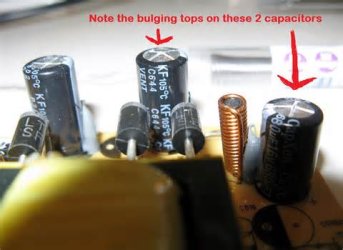
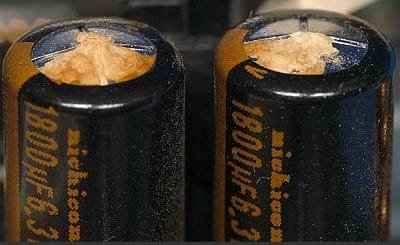
My question about display is solved.
Stop 0x124 continued from 20/02 to 15/05. But you are having display crashes even after that.
It also appears that the stop 0x124 stopped after changing the GPU to the onboard one; but display issue continued. Now the question is..... what may be the reason behind it.
So the possibility of overheating and inadequate power supply by the PSU appears. Improperly seated hardware components or any loose connection also may cause it.
As on 29/05 ....
Event[56427]:
Log Name: System
Source: Service Control Manager
Date: 2014-05-29T13:04:03.679
Event ID: 7026
Task: N/A
Level: Error
Opcode: N/A
Keyword: Classic
User: N/A
User Name: N/A
Computer: paz-pc
Description:
The following boot-start or system-start driver(s) failed to load:
AsIO
cdrom
discache
MpFilter
spldr
sptd
VBoxDrv
VBoxUSBMon
Wanarpv6
AsIO is ASUS PC Probe utility. A bloatware by the motherboard manufacturer. Uninstall it ....
Code:
Start Menu\Programs\ASUS\PC Probe II
Another more vital one ....
Event[56393]:
Log Name: System
Source: sptd
Date: 2014-05-29T13:03:33.587
Event ID: 4
Task: N/A
Level: Error
Opcode: N/A
Keyword: Classic
User: N/A
User Name: N/A
Computer: paz-pc
Description:
Driver detected an internal error in its data structures for .
Daemon Tools, Alcohol 120% and Power Archiver Pro uses
SCSI Pass Through Direct (
SPTD), which is a well known BSOD causer. Uninstall
Daemon Tools at first.
Code:
Start Menu\Programs\DAEMON Tools Lite
Then download SPTD standalone installer from
Disk-Tools.com, and execute the downloaded file as guided below :
- Double click to open it.
- Click this button only:
-
- If it is grayed out, as in the picture, there is no more SPTD in your system, and you just close the window.
Over last few days, all your disks are having controller errors. An example:
Event[47209]:
Log Name: System
Source: Disk
Date: 2014-05-24T13:33:18.936
Event ID: 11
Task: N/A
Level: Error
Opcode: N/A
Keyword: Classic
User: N/A
User Name: N/A
Computer: paz-pc
Description:
The driver detected a controller error on \Device\Harddisk2\DR4.
But the controller is system native PCI IDE controller, which should not fail. And, this failure may cause the blackouts as you have experienced.
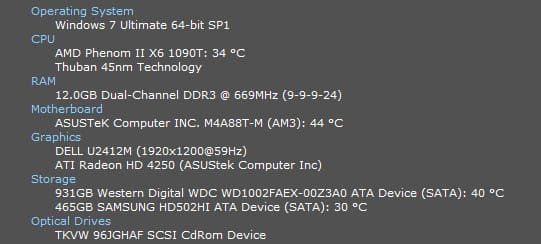
If the situation remains the same even after uninstalling Daemon Tools and PCProbe, you may need a dismantle and re-seating. And that is another place where the information ablut the system temp will be vital.






 )
)