Black Screen When Running FurMark and Almost All Games

iCsav

New member
Local time
8:28 PM
Messages
5
Hey guys. So, my first post here. I got a custom build about 1.5 months ago. It has got a GTX 950. The mistake I made was not testing some games on the damn thing sooner. Approx. 20 days ago, I installed Dying Light and on starting it, it played out the intro, got to the checkpoint screen and blacked out. I could hear weird noises. Not the game sounds, but buzzing, whirring and beeping until the monitor switched off after a minute or two. The only solution was to hard reset using case button. I thought it might have something to do with settings and left it alone. Due to real life issues, I couldn't do anything till a day ago. Optimistic, I tried it again. Same as before. Tried reinstalling and everything on forums about DL. I tried other games. This time from Steam. No luck. Then, I even tried a very new game - The Lost Mythologies. The opening screen comes on and the the same thing. This was suspicious. I tried FurMark (at 720 preset). I got the same results. Black screen, no sounds this time and monitor's message: "Power saving mode", which is basically no output signal from the GPU. I can't even monitor GPU temps or anything while running these things. The only game running (out of Windows 7 provided games) is Osu!. I found this thread. Seems pretty similar to mine. Would you guys suggest anything from it? Any other solutions? I can provide any other info you might want. I don't have any overclocking applied.
 

My Computer My Computer

At a glance

Windows 7 Ultimate x64FX 83508GB Corsair VengeanceNVIDIA GTX 950 2GB
Computer type
PC/Desktop
Computer Manufacturer/Model Number
Custom
OS
Windows 7 Ultimate x64
CPU
FX 8350
Motherboard
Gigabyte GA 970A DS3P
Memory
8GB Corsair Vengeance
Graphics Card(s)
NVIDIA GTX 950 2GB
Hard Drives
1 TB Seagate
PSU
iBall Marathon 500W Peak PSU
Hello and welcome iCsav mate I am assuming the machine runs normally otherwise?? If so please run speccy and let us know what the temps are at "normal" pace.
Speccy - Free Download - Piriform.

You might find a bit more in depth details using this ditty of mine
Using HW Info
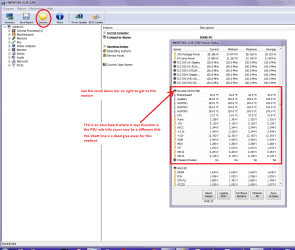
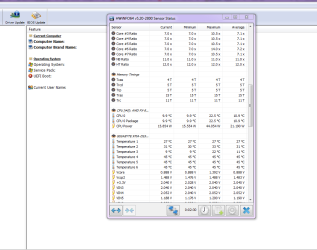
You can test the volts on the PSU with HW Info HWiNFO, HWiNFO32/64 - Download < download the right bit version and close the right hand window select Sensors and scroll down to the power section where you will see what the volts are doing see my pic.
The original right hand window shows the machine running and is handy for that but for looking at the components in some detail close it and use the main left hand side panel
FOR OTHER COMPONENTS
Open each + down into the component itself and then click on it - in the right hand side will appear all sorts of details including brands speeds and other essential info that device. See pic for example.
Use both PARTS and I would be interested to see the results from the PSU please

Edit: HWiNFO, HWiNFO32/64 - Download go to the bottom of the page and download from the uS site
 

Attachments

  • HW INFO DESKTOP PSU.PNG
    HW INFO DESKTOP PSU.PNG
    49.8 KB · Views: 2

My Computer My Computer

At a glance

Desk1 7 Home Prem / Desk2 10 Pro / Main lap A...Desk1 i5 3750K / Laptop i7 GTX 860M / Desk2 i...Desk1 8GB (1866) / Desk2 16GB (1333) / Laptop...Desk 1& 2NVidia GTX 650 & Laptops on board Intel
Computer type
PC/Desktop
Computer Manufacturer/Model Number
Own build (new) Desk1 / Asus ROG Win 7 / Desk2 1st build
OS
Desk1 7 Home Prem / Desk2 10 Pro / Main lap Asus ROG 10 Pro 2 laptop Toshiba 7 Pro Asus P2520 7 & 10
CPU
Desk1 i5 3750K / Laptop i7 GTX 860M / Desk2 i5 2500
Motherboard
Desk1 Asus P877-V / Desk2 Gigabyte H67 UD3H / Laptop ?
Memory
Desk1 8GB (1866) / Desk2 16GB (1333) / Laptop 8Gb DDR3
Graphics Card(s)
Desk 1& 2NVidia GTX 650 & Laptops on board Intel
Sound Card
Desk 1 & 2 -XONAR DG Realtek High Def audio Laptop
Monitor(s) Displays
Desk 1 Benq HD 2450 / Desk2 Philips 24" / Laptop 17.5"
Screen Resolution
1920x1080 D1 & D2 & Laptop 1
Hard Drives
Desk1 Samsung 120GB 830 SSD
Asus ROG 256GB 850 Pro SSD
Desk2 Samsung 840 256 SSD
Toshiba 120GB EVO
PSU
Desk 1 Corsair HX 1050/ Laptop ? / Desk 2 Corsair HX 650
Case
Desk 1 Cooler HAF XM ? Toshiba laptop / Desk2 Coolermaster
Cooling
Fans on all Desk1 -2 Desk2 - all Coolermasters 5 Laptop ?
Keyboard
Desk 1 MS Sidewinder X6 Desk 2 MS Sidewinder X 4
Mouse
Desk 1&2 - Gigabyte MS 900 gamer - laptop - Logitec wireless
Internet Speed
ADSL2+
Other Info
One other Desktop (tester) and spare Toshba laptop both with SSD's
Running Kaspersky 2016 ISS on all machines config'd identically
Logitec audio stereo systems on each machine (x3)
Canon MG5250MFC
Router/modem TP-Link running WPA2SK
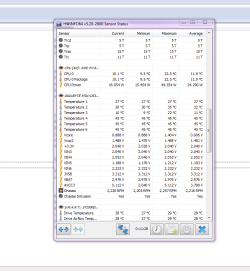
Here are the test results.

Form Speccy:

CPU
AMD FX-8350 11 °C
Vishera 32nm Technology
RAM
8.00GB Single-Channel DDR3 @ 803MHz (10-10-10-27)
Motherboard
Gigabyte Technology Co. Ltd. 970A-DS3P (CPU 1) 27 °C
Graphics
L195 Wide (1440x900@60Hz)
2047MB NVIDIA GeForce GTX 950 (NVIDIA) 34 °C
Storage
931GB Seagate ST1000DM003-1SB10C ATA Device (SATA) 28 °C

From HW:

I'm not sure if I got you what you wanted from this one, so please tell me if you need anything else.

Also, another thing I noticed was that now, even playing offline videos in fullscreen results in the same thing happening, albeit without sound. This was never happening before 2 days ago. I use MPC-HC with KCP.
 

Attachments

  • PSU.png
    PSU.png
    29.6 KB · Views: 2
  • PSU2.png
    PSU2.png
    25.2 KB · Views: 0
Last edited:

My Computer My Computer

At a glance

Windows 7 Ultimate x64FX 83508GB Corsair VengeanceNVIDIA GTX 950 2GB
Computer type
PC/Desktop
Computer Manufacturer/Model Number
Custom
OS
Windows 7 Ultimate x64
CPU
FX 8350
Motherboard
Gigabyte GA 970A DS3P
Memory
8GB Corsair Vengeance
Graphics Card(s)
NVIDIA GTX 950 2GB
Hard Drives
1 TB Seagate
PSU
iBall Marathon 500W Peak PSU
Ok mate the rail voltage for the 3.3v rail is not good and I am not usre why the 12v and 5v rail volts are not being shown. I just wonder if you downloaded the right bit version of that software. Having said that it doesn't always support or rather the machines sensors are not supported by HW Info.

The best way to know for definite is to measure the volts on the 24 pin plug with a digital multimeter. They are very cheap these days and all you need to to is place the black lead on any black cabled pin and then check the other colours for the voltages see the codes in this for the colour / volts .
https://en.wikipedia.org/wiki/Power_supply_unit_(computer) scroll down that reference and you will fin the colour coding NB the Power Good should read 5v when the machine is running if not then it will shut down the machine or not let it start at all.
 

My Computer My Computer

At a glance

Desk1 7 Home Prem / Desk2 10 Pro / Main lap A...Desk1 i5 3750K / Laptop i7 GTX 860M / Desk2 i...Desk1 8GB (1866) / Desk2 16GB (1333) / Laptop...Desk 1& 2NVidia GTX 650 & Laptops on board Intel
Computer type
PC/Desktop
Computer Manufacturer/Model Number
Own build (new) Desk1 / Asus ROG Win 7 / Desk2 1st build
OS
Desk1 7 Home Prem / Desk2 10 Pro / Main lap Asus ROG 10 Pro 2 laptop Toshiba 7 Pro Asus P2520 7 & 10
CPU
Desk1 i5 3750K / Laptop i7 GTX 860M / Desk2 i5 2500
Motherboard
Desk1 Asus P877-V / Desk2 Gigabyte H67 UD3H / Laptop ?
Memory
Desk1 8GB (1866) / Desk2 16GB (1333) / Laptop 8Gb DDR3
Graphics Card(s)
Desk 1& 2NVidia GTX 650 & Laptops on board Intel
Sound Card
Desk 1 & 2 -XONAR DG Realtek High Def audio Laptop
Monitor(s) Displays
Desk 1 Benq HD 2450 / Desk2 Philips 24" / Laptop 17.5"
Screen Resolution
1920x1080 D1 & D2 & Laptop 1
Hard Drives
Desk1 Samsung 120GB 830 SSD
Asus ROG 256GB 850 Pro SSD
Desk2 Samsung 840 256 SSD
Toshiba 120GB EVO
PSU
Desk 1 Corsair HX 1050/ Laptop ? / Desk 2 Corsair HX 650
Case
Desk 1 Cooler HAF XM ? Toshiba laptop / Desk2 Coolermaster
Cooling
Fans on all Desk1 -2 Desk2 - all Coolermasters 5 Laptop ?
Keyboard
Desk 1 MS Sidewinder X6 Desk 2 MS Sidewinder X 4
Mouse
Desk 1&2 - Gigabyte MS 900 gamer - laptop - Logitec wireless
Internet Speed
ADSL2+
Other Info
One other Desktop (tester) and spare Toshba laptop both with SSD's
Running Kaspersky 2016 ISS on all machines config'd identically
Logitec audio stereo systems on each machine (x3)
Canon MG5250MFC
Router/modem TP-Link running WPA2SK
Thank you for your help. I'm not sure that I can get the required multimeter anytime soon. I'll check if someone I know has it (iirc, someone does) but doing so may take a while - about 20 days. Is it alright to continue this thread after 20 days or perhaps PM you? I'm not sure how this forum's rules work. After how many days are we allowed to bump?
 

My Computer My Computer

At a glance

Windows 7 Ultimate x64FX 83508GB Corsair VengeanceNVIDIA GTX 950 2GB
Computer type
PC/Desktop
Computer Manufacturer/Model Number
Custom
OS
Windows 7 Ultimate x64
CPU
FX 8350
Motherboard
Gigabyte GA 970A DS3P
Memory
8GB Corsair Vengeance
Graphics Card(s)
NVIDIA GTX 950 2GB
Hard Drives
1 TB Seagate
PSU
iBall Marathon 500W Peak PSU
Yep keep this thread going mate any response comes through as you move a along. If you start another it might well get lost amongst the others.
 

My Computer My Computer

At a glance

Desk1 7 Home Prem / Desk2 10 Pro / Main lap A...Desk1 i5 3750K / Laptop i7 GTX 860M / Desk2 i...Desk1 8GB (1866) / Desk2 16GB (1333) / Laptop...Desk 1& 2NVidia GTX 650 & Laptops on board Intel
Computer type
PC/Desktop
Computer Manufacturer/Model Number
Own build (new) Desk1 / Asus ROG Win 7 / Desk2 1st build
OS
Desk1 7 Home Prem / Desk2 10 Pro / Main lap Asus ROG 10 Pro 2 laptop Toshiba 7 Pro Asus P2520 7 & 10
CPU
Desk1 i5 3750K / Laptop i7 GTX 860M / Desk2 i5 2500
Motherboard
Desk1 Asus P877-V / Desk2 Gigabyte H67 UD3H / Laptop ?
Memory
Desk1 8GB (1866) / Desk2 16GB (1333) / Laptop 8Gb DDR3
Graphics Card(s)
Desk 1& 2NVidia GTX 650 & Laptops on board Intel
Sound Card
Desk 1 & 2 -XONAR DG Realtek High Def audio Laptop
Monitor(s) Displays
Desk 1 Benq HD 2450 / Desk2 Philips 24" / Laptop 17.5"
Screen Resolution
1920x1080 D1 & D2 & Laptop 1
Hard Drives
Desk1 Samsung 120GB 830 SSD
Asus ROG 256GB 850 Pro SSD
Desk2 Samsung 840 256 SSD
Toshiba 120GB EVO
PSU
Desk 1 Corsair HX 1050/ Laptop ? / Desk 2 Corsair HX 650
Case
Desk 1 Cooler HAF XM ? Toshiba laptop / Desk2 Coolermaster
Cooling
Fans on all Desk1 -2 Desk2 - all Coolermasters 5 Laptop ?
Keyboard
Desk 1 MS Sidewinder X6 Desk 2 MS Sidewinder X 4
Mouse
Desk 1&2 - Gigabyte MS 900 gamer - laptop - Logitec wireless
Internet Speed
ADSL2+
Other Info
One other Desktop (tester) and spare Toshba laptop both with SSD's
Running Kaspersky 2016 ISS on all machines config'd identically
Logitec audio stereo systems on each machine (x3)
Canon MG5250MFC
Router/modem TP-Link running WPA2SK
Just for information.

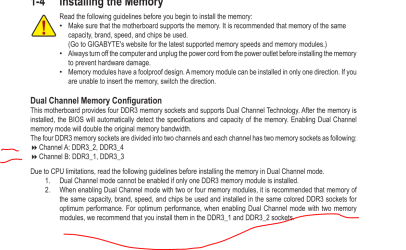
I notice that the ram is in single channel on a dual channel motherboard.
Might also be a ram problem.

From post #3

8.00GB Single-Channel DDR3 @ 803MHz (10-10-10-27)
Motherboard
Gigabyte Technology Co. Ltd. 970A-DS3P (CPU 1) 27 °C
 

My Computer My Computer

At a glance

Windows 10 Pro. 64/ version 1709 Windows 7 Pr...Intel i7-6800K @ 4.3Corsair Platinum 16 gig @2400EVGA GTX 1070 OC
Computer type
PC/Desktop
Computer Manufacturer/Model Number
Home made Desktop
OS
Windows 10 Pro. 64/ version 1709 Windows 7 Pro/64
CPU
Intel i7-6800K @ 4.3
Motherboard
ASUS X-99 Deluxe II
Memory
Corsair Platinum 16 gig @2400
Graphics Card(s)
EVGA GTX 1070 OC
Monitor(s) Displays
Asus 27" LED LCD/VE278Q
Screen Resolution
1920-1080 or 1280-720 HDMI
Hard Drives
INTEL SSD 730-240 Gb Sata 3.0/
PSU
EVGA Platium 1200W
Case
Phanteks Luxe Tempered Glass 8 fans/ one radiator
Cooling
XSPC/ Water Cooled CPU
Keyboard
Das 4 Professional
Mouse
Logitech M705/MX Anywhere 2-S
Internet Speed
100 mbits
Antivirus
Microsoft Security Essentials/ Malwarebytes Premium 3.0/ SAS
Browser
I.E. 11 default/Firefox/ ISP Time Warner Cable/Spectrum
Other Info
LG BluRay Burner/
Sound system-KLipsch-THX/
Icy Dock ssd Hot Swap bays.
@Layback Bear, could you expand on that? I don't know much about hardware. Do I need to check for something specifically?
 

My Computer My Computer

At a glance

Windows 7 Ultimate x64FX 83508GB Corsair VengeanceNVIDIA GTX 950 2GB
Computer type
PC/Desktop
Computer Manufacturer/Model Number
Custom
OS
Windows 7 Ultimate x64
CPU
FX 8350
Motherboard
Gigabyte GA 970A DS3P
Memory
8GB Corsair Vengeance
Graphics Card(s)
NVIDIA GTX 950 2GB
Hard Drives
1 TB Seagate
PSU
iBall Marathon 500W Peak PSU
Sure I will. In layman terms.
Please note: You may have more than one problem.

If your ram is install as per the motherboard manual it should be in dual channel..
If you have a bad ram module or motherboard ram slot it could shift to single channel. You will need a ever number of ram modules install in the proper slots.
A bad ram module and/or ram slot can cause various problems. It's possible that ram problem could cause goofy voltage readings.

Sometime such a ram problems will not cause a BSOD.
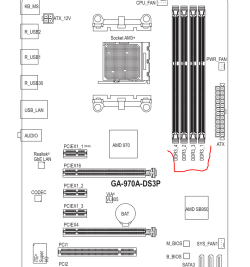
To me the next step would be to verify you have the proper ram installed properly as per the motherboard manual.

Please answer these questions.

1. How many ram modules (sticks) installed?
2. Do you have your motherboard manual.
3. Is your ram installed as per the motherboard manual.
4. Exactly what ram do you have installed?
These might help.

Ram install today.PNG

Ram install nr 2.PNG
 

My Computer My Computer

At a glance

Windows 10 Pro. 64/ version 1709 Windows 7 Pr...Intel i7-6800K @ 4.3Corsair Platinum 16 gig @2400EVGA GTX 1070 OC
Computer type
PC/Desktop
Computer Manufacturer/Model Number
Home made Desktop
OS
Windows 10 Pro. 64/ version 1709 Windows 7 Pro/64
CPU
Intel i7-6800K @ 4.3
Motherboard
ASUS X-99 Deluxe II
Memory
Corsair Platinum 16 gig @2400
Graphics Card(s)
EVGA GTX 1070 OC
Monitor(s) Displays
Asus 27" LED LCD/VE278Q
Screen Resolution
1920-1080 or 1280-720 HDMI
Hard Drives
INTEL SSD 730-240 Gb Sata 3.0/
PSU
EVGA Platium 1200W
Case
Phanteks Luxe Tempered Glass 8 fans/ one radiator
Cooling
XSPC/ Water Cooled CPU
Keyboard
Das 4 Professional
Mouse
Logitech M705/MX Anywhere 2-S
Internet Speed
100 mbits
Antivirus
Microsoft Security Essentials/ Malwarebytes Premium 3.0/ SAS
Browser
I.E. 11 default/Firefox/ ISP Time Warner Cable/Spectrum
Other Info
LG BluRay Burner/
Sound system-KLipsch-THX/
Icy Dock ssd Hot Swap bays.
Is your ram installed as per the motherboard manual.

Yep good point as boards specify slots 1 and 3 as the primary slots and other 2 and 4 as I found out when using a Gigabyte board and then an Asus board.

If you still have issues then maybe the RAM should tested http://www.sevenforums.com/tutorials/105647-ram-test-memtest86.html if you do though and you get errors on just one stick then you will need to try it in the next primary slot because it might be bad and also use only this memtest and always make sure at least 8 passes anything less is useless - unless errors come up fairly quickly then you can stop it and move the stick and errors come up in the second slot I would be very suspicious of the stick.

It is a tedious process but it will eliminate memory problems as an issue.
 

My Computer My Computer

At a glance

Desk1 7 Home Prem / Desk2 10 Pro / Main lap A...Desk1 i5 3750K / Laptop i7 GTX 860M / Desk2 i...Desk1 8GB (1866) / Desk2 16GB (1333) / Laptop...Desk 1& 2NVidia GTX 650 & Laptops on board Intel
Computer type
PC/Desktop
Computer Manufacturer/Model Number
Own build (new) Desk1 / Asus ROG Win 7 / Desk2 1st build
OS
Desk1 7 Home Prem / Desk2 10 Pro / Main lap Asus ROG 10 Pro 2 laptop Toshiba 7 Pro Asus P2520 7 & 10
CPU
Desk1 i5 3750K / Laptop i7 GTX 860M / Desk2 i5 2500
Motherboard
Desk1 Asus P877-V / Desk2 Gigabyte H67 UD3H / Laptop ?
Memory
Desk1 8GB (1866) / Desk2 16GB (1333) / Laptop 8Gb DDR3
Graphics Card(s)
Desk 1& 2NVidia GTX 650 & Laptops on board Intel
Sound Card
Desk 1 & 2 -XONAR DG Realtek High Def audio Laptop
Monitor(s) Displays
Desk 1 Benq HD 2450 / Desk2 Philips 24" / Laptop 17.5"
Screen Resolution
1920x1080 D1 & D2 & Laptop 1
Hard Drives
Desk1 Samsung 120GB 830 SSD
Asus ROG 256GB 850 Pro SSD
Desk2 Samsung 840 256 SSD
Toshiba 120GB EVO
PSU
Desk 1 Corsair HX 1050/ Laptop ? / Desk 2 Corsair HX 650
Case
Desk 1 Cooler HAF XM ? Toshiba laptop / Desk2 Coolermaster
Cooling
Fans on all Desk1 -2 Desk2 - all Coolermasters 5 Laptop ?
Keyboard
Desk 1 MS Sidewinder X6 Desk 2 MS Sidewinder X 4
Mouse
Desk 1&2 - Gigabyte MS 900 gamer - laptop - Logitec wireless
Internet Speed
ADSL2+
Other Info
One other Desktop (tester) and spare Toshba laptop both with SSD's
Running Kaspersky 2016 ISS on all machines config'd identically
Logitec audio stereo systems on each machine (x3)
Canon MG5250MFC
Router/modem TP-Link running WPA2SK
@iCsav:

Just so that we're all clear on the hardware angle of things, do you have the 6 pin power connector plugged into the GPU?

The problem that you're having could be explained by that connector not being plugged in.
 

My Computer My Computer

At a glance

Win 7 Pro x64/Win 10 Pro x64 dual bootAMD FX 8350 Vishera @ 420016 GB Mushkin Blackline DDR3-2400 @ 1866 (9-1...XFX Radeon R9 280 Double D Black Edition
Computer type
PC/Desktop
Computer Manufacturer/Model Number
Mellon Labs (custom build)
OS
Win 7 Pro x64/Win 10 Pro x64 dual boot
CPU
AMD FX 8350 Vishera @ 4200
Motherboard
ASUS M5A97 R2.0
Memory
16 GB Mushkin Blackline DDR3-2400 @ 1866 (9-10-10-10-31)
Graphics Card(s)
XFX Radeon R9 280 Double D Black Edition
Sound Card
Realtek HD Audio on MB. Sounds great.
Monitor(s) Displays
Acer 24", Acer 22"
Screen Resolution
3840 x 1080
Hard Drives
1 x Mushkin Chronos 120 GB SSD (Win 10)
1 x Samsung 850 EVO 250 GB SSD (Win 7)
1 x WD 1TB SATA Blue
1 x WD 1TB SATA Green
PSU
Corsair TX-750
Case
CoolerMaster HAF 912+
Cooling
Coolermaster Seidon 240M Liquid AIO. 6 case fans
Keyboard
Logitech G710+
Mouse
Logitech G500s
Internet Speed
Much better since I got fiber, but still way overpriced.
Antivirus
MSE, Malware Bytes for scanning
Browser
Firefox
Other Info
Corsair VOID USB headphones.

A Mellon Labs X-1 - LCD Smartie driven system status display.

Brought to you by the letter E
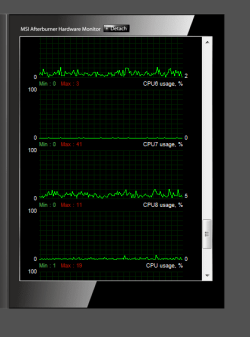
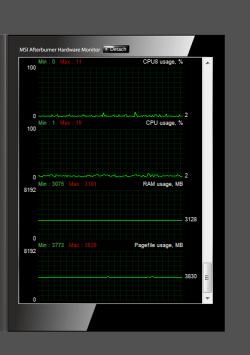
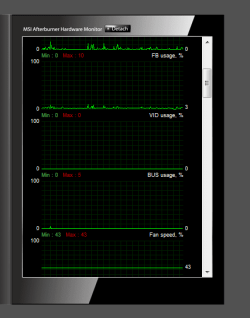
So. An update guys.
Some things I noticed recently:

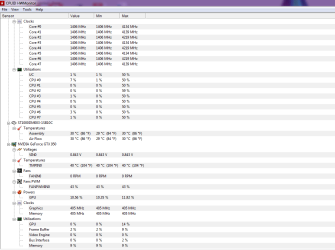
1. The full screen issue (post #3) was solved by itself within a day or two of posting. I has come up again today. Same stuff as earlier. Only difference was that this time, when I pressed some keys, I heard the sound that is played when a key is pressed numerous times in succession or no command is assigned to the key.

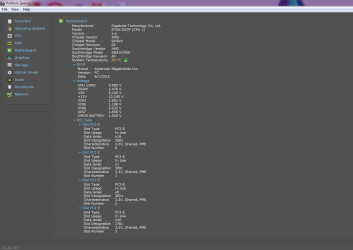
2. In the Speccy screenshot I'm posting below, I saw that all of my PCIe slots were being used. I had a look at the motherboard recently, and iirc this was not the case. I'll check again to be sure.

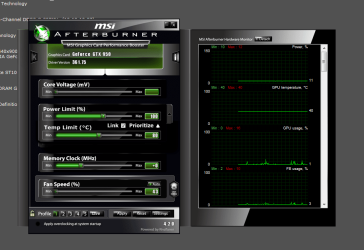
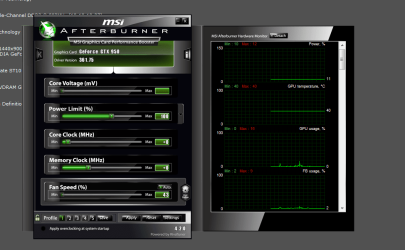
3. In the second MSI Afterburner screenshot, I noticed that the temperature limit was set to 80 °C. Could this be a problem?

4. As I had mentioned before, Osu! was the only game I could play just fine. Today, I found that after testing another game for the same results and then the full screen video one, even osu doesn't last anymore. I can hardly try 1 round and when displaying results or going back to main menu, the BSOD happens. Somehow, now I can't even open GeForce Experience. BSOD as soon as I go to that window.

@Mellon Head: Sorry, I was not keeping track of the thread so I didn't notice your post. I check it as soon as possible.
I'll test for the RAM today, though I can't say about the PSU pin.
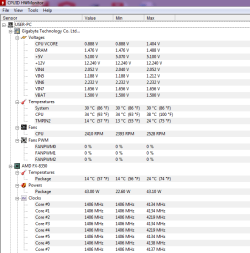
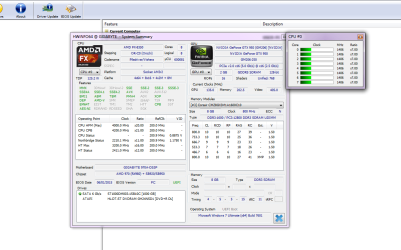
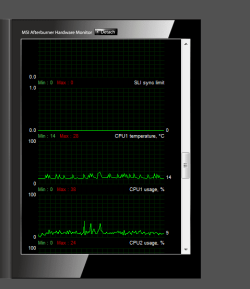
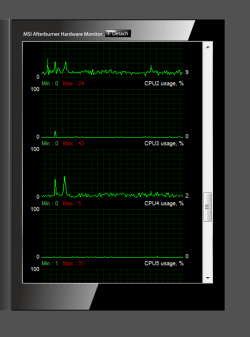
Anyways, here are the screenshots. I took as many as possible to capture all relevant information.
 

Attachments

  • HWmon1.png
    HWmon1.png
    18 KB · Views: 0
  • HWinfo4.png
    HWinfo4.png
    42.9 KB · Views: 0
  • HWinfo3.png
    HWinfo3.png
    24 KB · Views: 0
  • HWinfo2.png
    HWinfo2.png
    16.2 KB · Views: 0
  • HWinfo1.png
    HWinfo1.png
    23 KB · Views: 0
  • msi4.png
    msi4.png
    8.8 KB · Views: 4
  • msi3.png
    msi3.png
    8.9 KB · Views: 5
  • msi2.png
    msi2.png
    56.6 KB · Views: 0
  • msi1.png
    msi1.png
    53.6 KB · Views: 0
  • HWmon2.png
    HWmon2.png
    25.9 KB · Views: 0
  • msi5.png
    msi5.png
    9.2 KB · Views: 6
  • msi6.png
    msi6.png
    9.8 KB · Views: 5
  • msi7.png
    msi7.png
    9.6 KB · Views: 5
  • msi8.png
    msi8.png
    9.5 KB · Views: 4
  • Speccy1.png
    Speccy1.png
    28.1 KB · Views: 1
Last edited:

My Computer My Computer

At a glance

Windows 7 Ultimate x64FX 83508GB Corsair VengeanceNVIDIA GTX 950 2GB
Computer type
PC/Desktop
Computer Manufacturer/Model Number
Custom
OS
Windows 7 Ultimate x64
CPU
FX 8350
Motherboard
Gigabyte GA 970A DS3P
Memory
8GB Corsair Vengeance
Graphics Card(s)
NVIDIA GTX 950 2GB
Hard Drives
1 TB Seagate
PSU
iBall Marathon 500W Peak PSU
Back
Top