Blank Blue screen. Help plss!!

mrzpr22

New member
Local time
8:37 AM
Messages
7
Location
Singapore
Hi all, recently i got this problem with my PC. After my PC finishes its boot up process, the monitor always turn into a blank blue screen. I have tried to follow instructions from other threads, like pressing F8 to enter safe mode, but it simply doesn't work. Now i'm really stuck in this thing. This is the only two process happens after i turn on the power:

https://scontent-sin1-1.xx.fbcdn.ne...=880cfd2d3ea69da00250d6b9353bd36b&oe=56EE89A0

https://scontent-sin1-1.xx.fbcdn.ne...=8912e8fe4a7f2e71bbd6088ca7a63065&oe=56ED7D3D

I really need your help to solve this problem. Really-really-really appreciate your help :)
 

My Computer

Computer type
PC/Desktop
Computer Manufacturer/Model Number
Philips
OS
Windows 7 64bit

My Computer

Computer Manufacturer/Model Number
HP, Dell, Gateway, Toshiba - 4 laptops and 2 desktops
OS
Vista, Windows7, Mint Mate, Zorin, Windows 8
CPU
from 1.6GHz Duo to i7
Monitor(s) Displays
2x HP w2207
Hard Drives
5x HDD, 7x SSD, 12x Externals
Keyboard
with trackball - no mices
Mouse
Trackball mice
Internet Speed
DSL 6000
Hi there, the problem is after the system boots, it will turn into blank screen. So, i have no chance to even access my desktop to do repair/install. The only options available is to press (according to the system when it boots, before blank screen):

F10: Enter Boot Menu
F12: Network Boot

But i dont really know what the options will do, so i need your advice :)
 

My Computer

Computer type
PC/Desktop
Computer Manufacturer/Model Number
Philips
OS
Windows 7 64bit
The only one that may do anything is F10. Why don't you try it.
 

My Computer

Computer Manufacturer/Model Number
HP, Dell, Gateway, Toshiba - 4 laptops and 2 desktops
OS
Vista, Windows7, Mint Mate, Zorin, Windows 8
CPU
from 1.6GHz Duo to i7
Monitor(s) Displays
2x HP w2207
Hard Drives
5x HDD, 7x SSD, 12x Externals
Keyboard
with trackball - no mices
Mouse
Trackball mice
Internet Speed
DSL 6000
I have tried ytd, and it wants me to further select between this two boot devices:

1. SATA: message "Reboot and select proper Boot device or Insert Boot...."


2. UEFI: Windows screen suddenly loads but after finish loading, the monitor turns blank again.

So, the options seems not working as well
 

My Computer

Computer type
PC/Desktop
Computer Manufacturer/Model Number
Philips
OS
Windows 7 64bit
Looks like we are stusk. Rather than wasting more time of that, an OS reinstallation may be the quicker solution. Do you have a problem with that.
 

My Computer

Computer Manufacturer/Model Number
HP, Dell, Gateway, Toshiba - 4 laptops and 2 desktops
OS
Vista, Windows7, Mint Mate, Zorin, Windows 8
CPU
from 1.6GHz Duo to i7
Monitor(s) Displays
2x HP w2207
Hard Drives
5x HDD, 7x SSD, 12x Externals
Keyboard
with trackball - no mices
Mouse
Trackball mice
Internet Speed
DSL 6000
Not at all, since i didnt have any program or files inside my PC. I just don't know how to do it. Could you please guide me?
 

My Computer

Computer type
PC/Desktop
Computer Manufacturer/Model Number
Philips
OS
Windows 7 64bit
Thank you so much for the help, Sir.
 

My Computer

Computer type
PC/Desktop
Computer Manufacturer/Model Number
Philips
OS
Windows 7 64bit
Do you have an installation disc. And for which operating system do you have a valid key.
 

My Computer

Computer Manufacturer/Model Number
HP, Dell, Gateway, Toshiba - 4 laptops and 2 desktops
OS
Vista, Windows7, Mint Mate, Zorin, Windows 8
CPU
from 1.6GHz Duo to i7
Monitor(s) Displays
2x HP w2207
Hard Drives
5x HDD, 7x SSD, 12x Externals
Keyboard
with trackball - no mices
Mouse
Trackball mice
Internet Speed
DSL 6000
When you say F8 did not work, what do you mean? The key has no function or Safe Mode methods don't help? You can try F5 as well if it is the former.

- Do you use the welcome screen or straight to desktop normally?
- Did you connect another display (monitor/TV/etc) recently?
- Does it turn black if you CTRL+ALT+DEL?
- Caps Lock/Num Lock leds responsive?
- Does the PC shut down ok from the power button?
- Maybe try BIOS reset (take a photo or two of current settings though)

Also, PC specs?
 

My Computer

Computer type
PC/Desktop
Computer Manufacturer/Model Number
Custom Build
OS
Windows 7 Ultimate x64 SP1
CPU
AMD Phenom 2 1090T
Motherboard
Gigabyte GA-890FXA-UD5
Memory
2x8GB Kingston HyperX Fury Black 1600Mhz Unganged
Graphics Card(s)
MSI GTX 970 Gaming 4G
Sound Card
Realtek On-Board HD 7.1 Audio / Logitech G35
Monitor(s) Displays
3xAcer GD245HQ
Screen Resolution
1920x1080
Hard Drives
Samsung 850 Pro 512GB SSD - OS /
WD Caviar Black SATA 3 - 1 TBx2 - Dynamic RAID 0 /
WD Caviar Green SATA 2 - 640GBx2 - Dynamic RAID 0 /
WD Caviar Green SATA 2 - 640GB - Internal Backup /
Seagate Barracude SATA 3 - 3TB - External Backup/ Sync
PSU
HighPower 1000W
Case
Cooler Master HAF 932
Cooling
Noctua NH-D14
Keyboard
Logitech G19
Mouse
Logitech G500
Internet Speed
100/4 Mbit Cable (100GB quota)
Antivirus
ZoneAlarm Extreme Security / MBAM Pro / MBAE Free / SAS Free
Browser
IE 11 - Firefox - Chrome
Other Info
Logitech F710/ G27/ G940/ Z5500 // TrackIR 5 // Nvidia 3D Surround Vision
Hi Mr. GokAy,

When i hit F8 button, it didn't turn the PC into safe mode, in fact, it did nothing.

-It goes to welcome screen first
-I've never connected any external device, except thumbdrive
-It doesn't turn black when i press CTRL+ALT+DEL
-Caps lock is still responsive
-Yes, it still shutdown properly (as in, the pc off quickly)
-How to do the BIOS reset? And how i see the current settings while i can't access my desktop?

I'm not so sure about the detail specs, but i'm using Philips Brand.

As for Mr. WHS,

Unfortunately, i don't have the installation disc, Sir.
 

My Computer

Computer type
PC/Desktop
Computer Manufacturer/Model Number
Philips
OS
Windows 7 64bit
shame you didn`t create a disk image, why won`t people learn ????

Anyway, everything is here to create a windows 7 install dvd.

Download the version of Windows 7 you need from this site.

Microsoft DigitalRiver Mirror

You will need to install utorrent to download the iso file, don`t install any extra garbage utorrent may offer.

?Torrent® (uTorrent) - a (very) tiny BitTorrent client

Burn the iso file to dvd at no faster then x4 speed with this program.

Free ISO Burner

Boot from the dvd to reinstall Windows 7

http://www.sevenforums.com/tutorials/1649-clean-install-windows-7-a.html

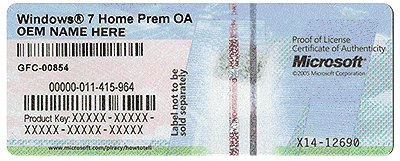
Use the key on your COA to activate windows, there`s no rush to activate it, you have 30 days.
 

Attachments

  • COA-Certificate-of-Authenticity.gif
    COA-Certificate-of-Authenticity.gif
    707.8 KB · Views: 7

My Computer

Computer type
PC/Desktop
Computer Manufacturer/Model Number
Skylake Special #666
OS
Windows 10 Pro x64
CPU
Intel Core i7 6700K
Motherboard
Asus Sabertooth Z170 Mark 1
Memory
GSkill TridentZ RGB 16GB 3600 16-16-16-36
Graphics Card(s)
EVGA GTX 980 Ti SC x2
Sound Card
Realtek High Definition
Monitor(s) Displays
AOC G2460PG
Screen Resolution
1920 x 1080 144Hz
Hard Drives
Samsung 860 Pro 256GB, Seagate Barracuda 4TB x2
PSU
EVGA 1000 P2, EVGA White Custom Braided Cables
Case
Corsair Vengeance C70 Gunmetal Black
Cooling
Corsair H100i v2, Corsair ML120 x2, Thermal Grizzly Kryonaut
Keyboard
Logitech G910 Orion Spectrum
Mouse
Logitech G700s
Internet Speed
Verizon Fios Quantum Gateway 75/75
Antivirus
Windows Defender, Malwarebytes Free 3.8.3
Browser
Chrome
Other Info
Corsair SP120 x4, LG Blu-ray Drive, Durabrand HT-395 100 Watt Dolby Digital Amp, Corsair H2100 Wireless 7.1 Headset
Hi, not to be rude but, actually i'm using my office PC (which have been 5 yrs old), and it has been used by many hands.

Anyway thank you for the solution, i will try it out first :)

Edit: Seems like my office won't allow access to torrent website, so i would be downloading at home and come back tmr
 

My Computer

Computer type
PC/Desktop
Computer Manufacturer/Model Number
Philips
OS
Windows 7 64bit
OK then it`s the offices responsibility to fix the PC, I wouldn`t touch it, it`s their problem, not yours.

They should just have it re imaged.
 

My Computer

Computer type
PC/Desktop
Computer Manufacturer/Model Number
Skylake Special #666
OS
Windows 10 Pro x64
CPU
Intel Core i7 6700K
Motherboard
Asus Sabertooth Z170 Mark 1
Memory
GSkill TridentZ RGB 16GB 3600 16-16-16-36
Graphics Card(s)
EVGA GTX 980 Ti SC x2
Sound Card
Realtek High Definition
Monitor(s) Displays
AOC G2460PG
Screen Resolution
1920 x 1080 144Hz
Hard Drives
Samsung 860 Pro 256GB, Seagate Barracuda 4TB x2
PSU
EVGA 1000 P2, EVGA White Custom Braided Cables
Case
Corsair Vengeance C70 Gunmetal Black
Cooling
Corsair H100i v2, Corsair ML120 x2, Thermal Grizzly Kryonaut
Keyboard
Logitech G910 Orion Spectrum
Mouse
Logitech G700s
Internet Speed
Verizon Fios Quantum Gateway 75/75
Antivirus
Windows Defender, Malwarebytes Free 3.8.3
Browser
Chrome
Other Info
Corsair SP120 x4, LG Blu-ray Drive, Durabrand HT-395 100 Watt Dolby Digital Amp, Corsair H2100 Wireless 7.1 Headset
Back
Top