Blank Icon in Control Panel - NVIDIA PhysX (32-Bit) how delete it?

Jesper

New member
Local time
8:11 AM
Messages
3
Hello all :D

I have strange problem on my new PC when im using Windows 7 HPx64 (signature under my AC or in my profile). I am currently installing NVIDIA Driver GeForce 332.21 WHQL with PhysX Software Package 9.13.0725 reinstaled to newest version 9.13.1220. My problem is Blank Icon NVIDIA PhysX (32-Bit) on control panel. Im trying too many guides how i can remove it , hide it or delete it , unfortunatelly i do not know how can I do. I am very tired of finding solutions for this problem. Please i need your helps or any ideas how to fix it.
 
Last edited:

My Computer My Computer

Computer type
PC/Desktop
Computer Manufacturer/Model Number
My Gaming RIG
OS
Windows 7 Home Premium x64
CPU
Intel Core i7 3770K @3,9GHz HT Off
Motherboard
MSI Z77 Mpower (BIOS Ver.17.12)
Memory
Corsair White Vengeance 4x4GB 1600MHz 9CL 1,35V XMP
Graphics Card(s)
EVGA GTX 780 SC ACX (default BIOS) NOT OC - 2 WAY SLI Coming
Sound Card
Integrated Realtek® ALC898
Monitor(s) Displays
AOC i2369vm Connected via DP
Screen Resolution
1920x1080 Full HD
Hard Drives
Western Digital - Caviar Black HDD 750GB 7200rpm
2 x Samsung SSD 840 PRO 120GB FW Ver.DXM06B0Q (first is OS disk only , second is Steam disk only)
Runing on Intel (RST) Version 12.8.11.1000 WHQL
PSU
Corsair AX 750W - Upgrade will be an EVGA SuperNOVA P2 1000W
Case
Bitfenix Colossus Venom Window
Cooling
Phanteks PH-TC14PE CPU Cooler
Keyboard
Mazer TYPE-X
Mouse
Gigabyte M6800
Internet Speed
Orange FIBER NET Optical
Antivirus
ESET Smart Security™ 7.0.302.26
Browser
Mozilla Firefox 27.0.1
Hello Jesper, and welcome to Seven Forums.

If you have not already, METHOD TWO in the tutorial below can help show you how to hide the icon in the Control Panel. Please feel free to ask any questions you may have about it.

Control Panel - Hide Icon

Hope this helps, :)
Shawn
 

My Computer My Computer

Computer type
PC/Desktop
Computer Manufacturer/Model Number
Self built custom
OS
64-bit Windows 11 Pro for Workstations
CPU
Intel i7-8700K OC'd to 5 GHz
Motherboard
ASUS ROG Maximus XI Formula Z390
Memory
64 GB (4x16GB) G.SKILL TridentZ RGB DDR4 3600 MHz
Graphics Card(s)
ASUS ROG-STRIX-GTX1080TI-O11G-GAMING
Sound Card
Integrated
Monitor(s) Displays
2 x Samsung Odyssey G7 27"
Screen Resolution
2560x1440
Hard Drives
1TB Samsung 990 PRO M.2,
4TB Samsung 990 PRO PRO M.2,
TerraMaster F8 SSD Plus NAS
PSU
Seasonic Prime Titanium 850W
Case
Thermaltake Core P3
Cooling
Corsair Hydro H115i
Keyboard
Logitech wireless K800
Mouse
Logitech MX Master 4
Internet Speed
2 Gb/s Download and 100 Mb/s Upload
Antivirus
Malwarebyte Anti-Malware Premium
Browser
Google Chrome
Other Info
Logitech Z625 speaker system,
Logitech BRIO 4K Pro webcam,
HP Color LaserJet Pro MFP M477fdn,
APC SMART-UPS RT 1000 XL - SURT1000XLI,
Galaxy S23 Plus phone
Thanks for the advice, but the method number two , I already tried it and it was unsuccessful. When I click on that icon empty NVIDIA PhysX ( 32 - bit ) Windows I wrote that the program is not assigned a default program , I have it assigned to him through the Default Programs item in Control Panel . I opened the default programs and there I could not find the PhysX I might be associated to the blank icon . When I go to uninstall the GPU driver with PhysX drivers I'm doing it through softwer DDU ( Display Driver Uninstaller ) is a very useful application . Using the Win + R keys cause the console to which the inscription '' msconfig '' in component sets the boot safe boot with networking Confirm and restart the PC . Disconnect internet from my PC because windows can download and install drivers for graphics through Windows Update . Run the DDU uninstall the drivers from the GPU (Clear folders , profiles , values ​​in registers , etc. ) absolutely uninstall the drivers from the system. Then when I have everything done , install a new driver to clean. This is why I do not get how I could be left blank NVIDIA PhysX icon in the control panel when an icon NVCPL successfully Deletes here PhysX item removed.

I looked and I searched the registry value PhysX.Cpl found it. I know that if there was blotted and would like it, my problem would be solved as the value in the registers of final sufix ´´Cpl´´ is assigned an icon in the Control Panel. I find, therefore, that in my schemes lack these two items PhysX.Cpl and PhysXCplUI.exe, this causes my problem, instead of NVIDIA PhysX icons (32-bit) I have just empty icon that, when the right click can create a link on your desktop otherwise it is absolutely inoperable and I am very irritated. I do not know at all how do I fix, it is important that I at least find out what's causing it. I hope that together we can find solutions to this strange problem
 

My Computer My Computer

Computer type
PC/Desktop
Computer Manufacturer/Model Number
My Gaming RIG
OS
Windows 7 Home Premium x64
CPU
Intel Core i7 3770K @3,9GHz HT Off
Motherboard
MSI Z77 Mpower (BIOS Ver.17.12)
Memory
Corsair White Vengeance 4x4GB 1600MHz 9CL 1,35V XMP
Graphics Card(s)
EVGA GTX 780 SC ACX (default BIOS) NOT OC - 2 WAY SLI Coming
Sound Card
Integrated Realtek® ALC898
Monitor(s) Displays
AOC i2369vm Connected via DP
Screen Resolution
1920x1080 Full HD
Hard Drives
Western Digital - Caviar Black HDD 750GB 7200rpm
2 x Samsung SSD 840 PRO 120GB FW Ver.DXM06B0Q (first is OS disk only , second is Steam disk only)
Runing on Intel (RST) Version 12.8.11.1000 WHQL
PSU
Corsair AX 750W - Upgrade will be an EVGA SuperNOVA P2 1000W
Case
Bitfenix Colossus Venom Window
Cooling
Phanteks PH-TC14PE CPU Cooler
Keyboard
Mazer TYPE-X
Mouse
Gigabyte M6800
Internet Speed
Orange FIBER NET Optical
Antivirus
ESET Smart Security™ 7.0.302.26
Browser
Mozilla Firefox 27.0.1
Why are you installing that older driver, you should be using at least 334.89 or maybe even the latest 335.23

Do a custom/clean install of the new drivers.

And use CCleaner to cleanup the registry.

You should have one nvidia icon in the control panel. nVidia Control Panel and that`s it.

Welcome to NVIDIA - World Leader in Visual Computing Technologies
 

My Computer My Computer

Computer type
PC/Desktop
Computer Manufacturer/Model Number
Skylake Special #666
OS
Windows 10 Pro x64
CPU
Intel Core i7 6700K
Motherboard
Asus Sabertooth Z170 Mark 1
Memory
GSkill TridentZ RGB 16GB 3600 16-16-16-36
Graphics Card(s)
EVGA GTX 980 Ti SC x2
Sound Card
Realtek High Definition
Monitor(s) Displays
AOC G2460PG
Screen Resolution
1920 x 1080 144Hz
Hard Drives
Samsung 860 Pro 256GB, Seagate Barracuda 4TB x2
PSU
EVGA 1000 P2, EVGA White Custom Braided Cables
Case
Corsair Vengeance C70 Gunmetal Black
Cooling
Corsair H100i v2, Corsair ML120 x2, Thermal Grizzly Kryonaut
Keyboard
Logitech G910 Orion Spectrum
Mouse
Logitech G700s
Internet Speed
Verizon Fios Quantum Gateway 75/75
Antivirus
Windows Defender, Malwarebytes Free 3.8.3
Browser
Chrome
Other Info
Corsair SP120 x4, LG Blu-ray Drive, Durabrand HT-395 100 Watt Dolby Digital Amp, Corsair H2100 Wireless 7.1 Headset
AddRAM thank you for your advice.

I did not install a new driver because I read the NVIDIA GeForce forum, driver was installed incorrectly and after installation do black screen. Windows can not operate and the only way to fix it is to restart the system and get away with F8 while booting and access to safe mode with networking. Then subsequently uninstall the driver using DDU. Today i can test install the new driver 335.23 WHQL x64-bit with the latest PhysX driver 9.13.1220. Then I write here on the forum how it turned out. I know when you install new drivers for my NVIDIA GPU stays in the Control Panel icon on the NVCPL (NVIDIA Control Panel), the icon for PhysX wasnt formed. My problem is blank icon NVIDIA PhysX (32-bit) in the Control Panel of my Windows 7 Home Premium x64-bit that I want to delete but do not know how can I do. Still have to try to fix the registry tweak to me recommended by Brink. Maybe if I was doing wrong, but nowhere in the registers can not find PhysX.Cpl - Maybe it is hidden in another folder in the registry but how do I find it. Where are most often placed Icon (Cpl) in the registry value? That I knew where I find it.
 

My Computer My Computer

Computer type
PC/Desktop
Computer Manufacturer/Model Number
My Gaming RIG
OS
Windows 7 Home Premium x64
CPU
Intel Core i7 3770K @3,9GHz HT Off
Motherboard
MSI Z77 Mpower (BIOS Ver.17.12)
Memory
Corsair White Vengeance 4x4GB 1600MHz 9CL 1,35V XMP
Graphics Card(s)
EVGA GTX 780 SC ACX (default BIOS) NOT OC - 2 WAY SLI Coming
Sound Card
Integrated Realtek® ALC898
Monitor(s) Displays
AOC i2369vm Connected via DP
Screen Resolution
1920x1080 Full HD
Hard Drives
Western Digital - Caviar Black HDD 750GB 7200rpm
2 x Samsung SSD 840 PRO 120GB FW Ver.DXM06B0Q (first is OS disk only , second is Steam disk only)
Runing on Intel (RST) Version 12.8.11.1000 WHQL
PSU
Corsair AX 750W - Upgrade will be an EVGA SuperNOVA P2 1000W
Case
Bitfenix Colossus Venom Window
Cooling
Phanteks PH-TC14PE CPU Cooler
Keyboard
Mazer TYPE-X
Mouse
Gigabyte M6800
Internet Speed
Orange FIBER NET Optical
Antivirus
ESET Smart Security™ 7.0.302.26
Browser
Mozilla Firefox 27.0.1
evga supports what Addram says: download notes

Control Panel > Programs and Features
Uninstall All Nvidia items listed below
  • 3D Vision Control Driver
  • 3D Vision Driver
  • Graphics Driver
  • HD Audio Driver
  • PhysX
  • Nvidia Update
:warn: Do NOT uninstall anything other than those are listed. There are Nvidia chipset drivers that might also appear in the list.

Then follow this tutorial: Drivers - Clean Left over Files after Uninstalling

Download the 335.23 WHQL driver on the evga download notes link above.
Restart your machine.
Install the 335.23 WHQL driver
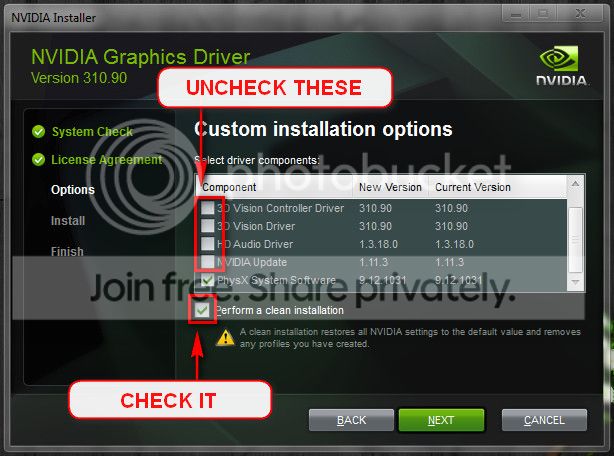
Select Custom (Advanced) install.
Follow these settings:

Cleaninstallnvidia_zps92576298.jpg


:note: the example image shows different version numbers - don't worry about that.

edit: Stay out of the registry for now, try to correct the issue using "best practices" methods.
 

My Computer My Computer

Computer type
Laptop
Computer Manufacturer/Model Number
HP Pavilion dv6-6c10us
OS
x64 (6.3.9600) Win8.1 Pro & soon dual boot x64 (6.1.7601) Win7_SP1 HomePrem
CPU
AMD A6-3420M APU with Radeon(tm) HD Graphics
Motherboard
Hewlett-Packard 1805
Memory
6.00 GB
Graphics Card(s)
AMD Radeon(TM) HD 6520G
Sound Card
(1) AMD High Definition Audio Device (2) IDT High Definiti
Monitor(s) Displays
HP W2072a 20" LCD (1600 x 900) @ 60 Hz
Screen Resolution
1366 x 768 x 32 bits (4294967296 colors) @ 60 Hz
Hard Drives
ST640LM0 00 HM641JI SATA Disk Device
Keyboard
Logitech k520 wireless KB
Mouse
Logitech m320 wireless mouse (bundled with KB)
Internet Speed
15/5 | 54 MB Wireless 'n'
Antivirus
Realtime: Defender or Avast | On-demand: Malwarebytes, ESET
Browser
IE 11 on Win8, IE 10 on win 7
Other Info
Media: [Gimp, Audacity, VLC] || Comm: [WEmail 2012, Skype] || Productivity: [OpenOffice,| Textpad] || Utils: [Sysinternals, cCleaner, Speccy, Defraggler]
Back
Top